Quick User Guide
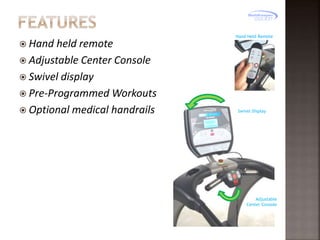
 Hand

held remote
 Adjustable Center Console
 Swivel display
 Pre-Programmed Workouts
 Optional medical handrails

Hand Held Remote

Swivel Display

Adjustable
Center Console
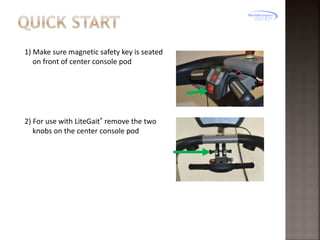
1) Make sure magnetic safety key is seated
on front of center console pod

2) For use with LiteGait® remove the two
knobs on the center console pod
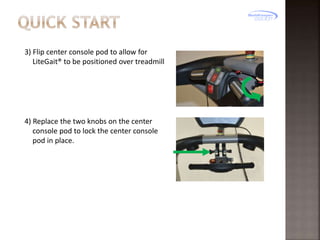
3) Flip center console pod to allow for
LiteGait® to be positioned over treadmill

4) Replace the two knobs on the center
console pod to lock the center console
pod in place.
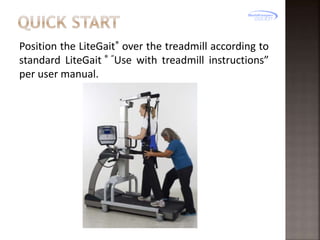
Position the LiteGait® over the treadmill according to
standard LiteGait ® “Use with treadmill instructions”
per user manual.
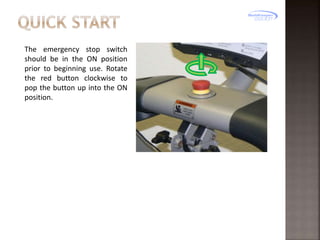
The emergency stop switch
should be in the ON position
prior to beginning use. Rotate
the red button clockwise to
pop the button up into the ON
position.
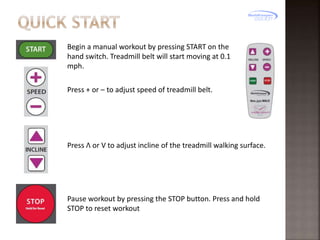
Begin a manual workout by pressing START on the
hand switch. Treadmill belt will start moving at 0.1
mph.
Press + or – to adjust speed of treadmill belt.

Press Λ or V to adjust incline of the treadmill walking surface.

Pause workout by pressing the STOP button. Press and hold
STOP to reset workout
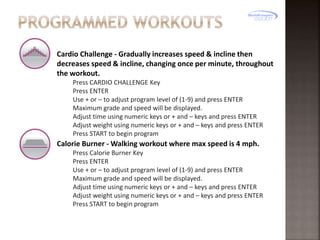
Cardio Challenge - Gradually increases speed & incline then
decreases speed & incline, changing once per minute, throughout
the workout.
Press CARDIO CHALLENGE Key
Press ENTER
Use + or – to adjust program level of (1-9) and press ENTER
Maximum grade and speed will be displayed.
Adjust time using numeric keys or + and – keys and press ENTER
Adjust weight using numeric keys or + and – keys and press ENTER
Press START to begin program

Calorie Burner - Walking workout where max speed is 4 mph.
Press Calorie Burner Key
Press ENTER
Use + or – to adjust program level of (1-9) and press ENTER
Maximum grade and speed will be displayed.
Adjust time using numeric keys or + and – keys and press ENTER
Adjust weight using numeric keys or + and – keys and press ENTER
Press START to begin program
Speed Intervals - Zero-incline walking or running intervals are in
one-minute segments.
Press Speed Intervals
Press ENTER
Use + or – to adjust program level of (1-9) and press ENTER
Maximum grade and speed will be displayed.
Adjust time using numeric keys or + and – keys and press ENTER
Adjust weight using numeric keys or + and – keys and press ENTER
Press START to begin program

Hill Intervals - Walking intervals with grade alternate between hills
and nearly flat in two minute segments.
Press Speed Intervals
Press ENTER
Use + or – to adjust program level of (1-9) and press ENTER
Maximum grade and speed will be displayed.
Adjust time using numeric keys or + and – keys and press ENTER
Adjust weight using numeric keys or + and – keys and press ENTER
Press START to begin program
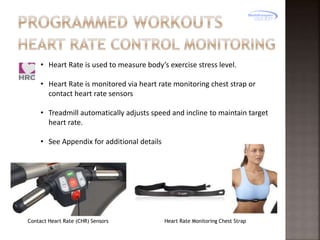
• Heart Rate is used to measure body’s exercise stress level.
• Heart Rate is monitored via heart rate monitoring chest strap or
contact heart rate sensors
• Treadmill automatically adjusts speed and incline to maintain target
heart rate.
• See Appendix for additional details

Contact Heart Rate (CHR) Sensors

Heart Rate Monitoring Chest Strap
Put on a compatible transmitter chest strap.
Press ENTER until you reach desired program.
Enter your target heart rate using numeric keys or + and – keys
and press ENTER
Adjust time using numeric keys or + and – keys and press ENTER
Enter maximum speed and press ENTER
Enter maximum grade and press ENTER
Press START to begin program
While in any workout, set your current heart rate as your target
heart rate by pressing the HRC CRUISE CONTROL key
During any Pre-Set Program, at the end of your workout time or distance, the
treadmill reduces workload by half and goes back into Manual Control Mode
where you directly control your cool down

Press ADVANCED OPTIONS to cycle fitness test options.
Gerkin Fitness Test - Requires compatible transmitter chest strap.
Fitness test used to estimate your VO2 max. This test increases speed
and incline gradually every minute and ends at the point where your
heart rate reaches 85% of the maximum for your age.
Army Fitness Test
2 - Mile Running test measured against age and gender
Navy Fitness Test
1.5 - Mile Running test measured against age and gender
Air Force Fitness Test
1.5 - Mile Running test measured against age and gender
Marines Fitness Test
3 - Mile Running test measured against calculations for male and
female.
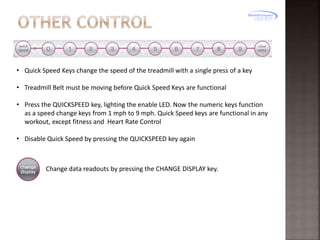
• Quick Speed Keys change the speed of the treadmill with a single press of a key
• Treadmill Belt must be moving before Quick Speed Keys are functional
• Press the QUICKSPEED key, lighting the enable LED. Now the numeric keys function
as a speed change keys from 1 mph to 9 mph. Quick Speed keys are functional in any
workout, except fitness and Heart Rate Control
• Disable Quick Speed by pressing the QUICKSPEED key again

Change data readouts by pressing the CHANGE DISPLAY key.
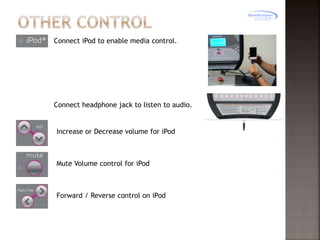
Connect iPod to enable media control.

Connect headphone jack to listen to audio.

Increase or Decrease volume for iPod

Mute Volume control for iPod

Forward / Reverse control on iPod
1.1 – Heart Rate Control Monitoring – Detailed Description/Precautions

FROM TRUE FITNESS:
Your Heart rate is a good measure of your body’s exercise stress level;. It
reflects differences in your physical condition, how tired you are, the comfort
of the workout environment, even you diet and emotional state. Using heart
rate to control workload takes the guesswork out of your workout settings.
Consult your physician before using heart rate controlled workouts for advice
on selecting a target heart rate range. Also, it is important to use the
treadmill for several workouts in the manual mode while monitoring your
heart rate
Compare your heart rate with how you feel to ensure your safety and
comfort.
1.2 – Heart Rate Control Monitoring – Monitor Application
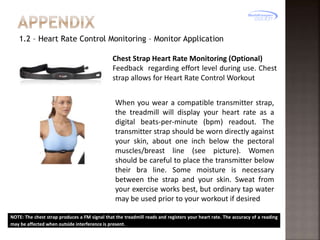
Chest Strap Heart Rate Monitoring (Optional)
Feedback regarding effort level during use. Chest
strap allows for Heart Rate Control Workout
When you wear a compatible transmitter strap,
the treadmill will display your heart rate as a
digital beats-per-minute (bpm) readout. The
transmitter strap should be worn directly against
your skin, about one inch below the pectoral
muscles/breast line (see picture). Women
should be careful to place the transmitter below
their bra line. Some moisture is necessary
between the strap and your skin. Sweat from
your exercise works best, but ordinary tap water
may be used prior to your workout if desired
NOTE: The chest strap produces a FM signal that the treadmill reads and registers your heart rate. The accuracy of a reading
may be affected when outside interference is present.
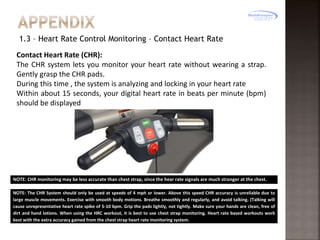
1.3 – Heart Rate Control Monitoring – Contact Heart Rate
Contact Heart Rate (CHR):
The CHR system lets you monitor your heart rate without wearing a strap.
Gently grasp the CHR pads.
During this time , the system is analyzing and locking in your heart rate
Within about 15 seconds, your digital heart rate in beats per minute (bpm)
should be displayed

NOTE: CHR monitoring may be less accurate than chest strap, since the hear rate signals are much stronger at the chest.
NOTE: The CHR System should only be used at speeds of 4 mph or lower. Above this speed CHR accuracy is unreliable due to
large muscle movements. Exercise with smooth body motions. Breathe smoothly and regularly, and avoid talking. (Talking will
cause unrepresentative heart rate spike of 5-10 bpm. Grip the pads lightly, not tightly. Make sure your hands are clean, free of
dirt and hand lotions. When using the HRC workout, it is best to use chest strap monitoring. Heart rate based workouts work
best with the extra accuracy gained from the chest strap heart rate monitoring system.

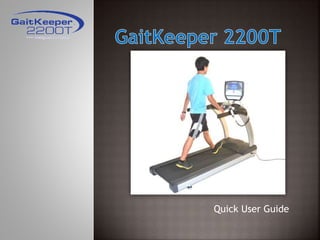
GaitKeeper 2200T

  • 1.
  • 2.
     Hand held remote Adjustable Center Console  Swivel display  Pre-Programmed Workouts  Optional medical handrails Hand Held Remote Swivel Display Adjustable Center Console
  • 3.
    1) Make suremagnetic safety key is seated on front of center console pod 2) For use with LiteGait® remove the two knobs on the center console pod
  • 4.
    3) Flip centerconsole pod to allow for LiteGait® to be positioned over treadmill 4) Replace the two knobs on the center console pod to lock the center console pod in place.
  • 5.
    Position the LiteGait®over the treadmill according to standard LiteGait ® “Use with treadmill instructions” per user manual.
  • 6.
    The emergency stopswitch should be in the ON position prior to beginning use. Rotate the red button clockwise to pop the button up into the ON position.
  • 7.
    Begin a manualworkout by pressing START on the hand switch. Treadmill belt will start moving at 0.1 mph. Press + or – to adjust speed of treadmill belt. Press Λ or V to adjust incline of the treadmill walking surface. Pause workout by pressing the STOP button. Press and hold STOP to reset workout
  • 8.
    Cardio Challenge -Gradually increases speed & incline then decreases speed & incline, changing once per minute, throughout the workout. Press CARDIO CHALLENGE Key Press ENTER Use + or – to adjust program level of (1-9) and press ENTER Maximum grade and speed will be displayed. Adjust time using numeric keys or + and – keys and press ENTER Adjust weight using numeric keys or + and – keys and press ENTER Press START to begin program Calorie Burner - Walking workout where max speed is 4 mph. Press Calorie Burner Key Press ENTER Use + or – to adjust program level of (1-9) and press ENTER Maximum grade and speed will be displayed. Adjust time using numeric keys or + and – keys and press ENTER Adjust weight using numeric keys or + and – keys and press ENTER Press START to begin program
  • 9.
    Speed Intervals -Zero-incline walking or running intervals are in one-minute segments. Press Speed Intervals Press ENTER Use + or – to adjust program level of (1-9) and press ENTER Maximum grade and speed will be displayed. Adjust time using numeric keys or + and – keys and press ENTER Adjust weight using numeric keys or + and – keys and press ENTER Press START to begin program Hill Intervals - Walking intervals with grade alternate between hills and nearly flat in two minute segments. Press Speed Intervals Press ENTER Use + or – to adjust program level of (1-9) and press ENTER Maximum grade and speed will be displayed. Adjust time using numeric keys or + and – keys and press ENTER Adjust weight using numeric keys or + and – keys and press ENTER Press START to begin program
  • 10.
    • Heart Rateis used to measure body’s exercise stress level. • Heart Rate is monitored via heart rate monitoring chest strap or contact heart rate sensors • Treadmill automatically adjusts speed and incline to maintain target heart rate. • See Appendix for additional details Contact Heart Rate (CHR) Sensors Heart Rate Monitoring Chest Strap
  • 11.
    Put on acompatible transmitter chest strap. Press ENTER until you reach desired program. Enter your target heart rate using numeric keys or + and – keys and press ENTER Adjust time using numeric keys or + and – keys and press ENTER Enter maximum speed and press ENTER Enter maximum grade and press ENTER Press START to begin program While in any workout, set your current heart rate as your target heart rate by pressing the HRC CRUISE CONTROL key
  • 12.
    During any Pre-SetProgram, at the end of your workout time or distance, the treadmill reduces workload by half and goes back into Manual Control Mode where you directly control your cool down Press ADVANCED OPTIONS to cycle fitness test options. Gerkin Fitness Test - Requires compatible transmitter chest strap. Fitness test used to estimate your VO2 max. This test increases speed and incline gradually every minute and ends at the point where your heart rate reaches 85% of the maximum for your age. Army Fitness Test 2 - Mile Running test measured against age and gender Navy Fitness Test 1.5 - Mile Running test measured against age and gender Air Force Fitness Test 1.5 - Mile Running test measured against age and gender Marines Fitness Test 3 - Mile Running test measured against calculations for male and female.
  • 13.
    • Quick SpeedKeys change the speed of the treadmill with a single press of a key • Treadmill Belt must be moving before Quick Speed Keys are functional • Press the QUICKSPEED key, lighting the enable LED. Now the numeric keys function as a speed change keys from 1 mph to 9 mph. Quick Speed keys are functional in any workout, except fitness and Heart Rate Control • Disable Quick Speed by pressing the QUICKSPEED key again Change data readouts by pressing the CHANGE DISPLAY key.
  • 14.
    Connect iPod toenable media control. Connect headphone jack to listen to audio. Increase or Decrease volume for iPod Mute Volume control for iPod Forward / Reverse control on iPod
  • 15.
    1.1 – HeartRate Control Monitoring – Detailed Description/Precautions FROM TRUE FITNESS: Your Heart rate is a good measure of your body’s exercise stress level;. It reflects differences in your physical condition, how tired you are, the comfort of the workout environment, even you diet and emotional state. Using heart rate to control workload takes the guesswork out of your workout settings. Consult your physician before using heart rate controlled workouts for advice on selecting a target heart rate range. Also, it is important to use the treadmill for several workouts in the manual mode while monitoring your heart rate Compare your heart rate with how you feel to ensure your safety and comfort.
  • 16.
    1.2 – HeartRate Control Monitoring – Monitor Application Chest Strap Heart Rate Monitoring (Optional) Feedback regarding effort level during use. Chest strap allows for Heart Rate Control Workout When you wear a compatible transmitter strap, the treadmill will display your heart rate as a digital beats-per-minute (bpm) readout. The transmitter strap should be worn directly against your skin, about one inch below the pectoral muscles/breast line (see picture). Women should be careful to place the transmitter below their bra line. Some moisture is necessary between the strap and your skin. Sweat from your exercise works best, but ordinary tap water may be used prior to your workout if desired NOTE: The chest strap produces a FM signal that the treadmill reads and registers your heart rate. The accuracy of a reading may be affected when outside interference is present.
  • 17.
    1.3 – HeartRate Control Monitoring – Contact Heart Rate Contact Heart Rate (CHR): The CHR system lets you monitor your heart rate without wearing a strap. Gently grasp the CHR pads. During this time , the system is analyzing and locking in your heart rate Within about 15 seconds, your digital heart rate in beats per minute (bpm) should be displayed NOTE: CHR monitoring may be less accurate than chest strap, since the hear rate signals are much stronger at the chest. NOTE: The CHR System should only be used at speeds of 4 mph or lower. Above this speed CHR accuracy is unreliable due to large muscle movements. Exercise with smooth body motions. Breathe smoothly and regularly, and avoid talking. (Talking will cause unrepresentative heart rate spike of 5-10 bpm. Grip the pads lightly, not tightly. Make sure your hands are clean, free of dirt and hand lotions. When using the HRC workout, it is best to use chest strap monitoring. Heart rate based workouts work best with the extra accuracy gained from the chest strap heart rate monitoring system.