eProphet Admin Payroll
Visual Tour
eProphet Admin
Payroll
Visual Tour
eProphet Admin Payroll
Visual Tour
Welcome to the
eProphet Admin Payroll Visual Tour!
In this tour you will catch a glimpse of many of the new and powerful
features we have built into our next generation Windows compatible
Payroll solution.
To navigate through the tour, simply use the Next >> and << Back
buttons at the bottom of the screen or You can navigate back and forth
through the tour at any time by clicking on either right or left side of the
slides to go back or forth.
eProphet Admin Payroll
Visual ToureProphet Admin
Payroll
Visual Tour
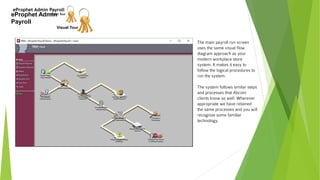
The main payroll run screen
uses the same visual flow
diagram approach as your
modern workplace store
system. It makes it easy to
follow the logical procedures to
run the system.
The system follows similar steps
and processes that Abcom
clients know so well. Wherever
appropriate we have retained
the same processes and you will
recognize some familiar
technology.
eProphet Admin Payroll
Visual Tour
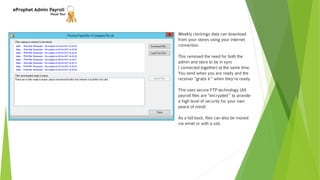
Weekly clockings data can download
from your stores using your internet
connection.
This removed the need for both the
admin and store to be in sync
( connected together) at the same time.
You send when you are ready and the
receiver "grabs it " when they're ready.
This uses secure FTP technology (All
payroll files are "encrypted " to provide
a high level of security for your own
peace of mind)
As a fall back, files can also be moved
via email or with a usb.
eProphet Admin Payroll
Visual Tour
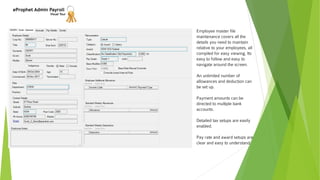
Employee master file
maintenance covers all the
details you need to maintain
relative to your employees, all
compiled for easy viewing. Its
easy to follow and easy to
navigate around the screen.
An unlimited number of
allowances and deduction can
be set up.
Payment amounts can be
directed to multiple bank
accounts.
Detailed tax setups are easily
enabled.
Pay rate and award setups are
clear and easy to understand.
eProphet Admin Payroll
Visual Tour
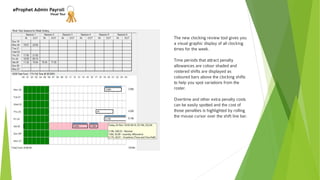
The new clocking review tool gives you
a visual graphic display of all clocking
times for the week.
Time periods that attract penalty
allowances are colour shaded and
rostered shifts are displayed as
coloured bars above the clocking shifts
to help you spot variations from the
roster.
Overtime and other extra penalty costs
can be easily spotted and the cost of
those penalties is highlighted by rolling
the mouse cursor over the shift line bar.
eProphet Admin Payroll
Visual Tour
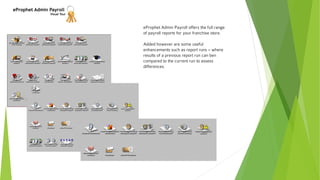
eProphet Admin Payroll offers the full range
of payroll reports for your franchise store.
Added however are some useful
enhancements such as report runs – where
results of a previous report run can ben
compared to the current run to assess
differences.
eProphet Admin Payroll
Visual Tour
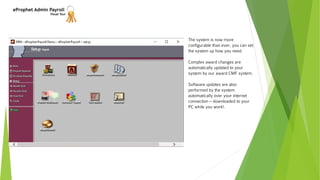
The system is now more
configurable than ever, you can set
the system up how you need.
Complex award changes are
automatically updated to your
system by our award CMF system.
Software updates are also
performed by the system
automatically over your internet
connection – downloaded to your
PC while you work!.
eProphet Admin Payroll
Visual Tour
Thank you for viewing the
eProphet Admin Payroll Visual Tour!
We hope you enjoyed this short preview of our most exciting franchise software system to
date.
We believe that eProphet Payroll is the only serious franchise payroll that so many of our
users have found to be such a key tool in their business over many years.
We’ve always known it has to provide ALL of the functionality of the todays modern
workplace as well as a host of new modular improvements.
You can now rest easy, knowing you will not end up in some mess trying to find an
alternative that cannot hope to be a logical progression from the highly specialised and
tuned system that has served you so well, for so long.
If you would like to know more, click on the button below and register your interest in this
unique franchise payroll software system and we’ll contact you to discuss your needs and
schedule.
Call 07 5530 7806

Franchise Payroll Software

  • 1.
    eProphet Admin Payroll VisualTour eProphet Admin Payroll Visual Tour
  • 2.
    eProphet Admin Payroll VisualTour Welcome to the eProphet Admin Payroll Visual Tour! In this tour you will catch a glimpse of many of the new and powerful features we have built into our next generation Windows compatible Payroll solution. To navigate through the tour, simply use the Next >> and << Back buttons at the bottom of the screen or You can navigate back and forth through the tour at any time by clicking on either right or left side of the slides to go back or forth.
  • 3.
    eProphet Admin Payroll VisualToureProphet Admin Payroll Visual Tour The main payroll run screen uses the same visual flow diagram approach as your modern workplace store system. It makes it easy to follow the logical procedures to run the system. The system follows similar steps and processes that Abcom clients know so well. Wherever appropriate we have retained the same processes and you will recognize some familiar technology.
  • 4.
    eProphet Admin Payroll VisualTour Weekly clockings data can download from your stores using your internet connection. This removed the need for both the admin and store to be in sync ( connected together) at the same time. You send when you are ready and the receiver "grabs it " when they're ready. This uses secure FTP technology (All payroll files are "encrypted " to provide a high level of security for your own peace of mind) As a fall back, files can also be moved via email or with a usb.
  • 5.
    eProphet Admin Payroll VisualTour Employee master file maintenance covers all the details you need to maintain relative to your employees, all compiled for easy viewing. Its easy to follow and easy to navigate around the screen. An unlimited number of allowances and deduction can be set up. Payment amounts can be directed to multiple bank accounts. Detailed tax setups are easily enabled. Pay rate and award setups are clear and easy to understand.
  • 6.
    eProphet Admin Payroll VisualTour The new clocking review tool gives you a visual graphic display of all clocking times for the week. Time periods that attract penalty allowances are colour shaded and rostered shifts are displayed as coloured bars above the clocking shifts to help you spot variations from the roster. Overtime and other extra penalty costs can be easily spotted and the cost of those penalties is highlighted by rolling the mouse cursor over the shift line bar.
  • 7.
    eProphet Admin Payroll VisualTour eProphet Admin Payroll offers the full range of payroll reports for your franchise store. Added however are some useful enhancements such as report runs – where results of a previous report run can ben compared to the current run to assess differences.
  • 8.
    eProphet Admin Payroll VisualTour The system is now more configurable than ever, you can set the system up how you need. Complex award changes are automatically updated to your system by our award CMF system. Software updates are also performed by the system automatically over your internet connection – downloaded to your PC while you work!.
  • 9.
    eProphet Admin Payroll VisualTour Thank you for viewing the eProphet Admin Payroll Visual Tour! We hope you enjoyed this short preview of our most exciting franchise software system to date. We believe that eProphet Payroll is the only serious franchise payroll that so many of our users have found to be such a key tool in their business over many years. We’ve always known it has to provide ALL of the functionality of the todays modern workplace as well as a host of new modular improvements. You can now rest easy, knowing you will not end up in some mess trying to find an alternative that cannot hope to be a logical progression from the highly specialised and tuned system that has served you so well, for so long. If you would like to know more, click on the button below and register your interest in this unique franchise payroll software system and we’ll contact you to discuss your needs and schedule. Call 07 5530 7806