SELF INTRODUCTION
QUALIFICATION :M.SC., B.ED [CS].,D.EL.ED
Designation : PGT
Joining Date: 01-06-2016
NO OF EXPERIENCE IN LGS : 9 YEARS
Classes Handling: XII [CS]
File Handling
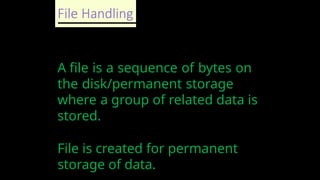
A fileis a sequence of bytes on
the disk/permanent storage
where a group of related data is
stored.
File is created for permanent
storage of data.
5.
File Handling
Types ofFile
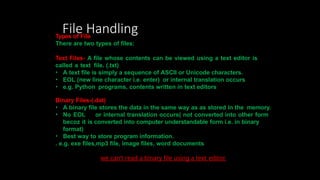
There are two types of files:
Text Files- A file whose contents can be viewed using a text editor is
called a text file. (.txt)
• A text file is simply a sequence of ASCII or Unicode characters.
• EOL (new line character i.e. enter) or internal translation occurs
• e.g. Python programs, contents written in text editors
Binary Files-(.dat)
• A binary file stores the data in the same way as as stored in the memory.
• No EOL or internal translation occurs( not converted into other form
becoz it is converted into computer understandable form i.e. in binary
format)
• Best way to store program information.
. e.g. exe files,mp3 file, image files, word documents
we can’t read a binary file using a text editor.
6.
TEXT FILE
•Text filesdon’t have any specific encoding and it can
be opened in normal text editor itself.
•Example:
•Documents: txt, RTF etc.
•Tabular data: csv, tsv etc.
7.
BINARY FILE
• Nonhuman readable
• Can open in normal text editor.
• but we can’t read the content present inside the file.
• That’s because all the binary files will be encoded in the
binary format, which can be understood only by a computer or
machine.
• For handling such binary files we need a specific type of
software to open it.
• For Example, We need Microsoft word software to open .doc
binary files.
• Likewise, you need a pdf reader software to open .pdf binary
files and you need a photo editor software to read the
image files and so on.
8.
File Handling
File operations-adding, modifying, deleting, reading, writing,
appending data There are three steps to perform these operations:
Open the file.- Before any reading or writing operation of any
file , it
must be opened first
of all.
Process file- i.e perform read or write operation.
Close the file.-Once we are done working with the file, we should
close the
file.
9.
File Handling- open() - built in function
Syntax
file_object/file_handler = open(<file_name>,
<access_mode>)
• file_name = name of the file ,enclosed in double quotes.
access_mode= It is also called file mode.
• Determines the what kind of operations can be performed
with file,like read,write etc.
• If no mode is specified then the file will open in read mode.
10.
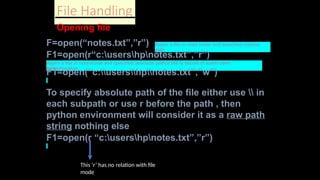
File Handling
Opening file
F=open(“notes.txt”,”r”)#open a file in read mode and specified relative
path
F1=open(r“c:usershpnotes.txt”,”r”)
#open a file in read mode and specified absolute path(if file is stored in some other
folder/location
F1=open(“c:usershpnotes.txt”,”w”)
To specify absolute path of the file either use in
each subpath or use r before the path , then
python environment will consider it as a raw path
string nothing else
F1=open(r “c:usershpnotes.txt”,”r”)
This ‘r’ has no relation with file
mode
11.
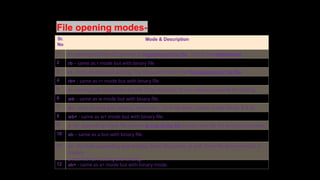
File opening modes-
Sr.
No
Mode& Description
1 r - reading only.Sets file pointer at beginning of the file . This is the defaultmode.
2 rb – same as r mode but with binary file
3 r+ - both reading and writing. The file pointer placed at the beginning of the file.
4 rb+ - same as r+ mode but with binary file
5 w - writing only. Overwrites the file if the file exists. If not, creates a new file for writing.
6 wb – same as w mode but with binary file.
7 w+ - both writing and reading. Overwrites . If no file exist, creates a new file for R & W.
8 wb+ - same as w+ mode but with binary file.
9 a -for appending. Move file pointer at end of the file.Creates new file for writing,if not exist.
10 ab – same as a but with binary file.
11 a+ - for both appending and reading. Move file pointer at end. If the file does not exist, it
creates
a new file for reading and writing.
12 ab+ - same as a+ mode but with binary mode.
12.
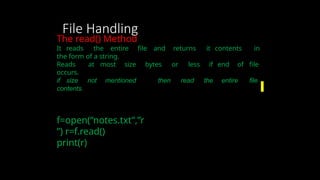
File Handling
The read()Method
It reads the entire file and returns it contents in
the form of a string.
Reads at most size bytes or less if end of file
occurs.
if size not mentioned then read the entire file
contents.
f=open(“notes.txt”,”r
”) r=f.read()
print(r)
13.
File Handling
Read charactersfrom last
position
read([size]) method
It reads the no of bytes
f=open(“notes.txt”,”r
”) r=f.read(10)
print(r)
r1=f.read(15
) print(r1)
14.
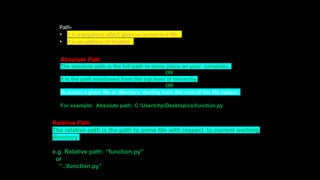
Absolute Path
The absolutepath is the full path to some place on your computer.
OR
It is the path mentioned from the top level of hierarchy.
OR
To access a given file or directory, starting from the root of the file system
For example: Absolute path: C:UsershpDesktopcsfunction.py
Path-
it is a sequence which gives us access to a file.
•
• It is an address or location
Relative Path
The relative path is the path to some file with respect to current working
directory
e.g. Relative path: “function.py”
or
“..function.py”
15.
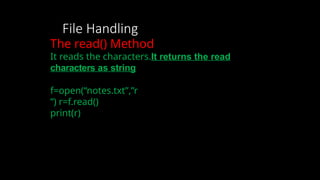
File Handling
The read()Method
It reads the characters.It returns the read
characters as string
f=open(“notes.txt”,”r
”) r=f.read()
print(r)
16.
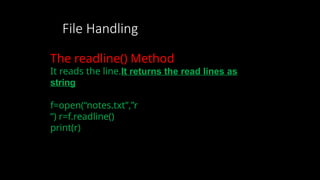
File Handling
The readline()Method
It reads the line.It returns the read lines as
string
f=open(“notes.txt”,”r
”) r=f.readline()
print(r)
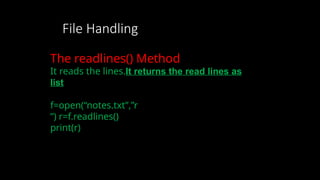
17.
File Handling
The readlines()Method
It reads the lines.It returns the read lines as
list
f=open(“notes.txt”,”r
”) r=f.readlines()
print(r)
18.
File Handling
Read first2 lines
It reads the lines.It returns the read lines as list
f=open(“notes.txt”,”r
”) r=f.readline()
print(r)
r1=f.readline(
) print(r1)
OR
readlines([si
ze]) method-
Read no of
lines from
file if size
19.
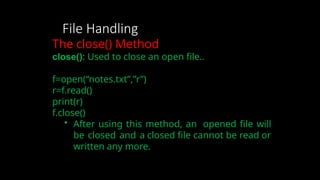
File Handling
The close()Method
close(): Used to close an open file..
f=open(“notes.txt”,”r”)
r=f.read()
print(r)
f.close()
• After using this method, an opened file will
be closed and a closed file cannot be read or
written any more.
20.
File Handling
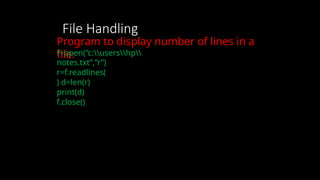
Program todisplay number of lines in a
file.
f=open(“c:usershp
notes.txt”,”r”)
r=f.readlines(
) d=len(r)
print(d)
f.close()
21.
File Handling
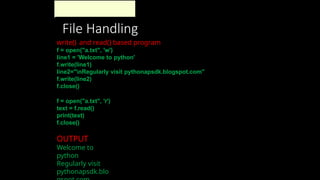
write() andread() based program
f = open("a.txt", 'w')
line1 = 'Welcome to python'
f.write(line1)
line2="nRegularly visit pythonapsdk.blogspot.com"
f.write(line2)
f.close()
f = open("a.txt", 'r')
text = f.read()
print(text)
f.close()
OUTPUT
Welcome to
python
Regularly visit
pythonapsdk.blo
22.
File Handling
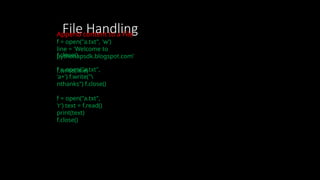
Append contentto a File
f = open("a.txt", 'w')
line = 'Welcome to
pythonapsdk.blogspot.com’
f.write(line)
f.close()
f = open("a.txt",
'a+') f.write("
nthanks") f.close()
f = open("a.txt",
'r') text = f.read()
print(text)
f.close()
23.
File Handling
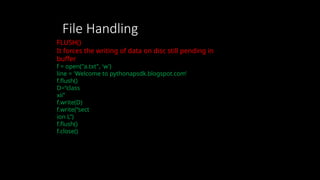
FLUSH()
It forcesthe writing of data on disc still pending in
buffer
f = open("a.txt", 'w')
line = 'Welcome to pythonapsdk.blogspot.com’
f.flush()
D=“class
xii”
f.write(D)
f.write(“sect
ion L”)
f.flush()
f.close()
24.
File Handling
File Pointer
Ittells the current position in the file
where writing or reading
will take place.(like a bookmark in a
book)
The tell() method of python tells us the current
position within the file,where as The seek(offset[,
from]) method changes the current file position. If
from is 0, the beginning of the file to seek. If it is set
to 1, the current position is used . If it is set to 2 then
the end of the file would be taken as seek
position. The offset argument indicates the number
of bytes to be moved.
25.
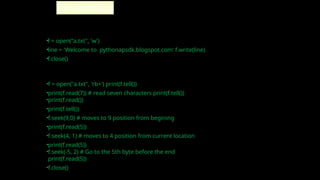
•f = open("a.txt",'w')
•line = 'Welcome to pythonapsdk.blogspot.com' f.write(line)
•f.close()
•f = open("a.txt", 'rb+') print(f.tell())
•print(f.read(7)) # read seven characters print(f.tell())
•print(f.read())
•print(f.tell())
•f.seek(9,0) # moves to 9 position from begining
•print(f.read(5))
•f.seek(4, 1) # moves to 4 position from current location
•print(f.read(5))
•f.seek(-5, 2) # Go to the 5th byte before the end
print(f.read(5))
•f.close()
File handling


![SELF INTRODUCTION
QUALIFICATION : M.SC., B.ED [CS].,D.EL.ED
Designation : PGT
Joining Date: 01-06-2016
NO OF EXPERIENCE IN LGS : 9 YEARS
Classes Handling: XII [CS]](https://image.slidesharecdn.com/reviewppt-250327032706-0226176f/85/for-interview-this-ppt-is-a-teching-aid-for-file-handling-concepts-includes-text-file-binary-file-csv-file-2-320.jpg)
![File Handling
Read characters from last
position
read([size]) method
It reads the no of bytes
f=open(“notes.txt”,”r
”) r=f.read(10)
print(r)
r1=f.read(15
) print(r1)](https://image.slidesharecdn.com/reviewppt-250327032706-0226176f/85/for-interview-this-ppt-is-a-teching-aid-for-file-handling-concepts-includes-text-file-binary-file-csv-file-13-320.jpg)
![File Handling
Read first 2 lines
It reads the lines.It returns the read lines as list
f=open(“notes.txt”,”r
”) r=f.readline()
print(r)
r1=f.readline(
) print(r1)
OR
readlines([si
ze]) method-
Read no of
lines from
file if size](https://image.slidesharecdn.com/reviewppt-250327032706-0226176f/85/for-interview-this-ppt-is-a-teching-aid-for-file-handling-concepts-includes-text-file-binary-file-csv-file-18-320.jpg)
![File Handling
File Pointer
It tells the current position in the file
where writing or reading
will take place.(like a bookmark in a
book)
The tell() method of python tells us the current
position within the file,where as The seek(offset[,
from]) method changes the current file position. If
from is 0, the beginning of the file to seek. If it is set
to 1, the current position is used . If it is set to 2 then
the end of the file would be taken as seek
position. The offset argument indicates the number
of bytes to be moved.](https://image.slidesharecdn.com/reviewppt-250327032706-0226176f/85/for-interview-this-ppt-is-a-teching-aid-for-file-handling-concepts-includes-text-file-binary-file-csv-file-24-320.jpg)