Folder structure &
setup dev-
environment
Thai Lam Ha - React developer
Bravebits.co
About me
Lâm Hà Thái
UET - VNU
github.com/thailh12
thailh@bravebits.vn
Table of contents
Folder structure approach
Setup develop environment
Problems
Is there a recommended way to structure React projects?
React doesn’t have opinions on how you put files into folders.
That said there are a few common approaches popular in the
ecosystem you may want to consider.
Problems
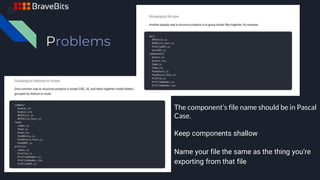
The component’s file name should be in Pascal
Case.
Keep components shallow
Name your file the same as the thing you’re
exporting from that file
Goals of project structure
1. Productivity should be increased. Fuzzy searching files in
text editor must be easier.
2. Flexible and not too highly dictated. There should be some
room for developers to do their own thing.
3. The structure should encourage scalability, but also
reusability.
4. The structure should be simple enough for new team
members to quickly get on board and dive into the project.
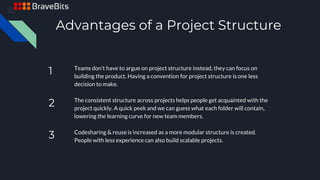
Advantages of a Project Structure
1 Teams don’t have to argue on project structure instead, they can focus on
building the product. Having a convention for project structure is one less
decision to make.
2 The consistent structure across projects helps people get acquainted with the
project quickly. A quick peek and we can guess what each folder will contain,
lowering the learning curve for new team members.
3 Codesharing & reuse is increased as a more modular structure is created.
People with less experience can also build scalable projects.
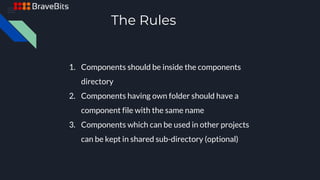
The Rules
1. Components should be inside the components
directory
2. Components having own folder should have a
component file with the same name
3. Components which can be used in other projects
can be kept in shared sub-directory (optional)
Config develop environment
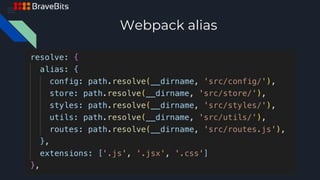
1. Webpack alias
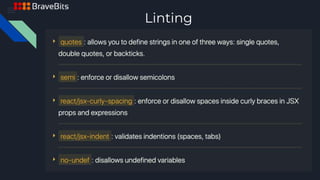
2. Eslint/Tslint
3. Additional config for create react app
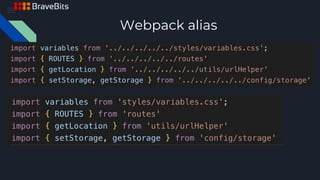
Webpack alias
Webpack alias
Linting
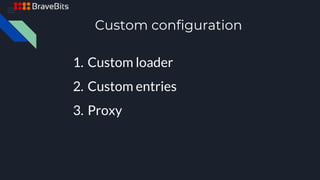
Custom configuration
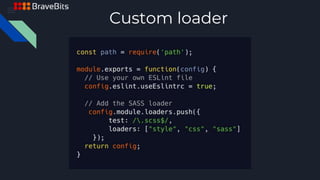
1. Custom loader
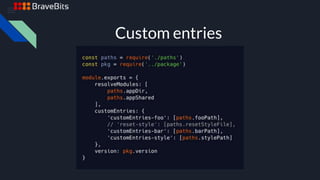
2. Custom entries
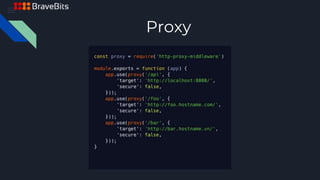
3. Proxy
Custom loader
Custom entries
Proxy
Q&A

Folder structure & setup dev environment

  • 1.
    Folder structure & setupdev- environment Thai Lam Ha - React developer Bravebits.co
  • 2.
    About me Lâm HàThái UET - VNU github.com/thailh12 thailh@bravebits.vn
  • 3.
    Table of contents Folderstructure approach Setup develop environment
  • 4.
    Problems Is there arecommended way to structure React projects? React doesn’t have opinions on how you put files into folders. That said there are a few common approaches popular in the ecosystem you may want to consider.
  • 5.
    Problems The component’s filename should be in Pascal Case. Keep components shallow Name your file the same as the thing you’re exporting from that file
  • 6.
    Goals of projectstructure 1. Productivity should be increased. Fuzzy searching files in text editor must be easier. 2. Flexible and not too highly dictated. There should be some room for developers to do their own thing. 3. The structure should encourage scalability, but also reusability. 4. The structure should be simple enough for new team members to quickly get on board and dive into the project.
  • 7.
    Advantages of aProject Structure 1 Teams don’t have to argue on project structure instead, they can focus on building the product. Having a convention for project structure is one less decision to make. 2 The consistent structure across projects helps people get acquainted with the project quickly. A quick peek and we can guess what each folder will contain, lowering the learning curve for new team members. 3 Codesharing & reuse is increased as a more modular structure is created. People with less experience can also build scalable projects.

  • 8.
    The Rules 1. Componentsshould be inside the components directory 2. Components having own folder should have a component file with the same name 3. Components which can be used in other projects can be kept in shared sub-directory (optional)
  • 9.
    Config develop environment 1.Webpack alias 2. Eslint/Tslint 3. Additional config for create react app
  • 10.
  • 11.
  • 12.
  • 13.
    Custom configuration 1. Customloader 2. Custom entries 3. Proxy
  • 14.
  • 15.
  • 16.
  • 17.