

Templates & Workspaces
Workspaces& Templates

Tips n’ tricks for Esri Users

                                April 2012
Agenda

 Using an FME Workspace template to create a workspace
 Using Esri XML Workspaces as a template to create a
  Geodatabase
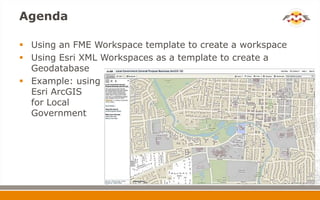
 Example: using
  Esri ArcGIS
  for Local
  Government
Esri ArcGIS for Local Government


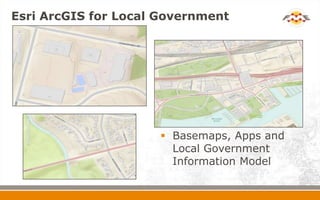
                      Basemaps, Apps and
                       Local Government
                       Information Model
Esri ArcGIS for Local Government
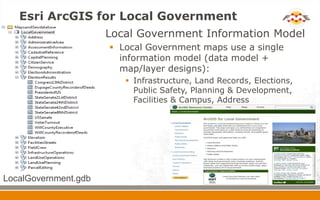
                       Local Government Information Model
                         Local Government maps use a single
                          information model (data model +
                          map/layer designs):
                            Infrastructure, Land Records, Elections,
                             Public Safety, Planning & Development,
                             Facilities & Campus, Address


LocalGovernment.gdb
FME Workspace template
 What’s an FME Workspace template?
   A starting point for your own workspace
Example: Local Government
         Election Results
 Data Loading Components:
   Source Data
      Election Voting Results (CSV or Excel spreadsheets)
      Voting Precinct polygons for various levels of Gov.
   Geodatabase Template
      Esri XML Workspace Document (schema only)
       or
      existing Local Government FGDB
   FME Workspace Template / Spatial ETL Tool
    Template
Example: Election Results
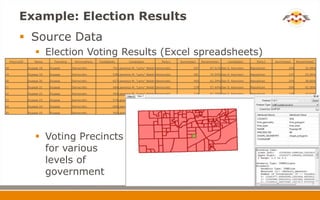
             Source Data
                       Election Voting Results (Excel spreadsheets)
     PrecinctID       Name      Township     WinningParty   TotalBallots         Candidate1            Party1    NumVotes1    PercentVote1     Candidate2        Party2   NumVotes2    PercentVote2

18                Dupage 18   Dupage       Democratic                 751 Lawrence M. "Larry" Walsh Democratic          507         67.51% Dan S. Kennison   Republican          244         32.49%

19                Dupage 19   Dupage       Democratic                 538 Lawrence M. "Larry" Walsh Democratic          401         74.54% Dan S. Kennison   Republican          137         25.46%

20                Dupage 20   Dupage       Democratic                 657 Lawrence M. "Larry" Walsh Democratic          403         61.34% Dan S. Kennison   Republican          254         38.66%

21                Dupage 21   Dupage       Democratic                 484 Lawrence M. "Larry" Walsh Democratic          278         57.44% Dan S. Kennison   Republican          206         42.56%

22                Dupage 22   Dupage       Democratic                 343 Lawrence M. "Larry" Walsh Democratic          214         62.39% Dan S. Kennison   Republican          129         37.61%

23                Dupage 23   Dupage       Democratic                 574 Lawrence M. "Larry" Walsh Democratic          408         71.08% Dan S. Kennison   Republican          166         28.92%

24                Dupage 24   Dupage       Democratic                 609 Lawrence M. "Larry" Walsh Democratic          423         69.46% Dan S. Kennison   Republican          186         30.54%

25                Dupage 25   Dupage       Democratic                 392 Lawrence M. "Larry" Walsh Democratic          267         68.11% Dan S. Kennison   Republican          125         31.89%


                       Voting Precincts
                        for various
                        levels of
                        government
Example: Election Results
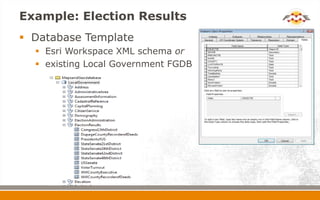
 Database Template
   Esri Workspace XML schema or
   existing Local Government FGDB
Example: Election Results
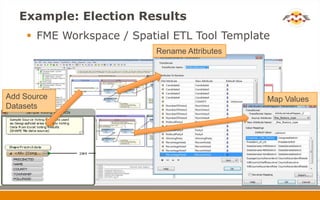
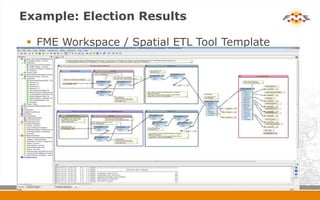
     FME Workspace / Spatial ETL Tool Template
                          Rename Attributes


Add Source                                    Map Values
Datasets
Example: Election Results

  FME Workspace / Spatial ETL Tool Template
Example: Election Results
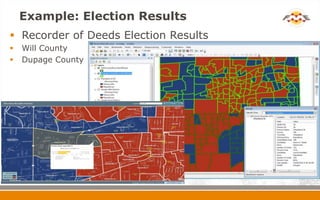
 Recorder of Deeds Election Results
   Will County
   Dupage County
FME Template
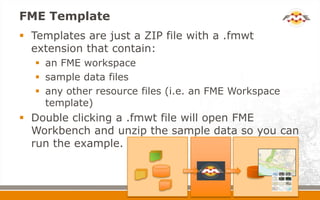
 Templates are just a ZIP file with a .fmwt
  extension that contain:
    an FME workspace
    sample data files
    any other resource files (i.e. an FME Workspace
     template)
 Double clicking a .fmwt file will open FME
  Workbench and unzip the sample data so you can
  run the example.
Beyond Local Government Data


 How else can FME technology help me?
   FME Desktop or Esri Data Interoperability Extension

    Bring any data into ArcGIS

    Share data out to anyone
Summary

 What we’ve seen:
   How to use a FME Workspace template to
    create a workspace
   How to use an Esri XML Workspace as a
    template to create a Geodatabase
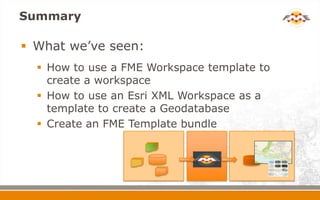
   Create an FME Template bundle
FME Lightning Talk: Esri Geodatabase Templates

FME Lightning Talk: Esri Geodatabase Templates

  • 1.
    Templates & Workspaces Workspaces&Templates Tips n’ tricks for Esri Users April 2012
  • 2.
    Agenda  Using anFME Workspace template to create a workspace  Using Esri XML Workspaces as a template to create a Geodatabase  Example: using Esri ArcGIS for Local Government
  • 3.
    Esri ArcGIS forLocal Government  Basemaps, Apps and Local Government Information Model
  • 4.
    Esri ArcGIS forLocal Government  Local Government Information Model  Local Government maps use a single information model (data model + map/layer designs):  Infrastructure, Land Records, Elections, Public Safety, Planning & Development, Facilities & Campus, Address LocalGovernment.gdb
  • 5.
    FME Workspace template What’s an FME Workspace template?  A starting point for your own workspace
  • 6.
    Example: Local Government Election Results  Data Loading Components:  Source Data  Election Voting Results (CSV or Excel spreadsheets)  Voting Precinct polygons for various levels of Gov.  Geodatabase Template  Esri XML Workspace Document (schema only) or  existing Local Government FGDB  FME Workspace Template / Spatial ETL Tool Template
  • 7.
    Example: Election Results  Source Data  Election Voting Results (Excel spreadsheets) PrecinctID Name Township WinningParty TotalBallots Candidate1 Party1 NumVotes1 PercentVote1 Candidate2 Party2 NumVotes2 PercentVote2 18 Dupage 18 Dupage Democratic 751 Lawrence M. "Larry" Walsh Democratic 507 67.51% Dan S. Kennison Republican 244 32.49% 19 Dupage 19 Dupage Democratic 538 Lawrence M. "Larry" Walsh Democratic 401 74.54% Dan S. Kennison Republican 137 25.46% 20 Dupage 20 Dupage Democratic 657 Lawrence M. "Larry" Walsh Democratic 403 61.34% Dan S. Kennison Republican 254 38.66% 21 Dupage 21 Dupage Democratic 484 Lawrence M. "Larry" Walsh Democratic 278 57.44% Dan S. Kennison Republican 206 42.56% 22 Dupage 22 Dupage Democratic 343 Lawrence M. "Larry" Walsh Democratic 214 62.39% Dan S. Kennison Republican 129 37.61% 23 Dupage 23 Dupage Democratic 574 Lawrence M. "Larry" Walsh Democratic 408 71.08% Dan S. Kennison Republican 166 28.92% 24 Dupage 24 Dupage Democratic 609 Lawrence M. "Larry" Walsh Democratic 423 69.46% Dan S. Kennison Republican 186 30.54% 25 Dupage 25 Dupage Democratic 392 Lawrence M. "Larry" Walsh Democratic 267 68.11% Dan S. Kennison Republican 125 31.89%  Voting Precincts for various levels of government
  • 8.
    Example: Election Results Database Template  Esri Workspace XML schema or  existing Local Government FGDB
  • 9.
    Example: Election Results  FME Workspace / Spatial ETL Tool Template Rename Attributes Add Source Map Values Datasets
  • 10.
    Example: Election Results  FME Workspace / Spatial ETL Tool Template
  • 11.
    Example: Election Results Recorder of Deeds Election Results  Will County  Dupage County
  • 12.
    FME Template  Templatesare just a ZIP file with a .fmwt extension that contain:  an FME workspace  sample data files  any other resource files (i.e. an FME Workspace template)  Double clicking a .fmwt file will open FME Workbench and unzip the sample data so you can run the example.
  • 13.
    Beyond Local GovernmentData  How else can FME technology help me? FME Desktop or Esri Data Interoperability Extension  Bring any data into ArcGIS  Share data out to anyone
  • 14.
    Summary  What we’veseen:  How to use a FME Workspace template to create a workspace  How to use an Esri XML Workspace as a template to create a Geodatabase  Create an FME Template bundle

Editor's Notes

  • #3 This presentation introduces two subjects.How to use an Esri XML Workspace as an template to create a more complex Geodatabase that includes feature class, Feature dataset, domains, & spatial domain definitionsHow to start with an FME Workspace template and create a final FME Workspace. This is a trend you’ll see on FMEpedia. We’ll create a template (a starting workspace) that illustrates how to map to a well defined data model, Esri Local Government, AIXM, S-57, PPDM and an example of a resulting workspace.The presentation example is based on the Esri Local Government initiative but could be any example that writes to an Esri Geodb.
  • #4 Just a bit on Esri Local Government resources centre. This contains various example apps & datasets to help Local Government users. There are similar resource centres for utilities, navigation etc. The resource centres include Basemaps & Apps. The basemaps have defined styles as well as Apps for ArcServer to make the data available on-line.
  • #5 Esri ArcGIS for Local Government Information Model includes the LocalGovernment.gdb and map/layer designs for symbology & display. The Local Government Data Model covers a wide range of Local government requirements Infrastructure, Land Records, Elections, Public Safety, Planning & Development, Facilities & Campus, AddressAvailable through the Esri Local Gov. ArcGIS Resource CenterFME can use a Esri XML Workspace as a template to easily create a complex Geodatabase. This really simplifies the FME Workspace, in particular it means you don’t have to define the detailed domain/subtypes or feature datasets in your workspace feature type definitions. Example: Open workspace and show where the XML Workspace document is defined in the Esri Geodb writer parameters.
  • #6 So what is an FME Workspace template?It’s a starting point for your own workspace. Usually is a workspace that is set-up to write too (or read from) a well defined data model such as PPDM, AIXM, S-57, Esri Local Government, Esri Utility, etc.Add reader (or writer) - You then add your reader (or writer) to match your formatNew Feature Types - You import your feature types for your specific dataPlaces to Edit Stuff - complete the transformation mappings Lot’s of Red Stuff - transformers may be dependent on your mappings or source data and these should resolve themselves as you add your format and feature types and complete the mappings.
  • #8 Source data:In this example there are two source datasets: election result spreadsheetsSpreadsheets that contain the election voting results. Could be in any format - although it makes life a lot easier if the format is relatively consistentVoting precinct areasShape data that represents the precincts or districts
  • #9 Database template for the LocalGovernment.gdbUse the Esri XML Workspace as a template to create the complex Esri FGDBORYou could write to an existing FGDB
  • #10 Complete the FME Workspace or Spatial ETL Tool template workspace. Add source datasets (XLS & SHAPE)Rename attributes as needed – rename attributes to match the FGDB data modelMap Values – in this case we’re making the table names consistent for the both the XLS & The SHAPE dataMake sure any incomplete transformers (red properties) get resolved by the correct mapping.Useful transformers in FME Workspace templates are:AttributeRenamerAttributeValueMapperSchemaMapper
  • #11 End result –Workspace. Run the workspace to load the Geodatabase- Choose which poling results you want to load
  • #12 Data can be checked in ArcMap or displayed through ArcServer Apps
  • #13 Bundle everything in an FME Templatehttp://fmepedia.safe.com/articles/How_To/What-are-Templates-fmwt-and-how-can-I-create-one