
Created By
Amit Tomer
 Describe the web container request cycle
 Describe the Filter API
 Develop a filter class
 Configure a filter in the web.xml file
Objectives
Amit Tomer 2
 Request processing by the web container
 Applying filters to an incoming request
 Applying filters to a dispatched request
Web Container Request Cycle
Amit Tomer 3
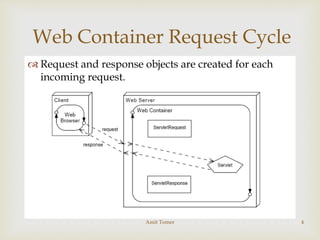
 Request and response objects are created for each
incoming request.
Web Container Request Cycle
Amit Tomer 4

Applying Filters to an Incoming
Request
 A filter intercepts the request before it gets to the
requested resource.
 A response is returned to the client through the
filter.
Amit Tomer 5

Applying Filters to an Incoming
Request (Contd.)
Multiple filters can intercept a given request.
This provides for modularity and reuse of code.
Amit Tomer 6

Applying Filters to an Incoming
Request (Contd.)
 Filters can be applied to different requests in
different combinations.
Amit Tomer 7

Applying Filters to an Incoming
Request (Contd.)
 Filters can be used for many activities in a web
application, such as:
 Blocking access to a resource based on user identity or
role membership
 Auditing incoming requests
 Compressing the response data stream
 Transforming the response
 Measuring and logging servlet performance
Amit Tomer 8

Filters Applied to a Dispatch
 Filters can be applied to an internal dispatch, such as
a request forward or include.
 This behavior is determined by the information in
the deployment descriptor.
Amit Tomer 9

Filter API
Amit Tomer 10

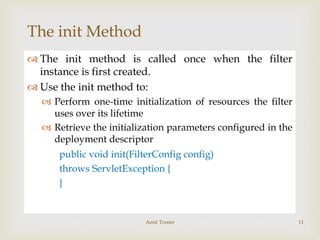
The init Method
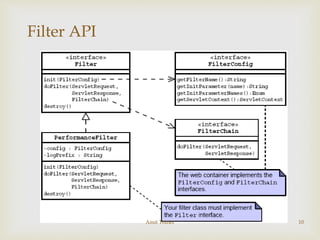
 The init method is called once when the filter
instance is first created.
 Use the init method to:
 Perform one-time initialization of resources the filter
uses over its lifetime
 Retrieve the initialization parameters configured in the
deployment descriptor
public void init(FilterConfig config)
throws ServletException {
}
Amit Tomer 11

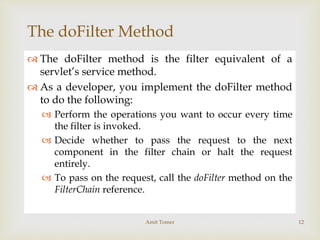
The doFilter Method
 The doFilter method is the filter equivalent of a
servlet’s service method.
 As a developer, you implement the doFilter method
to do the following:
 Perform the operations you want to occur every time
the filter is invoked.
 Decide whether to pass the request to the next
component in the filter chain or halt the request
entirely.
 To pass on the request, call the doFilter method on the
FilterChain reference.
Amit Tomer 12

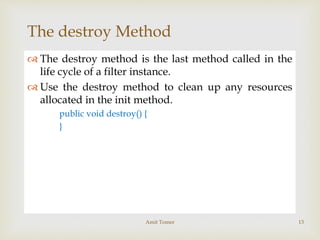
The destroy Method
 The destroy method is the last method called in the
life cycle of a filter instance.
 Use the destroy method to clean up any resources
allocated in the init method.
public void destroy() {
}
Amit Tomer 13

Configuring the Filter
 You declare the filter in the deployment descriptor.
 You can supply initialization parameters in the
declaration.
<filter>
<filter-name>perfFilter</filter-name>
<filter-class>sl314.web.PerformanceFilter
</filter-class>
<init-param>
<param-name>Log Entry Prefix</param-name>
<param-value>Performance: </param-value>
</init-param>
</filter>
Amit Tomer 14

Configuring the Filter(Contd…)
 Mappings can be:
 URL based – Use the exact URL or a wildcard (*)
 Servlet name-based – Specify the name of the servlet to
which the filter is applied
<filter-mapping>
<filter-name>perfFilter</filter-name>
<url-pattern>*.do</url-pattern>
</filter-mapping>
 For a given request, if multiple filter mappings match:
 URL-based filters applied before servlet name-based filters
 Filters applied in the order in which the mappings occur in
the deployment descriptor
Amit Tomer 15

Configuring the Filter (Contd.)
Just A Minute
 Given these servlet mappings, what happens if the client requests
/admin/add_league.do?
<servlet-mapping>
<servlet-name>FrontController</servlet-name>
</url-pattern>*.do</url-pattern>
</servlet-mapping>
<filter-mapping>
<filter-name>perfFilter</filter-name>
<servlet-name>FrontController</servlet-name>
</filter-mapping>
<filter-mapping>
<filter-name>auditFilter</filter-name>
<url-pattern>*.do</url-pattern>
</filter-mapping>
<filter-mapping>
<filter-name>transformFilter</filter-name>
<url-pattern>*.do</url-pattern>
</filter-mapping> Amit Tomer 16

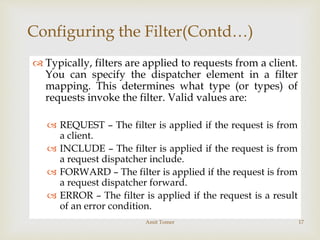
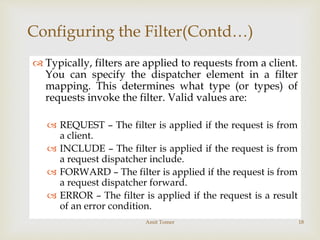
Configuring the Filter(Contd…)
 Typically, filters are applied to requests from a client.
You can specify the dispatcher element in a filter
mapping. This determines what type (or types) of
requests invoke the filter. Valid values are:
 REQUEST – The filter is applied if the request is from
a client.
 INCLUDE – The filter is applied if the request is from
a request dispatcher include.
 FORWARD – The filter is applied if the request is from
a request dispatcher forward.
 ERROR – The filter is applied if the request is a result
of an error condition.
Amit Tomer 17

Configuring the Filter(Contd…)
 Typically, filters are applied to requests from a client.
You can specify the dispatcher element in a filter
mapping. This determines what type (or types) of
requests invoke the filter. Valid values are:
 REQUEST – The filter is applied if the request is from
a client.
 INCLUDE – The filter is applied if the request is from
a request dispatcher include.
 FORWARD – The filter is applied if the request is from
a request dispatcher forward.
 ERROR – The filter is applied if the request is a result
of an error condition.
Amit Tomer 18

Configuring the Filter(Contd…)
 You can use a combination of dispatcher elements to
specify when filters should be applied.
 Given:
<filter-mapping>
<filter-name>auditFilter</filter-name>
<url-pattern>*.do</url-pattern>
<dispatcher>INCLUDE</dispatcher>
<dispatcher>FORWARD</dispatcher>
</filter-mapping>
 When would the auditFilter be applied?
Amit Tomer 19

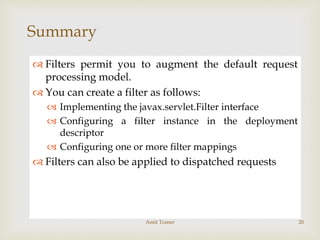
Summary
 Filters permit you to augment the default request
processing model.
 You can create a filter as follows:
 Implementing the javax.servlet.Filter interface
 Configuring a filter instance in the deployment
descriptor
 Configuring one or more filter mappings
 Filters can also be applied to dispatched requests
Amit Tomer 20

Filters

  • 1.
  • 2.
     Describe theweb container request cycle  Describe the Filter API  Develop a filter class  Configure a filter in the web.xml file Objectives Amit Tomer 2
  • 3.
     Request processingby the web container  Applying filters to an incoming request  Applying filters to a dispatched request Web Container Request Cycle Amit Tomer 3
  • 4.
     Request andresponse objects are created for each incoming request. Web Container Request Cycle Amit Tomer 4
  • 5.
     Applying Filters toan Incoming Request  A filter intercepts the request before it gets to the requested resource.  A response is returned to the client through the filter. Amit Tomer 5
  • 6.
     Applying Filters toan Incoming Request (Contd.) Multiple filters can intercept a given request. This provides for modularity and reuse of code. Amit Tomer 6
  • 7.
     Applying Filters toan Incoming Request (Contd.)  Filters can be applied to different requests in different combinations. Amit Tomer 7
  • 8.
     Applying Filters toan Incoming Request (Contd.)  Filters can be used for many activities in a web application, such as:  Blocking access to a resource based on user identity or role membership  Auditing incoming requests  Compressing the response data stream  Transforming the response  Measuring and logging servlet performance Amit Tomer 8
  • 9.
     Filters Applied toa Dispatch  Filters can be applied to an internal dispatch, such as a request forward or include.  This behavior is determined by the information in the deployment descriptor. Amit Tomer 9
  • 10.
  • 11.
     The init Method The init method is called once when the filter instance is first created.  Use the init method to:  Perform one-time initialization of resources the filter uses over its lifetime  Retrieve the initialization parameters configured in the deployment descriptor public void init(FilterConfig config) throws ServletException { } Amit Tomer 11
  • 12.
     The doFilter Method The doFilter method is the filter equivalent of a servlet’s service method.  As a developer, you implement the doFilter method to do the following:  Perform the operations you want to occur every time the filter is invoked.  Decide whether to pass the request to the next component in the filter chain or halt the request entirely.  To pass on the request, call the doFilter method on the FilterChain reference. Amit Tomer 12
  • 13.
     The destroy Method The destroy method is the last method called in the life cycle of a filter instance.  Use the destroy method to clean up any resources allocated in the init method. public void destroy() { } Amit Tomer 13
  • 14.
     Configuring the Filter You declare the filter in the deployment descriptor.  You can supply initialization parameters in the declaration. <filter> <filter-name>perfFilter</filter-name> <filter-class>sl314.web.PerformanceFilter </filter-class> <init-param> <param-name>Log Entry Prefix</param-name> <param-value>Performance: </param-value> </init-param> </filter> Amit Tomer 14
  • 15.
     Configuring the Filter(Contd…) Mappings can be:  URL based – Use the exact URL or a wildcard (*)  Servlet name-based – Specify the name of the servlet to which the filter is applied <filter-mapping> <filter-name>perfFilter</filter-name> <url-pattern>*.do</url-pattern> </filter-mapping>  For a given request, if multiple filter mappings match:  URL-based filters applied before servlet name-based filters  Filters applied in the order in which the mappings occur in the deployment descriptor Amit Tomer 15
  • 16.
     Configuring the Filter(Contd.) Just A Minute  Given these servlet mappings, what happens if the client requests /admin/add_league.do? <servlet-mapping> <servlet-name>FrontController</servlet-name> </url-pattern>*.do</url-pattern> </servlet-mapping> <filter-mapping> <filter-name>perfFilter</filter-name> <servlet-name>FrontController</servlet-name> </filter-mapping> <filter-mapping> <filter-name>auditFilter</filter-name> <url-pattern>*.do</url-pattern> </filter-mapping> <filter-mapping> <filter-name>transformFilter</filter-name> <url-pattern>*.do</url-pattern> </filter-mapping> Amit Tomer 16
  • 17.
     Configuring the Filter(Contd…) Typically, filters are applied to requests from a client. You can specify the dispatcher element in a filter mapping. This determines what type (or types) of requests invoke the filter. Valid values are:  REQUEST – The filter is applied if the request is from a client.  INCLUDE – The filter is applied if the request is from a request dispatcher include.  FORWARD – The filter is applied if the request is from a request dispatcher forward.  ERROR – The filter is applied if the request is a result of an error condition. Amit Tomer 17
  • 18.
     Configuring the Filter(Contd…) Typically, filters are applied to requests from a client. You can specify the dispatcher element in a filter mapping. This determines what type (or types) of requests invoke the filter. Valid values are:  REQUEST – The filter is applied if the request is from a client.  INCLUDE – The filter is applied if the request is from a request dispatcher include.  FORWARD – The filter is applied if the request is from a request dispatcher forward.  ERROR – The filter is applied if the request is a result of an error condition. Amit Tomer 18
  • 19.
     Configuring the Filter(Contd…) You can use a combination of dispatcher elements to specify when filters should be applied.  Given: <filter-mapping> <filter-name>auditFilter</filter-name> <url-pattern>*.do</url-pattern> <dispatcher>INCLUDE</dispatcher> <dispatcher>FORWARD</dispatcher> </filter-mapping>  When would the auditFilter be applied? Amit Tomer 19
  • 20.
     Summary  Filters permityou to augment the default request processing model.  You can create a filter as follows:  Implementing the javax.servlet.Filter interface  Configuring a filter instance in the deployment descriptor  Configuring one or more filter mappings  Filters can also be applied to dispatched requests Amit Tomer 20