FILE HANDLING
CONTENTS
Introduction
 Concept Of Streams
 Stream Classes
 Types Of Stream Classes
 Reading and Writing Characters
 Reading and Writing Bytes
 Handling Primitive Data Types
 Concatenating & Buffering Files
 Random Access Files
 Interactive I/O

INTRODUCTION


File is a collection of bytes stored in secondary storage
device i.e. disk.



File handling is used to read, write, append or update a
file without directly opening it.



Storing and managing data using files is known as File
Processing.
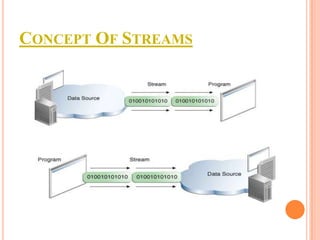
CONCEPT OF STREAMS
STREAM CLASSES
 java.io

package contain large no of stream
classes.

 It

provide capability to process all type of data
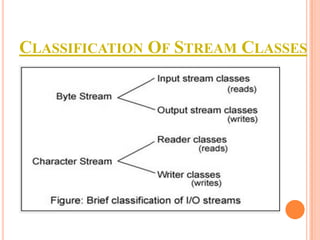
CLASSIFICATION OF STREAM CLASSES
1.BYTE STREAM CLASSES


It provide features for creating and manipulating streams
and files for reading and writing bytes.



It has 2 classes:
InputStream Classes
 OutputStream Classes

A.INPUTSTREAM

CLASSES
METHODS OF INPUTSTREAM


public void read()




public void read(byte b[])




Reads a single byte from input stream.

Reads an array of bytes.

public void close


Close input stream.
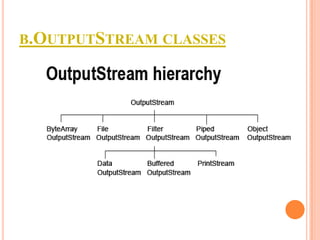
B.OUTPUTSTREAM CLASSES
METHODS OF OUTPUTSTREAM


public void write()




public void write(byte b[])




Write all bytes in an array.

public void flush()




Write single byte to an output stream.

Flushes the output stream.

public void write(byte b[], int n, int m)


Write m bytes from array b starting from nth byte.
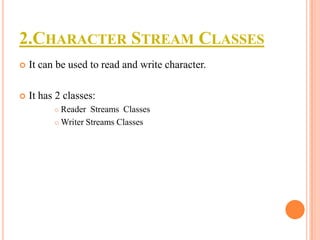
2.CHARACTER STREAM CLASSES


It can be used to read and write character.



It has 2 classes:
Reader Streams Classes
 Writer Streams Classes

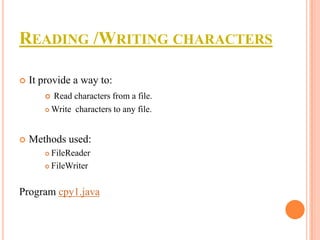
READING /WRITING CHARACTERS


It provide a way to:
Read characters from a file.
 Write characters to any file.




Methods used:
FileReader
 FileWriter


Program cpy1.java
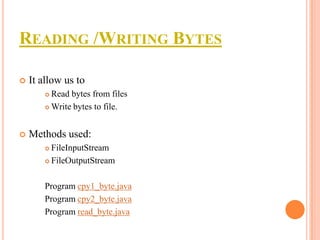
READING /WRITING BYTES


It allow us to
Read bytes from files
 Write bytes to file.




Methods used:
FileInputStream
 FileOutputStream


Program cpy1_byte.java
Program cpy2_byte.java
Program read_byte.java
HANDLING PRIMITIVE TYPES


Its used to add primitive data into file



Following methods used:
writeInt
 writeDouble
 WriteBoolean


Program cpy3_prim.java
CONCATENATION & BUFFERING FILES
Concatenation
 To combine 2 or more input files into 1 input file.
 It’s achieved using:


SequenceInputStream

Buffering
 To store temporarily data i.e read/write to a file.
 It’s created using:


BufferedInputStream

program sb.java
RANDOM ACCESS FILES


It allow us to create a file that can be used for reading &
writing data with random access.



It has 2 mode strings
“r” for reading only
 “rw” for both reading & writing


Program randomIO.java
Program rand.java
INTERACTIVE I/O


It’s process of reading data from keyboard & displaying
output on screen.



Two types of interactive i/o:
Simple interactive i/o
 Graphical interactive i/o


Program aj.java
THANK
YOU

File handling

  • 1.
  • 2.
    CONTENTS Introduction  Concept OfStreams  Stream Classes  Types Of Stream Classes  Reading and Writing Characters  Reading and Writing Bytes  Handling Primitive Data Types  Concatenating & Buffering Files  Random Access Files  Interactive I/O 
  • 3.
    INTRODUCTION  File is acollection of bytes stored in secondary storage device i.e. disk.  File handling is used to read, write, append or update a file without directly opening it.  Storing and managing data using files is known as File Processing.
  • 4.
  • 5.
    STREAM CLASSES  java.io packagecontain large no of stream classes.  It provide capability to process all type of data
  • 6.
  • 7.
    1.BYTE STREAM CLASSES  Itprovide features for creating and manipulating streams and files for reading and writing bytes.  It has 2 classes: InputStream Classes  OutputStream Classes 
  • 8.
  • 9.
    METHODS OF INPUTSTREAM  publicvoid read()   public void read(byte b[])   Reads a single byte from input stream. Reads an array of bytes. public void close  Close input stream.
  • 10.
  • 11.
    METHODS OF OUTPUTSTREAM  publicvoid write()   public void write(byte b[])   Write all bytes in an array. public void flush()   Write single byte to an output stream. Flushes the output stream. public void write(byte b[], int n, int m)  Write m bytes from array b starting from nth byte.
  • 12.
    2.CHARACTER STREAM CLASSES  Itcan be used to read and write character.  It has 2 classes: Reader Streams Classes  Writer Streams Classes 
  • 13.
    READING /WRITING CHARACTERS  Itprovide a way to: Read characters from a file.  Write characters to any file.   Methods used: FileReader  FileWriter  Program cpy1.java
  • 14.
    READING /WRITING BYTES  Itallow us to Read bytes from files  Write bytes to file.   Methods used: FileInputStream  FileOutputStream  Program cpy1_byte.java Program cpy2_byte.java Program read_byte.java
  • 15.
    HANDLING PRIMITIVE TYPES  Itsused to add primitive data into file  Following methods used: writeInt  writeDouble  WriteBoolean  Program cpy3_prim.java
  • 16.
    CONCATENATION & BUFFERINGFILES Concatenation  To combine 2 or more input files into 1 input file.  It’s achieved using:  SequenceInputStream Buffering  To store temporarily data i.e read/write to a file.  It’s created using:  BufferedInputStream program sb.java
  • 17.
    RANDOM ACCESS FILES  Itallow us to create a file that can be used for reading & writing data with random access.  It has 2 mode strings “r” for reading only  “rw” for both reading & writing  Program randomIO.java Program rand.java
  • 18.
    INTERACTIVE I/O  It’s processof reading data from keyboard & displaying output on screen.  Two types of interactive i/o: Simple interactive i/o  Graphical interactive i/o  Program aj.java
  • 19.