WORDPRESS
1
CONTENTS:
How to install local host?
Overview of wordpress
History of Wordpress
Themes
Plugins
Widgets
Menus
Background & Header etc
Demo Of Website

2
WORDPRESS OVERVIEW
 WordPress is an open-source and free Web publishing
application.
 WordPress allows users to build dynamic websites .

4
WORDPRESS -HISTORY

•
•

WordPress started in 2003, with fewer users than you can count on
your fingers and toes.
Matt Mullenweg and Mike Little co-founded WordPress.

5
WORDPRESS THEMES
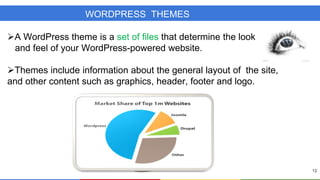
A WordPress theme is a set of files that determine the look
and feel of your WordPress-powered website.
Themes include information about the general layout of the site,
and other content such as graphics, header, footer and logo.

12
WORDPRESS PLUGIN
 Plugin is a collection of code files that adds one or
more features to your web site.
 WordPress has a database of over 26,000 plugin.

13
HEADER

•

It allows to manage what image is display in theme’s header.
BACKGROUND

•

It allows you to manage the look & feel of background for your
theme.
MENUS

•

MENUS

It allows you to create a navigation menu of pages
,categories,custom links,tags etc.
WIDGETS

•

Widgets are gadgets that allows you to add various pieces of
information in sidebar content.
WORDPRESS USERS








Super admin
Administrator
Editor
Author
Contributor
Subscriber
Practical Implementation
ANY QUESTIONS?

14
Wordpress

Wordpress