Fault List RBS 2000 Micro
2/006 51-LZA 701 0001 Uen AX
Copyright
© Ericsson AB 2018. All rights reserved. No part of this document may be
reproduced in any form without the written permission of the copyright owner.
Disclaimer
The contents of this document are subject to revision without notice due to
continued progress in methodology, design and manufacturing. Ericsson shall
have no liability for any error or damage of any kind resulting from the use of
this document.
2/006 51-LZA 701 0001 Uen AX | 2018-10-25
Contents
Contents
1 Introduction 1
1.1 Revision Information 1
2 Terminology 3
2.1 Fault Numbers 3
2.2 Fault Maps 3
2.3 Logical RU 4
2.4 Fault Map Overview 4
3 SO CF Fault Maps 5
3.1 SO CF Internal Fault Map Class 1A 5
3.2 SO CF Internal Fault Map Class 2A 13
3.3 SO CF External Condition Map Class 1 32
3.4 SO CF External Condition Map Class 2 33
3.5 SO CF Replacement Unit Map 35
4 SO TRXC Fault Maps 39
4.1 SO TRXC Internal Fault Map Class 1A 39
4.2 SO TRXC Internal Fault Map Class 1B 48
4.3 SO TRXC Internal Fault Map Class 2A 50
4.4 SO TRXC External Condition Map Class 1 63
4.5 SO TRXC External Condition Map Class 2 63
4.6 SO TRXC Replacement Unit Map 69
5 AO Fault Maps 71
5.1 AO CON External Condition Map Class 1 71
5.2 AO CON External Condition Map Class 2 71
5.3 AO RX Internal Fault Map Class 1B 72
5.4 AO RX Internal Fault Map Class 2A 75
5.5 AO TF Internal Fault Map Class 1B 78
5.6 AO TF Internal Fault Map Class 2A 79
5.7 AO TF External Condition Map Class 1 80
5.8 AO TF External Condition Map Class 2 84
5.9 AO TS External Condition Map Class 1 87
5.10 AO TX Internal Fault Map Class 1A 89
2/006 51-LZA 701 0001 Uen AX | 2018-10-25
Fault List RBS 2000 Micro
5.11 AO TX Internal Fault Map Class 1B 89
5.12 AO TX Internal Fault Map Class 2A 93
2/006 51-LZA 701 0001 Uen AX | 2018-10-25
Introduction
1 Introduction
This document describes all faults reported from all Micro RBSs, RBS 2109, and
RBS 2111 to the BSC and hardware units suspected of causing the fault.
Note: The fault must be verified before returning the faulty unit to the Ericsson
repair centre.
Unused fault numbers are not indicated in the fault lists.
1.1 Revision Information
Other than editorial changes, this document has been revised as follows:
1
2/006 51-LZA 701 0001 Uen AX | 2018-10-25
Fault List RBS 2000 Micro
2 2/006 51-LZA 701 0001 Uen AX | 2018-10-25
Terminology
2 Terminology
The following terminology is used throughout this document.
2.1 Fault Numbers
The fault number is identical to the bit position in the fault map reported over
the Abis interface.
2.2 Fault Maps
Internal Fault Map Class 1A (I1A)
Faults reported in this class are faults that affect the MO function. Faulty
hardware is part of the signalling MO.
Internal Fault Map Class 1B (I1B)
Faults reported in this class are faults that affect the MO function. The origin of
the fault is external to the signalling MO.
Internal Fault Map Class 2A (I2A)
Faults reported in this class are faults that do not affect the MO function. Faulty
hardware is part of the signalling MO.
External Condition Map Class 1 (EC1)
Conditions reported in this class are conditions that affect the MO function. The
conditions are TG external.
External Condition Map Class 2 (EC2)
Conditions reported in this class are conditions that do not affect the MO function.
The conditions are TG external.
Replacement Unit Map (RU Map)
Units reported in this map are hardware units suspected of causing the faults in
the internal fault maps described above.
3
2/006 51-LZA 701 0001 Uen AX | 2018-10-25
Fault List RBS 2000 Micro
2.3 Logical RU
A logical RU is defined as a unit that can be referred to but is not a single physical
unit. There are four kinds of logical RUs. Logical RUs are pointed out when the
analysis fails to give a more detailed localization of the fault. Logical RUs are
intended to assist the fault localization process.
— Buses. These are often referred to as a single physical unit but are
implemented in the backplane of the cabinet or with cables. A bus pointed out
in the RU map indicates that the faulty hardware can be any unit connected
to the bus or the bus itself. Logical bus RUs are:
• Local bus
• Timing bus
• X bus
• Y link
— Antenna. A logical antenna means the whole signal path between the
Transmitter/Receiver and the physical antenna.
— Environment. This RU records conditions that cannot be affected by the base
station. For example, if the temperature in the cabinet is too high or the
incoming AC power is out of range, the logical RU Environment is denoted as
faulty. Two groups exist under this RU:
• Power, that handles external power
• Climate, that handles internal temperature
— IDB. The RBS installation database is regarded as a replaceable unit even
though it is not a physical unit. It comprises the data in the database only,
not the medium in which it resides.
2.4 Fault Map Overview
Fault codes on the Abis interface are defined per MO. The SO RU map and the
I1A/I2A fault maps must be read together. The SO fault map identifies the fault
and the RU map denotes where the fault is located.
An AO I1B fault has a corresponding SO I2A fault. So by reading the I2A fault
map and the RU map for SO CF or SO TRXC, the hardware that is causing the
AO I1B fault can be found. This is the case when BTS internal hardware affects
a single AO.
The AO is not allowed to report the hardware itself as this task is assigned to
the SO responsible for hardware. This means that the consequence is reported
by the AO I1B fault map and the cause is reported by the SO I1A/I2A fault maps
and the RU map.
4 2/006 51-LZA 701 0001 Uen AX | 2018-10-25
SO CF Fault Maps
3 SO CF Fault Maps
3.1 SO CF Internal Fault Map Class 1A
3.1.1 SO CF I1A:0 - Reset, Automatic Recovery
Description An IXU/Micro /MU reset is triggered by the loss of
BSC-RBS contact on the CF link for more than 1 hour.
Note: For information only.
Action If the fault occurs frequently, then investigate the cause
of the disturbance between the BSC and RBS, which is
probably in the transmission equipment.
Note: This fault alone is not cause to replace the
IXU/Micro /MU.
3.1.2 SO CF I1A:1 - Reset, Power On
Description The IXU/Micro/MU has recovered after power off.
Note: For information only.
3.1.3 SO CF I1A:2 - Reset, Switch
Description The IXU/Micro/MU is reset with the Reset button or the
OMT.
Note: For information only.
3.1.4 SO CF I1A:3 - Reset, Watchdog
Description The software is supposed to reset timers at regular
intervals. If the software locks up and does not do this,
the IXU/Micro/MU is reset.
Action If this fault is recurring, then follow the instructions below
until the fault is resolved.
— Print out the RBS log and IDB, using the OMT, and
send them together with a trouble report to Ericsson.
— Replace the RBS software.
3.1.5 SO CF I1A:4 - Reset, SW Fault
Description The IXU/Micro/MU is reset because of a severe software
fault.
5
2/006 51-LZA 701 0001 Uen AX | 2018-10-25
Fault List RBS 2000 Micro
Action If this fault is recurring, then follow the instructions below
until the fault is resolved.
— Print out the RBS log and IDB, using the OMT, and
send them together with a trouble report to Ericsson.
— Replace the RBS software.
3.1.6 SO CF I1A:5 - Reset, RAM Fault
Description The IXU/Micro/MU is reset because of an error in the
RAM parity check.
Action Follow the instructions below until the fault is resolved.
— If this fault occurs frequently, then replace the RBS
software.
— Replace the IXU/Micro/MU.
3.1.7 SO CF I1A:6 - Reset, Internal Function Change
Description The RBS is reset after software download in order to
activate the new software.
Note: For information only.
3.1.8 SO CF I1A:7 - XBus Fault
Related Faults Section 4.1.16 SO TRXC I1A:15 - X Bus Communication
Fault on page 42
Related RUs SO CF RU:39 - X bus Section 3.5 SO CF Replacement Unit
Map on page 35
SO CF RU:2 - Micro RBS Section 3.5 SO CF Replacement
Unit Map on page 35
Description The fault occurs when at least two TRXs report
communication problems on the X bus.
Note: The alarm is raised or ceased intermittently if a
TRXC is reset.
6 2/006 51-LZA 701 0001 Uen AX | 2018-10-25
SO CF Fault Maps
Action Follow the instructions below until the fault is resolved.
— If applicable, check that the external TXL cable
between the cabinets is correctly connected and
undamaged. If the cable is damaged, then replace it.
— For RBS 2302: Check that the internal TXL cable in
the mounting base, between connectors X10 and
X22, is correctly connected and undamaged. If the
cable is damaged, then replace it.
— Reset the master cabinet.
— Replace the Micro cabinets with TRXs reporting the
alarm.
3.1.9 SO CF I1A:8 - Timing Unit VCO Fault
Related RUs SO CF RU:0 - DXU, DUG 10, DUG 20, MU or IXU Section
3.5 SO CF Replacement Unit Map on page 35
SO CF RU:2 - Micro RBS Section 3.5 SO CF Replacement
Unit Map on page 35
Description The VCO is failing, probably because of a power supply
problem or a hardware fault.
If a large number of RBSs raise the alarm, the fault is
probably located in the PCM or External References.
Action Follow the instructions below until the fault is resolved.
— Check that the RBS receives the correct
synchronization signals according to configuration.
— Reset the IXU/MU/Micro (master cabinet).
— Replace the IXU/MU/Micro (master cabinet).
3.1.10 SO CF I1A:9 - Timing Bus Fault
Related Faults Section 4.1.9 SO TRXC I1A:8 - Timing Reception Fault
on page 40
Related RUs SO CF RU:36 - Timing Bus Section 3.5 SO CF Replacement
Unit Map on page 35
SO CF RU:2 - Micro RBS Section 3.5 SO CF Replacement
Unit Map on page 35
Description This fault is raised when the Timing bus driver in the
master cabinet is faulty or at least two TRXs have
reported timing reception problems.
7
2/006 51-LZA 701 0001 Uen AX | 2018-10-25
Fault List RBS 2000 Micro
Action Follow the instructions below until the fault is resolved.
— If applicable, check that the external TXL cable
between the cabinets is correctly connected and
undamaged. If not, then replace the cable.
— For the RBS 2302: Check that the internal TXL cable
in the mounting base between connectors X10 and
X22 is correctly connected and undamaged. If not,
then replace the cable.
— Reset the master cabinet.
— Replace the Micro cabinets.
3.1.11 SO CF I1A:10 - Indoor Temp Out of Safe Range
Related Faults Section 3.2.5 SO CF I2A:16 - Indoor Temp Out of Normal
Conditional Range on page 15
Section 4.2.2 SO TRXC I1B:1 - Indoor Temp Out of Safe
Range on page 48
Related RUs SO CF RU:31 - Environment Section 3.5 SO CF
Replacement Unit Map on page 35
Description The temperature at the IXU/MU/Micro (master cabinet) is
outside the specified safe range. The alarm ceases when
the temperature is back within the safe range.
Action Follow the instructions below until the fault is resolved.
If hot conditions:
— Check that nothing prevents a free airflow above,
below or through the IXU/Micro/MU cooling flanges.
— For RBS 2302: Install a fan unit to the cabinet.
— Move the master cabinet to a colder location.
If cold conditions:
— Check the power supply, since the heater in the
IXU/Micro works only when AC power supply is
available.
— Move the master cabinet to a warmer location.
8 2/006 51-LZA 701 0001 Uen AX | 2018-10-25
SO CF Fault Maps
3.1.12 SO CF I1A:11 - Reset, BSC ordered HW Reset
Description The IXU/Micro/MU is reset with the BSC ordered HW
Reset Request Command.
Note: For information only.
3.1.13 SO CF I1A:12 - DC Voltage Out of Range
Related Faults Section 3.2.7 SO CF I2A:18 - DC Voltage Out of Range
on page 16
Section 4.2.3 SO TRXC I1B:3 - DC Voltage Out of Range
on page 49
Section 3.2.8 SO CF I2A:22 - Battery Backup Capacity
Reduced on page 17
Related RUs SO CF RU:31 - Environment Section 3.5 SO CF
Replacement Unit Map on page 35
SO CF RU:14 - Battery Section 3.5 SO CF Replacement
Unit Map on page 35
Description The DC voltage is outside operational range and the RBS
will shut down.
Note: If fault SO CF EC2:10 Mains fail (External power
source fail) was present before this alarm, it
probably means that battery backup is about to
end.
Action Follow the instructions below until the fault is resolved.
— For RBS 2302: Check which Micros have the Battery
fault indicator on.
— Check the DC supply chain of the IXU/Micro/MU,
for example, MBU circuit breakers, DC connection,
external fuses, and PSA (RBS 2302 only).
— For IXU: If no DC power or battery backup is required
for the cabinet with the IXU, then create and install
a new IDB with Power System = 230/115 VAC, no
backup.
3.1.14 SO CF I1A:15 - IDB Corrupted
Related Faults Section 3.1.17 SO CF I1A:18 - Internal Configuration
Failed on page 11
Related RUs SO CF RU:34 - IDB Section 3.5 SO CF Replacement Unit
Map on page 35
9
2/006 51-LZA 701 0001 Uen AX | 2018-10-25
Fault List RBS 2000 Micro
Description The IDB/RBS database is corrupted or cannot be read
by the software.
Action Follow the instructions below until the fault is resolved.
— Reinstall the IDB, using the OMT.
— Create and install a new IDB.
3.1.15 SO CF I1A:16 - RU Database Corrupted
Related Faults Section 3.1.17 SO CF I1A:18 - Internal Configuration
Failed on page 11
Related RUs SO CF RU:0 - DXU, DUG 10, DUG 20, MU or IXU Section
3.5 SO CF Replacement Unit Map on page 35
SO CF RU:2 - Micro RBS Section 3.5 SO CF Replacement
Unit Map on page 35
Description The IXU/Micro/MU database is corrupted or cannot be
read by the software.
Action Follow the instructions below until the fault is resolved.
— Reset the IXU/Micro/MU.
— Replace the IXU/Micro/MU.
3.1.16 SO CF I1A:17 - HW and IDB Inconsistent
Related Faults Section 3.1.17 SO CF I1A:18 - Internal Configuration
Failed on page 11
Description The IDB does not match the hardware, for example,
wrong RBS type, wrong number of RRUs/Micro cabinets,
or wrong transmission type (Micro only).
Note: The OMT function Check IDB can be used to
identify hardware/IDB inconsistencies. Not
supported by RBS 2301, 2302, and 2401.
10 2/006 51-LZA 701 0001 Uen AX | 2018-10-25
SO CF Fault Maps
Action Follow the instructions below until the fault is resolved.
— Check that the RRUs are connected to the correct
Y link ports in the IXU/MU and that the RRUs are
powered on.
— Check that the correct number of RRUs or Micros is
defined in the IDB.
— For RBS 2301/2302/2401: Check that the
transmission type defined in the IDB is supported by
the master cabinet, see ending of the product number:
• E1: /022, /024, /054, /056, /088
• T1: /032, /064, /090, /094
— Create a new IDB that applies to the RBS and install
it, using the OMT.
3.1.17 SO CF I1A:18 - Internal Configuration Failed
Related Faults Section 3.1.14 SO CF I1A:15 - IDB Corrupted on page 9
Section 3.1.15 SO CF I1A:16 - RU Database Corrupted
on page 10
Section 3.1.16 SO CF I1A:17 - HW and IDB Inconsistent
on page 10
Description The IXU/Micro/MU failed its internal configuration at
start-up, usually as a consequence of the related faults.
Action Follow the instructions below until the fault is resolved.
— Perform actions for related faults.
— Reset the IXU/Micro/MU.
— Reinstall the IDB, using the OMT.
— Create and install a new IDB.
— Replace the IXU/Micro/MU.
3.1.18 SO CF I1A:19 - HW and SW Inconsistent
Description The software release does not support hardware board
currently in use.
11
2/006 51-LZA 701 0001 Uen AX | 2018-10-25
Fault List RBS 2000 Micro
Action Follow the instructions below until the fault is resolved.
— Check the release notes for the software currently
running to see the hardware limitation.
— Perform a software download with a different
software release, which supports the hardware board
in use.
3.1.19 SO CF I1A:21 - HW Fault
Related RUs SO CF RU:0 - DXU, DUG 10, DUG 20, MU or IXU Section
3.5 SO CF Replacement Unit Map on page 35
Description The IXU/MU has an internal hardware fault.
Action Follow the instructions below until the fault is resolved.
— Reset the IXU/MU.
— Replace the IXU/MU.
3.1.20 SO CF I1A:22 - Air Time Counter Lost
Related RUs SO CF RU:0 - DXU, DUG 10, DUG 20, MU or IXU Section
3.5 SO CF Replacement Unit Map on page 35
Description The IXU/MU has an internal signalling problem.
Action Follow the instructions below until the fault is resolved.
— Reset the IXU/MU.
— Replace the IXU/MU.
3.1.21 SO CF I1A:23 - Time Distribution Fault
Related Faults Section 4.1.9 SO TRXC I1A:8 - Timing Reception Fault
on page 40
Related RUs SO CF RU:3 - Y Link Section 3.5 SO CF Replacement Unit
Map on page 35
Description At least two TRXs have reported timing reception
problems.
12 2/006 51-LZA 701 0001 Uen AX | 2018-10-25
SO CF Fault Maps
Action Follow the instructions below until the fault is resolved.
— Reset the IXU/MU and the RRUs with alarms.
— Check the Y cables and connections.
— Replace the Y cable between the RRU and the TRX
that reports the alarm.
— Replace the RRU.
— Replace the IXU/MU.
3.2 SO CF Internal Fault Map Class 2A
3.2.1 SO CF I2A:7 - RX Internal Amplifier Fault
Related Faults Section 5.3.1 AO RX I1B:0 - RX Internal Amplifier Fault
on page 72
Section 5.4.1 AO RX I2A:1 - RX Path Lost on A Receiver
Side on page 75
Section 5.4.2 AO RX I2A:2 - RX Path Lost on B Receiver
Side on page 76
Related RUs SO CF RU:2 - Micro RBS Section 3.5 SO CF Replacement
Unit Map on page 35
Description At least one of the Micros RX amplifiers is faulty.
Action Follow the instructions below until the fault is resolved.
— Reset the Micro that has the RX that reports any of
the related alarms.
— Replace the Micro.
3.2.2 SO CF I2A:10 - DXU-Opt EEPROM Checksum Fault
Related Faults Section 5.5.2 AO TF I1B:1 - DXU-Opt EEPROM Checksum
Fault on page 79
Related RUs SO CF RU:2 - Micro RBS Section 3.5 SO CF Replacement
Unit Map on page 35
Description The EEPROM for the optional synchronization oscillator
in the master cabinet is corrupted.
13
2/006 51-LZA 701 0001 Uen AX | 2018-10-25
Fault List RBS 2000 Micro
Action Follow the instructions below until the fault is resolved.
— The alarm can probably be removed by using PCM as
synchronization source. This is done by defining the
TF parameter SYNCSRC = PCM in the BSC.
— Reset the master cabinet.
— Replace the master cabinet.
3.2.3 SO CF I2A:12 - RX Maxgain/Mingain Violated
Related RUs SO CF RU:40 - Antenna Section 3.5 SO CF Replacement
Unit Map on page 35
Description The total RX gain (from antenna to RRU) is outside the
recommended range. Probably one or more values for
TMA gain or feeder loss are wrongly defined in the IDB.
Action Follow the instructions below until the fault is resolved.
— Confirm with the OMT that the IDB is correct
regarding installed TMAs. If not, then modify and
install a new IDB.
— Check the defined values for TMA gain and feeder
loss.
Note: TMA Loss = 0TMA Gain
— Reset the IXU/MU.
3.2.4 SO CF I2A:13 - Timing Unit VCO Ageing
Related RUs SO CF RU:0 - DXU, DUG 10, DUG 20, MU or IXU Section
3.5 SO CF Replacement Unit Map on page 35
SO CF RU:2 - Micro RBS Section 3.5 SO CF Replacement
Unit Map on page 35
Description The VCO is ageing. Its control value has drifted outside
its authorized range.
Action Follow the instructions below until the fault is resolved.
— Reset the IXU/MU/Micro (master cabinet).
— Replace the IXU/MU/Micro (master cabinet).
14 2/006 51-LZA 701 0001 Uen AX | 2018-10-25
SO CF Fault Maps
3.2.5 SO CF I2A:16 - Indoor Temp Out of Normal Conditional Range
Related Faults Section 3.1.11 SO CF I1A:10 - Indoor Temp Out of Safe
Range on page 8
Section 4.2.2 SO TRXC I1B:1 - Indoor Temp Out of Safe
Range on page 48
Related RUs SO CF RU:31 - Environment Section 3.5 SO CF
Replacement Unit Map on page 35
Description The temperature at one or more RRUs/Micros (extension
cabinet) is outside the specified normal conditional range.
The alarm ceases when the temperature is back within
the normal conditional range.
Alarm SO TRXC I1B:1 is raised for every TRXC in relevant
RRUs/Micros.
Action Follow the instructions below until the fault is resolved.
If hot conditions:
— Check that nothing prevents a free airflow above,
below or through the RRU/Micro cooling flanges.
— Install a fan unit to the cabinet. Not applicable for
RBS 2108/2111.
— For RRU: This also requires a new IDB with Climate
System = Fan Unit defined for this cabinet.
— Move the cabinet with the RRU/Micro to a colder
location.
If cold conditions:
— Check the power supply, since the heater in the
RRU/Micro works only when AC supply is available.
— Move the cabinet with the RRU/Micro to a warmer
location.
3.2.6 SO CF I2A:17 - Indoor Humidity
Related RUs SO CF RU:31 - Environment Section 3.5 SO CF
Replacement Unit Map on page 35
Description The humidity in the cabinet is above the allowed level.
Condensation is imminent, damage such as corrosion or
short circuiting can occur.
Action Check the climate system.
15
2/006 51-LZA 701 0001 Uen AX | 2018-10-25
Fault List RBS 2000 Micro
3.2.7 SO CF I2A:18 - DC Voltage Out of Range
Related Faults Section 3.1.13 SO CF I1A:12 - DC Voltage Out of Range
on page 9
Section 4.2.3 SO TRXC I1B:3 - DC Voltage Out of Range
on page 49
Section 3.2.8 SO CF I2A:22 - Battery Backup Capacity
Reduced on page 17
Related RUs SO CF RU:14 - Battery Section 3.5 SO CF Replacement
Unit Map on page 35
SO CF RU:31 - Environment Section 3.5 SO CF
Replacement Unit Map on page 35
Description The DC supply voltage to one or more RRUs/Micros
(extension cabinets) is outside operational range. The
fault SO TRXC I1B:3 is raised for every TRXC in concerned
RRUs/Micros.
Note: If fault SO CF EC2:10 was present before this
alarm, it probably means that the battery backup
is about to end.
Action Follow the instructions below until the fault is resolved.
— For RRU: Check which RRUs that have the DC power
on indicator off. The indicator is not available on
RRUs in RBS 2108 or RBS 2111.
— For RBS 2302: Check which Micros have the Battery
Fault indicator on.
— Check the DC supply chain of the RRUs/Micros, for
example, MBU circuit breakers, DC connection, or
external fuses, and PSA (RBS 2302 only).
— For RRU: If no DC power or battery backup is required
for the cabinets with the alarm, then create and
install a new IDB with Power System = 230/115 V
AC, no backup. Not applicable in case of RBS 2108 or
RBS 2111.
16 2/006 51-LZA 701 0001 Uen AX | 2018-10-25
SO CF Fault Maps
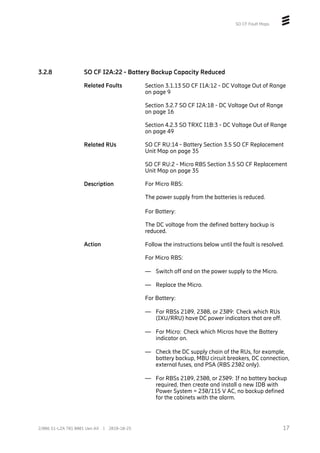
3.2.8 SO CF I2A:22 - Battery Backup Capacity Reduced
Related Faults Section 3.1.13 SO CF I1A:12 - DC Voltage Out of Range
on page 9
Section 3.2.7 SO CF I2A:18 - DC Voltage Out of Range
on page 16
Section 4.2.3 SO TRXC I1B:3 - DC Voltage Out of Range
on page 49
Related RUs SO CF RU:14 - Battery Section 3.5 SO CF Replacement
Unit Map on page 35
SO CF RU:2 - Micro RBS Section 3.5 SO CF Replacement
Unit Map on page 35
Description For Micro RBS:
The power supply from the batteries is reduced.
For Battery:
The DC voltage from the defined battery backup is
reduced.
Action Follow the instructions below until the fault is resolved.
For Micro RBS:
— Switch off and on the power supply to the Micro.
— Replace the Micro.
For Battery:
— For RBSs 2109, 2308, or 2309: Check which RUs
(IXU/RRU) have DC power indicators that are off.
— For Micro: Check which Micros have the Battery
indicator on.
— Check the DC supply chain of the RUs, for example,
battery backup, MBU circuit breakers, DC connection,
external fuses, and PSA (RBS 2302 only).
— For RBSs 2109, 2308, or 2309: If no battery backup
required, then create and install a new IDB with
Power System = 230/115 V AC, no backup defined
for the cabinets with the alarm.
17
2/006 51-LZA 701 0001 Uen AX | 2018-10-25
Fault List RBS 2000 Micro
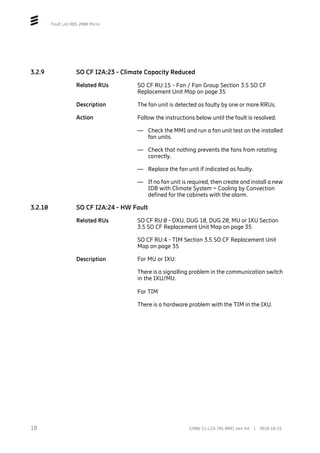
3.2.9 SO CF I2A:23 - Climate Capacity Reduced
Related RUs SO CF RU:15 - Fan / Fan Group Section 3.5 SO CF
Replacement Unit Map on page 35
Description The fan unit is detected as faulty by one or more RRUs.
Action Follow the instructions below until the fault is resolved.
— Check the MMI and run a fan unit test on the installed
fan units.
— Check that nothing prevents the fans from rotating
correctly.
— Replace the fan unit if indicated as faulty.
— If no fan unit is required, then create and install a new
IDB with Climate System = Cooling by Convection
defined for the cabinets with the alarm.
3.2.10 SO CF I2A:24 - HW Fault
Related RUs SO CF RU:0 - DXU, DUG 10, DUG 20, MU or IXU Section
3.5 SO CF Replacement Unit Map on page 35
SO CF RU:4 - TIM Section 3.5 SO CF Replacement Unit
Map on page 35
Description For MU or IXU:
There is a signalling problem in the communication switch
in the IXU/MU.
For TIM
There is a hardware problem with the TIM in the IXU.
18 2/006 51-LZA 701 0001 Uen AX | 2018-10-25
SO CF Fault Maps
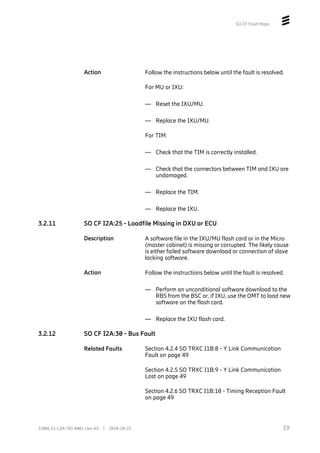
Action Follow the instructions below until the fault is resolved.
For MU or IXU:
— Reset the IXU/MU.
— Replace the IXU/MU.
For TIM:
— Check that the TIM is correctly installed.
— Check that the connectors between TIM and IXU are
undamaged.
— Replace the TIM.
— Replace the IXU.
3.2.11 SO CF I2A:25 - Loadfile Missing in DXU or ECU
Description A software file in the IXU/MU flash card or in the Micro
(master cabinet) is missing or corrupted. The likely cause
is either failed software download or connection of slave
lacking software.
Action Follow the instructions below until the fault is resolved.
— Perform an unconditional software download to the
RBS from the BSC or, if IXU, use the OMT to load new
software on the flash card.
— Replace the IXU flash card.
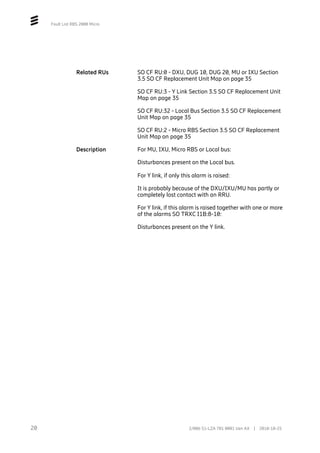
3.2.12 SO CF I2A:30 - Bus Fault
Related Faults Section 4.2.4 SO TRXC I1B:8 - Y Link Communication
Fault on page 49
Section 4.2.5 SO TRXC I1B:9 - Y Link Communication
Lost on page 49
Section 4.2.6 SO TRXC I1B:10 - Timing Reception Fault
on page 49
19
2/006 51-LZA 701 0001 Uen AX | 2018-10-25
Fault List RBS 2000 Micro
Related RUs SO CF RU:0 - DXU, DUG 10, DUG 20, MU or IXU Section
3.5 SO CF Replacement Unit Map on page 35
SO CF RU:3 - Y Link Section 3.5 SO CF Replacement Unit
Map on page 35
SO CF RU:32 - Local Bus Section 3.5 SO CF Replacement
Unit Map on page 35
SO CF RU:2 - Micro RBS Section 3.5 SO CF Replacement
Unit Map on page 35
Description For MU, IXU, Micro RBS or Local bus:
Disturbances present on the Local bus.
For Y link, if only this alarm is raised:
It is probably because of the DXU/IXU/MU has partly or
completely lost contact with an RRU.
For Y link, if this alarm is raised together with one or more
of the alarms SO TRXC I1B:8-10:
Disturbances present on the Y link.
20 2/006 51-LZA 701 0001 Uen AX | 2018-10-25
SO CF Fault Maps
Action Follow the instructions below until the fault is resolved.
For MU, IXU, Micro RBS, or Local bus:
— If applicable, check that the external TXL cable
between the cabinets is undamaged and correctly
mounted. If the cable is damaged, then replace it.
— For RBS 2302: Check that the internal TXL cable in
the mounting base, between connectors X10 and
X22, is correctly mounted and especially that the pins
of the connectors are intact. If they are not, then
replace the cable.
— Switch off and on the power supply to the Micro
extension cabinets.
— Reset the IXU/MU/Micro (master cabinet).
— Replace the IXU, MU, or Micro cabinets.
For Y link, if only this alarm is raised:
— Check that the present RRUs match the IDB and that
they are operational.
— Reset the IXU/MU and the RRUs with the missing
TRXs.
— Check the Y cables and connections.
— If there is no contact with any of the TRXs in one
RRU, then replace the Y cable between the IXU/MU
and this RRU.
— Replace the RRU.
— Replace the IXU/MU.
For Y link, if this alarm is raised together with one or more
of the alarms SO TRXC I1B:8-10:
— Reset the IXU/MU and the RRUs with the faulty TRXs.
— Check the Y cables and connections.
— If all TRXs in one RRU have the same fault, then
replace the Y cable between the IXU/MU and this
RRU.
— Replace the RRU.
— Replace the IXU/MU.
21
2/006 51-LZA 701 0001 Uen AX | 2018-10-25
Fault List RBS 2000 Micro
3.2.13 SO CF I2A:31 - High Frequency of Software Fault
Description Frequent software errors during execution of the RBS
software.
Action Follow the instructions below until the fault is resolved.
— Print out the RBS log and IDB, using the OMT, and
send them together with a trouble report to Ericsson.
— If this fault occurs frequently, then replace the RBS
software.
3.2.14 SO CF I2A:32 - Non-volatile Memory Corrupted
Related RUs SO CF RU:0 - DXU, DUG 10, DUG 20, MU or IXU Section
3.5 SO CF Replacement Unit Map on page 35
SO CF RU:1 - ECU Section 3.5 SO CF Replacement Unit
Map on page 35
SO CF RU:2 - Micro RBS Section 3.5 SO CF Replacement
Unit Map on page 35
Description The content of the flash memory in the master cabinet
is corrupted.
Action Follow the instructions below until the fault is resolved.
— Perform an unconditional software download to the
RBS.
— Reinstall the IDB, using the OMT.
— Switch off and on the power supply to the master
cabinet.
— Replace the Micro (master cabinet).
3.2.15 SO CF I2A:33 - RX Diversity Lost
Related Faults Section 5.4.1 AO RX I2A:1 - RX Path Lost on A Receiver
Side on page 75
Section 5.4.2 AO RX I2A:2 - RX Path Lost on B Receiver
Side on page 76
Related RUs SO CF RU:40 - Antenna Section 3.5 SO CF Replacement
Unit Map on page 35
22 2/006 51-LZA 701 0001 Uen AX | 2018-10-25
SO CF Fault Maps
Description There is an imbalance in signal strength between the
receiver paths for one or more TRXs. Depending on which
RX path has the lowest signal strength, one or more of the
related faults are also raised.
To avoid false alarms, the fault has a long filter time that
depends on the traffic load. Therefore, the fault can occur
several days after installation. Despite the long filter time,
a single mobile might cause an alarm if the call is made
when the traffic is low and the call continues for a long
time in an area with poor coverage, for example, during
nights and behind the antenna. When traffic increases,
the alarm normally ceases. To correct this kind of alarm,
the radio cell planning must be revised.
Action Follow the instructions below until the fault is resolved.
Note: Long filter time 0do not use reset until all actions
have been performed.
If other alarms are raised on the same RX path,
this might also be the cause of the RX diversity
alarm. If present, then correct such alarms first.
— Use the raised RX I2A faults to identify which RXs and
thereby which RRU/Micro that is concerned. The RX
path identifies the antenna connection to investigate.
— Confirm that radio cables are connected to the correct
RRUs/Micros and antennas. The OMT Radio view
shows how the IDB is defined regarding connections.
— Check if RX diversity must be defined for the RXs
(BSC parameter RXD = AB), that is, that these RXs are
connected to two RX antennas. If not, then change
the RXD parameter to A or B depending on antenna
setup, see the OMT Radio view for help.
— If applicable, check that ALNA/TMAs are working
correctly.
— Check all radio cables, connectors and other passive
radio equipment, for example, MCBs, RXBPs, and
duplex filters (if present on-site), for example, with
VSWR tests.
— Check the antennas.
3.2.16 SO CF I2A:35 - Optional Synchronization Source
Related Faults Section 5.5.1 AO TF I1B:0 - Optional Synchronization
Source on page 78
23
2/006 51-LZA 701 0001 Uen AX | 2018-10-25
Fault List RBS 2000 Micro
Related RUs SO CF RU:2 - Micro RBS Section 3.5 SO CF Replacement
Unit Map on page 35
Description The optional synchronization oscillator in the master
cabinet is faulty.
Action Follow the instructions below until the fault is resolved.
— The alarm can probably be removed by using PCM as
synchronization source. This is done by defining the
TF parameter SYNCSRC = PCM in the BSC.
— Switch off and on the power supply to the master
cabinet.
— Calibrate the oscillator.
— Replace the master cabinet.
Note: After a cold start it takes at least an hour for the 5
MHz oscillator to warm up and stabilize.
3.2.17 SO CF I2A:36 - RU Database Corrupted
Related Faults Section 4.2.1 SO TRXC I1B:0 - CDU/Combiner Not Usable
on page 48
Section 5.4.1 AO RX I2A:1 - RX Path Lost on A Receiver
Side on page 75
Section 5.4.2 AO RX I2A:2 - RX Path Lost on B Receiver
Side on page 76
Related RUs SO CF RU:2 - Micro RBS Section 3.5 SO CF Replacement
Unit Map on page 35
Description The CDU database is corrupted or cannot be read by the
software in at least one Micro.
Action Follow the instructions below until the fault is resolved.
— Reset the Micro with the TRXs reporting the alarm.
— Replace the Micro.
3.2.18 SO CF I2A:38 - Default Values Used
Description The IXU/MU/Micro (master cabinet) is using default
values for its internal configuration, usually as a
consequence of the related faults. Performance can be
reduced.
24 2/006 51-LZA 701 0001 Uen AX | 2018-10-25
SO CF Fault Maps
Action Follow the instructions below until the fault is resolved.
— Reset the IXU/MU/Micro (master cabinet).
— Create a new IDB and install it, using the OMT.
3.2.19 SO CF I2A:41 - Lost Communication to TRU
Related RUs SO CF RU:3 - Y Link Section 3.5 SO CF Replacement Unit
Map on page 35
SO CF RU:32 - Local Bus Section 3.5 SO CF Replacement
Unit Map on page 35
Description The IXU/MU/Micro (master cabinet) has no contact with
one or more expected TRXs.
Action Follow the instructions below until the fault is resolved.
— Check that the present RRUs and Micros match the
IDB and that they are up and running.
— If applicable, check that the external TXL cable
between the cabinets is correctly mounted and
undamaged. If they are damaged, then replace the
cable.
— For RBS 2302: Check that the internal TXL cable in
the mounting base, between connectors X10 and
X22, is correctly mounted and undamaged. If they
are damaged, then replace the cable.
— Switch off and on the power supply to the Micro
extension cabinets.
— Reset the IXU/MU/Micro (master cabinet) and the
RRUs with missing TRXs.
— Check the Y cables and connections.
— If there is no contact with any of the TRXs in one
RRU, then replace the Y cable between the IXU/MU
and this RRU.
— Replace the RRUs/Micros with non-communicating
TRXs.
— Replace the IXU/MU/Micro (master cabinet).
3.2.20 SO CF I2A:43 - Internal Configuration Failed
Related Faults Section 4.1.22 SO TRXC I1A:21 - Internal Configuration
Failed on page 45
25
2/006 51-LZA 701 0001 Uen AX | 2018-10-25
Fault List RBS 2000 Micro
Description One or more TRXs have failed their internal configuration
at startup.
Action See related fault SO TRXC I1A:21 for more information.
3.2.21 SO CF I2A:45 - High Temperature
Related RUs SO CF RU:4 - TIM Section 3.5 SO CF Replacement Unit
Map on page 35
Description The TIM temperature is above normal conditional range.
The fault ceases when the temperature is back within the
normal conditional range.
Action Follow the instructions below until the fault is resolved.
— Check that nothing prevents a free airflow above,
below or through the IXU cooling flanges.
— Move the IXU to a colder location.
3.2.22 SO CF I2A:46 - DB Parameter Fault
Related RUs SO CF RU:0 - DXU, DUG 10, DUG 20, MU or IXU Section
3.5 SO CF Replacement Unit Map on page 35
SO CF RU:34 - IDB Section 3.5 SO CF Replacement Unit
Map on page 35
SO CF RU:2 - Micro RBS Section 3.5 SO CF Replacement
Unit Map on page 35
Description The IDB or one of the RU databases contains one or more
erroneous parameters. The software uses a default value
instead and performance might be reduced.
Action Follow the instructions below until the fault is resolved.
— Reset the IXU, MU, or Micro that reports the alarm.
— Create a new IDB and install it, using the OMT.
— Replace the IXU/MU/Micro.
26 2/006 51-LZA 701 0001 Uen AX | 2018-10-25
SO CF Fault Maps
3.2.23 SO CF I2A:47 - Antenna Hopping Failure
Description Antenna hopping is not possible, either because of the
configuration received from the BSC or site constraints.
The BSS feature BTS Power Saving might raise this alarm
when the traffic load is continuously low. The alarm has a
filtering time of one week before the alarm is raised.
Only configurations with RRUs support antenna hopping,
hence configurations including RBS 2301, 2302, or 2401
have no support of antenna hopping.
To enable antenna hopping, at least one antenna system
needs to include two enabled TXs, connected to separate
antennas.
Action Follow the instructions below until the fault is resolved.
— Check the BSC configuration of Antenna Hopping.
— Read the IDB and use the Radio view in the OMT
to check how the IDB is defined regarding the
connections.
— Undefine Antenna Hopping with the BSC if not
feasible.
Note: Manual definition of Antenna Hopping = On/Off
in the IDB is overruled/redefined by the BSC
configuration.
3.2.24 SO CF I2A:48 - GPS Synch Fault
Related Faults Section 5.5.3 AO TF I1B:2 - GPS Synch Fault on page 79
Related RUs SO CF RU:48 - GPS Receiver Section 3.5 SO CF
Replacement Unit Map on page 35
SO CF RU:49 - GPS Receiver DXU Cable Section 3.5 SO
CF Replacement Unit Map on page 35
Description For GPS receiver:
— The defined GPS receiver has a hardware fault. If no
backup synchronization source (PCM) is available,
fault AO TF I1B:2 is raised.
For GPS receiver DXU cable:
— There is no communication between the IXU and the
defined GPS receiver. If no backup synchronization
source (PCM) is available, fault AO TF I1B:2 is raised.
27
2/006 51-LZA 701 0001 Uen AX | 2018-10-25
Fault List RBS 2000 Micro
Action Follow the instructions below until the fault is resolved.
For GPS receiver:
— Remove the class 1 alarm, if present, by using PCM
as backup synchronization source. This is done by
defining the TF parameter SYNCSRC = DEFAULT in
the BSC.
— Check the GPS receiver and its receiver chain, that is,
the antenna and cables.
— Disconnect the power to the GPS receiver, for
example, by disconnecting the connector in the OVP
module. Wait a few minutes, then reconnect the
power.
For GPS receiver DXU cable:
— Remove the class 1 alarm, if present, by using PCM
as backup synchronization source. This is done by
defining the TF parameter SYNCSRC = DEFAULT in
the BSC.
— Check the connection between the IXU and the GPS
receiver.
— Disconnect the power to the GPS receiver, for
example, by disconnecting the connector in the OVP
module. Wait a few minutes, then reconnect the
power.
— Check the power supply to the GPS receiver by
checking the DC indicator in the OVP module.
— Check the GPS receiver and its receiver chain, that is,
the antenna and cables.
— If no GPS receiver is required, then use Define GPS
Parameters in the OMT to set GPS present = No in
the IDB.
3.2.25 SO CF I2A:50 - RBS Running on Battery
Related Faults Section 3.4.2 SO CF EC2:10 - MAINS FAIL (External
Power Source Failure) on page 33
Description The RBS is running on batteries. Unless external power is
restored the RBS eventually turns itself off.
28 2/006 51-LZA 701 0001 Uen AX | 2018-10-25
SO CF Fault Maps
Action Follow the instructions below until the fault is resolved.
— Check the external power supply.
— Check the defined Power System for each cabinet in
the IDB.
3.2.26 SO CF I2A:53 - HW and IDB Inconsistent
Related Faults Section 4.1.21 SO TRXC I1A:20 - HW and IDB
Inconsistent on page 44
Related RUs SO CF RU:34 - IDB Section 3.5 SO CF Replacement Unit
Map on page 35
SO CF RU:8 - BFU Section 3.5 SO CF Replacement Unit
Map on page 35
SO CF RU:7 - PSU Section 3.5 SO CF Replacement Unit
Map on page 35
SO CF RU:61 - PDU Section 3.5 SO CF Replacement Unit
Map on page 35
SO CF RU:62 - SAU Section 3.5 SO CF Replacement Unit
Map on page 35
Description The IDB does not match the RBS hardware.
Action Follow the instructions below until the fault is resolved.
— If the alarm SO TRXC I1A:20 is present, see this fault
for more information.
— Check that the RRUs are connected to the correct
Y link ports in the IXU/MU and that the RRUs are
powered on.
— Use the OMT function Check IDB to identify
hardware/IDB inconsistencies. Not supported by
RBS 2301, 2302, and 2401.
— Create a new IDB that applies to the RBS hardware
and install it, using the OMT.
3.2.27 SO CF I2A:54 - Timing Bus Fault
Related Faults Section 4.2.6 SO TRXC I1B:10 - Timing Reception Fault
on page 49
29
2/006 51-LZA 701 0001 Uen AX | 2018-10-25
Fault List RBS 2000 Micro
Related RUs SO CF RU:0 - DXU, DUG 10, DUG 20, MU or IXU Section
3.5 SO CF Replacement Unit Map on page 35
SO CF RU:36 - Timing Bus Section 3.5 SO CF Replacement
Unit Map on page 35
SO CF RU:2 - Micro RBS Section 3.5 SO CF Replacement
Unit Map on page 35
Description For Micro, MU, or IXU:
— The Timing bus driver in the Micro/MU/IXU is faulty.
For Timing bus:
— The TRXs have reported timing reception problems
on the Timing bus and this alarm is raised together
with SO TRXC I1B:10.
Action Follow the instructions below until the fault is resolved.
For Micro, MU, or IXU:
— Reset the Micro/MU/IXU.
— Replace the Micro/MU/IXU.
For Timing bus:
— If applicable, check that the external TXL cable
between the cabinets is correctly mounted and
undamaged. If the cable is damaged, then replace it.
— For RBS 2302: Check that the internal TXL cable in
the mounting base, between connectors X10 and
X22, is correctly mounted and especially that the pins
of the connectors are intact. If they are not, then
replace the cable.
— Reset the Micro cabinets.
— Reset the IXU.
— Replace the Micro cabinets that have the TRXs
reporting the alarm.
3.2.28 SO CF I2A:55 - XBus Fault
Related Faults Section 4.2.7 SO TRXC I1B:11 - X Bus Communication
Fault on page 50
30 2/006 51-LZA 701 0001 Uen AX | 2018-10-25
SO CF Fault Maps
Related RUs SO CF RU:39 - X bus Section 3.5 SO CF Replacement Unit
Map on page 35
SO CF RU:2 - Micro RBS Section 3.5 SO CF Replacement
Unit Map on page 35
Description This fault occurs when one or more TRXs have reported
communication problems on the X bus.
Action Follow the instructions below until the fault is resolved.
— If applicable, check that the external TXL cable
between the cabinets is correctly mounted and is
undamaged. If the cable is damaged, then replace it.
— For RBS 2302: Check that the internal TXL cable in
the mounting base, between connectors X10 and
X22, is correctly mounted and is undamaged. If the
cable is damaged, then replace it.
— Reset the Micro cabinets.
— Replace the Micro cabinets with TRXs reporting the
alarm.
3.2.29 SO CF I2A:57 - RX Path Imbalance
Related Faults Section 5.4.3 AO RX I2A:5 - RX Path A Imbalance on
page 76
Section 5.4.4 AO RX I2A:6 - RX Path B Imbalance on
page 77
Section 5.11.13 AO TX I1B:35 - RX Path Imbalance on
page 92
Section 5.12.1 AO TX I2A:0 - TX Diversity Fault on page
93
Related RUs SO CF RU:40 - Antenna Section 3.5 SO CF Replacement
Unit Map on page 35
31
2/006 51-LZA 701 0001 Uen AX | 2018-10-25
Fault List RBS 2000 Micro
Description This fault is raised if the difference in signal strength
between two antennas in the same antenna system
exceeds the limits defined by the Define RX Path
Imbalance Parameters in the OMT.
If the class 1 limit is exceeded, related fault AO TX I1B:35
is also raised and the TX disabled.
The supervision of this fault is based on measurements
over a long period; hence the fault does not cease as soon
as the fault is corrected. The RX imbalance monitor must
therefore be used to verify the correction of the fault.
Action Follow the instructions below:
— Check the defined RX path invariance limits using the
Define RX Path Imbalance Parameters function in
the OMT for the faulty antenna system.
— Check the TX cables/feeders, cable connections inside
and outside the cabinet and antennas, for example,
with Antenna System SWR tests. For information
about how to perform an SWR test, see document
Verifying System Antennas or document Antenna
System Tests for the relevant RBS.
— When the fault is corrected, reset the TRU to cease
the fault immediately.
Note: If the fault is not resolved, it is reported again
as soon as the minimum number of samples is
collected.
3.2.30 SO CF I2A:95 - High Utilization
Description The DX CPU utilization has been high, that is, greater
than 90 %, for 60 seconds. During Function Change it is
normal to get high CPU utilization during loading of SW
to Radio Units.
Action No action.
3.3 SO CF External Condition Map Class 1
3.3.1 SO CF EC1:2 - LMT (BTS Locally Disconnected)
Description The IXU/MU/Micro is in local mode and cannot be
controlled by the BSC.
32 2/006 51-LZA 701 0001 Uen AX | 2018-10-25
SO CF Fault Maps
Action The IXU/MU/Micro can be brought into remote mode by
pressing the Local/Remote button on the IXU/MU/Micro
or using the function Change Local/Remote State in Local
OMT, Remote OMT, or Remote OMT over IP.
3.3.2 SO CF EC1:4 - L/R SWI (BTS in Local Mode)
Description The IXU/MU/Micro is in local mode and cannot be
controlled by the BSC.
Action The IXU/MU/Micro can be brought into remote mode by
pressing the Local/Remote button on the IXU/MU/Micro
or using the function Change Local/Remote State in Local
OMT, Remote OMT, or Remote OMT over IP.
3.3.3 SO CF EC1:5 - L/R TI (Local to Remote While Link Lost)
Description The IXU/MU/Micro went into remote mode while the CF
link was down.
Note: For information only.
3.4 SO CF External Condition Map Class 2
3.4.1 SO CF EC2:6 - O&M Link Disturbed
Description The O&M Link is disturbed and the IXU/MU/Micro cannot
be controlled by the BSC. This is most likely a fault in the
BSC or in the Abis transmission path.
Action For information only, not an RBS fault.
3.4.2 SO CF EC2:10 - MAINS FAIL (External Power Source Failure)
Related RUs SO CF RU:31 - Environment Section 3.5 SO CF
Replacement Unit Map on page 35
Description There is a failure in the AC mains supply.
33
2/006 51-LZA 701 0001 Uen AX | 2018-10-25
Fault List RBS 2000 Micro
Action Follow the instructions below until the fault is resolved.
— Check which RUs (IXU/RRU/Micro) that have the AC
Power on indicators off.
— Check the AC supply chain, for example, MBU circuit
breakers, AC connection, external, and internal (Micro
only) fuses.
— If no AC power is required, then create and install
a new IDB with Power System = -48 V DC for RBS
2109, 2308, or 2309, and +24 V DC for RBS 2302
defined for the cabinets with the alarm.
Note: If the AC supply is recovered while the RBS is
running on battery backup, the AC Power on
indicator comes on immediately, but the alarm
does not cease until after 60 seconds because of
filtering.
3.4.3 SO CF EC2:13 - Auxiliary Equipment Fault
Related Faults Section 5.3.10 AO RX I1B:47 - RX Auxiliary Equipment
Fault on page 74
Section 5.4.1 AO RX I2A:1 - RX Path Lost on A Receiver
Side on page 75
Section 5.4.2 AO RX I2A:2 - RX Path Lost on B Receiver
Side on page 76
Section 5.11.14 AO TX I1B:47 - TX Auxiliary Equipment
Fault on page 93
Section 5.12.1 AO TX I2A:0 - TX Diversity Fault on page
93
Related RUs SO CF RU:40 - Antenna Section 3.5 SO CF Replacement
Unit Map on page 35
Description An ARAE fault is activated, indicating that a fault has
occurred on auxiliary equipment related to a TX and/or
RX antenna.
34 2/006 51-LZA 701 0001 Uen AX | 2018-10-25
SO CF Fault Maps
Action Follow the instructions below until the fault is resolved.
— Use the OMT to identify which ARAE fault is active.
Check the definition of the ARAE fault in the IDB.
— Check the ARAE fault cable connection.
— Check the connected auxiliary equipment.
Note: For RRU: When TX diversity is activated, two TXs
are used. The second TX belongs to the TRX that
follows sequentially after the TRX that sends
the alarm and might therefore be located in a
different RRU.
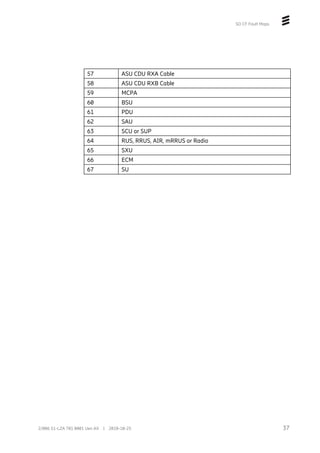
3.5 SO CF Replacement Unit Map
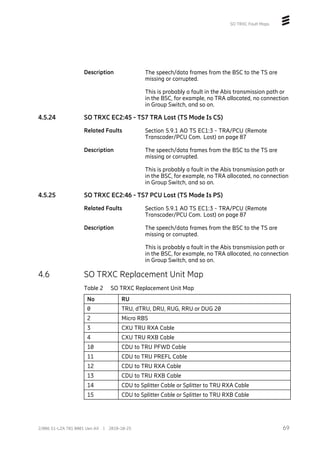
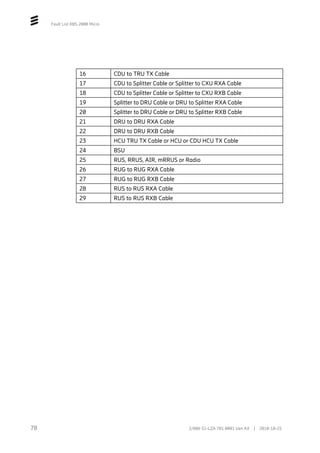
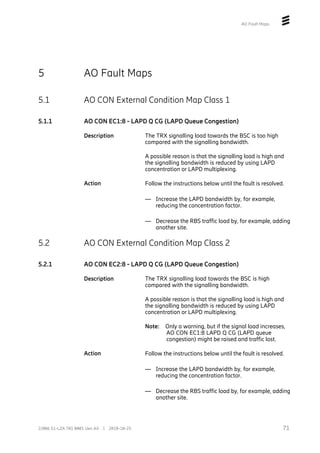
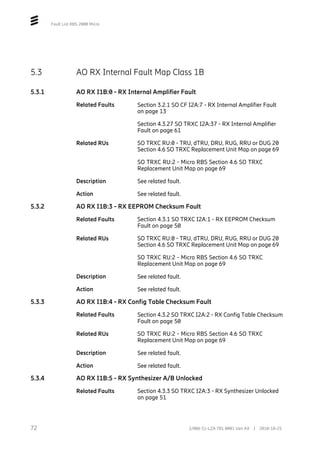
Table 1 SO CF Replacement Unit Map
No RU
0 DXU, DUG 10, DUG 20, MU or IXU
1 ECU
2 Micro RBS
3 Y Link
4 TIM
5 CDU
6 CCU
7 PSU
8 BFU
9 BDM
10 ACCU
11 Active Cooler
12 ALNA/TMA A
13 ALNA/TMA B
14 Battery
15 Fan / Fan Group
16 Heater
17 Heat Exchanger Ext Fan
18 Heat Exchanger Int Fan
19 Humidity Sensor
20 TMA-CM
35
2/006 51-LZA 701 0001 Uen AX | 2018-10-25
Fault List RBS 2000 Micro
21 Temperature Sensor
22 CDU HLOUT HLIN Cable
23 CDU RX IN Cable
24 CU
25 DU
26 FU
27 FU CU PFWD Cable
28 FU CU PREFL Cable
29 CAB HLIN Cable
30 CDU bus
31 Environment
32 Local Bus
33 EPC Bus/Power Communication Loop
34 IDB
36 Timing Bus
37 CDU CXU RXA Cable
38 CDU CXU RXB Cable
39 X bus
40 Antenna
41 PSU DC Cable
42 CXU
43 Flash Card
45 Battery Temp Sensor
46 FCU
47 TMA-CM Cable
48 GPS Receiver
49 GPS Receiver DXU Cable
50 Active Cooler Fan
51 BFU Fuse or Circuit Breaker
52 CDU CDU PFWD Cable
53 CDU CDU PREFL Cable
54 IOM Bus
55 ASU RXA Units or Cables
56 ASU RXB Units or Cables
36 2/006 51-LZA 701 0001 Uen AX | 2018-10-25
SO CF Fault Maps
57 ASU CDU RXA Cable
58 ASU CDU RXB Cable
59 MCPA
60 BSU
61 PDU
62 SAU
63 SCU or SUP
64 RUS, RRUS, AIR, mRRUS or Radio
65 SXU
66 ECM
67 SU
37
2/006 51-LZA 701 0001 Uen AX | 2018-10-25
Fault List RBS 2000 Micro
38 2/006 51-LZA 701 0001 Uen AX | 2018-10-25
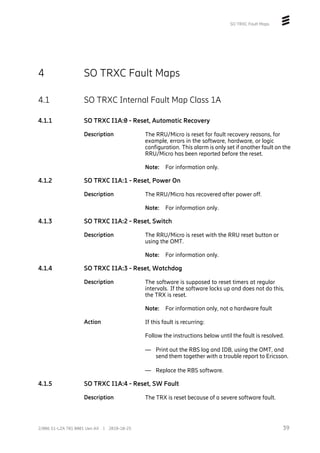
SO TRXC Fault Maps
4 SO TRXC Fault Maps
4.1 SO TRXC Internal Fault Map Class 1A
4.1.1 SO TRXC I1A:0 - Reset, Automatic Recovery
Description The RRU/Micro is reset for fault recovery reasons, for
example, errors in the software, hardware, or logic
configuration. This alarm is only set if another fault on the
RRU/Micro has been reported before the reset.
Note: For information only.
4.1.2 SO TRXC I1A:1 - Reset, Power On
Description The RRU/Micro has recovered after power off.
Note: For information only.
4.1.3 SO TRXC I1A:2 - Reset, Switch
Description The RRU/Micro is reset with the RRU reset button or
using the OMT.
Note: For information only.
4.1.4 SO TRXC I1A:3 - Reset, Watchdog
Description The software is supposed to reset timers at regular
intervals. If the software locks up and does not do this,
the TRX is reset.
Note: For information only, not a hardware fault
Action If this fault is recurring:
Follow the instructions below until the fault is resolved.
— Print out the RBS log and IDB, using the OMT, and
send them together with a trouble report to Ericsson.
— Replace the RBS software.
4.1.5 SO TRXC I1A:4 - Reset, SW Fault
Description The TRX is reset because of a severe software fault.
39
2/006 51-LZA 701 0001 Uen AX | 2018-10-25
Fault List RBS 2000 Micro
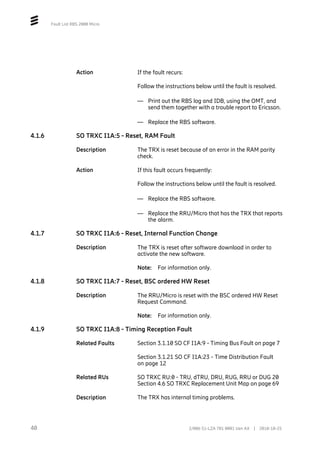
Action If the fault recurs:
Follow the instructions below until the fault is resolved.
— Print out the RBS log and IDB, using the OMT, and
send them together with a trouble report to Ericsson.
— Replace the RBS software.
4.1.6 SO TRXC I1A:5 - Reset, RAM Fault
Description The TRX is reset because of an error in the RAM parity
check.
Action If this fault occurs frequently:
Follow the instructions below until the fault is resolved.
— Replace the RBS software.
— Replace the RRU/Micro that has the TRX that reports
the alarm.
4.1.7 SO TRXC I1A:6 - Reset, Internal Function Change
Description The TRX is reset after software download in order to
activate the new software.
Note: For information only.
4.1.8 SO TRXC I1A:7 - Reset, BSC ordered HW Reset
Description The RRU/Micro is reset with the BSC ordered HW Reset
Request Command.
Note: For information only.
4.1.9 SO TRXC I1A:8 - Timing Reception Fault
Related Faults Section 3.1.10 SO CF I1A:9 - Timing Bus Fault on page 7
Section 3.1.21 SO CF I1A:23 - Time Distribution Fault
on page 12
Related RUs SO TRXC RU:0 - TRU, dTRU, DRU, RUG, RRU or DUG 20
Section 4.6 SO TRXC Replacement Unit Map on page 69
Description The TRX has internal timing problems.
40 2/006 51-LZA 701 0001 Uen AX | 2018-10-25
SO TRXC Fault Maps
Action Follow the instructions below until the fault is resolved.
— Reset the RRU/Micro that has the faulty TRX.
— Replace the RRU/Micro.
4.1.10 SO TRXC I1A:9 - Signal Processing Fault
Related RUs SO TRXC RU:0 - TRU, dTRU, DRU, RUG, RRU or DUG 20
Section 4.6 SO TRXC Replacement Unit Map on page 69
SO TRXC RU:2 - Micro RBS Section 4.6 SO TRXC
Replacement Unit Map on page 69
Description The TRX has problems with its signal processing.
Action Follow the instructions below until the fault is resolved.
— Reset the RRU/Micro that has the faulty TRX.
— Replace the RRU/Micro.
4.1.11 SO TRXC I1A:10 - RX Communication Fault
Related RUs SO TRXC RU:2 - Micro RBS Section 4.6 SO TRXC
Replacement Unit Map on page 69
Description The TRX has communication problems on its RX bus.
Action Follow the instructions below until the fault is resolved.
— Reset the Micro that has the faulty TRX.
— Replace the Micro.
4.1.12 SO TRXC I1A:11 - DSP CPU Communication Fault
Related RUs SO TRXC RU:2 - Micro RBS Section 4.6 SO TRXC
Replacement Unit Map on page 69
Description The TRX has communication problems with a DSP.
Action Follow the instructions below until the fault is resolved.
— Reset the Micro that has the faulty TRX.
— Replace the Micro.
41
2/006 51-LZA 701 0001 Uen AX | 2018-10-25
Fault List RBS 2000 Micro
4.1.13 SO TRXC I1A:12 - Terrestrial Traffic Channel Fault
Related RUs SO TRXC RU:0 - TRU, dTRU, DRU, RUG, RRU or DUG 20
Section 4.6 SO TRXC Replacement Unit Map on page 69
SO TRXC RU:2 - Micro RBS Section 4.6 SO TRXC
Replacement Unit Map on page 69
Description Internal signalling fault
Action Follow the instructions below until the fault is resolved.
— Reset the RRU/Micro that has the faulty TRX.
— Replace the RRU/Micro.
4.1.14 SO TRXC I1A:13 - RF Loop Test Fault
Related RUs SO TRXC RU:0 - TRU, dTRU, DRU, RUG, RRU or DUG 20
Section 4.6 SO TRXC Replacement Unit Map on page 69
SO TRXC RU:2 - Micro RBS Section 4.6 SO TRXC
Replacement Unit Map on page 69
Description The RF loop test is used to detect faults on the TX or RX.
Action Follow the instructions below until the fault is resolved.
— Reset the RRU/Micro that has the faulty TRX.
— Replace the RRU/Micro.
4.1.15 SO TRXC I1A:14 - RU Database Corrupted
Related RUs SO TRXC RU:0 - TRU, dTRU, DRU, RUG, RRU or DUG 20
Section 4.6 SO TRXC Replacement Unit Map on page 69
SO TRXC RU:2 - Micro RBS Section 4.6 SO TRXC
Replacement Unit Map on page 69
Description The RRU/Micro internal database is corrupted or cannot
be read by the software.
Action Follow the instructions below until the fault is resolved.
— Reset the RRU/Micro that has the faulty TRX.
— Replace the RRU/Micro.
4.1.16 SO TRXC I1A:15 - X Bus Communication Fault
Related Faults Section 3.1.8 SO CF I1A:7 - XBus Fault on page 6
42 2/006 51-LZA 701 0001 Uen AX | 2018-10-25
SO TRXC Fault Maps
Related RUs SO TRXC RU:2 - Micro RBS Section 4.6 SO TRXC
Replacement Unit Map on page 69
Description The TRX has communication problems on the X bus.
Action Follow the instructions below until the fault is resolved.
— Reset the Micro that has the faulty TRX.
— Replace the Micro.
4.1.17 SO TRXC I1A:16 - Initiation Fault
Related RUs SO TRXC RU:2 - Micro RBS Section 4.6 SO TRXC
Replacement Unit Map on page 69
Description The TRX has failed its initiation after a restart.
Action Follow the instructions below until the fault is resolved.
— Reset the Micro that has the faulty TRX.
— Replace the Micro.
4.1.18 SO TRXC I1A:17 - X Interface Fault
Related RUs SO TRXC RU:2 - Micro RBS Section 4.6 SO TRXC
Replacement Unit Map on page 69
Description The TRX has detected loss of data on the X bus.
Action Follow the instructions below until the fault is resolved.
— Reset the Micro that has the faulty TRX.
— Replace the Micro.
4.1.19 SO TRXC I1A:18 - DSP Fault
Related RUs SO TRXC RU:0 - TRU, dTRU, DRU, RUG, RRU or DUG 20
Section 4.6 SO TRXC Replacement Unit Map on page 69
SO TRXC RU:2 - Micro RBS Section 4.6 SO TRXC
Replacement Unit Map on page 69
Description One of the TRX DSPs is faulty.
Action Follow the instructions below until the fault is resolved.
— Reset the RRU/Micro that has the faulty TRX.
— Replace the RRU/Micro.
43
2/006 51-LZA 701 0001 Uen AX | 2018-10-25
Fault List RBS 2000 Micro
4.1.20 SO TRXC I1A:19 - Reset, DXU Link Lost
Related Faults Section 3.1.1 SO CF I1A:0 - Reset, Automatic Recovery
on page 5
Section 3.1.2 SO CF I1A:1 - Reset, Power On on page 5
Section 3.1.3 SO CF I1A:2 - Reset, Switch on page 5
Section 3.1.4 SO CF I1A:3 - Reset, Watchdog on page 5
Section 3.1.5 SO CF I1A:4 - Reset, SW Fault on page 5
Section 3.1.6 SO CF I1A:5 - Reset, RAM Fault on page 6
Description After several IXU/MU/Micro (master cabinets) resets
(see related faults), the TRX loses contact with the
IXU/MU/Micro (master cabinet). This provokes it to reset
and raise this alarm.
Note: For information only.
4.1.21 SO TRXC I1A:20 - HW and IDB Inconsistent
Related Faults Section 3.2.26 SO CF I2A:53 - HW and IDB Inconsistent
on page 29
Description The IDB does not match the RRU/Micro hardware, for
example, wrong frequency band.
Note: The OMT function Check IDB can be used to
identify hardware/IDB inconsistencies. Not
supported by configurations with RBS 2301,
2302, and 2401.
44 2/006 51-LZA 701 0001 Uen AX | 2018-10-25
SO TRXC Fault Maps
Action Follow the instructions below until the fault is resolved.
— Confirm that the frequency band, defined in the
IDB for each cabinet, corresponds with the installed
hardware.
— For RRU: See each MMI.
— For Micro: See ending of the Micro product number.
• GSM 900: /022, /024, /032.
• GSM 1800: /054, /056, /064.
• GSM 1900: /088, /090, /094.
— For RRU: Check that each RRU is connected to the
correct Y link port in the IXU/MU.
— Create a new IDB that applies to the RBS hardware
and install it, using the OMT.
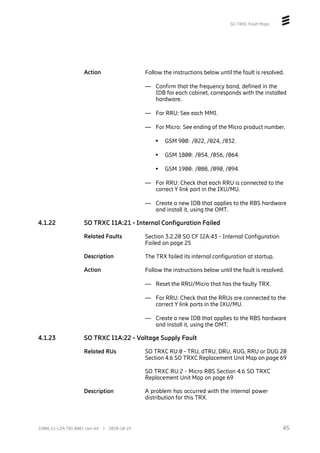
4.1.22 SO TRXC I1A:21 - Internal Configuration Failed
Related Faults Section 3.2.20 SO CF I2A:43 - Internal Configuration
Failed on page 25
Description The TRX failed its internal configuration at startup.
Action Follow the instructions below until the fault is resolved.
— Reset the RRU/Micro that has the faulty TRX.
— For RRU: Check that the RRUs are connected to the
correct Y link ports in the IXU/MU.
— Create a new IDB that applies to the RBS hardware
and install it, using the OMT.
4.1.23 SO TRXC I1A:22 - Voltage Supply Fault
Related RUs SO TRXC RU:0 - TRU, dTRU, DRU, RUG, RRU or DUG 20
Section 4.6 SO TRXC Replacement Unit Map on page 69
SO TRXC RU:2 - Micro RBS Section 4.6 SO TRXC
Replacement Unit Map on page 69
Description A problem has occurred with the internal power
distribution for this TRX.
45
2/006 51-LZA 701 0001 Uen AX | 2018-10-25
Fault List RBS 2000 Micro
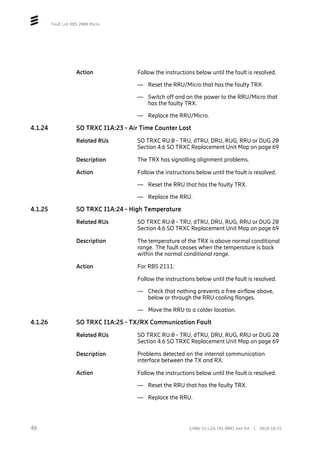
Action Follow the instructions below until the fault is resolved.
— Reset the RRU/Micro that has the faulty TRX.
— Switch off and on the power to the RRU/Micro that
has the faulty TRX.
— Replace the RRU/Micro.
4.1.24 SO TRXC I1A:23 - Air Time Counter Lost
Related RUs SO TRXC RU:0 - TRU, dTRU, DRU, RUG, RRU or DUG 20
Section 4.6 SO TRXC Replacement Unit Map on page 69
Description The TRX has signalling alignment problems.
Action Follow the instructions below until the fault is resolved.
— Reset the RRU that has the faulty TRX.
— Replace the RRU.
4.1.25 SO TRXC I1A:24 - High Temperature
Related RUs SO TRXC RU:0 - TRU, dTRU, DRU, RUG, RRU or DUG 20
Section 4.6 SO TRXC Replacement Unit Map on page 69
Description The temperature of the TRX is above normal conditional
range. The fault ceases when the temperature is back
within the normal conditional range.
Action For RBS 2111:
Follow the instructions below until the fault is resolved.
— Check that nothing prevents a free airflow above,
below or through the RRU cooling flanges.
— Move the RRU to a colder location.
4.1.26 SO TRXC I1A:25 - TX/RX Communication Fault
Related RUs SO TRXC RU:0 - TRU, dTRU, DRU, RUG, RRU or DUG 20
Section 4.6 SO TRXC Replacement Unit Map on page 69
Description Problems detected on the internal communication
interface between the TX and RX.
Action Follow the instructions below until the fault is resolved.
— Reset the RRU that has the faulty TRX.
— Replace the RRU.
46 2/006 51-LZA 701 0001 Uen AX | 2018-10-25
SO TRXC Fault Maps
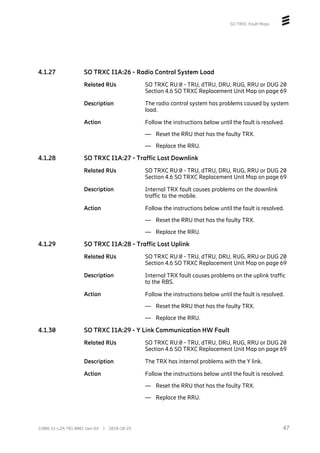
4.1.27 SO TRXC I1A:26 - Radio Control System Load
Related RUs SO TRXC RU:0 - TRU, dTRU, DRU, RUG, RRU or DUG 20
Section 4.6 SO TRXC Replacement Unit Map on page 69
Description The radio control system has problems caused by system
load.
Action Follow the instructions below until the fault is resolved.
— Reset the RRU that has the faulty TRX.
— Replace the RRU.
4.1.28 SO TRXC I1A:27 - Traffic Lost Downlink
Related RUs SO TRXC RU:0 - TRU, dTRU, DRU, RUG, RRU or DUG 20
Section 4.6 SO TRXC Replacement Unit Map on page 69
Description Internal TRX fault causes problems on the downlink
traffic to the mobile.
Action Follow the instructions below until the fault is resolved.
— Reset the RRU that has the faulty TRX.
— Replace the RRU.
4.1.29 SO TRXC I1A:28 - Traffic Lost Uplink
Related RUs SO TRXC RU:0 - TRU, dTRU, DRU, RUG, RRU or DUG 20
Section 4.6 SO TRXC Replacement Unit Map on page 69
Description Internal TRX fault causes problems on the uplink traffic
to the RBS.
Action Follow the instructions below until the fault is resolved.
— Reset the RRU that has the faulty TRX.
— Replace the RRU.
4.1.30 SO TRXC I1A:29 - Y Link Communication HW Fault
Related RUs SO TRXC RU:0 - TRU, dTRU, DRU, RUG, RRU or DUG 20
Section 4.6 SO TRXC Replacement Unit Map on page 69
Description The TRX has internal problems with the Y link.
Action Follow the instructions below until the fault is resolved.
— Reset the RRU that has the faulty TRX.
— Replace the RRU.
47
2/006 51-LZA 701 0001 Uen AX | 2018-10-25
Fault List RBS 2000 Micro
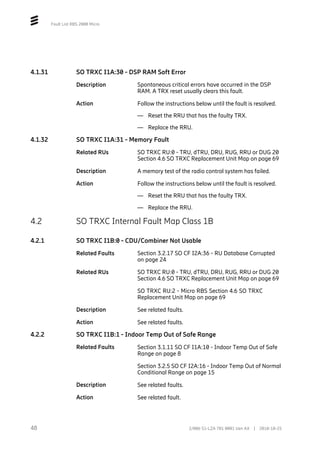
4.1.31 SO TRXC I1A:30 - DSP RAM Soft Error
Description Spontaneous critical errors have occurred in the DSP
RAM. A TRX reset usually clears this fault.
Action Follow the instructions below until the fault is resolved.
— Reset the RRU that has the faulty TRX.
— Replace the RRU.
4.1.32 SO TRXC I1A:31 - Memory Fault
Related RUs SO TRXC RU:0 - TRU, dTRU, DRU, RUG, RRU or DUG 20
Section 4.6 SO TRXC Replacement Unit Map on page 69
Description A memory test of the radio control system has failed.
Action Follow the instructions below until the fault is resolved.
— Reset the RRU that has the faulty TRX.
— Replace the RRU.
4.2 SO TRXC Internal Fault Map Class 1B
4.2.1 SO TRXC I1B:0 - CDU/Combiner Not Usable
Related Faults Section 3.2.17 SO CF I2A:36 - RU Database Corrupted
on page 24
Related RUs SO TRXC RU:0 - TRU, dTRU, DRU, RUG, RRU or DUG 20
Section 4.6 SO TRXC Replacement Unit Map on page 69
SO TRXC RU:2 - Micro RBS Section 4.6 SO TRXC
Replacement Unit Map on page 69
Description See related faults.
Action See related faults.
4.2.2 SO TRXC I1B:1 - Indoor Temp Out of Safe Range
Related Faults Section 3.1.11 SO CF I1A:10 - Indoor Temp Out of Safe
Range on page 8
Section 3.2.5 SO CF I2A:16 - Indoor Temp Out of Normal
Conditional Range on page 15
Description See related faults.
Action See related fault.
48 2/006 51-LZA 701 0001 Uen AX | 2018-10-25
SO TRXC Fault Maps
4.2.3 SO TRXC I1B:3 - DC Voltage Out of Range
Related Faults Section 3.2.3 SO CF I2A:12 - RX Maxgain/Mingain
Violated on page 14
Section 3.2.7 SO CF I2A:18 - DC Voltage Out of Range
on page 16
Section 3.2.8 SO CF I2A:22 - Battery Backup Capacity
Reduced on page 17
Description See related fault.
Action See related fault.
4.2.4 SO TRXC I1B:8 - Y Link Communication Fault
Related Faults Section 3.2.12 SO CF I2A:30 - Bus Fault on page 19
Description See related fault.
Action — For RBS2x06, follow the instructions in RBS 2x06
Troubleshooting Guidelines.
— For RBS2x16, follow the instructions in RBS 2x16
Troubleshooting Guidelines.
— For RUG, follow the instructions in RBS 6000
DUG-RUG Troubleshooting Guidelines.
See related fault.
4.2.5 SO TRXC I1B:9 - Y Link Communication Lost
Related Faults Section 3.2.12 SO CF I2A:30 - Bus Fault on page 19
Description See related fault.
Action See related fault.
4.2.6 SO TRXC I1B:10 - Timing Reception Fault
Related Faults Section 3.2.12 SO CF I2A:30 - Bus Fault on page 19
Section 3.2.27 SO CF I2A:54 - Timing Bus Fault on page
29
Description See related faults.
Action See related faults.
49
2/006 51-LZA 701 0001 Uen AX | 2018-10-25
Fault List RBS 2000 Micro
4.2.7 SO TRXC I1B:11 - X Bus Communication Fault
Related Faults Section 3.2.28 SO CF I2A:55 - XBus Fault on page 30
Description See related fault.
Action See related fault.
4.3 SO TRXC Internal Fault Map Class 2A
4.3.1 SO TRXC I2A:1 - RX EEPROM Checksum Fault
Related Faults Section 5.3.2 AO RX I1B:3 - RX EEPROM Checksum Fault
on page 72
Related RUs SO TRXC RU:0 - TRU, dTRU, DRU, RUG, RRU or DUG 20
Section 4.6 SO TRXC Replacement Unit Map on page 69
SO TRXC RU:2 - Micro RBS Section 4.6 SO TRXC
Replacement Unit Map on page 69
Description The data stored in the RX database, used by the software
for internal configuration, is corrupted.
Action Follow the instructions below until the fault is resolved.
— Reset the RRU/Micro that has the faulty TRX.
— Replace the RRU/Micro.
4.3.2 SO TRXC I2A:2 - RX Config Table Checksum Fault
Related Faults Section 5.3.3 AO RX I1B:4 - RX Config Table Checksum
Fault on page 72
Related RUs SO TRXC RU:2 - Micro RBS Section 4.6 SO TRXC
Replacement Unit Map on page 69
Description Data used for internal configuration of the RX is
erroneous.
Action Follow the instructions below until the fault is resolved.
— Reset the Micro that has the TRX that reports the
alarm.
— Replace the Micro.
50 2/006 51-LZA 701 0001 Uen AX | 2018-10-25
SO TRXC Fault Maps
4.3.3 SO TRXC I2A:3 - RX Synthesizer Unlocked
Related Faults Section 5.3.4 AO RX I1B:5 - RX Synthesizer A/B Unlocked
on page 72
Section 5.3.5 AO RX I1B:6 - RX Synthesizer C Unlocked
on page 73
Related RUs SO TRXC RU:0 - TRU, dTRU, DRU, RUG, RRU or DUG 20
Section 4.6 SO TRXC Replacement Unit Map on page 69
SO TRXC RU:2 - Micro RBS Section 4.6 SO TRXC
Replacement Unit Map on page 69
Description At least one of the radio synthesizers in the RX has failed
to lock to the required frequency.
Action Follow the instructions below until the fault is resolved.
— Reset the RRU/Micro that has the faulty TRX.
— Replace the RRU/Micro.
4.3.4 SO TRXC I2A:4 - RX Internal Voltage Fault
Related Faults Section 5.3.7 AO RX I1B:8 - RX Internal Voltage Fault
on page 73
Related RUs SO TRXC RU:0 - TRU, dTRU, DRU, RUG, RRU or DUG 20
Section 4.6 SO TRXC Replacement Unit Map on page 69
SO TRXC RU:2 - Micro RBS Section 4.6 SO TRXC
Replacement Unit Map on page 69
Description The RX internal voltage is not within the expected voltage
range.
Action Follow the instructions below until the fault is resolved.
— Reset the RRU/Micro that has the faulty TRX.
— Replace the RRU/Micro.
4.3.5 SO TRXC I2A:5 - RX Communication Fault
Related Faults Section 5.3.6 AO RX I1B:7 - RX Communication Fault
on page 73
Related RUs SO TRXC RU:2 - Micro RBS Section 4.6 SO TRXC
Replacement Unit Map on page 69
Description An internal RX communication fault has occurred.
51
2/006 51-LZA 701 0001 Uen AX | 2018-10-25
Fault List RBS 2000 Micro
Action Follow the instructions below until the fault is resolved.
— Reset the Micro that has the TRX that reports the
alarm.
— Replace the Micro.
4.3.6 SO TRXC I2A:6 - TX Communication Fault
Related Faults Section 5.11.5 AO TX I1B:10 - TX Communication Fault
on page 90
Section 5.12.1 AO TX I2A:0 - TX Diversity Fault on page
93
Related RUs SO TRXC RU:2 - Micro RBS Section 4.6 SO TRXC
Replacement Unit Map on page 69
Description An internal TX communication fault has occurred.
Action Follow the instructions below until the fault is resolved.
— Reset the Micro that has the TRX that reports the
alarm.
— Replace the Micro.
4.3.7 SO TRXC I2A:7 - TX EEPROM Checksum Fault
Related Faults Section 5.11.1 AO TX I1B:6 - TX EEPROM Checksum
Fault on page 89
Section 5.12.1 AO TX I2A:0 - TX Diversity Fault on page
93
Related RUs SO TRXC RU:0 - TRU, dTRU, DRU, RUG, RRU or DUG 20
Section 4.6 SO TRXC Replacement Unit Map on page 69
SO TRXC RU:2 - Micro RBS Section 4.6 SO TRXC
Replacement Unit Map on page 69
Description The data stored in the TX database, used by software for
internal configuration, is corrupted.
Action Follow the instructions below until the fault is resolved.
— Reset the RRU/Micro that has the faulty TRX.
— Replace the RRU/Micro.
Note: For RRU: When TX diversity is activated, two TXs
are used. The second TX might belong to a TRX
located in a different RRU.
52 2/006 51-LZA 701 0001 Uen AX | 2018-10-25
SO TRXC Fault Maps
4.3.8 SO TRXC I2A:8 - TX Config Table Checksum Fault
Related Faults Section 5.11.2 AO TX I1B:7 - TX Config Table Checksum
Fault on page 89
Section 5.12.1 AO TX I2A:0 - TX Diversity Fault on page
93
Related RUs SO TRXC RU:2 - Micro RBS Section 4.6 SO TRXC
Replacement Unit Map on page 69
Description Data used for internal configuration of the TX is erroneous.
Action Follow the instructions below until the fault is resolved.
— Reset the Micro that has the TRX that reports the
alarm.
— Replace the Micro.
4.3.9 SO TRXC I2A:9 - TX Synthesizer Unlocked
Related Faults Section 5.11.3 AO TX I1B:8 - TX Synthesizer A/B
Unlocked on page 90
Section 5.11.4 AO TX I1B:9 - TX Synthesizer C Unlocked
on page 90
Section 5.12.1 AO TX I2A:0 - TX Diversity Fault on page
93
Related RUs SO TRXC RU:0 - TRU, dTRU, DRU, RUG, RRU or DUG 20
Section 4.6 SO TRXC Replacement Unit Map on page 69
SO TRXC RU:2 - Micro RBS Section 4.6 SO TRXC
Replacement Unit Map on page 69
Description At least one of the radio synthesizers in the TX has failed
to lock to the required frequency.
Action Follow the instructions below until the fault is resolved.
— Reset the RRU/Micro that has the faulty TRX.
— Replace the RRU/Micro.
Note: For RRU: When TX diversity is activated, two TXs
are used. The second TX might belong to a TRX
located in a different RRU.
53
2/006 51-LZA 701 0001 Uen AX | 2018-10-25
Fault List RBS 2000 Micro
4.3.10 SO TRXC I2A:10 - TX Internal Voltage Fault
Related Faults Section 5.11.6 AO TX I1B:11 - TX Internal Voltage Fault
on page 90
Section 5.12.1 AO TX I2A:0 - TX Diversity Fault on page
93
Related RUs SO TRXC RU:0 - TRU, dTRU, DRU, RUG, RRU or DUG 20
Section 4.6 SO TRXC Replacement Unit Map on page 69
SO TRXC RU:2 - Micro RBS Section 4.6 SO TRXC
Replacement Unit Map on page 69
Description The TX has problems with its internal voltage regulation.
Action Follow the instructions below until the fault is resolved.
— Reset the RRU/Micro that has the faulty TRX.
— Replace the RRU/Micro.
Note: For RRU: When TX diversity is activated, two TXs
are used. The second TX might belong to a TRX
located in a different RRU.
4.3.11 SO TRXC I2A:11 - TX High Temperature
Related Faults Section 5.11.7 AO TX I1B:12 - TX High Temperature on
page 91
Section 5.12.1 AO TX I2A:0 - TX Diversity Fault on page
93
Related RUs SO TRXC RU:0 - TRU, dTRU, DRU, RUG, RRU or DUG 20
Section 4.6 SO TRXC Replacement Unit Map on page 69
SO TRXC RU:2 - Micro RBS Section 4.6 SO TRXC
Replacement Unit Map on page 69
Description This alarm indicates a high temperature in the TRX.
If raised together with SO TRXC I2A:25, see this alarm
for more description.
If the high temperature remains and function TX diversity
is activated, one of the following alarms is also raised: AO
TX I1B:12 or AO TX I2A:0.
54 2/006 51-LZA 701 0001 Uen AX | 2018-10-25
SO TRXC Fault Maps
Action If frequent:
Follow the instructions below until the fault is resolved.
— Check that nothing prevents a free airflow above,
below or through the cooling flanges of the
RRU/Micro.
— Install a fan unit to the cabinet. Not applicable for
RBS 2108/2111.
• For RRU: This also requires a new IDB with
Climate System = Fan Unit defined for this
cabinet.
— Move the RRU/Micro to a colder location.
4.3.12 SO TRXC I2A:12 - TX Output Power Limits Exceeded
Related Faults Section 5.11.8 AO TX I1B:13 - TX Output Power Limits
Exceeded on page 91
Section 5.12.1 AO TX I2A:0 - TX Diversity Fault on page
93
Related RUs SO TRXC RU:0 - TRU, dTRU, DRU, RUG, RRU or DUG 20
Section 4.6 SO TRXC Replacement Unit Map on page 69
SO TRXC RU:2 - Micro RBS Section 4.6 SO TRXC
Replacement Unit Map on page 69
Description If TX output power differs by more than 2 dB from its
expected value, this fault is raised. If it differs by more
than 4 dB from its expected value and TX diversity is
activated, one of the following faults is also raised: AO
TX I1B:13 or AO TX I2A:0.
Action Follow the instructions below until the fault is resolved.
— Reset the RRU/Micro that has the faulty TRX.
— Replace the RRU/Micro.
Note: For RRU: When TX diversity is activated, two
TXs are used. The second TX belongs to the TRX
that follows in order after the TRX that sends
the alarm and might therefore be located in a
different RRU.
55
2/006 51-LZA 701 0001 Uen AX | 2018-10-25
Fault List RBS 2000 Micro
4.3.13 SO TRXC I2A:13 - TX Saturation
Related Faults Section 5.11.9 AO TX I1B:14 - TX Saturation on page 91
Section 5.12.1 AO TX I2A:0 - TX Diversity Fault on page
93
Related RUs SO TRXC RU:0 - TRU, dTRU, DRU, RUG, RRU or DUG 20
Section 4.6 SO TRXC Replacement Unit Map on page 69
SO TRXC RU:2 - Micro RBS Section 4.6 SO TRXC
Replacement Unit Map on page 69
Description The TX power amplifier is saturated.
Action If raised together with SO TRXC I1B:3, DC Voltage Out
of Range:
— See action for SO TRXC I1B:3.
If not raised together with SO TRXC I1B:3, DC Voltage
Out of Range:
Follow the instructions below until the fault is resolved.
— Reset the RRU/Micro where the faulty TRX is located.
— Replace the RRU/Micro.
Note: For RRU: When TX diversity is activated, two TXs
are used. The second TRX belongs to the TRX
that sequentially follows the TRX sending the
alarm. The second TRX can therefore be located
in a different RRU.
4.3.14 SO TRXC I2A:14 - Voltage Supply Fault
Related RUs SO TRXC RU:0 - TRU, dTRU, DRU, RUG, RRU or DUG 20
Section 4.6 SO TRXC Replacement Unit Map on page 69
SO TRXC RU:2 - Micro RBS Section 4.6 SO TRXC
Replacement Unit Map on page 69
Description A problem has occurred with the power supply to the
power amplifier for this TRX.
Action Follow the instructions below until the fault is resolved.
— Switch off and on the power supply to the RRU/Micro
that has the TRX that reports the alarm.
— Replace the RRU/Micro.
56 2/006 51-LZA 701 0001 Uen AX | 2018-10-25
SO TRXC Fault Maps
4.3.15 SO TRXC I2A:16 - Non-volatile Memory Corrupted
Related RUs SO TRXC RU:2 - Micro RBS Section 4.6 SO TRXC
Replacement Unit Map on page 69
Description The flash memory in the Micro is corrupted.
Action Follow the instructions below until the fault is resolved.
— Switch off and on the power supply to the Micro that
has the TRX that reports the alarm.
— Replace the Micro.
4.3.16 SO TRXC I2A:17 - Loadfile Missing for TRX node
Description A software file in the RRU/Micro Flash memory is missing
or corrupted. The likely cause is either failed software
download or connection of a RRU/Micro with incomplete
software.
Action Perform an unconditional software download to the RBS
from the BSC.
Note: For an RBS equipped with a flash card, the faults
also cease after new software has been loaded
onto the flash card using the OMT. In some
cases, however, this might not be sufficient and
the fault can persist after the RBS is restarted
despite the new software. If this occurs, repeat
the procedure, installing a software version
that differs from the software version currently
installed on the RBS.
4.3.17 SO TRXC I2A:18 - DSP Fault
Related RUs SO TRXC RU:0 - TRU, dTRU, DRU, RUG, RRU or DUG 20
Section 4.6 SO TRXC Replacement Unit Map on page 69
SO TRXC RU:2 - Micro RBS Section 4.6 SO TRXC
Replacement Unit Map on page 69
Description One of the TRX DSPs is faulty.
Action Follow the instructions below until the fault is resolved.
— Reset the RRU/Micro that has the faulty TRX.
— Replace the RRU/Micro.
57
2/006 51-LZA 701 0001 Uen AX | 2018-10-25
Fault List RBS 2000 Micro
4.3.18 SO TRXC I2A:19 - High Frequency of Software Fault
Description Frequent software errors during execution of the RBS
software.
Action Follow the instructions below until the fault is resolved.
— For RUS, follow the instructions in RBS 6000
DUG-RUS Troubleshooting Guidelines.
— Print out the RBS log and IDB, using the OMT, and
send them together with a trouble report to Ericsson.
— If frequent, then replace the RBS software.
4.3.19 SO TRXC I2A:20 - RX Initiation Fault
Related Faults Section 5.3.8 AO RX I1B:10 - RX Initiation Fault on page
74
Related RUs SO TRXC RU:0 - TRU, dTRU, DRU, RUG, RRU or DUG 20
Section 4.6 SO TRXC Replacement Unit Map on page 69
SO TRXC RU:2 - Micro RBS Section 4.6 SO TRXC
Replacement Unit Map on page 69
Description The RX failed its initiation at startup.
Action Follow the instructions below until the fault is resolved.
— Reset the RRU/Micro that has the faulty TRX.
— Replace the RRU/Micro.
4.3.20 SO TRXC I2A:21 - TX Initiation Fault
Related Faults Section 5.11.10 AO TX I1B:17 - TX Initiation Fault on
page 92
Section 5.12.1 AO TX I2A:0 - TX Diversity Fault on page
93
Related RUs SO TRXC RU:0 - TRU, dTRU, DRU, RUG, RRU or DUG 20
Section 4.6 SO TRXC Replacement Unit Map on page 69
SO TRXC RU:2 - Micro RBS Section 4.6 SO TRXC
Replacement Unit Map on page 69
Description The TX failed its initiation at startup.
58 2/006 51-LZA 701 0001 Uen AX | 2018-10-25
SO TRXC Fault Maps
Action Follow the instructions below until the fault is resolved.
— Reset the RRU/Micro that has the faulty TRX.
— Replace the RRU/Micro.
Note: For RRU: When TX diversity is activated, two
TXs are used. The second TX belongs to the TRX
that follows in order after the TRX that sends
the alarm and might therefore be located in a
different RRU.
4.3.21 SO TRXC I2A:23 - Default Values Used
Description The TRX software is using default values for its internal
configuration.
Action Follow the instructions below until the fault is resolved.
— Reset the RRU/Micro that has the faulty TRX.
— Create a new IDB and install it, using the OMT.
4.3.22 SO TRXC I2A:25 - TX Max Power Restricted
Related Faults Section 5.11.11 AO TX I1B:27 - TX Max Power Restricted
on page 92
Section 5.12.1 AO TX I2A:0 - TX Diversity Fault on page
93
Description If raised together with SO TRXC I2A:11, TX high
temperature:
— This indicates a high temperature in the TRX.
The output power is reduced 2 dB to lower the
temperature. This can be repeated once to give
a total reduction of 4 dB. If the high temperature
remains, the output power is switched off and one of
the AO TX alarms is also raised.
Action Follow the instructions below until the fault is resolved.
— Check that nothing prevents a free airflow above,
below or through the cooling flanges of the
RRU/Micro.
— Install a fan unit in the cabinet. Not applicable for
RBS 2108/2111. For RRU: This also requires a new
IDB with Climate System = Fan Unit defined for this
cabinet.
— Move the RRU/Micro to a colder location.
59
2/006 51-LZA 701 0001 Uen AX | 2018-10-25
Fault List RBS 2000 Micro
4.3.23 SO TRXC I2A:26 - DB Parameter Fault
Related RUs SO TRXC RU:0 - TRU, dTRU, DRU, RUG, RRU or DUG 20
Section 4.6 SO TRXC Replacement Unit Map on page 69
SO TRXC RU:2 - Micro RBS Section 4.6 SO TRXC
Replacement Unit Map on page 69
Description One or more parameters in the TRX databases are
considered erroneous and default values are used instead.
Action Follow the instructions below until the fault is resolved.
— Reset the RRU/Micro that has the faulty TRX.
— Replace the RRU/Micro.
4.3.24 SO TRXC I2A:29 - Power Amplifier Fault
Related Faults Section 5.11.12 AO TX I1B:31 - Power Amplifier Fault
on page 92
Section 5.12.1 AO TX I2A:0 - TX Diversity Fault on page
93
Related RUs SO TRXC RU:0 - TRU, dTRU, DRU, RUG, RRU or DUG 20
Section 4.6 SO TRXC Replacement Unit Map on page 69
Description The data stored in the TX power amplifier database, used
by software for internal configuration, is corrupted.
Action Follow the instructions below until the fault is resolved.
— Reset the RRU that has the faulty TRX.
— Replace the RRU.
Note: When TX diversity is activated, two TXs are used.
The second TX belongs to the TRX that follows
in order after the TRX that sends the alarm and
might therefore be located in a different RRU.
4.3.25 SO TRXC I2A:33 - Inter TRX Communication Fault
Related RUs SO TRXC RU:0 - TRU, dTRU, DRU, RUG, RRU or DUG 20
Section 4.6 SO TRXC Replacement Unit Map on page 69
Description The communication between two TRXs in the same RRU
half has problems or is degraded.
60 2/006 51-LZA 701 0001 Uen AX | 2018-10-25
SO TRXC Fault Maps
Action Follow the instructions below until the fault is resolved.
— Reset the RRU that has the faulty TRX.
— Replace the RRU.
4.3.26 SO TRXC I2A:36 - RX Filter Loadfile Checksum Fault
Related Faults Section 5.3.9 AO RX I1B:19 - RX Filter Loadfile Checksum
Fault on page 74
Related RUs SO TRXC RU:0 - TRU, dTRU, DRU, RUG, RRU or DUG 20
Section 4.6 SO TRXC Replacement Unit Map on page 69
Description Faulty checksum of RX Filter Loadfile.
Action Follow the instructions below until the fault is resolved.
— Reset the RRU.
— Replace the RBS software.
— Replace the RRU.
4.3.27 SO TRXC I2A:37 - RX Internal Amplifier Fault
Related Faults Section 5.3.1 AO RX I1B:0 - RX Internal Amplifier Fault
on page 72
Section 5.4.1 AO RX I2A:1 - RX Path Lost on A Receiver
Side on page 75
Section 5.4.2 AO RX I2A:2 - RX Path Lost on B Receiver
Side on page 76
Related RUs SO TRXC RU:0 - TRU, dTRU, DRU, RUG, RRU or DUG 20
Section 4.6 SO TRXC Replacement Unit Map on page 69
Description At least one of the TRXs two RX amplifiers is faulty.
If both RX amplifiers are faulty or if RX diversity is not
used, fault AO RX I1B:0 is raised.
Action Follow the instructions below until the fault is resolved.
— Reset the RRU that has the faulty TRX.
— Replace the RRU.
4.3.28 SO TRXC I2A:38 - High Utilization
Description The TRX CPU utilization has been high, that is, greater
than 90 %, for 60 seconds.
61
2/006 51-LZA 701 0001 Uen AX | 2018-10-25
Fault List RBS 2000 Micro
Action No action.
4.3.29 SO TRXC I2A:39 - RF Loop Test Fault, Degraded RX
Related RUs SO TRXC RU:0 - TRU, dTRU, DRU, RUG, RRU or DUG 20
Section 4.6 SO TRXC Replacement Unit Map on page 69
SO TRXC RU:2 - Micro RBS Section 4.6 SO TRXC
Replacement Unit Map on page 69
Description The RF Loop test is used to detect problems with the TX
and RX by sending dummy bursts between them. One RX
path is detected as faulty.
Action Follow the instructions below until the fault is resolved.
— Reset the RRU/Micro that has the faulty TRX.
— Replace the RRU/Micro.
4.3.30 SO TRXC I2A:40 - Memory Fault
Related RUs SO TRXC RU:0 - TRU, dTRU, DRU, RUG, RRU or DUG 20
Section 4.6 SO TRXC Replacement Unit Map on page 69
Description A memory test of the radio control system has failed.
Action Follow the instructions below until the fault is resolved.
— Reset the RRU that has the faulty TRX.
— Replace the RRU.
4.3.31 SO TRXC I2A:41 - IR Memory Not Started
Description The feature Incremental Redundancy in Uplink is not
supported on this TRU/DRU because of IR-memory
problems.
Action Replace the RRU.
4.3.32 SO TRXC I2A:43 - Internal HC Load Power Fault
Related Faults Section 5.10.1 AO TX I1A:1 - Internal HC Load Power
Fault on page 89
Related RUs SO TRXC RU:0 - TRU, dTRU, DRU, RUG, RRU or DUG 20
Section 4.6 SO TRXC Replacement Unit Map on page 69
Description The input switch circuitry to the internal hybrid combiner
in the transceiver unit is broken.
Action Replace the RRU.
62 2/006 51-LZA 701 0001 Uen AX | 2018-10-25
SO TRXC Fault Maps
4.4 SO TRXC External Condition Map Class 1
4.4.1 SO TRXC EC1:4 - L/R SWI (TRU in Local Mode)
Description The RRU/Micro is in local mode and cannot be controlled
by the BSC.
This can happen, for example, after installing a new IDB.
Action To bring the RRU/Micro into remote mode, use the OMT
or press the Local/Remote button on the RRU/Micro.
4.4.2 SO TRXC EC1:5 - L/R TI (Local to Remote While Link Lost)
Description The RRU/Micro went into remote mode while the link was
down.
Note: For information only.
4.5 SO TRXC External Condition Map Class 2
4.5.1 SO TRXC EC2:6 - O&M Link Disturbed
Description The O&M Link is disturbed and the RRU/Micro cannot be
controlled by the BSC. This is most likely a fault in the Abis
transmission path or possibly the BSC.
Action For information only, not an RBS fault.
4.5.2 SO TRXC EC2:16 - TS0 TRA Lost (TS Mode Is IDLE)
Related Faults Section 5.9.1 AO TS EC1:3 - TRA/PCU (Remote
Transcoder/PCU Com. Lost) on page 87
Description The speech/data frames from the BSC to the TS are
missing or corrupted.
This is probably a fault in the Abis transmission path or
in the BSC, for example, no TRA allocated, no connection
in Group Switch, and so on.
4.5.3 SO TRXC EC2:17 - TS0 TRA Lost (TS Mode Is CS)
Related Faults Section 5.9.1 AO TS EC1:3 - TRA/PCU (Remote
Transcoder/PCU Com. Lost) on page 87
63
2/006 51-LZA 701 0001 Uen AX | 2018-10-25
Fault List RBS 2000 Micro
Description The speech/data frames from the BSC to the TS are
missing or corrupted.
This is probably a fault in the Abis transmission path or
in the BSC, for example, no TRA allocated, no connection
in Group Switch, and so on.
4.5.4 SO TRXC EC2:18 - TS0 PCU Lost (TS Mode Is PS)
Related Faults Section 5.9.1 AO TS EC1:3 - TRA/PCU (Remote
Transcoder/PCU Com. Lost) on page 87
Description The speech/data frames from the BSC to the TS are
missing or corrupted.
This is probably a fault in the Abis transmission path or
in the BSC, for example, no TRA allocated, no connection
in Group Switch, and so on.
4.5.5 SO TRXC EC2:20 - TS1 TRA Lost (TS Mode Is IDLE)
Related Faults Section 5.9.1 AO TS EC1:3 - TRA/PCU (Remote
Transcoder/PCU Com. Lost) on page 87
Description The speech/data frames from the BSC to the TS are
missing or corrupted.
This is probably a fault in the Abis transmission path or
in the BSC, for example, no TRA allocated, no connection
in Group Switch, and so on.
4.5.6 SO TRXC EC2:21 - TS1 TRA Lost (TS Mode Is CS)
Related Faults Section 5.9.1 AO TS EC1:3 - TRA/PCU (Remote
Transcoder/PCU Com. Lost) on page 87
Description The speech/data frames from the BSC to the TS are
missing or corrupted.
This is probably a fault in the Abis transmission path or
in the BSC, for example, no TRA allocated, no connection
in Group Switch, and so on.
4.5.7 SO TRXC EC2:22 - TS1 PCU Lost (TS Mode Is PS)
Related Faults Section 5.9.1 AO TS EC1:3 - TRA/PCU (Remote
Transcoder/PCU Com. Lost) on page 87
64 2/006 51-LZA 701 0001 Uen AX | 2018-10-25
SO TRXC Fault Maps
Description The speech/data frames from the BSC to the TS are
missing or corrupted.
This is probably a fault in the Abis transmission path or
in the BSC, for example, no TRA allocated, no connection
in Group Switch, and so on.
4.5.8 SO TRXC EC2:24 - TS2 TRA Lost (TS Mode Is IDLE)
Related Faults Section 5.9.1 AO TS EC1:3 - TRA/PCU (Remote
Transcoder/PCU Com. Lost) on page 87
Description The speech/data frames from the BSC to the TS are
missing or corrupted.
This is probably a fault in the Abis transmission path or
in the BSC, for example, no TRA allocated, no connection
in Group Switch, and so on.
4.5.9 SO TRXC EC2:25 - TS2 TRA Lost (TS Mode Is CS)
Related Faults Section 5.9.1 AO TS EC1:3 - TRA/PCU (Remote
Transcoder/PCU Com. Lost) on page 87
Description The speech/data frames from the BSC to the TS are
missing or corrupted.
This is probably a fault in the Abis transmission path or
in the BSC, for example, no TRA allocated, no connection
in Group Switch, and so on.
4.5.10 SO TRXC EC2:26 - TS2 PCU Lost (TS Mode Is PS)
Related Faults Section 5.9.1 AO TS EC1:3 - TRA/PCU (Remote
Transcoder/PCU Com. Lost) on page 87
Description The speech/data frames from the BSC to the TS are
missing or corrupted.
This is probably a fault in the Abis transmission path or
in the BSC, for example, no TRA allocated, no connection
in Group Switch, and so on.
4.5.11 SO TRXC EC2:28 - TS3 TRA Lost (TS Mode Is IDLE)
Related Faults Section 5.9.1 AO TS EC1:3 - TRA/PCU (Remote
Transcoder/PCU Com. Lost) on page 87
65
2/006 51-LZA 701 0001 Uen AX | 2018-10-25
Fault List RBS 2000 Micro
Description The speech/data frames from the BSC to the TS are
missing or corrupted.
This is probably a fault in the Abis transmission path or
in the BSC, for example, no TRA allocated, no connection
in Group Switch, and so on.
4.5.12 SO TRXC EC2:29 - TS3 TRA Lost (TS Mode Is CS)
Related Faults Section 5.9.1 AO TS EC1:3 - TRA/PCU (Remote
Transcoder/PCU Com. Lost) on page 87
Description The speech/data frames from the BSC to the TS are
missing or corrupted.
This is probably a fault in the Abis transmission path or
in the BSC, for example, no TRA allocated, no connection
in Group Switch, and so on.
4.5.13 SO TRXC EC2:30 - TS3 PCU Lost (TS Mode Is PS)
Related Faults Section 5.9.1 AO TS EC1:3 - TRA/PCU (Remote
Transcoder/PCU Com. Lost) on page 87
Description The speech/data frames from the BSC to the TS are
missing or corrupted.
This is probably a fault in the Abis transmission path or
in the BSC, for example, no TRA allocated, no connection
in Group Switch, and so on.
4.5.14 SO TRXC EC2:32 - TS4 TRA Lost (TS Mode Is IDLE)
Related Faults Section 5.9.1 AO TS EC1:3 - TRA/PCU (Remote
Transcoder/PCU Com. Lost) on page 87
Description The speech/data frames from the BSC to the TS are
missing or corrupted
This is probably a fault in the Abis transmission path or in
the BSC (for example, no TRA allocated, no connection in
Group Switch, and so on)
4.5.15 SO TRXC EC2:33 - TS4 TRA Lost (TS Mode Is CS)
Related Faults Section 5.9.1 AO TS EC1:3 - TRA/PCU (Remote
Transcoder/PCU Com. Lost) on page 87
66 2/006 51-LZA 701 0001 Uen AX | 2018-10-25
SO TRXC Fault Maps
Description The speech/data frames from the BSC to the TS are
missing or corrupted.
This is probably a fault in the Abis transmission path or
in the BSC, for example, no TRA allocated, no connection
in Group Switch, and so on.
4.5.16 SO TRXC EC2:34 - TS4 PCU Lost (TS Mode Is PS)
Related Faults Section 5.9.1 AO TS EC1:3 - TRA/PCU (Remote
Transcoder/PCU Com. Lost) on page 87
Description The speech/data frames from the BSC to the TS are
missing or corrupted.
This is probably a fault in the Abis transmission path or
in the BSC, for example, no TRA allocated, no connection
in Group Switch, and so on.
4.5.17 SO TRXC EC2:36 - TS5 TRA Lost (TS Mode Is IDLE)
Related Faults Section 5.9.1 AO TS EC1:3 - TRA/PCU (Remote
Transcoder/PCU Com. Lost) on page 87
Description The speech/data frames from the BSC to the TS are
missing or corrupted.
This is probably a fault in the Abis transmission path or
in the BSC, for example, no TRA allocated, no connection
in Group Switch, and so on.
4.5.18 SO TRXC EC2:37 - TS5 TRA Lost (TS Mode Is CS)
Related Faults Section 5.9.1 AO TS EC1:3 - TRA/PCU (Remote
Transcoder/PCU Com. Lost) on page 87
Description The speech/data frames from the BSC to the TS are
missing or corrupted.
This is probably a fault in the Abis transmission path or
in the BSC, for example, no TRA allocated, no connection
in Group Switch, and so on.
4.5.19 SO TRXC EC2:38 - TS5 PCU Lost (TS Mode Is PS)
Related Faults Section 5.9.1 AO TS EC1:3 - TRA/PCU (Remote
Transcoder/PCU Com. Lost) on page 87
67
2/006 51-LZA 701 0001 Uen AX | 2018-10-25
Fault List RBS 2000 Micro
Description The speech/data frames from the BSC to the TS are
missing or corrupted.
This is probably a fault in the Abis transmission path or
in the BSC, for example, no TRA allocated, no connection
in Group Switch, and so on
4.5.20 SO TRXC EC2:40 - TS6 TRA Lost (TS Mode Is IDLE)
Related Faults Section 5.9.1 AO TS EC1:3 - TRA/PCU (Remote
Transcoder/PCU Com. Lost) on page 87
Description The speech/data frames from the BSC to the TS are
missing or corrupted.
This is probably a fault in the Abis transmission path or
in the BSC, for example, no TRA allocated, no connection
in Group Switch, and so on.
4.5.21 SO TRXC EC2:41 - TS6 TRA Lost (TS Mode Is CS)
Related Faults Section 5.9.1 AO TS EC1:3 - TRA/PCU (Remote
Transcoder/PCU Com. Lost) on page 87
Description The speech/data frames from the BSC to the TS are
missing or corrupted.
This is probably a fault in the Abis transmission path or
in the BSC, for example, no TRA allocated, no connection
in Group Switch, and so on.
4.5.22 SO TRXC EC2:42 - TS6 PCU Lost (TS Mode Is PS)
Related Faults Section 5.9.1 AO TS EC1:3 - TRA/PCU (Remote
Transcoder/PCU Com. Lost) on page 87
Description The speech/data frames from the BSC to the TS are
missing or corrupted.
This is probably a fault in the Abis transmission path or
in the BSC, for example, no TRA allocated, no connection
in Group Switch, and so on.
4.5.23 SO TRXC EC2:44 - TS7 TRA Lost (TS Mode Is IDLE)
Related Faults Section 5.9.1 AO TS EC1:3 - TRA/PCU (Remote
Transcoder/PCU Com. Lost) on page 87
68 2/006 51-LZA 701 0001 Uen AX | 2018-10-25
SO TRXC Fault Maps
Description The speech/data frames from the BSC to the TS are
missing or corrupted.
This is probably a fault in the Abis transmission path or
in the BSC, for example, no TRA allocated, no connection
in Group Switch, and so on.
4.5.24 SO TRXC EC2:45 - TS7 TRA Lost (TS Mode Is CS)
Related Faults Section 5.9.1 AO TS EC1:3 - TRA/PCU (Remote
Transcoder/PCU Com. Lost) on page 87
Description The speech/data frames from the BSC to the TS are
missing or corrupted.
This is probably a fault in the Abis transmission path or
in the BSC, for example, no TRA allocated, no connection
in Group Switch, and so on.
4.5.25 SO TRXC EC2:46 - TS7 PCU Lost (TS Mode Is PS)
Related Faults Section 5.9.1 AO TS EC1:3 - TRA/PCU (Remote
Transcoder/PCU Com. Lost) on page 87
Description The speech/data frames from the BSC to the TS are
missing or corrupted.
This is probably a fault in the Abis transmission path or
in the BSC, for example, no TRA allocated, no connection
in Group Switch, and so on.
4.6 SO TRXC Replacement Unit Map
Table 2 SO TRXC Replacement Unit Map
No RU
0 TRU, dTRU, DRU, RUG, RRU or DUG 20
2 Micro RBS
3 CXU TRU RXA Cable
4 CXU TRU RXB Cable
10 CDU to TRU PFWD Cable
11 CDU to TRU PREFL Cable
12 CDU to TRU RXA Cable
13 CDU to TRU RXB Cable
14 CDU to Splitter Cable or Splitter to TRU RXA Cable
15 CDU to Splitter Cable or Splitter to TRU RXB Cable
69
2/006 51-LZA 701 0001 Uen AX | 2018-10-25
Fault List RBS 2000 Micro
16 CDU to TRU TX Cable
17 CDU to Splitter Cable or Splitter to CXU RXA Cable
18 CDU to Splitter Cable or Splitter to CXU RXB Cable
19 Splitter to DRU Cable or DRU to Splitter RXA Cable
20 Splitter to DRU Cable or DRU to Splitter RXB Cable
21 DRU to DRU RXA Cable
22 DRU to DRU RXB Cable
23 HCU TRU TX Cable or HCU or CDU HCU TX Cable
24 BSU
25 RUS, RRUS, AIR, mRRUS or Radio
26 RUG to RUG RXA Cable
27 RUG to RUG RXB Cable
28 RUS to RUS RXA Cable
29 RUS to RUS RXB Cable
70 2/006 51-LZA 701 0001 Uen AX | 2018-10-25
AO Fault Maps
5 AO Fault Maps
5.1 AO CON External Condition Map Class 1
5.1.1 AO CON EC1:8 - LAPD Q CG (LAPD Queue Congestion)
Description The TRX signalling load towards the BSC is too high
compared with the signalling bandwidth.
A possible reason is that the signalling load is high and
the signalling bandwidth is reduced by using LAPD
concentration or LAPD multiplexing.
Action Follow the instructions below until the fault is resolved.
— Increase the LAPD bandwidth by, for example,
reducing the concentration factor.
— Decrease the RBS traffic load by, for example, adding
another site.
5.2 AO CON External Condition Map Class 2
5.2.1 AO CON EC2:8 - LAPD Q CG (LAPD Queue Congestion)
Description The TRX signalling load towards the BSC is high
compared with the signalling bandwidth.
A possible reason is that the signalling load is high and
the signalling bandwidth is reduced by using LAPD
concentration or LAPD multiplexing.
Note: Only a warning, but if the signal load increases,
AO CON EC1:8 LAPD Q CG (LAPD queue
congestion) might be raised and traffic lost.
Action Follow the instructions below until the fault is resolved.
— Increase the LAPD bandwidth by, for example,
reducing the concentration factor.
— Decrease the RBS traffic load by, for example, adding
another site.
71
2/006 51-LZA 701 0001 Uen AX | 2018-10-25
Fault List RBS 2000 Micro
5.3 AO RX Internal Fault Map Class 1B
5.3.1 AO RX I1B:0 - RX Internal Amplifier Fault
Related Faults Section 3.2.1 SO CF I2A:7 - RX Internal Amplifier Fault
on page 13
Section 4.3.27 SO TRXC I2A:37 - RX Internal Amplifier
Fault on page 61
Related RUs SO TRXC RU:0 - TRU, dTRU, DRU, RUG, RRU or DUG 20
Section 4.6 SO TRXC Replacement Unit Map on page 69
SO TRXC RU:2 - Micro RBS Section 4.6 SO TRXC
Replacement Unit Map on page 69
Description See related fault.
Action See related fault.
5.3.2 AO RX I1B:3 - RX EEPROM Checksum Fault
Related Faults Section 4.3.1 SO TRXC I2A:1 - RX EEPROM Checksum
Fault on page 50
Related RUs SO TRXC RU:0 - TRU, dTRU, DRU, RUG, RRU or DUG 20
Section 4.6 SO TRXC Replacement Unit Map on page 69
SO TRXC RU:2 - Micro RBS Section 4.6 SO TRXC
Replacement Unit Map on page 69
Description See related fault.
Action See related fault.
5.3.3 AO RX I1B:4 - RX Config Table Checksum Fault
Related Faults Section 4.3.2 SO TRXC I2A:2 - RX Config Table Checksum
Fault on page 50
Related RUs SO TRXC RU:2 - Micro RBS Section 4.6 SO TRXC
Replacement Unit Map on page 69
Description See related fault.
Action See related fault.
5.3.4 AO RX I1B:5 - RX Synthesizer A/B Unlocked
Related Faults Section 4.3.3 SO TRXC I2A:3 - RX Synthesizer Unlocked
on page 51
72 2/006 51-LZA 701 0001 Uen AX | 2018-10-25
AO Fault Maps
Related RUs SO TRXC RU:0 - TRU, dTRU, DRU, RUG, RRU or DUG 20
Section 4.6 SO TRXC Replacement Unit Map on page 69
SO TRXC RU:2 - Micro RBS Section 4.6 SO TRXC
Replacement Unit Map on page 69
Description See related fault.
Action See related fault.
5.3.5 AO RX I1B:6 - RX Synthesizer C Unlocked
Related Faults Section 4.3.3 SO TRXC I2A:3 - RX Synthesizer Unlocked
on page 51
Related RUs SO TRXC RU:0 - TRU, dTRU, DRU, RUG, RRU or DUG 20
Section 4.6 SO TRXC Replacement Unit Map on page 69
SO TRXC RU:2 - Micro RBS Section 4.6 SO TRXC
Replacement Unit Map on page 69
Description See related fault.
Action See related fault.
5.3.6 AO RX I1B:7 - RX Communication Fault
Related Faults Section 4.3.5 SO TRXC I2A:5 - RX Communication Fault
on page 51
Related RUs SO TRXC RU:0 - TRU, dTRU, DRU, RUG, RRU or DUG 20
Section 4.6 SO TRXC Replacement Unit Map on page 69
SO TRXC RU:2 - Micro RBS Section 4.6 SO TRXC
Replacement Unit Map on page 69
Description See related fault.
Action See related fault.
5.3.7 AO RX I1B:8 - RX Internal Voltage Fault
Related Faults Section 4.3.4 SO TRXC I2A:4 - RX Internal Voltage Fault
on page 51
Related RUs SO TRXC RU:0 - TRU, dTRU, DRU, RUG, RRU or DUG 20
Section 4.6 SO TRXC Replacement Unit Map on page 69
SO TRXC RU:2 - Micro RBS Section 4.6 SO TRXC
Replacement Unit Map on page 69
Description See related fault.
73
2/006 51-LZA 701 0001 Uen AX | 2018-10-25
Fault List RBS 2000 Micro
Action See related fault.
5.3.8 AO RX I1B:10 - RX Initiation Fault
Related Faults Section 4.3.19 SO TRXC I2A:20 - RX Initiation Fault on
page 58
Related RUs SO TRXC RU:0 - TRU, dTRU, DRU, RUG, RRU or DUG 20
Section 4.6 SO TRXC Replacement Unit Map on page 69
SO TRXC RU:2 - Micro RBS Section 4.6 SO TRXC
Replacement Unit Map on page 69
Description See related fault.
Action See related fault.
5.3.9 AO RX I1B:19 - RX Filter Loadfile Checksum Fault
Related Faults Section 4.3.26 SO TRXC I2A:36 - RX Filter Loadfile
Checksum Fault on page 61
Related RUs SO TRXC RU:0 - TRU, dTRU, DRU, RUG, RRU or DUG 20
Section 4.6 SO TRXC Replacement Unit Map on page 69
Description See related fault.
Action See related fault.
5.3.10 AO RX I1B:47 - RX Auxiliary Equipment Fault
Related Faults Section 3.4.3 SO CF EC2:13 - Auxiliary Equipment Fault
on page 34
Related RUs SO CF RU:40 - Antenna Section 3.5 SO CF Replacement
Unit Map on page 35
Description See related fault.
Action See related fault.
74 2/006 51-LZA 701 0001 Uen AX | 2018-10-25
AO Fault Maps
5.4 AO RX Internal Fault Map Class 2A
5.4.1 AO RX I2A:1 - RX Path Lost on A Receiver Side
Related Faults Section 3.4.3 SO CF EC2:13 - Auxiliary Equipment Fault
on page 34
Section 3.2.1 SO CF I2A:7 - RX Internal Amplifier Fault
on page 13
Section 3.2.15 SO CF I2A:33 - RX Diversity Lost on page
22
Section 3.2.17 SO CF I2A:36 - RU Database Corrupted
on page 24
Section 4.3.27 SO TRXC I2A:37 - RX Internal Amplifier
Fault on page 61
Description The RX path on the A receiver side of the TRX is lost. This
alarm is raised if any related faults are raised on a TRX
configured for RX diversity.
If raised on a RU with 4 RF ports and 2 way receiver
diversity is enabled, this alarm can be reported on both
RF A and RF C.
Action For RBS2x06, follow the instructions in RBS 2x06
Troubleshooting Guidelines.
For RBS2x16, follow the instructions in RBS 2x16
Troubleshooting Guidelines.
For RUG, follow the instructions in RBS 6000 DUG-RUG
Troubleshooting Guidelines.
For RUS, follow the instructions in RBS 6000 DUG-RUS
Troubleshooting Guidelines.
Check for any related faults, using the OMT.
See respective related fault.
75
2/006 51-LZA 701 0001 Uen AX | 2018-10-25
Fault List RBS 2000 Micro
5.4.2 AO RX I2A:2 - RX Path Lost on B Receiver Side
Related Faults Section 3.4.3 SO CF EC2:13 - Auxiliary Equipment Fault
on page 34
Section 3.2.1 SO CF I2A:7 - RX Internal Amplifier Fault
on page 13
Section 3.2.15 SO CF I2A:33 - RX Diversity Lost on page
22
Section 3.2.17 SO CF I2A:36 - RU Database Corrupted
on page 24
Section 4.3.27 SO TRXC I2A:37 - RX Internal Amplifier
Fault on page 61
Description The RX path on the B receiver side of the TRX is lost. This
alarm is raised if any related faults are raised on a TRX
configured for RX diversity.
If raised on a RU with 4 RF ports and 2 way receiver
diversity is enabled, this alarm can be reported on both
RF B and RF D.
Action For RBS2x06, follow the instructions in RBS 2x06
Troubleshooting Guidelines.
For RBS2x16, follow the instructions in RBS 2x16
Troubleshooting Guidelines.
For RUG, follow the instructions in RBS 6000 DUG-RUG
Troubleshooting Guidelines.
For RUS, follow the instructions in RBS 6000 DUG-RUS
Troubleshooting Guidelines.
Check for any related faults, using the OMT.
See respective related faults.
5.4.3 AO RX I2A:5 - RX Path A Imbalance
Related Faults Section 3.2.29 SO CF I2A:57 - RX Path Imbalance on
page 31
Related RUs SO CF RU:40 - Antenna Section 3.5 SO CF Replacement
Unit Map on page 35
Description See related fault.
76 2/006 51-LZA 701 0001 Uen AX | 2018-10-25
AO Fault Maps
Action For RBS2x06, follow the instructions in RBS 2x06
Troubleshooting Guidelines.
For RBS2x16, follow the instructions in RBS 2x16
Troubleshooting Guidelines.
For RUG, follow the instructions in RBS 6000 DUG-RUG
Troubleshooting Guidelines.
For RUS, follow the instructions in RBS 6000 DUG-RUS
Troubleshooting Guidelines.
See related fault.
5.4.4 AO RX I2A:6 - RX Path B Imbalance
Related Faults Section 3.2.29 SO CF I2A:57 - RX Path Imbalance on
page 31
Related RUs SO CF RU:40 - Antenna Section 3.5 SO CF Replacement
Unit Map on page 35
Description See related fault.
Action For RBS2x06, follow the instructions in RBS 2x06
Troubleshooting Guidelines.
For RBS2x16, follow the instructions in RBS 2x16
Troubleshooting Guidelines.
For RUG, follow the instructions in RBS 6000 DUG-RUG
Troubleshooting Guidelines.
For RUS, follow the instructions in RBS 6000 DUG-RUS
Troubleshooting Guidelines.
See related fault.
5.4.5 AO RX I2A:7 - RX Path C Imbalance
Related Faults Section 3.2.29 SO CF I2A:57 - RX Path Imbalance on
page 31
Related RUs SO CF RU:40 - Antenna Section 3.5 SO CF Replacement
Unit Map on page 35
Description See related fault.
77
2/006 51-LZA 701 0001 Uen AX | 2018-10-25
Fault List RBS 2000 Micro
Action For RBS2x06, follow the instructions in RBS 2x06
Troubleshooting Guidelines.
For RBS2x16, follow the instructions in RBS 2x16
Troubleshooting Guidelines.
For RUG, follow the instructions in RBS 6000 DUG-RUG
Troubleshooting Guidelines.
For RUS, follow the instructions in RBS 6000 DUG-RUS
Troubleshooting Guidelines.
See related fault.
5.4.6 AO RX I2A:8 - RX Path D Imbalance
Related Faults Section 3.2.29 SO CF I2A:57 - RX Path Imbalance on
page 31
Related RUs SO CF RU:40 - Antenna Section 3.5 SO CF Replacement
Unit Map on page 35
Description See related fault.
Action For RBS2x06, follow the instructions in RBS 2x06
Troubleshooting Guidelines.
For RBS2x16, follow the instructions in RBS 2x16
Troubleshooting Guidelines.
For RUG, follow the instructions in RBS 6000 DUG-RUG
Troubleshooting Guidelines.
For RUS, follow the instructions in RBS 6000 DUG-RUS
Troubleshooting Guidelines.
See related fault.
5.5 AO TF Internal Fault Map Class 1B
5.5.1 AO TF I1B:0 - Optional Synchronization Source
Related Faults Section 3.2.16 SO CF I2A:35 - Optional Synchronization
Source on page 23
Related RUs SO CF RU:2 - Micro RBS Section 3.5 SO CF Replacement
Unit Map on page 35
Description See related fault.
Action See related fault.
78 2/006 51-LZA 701 0001 Uen AX | 2018-10-25
AO Fault Maps
5.5.2 AO TF I1B:1 - DXU-Opt EEPROM Checksum Fault
Related Faults Section 3.2.2 SO CF I2A:10 - DXU-Opt EEPROM
Checksum Fault on page 13
Related RUs SO CF RU:2 - Micro RBS Section 3.5 SO CF Replacement
Unit Map on page 35
Description See related fault.
Action See related fault.
5.5.3 AO TF I1B:2 - GPS Synch Fault
Related Faults Section 3.2.24 SO CF I2A:48 - GPS Synch Fault on page
27
Related RUs SO CF RU:48 - GPS Receiver Section 3.5 SO CF
Replacement Unit Map on page 35
SO CF RU:49 - GPS Receiver DXU Cable Section 3.5 SO
CF Replacement Unit Map on page 35
Description See related fault.
Action See related fault.
5.6 AO TF Internal Fault Map Class 2A
5.6.1 AO TF I2A:0 - Frame Start Offset Fault
Description Frame synchronization cannot be maintained for the RBS.
If no related faults are present, the frame synchronization
will probably recover after a few hours.
Action Follow the instructions below until the fault is resolved.
— Block/deblock the TF.
— Check that the GPS antenna is positioned so that
it can receive signals from a sufficient number of
satellites all the time.
— Check the connection between the IXU and the GPS
receiver.
— Check the GPS receiver and its receiver chain, that is,
antenna, cables, and so on.
79
2/006 51-LZA 701 0001 Uen AX | 2018-10-25
Fault List RBS 2000 Micro
5.7 AO TF External Condition Map Class 1
5.7.1 AO TF EC1:0 - EXT SYNCH (No Usable External Reference)
Description There are two options:
— The RBS has tried to synchronize with the GPS
reference for 5 minutes but failed and no PCM is
defined as backup synchronization source.
— TF has been in holdover mode because of failing
GPS reference and the GPS reference did not recover
before the holdover timeout.
Action Follow the instructions below until the fault is resolved.
— Use PCM as backup synchronization source. This
is done by defining the TF parameter SYNCSRC =
DEFAULT in the BSC.
— Check the GPS antenna.
— Check the connection between the GPS receiver and
the GPS antenna.
— Check that the GPS antenna is placed so that it can
receive signals from a sufficient number of satellites
all the time. If this is not possible, move the GPS
antenna.
80 2/006 51-LZA 701 0001 Uen AX | 2018-10-25
AO Fault Maps
5.7.2 AO TF EC1:1 - PCM SYNCH (No Usable PCM Reference)
Description The synchronization reference from the PCM network is
faulty (for example, too much jitter/wander) or missing.
More information can be found in Transmission System
Supervision in the CPI for the relevant RBS.
The alarm is raised if the following applies:
— TF has been trying to synchronize with the PCM
reference for more than 5 minutes after initial startup.
— TF has detected that the PCM reference has drifted
more than 80 ppb during the last 48h.
— If a second PCM reference is not available and the TF
did not recover before the holdover period expired
(that is, the AO TF EC2:1 alarm was active for too
long.)
— The holdover period depends on how long it takes for
the variance of the TF estimated frequency to exceed
a variance limit for a class 1 alarm. The limit is set to
ensure that the frequency at the antenna does not
exceed the 50 ppb accuracy limit.
— Explanation:When the reference quality of the PCM
is outside specification of G.823 and G.824, the BTS
goes into holdover and the TF starts to estimate
its own frequency quality. The trigger to go into
holdover and start the estimation is when short-term
wander on the PCM reference is more than 6 ppm for
25 seconds. The estimation process, using a Kalman
filter, causes the variance of the estimated frequency
to increase with time.
— The alarm is raised after about 24 h when the
temperature varies within +-10°C if the following
conditions are fulfilled:
— RBS with DUG or DXU excluding DXU-01, DXU-03,
DXU-11
— More than 72 hours of operation locked to PCM, with
temperature supervision.
— PCM reference traceable to G.812 Type II/Stratum 2
— The alarm is raised after about 60 minutes if the
above conditions are not fulfilled.
Note: Only when TF mode is master or stand-alone.
81
2/006 51-LZA 701 0001 Uen AX | 2018-10-25
Fault List RBS 2000 Micro
Action Follow the instructions below until the fault is resolved.
— Check the PCM quality with the BSC printout
command DTQUP: DIP.
— Check that the transmission parameters are correctly
set in the IDB, for example, transmission interface
(E1 or T1), CRC-4, spare bits, synchronization source,
receiver sensitivity, LBO, or STN Equipment.
— For IXU: Check the position of the TIM/IXU
impedance switches, 100/120 Ohm or 75 Ohm, for
each transmission port.
— For RBS 2302: Check that the internal transmission
cable in the mounting base of the master cabinet,
between connectors X5 and X8, is correctly mounted.
Do this by confirming that the connector connected to
X5 has the correct transmission impedance, 100/120
Ohm or 75 Ohm, written next to it. If not, then swap
the direction of the cable.
— For RBS 2401: Check the position of its impedance
switches, 100/120 Ohm or 75 Ohm, for each
transmission port.
— Check that the transmission equipment at the other
end is working correctly and all cables are connected
correctly.
— Check the transmission cable and replace it if
necessary.
— If the RBS is equipped with IXU-21, a GPS receiver
can be installed and used as an alternative
synchronization source.
— Reset the IXU/MU/Micro (master cabinet).
82 2/006 51-LZA 701 0001 Uen AX | 2018-10-25
AO Fault Maps
5.7.3 AO TF EC1:6 - EXT CFG (Multiple Timing Masters)
Description Multiple RBSs are configured as timing masters. Only one
RBS is allowed to be a timing master in a TG cluster, that
is, a set of RBSs connected to the same ESB. This fault is
reported by the RBS that is unable to be a timing master
and therefore disabled.
This fault is probably caused by the following:
— The BSC is unable to reconfigure an RBS as timing
slave because of a link break. The RBS with a link
break is reporting this fault.
— Multiple logical TG clusters are defined for a single
physical cluster connected to the same ESB. The
RBSs that are not allowed to be timing master report
this fault.
— The RBS is unable to become a timing master because
of an ESB cable fault.
Action Follow the instructions below until the fault is resolved.
— Check that the CF link between the BSC and RBS is
established. If it is not established, then check the
PCM line, transmission equipment, and so on.
— Check the configuration of the TG cluster. Identity for
the TGs with the BSC printout RXMOP.
— Check the ESB cables.
83
2/006 51-LZA 701 0001 Uen AX | 2018-10-25
Fault List RBS 2000 Micro
5.7.4 AO TF EC1:7 - EXT MEAS (ESB Measurement Failure)
Description The RBS is configured to be a timing slave with intracell
holdover mode and the measurement of the ESB
distribution delay between the timing master and this
timing slave has failed.
If the fault occurs while TF is trying to synchronize, the
fault is reported after 5 minutes.
If the fault occurs while TF is synchronized and measuring
the ESB delay because of recalculation of the TF
compensation value, TF goes into holdover mode. If
the measurements do not succeed within the 2-minute
holdover timeout period, the alarm is raised and TF is
disabled.
The likely causes are as follows:
— The ESB cable is faulty or disconnected.
— A terminator on the ESB is faulty or missing.
Note: Only when TF mode is master or stand-alone.
Action Check ESB cable and connections.
5.8 AO TF External Condition Map Class 2
5.8.1 AO TF EC2:0 - EXT SYNCH (No Usable External Reference)
Description The GPS reference, used as synchronization source, is
unusable and TF is in holdover mode. If the GPS reference
does not recover before holdover timeout, class 1 fault
AO TF EC1:0 is raised.
Action Follow the instructions below until the fault is resolved.
— Check that PCM is defined as backup synchronization
source, that is, that the TF parameter SYNCSRC =
DEFAULT in the BSC.
— Check the GPS antenna.
— Check the connection between the GPS receiver and
the GPS antenna.
— Check that the GPS antenna is placed so that it can
receive signals from a sufficient number of satellites
all the time, if not move the GPS antenna.
84 2/006 51-LZA 701 0001 Uen AX | 2018-10-25
AO Fault Maps
5.8.2 AO TF EC2:1 - PCM SYNCH (No Usable PCM Reference)
Description The synchronization reference from the PCM network is
faulty (for example, too much jitter/wander) or missing.
When a second PCM reference is not available, an AO TF
EC1:1 class 1 alarm is raised if the PCM reference does
not recover before the holdover period expires.
The class 2 alarm is raised if the following applies:
The variance of the TF estimated frequency exceeds a
variance limit for a class 2 alarm.
— Explanation:When the reference quality of the PCM
is outside specification of G.823 and G.824, the BTS
goes into holdover and the TF starts to estimate
its own frequency quality. The trigger to go into
holdover and start the estimation is when short-term
wander on the PCM reference is more than 6 ppm for
25 seconds. The estimation process, using a Kalman
filter, causes the variance of the estimated frequency
to increase with time.
— The alarm is raised after about 2 hours when
temperature varies within +-10°C if the following
conditions are fulfilled:
— RBS with DUG or DXU excluding DXU-01, DXU-03,
DXU-11
— More than 72 hours of operation locked to PCM, with
temperature supervision.
— PCM reference traceable to G.812 Type II/Stratum 2
— The alarm is raised after about 5 minutes if the above
conditions are not fulfilled.
85
2/006 51-LZA 701 0001 Uen AX | 2018-10-25
Fault List RBS 2000 Micro
Action Follow the instructions below until the fault is resolved.
— Check the PCM quality with the BSC printout
command DTQUP: DIP.
— Check that the transmission parameters are correctly
set in the IDB, for example, transmission interface
(E1 or T1), CRC-4, spare bits, synchronization source,
receiver sensitivity, LBO, or STN Equipment.
— For IXU: Check the position of the TIM/IXU
impedance switches, 100/120 Ohm or 75 Ohm, for
each transmission port.
— For RBS 2302: Check that the internal transmission
cable in the mounting base of the master cabinet,
between connectors X5 and X8, is correctly mounted.
Do this by confirming that the connector connected to
X5 has the correct transmission impedance, 100/120
Ohm or 75 Ohm, written next to it. If not, then swap
the direction of the cable.
— For RBS 2401: Check the position of its impedance
switches, 100/120 Ohm or 75 Ohm, for each
transmission port.
— Check that the transmission equipment at the other
end is working correctly and all cables are connected
correctly.
— Check the transmission cable and replace it if
necessary.
— If the RBS is equipped with an IXU-21, a GPS receiver
can be installed as an alternative synchronization
source.
— Reset the IXU/MU/Micro (master cabinet).
86 2/006 51-LZA 701 0001 Uen AX | 2018-10-25
AO Fault Maps
5.8.3 AO TF EC2:7 - EXT MEAS (ESB Measurement Failure)
Description The RBS is configured to be a timing slave with intercell
holdover mode and the measurement of the ESB
distribution delay between the timing master and this
timing slave has failed.
If the fault occurs while TF is trying to synchronize, the
fault is reported after 5 minutes.
If the fault occurs while TF is synchronized and measuring
the ESB delay caused by recalculation of the TF
compensation value and the measurement does not
succeed, the alarm is raised and TF is not disabled. No
class 1 fault is reported when holdover mode is set to
intercell.
The likely causes are as follows:
— The ESB cable is faulty or disconnected.
— A terminator on the ESB is faulty or missing.
Action Check ESB cable and connections.
5.9 AO TS External Condition Map Class 1
5.9.1 AO TS EC1:3 - TRA/PCU (Remote Transcoder/PCU Com. Lost)
Related Faults Section 4.5.2 SO TRXC EC2:16 - TS0 TRA Lost (TS Mode
Is IDLE) on page 63
Section 4.5.3 SO TRXC EC2:17 - TS0 TRA Lost (TS Mode
Is CS) on page 63
Section 4.5.4 SO TRXC EC2:18 - TS0 PCU Lost (TS Mode
Is PS) on page 64
Section 4.5.5 SO TRXC EC2:20 - TS1 TRA Lost (TS Mode
Is IDLE) on page 64
Section 4.5.6 SO TRXC EC2:21 - TS1 TRA Lost (TS Mode
Is CS) on page 64
Section 4.5.7 SO TRXC EC2:22 - TS1 PCU Lost (TS Mode
Is PS) on page 64
Section 4.5.8 SO TRXC EC2:24 - TS2 TRA Lost (TS Mode
Is IDLE) on page 65
87
2/006 51-LZA 701 0001 Uen AX | 2018-10-25
Fault List RBS 2000 Micro
Section 4.5.9 SO TRXC EC2:25 - TS2 TRA Lost (TS Mode
Is CS) on page 65
Section 4.5.10 SO TRXC EC2:26 - TS2 PCU Lost (TS Mode
Is PS) on page 65
Section 4.5.11 SO TRXC EC2:28 - TS3 TRA Lost (TS Mode
Is IDLE) on page 65
Section 4.5.12 SO TRXC EC2:29 - TS3 TRA Lost (TS Mode
Is CS) on page 66
Section 4.5.13 SO TRXC EC2:30 - TS3 PCU Lost (TS Mode
Is PS) on page 66
Section 4.5.14 SO TRXC EC2:32 - TS4 TRA Lost (TS Mode
Is IDLE) on page 66
Section 4.5.15 SO TRXC EC2:33 - TS4 TRA Lost (TS Mode
Is CS) on page 66
Section 4.5.16 SO TRXC EC2:34 - TS4 PCU Lost (TS Mode
Is PS) on page 67
Section 4.5.17 SO TRXC EC2:36 - TS5 TRA Lost (TS Mode
Is IDLE) on page 67
Section 4.5.18 SO TRXC EC2:37 - TS5 TRA Lost (TS Mode
Is CS) on page 67
Section 4.5.19 SO TRXC EC2:38 - TS5 PCU Lost (TS Mode
Is PS) on page 67
Section 4.5.20 SO TRXC EC2:40 - TS6 TRA Lost (TS Mode
Is IDLE) on page 68
Section 4.5.21 SO TRXC EC2:41 - TS6 TRA Lost (TS Mode
Is CS) on page 68
Section 4.5.22 SO TRXC EC2:42 - TS6 PCU Lost (TS Mode
Is PS) on page 68
Section 4.5.23 SO TRXC EC2:44 - TS7 TRA Lost (TS Mode
Is IDLE) on page 68
Section 4.5.24 SO TRXC EC2:45 - TS7 TRA Lost (TS Mode
Is CS) on page 69
Section 4.5.25 SO TRXC EC2:46 - TS7 PCU Lost (TS Mode
Is PS) on page 69
88 2/006 51-LZA 701 0001 Uen AX | 2018-10-25
AO Fault Maps
Description The speech/data frames coming from the BSC to the TS
are missing or corrupted.
This is most likely a fault in the BSC (for example, no TRA
allocated, no connection in Group-Switch, and so on) or in
the Abis transmission path.
5.10 AO TX Internal Fault Map Class 1A
5.10.1 AO TX I1A:1 - Internal HC Load Power Fault
Related Faults Section 4.3.32 SO TRXC I2A:43 - Internal HC Load Power
Fault on page 62
Description See related fault.
Action — For RBS2x16, follow the instructions in RBS 2x16
Troubleshooting Guidelines.
See related fault.
5.11 AO TX Internal Fault Map Class 1B
5.11.1 AO TX I1B:6 - TX EEPROM Checksum Fault
Related Faults Section 4.3.7 SO TRXC I2A:7 - TX EEPROM Checksum
Fault on page 52
Related RUs SO TRXC RU:0 - TRU, dTRU, DRU, RUG, RRU or DUG 20
Section 4.6 SO TRXC Replacement Unit Map on page 69
SO TRXC RU:2 - Micro RBS Section 4.6 SO TRXC
Replacement Unit Map on page 69
Description See related fault.
Action See related fault.
5.11.2 AO TX I1B:7 - TX Config Table Checksum Fault
Related Faults Section 4.3.8 SO TRXC I2A:8 - TX Config Table Checksum
Fault on page 53
Description See related fault.
Action See related fault.
89
2/006 51-LZA 701 0001 Uen AX | 2018-10-25
Fault List RBS 2000 Micro
5.11.3 AO TX I1B:8 - TX Synthesizer A/B Unlocked
Related Faults Section 4.3.9 SO TRXC I2A:9 - TX Synthesizer Unlocked
on page 53
Related RUs SO TRXC RU:0 - TRU, dTRU, DRU, RUG, RRU or DUG 20
Section 4.6 SO TRXC Replacement Unit Map on page 69
SO TRXC RU:2 - Micro RBS Section 4.6 SO TRXC
Replacement Unit Map on page 69
Description See related fault.
Action See related fault.
5.11.4 AO TX I1B:9 - TX Synthesizer C Unlocked
Related Faults Section 4.3.9 SO TRXC I2A:9 - TX Synthesizer Unlocked
on page 53
Related RUs SO TRXC RU:0 - TRU, dTRU, DRU, RUG, RRU or DUG 20
Section 4.6 SO TRXC Replacement Unit Map on page 69
SO TRXC RU:2 - Micro RBS Section 4.6 SO TRXC
Replacement Unit Map on page 69
Description See related fault.
Action See related fault.
5.11.5 AO TX I1B:10 - TX Communication Fault
Related Faults Section 4.3.6 SO TRXC I2A:6 - TX Communication Fault
on page 52
Related RUs SO TRXC RU:2 - Micro RBS Section 4.6 SO TRXC
Replacement Unit Map on page 69
Description See related fault.
Action See related fault.
5.11.6 AO TX I1B:11 - TX Internal Voltage Fault
Related Faults Section 4.3.10 SO TRXC I2A:10 - TX Internal Voltage
Fault on page 54
Related RUs SO TRXC RU:0 - TRU, dTRU, DRU, RUG, RRU or DUG 20
Section 4.6 SO TRXC Replacement Unit Map on page 69
SO TRXC RU:2 - Micro RBS Section 4.6 SO TRXC
Replacement Unit Map on page 69
90 2/006 51-LZA 701 0001 Uen AX | 2018-10-25
AO Fault Maps
Description See related fault.
Action See related fault.
5.11.7 AO TX I1B:12 - TX High Temperature
Related Faults Section 4.3.11 SO TRXC I2A:11 - TX High Temperature
on page 54
Related RUs SO TRXC RU:0 - TRU, dTRU, DRU, RUG, RRU or DUG 20
Section 4.6 SO TRXC Replacement Unit Map on page 69
SO TRXC RU:2 - Micro RBS Section 4.6 SO TRXC
Replacement Unit Map on page 69
Description See related fault.
Action — For RBS2x06, follow the instructions in RBS 2x06
Troubleshooting Guidelines.
— For RBS2x16, follow the instructions in RBS 2x16
Troubleshooting Guidelines.
— For RUS, follow the instructions in RBS 6000
DUG-RUS Troubleshooting Guidelines.
See related fault.
5.11.8 AO TX I1B:13 - TX Output Power Limits Exceeded
Related Faults Section 4.3.12 SO TRXC I2A:12 - TX Output Power Limits
Exceeded on page 55
Related RUs SO TRXC RU:0 - TRU, dTRU, DRU, RUG, RRU or DUG 20
Section 4.6 SO TRXC Replacement Unit Map on page 69
SO TRXC RU:2 - Micro RBS Section 4.6 SO TRXC
Replacement Unit Map on page 69
Description See related fault.
Action — For RUG, follow the instructions in RBS 6000
DUG-RUG Troubleshooting Guidelines.
See related fault.
5.11.9 AO TX I1B:14 - TX Saturation
Related Faults Section 4.3.13 SO TRXC I2A:13 - TX Saturation on page
56
91
2/006 51-LZA 701 0001 Uen AX | 2018-10-25
Fault List RBS 2000 Micro
Related RUs SO TRXC RU:0 - TRU, dTRU, DRU, RUG, RRU or DUG 20
Section 4.6 SO TRXC Replacement Unit Map on page 69
SO TRXC RU:2 - Micro RBS Section 4.6 SO TRXC
Replacement Unit Map on page 69
Description See related fault.
Action See related fault.
5.11.10 AO TX I1B:17 - TX Initiation Fault
Related Faults Section 4.3.20 SO TRXC I2A:21 - TX Initiation Fault on
page 58
Related RUs SO TRXC RU:0 - TRU, dTRU, DRU, RUG, RRU or DUG 20
Section 4.6 SO TRXC Replacement Unit Map on page 69
SO TRXC RU:2 - Micro RBS Section 4.6 SO TRXC
Replacement Unit Map on page 69
Description See related fault.
Action See related fault.
5.11.11 AO TX I1B:27 - TX Max Power Restricted
Related Faults Section 4.3.22 SO TRXC I2A:25 - TX Max Power
Restricted on page 59
Description See related fault.
Action See related fault.
5.11.12 AO TX I1B:31 - Power Amplifier Fault
Related Faults Section 4.3.24 SO TRXC I2A:29 - Power Amplifier Fault
on page 60
Related RUs SO TRXC RU:0 - TRU, dTRU, DRU, RUG, RRU or DUG 20
Section 4.6 SO TRXC Replacement Unit Map on page 69
Description See related fault.
Action See related fault.
5.11.13 AO TX I1B:35 - RX Path Imbalance
Related Faults Section 3.2.29 SO CF I2A:57 - RX Path Imbalance on
page 31
Related RUs SO CF RU:40 - Antenna Section 3.5 SO CF Replacement
Unit Map on page 35
92 2/006 51-LZA 701 0001 Uen AX | 2018-10-25
AO Fault Maps
Description See related fault
Action — For RBS2x06, follow the instructions in RBS 2x06
Troubleshooting Guidelines.
— For RBS2x16, follow the instructions in RBS 2x16
Troubleshooting Guidelines.
— For RUG, follow the instructions in RBS 6000
DUG-RUG Troubleshooting Guidelines.
— For RUS, follow the instructions in RBS 6000
DUG-RUS Troubleshooting Guidelines
See related fault
5.11.14 AO TX I1B:47 - TX Auxiliary Equipment Fault
Related Faults Section 3.4.3 SO CF EC2:13 - Auxiliary Equipment Fault
on page 34
Related RUs SO CF RU:40 - Antenna Section 3.5 SO CF Replacement
Unit Map on page 35
Description See related fault.
Action See related fault.
5.12 AO TX Internal Fault Map Class 2A
5.12.1 AO TX I2A:0 - TX Diversity Fault
Description The TX diversity function (TCC or software power boost)
is lost. This alarm is raised if:
— The TRX with the slave TX is in local mode or is not
available.
— Any of the related faults are active on one of the two
TXs used together in a TX diversity configuration.
Action Follow the instructions below until the fault is resolved.
— See description of active related alarm, if present.
— Reset the two TRXs used in the TX diversity pair.
— Deactivate TX diversity on the TRX that reports the
alarm and solve any alarms present before activating
TX diversity again.
93
2/006 51-LZA 701 0001 Uen AX | 2018-10-25
Fault List RBS 2000 Micro
5.12.2 AO TX I2A:1 - Fast Antenna Hopping Failure
Description The transmitter is not included in the antenna hopping
set because of either the configuration received from the
BSC or site constraints.
Only configurations with RRUs support fast antenna
hopping. That means that configurations including RBS
2301, 2302, or 2401 do not support fast antenna hopping.
To enable fast antenna hopping, at least one antenna
system needs to include two enabled TXs.
If baseband hopping is activated, fast antenna hopping is
suspended for all active TXs.
Action Follow the instructions below until the fault is resolved.
— Check the BSC configuration of the TG.
— Read the IDB and use the Radio view in the OMT
to check how the IDB is defined regarding the
connections.
— If possible, harmonize capabilities of the transmitters
in a cell so they can be included in the antenna
hopping set.
— If not feasible, then disable the FFTAD function for
the current TG.
94 2/006 51-LZA 701 0001 Uen AX | 2018-10-25

Fault List RBS 2000Fault List RBS 6000 .pdf

  • 1.
    Fault List RBS2000 Micro 2/006 51-LZA 701 0001 Uen AX
  • 2.
    Copyright © Ericsson AB2018. All rights reserved. No part of this document may be reproduced in any form without the written permission of the copyright owner. Disclaimer The contents of this document are subject to revision without notice due to continued progress in methodology, design and manufacturing. Ericsson shall have no liability for any error or damage of any kind resulting from the use of this document. 2/006 51-LZA 701 0001 Uen AX | 2018-10-25
  • 3.
    Contents Contents 1 Introduction 1 1.1Revision Information 1 2 Terminology 3 2.1 Fault Numbers 3 2.2 Fault Maps 3 2.3 Logical RU 4 2.4 Fault Map Overview 4 3 SO CF Fault Maps 5 3.1 SO CF Internal Fault Map Class 1A 5 3.2 SO CF Internal Fault Map Class 2A 13 3.3 SO CF External Condition Map Class 1 32 3.4 SO CF External Condition Map Class 2 33 3.5 SO CF Replacement Unit Map 35 4 SO TRXC Fault Maps 39 4.1 SO TRXC Internal Fault Map Class 1A 39 4.2 SO TRXC Internal Fault Map Class 1B 48 4.3 SO TRXC Internal Fault Map Class 2A 50 4.4 SO TRXC External Condition Map Class 1 63 4.5 SO TRXC External Condition Map Class 2 63 4.6 SO TRXC Replacement Unit Map 69 5 AO Fault Maps 71 5.1 AO CON External Condition Map Class 1 71 5.2 AO CON External Condition Map Class 2 71 5.3 AO RX Internal Fault Map Class 1B 72 5.4 AO RX Internal Fault Map Class 2A 75 5.5 AO TF Internal Fault Map Class 1B 78 5.6 AO TF Internal Fault Map Class 2A 79 5.7 AO TF External Condition Map Class 1 80 5.8 AO TF External Condition Map Class 2 84 5.9 AO TS External Condition Map Class 1 87 5.10 AO TX Internal Fault Map Class 1A 89 2/006 51-LZA 701 0001 Uen AX | 2018-10-25
  • 4.
    Fault List RBS2000 Micro 5.11 AO TX Internal Fault Map Class 1B 89 5.12 AO TX Internal Fault Map Class 2A 93 2/006 51-LZA 701 0001 Uen AX | 2018-10-25
  • 5.
    Introduction 1 Introduction This documentdescribes all faults reported from all Micro RBSs, RBS 2109, and RBS 2111 to the BSC and hardware units suspected of causing the fault. Note: The fault must be verified before returning the faulty unit to the Ericsson repair centre. Unused fault numbers are not indicated in the fault lists. 1.1 Revision Information Other than editorial changes, this document has been revised as follows: 1 2/006 51-LZA 701 0001 Uen AX | 2018-10-25
  • 6.
    Fault List RBS2000 Micro 2 2/006 51-LZA 701 0001 Uen AX | 2018-10-25
  • 7.
    Terminology 2 Terminology The followingterminology is used throughout this document. 2.1 Fault Numbers The fault number is identical to the bit position in the fault map reported over the Abis interface. 2.2 Fault Maps Internal Fault Map Class 1A (I1A) Faults reported in this class are faults that affect the MO function. Faulty hardware is part of the signalling MO. Internal Fault Map Class 1B (I1B) Faults reported in this class are faults that affect the MO function. The origin of the fault is external to the signalling MO. Internal Fault Map Class 2A (I2A) Faults reported in this class are faults that do not affect the MO function. Faulty hardware is part of the signalling MO. External Condition Map Class 1 (EC1) Conditions reported in this class are conditions that affect the MO function. The conditions are TG external. External Condition Map Class 2 (EC2) Conditions reported in this class are conditions that do not affect the MO function. The conditions are TG external. Replacement Unit Map (RU Map) Units reported in this map are hardware units suspected of causing the faults in the internal fault maps described above. 3 2/006 51-LZA 701 0001 Uen AX | 2018-10-25
  • 8.
    Fault List RBS2000 Micro 2.3 Logical RU A logical RU is defined as a unit that can be referred to but is not a single physical unit. There are four kinds of logical RUs. Logical RUs are pointed out when the analysis fails to give a more detailed localization of the fault. Logical RUs are intended to assist the fault localization process. — Buses. These are often referred to as a single physical unit but are implemented in the backplane of the cabinet or with cables. A bus pointed out in the RU map indicates that the faulty hardware can be any unit connected to the bus or the bus itself. Logical bus RUs are: • Local bus • Timing bus • X bus • Y link — Antenna. A logical antenna means the whole signal path between the Transmitter/Receiver and the physical antenna. — Environment. This RU records conditions that cannot be affected by the base station. For example, if the temperature in the cabinet is too high or the incoming AC power is out of range, the logical RU Environment is denoted as faulty. Two groups exist under this RU: • Power, that handles external power • Climate, that handles internal temperature — IDB. The RBS installation database is regarded as a replaceable unit even though it is not a physical unit. It comprises the data in the database only, not the medium in which it resides. 2.4 Fault Map Overview Fault codes on the Abis interface are defined per MO. The SO RU map and the I1A/I2A fault maps must be read together. The SO fault map identifies the fault and the RU map denotes where the fault is located. An AO I1B fault has a corresponding SO I2A fault. So by reading the I2A fault map and the RU map for SO CF or SO TRXC, the hardware that is causing the AO I1B fault can be found. This is the case when BTS internal hardware affects a single AO. The AO is not allowed to report the hardware itself as this task is assigned to the SO responsible for hardware. This means that the consequence is reported by the AO I1B fault map and the cause is reported by the SO I1A/I2A fault maps and the RU map. 4 2/006 51-LZA 701 0001 Uen AX | 2018-10-25
  • 9.
    SO CF FaultMaps 3 SO CF Fault Maps 3.1 SO CF Internal Fault Map Class 1A 3.1.1 SO CF I1A:0 - Reset, Automatic Recovery Description An IXU/Micro /MU reset is triggered by the loss of BSC-RBS contact on the CF link for more than 1 hour. Note: For information only. Action If the fault occurs frequently, then investigate the cause of the disturbance between the BSC and RBS, which is probably in the transmission equipment. Note: This fault alone is not cause to replace the IXU/Micro /MU. 3.1.2 SO CF I1A:1 - Reset, Power On Description The IXU/Micro/MU has recovered after power off. Note: For information only. 3.1.3 SO CF I1A:2 - Reset, Switch Description The IXU/Micro/MU is reset with the Reset button or the OMT. Note: For information only. 3.1.4 SO CF I1A:3 - Reset, Watchdog Description The software is supposed to reset timers at regular intervals. If the software locks up and does not do this, the IXU/Micro/MU is reset. Action If this fault is recurring, then follow the instructions below until the fault is resolved. — Print out the RBS log and IDB, using the OMT, and send them together with a trouble report to Ericsson. — Replace the RBS software. 3.1.5 SO CF I1A:4 - Reset, SW Fault Description The IXU/Micro/MU is reset because of a severe software fault. 5 2/006 51-LZA 701 0001 Uen AX | 2018-10-25
  • 10.
    Fault List RBS2000 Micro Action If this fault is recurring, then follow the instructions below until the fault is resolved. — Print out the RBS log and IDB, using the OMT, and send them together with a trouble report to Ericsson. — Replace the RBS software. 3.1.6 SO CF I1A:5 - Reset, RAM Fault Description The IXU/Micro/MU is reset because of an error in the RAM parity check. Action Follow the instructions below until the fault is resolved. — If this fault occurs frequently, then replace the RBS software. — Replace the IXU/Micro/MU. 3.1.7 SO CF I1A:6 - Reset, Internal Function Change Description The RBS is reset after software download in order to activate the new software. Note: For information only. 3.1.8 SO CF I1A:7 - XBus Fault Related Faults Section 4.1.16 SO TRXC I1A:15 - X Bus Communication Fault on page 42 Related RUs SO CF RU:39 - X bus Section 3.5 SO CF Replacement Unit Map on page 35 SO CF RU:2 - Micro RBS Section 3.5 SO CF Replacement Unit Map on page 35 Description The fault occurs when at least two TRXs report communication problems on the X bus. Note: The alarm is raised or ceased intermittently if a TRXC is reset. 6 2/006 51-LZA 701 0001 Uen AX | 2018-10-25
  • 11.
    SO CF FaultMaps Action Follow the instructions below until the fault is resolved. — If applicable, check that the external TXL cable between the cabinets is correctly connected and undamaged. If the cable is damaged, then replace it. — For RBS 2302: Check that the internal TXL cable in the mounting base, between connectors X10 and X22, is correctly connected and undamaged. If the cable is damaged, then replace it. — Reset the master cabinet. — Replace the Micro cabinets with TRXs reporting the alarm. 3.1.9 SO CF I1A:8 - Timing Unit VCO Fault Related RUs SO CF RU:0 - DXU, DUG 10, DUG 20, MU or IXU Section 3.5 SO CF Replacement Unit Map on page 35 SO CF RU:2 - Micro RBS Section 3.5 SO CF Replacement Unit Map on page 35 Description The VCO is failing, probably because of a power supply problem or a hardware fault. If a large number of RBSs raise the alarm, the fault is probably located in the PCM or External References. Action Follow the instructions below until the fault is resolved. — Check that the RBS receives the correct synchronization signals according to configuration. — Reset the IXU/MU/Micro (master cabinet). — Replace the IXU/MU/Micro (master cabinet). 3.1.10 SO CF I1A:9 - Timing Bus Fault Related Faults Section 4.1.9 SO TRXC I1A:8 - Timing Reception Fault on page 40 Related RUs SO CF RU:36 - Timing Bus Section 3.5 SO CF Replacement Unit Map on page 35 SO CF RU:2 - Micro RBS Section 3.5 SO CF Replacement Unit Map on page 35 Description This fault is raised when the Timing bus driver in the master cabinet is faulty or at least two TRXs have reported timing reception problems. 7 2/006 51-LZA 701 0001 Uen AX | 2018-10-25
  • 12.
    Fault List RBS2000 Micro Action Follow the instructions below until the fault is resolved. — If applicable, check that the external TXL cable between the cabinets is correctly connected and undamaged. If not, then replace the cable. — For the RBS 2302: Check that the internal TXL cable in the mounting base between connectors X10 and X22 is correctly connected and undamaged. If not, then replace the cable. — Reset the master cabinet. — Replace the Micro cabinets. 3.1.11 SO CF I1A:10 - Indoor Temp Out of Safe Range Related Faults Section 3.2.5 SO CF I2A:16 - Indoor Temp Out of Normal Conditional Range on page 15 Section 4.2.2 SO TRXC I1B:1 - Indoor Temp Out of Safe Range on page 48 Related RUs SO CF RU:31 - Environment Section 3.5 SO CF Replacement Unit Map on page 35 Description The temperature at the IXU/MU/Micro (master cabinet) is outside the specified safe range. The alarm ceases when the temperature is back within the safe range. Action Follow the instructions below until the fault is resolved. If hot conditions: — Check that nothing prevents a free airflow above, below or through the IXU/Micro/MU cooling flanges. — For RBS 2302: Install a fan unit to the cabinet. — Move the master cabinet to a colder location. If cold conditions: — Check the power supply, since the heater in the IXU/Micro works only when AC power supply is available. — Move the master cabinet to a warmer location. 8 2/006 51-LZA 701 0001 Uen AX | 2018-10-25
  • 13.
    SO CF FaultMaps 3.1.12 SO CF I1A:11 - Reset, BSC ordered HW Reset Description The IXU/Micro/MU is reset with the BSC ordered HW Reset Request Command. Note: For information only. 3.1.13 SO CF I1A:12 - DC Voltage Out of Range Related Faults Section 3.2.7 SO CF I2A:18 - DC Voltage Out of Range on page 16 Section 4.2.3 SO TRXC I1B:3 - DC Voltage Out of Range on page 49 Section 3.2.8 SO CF I2A:22 - Battery Backup Capacity Reduced on page 17 Related RUs SO CF RU:31 - Environment Section 3.5 SO CF Replacement Unit Map on page 35 SO CF RU:14 - Battery Section 3.5 SO CF Replacement Unit Map on page 35 Description The DC voltage is outside operational range and the RBS will shut down. Note: If fault SO CF EC2:10 Mains fail (External power source fail) was present before this alarm, it probably means that battery backup is about to end. Action Follow the instructions below until the fault is resolved. — For RBS 2302: Check which Micros have the Battery fault indicator on. — Check the DC supply chain of the IXU/Micro/MU, for example, MBU circuit breakers, DC connection, external fuses, and PSA (RBS 2302 only). — For IXU: If no DC power or battery backup is required for the cabinet with the IXU, then create and install a new IDB with Power System = 230/115 VAC, no backup. 3.1.14 SO CF I1A:15 - IDB Corrupted Related Faults Section 3.1.17 SO CF I1A:18 - Internal Configuration Failed on page 11 Related RUs SO CF RU:34 - IDB Section 3.5 SO CF Replacement Unit Map on page 35 9 2/006 51-LZA 701 0001 Uen AX | 2018-10-25
  • 14.
    Fault List RBS2000 Micro Description The IDB/RBS database is corrupted or cannot be read by the software. Action Follow the instructions below until the fault is resolved. — Reinstall the IDB, using the OMT. — Create and install a new IDB. 3.1.15 SO CF I1A:16 - RU Database Corrupted Related Faults Section 3.1.17 SO CF I1A:18 - Internal Configuration Failed on page 11 Related RUs SO CF RU:0 - DXU, DUG 10, DUG 20, MU or IXU Section 3.5 SO CF Replacement Unit Map on page 35 SO CF RU:2 - Micro RBS Section 3.5 SO CF Replacement Unit Map on page 35 Description The IXU/Micro/MU database is corrupted or cannot be read by the software. Action Follow the instructions below until the fault is resolved. — Reset the IXU/Micro/MU. — Replace the IXU/Micro/MU. 3.1.16 SO CF I1A:17 - HW and IDB Inconsistent Related Faults Section 3.1.17 SO CF I1A:18 - Internal Configuration Failed on page 11 Description The IDB does not match the hardware, for example, wrong RBS type, wrong number of RRUs/Micro cabinets, or wrong transmission type (Micro only). Note: The OMT function Check IDB can be used to identify hardware/IDB inconsistencies. Not supported by RBS 2301, 2302, and 2401. 10 2/006 51-LZA 701 0001 Uen AX | 2018-10-25
  • 15.
    SO CF FaultMaps Action Follow the instructions below until the fault is resolved. — Check that the RRUs are connected to the correct Y link ports in the IXU/MU and that the RRUs are powered on. — Check that the correct number of RRUs or Micros is defined in the IDB. — For RBS 2301/2302/2401: Check that the transmission type defined in the IDB is supported by the master cabinet, see ending of the product number: • E1: /022, /024, /054, /056, /088 • T1: /032, /064, /090, /094 — Create a new IDB that applies to the RBS and install it, using the OMT. 3.1.17 SO CF I1A:18 - Internal Configuration Failed Related Faults Section 3.1.14 SO CF I1A:15 - IDB Corrupted on page 9 Section 3.1.15 SO CF I1A:16 - RU Database Corrupted on page 10 Section 3.1.16 SO CF I1A:17 - HW and IDB Inconsistent on page 10 Description The IXU/Micro/MU failed its internal configuration at start-up, usually as a consequence of the related faults. Action Follow the instructions below until the fault is resolved. — Perform actions for related faults. — Reset the IXU/Micro/MU. — Reinstall the IDB, using the OMT. — Create and install a new IDB. — Replace the IXU/Micro/MU. 3.1.18 SO CF I1A:19 - HW and SW Inconsistent Description The software release does not support hardware board currently in use. 11 2/006 51-LZA 701 0001 Uen AX | 2018-10-25
  • 16.
    Fault List RBS2000 Micro Action Follow the instructions below until the fault is resolved. — Check the release notes for the software currently running to see the hardware limitation. — Perform a software download with a different software release, which supports the hardware board in use. 3.1.19 SO CF I1A:21 - HW Fault Related RUs SO CF RU:0 - DXU, DUG 10, DUG 20, MU or IXU Section 3.5 SO CF Replacement Unit Map on page 35 Description The IXU/MU has an internal hardware fault. Action Follow the instructions below until the fault is resolved. — Reset the IXU/MU. — Replace the IXU/MU. 3.1.20 SO CF I1A:22 - Air Time Counter Lost Related RUs SO CF RU:0 - DXU, DUG 10, DUG 20, MU or IXU Section 3.5 SO CF Replacement Unit Map on page 35 Description The IXU/MU has an internal signalling problem. Action Follow the instructions below until the fault is resolved. — Reset the IXU/MU. — Replace the IXU/MU. 3.1.21 SO CF I1A:23 - Time Distribution Fault Related Faults Section 4.1.9 SO TRXC I1A:8 - Timing Reception Fault on page 40 Related RUs SO CF RU:3 - Y Link Section 3.5 SO CF Replacement Unit Map on page 35 Description At least two TRXs have reported timing reception problems. 12 2/006 51-LZA 701 0001 Uen AX | 2018-10-25
  • 17.
    SO CF FaultMaps Action Follow the instructions below until the fault is resolved. — Reset the IXU/MU and the RRUs with alarms. — Check the Y cables and connections. — Replace the Y cable between the RRU and the TRX that reports the alarm. — Replace the RRU. — Replace the IXU/MU. 3.2 SO CF Internal Fault Map Class 2A 3.2.1 SO CF I2A:7 - RX Internal Amplifier Fault Related Faults Section 5.3.1 AO RX I1B:0 - RX Internal Amplifier Fault on page 72 Section 5.4.1 AO RX I2A:1 - RX Path Lost on A Receiver Side on page 75 Section 5.4.2 AO RX I2A:2 - RX Path Lost on B Receiver Side on page 76 Related RUs SO CF RU:2 - Micro RBS Section 3.5 SO CF Replacement Unit Map on page 35 Description At least one of the Micros RX amplifiers is faulty. Action Follow the instructions below until the fault is resolved. — Reset the Micro that has the RX that reports any of the related alarms. — Replace the Micro. 3.2.2 SO CF I2A:10 - DXU-Opt EEPROM Checksum Fault Related Faults Section 5.5.2 AO TF I1B:1 - DXU-Opt EEPROM Checksum Fault on page 79 Related RUs SO CF RU:2 - Micro RBS Section 3.5 SO CF Replacement Unit Map on page 35 Description The EEPROM for the optional synchronization oscillator in the master cabinet is corrupted. 13 2/006 51-LZA 701 0001 Uen AX | 2018-10-25
  • 18.
    Fault List RBS2000 Micro Action Follow the instructions below until the fault is resolved. — The alarm can probably be removed by using PCM as synchronization source. This is done by defining the TF parameter SYNCSRC = PCM in the BSC. — Reset the master cabinet. — Replace the master cabinet. 3.2.3 SO CF I2A:12 - RX Maxgain/Mingain Violated Related RUs SO CF RU:40 - Antenna Section 3.5 SO CF Replacement Unit Map on page 35 Description The total RX gain (from antenna to RRU) is outside the recommended range. Probably one or more values for TMA gain or feeder loss are wrongly defined in the IDB. Action Follow the instructions below until the fault is resolved. — Confirm with the OMT that the IDB is correct regarding installed TMAs. If not, then modify and install a new IDB. — Check the defined values for TMA gain and feeder loss. Note: TMA Loss = 0TMA Gain — Reset the IXU/MU. 3.2.4 SO CF I2A:13 - Timing Unit VCO Ageing Related RUs SO CF RU:0 - DXU, DUG 10, DUG 20, MU or IXU Section 3.5 SO CF Replacement Unit Map on page 35 SO CF RU:2 - Micro RBS Section 3.5 SO CF Replacement Unit Map on page 35 Description The VCO is ageing. Its control value has drifted outside its authorized range. Action Follow the instructions below until the fault is resolved. — Reset the IXU/MU/Micro (master cabinet). — Replace the IXU/MU/Micro (master cabinet). 14 2/006 51-LZA 701 0001 Uen AX | 2018-10-25
  • 19.
    SO CF FaultMaps 3.2.5 SO CF I2A:16 - Indoor Temp Out of Normal Conditional Range Related Faults Section 3.1.11 SO CF I1A:10 - Indoor Temp Out of Safe Range on page 8 Section 4.2.2 SO TRXC I1B:1 - Indoor Temp Out of Safe Range on page 48 Related RUs SO CF RU:31 - Environment Section 3.5 SO CF Replacement Unit Map on page 35 Description The temperature at one or more RRUs/Micros (extension cabinet) is outside the specified normal conditional range. The alarm ceases when the temperature is back within the normal conditional range. Alarm SO TRXC I1B:1 is raised for every TRXC in relevant RRUs/Micros. Action Follow the instructions below until the fault is resolved. If hot conditions: — Check that nothing prevents a free airflow above, below or through the RRU/Micro cooling flanges. — Install a fan unit to the cabinet. Not applicable for RBS 2108/2111. — For RRU: This also requires a new IDB with Climate System = Fan Unit defined for this cabinet. — Move the cabinet with the RRU/Micro to a colder location. If cold conditions: — Check the power supply, since the heater in the RRU/Micro works only when AC supply is available. — Move the cabinet with the RRU/Micro to a warmer location. 3.2.6 SO CF I2A:17 - Indoor Humidity Related RUs SO CF RU:31 - Environment Section 3.5 SO CF Replacement Unit Map on page 35 Description The humidity in the cabinet is above the allowed level. Condensation is imminent, damage such as corrosion or short circuiting can occur. Action Check the climate system. 15 2/006 51-LZA 701 0001 Uen AX | 2018-10-25
  • 20.
    Fault List RBS2000 Micro 3.2.7 SO CF I2A:18 - DC Voltage Out of Range Related Faults Section 3.1.13 SO CF I1A:12 - DC Voltage Out of Range on page 9 Section 4.2.3 SO TRXC I1B:3 - DC Voltage Out of Range on page 49 Section 3.2.8 SO CF I2A:22 - Battery Backup Capacity Reduced on page 17 Related RUs SO CF RU:14 - Battery Section 3.5 SO CF Replacement Unit Map on page 35 SO CF RU:31 - Environment Section 3.5 SO CF Replacement Unit Map on page 35 Description The DC supply voltage to one or more RRUs/Micros (extension cabinets) is outside operational range. The fault SO TRXC I1B:3 is raised for every TRXC in concerned RRUs/Micros. Note: If fault SO CF EC2:10 was present before this alarm, it probably means that the battery backup is about to end. Action Follow the instructions below until the fault is resolved. — For RRU: Check which RRUs that have the DC power on indicator off. The indicator is not available on RRUs in RBS 2108 or RBS 2111. — For RBS 2302: Check which Micros have the Battery Fault indicator on. — Check the DC supply chain of the RRUs/Micros, for example, MBU circuit breakers, DC connection, or external fuses, and PSA (RBS 2302 only). — For RRU: If no DC power or battery backup is required for the cabinets with the alarm, then create and install a new IDB with Power System = 230/115 V AC, no backup. Not applicable in case of RBS 2108 or RBS 2111. 16 2/006 51-LZA 701 0001 Uen AX | 2018-10-25
  • 21.
    SO CF FaultMaps 3.2.8 SO CF I2A:22 - Battery Backup Capacity Reduced Related Faults Section 3.1.13 SO CF I1A:12 - DC Voltage Out of Range on page 9 Section 3.2.7 SO CF I2A:18 - DC Voltage Out of Range on page 16 Section 4.2.3 SO TRXC I1B:3 - DC Voltage Out of Range on page 49 Related RUs SO CF RU:14 - Battery Section 3.5 SO CF Replacement Unit Map on page 35 SO CF RU:2 - Micro RBS Section 3.5 SO CF Replacement Unit Map on page 35 Description For Micro RBS: The power supply from the batteries is reduced. For Battery: The DC voltage from the defined battery backup is reduced. Action Follow the instructions below until the fault is resolved. For Micro RBS: — Switch off and on the power supply to the Micro. — Replace the Micro. For Battery: — For RBSs 2109, 2308, or 2309: Check which RUs (IXU/RRU) have DC power indicators that are off. — For Micro: Check which Micros have the Battery indicator on. — Check the DC supply chain of the RUs, for example, battery backup, MBU circuit breakers, DC connection, external fuses, and PSA (RBS 2302 only). — For RBSs 2109, 2308, or 2309: If no battery backup required, then create and install a new IDB with Power System = 230/115 V AC, no backup defined for the cabinets with the alarm. 17 2/006 51-LZA 701 0001 Uen AX | 2018-10-25
  • 22.
    Fault List RBS2000 Micro 3.2.9 SO CF I2A:23 - Climate Capacity Reduced Related RUs SO CF RU:15 - Fan / Fan Group Section 3.5 SO CF Replacement Unit Map on page 35 Description The fan unit is detected as faulty by one or more RRUs. Action Follow the instructions below until the fault is resolved. — Check the MMI and run a fan unit test on the installed fan units. — Check that nothing prevents the fans from rotating correctly. — Replace the fan unit if indicated as faulty. — If no fan unit is required, then create and install a new IDB with Climate System = Cooling by Convection defined for the cabinets with the alarm. 3.2.10 SO CF I2A:24 - HW Fault Related RUs SO CF RU:0 - DXU, DUG 10, DUG 20, MU or IXU Section 3.5 SO CF Replacement Unit Map on page 35 SO CF RU:4 - TIM Section 3.5 SO CF Replacement Unit Map on page 35 Description For MU or IXU: There is a signalling problem in the communication switch in the IXU/MU. For TIM There is a hardware problem with the TIM in the IXU. 18 2/006 51-LZA 701 0001 Uen AX | 2018-10-25
  • 23.
    SO CF FaultMaps Action Follow the instructions below until the fault is resolved. For MU or IXU: — Reset the IXU/MU. — Replace the IXU/MU. For TIM: — Check that the TIM is correctly installed. — Check that the connectors between TIM and IXU are undamaged. — Replace the TIM. — Replace the IXU. 3.2.11 SO CF I2A:25 - Loadfile Missing in DXU or ECU Description A software file in the IXU/MU flash card or in the Micro (master cabinet) is missing or corrupted. The likely cause is either failed software download or connection of slave lacking software. Action Follow the instructions below until the fault is resolved. — Perform an unconditional software download to the RBS from the BSC or, if IXU, use the OMT to load new software on the flash card. — Replace the IXU flash card. 3.2.12 SO CF I2A:30 - Bus Fault Related Faults Section 4.2.4 SO TRXC I1B:8 - Y Link Communication Fault on page 49 Section 4.2.5 SO TRXC I1B:9 - Y Link Communication Lost on page 49 Section 4.2.6 SO TRXC I1B:10 - Timing Reception Fault on page 49 19 2/006 51-LZA 701 0001 Uen AX | 2018-10-25
  • 24.
    Fault List RBS2000 Micro Related RUs SO CF RU:0 - DXU, DUG 10, DUG 20, MU or IXU Section 3.5 SO CF Replacement Unit Map on page 35 SO CF RU:3 - Y Link Section 3.5 SO CF Replacement Unit Map on page 35 SO CF RU:32 - Local Bus Section 3.5 SO CF Replacement Unit Map on page 35 SO CF RU:2 - Micro RBS Section 3.5 SO CF Replacement Unit Map on page 35 Description For MU, IXU, Micro RBS or Local bus: Disturbances present on the Local bus. For Y link, if only this alarm is raised: It is probably because of the DXU/IXU/MU has partly or completely lost contact with an RRU. For Y link, if this alarm is raised together with one or more of the alarms SO TRXC I1B:8-10: Disturbances present on the Y link. 20 2/006 51-LZA 701 0001 Uen AX | 2018-10-25
  • 25.
    SO CF FaultMaps Action Follow the instructions below until the fault is resolved. For MU, IXU, Micro RBS, or Local bus: — If applicable, check that the external TXL cable between the cabinets is undamaged and correctly mounted. If the cable is damaged, then replace it. — For RBS 2302: Check that the internal TXL cable in the mounting base, between connectors X10 and X22, is correctly mounted and especially that the pins of the connectors are intact. If they are not, then replace the cable. — Switch off and on the power supply to the Micro extension cabinets. — Reset the IXU/MU/Micro (master cabinet). — Replace the IXU, MU, or Micro cabinets. For Y link, if only this alarm is raised: — Check that the present RRUs match the IDB and that they are operational. — Reset the IXU/MU and the RRUs with the missing TRXs. — Check the Y cables and connections. — If there is no contact with any of the TRXs in one RRU, then replace the Y cable between the IXU/MU and this RRU. — Replace the RRU. — Replace the IXU/MU. For Y link, if this alarm is raised together with one or more of the alarms SO TRXC I1B:8-10: — Reset the IXU/MU and the RRUs with the faulty TRXs. — Check the Y cables and connections. — If all TRXs in one RRU have the same fault, then replace the Y cable between the IXU/MU and this RRU. — Replace the RRU. — Replace the IXU/MU. 21 2/006 51-LZA 701 0001 Uen AX | 2018-10-25
  • 26.
    Fault List RBS2000 Micro 3.2.13 SO CF I2A:31 - High Frequency of Software Fault Description Frequent software errors during execution of the RBS software. Action Follow the instructions below until the fault is resolved. — Print out the RBS log and IDB, using the OMT, and send them together with a trouble report to Ericsson. — If this fault occurs frequently, then replace the RBS software. 3.2.14 SO CF I2A:32 - Non-volatile Memory Corrupted Related RUs SO CF RU:0 - DXU, DUG 10, DUG 20, MU or IXU Section 3.5 SO CF Replacement Unit Map on page 35 SO CF RU:1 - ECU Section 3.5 SO CF Replacement Unit Map on page 35 SO CF RU:2 - Micro RBS Section 3.5 SO CF Replacement Unit Map on page 35 Description The content of the flash memory in the master cabinet is corrupted. Action Follow the instructions below until the fault is resolved. — Perform an unconditional software download to the RBS. — Reinstall the IDB, using the OMT. — Switch off and on the power supply to the master cabinet. — Replace the Micro (master cabinet). 3.2.15 SO CF I2A:33 - RX Diversity Lost Related Faults Section 5.4.1 AO RX I2A:1 - RX Path Lost on A Receiver Side on page 75 Section 5.4.2 AO RX I2A:2 - RX Path Lost on B Receiver Side on page 76 Related RUs SO CF RU:40 - Antenna Section 3.5 SO CF Replacement Unit Map on page 35 22 2/006 51-LZA 701 0001 Uen AX | 2018-10-25
  • 27.
    SO CF FaultMaps Description There is an imbalance in signal strength between the receiver paths for one or more TRXs. Depending on which RX path has the lowest signal strength, one or more of the related faults are also raised. To avoid false alarms, the fault has a long filter time that depends on the traffic load. Therefore, the fault can occur several days after installation. Despite the long filter time, a single mobile might cause an alarm if the call is made when the traffic is low and the call continues for a long time in an area with poor coverage, for example, during nights and behind the antenna. When traffic increases, the alarm normally ceases. To correct this kind of alarm, the radio cell planning must be revised. Action Follow the instructions below until the fault is resolved. Note: Long filter time 0do not use reset until all actions have been performed. If other alarms are raised on the same RX path, this might also be the cause of the RX diversity alarm. If present, then correct such alarms first. — Use the raised RX I2A faults to identify which RXs and thereby which RRU/Micro that is concerned. The RX path identifies the antenna connection to investigate. — Confirm that radio cables are connected to the correct RRUs/Micros and antennas. The OMT Radio view shows how the IDB is defined regarding connections. — Check if RX diversity must be defined for the RXs (BSC parameter RXD = AB), that is, that these RXs are connected to two RX antennas. If not, then change the RXD parameter to A or B depending on antenna setup, see the OMT Radio view for help. — If applicable, check that ALNA/TMAs are working correctly. — Check all radio cables, connectors and other passive radio equipment, for example, MCBs, RXBPs, and duplex filters (if present on-site), for example, with VSWR tests. — Check the antennas. 3.2.16 SO CF I2A:35 - Optional Synchronization Source Related Faults Section 5.5.1 AO TF I1B:0 - Optional Synchronization Source on page 78 23 2/006 51-LZA 701 0001 Uen AX | 2018-10-25
  • 28.
    Fault List RBS2000 Micro Related RUs SO CF RU:2 - Micro RBS Section 3.5 SO CF Replacement Unit Map on page 35 Description The optional synchronization oscillator in the master cabinet is faulty. Action Follow the instructions below until the fault is resolved. — The alarm can probably be removed by using PCM as synchronization source. This is done by defining the TF parameter SYNCSRC = PCM in the BSC. — Switch off and on the power supply to the master cabinet. — Calibrate the oscillator. — Replace the master cabinet. Note: After a cold start it takes at least an hour for the 5 MHz oscillator to warm up and stabilize. 3.2.17 SO CF I2A:36 - RU Database Corrupted Related Faults Section 4.2.1 SO TRXC I1B:0 - CDU/Combiner Not Usable on page 48 Section 5.4.1 AO RX I2A:1 - RX Path Lost on A Receiver Side on page 75 Section 5.4.2 AO RX I2A:2 - RX Path Lost on B Receiver Side on page 76 Related RUs SO CF RU:2 - Micro RBS Section 3.5 SO CF Replacement Unit Map on page 35 Description The CDU database is corrupted or cannot be read by the software in at least one Micro. Action Follow the instructions below until the fault is resolved. — Reset the Micro with the TRXs reporting the alarm. — Replace the Micro. 3.2.18 SO CF I2A:38 - Default Values Used Description The IXU/MU/Micro (master cabinet) is using default values for its internal configuration, usually as a consequence of the related faults. Performance can be reduced. 24 2/006 51-LZA 701 0001 Uen AX | 2018-10-25
  • 29.
    SO CF FaultMaps Action Follow the instructions below until the fault is resolved. — Reset the IXU/MU/Micro (master cabinet). — Create a new IDB and install it, using the OMT. 3.2.19 SO CF I2A:41 - Lost Communication to TRU Related RUs SO CF RU:3 - Y Link Section 3.5 SO CF Replacement Unit Map on page 35 SO CF RU:32 - Local Bus Section 3.5 SO CF Replacement Unit Map on page 35 Description The IXU/MU/Micro (master cabinet) has no contact with one or more expected TRXs. Action Follow the instructions below until the fault is resolved. — Check that the present RRUs and Micros match the IDB and that they are up and running. — If applicable, check that the external TXL cable between the cabinets is correctly mounted and undamaged. If they are damaged, then replace the cable. — For RBS 2302: Check that the internal TXL cable in the mounting base, between connectors X10 and X22, is correctly mounted and undamaged. If they are damaged, then replace the cable. — Switch off and on the power supply to the Micro extension cabinets. — Reset the IXU/MU/Micro (master cabinet) and the RRUs with missing TRXs. — Check the Y cables and connections. — If there is no contact with any of the TRXs in one RRU, then replace the Y cable between the IXU/MU and this RRU. — Replace the RRUs/Micros with non-communicating TRXs. — Replace the IXU/MU/Micro (master cabinet). 3.2.20 SO CF I2A:43 - Internal Configuration Failed Related Faults Section 4.1.22 SO TRXC I1A:21 - Internal Configuration Failed on page 45 25 2/006 51-LZA 701 0001 Uen AX | 2018-10-25
  • 30.
    Fault List RBS2000 Micro Description One or more TRXs have failed their internal configuration at startup. Action See related fault SO TRXC I1A:21 for more information. 3.2.21 SO CF I2A:45 - High Temperature Related RUs SO CF RU:4 - TIM Section 3.5 SO CF Replacement Unit Map on page 35 Description The TIM temperature is above normal conditional range. The fault ceases when the temperature is back within the normal conditional range. Action Follow the instructions below until the fault is resolved. — Check that nothing prevents a free airflow above, below or through the IXU cooling flanges. — Move the IXU to a colder location. 3.2.22 SO CF I2A:46 - DB Parameter Fault Related RUs SO CF RU:0 - DXU, DUG 10, DUG 20, MU or IXU Section 3.5 SO CF Replacement Unit Map on page 35 SO CF RU:34 - IDB Section 3.5 SO CF Replacement Unit Map on page 35 SO CF RU:2 - Micro RBS Section 3.5 SO CF Replacement Unit Map on page 35 Description The IDB or one of the RU databases contains one or more erroneous parameters. The software uses a default value instead and performance might be reduced. Action Follow the instructions below until the fault is resolved. — Reset the IXU, MU, or Micro that reports the alarm. — Create a new IDB and install it, using the OMT. — Replace the IXU/MU/Micro. 26 2/006 51-LZA 701 0001 Uen AX | 2018-10-25
  • 31.
    SO CF FaultMaps 3.2.23 SO CF I2A:47 - Antenna Hopping Failure Description Antenna hopping is not possible, either because of the configuration received from the BSC or site constraints. The BSS feature BTS Power Saving might raise this alarm when the traffic load is continuously low. The alarm has a filtering time of one week before the alarm is raised. Only configurations with RRUs support antenna hopping, hence configurations including RBS 2301, 2302, or 2401 have no support of antenna hopping. To enable antenna hopping, at least one antenna system needs to include two enabled TXs, connected to separate antennas. Action Follow the instructions below until the fault is resolved. — Check the BSC configuration of Antenna Hopping. — Read the IDB and use the Radio view in the OMT to check how the IDB is defined regarding the connections. — Undefine Antenna Hopping with the BSC if not feasible. Note: Manual definition of Antenna Hopping = On/Off in the IDB is overruled/redefined by the BSC configuration. 3.2.24 SO CF I2A:48 - GPS Synch Fault Related Faults Section 5.5.3 AO TF I1B:2 - GPS Synch Fault on page 79 Related RUs SO CF RU:48 - GPS Receiver Section 3.5 SO CF Replacement Unit Map on page 35 SO CF RU:49 - GPS Receiver DXU Cable Section 3.5 SO CF Replacement Unit Map on page 35 Description For GPS receiver: — The defined GPS receiver has a hardware fault. If no backup synchronization source (PCM) is available, fault AO TF I1B:2 is raised. For GPS receiver DXU cable: — There is no communication between the IXU and the defined GPS receiver. If no backup synchronization source (PCM) is available, fault AO TF I1B:2 is raised. 27 2/006 51-LZA 701 0001 Uen AX | 2018-10-25
  • 32.
    Fault List RBS2000 Micro Action Follow the instructions below until the fault is resolved. For GPS receiver: — Remove the class 1 alarm, if present, by using PCM as backup synchronization source. This is done by defining the TF parameter SYNCSRC = DEFAULT in the BSC. — Check the GPS receiver and its receiver chain, that is, the antenna and cables. — Disconnect the power to the GPS receiver, for example, by disconnecting the connector in the OVP module. Wait a few minutes, then reconnect the power. For GPS receiver DXU cable: — Remove the class 1 alarm, if present, by using PCM as backup synchronization source. This is done by defining the TF parameter SYNCSRC = DEFAULT in the BSC. — Check the connection between the IXU and the GPS receiver. — Disconnect the power to the GPS receiver, for example, by disconnecting the connector in the OVP module. Wait a few minutes, then reconnect the power. — Check the power supply to the GPS receiver by checking the DC indicator in the OVP module. — Check the GPS receiver and its receiver chain, that is, the antenna and cables. — If no GPS receiver is required, then use Define GPS Parameters in the OMT to set GPS present = No in the IDB. 3.2.25 SO CF I2A:50 - RBS Running on Battery Related Faults Section 3.4.2 SO CF EC2:10 - MAINS FAIL (External Power Source Failure) on page 33 Description The RBS is running on batteries. Unless external power is restored the RBS eventually turns itself off. 28 2/006 51-LZA 701 0001 Uen AX | 2018-10-25
  • 33.
    SO CF FaultMaps Action Follow the instructions below until the fault is resolved. — Check the external power supply. — Check the defined Power System for each cabinet in the IDB. 3.2.26 SO CF I2A:53 - HW and IDB Inconsistent Related Faults Section 4.1.21 SO TRXC I1A:20 - HW and IDB Inconsistent on page 44 Related RUs SO CF RU:34 - IDB Section 3.5 SO CF Replacement Unit Map on page 35 SO CF RU:8 - BFU Section 3.5 SO CF Replacement Unit Map on page 35 SO CF RU:7 - PSU Section 3.5 SO CF Replacement Unit Map on page 35 SO CF RU:61 - PDU Section 3.5 SO CF Replacement Unit Map on page 35 SO CF RU:62 - SAU Section 3.5 SO CF Replacement Unit Map on page 35 Description The IDB does not match the RBS hardware. Action Follow the instructions below until the fault is resolved. — If the alarm SO TRXC I1A:20 is present, see this fault for more information. — Check that the RRUs are connected to the correct Y link ports in the IXU/MU and that the RRUs are powered on. — Use the OMT function Check IDB to identify hardware/IDB inconsistencies. Not supported by RBS 2301, 2302, and 2401. — Create a new IDB that applies to the RBS hardware and install it, using the OMT. 3.2.27 SO CF I2A:54 - Timing Bus Fault Related Faults Section 4.2.6 SO TRXC I1B:10 - Timing Reception Fault on page 49 29 2/006 51-LZA 701 0001 Uen AX | 2018-10-25
  • 34.
    Fault List RBS2000 Micro Related RUs SO CF RU:0 - DXU, DUG 10, DUG 20, MU or IXU Section 3.5 SO CF Replacement Unit Map on page 35 SO CF RU:36 - Timing Bus Section 3.5 SO CF Replacement Unit Map on page 35 SO CF RU:2 - Micro RBS Section 3.5 SO CF Replacement Unit Map on page 35 Description For Micro, MU, or IXU: — The Timing bus driver in the Micro/MU/IXU is faulty. For Timing bus: — The TRXs have reported timing reception problems on the Timing bus and this alarm is raised together with SO TRXC I1B:10. Action Follow the instructions below until the fault is resolved. For Micro, MU, or IXU: — Reset the Micro/MU/IXU. — Replace the Micro/MU/IXU. For Timing bus: — If applicable, check that the external TXL cable between the cabinets is correctly mounted and undamaged. If the cable is damaged, then replace it. — For RBS 2302: Check that the internal TXL cable in the mounting base, between connectors X10 and X22, is correctly mounted and especially that the pins of the connectors are intact. If they are not, then replace the cable. — Reset the Micro cabinets. — Reset the IXU. — Replace the Micro cabinets that have the TRXs reporting the alarm. 3.2.28 SO CF I2A:55 - XBus Fault Related Faults Section 4.2.7 SO TRXC I1B:11 - X Bus Communication Fault on page 50 30 2/006 51-LZA 701 0001 Uen AX | 2018-10-25
  • 35.
    SO CF FaultMaps Related RUs SO CF RU:39 - X bus Section 3.5 SO CF Replacement Unit Map on page 35 SO CF RU:2 - Micro RBS Section 3.5 SO CF Replacement Unit Map on page 35 Description This fault occurs when one or more TRXs have reported communication problems on the X bus. Action Follow the instructions below until the fault is resolved. — If applicable, check that the external TXL cable between the cabinets is correctly mounted and is undamaged. If the cable is damaged, then replace it. — For RBS 2302: Check that the internal TXL cable in the mounting base, between connectors X10 and X22, is correctly mounted and is undamaged. If the cable is damaged, then replace it. — Reset the Micro cabinets. — Replace the Micro cabinets with TRXs reporting the alarm. 3.2.29 SO CF I2A:57 - RX Path Imbalance Related Faults Section 5.4.3 AO RX I2A:5 - RX Path A Imbalance on page 76 Section 5.4.4 AO RX I2A:6 - RX Path B Imbalance on page 77 Section 5.11.13 AO TX I1B:35 - RX Path Imbalance on page 92 Section 5.12.1 AO TX I2A:0 - TX Diversity Fault on page 93 Related RUs SO CF RU:40 - Antenna Section 3.5 SO CF Replacement Unit Map on page 35 31 2/006 51-LZA 701 0001 Uen AX | 2018-10-25
  • 36.
    Fault List RBS2000 Micro Description This fault is raised if the difference in signal strength between two antennas in the same antenna system exceeds the limits defined by the Define RX Path Imbalance Parameters in the OMT. If the class 1 limit is exceeded, related fault AO TX I1B:35 is also raised and the TX disabled. The supervision of this fault is based on measurements over a long period; hence the fault does not cease as soon as the fault is corrected. The RX imbalance monitor must therefore be used to verify the correction of the fault. Action Follow the instructions below: — Check the defined RX path invariance limits using the Define RX Path Imbalance Parameters function in the OMT for the faulty antenna system. — Check the TX cables/feeders, cable connections inside and outside the cabinet and antennas, for example, with Antenna System SWR tests. For information about how to perform an SWR test, see document Verifying System Antennas or document Antenna System Tests for the relevant RBS. — When the fault is corrected, reset the TRU to cease the fault immediately. Note: If the fault is not resolved, it is reported again as soon as the minimum number of samples is collected. 3.2.30 SO CF I2A:95 - High Utilization Description The DX CPU utilization has been high, that is, greater than 90 %, for 60 seconds. During Function Change it is normal to get high CPU utilization during loading of SW to Radio Units. Action No action. 3.3 SO CF External Condition Map Class 1 3.3.1 SO CF EC1:2 - LMT (BTS Locally Disconnected) Description The IXU/MU/Micro is in local mode and cannot be controlled by the BSC. 32 2/006 51-LZA 701 0001 Uen AX | 2018-10-25
  • 37.
    SO CF FaultMaps Action The IXU/MU/Micro can be brought into remote mode by pressing the Local/Remote button on the IXU/MU/Micro or using the function Change Local/Remote State in Local OMT, Remote OMT, or Remote OMT over IP. 3.3.2 SO CF EC1:4 - L/R SWI (BTS in Local Mode) Description The IXU/MU/Micro is in local mode and cannot be controlled by the BSC. Action The IXU/MU/Micro can be brought into remote mode by pressing the Local/Remote button on the IXU/MU/Micro or using the function Change Local/Remote State in Local OMT, Remote OMT, or Remote OMT over IP. 3.3.3 SO CF EC1:5 - L/R TI (Local to Remote While Link Lost) Description The IXU/MU/Micro went into remote mode while the CF link was down. Note: For information only. 3.4 SO CF External Condition Map Class 2 3.4.1 SO CF EC2:6 - O&M Link Disturbed Description The O&M Link is disturbed and the IXU/MU/Micro cannot be controlled by the BSC. This is most likely a fault in the BSC or in the Abis transmission path. Action For information only, not an RBS fault. 3.4.2 SO CF EC2:10 - MAINS FAIL (External Power Source Failure) Related RUs SO CF RU:31 - Environment Section 3.5 SO CF Replacement Unit Map on page 35 Description There is a failure in the AC mains supply. 33 2/006 51-LZA 701 0001 Uen AX | 2018-10-25
  • 38.
    Fault List RBS2000 Micro Action Follow the instructions below until the fault is resolved. — Check which RUs (IXU/RRU/Micro) that have the AC Power on indicators off. — Check the AC supply chain, for example, MBU circuit breakers, AC connection, external, and internal (Micro only) fuses. — If no AC power is required, then create and install a new IDB with Power System = -48 V DC for RBS 2109, 2308, or 2309, and +24 V DC for RBS 2302 defined for the cabinets with the alarm. Note: If the AC supply is recovered while the RBS is running on battery backup, the AC Power on indicator comes on immediately, but the alarm does not cease until after 60 seconds because of filtering. 3.4.3 SO CF EC2:13 - Auxiliary Equipment Fault Related Faults Section 5.3.10 AO RX I1B:47 - RX Auxiliary Equipment Fault on page 74 Section 5.4.1 AO RX I2A:1 - RX Path Lost on A Receiver Side on page 75 Section 5.4.2 AO RX I2A:2 - RX Path Lost on B Receiver Side on page 76 Section 5.11.14 AO TX I1B:47 - TX Auxiliary Equipment Fault on page 93 Section 5.12.1 AO TX I2A:0 - TX Diversity Fault on page 93 Related RUs SO CF RU:40 - Antenna Section 3.5 SO CF Replacement Unit Map on page 35 Description An ARAE fault is activated, indicating that a fault has occurred on auxiliary equipment related to a TX and/or RX antenna. 34 2/006 51-LZA 701 0001 Uen AX | 2018-10-25
  • 39.
    SO CF FaultMaps Action Follow the instructions below until the fault is resolved. — Use the OMT to identify which ARAE fault is active. Check the definition of the ARAE fault in the IDB. — Check the ARAE fault cable connection. — Check the connected auxiliary equipment. Note: For RRU: When TX diversity is activated, two TXs are used. The second TX belongs to the TRX that follows sequentially after the TRX that sends the alarm and might therefore be located in a different RRU. 3.5 SO CF Replacement Unit Map Table 1 SO CF Replacement Unit Map No RU 0 DXU, DUG 10, DUG 20, MU or IXU 1 ECU 2 Micro RBS 3 Y Link 4 TIM 5 CDU 6 CCU 7 PSU 8 BFU 9 BDM 10 ACCU 11 Active Cooler 12 ALNA/TMA A 13 ALNA/TMA B 14 Battery 15 Fan / Fan Group 16 Heater 17 Heat Exchanger Ext Fan 18 Heat Exchanger Int Fan 19 Humidity Sensor 20 TMA-CM 35 2/006 51-LZA 701 0001 Uen AX | 2018-10-25
  • 40.
    Fault List RBS2000 Micro 21 Temperature Sensor 22 CDU HLOUT HLIN Cable 23 CDU RX IN Cable 24 CU 25 DU 26 FU 27 FU CU PFWD Cable 28 FU CU PREFL Cable 29 CAB HLIN Cable 30 CDU bus 31 Environment 32 Local Bus 33 EPC Bus/Power Communication Loop 34 IDB 36 Timing Bus 37 CDU CXU RXA Cable 38 CDU CXU RXB Cable 39 X bus 40 Antenna 41 PSU DC Cable 42 CXU 43 Flash Card 45 Battery Temp Sensor 46 FCU 47 TMA-CM Cable 48 GPS Receiver 49 GPS Receiver DXU Cable 50 Active Cooler Fan 51 BFU Fuse or Circuit Breaker 52 CDU CDU PFWD Cable 53 CDU CDU PREFL Cable 54 IOM Bus 55 ASU RXA Units or Cables 56 ASU RXB Units or Cables 36 2/006 51-LZA 701 0001 Uen AX | 2018-10-25
  • 41.
    SO CF FaultMaps 57 ASU CDU RXA Cable 58 ASU CDU RXB Cable 59 MCPA 60 BSU 61 PDU 62 SAU 63 SCU or SUP 64 RUS, RRUS, AIR, mRRUS or Radio 65 SXU 66 ECM 67 SU 37 2/006 51-LZA 701 0001 Uen AX | 2018-10-25
  • 42.
    Fault List RBS2000 Micro 38 2/006 51-LZA 701 0001 Uen AX | 2018-10-25
  • 43.
    SO TRXC FaultMaps 4 SO TRXC Fault Maps 4.1 SO TRXC Internal Fault Map Class 1A 4.1.1 SO TRXC I1A:0 - Reset, Automatic Recovery Description The RRU/Micro is reset for fault recovery reasons, for example, errors in the software, hardware, or logic configuration. This alarm is only set if another fault on the RRU/Micro has been reported before the reset. Note: For information only. 4.1.2 SO TRXC I1A:1 - Reset, Power On Description The RRU/Micro has recovered after power off. Note: For information only. 4.1.3 SO TRXC I1A:2 - Reset, Switch Description The RRU/Micro is reset with the RRU reset button or using the OMT. Note: For information only. 4.1.4 SO TRXC I1A:3 - Reset, Watchdog Description The software is supposed to reset timers at regular intervals. If the software locks up and does not do this, the TRX is reset. Note: For information only, not a hardware fault Action If this fault is recurring: Follow the instructions below until the fault is resolved. — Print out the RBS log and IDB, using the OMT, and send them together with a trouble report to Ericsson. — Replace the RBS software. 4.1.5 SO TRXC I1A:4 - Reset, SW Fault Description The TRX is reset because of a severe software fault. 39 2/006 51-LZA 701 0001 Uen AX | 2018-10-25
  • 44.
    Fault List RBS2000 Micro Action If the fault recurs: Follow the instructions below until the fault is resolved. — Print out the RBS log and IDB, using the OMT, and send them together with a trouble report to Ericsson. — Replace the RBS software. 4.1.6 SO TRXC I1A:5 - Reset, RAM Fault Description The TRX is reset because of an error in the RAM parity check. Action If this fault occurs frequently: Follow the instructions below until the fault is resolved. — Replace the RBS software. — Replace the RRU/Micro that has the TRX that reports the alarm. 4.1.7 SO TRXC I1A:6 - Reset, Internal Function Change Description The TRX is reset after software download in order to activate the new software. Note: For information only. 4.1.8 SO TRXC I1A:7 - Reset, BSC ordered HW Reset Description The RRU/Micro is reset with the BSC ordered HW Reset Request Command. Note: For information only. 4.1.9 SO TRXC I1A:8 - Timing Reception Fault Related Faults Section 3.1.10 SO CF I1A:9 - Timing Bus Fault on page 7 Section 3.1.21 SO CF I1A:23 - Time Distribution Fault on page 12 Related RUs SO TRXC RU:0 - TRU, dTRU, DRU, RUG, RRU or DUG 20 Section 4.6 SO TRXC Replacement Unit Map on page 69 Description The TRX has internal timing problems. 40 2/006 51-LZA 701 0001 Uen AX | 2018-10-25
  • 45.
    SO TRXC FaultMaps Action Follow the instructions below until the fault is resolved. — Reset the RRU/Micro that has the faulty TRX. — Replace the RRU/Micro. 4.1.10 SO TRXC I1A:9 - Signal Processing Fault Related RUs SO TRXC RU:0 - TRU, dTRU, DRU, RUG, RRU or DUG 20 Section 4.6 SO TRXC Replacement Unit Map on page 69 SO TRXC RU:2 - Micro RBS Section 4.6 SO TRXC Replacement Unit Map on page 69 Description The TRX has problems with its signal processing. Action Follow the instructions below until the fault is resolved. — Reset the RRU/Micro that has the faulty TRX. — Replace the RRU/Micro. 4.1.11 SO TRXC I1A:10 - RX Communication Fault Related RUs SO TRXC RU:2 - Micro RBS Section 4.6 SO TRXC Replacement Unit Map on page 69 Description The TRX has communication problems on its RX bus. Action Follow the instructions below until the fault is resolved. — Reset the Micro that has the faulty TRX. — Replace the Micro. 4.1.12 SO TRXC I1A:11 - DSP CPU Communication Fault Related RUs SO TRXC RU:2 - Micro RBS Section 4.6 SO TRXC Replacement Unit Map on page 69 Description The TRX has communication problems with a DSP. Action Follow the instructions below until the fault is resolved. — Reset the Micro that has the faulty TRX. — Replace the Micro. 41 2/006 51-LZA 701 0001 Uen AX | 2018-10-25
  • 46.
    Fault List RBS2000 Micro 4.1.13 SO TRXC I1A:12 - Terrestrial Traffic Channel Fault Related RUs SO TRXC RU:0 - TRU, dTRU, DRU, RUG, RRU or DUG 20 Section 4.6 SO TRXC Replacement Unit Map on page 69 SO TRXC RU:2 - Micro RBS Section 4.6 SO TRXC Replacement Unit Map on page 69 Description Internal signalling fault Action Follow the instructions below until the fault is resolved. — Reset the RRU/Micro that has the faulty TRX. — Replace the RRU/Micro. 4.1.14 SO TRXC I1A:13 - RF Loop Test Fault Related RUs SO TRXC RU:0 - TRU, dTRU, DRU, RUG, RRU or DUG 20 Section 4.6 SO TRXC Replacement Unit Map on page 69 SO TRXC RU:2 - Micro RBS Section 4.6 SO TRXC Replacement Unit Map on page 69 Description The RF loop test is used to detect faults on the TX or RX. Action Follow the instructions below until the fault is resolved. — Reset the RRU/Micro that has the faulty TRX. — Replace the RRU/Micro. 4.1.15 SO TRXC I1A:14 - RU Database Corrupted Related RUs SO TRXC RU:0 - TRU, dTRU, DRU, RUG, RRU or DUG 20 Section 4.6 SO TRXC Replacement Unit Map on page 69 SO TRXC RU:2 - Micro RBS Section 4.6 SO TRXC Replacement Unit Map on page 69 Description The RRU/Micro internal database is corrupted or cannot be read by the software. Action Follow the instructions below until the fault is resolved. — Reset the RRU/Micro that has the faulty TRX. — Replace the RRU/Micro. 4.1.16 SO TRXC I1A:15 - X Bus Communication Fault Related Faults Section 3.1.8 SO CF I1A:7 - XBus Fault on page 6 42 2/006 51-LZA 701 0001 Uen AX | 2018-10-25
  • 47.
    SO TRXC FaultMaps Related RUs SO TRXC RU:2 - Micro RBS Section 4.6 SO TRXC Replacement Unit Map on page 69 Description The TRX has communication problems on the X bus. Action Follow the instructions below until the fault is resolved. — Reset the Micro that has the faulty TRX. — Replace the Micro. 4.1.17 SO TRXC I1A:16 - Initiation Fault Related RUs SO TRXC RU:2 - Micro RBS Section 4.6 SO TRXC Replacement Unit Map on page 69 Description The TRX has failed its initiation after a restart. Action Follow the instructions below until the fault is resolved. — Reset the Micro that has the faulty TRX. — Replace the Micro. 4.1.18 SO TRXC I1A:17 - X Interface Fault Related RUs SO TRXC RU:2 - Micro RBS Section 4.6 SO TRXC Replacement Unit Map on page 69 Description The TRX has detected loss of data on the X bus. Action Follow the instructions below until the fault is resolved. — Reset the Micro that has the faulty TRX. — Replace the Micro. 4.1.19 SO TRXC I1A:18 - DSP Fault Related RUs SO TRXC RU:0 - TRU, dTRU, DRU, RUG, RRU or DUG 20 Section 4.6 SO TRXC Replacement Unit Map on page 69 SO TRXC RU:2 - Micro RBS Section 4.6 SO TRXC Replacement Unit Map on page 69 Description One of the TRX DSPs is faulty. Action Follow the instructions below until the fault is resolved. — Reset the RRU/Micro that has the faulty TRX. — Replace the RRU/Micro. 43 2/006 51-LZA 701 0001 Uen AX | 2018-10-25
  • 48.
    Fault List RBS2000 Micro 4.1.20 SO TRXC I1A:19 - Reset, DXU Link Lost Related Faults Section 3.1.1 SO CF I1A:0 - Reset, Automatic Recovery on page 5 Section 3.1.2 SO CF I1A:1 - Reset, Power On on page 5 Section 3.1.3 SO CF I1A:2 - Reset, Switch on page 5 Section 3.1.4 SO CF I1A:3 - Reset, Watchdog on page 5 Section 3.1.5 SO CF I1A:4 - Reset, SW Fault on page 5 Section 3.1.6 SO CF I1A:5 - Reset, RAM Fault on page 6 Description After several IXU/MU/Micro (master cabinets) resets (see related faults), the TRX loses contact with the IXU/MU/Micro (master cabinet). This provokes it to reset and raise this alarm. Note: For information only. 4.1.21 SO TRXC I1A:20 - HW and IDB Inconsistent Related Faults Section 3.2.26 SO CF I2A:53 - HW and IDB Inconsistent on page 29 Description The IDB does not match the RRU/Micro hardware, for example, wrong frequency band. Note: The OMT function Check IDB can be used to identify hardware/IDB inconsistencies. Not supported by configurations with RBS 2301, 2302, and 2401. 44 2/006 51-LZA 701 0001 Uen AX | 2018-10-25
  • 49.
    SO TRXC FaultMaps Action Follow the instructions below until the fault is resolved. — Confirm that the frequency band, defined in the IDB for each cabinet, corresponds with the installed hardware. — For RRU: See each MMI. — For Micro: See ending of the Micro product number. • GSM 900: /022, /024, /032. • GSM 1800: /054, /056, /064. • GSM 1900: /088, /090, /094. — For RRU: Check that each RRU is connected to the correct Y link port in the IXU/MU. — Create a new IDB that applies to the RBS hardware and install it, using the OMT. 4.1.22 SO TRXC I1A:21 - Internal Configuration Failed Related Faults Section 3.2.20 SO CF I2A:43 - Internal Configuration Failed on page 25 Description The TRX failed its internal configuration at startup. Action Follow the instructions below until the fault is resolved. — Reset the RRU/Micro that has the faulty TRX. — For RRU: Check that the RRUs are connected to the correct Y link ports in the IXU/MU. — Create a new IDB that applies to the RBS hardware and install it, using the OMT. 4.1.23 SO TRXC I1A:22 - Voltage Supply Fault Related RUs SO TRXC RU:0 - TRU, dTRU, DRU, RUG, RRU or DUG 20 Section 4.6 SO TRXC Replacement Unit Map on page 69 SO TRXC RU:2 - Micro RBS Section 4.6 SO TRXC Replacement Unit Map on page 69 Description A problem has occurred with the internal power distribution for this TRX. 45 2/006 51-LZA 701 0001 Uen AX | 2018-10-25
  • 50.
    Fault List RBS2000 Micro Action Follow the instructions below until the fault is resolved. — Reset the RRU/Micro that has the faulty TRX. — Switch off and on the power to the RRU/Micro that has the faulty TRX. — Replace the RRU/Micro. 4.1.24 SO TRXC I1A:23 - Air Time Counter Lost Related RUs SO TRXC RU:0 - TRU, dTRU, DRU, RUG, RRU or DUG 20 Section 4.6 SO TRXC Replacement Unit Map on page 69 Description The TRX has signalling alignment problems. Action Follow the instructions below until the fault is resolved. — Reset the RRU that has the faulty TRX. — Replace the RRU. 4.1.25 SO TRXC I1A:24 - High Temperature Related RUs SO TRXC RU:0 - TRU, dTRU, DRU, RUG, RRU or DUG 20 Section 4.6 SO TRXC Replacement Unit Map on page 69 Description The temperature of the TRX is above normal conditional range. The fault ceases when the temperature is back within the normal conditional range. Action For RBS 2111: Follow the instructions below until the fault is resolved. — Check that nothing prevents a free airflow above, below or through the RRU cooling flanges. — Move the RRU to a colder location. 4.1.26 SO TRXC I1A:25 - TX/RX Communication Fault Related RUs SO TRXC RU:0 - TRU, dTRU, DRU, RUG, RRU or DUG 20 Section 4.6 SO TRXC Replacement Unit Map on page 69 Description Problems detected on the internal communication interface between the TX and RX. Action Follow the instructions below until the fault is resolved. — Reset the RRU that has the faulty TRX. — Replace the RRU. 46 2/006 51-LZA 701 0001 Uen AX | 2018-10-25
  • 51.
    SO TRXC FaultMaps 4.1.27 SO TRXC I1A:26 - Radio Control System Load Related RUs SO TRXC RU:0 - TRU, dTRU, DRU, RUG, RRU or DUG 20 Section 4.6 SO TRXC Replacement Unit Map on page 69 Description The radio control system has problems caused by system load. Action Follow the instructions below until the fault is resolved. — Reset the RRU that has the faulty TRX. — Replace the RRU. 4.1.28 SO TRXC I1A:27 - Traffic Lost Downlink Related RUs SO TRXC RU:0 - TRU, dTRU, DRU, RUG, RRU or DUG 20 Section 4.6 SO TRXC Replacement Unit Map on page 69 Description Internal TRX fault causes problems on the downlink traffic to the mobile. Action Follow the instructions below until the fault is resolved. — Reset the RRU that has the faulty TRX. — Replace the RRU. 4.1.29 SO TRXC I1A:28 - Traffic Lost Uplink Related RUs SO TRXC RU:0 - TRU, dTRU, DRU, RUG, RRU or DUG 20 Section 4.6 SO TRXC Replacement Unit Map on page 69 Description Internal TRX fault causes problems on the uplink traffic to the RBS. Action Follow the instructions below until the fault is resolved. — Reset the RRU that has the faulty TRX. — Replace the RRU. 4.1.30 SO TRXC I1A:29 - Y Link Communication HW Fault Related RUs SO TRXC RU:0 - TRU, dTRU, DRU, RUG, RRU or DUG 20 Section 4.6 SO TRXC Replacement Unit Map on page 69 Description The TRX has internal problems with the Y link. Action Follow the instructions below until the fault is resolved. — Reset the RRU that has the faulty TRX. — Replace the RRU. 47 2/006 51-LZA 701 0001 Uen AX | 2018-10-25
  • 52.
    Fault List RBS2000 Micro 4.1.31 SO TRXC I1A:30 - DSP RAM Soft Error Description Spontaneous critical errors have occurred in the DSP RAM. A TRX reset usually clears this fault. Action Follow the instructions below until the fault is resolved. — Reset the RRU that has the faulty TRX. — Replace the RRU. 4.1.32 SO TRXC I1A:31 - Memory Fault Related RUs SO TRXC RU:0 - TRU, dTRU, DRU, RUG, RRU or DUG 20 Section 4.6 SO TRXC Replacement Unit Map on page 69 Description A memory test of the radio control system has failed. Action Follow the instructions below until the fault is resolved. — Reset the RRU that has the faulty TRX. — Replace the RRU. 4.2 SO TRXC Internal Fault Map Class 1B 4.2.1 SO TRXC I1B:0 - CDU/Combiner Not Usable Related Faults Section 3.2.17 SO CF I2A:36 - RU Database Corrupted on page 24 Related RUs SO TRXC RU:0 - TRU, dTRU, DRU, RUG, RRU or DUG 20 Section 4.6 SO TRXC Replacement Unit Map on page 69 SO TRXC RU:2 - Micro RBS Section 4.6 SO TRXC Replacement Unit Map on page 69 Description See related faults. Action See related faults. 4.2.2 SO TRXC I1B:1 - Indoor Temp Out of Safe Range Related Faults Section 3.1.11 SO CF I1A:10 - Indoor Temp Out of Safe Range on page 8 Section 3.2.5 SO CF I2A:16 - Indoor Temp Out of Normal Conditional Range on page 15 Description See related faults. Action See related fault. 48 2/006 51-LZA 701 0001 Uen AX | 2018-10-25
  • 53.
    SO TRXC FaultMaps 4.2.3 SO TRXC I1B:3 - DC Voltage Out of Range Related Faults Section 3.2.3 SO CF I2A:12 - RX Maxgain/Mingain Violated on page 14 Section 3.2.7 SO CF I2A:18 - DC Voltage Out of Range on page 16 Section 3.2.8 SO CF I2A:22 - Battery Backup Capacity Reduced on page 17 Description See related fault. Action See related fault. 4.2.4 SO TRXC I1B:8 - Y Link Communication Fault Related Faults Section 3.2.12 SO CF I2A:30 - Bus Fault on page 19 Description See related fault. Action — For RBS2x06, follow the instructions in RBS 2x06 Troubleshooting Guidelines. — For RBS2x16, follow the instructions in RBS 2x16 Troubleshooting Guidelines. — For RUG, follow the instructions in RBS 6000 DUG-RUG Troubleshooting Guidelines. See related fault. 4.2.5 SO TRXC I1B:9 - Y Link Communication Lost Related Faults Section 3.2.12 SO CF I2A:30 - Bus Fault on page 19 Description See related fault. Action See related fault. 4.2.6 SO TRXC I1B:10 - Timing Reception Fault Related Faults Section 3.2.12 SO CF I2A:30 - Bus Fault on page 19 Section 3.2.27 SO CF I2A:54 - Timing Bus Fault on page 29 Description See related faults. Action See related faults. 49 2/006 51-LZA 701 0001 Uen AX | 2018-10-25
  • 54.
    Fault List RBS2000 Micro 4.2.7 SO TRXC I1B:11 - X Bus Communication Fault Related Faults Section 3.2.28 SO CF I2A:55 - XBus Fault on page 30 Description See related fault. Action See related fault. 4.3 SO TRXC Internal Fault Map Class 2A 4.3.1 SO TRXC I2A:1 - RX EEPROM Checksum Fault Related Faults Section 5.3.2 AO RX I1B:3 - RX EEPROM Checksum Fault on page 72 Related RUs SO TRXC RU:0 - TRU, dTRU, DRU, RUG, RRU or DUG 20 Section 4.6 SO TRXC Replacement Unit Map on page 69 SO TRXC RU:2 - Micro RBS Section 4.6 SO TRXC Replacement Unit Map on page 69 Description The data stored in the RX database, used by the software for internal configuration, is corrupted. Action Follow the instructions below until the fault is resolved. — Reset the RRU/Micro that has the faulty TRX. — Replace the RRU/Micro. 4.3.2 SO TRXC I2A:2 - RX Config Table Checksum Fault Related Faults Section 5.3.3 AO RX I1B:4 - RX Config Table Checksum Fault on page 72 Related RUs SO TRXC RU:2 - Micro RBS Section 4.6 SO TRXC Replacement Unit Map on page 69 Description Data used for internal configuration of the RX is erroneous. Action Follow the instructions below until the fault is resolved. — Reset the Micro that has the TRX that reports the alarm. — Replace the Micro. 50 2/006 51-LZA 701 0001 Uen AX | 2018-10-25
  • 55.
    SO TRXC FaultMaps 4.3.3 SO TRXC I2A:3 - RX Synthesizer Unlocked Related Faults Section 5.3.4 AO RX I1B:5 - RX Synthesizer A/B Unlocked on page 72 Section 5.3.5 AO RX I1B:6 - RX Synthesizer C Unlocked on page 73 Related RUs SO TRXC RU:0 - TRU, dTRU, DRU, RUG, RRU or DUG 20 Section 4.6 SO TRXC Replacement Unit Map on page 69 SO TRXC RU:2 - Micro RBS Section 4.6 SO TRXC Replacement Unit Map on page 69 Description At least one of the radio synthesizers in the RX has failed to lock to the required frequency. Action Follow the instructions below until the fault is resolved. — Reset the RRU/Micro that has the faulty TRX. — Replace the RRU/Micro. 4.3.4 SO TRXC I2A:4 - RX Internal Voltage Fault Related Faults Section 5.3.7 AO RX I1B:8 - RX Internal Voltage Fault on page 73 Related RUs SO TRXC RU:0 - TRU, dTRU, DRU, RUG, RRU or DUG 20 Section 4.6 SO TRXC Replacement Unit Map on page 69 SO TRXC RU:2 - Micro RBS Section 4.6 SO TRXC Replacement Unit Map on page 69 Description The RX internal voltage is not within the expected voltage range. Action Follow the instructions below until the fault is resolved. — Reset the RRU/Micro that has the faulty TRX. — Replace the RRU/Micro. 4.3.5 SO TRXC I2A:5 - RX Communication Fault Related Faults Section 5.3.6 AO RX I1B:7 - RX Communication Fault on page 73 Related RUs SO TRXC RU:2 - Micro RBS Section 4.6 SO TRXC Replacement Unit Map on page 69 Description An internal RX communication fault has occurred. 51 2/006 51-LZA 701 0001 Uen AX | 2018-10-25
  • 56.
    Fault List RBS2000 Micro Action Follow the instructions below until the fault is resolved. — Reset the Micro that has the TRX that reports the alarm. — Replace the Micro. 4.3.6 SO TRXC I2A:6 - TX Communication Fault Related Faults Section 5.11.5 AO TX I1B:10 - TX Communication Fault on page 90 Section 5.12.1 AO TX I2A:0 - TX Diversity Fault on page 93 Related RUs SO TRXC RU:2 - Micro RBS Section 4.6 SO TRXC Replacement Unit Map on page 69 Description An internal TX communication fault has occurred. Action Follow the instructions below until the fault is resolved. — Reset the Micro that has the TRX that reports the alarm. — Replace the Micro. 4.3.7 SO TRXC I2A:7 - TX EEPROM Checksum Fault Related Faults Section 5.11.1 AO TX I1B:6 - TX EEPROM Checksum Fault on page 89 Section 5.12.1 AO TX I2A:0 - TX Diversity Fault on page 93 Related RUs SO TRXC RU:0 - TRU, dTRU, DRU, RUG, RRU or DUG 20 Section 4.6 SO TRXC Replacement Unit Map on page 69 SO TRXC RU:2 - Micro RBS Section 4.6 SO TRXC Replacement Unit Map on page 69 Description The data stored in the TX database, used by software for internal configuration, is corrupted. Action Follow the instructions below until the fault is resolved. — Reset the RRU/Micro that has the faulty TRX. — Replace the RRU/Micro. Note: For RRU: When TX diversity is activated, two TXs are used. The second TX might belong to a TRX located in a different RRU. 52 2/006 51-LZA 701 0001 Uen AX | 2018-10-25
  • 57.
    SO TRXC FaultMaps 4.3.8 SO TRXC I2A:8 - TX Config Table Checksum Fault Related Faults Section 5.11.2 AO TX I1B:7 - TX Config Table Checksum Fault on page 89 Section 5.12.1 AO TX I2A:0 - TX Diversity Fault on page 93 Related RUs SO TRXC RU:2 - Micro RBS Section 4.6 SO TRXC Replacement Unit Map on page 69 Description Data used for internal configuration of the TX is erroneous. Action Follow the instructions below until the fault is resolved. — Reset the Micro that has the TRX that reports the alarm. — Replace the Micro. 4.3.9 SO TRXC I2A:9 - TX Synthesizer Unlocked Related Faults Section 5.11.3 AO TX I1B:8 - TX Synthesizer A/B Unlocked on page 90 Section 5.11.4 AO TX I1B:9 - TX Synthesizer C Unlocked on page 90 Section 5.12.1 AO TX I2A:0 - TX Diversity Fault on page 93 Related RUs SO TRXC RU:0 - TRU, dTRU, DRU, RUG, RRU or DUG 20 Section 4.6 SO TRXC Replacement Unit Map on page 69 SO TRXC RU:2 - Micro RBS Section 4.6 SO TRXC Replacement Unit Map on page 69 Description At least one of the radio synthesizers in the TX has failed to lock to the required frequency. Action Follow the instructions below until the fault is resolved. — Reset the RRU/Micro that has the faulty TRX. — Replace the RRU/Micro. Note: For RRU: When TX diversity is activated, two TXs are used. The second TX might belong to a TRX located in a different RRU. 53 2/006 51-LZA 701 0001 Uen AX | 2018-10-25
  • 58.
    Fault List RBS2000 Micro 4.3.10 SO TRXC I2A:10 - TX Internal Voltage Fault Related Faults Section 5.11.6 AO TX I1B:11 - TX Internal Voltage Fault on page 90 Section 5.12.1 AO TX I2A:0 - TX Diversity Fault on page 93 Related RUs SO TRXC RU:0 - TRU, dTRU, DRU, RUG, RRU or DUG 20 Section 4.6 SO TRXC Replacement Unit Map on page 69 SO TRXC RU:2 - Micro RBS Section 4.6 SO TRXC Replacement Unit Map on page 69 Description The TX has problems with its internal voltage regulation. Action Follow the instructions below until the fault is resolved. — Reset the RRU/Micro that has the faulty TRX. — Replace the RRU/Micro. Note: For RRU: When TX diversity is activated, two TXs are used. The second TX might belong to a TRX located in a different RRU. 4.3.11 SO TRXC I2A:11 - TX High Temperature Related Faults Section 5.11.7 AO TX I1B:12 - TX High Temperature on page 91 Section 5.12.1 AO TX I2A:0 - TX Diversity Fault on page 93 Related RUs SO TRXC RU:0 - TRU, dTRU, DRU, RUG, RRU or DUG 20 Section 4.6 SO TRXC Replacement Unit Map on page 69 SO TRXC RU:2 - Micro RBS Section 4.6 SO TRXC Replacement Unit Map on page 69 Description This alarm indicates a high temperature in the TRX. If raised together with SO TRXC I2A:25, see this alarm for more description. If the high temperature remains and function TX diversity is activated, one of the following alarms is also raised: AO TX I1B:12 or AO TX I2A:0. 54 2/006 51-LZA 701 0001 Uen AX | 2018-10-25
  • 59.
    SO TRXC FaultMaps Action If frequent: Follow the instructions below until the fault is resolved. — Check that nothing prevents a free airflow above, below or through the cooling flanges of the RRU/Micro. — Install a fan unit to the cabinet. Not applicable for RBS 2108/2111. • For RRU: This also requires a new IDB with Climate System = Fan Unit defined for this cabinet. — Move the RRU/Micro to a colder location. 4.3.12 SO TRXC I2A:12 - TX Output Power Limits Exceeded Related Faults Section 5.11.8 AO TX I1B:13 - TX Output Power Limits Exceeded on page 91 Section 5.12.1 AO TX I2A:0 - TX Diversity Fault on page 93 Related RUs SO TRXC RU:0 - TRU, dTRU, DRU, RUG, RRU or DUG 20 Section 4.6 SO TRXC Replacement Unit Map on page 69 SO TRXC RU:2 - Micro RBS Section 4.6 SO TRXC Replacement Unit Map on page 69 Description If TX output power differs by more than 2 dB from its expected value, this fault is raised. If it differs by more than 4 dB from its expected value and TX diversity is activated, one of the following faults is also raised: AO TX I1B:13 or AO TX I2A:0. Action Follow the instructions below until the fault is resolved. — Reset the RRU/Micro that has the faulty TRX. — Replace the RRU/Micro. Note: For RRU: When TX diversity is activated, two TXs are used. The second TX belongs to the TRX that follows in order after the TRX that sends the alarm and might therefore be located in a different RRU. 55 2/006 51-LZA 701 0001 Uen AX | 2018-10-25
  • 60.
    Fault List RBS2000 Micro 4.3.13 SO TRXC I2A:13 - TX Saturation Related Faults Section 5.11.9 AO TX I1B:14 - TX Saturation on page 91 Section 5.12.1 AO TX I2A:0 - TX Diversity Fault on page 93 Related RUs SO TRXC RU:0 - TRU, dTRU, DRU, RUG, RRU or DUG 20 Section 4.6 SO TRXC Replacement Unit Map on page 69 SO TRXC RU:2 - Micro RBS Section 4.6 SO TRXC Replacement Unit Map on page 69 Description The TX power amplifier is saturated. Action If raised together with SO TRXC I1B:3, DC Voltage Out of Range: — See action for SO TRXC I1B:3. If not raised together with SO TRXC I1B:3, DC Voltage Out of Range: Follow the instructions below until the fault is resolved. — Reset the RRU/Micro where the faulty TRX is located. — Replace the RRU/Micro. Note: For RRU: When TX diversity is activated, two TXs are used. The second TRX belongs to the TRX that sequentially follows the TRX sending the alarm. The second TRX can therefore be located in a different RRU. 4.3.14 SO TRXC I2A:14 - Voltage Supply Fault Related RUs SO TRXC RU:0 - TRU, dTRU, DRU, RUG, RRU or DUG 20 Section 4.6 SO TRXC Replacement Unit Map on page 69 SO TRXC RU:2 - Micro RBS Section 4.6 SO TRXC Replacement Unit Map on page 69 Description A problem has occurred with the power supply to the power amplifier for this TRX. Action Follow the instructions below until the fault is resolved. — Switch off and on the power supply to the RRU/Micro that has the TRX that reports the alarm. — Replace the RRU/Micro. 56 2/006 51-LZA 701 0001 Uen AX | 2018-10-25
  • 61.
    SO TRXC FaultMaps 4.3.15 SO TRXC I2A:16 - Non-volatile Memory Corrupted Related RUs SO TRXC RU:2 - Micro RBS Section 4.6 SO TRXC Replacement Unit Map on page 69 Description The flash memory in the Micro is corrupted. Action Follow the instructions below until the fault is resolved. — Switch off and on the power supply to the Micro that has the TRX that reports the alarm. — Replace the Micro. 4.3.16 SO TRXC I2A:17 - Loadfile Missing for TRX node Description A software file in the RRU/Micro Flash memory is missing or corrupted. The likely cause is either failed software download or connection of a RRU/Micro with incomplete software. Action Perform an unconditional software download to the RBS from the BSC. Note: For an RBS equipped with a flash card, the faults also cease after new software has been loaded onto the flash card using the OMT. In some cases, however, this might not be sufficient and the fault can persist after the RBS is restarted despite the new software. If this occurs, repeat the procedure, installing a software version that differs from the software version currently installed on the RBS. 4.3.17 SO TRXC I2A:18 - DSP Fault Related RUs SO TRXC RU:0 - TRU, dTRU, DRU, RUG, RRU or DUG 20 Section 4.6 SO TRXC Replacement Unit Map on page 69 SO TRXC RU:2 - Micro RBS Section 4.6 SO TRXC Replacement Unit Map on page 69 Description One of the TRX DSPs is faulty. Action Follow the instructions below until the fault is resolved. — Reset the RRU/Micro that has the faulty TRX. — Replace the RRU/Micro. 57 2/006 51-LZA 701 0001 Uen AX | 2018-10-25
  • 62.
    Fault List RBS2000 Micro 4.3.18 SO TRXC I2A:19 - High Frequency of Software Fault Description Frequent software errors during execution of the RBS software. Action Follow the instructions below until the fault is resolved. — For RUS, follow the instructions in RBS 6000 DUG-RUS Troubleshooting Guidelines. — Print out the RBS log and IDB, using the OMT, and send them together with a trouble report to Ericsson. — If frequent, then replace the RBS software. 4.3.19 SO TRXC I2A:20 - RX Initiation Fault Related Faults Section 5.3.8 AO RX I1B:10 - RX Initiation Fault on page 74 Related RUs SO TRXC RU:0 - TRU, dTRU, DRU, RUG, RRU or DUG 20 Section 4.6 SO TRXC Replacement Unit Map on page 69 SO TRXC RU:2 - Micro RBS Section 4.6 SO TRXC Replacement Unit Map on page 69 Description The RX failed its initiation at startup. Action Follow the instructions below until the fault is resolved. — Reset the RRU/Micro that has the faulty TRX. — Replace the RRU/Micro. 4.3.20 SO TRXC I2A:21 - TX Initiation Fault Related Faults Section 5.11.10 AO TX I1B:17 - TX Initiation Fault on page 92 Section 5.12.1 AO TX I2A:0 - TX Diversity Fault on page 93 Related RUs SO TRXC RU:0 - TRU, dTRU, DRU, RUG, RRU or DUG 20 Section 4.6 SO TRXC Replacement Unit Map on page 69 SO TRXC RU:2 - Micro RBS Section 4.6 SO TRXC Replacement Unit Map on page 69 Description The TX failed its initiation at startup. 58 2/006 51-LZA 701 0001 Uen AX | 2018-10-25
  • 63.
    SO TRXC FaultMaps Action Follow the instructions below until the fault is resolved. — Reset the RRU/Micro that has the faulty TRX. — Replace the RRU/Micro. Note: For RRU: When TX diversity is activated, two TXs are used. The second TX belongs to the TRX that follows in order after the TRX that sends the alarm and might therefore be located in a different RRU. 4.3.21 SO TRXC I2A:23 - Default Values Used Description The TRX software is using default values for its internal configuration. Action Follow the instructions below until the fault is resolved. — Reset the RRU/Micro that has the faulty TRX. — Create a new IDB and install it, using the OMT. 4.3.22 SO TRXC I2A:25 - TX Max Power Restricted Related Faults Section 5.11.11 AO TX I1B:27 - TX Max Power Restricted on page 92 Section 5.12.1 AO TX I2A:0 - TX Diversity Fault on page 93 Description If raised together with SO TRXC I2A:11, TX high temperature: — This indicates a high temperature in the TRX. The output power is reduced 2 dB to lower the temperature. This can be repeated once to give a total reduction of 4 dB. If the high temperature remains, the output power is switched off and one of the AO TX alarms is also raised. Action Follow the instructions below until the fault is resolved. — Check that nothing prevents a free airflow above, below or through the cooling flanges of the RRU/Micro. — Install a fan unit in the cabinet. Not applicable for RBS 2108/2111. For RRU: This also requires a new IDB with Climate System = Fan Unit defined for this cabinet. — Move the RRU/Micro to a colder location. 59 2/006 51-LZA 701 0001 Uen AX | 2018-10-25
  • 64.
    Fault List RBS2000 Micro 4.3.23 SO TRXC I2A:26 - DB Parameter Fault Related RUs SO TRXC RU:0 - TRU, dTRU, DRU, RUG, RRU or DUG 20 Section 4.6 SO TRXC Replacement Unit Map on page 69 SO TRXC RU:2 - Micro RBS Section 4.6 SO TRXC Replacement Unit Map on page 69 Description One or more parameters in the TRX databases are considered erroneous and default values are used instead. Action Follow the instructions below until the fault is resolved. — Reset the RRU/Micro that has the faulty TRX. — Replace the RRU/Micro. 4.3.24 SO TRXC I2A:29 - Power Amplifier Fault Related Faults Section 5.11.12 AO TX I1B:31 - Power Amplifier Fault on page 92 Section 5.12.1 AO TX I2A:0 - TX Diversity Fault on page 93 Related RUs SO TRXC RU:0 - TRU, dTRU, DRU, RUG, RRU or DUG 20 Section 4.6 SO TRXC Replacement Unit Map on page 69 Description The data stored in the TX power amplifier database, used by software for internal configuration, is corrupted. Action Follow the instructions below until the fault is resolved. — Reset the RRU that has the faulty TRX. — Replace the RRU. Note: When TX diversity is activated, two TXs are used. The second TX belongs to the TRX that follows in order after the TRX that sends the alarm and might therefore be located in a different RRU. 4.3.25 SO TRXC I2A:33 - Inter TRX Communication Fault Related RUs SO TRXC RU:0 - TRU, dTRU, DRU, RUG, RRU or DUG 20 Section 4.6 SO TRXC Replacement Unit Map on page 69 Description The communication between two TRXs in the same RRU half has problems or is degraded. 60 2/006 51-LZA 701 0001 Uen AX | 2018-10-25
  • 65.
    SO TRXC FaultMaps Action Follow the instructions below until the fault is resolved. — Reset the RRU that has the faulty TRX. — Replace the RRU. 4.3.26 SO TRXC I2A:36 - RX Filter Loadfile Checksum Fault Related Faults Section 5.3.9 AO RX I1B:19 - RX Filter Loadfile Checksum Fault on page 74 Related RUs SO TRXC RU:0 - TRU, dTRU, DRU, RUG, RRU or DUG 20 Section 4.6 SO TRXC Replacement Unit Map on page 69 Description Faulty checksum of RX Filter Loadfile. Action Follow the instructions below until the fault is resolved. — Reset the RRU. — Replace the RBS software. — Replace the RRU. 4.3.27 SO TRXC I2A:37 - RX Internal Amplifier Fault Related Faults Section 5.3.1 AO RX I1B:0 - RX Internal Amplifier Fault on page 72 Section 5.4.1 AO RX I2A:1 - RX Path Lost on A Receiver Side on page 75 Section 5.4.2 AO RX I2A:2 - RX Path Lost on B Receiver Side on page 76 Related RUs SO TRXC RU:0 - TRU, dTRU, DRU, RUG, RRU or DUG 20 Section 4.6 SO TRXC Replacement Unit Map on page 69 Description At least one of the TRXs two RX amplifiers is faulty. If both RX amplifiers are faulty or if RX diversity is not used, fault AO RX I1B:0 is raised. Action Follow the instructions below until the fault is resolved. — Reset the RRU that has the faulty TRX. — Replace the RRU. 4.3.28 SO TRXC I2A:38 - High Utilization Description The TRX CPU utilization has been high, that is, greater than 90 %, for 60 seconds. 61 2/006 51-LZA 701 0001 Uen AX | 2018-10-25
  • 66.
    Fault List RBS2000 Micro Action No action. 4.3.29 SO TRXC I2A:39 - RF Loop Test Fault, Degraded RX Related RUs SO TRXC RU:0 - TRU, dTRU, DRU, RUG, RRU or DUG 20 Section 4.6 SO TRXC Replacement Unit Map on page 69 SO TRXC RU:2 - Micro RBS Section 4.6 SO TRXC Replacement Unit Map on page 69 Description The RF Loop test is used to detect problems with the TX and RX by sending dummy bursts between them. One RX path is detected as faulty. Action Follow the instructions below until the fault is resolved. — Reset the RRU/Micro that has the faulty TRX. — Replace the RRU/Micro. 4.3.30 SO TRXC I2A:40 - Memory Fault Related RUs SO TRXC RU:0 - TRU, dTRU, DRU, RUG, RRU or DUG 20 Section 4.6 SO TRXC Replacement Unit Map on page 69 Description A memory test of the radio control system has failed. Action Follow the instructions below until the fault is resolved. — Reset the RRU that has the faulty TRX. — Replace the RRU. 4.3.31 SO TRXC I2A:41 - IR Memory Not Started Description The feature Incremental Redundancy in Uplink is not supported on this TRU/DRU because of IR-memory problems. Action Replace the RRU. 4.3.32 SO TRXC I2A:43 - Internal HC Load Power Fault Related Faults Section 5.10.1 AO TX I1A:1 - Internal HC Load Power Fault on page 89 Related RUs SO TRXC RU:0 - TRU, dTRU, DRU, RUG, RRU or DUG 20 Section 4.6 SO TRXC Replacement Unit Map on page 69 Description The input switch circuitry to the internal hybrid combiner in the transceiver unit is broken. Action Replace the RRU. 62 2/006 51-LZA 701 0001 Uen AX | 2018-10-25
  • 67.
    SO TRXC FaultMaps 4.4 SO TRXC External Condition Map Class 1 4.4.1 SO TRXC EC1:4 - L/R SWI (TRU in Local Mode) Description The RRU/Micro is in local mode and cannot be controlled by the BSC. This can happen, for example, after installing a new IDB. Action To bring the RRU/Micro into remote mode, use the OMT or press the Local/Remote button on the RRU/Micro. 4.4.2 SO TRXC EC1:5 - L/R TI (Local to Remote While Link Lost) Description The RRU/Micro went into remote mode while the link was down. Note: For information only. 4.5 SO TRXC External Condition Map Class 2 4.5.1 SO TRXC EC2:6 - O&M Link Disturbed Description The O&M Link is disturbed and the RRU/Micro cannot be controlled by the BSC. This is most likely a fault in the Abis transmission path or possibly the BSC. Action For information only, not an RBS fault. 4.5.2 SO TRXC EC2:16 - TS0 TRA Lost (TS Mode Is IDLE) Related Faults Section 5.9.1 AO TS EC1:3 - TRA/PCU (Remote Transcoder/PCU Com. Lost) on page 87 Description The speech/data frames from the BSC to the TS are missing or corrupted. This is probably a fault in the Abis transmission path or in the BSC, for example, no TRA allocated, no connection in Group Switch, and so on. 4.5.3 SO TRXC EC2:17 - TS0 TRA Lost (TS Mode Is CS) Related Faults Section 5.9.1 AO TS EC1:3 - TRA/PCU (Remote Transcoder/PCU Com. Lost) on page 87 63 2/006 51-LZA 701 0001 Uen AX | 2018-10-25
  • 68.
    Fault List RBS2000 Micro Description The speech/data frames from the BSC to the TS are missing or corrupted. This is probably a fault in the Abis transmission path or in the BSC, for example, no TRA allocated, no connection in Group Switch, and so on. 4.5.4 SO TRXC EC2:18 - TS0 PCU Lost (TS Mode Is PS) Related Faults Section 5.9.1 AO TS EC1:3 - TRA/PCU (Remote Transcoder/PCU Com. Lost) on page 87 Description The speech/data frames from the BSC to the TS are missing or corrupted. This is probably a fault in the Abis transmission path or in the BSC, for example, no TRA allocated, no connection in Group Switch, and so on. 4.5.5 SO TRXC EC2:20 - TS1 TRA Lost (TS Mode Is IDLE) Related Faults Section 5.9.1 AO TS EC1:3 - TRA/PCU (Remote Transcoder/PCU Com. Lost) on page 87 Description The speech/data frames from the BSC to the TS are missing or corrupted. This is probably a fault in the Abis transmission path or in the BSC, for example, no TRA allocated, no connection in Group Switch, and so on. 4.5.6 SO TRXC EC2:21 - TS1 TRA Lost (TS Mode Is CS) Related Faults Section 5.9.1 AO TS EC1:3 - TRA/PCU (Remote Transcoder/PCU Com. Lost) on page 87 Description The speech/data frames from the BSC to the TS are missing or corrupted. This is probably a fault in the Abis transmission path or in the BSC, for example, no TRA allocated, no connection in Group Switch, and so on. 4.5.7 SO TRXC EC2:22 - TS1 PCU Lost (TS Mode Is PS) Related Faults Section 5.9.1 AO TS EC1:3 - TRA/PCU (Remote Transcoder/PCU Com. Lost) on page 87 64 2/006 51-LZA 701 0001 Uen AX | 2018-10-25
  • 69.
    SO TRXC FaultMaps Description The speech/data frames from the BSC to the TS are missing or corrupted. This is probably a fault in the Abis transmission path or in the BSC, for example, no TRA allocated, no connection in Group Switch, and so on. 4.5.8 SO TRXC EC2:24 - TS2 TRA Lost (TS Mode Is IDLE) Related Faults Section 5.9.1 AO TS EC1:3 - TRA/PCU (Remote Transcoder/PCU Com. Lost) on page 87 Description The speech/data frames from the BSC to the TS are missing or corrupted. This is probably a fault in the Abis transmission path or in the BSC, for example, no TRA allocated, no connection in Group Switch, and so on. 4.5.9 SO TRXC EC2:25 - TS2 TRA Lost (TS Mode Is CS) Related Faults Section 5.9.1 AO TS EC1:3 - TRA/PCU (Remote Transcoder/PCU Com. Lost) on page 87 Description The speech/data frames from the BSC to the TS are missing or corrupted. This is probably a fault in the Abis transmission path or in the BSC, for example, no TRA allocated, no connection in Group Switch, and so on. 4.5.10 SO TRXC EC2:26 - TS2 PCU Lost (TS Mode Is PS) Related Faults Section 5.9.1 AO TS EC1:3 - TRA/PCU (Remote Transcoder/PCU Com. Lost) on page 87 Description The speech/data frames from the BSC to the TS are missing or corrupted. This is probably a fault in the Abis transmission path or in the BSC, for example, no TRA allocated, no connection in Group Switch, and so on. 4.5.11 SO TRXC EC2:28 - TS3 TRA Lost (TS Mode Is IDLE) Related Faults Section 5.9.1 AO TS EC1:3 - TRA/PCU (Remote Transcoder/PCU Com. Lost) on page 87 65 2/006 51-LZA 701 0001 Uen AX | 2018-10-25
  • 70.
    Fault List RBS2000 Micro Description The speech/data frames from the BSC to the TS are missing or corrupted. This is probably a fault in the Abis transmission path or in the BSC, for example, no TRA allocated, no connection in Group Switch, and so on. 4.5.12 SO TRXC EC2:29 - TS3 TRA Lost (TS Mode Is CS) Related Faults Section 5.9.1 AO TS EC1:3 - TRA/PCU (Remote Transcoder/PCU Com. Lost) on page 87 Description The speech/data frames from the BSC to the TS are missing or corrupted. This is probably a fault in the Abis transmission path or in the BSC, for example, no TRA allocated, no connection in Group Switch, and so on. 4.5.13 SO TRXC EC2:30 - TS3 PCU Lost (TS Mode Is PS) Related Faults Section 5.9.1 AO TS EC1:3 - TRA/PCU (Remote Transcoder/PCU Com. Lost) on page 87 Description The speech/data frames from the BSC to the TS are missing or corrupted. This is probably a fault in the Abis transmission path or in the BSC, for example, no TRA allocated, no connection in Group Switch, and so on. 4.5.14 SO TRXC EC2:32 - TS4 TRA Lost (TS Mode Is IDLE) Related Faults Section 5.9.1 AO TS EC1:3 - TRA/PCU (Remote Transcoder/PCU Com. Lost) on page 87 Description The speech/data frames from the BSC to the TS are missing or corrupted This is probably a fault in the Abis transmission path or in the BSC (for example, no TRA allocated, no connection in Group Switch, and so on) 4.5.15 SO TRXC EC2:33 - TS4 TRA Lost (TS Mode Is CS) Related Faults Section 5.9.1 AO TS EC1:3 - TRA/PCU (Remote Transcoder/PCU Com. Lost) on page 87 66 2/006 51-LZA 701 0001 Uen AX | 2018-10-25
  • 71.
    SO TRXC FaultMaps Description The speech/data frames from the BSC to the TS are missing or corrupted. This is probably a fault in the Abis transmission path or in the BSC, for example, no TRA allocated, no connection in Group Switch, and so on. 4.5.16 SO TRXC EC2:34 - TS4 PCU Lost (TS Mode Is PS) Related Faults Section 5.9.1 AO TS EC1:3 - TRA/PCU (Remote Transcoder/PCU Com. Lost) on page 87 Description The speech/data frames from the BSC to the TS are missing or corrupted. This is probably a fault in the Abis transmission path or in the BSC, for example, no TRA allocated, no connection in Group Switch, and so on. 4.5.17 SO TRXC EC2:36 - TS5 TRA Lost (TS Mode Is IDLE) Related Faults Section 5.9.1 AO TS EC1:3 - TRA/PCU (Remote Transcoder/PCU Com. Lost) on page 87 Description The speech/data frames from the BSC to the TS are missing or corrupted. This is probably a fault in the Abis transmission path or in the BSC, for example, no TRA allocated, no connection in Group Switch, and so on. 4.5.18 SO TRXC EC2:37 - TS5 TRA Lost (TS Mode Is CS) Related Faults Section 5.9.1 AO TS EC1:3 - TRA/PCU (Remote Transcoder/PCU Com. Lost) on page 87 Description The speech/data frames from the BSC to the TS are missing or corrupted. This is probably a fault in the Abis transmission path or in the BSC, for example, no TRA allocated, no connection in Group Switch, and so on. 4.5.19 SO TRXC EC2:38 - TS5 PCU Lost (TS Mode Is PS) Related Faults Section 5.9.1 AO TS EC1:3 - TRA/PCU (Remote Transcoder/PCU Com. Lost) on page 87 67 2/006 51-LZA 701 0001 Uen AX | 2018-10-25
  • 72.
    Fault List RBS2000 Micro Description The speech/data frames from the BSC to the TS are missing or corrupted. This is probably a fault in the Abis transmission path or in the BSC, for example, no TRA allocated, no connection in Group Switch, and so on 4.5.20 SO TRXC EC2:40 - TS6 TRA Lost (TS Mode Is IDLE) Related Faults Section 5.9.1 AO TS EC1:3 - TRA/PCU (Remote Transcoder/PCU Com. Lost) on page 87 Description The speech/data frames from the BSC to the TS are missing or corrupted. This is probably a fault in the Abis transmission path or in the BSC, for example, no TRA allocated, no connection in Group Switch, and so on. 4.5.21 SO TRXC EC2:41 - TS6 TRA Lost (TS Mode Is CS) Related Faults Section 5.9.1 AO TS EC1:3 - TRA/PCU (Remote Transcoder/PCU Com. Lost) on page 87 Description The speech/data frames from the BSC to the TS are missing or corrupted. This is probably a fault in the Abis transmission path or in the BSC, for example, no TRA allocated, no connection in Group Switch, and so on. 4.5.22 SO TRXC EC2:42 - TS6 PCU Lost (TS Mode Is PS) Related Faults Section 5.9.1 AO TS EC1:3 - TRA/PCU (Remote Transcoder/PCU Com. Lost) on page 87 Description The speech/data frames from the BSC to the TS are missing or corrupted. This is probably a fault in the Abis transmission path or in the BSC, for example, no TRA allocated, no connection in Group Switch, and so on. 4.5.23 SO TRXC EC2:44 - TS7 TRA Lost (TS Mode Is IDLE) Related Faults Section 5.9.1 AO TS EC1:3 - TRA/PCU (Remote Transcoder/PCU Com. Lost) on page 87 68 2/006 51-LZA 701 0001 Uen AX | 2018-10-25
  • 73.
    SO TRXC FaultMaps Description The speech/data frames from the BSC to the TS are missing or corrupted. This is probably a fault in the Abis transmission path or in the BSC, for example, no TRA allocated, no connection in Group Switch, and so on. 4.5.24 SO TRXC EC2:45 - TS7 TRA Lost (TS Mode Is CS) Related Faults Section 5.9.1 AO TS EC1:3 - TRA/PCU (Remote Transcoder/PCU Com. Lost) on page 87 Description The speech/data frames from the BSC to the TS are missing or corrupted. This is probably a fault in the Abis transmission path or in the BSC, for example, no TRA allocated, no connection in Group Switch, and so on. 4.5.25 SO TRXC EC2:46 - TS7 PCU Lost (TS Mode Is PS) Related Faults Section 5.9.1 AO TS EC1:3 - TRA/PCU (Remote Transcoder/PCU Com. Lost) on page 87 Description The speech/data frames from the BSC to the TS are missing or corrupted. This is probably a fault in the Abis transmission path or in the BSC, for example, no TRA allocated, no connection in Group Switch, and so on. 4.6 SO TRXC Replacement Unit Map Table 2 SO TRXC Replacement Unit Map No RU 0 TRU, dTRU, DRU, RUG, RRU or DUG 20 2 Micro RBS 3 CXU TRU RXA Cable 4 CXU TRU RXB Cable 10 CDU to TRU PFWD Cable 11 CDU to TRU PREFL Cable 12 CDU to TRU RXA Cable 13 CDU to TRU RXB Cable 14 CDU to Splitter Cable or Splitter to TRU RXA Cable 15 CDU to Splitter Cable or Splitter to TRU RXB Cable 69 2/006 51-LZA 701 0001 Uen AX | 2018-10-25
  • 74.
    Fault List RBS2000 Micro 16 CDU to TRU TX Cable 17 CDU to Splitter Cable or Splitter to CXU RXA Cable 18 CDU to Splitter Cable or Splitter to CXU RXB Cable 19 Splitter to DRU Cable or DRU to Splitter RXA Cable 20 Splitter to DRU Cable or DRU to Splitter RXB Cable 21 DRU to DRU RXA Cable 22 DRU to DRU RXB Cable 23 HCU TRU TX Cable or HCU or CDU HCU TX Cable 24 BSU 25 RUS, RRUS, AIR, mRRUS or Radio 26 RUG to RUG RXA Cable 27 RUG to RUG RXB Cable 28 RUS to RUS RXA Cable 29 RUS to RUS RXB Cable 70 2/006 51-LZA 701 0001 Uen AX | 2018-10-25
  • 75.
    AO Fault Maps 5AO Fault Maps 5.1 AO CON External Condition Map Class 1 5.1.1 AO CON EC1:8 - LAPD Q CG (LAPD Queue Congestion) Description The TRX signalling load towards the BSC is too high compared with the signalling bandwidth. A possible reason is that the signalling load is high and the signalling bandwidth is reduced by using LAPD concentration or LAPD multiplexing. Action Follow the instructions below until the fault is resolved. — Increase the LAPD bandwidth by, for example, reducing the concentration factor. — Decrease the RBS traffic load by, for example, adding another site. 5.2 AO CON External Condition Map Class 2 5.2.1 AO CON EC2:8 - LAPD Q CG (LAPD Queue Congestion) Description The TRX signalling load towards the BSC is high compared with the signalling bandwidth. A possible reason is that the signalling load is high and the signalling bandwidth is reduced by using LAPD concentration or LAPD multiplexing. Note: Only a warning, but if the signal load increases, AO CON EC1:8 LAPD Q CG (LAPD queue congestion) might be raised and traffic lost. Action Follow the instructions below until the fault is resolved. — Increase the LAPD bandwidth by, for example, reducing the concentration factor. — Decrease the RBS traffic load by, for example, adding another site. 71 2/006 51-LZA 701 0001 Uen AX | 2018-10-25
  • 76.
    Fault List RBS2000 Micro 5.3 AO RX Internal Fault Map Class 1B 5.3.1 AO RX I1B:0 - RX Internal Amplifier Fault Related Faults Section 3.2.1 SO CF I2A:7 - RX Internal Amplifier Fault on page 13 Section 4.3.27 SO TRXC I2A:37 - RX Internal Amplifier Fault on page 61 Related RUs SO TRXC RU:0 - TRU, dTRU, DRU, RUG, RRU or DUG 20 Section 4.6 SO TRXC Replacement Unit Map on page 69 SO TRXC RU:2 - Micro RBS Section 4.6 SO TRXC Replacement Unit Map on page 69 Description See related fault. Action See related fault. 5.3.2 AO RX I1B:3 - RX EEPROM Checksum Fault Related Faults Section 4.3.1 SO TRXC I2A:1 - RX EEPROM Checksum Fault on page 50 Related RUs SO TRXC RU:0 - TRU, dTRU, DRU, RUG, RRU or DUG 20 Section 4.6 SO TRXC Replacement Unit Map on page 69 SO TRXC RU:2 - Micro RBS Section 4.6 SO TRXC Replacement Unit Map on page 69 Description See related fault. Action See related fault. 5.3.3 AO RX I1B:4 - RX Config Table Checksum Fault Related Faults Section 4.3.2 SO TRXC I2A:2 - RX Config Table Checksum Fault on page 50 Related RUs SO TRXC RU:2 - Micro RBS Section 4.6 SO TRXC Replacement Unit Map on page 69 Description See related fault. Action See related fault. 5.3.4 AO RX I1B:5 - RX Synthesizer A/B Unlocked Related Faults Section 4.3.3 SO TRXC I2A:3 - RX Synthesizer Unlocked on page 51 72 2/006 51-LZA 701 0001 Uen AX | 2018-10-25
  • 77.
    AO Fault Maps RelatedRUs SO TRXC RU:0 - TRU, dTRU, DRU, RUG, RRU or DUG 20 Section 4.6 SO TRXC Replacement Unit Map on page 69 SO TRXC RU:2 - Micro RBS Section 4.6 SO TRXC Replacement Unit Map on page 69 Description See related fault. Action See related fault. 5.3.5 AO RX I1B:6 - RX Synthesizer C Unlocked Related Faults Section 4.3.3 SO TRXC I2A:3 - RX Synthesizer Unlocked on page 51 Related RUs SO TRXC RU:0 - TRU, dTRU, DRU, RUG, RRU or DUG 20 Section 4.6 SO TRXC Replacement Unit Map on page 69 SO TRXC RU:2 - Micro RBS Section 4.6 SO TRXC Replacement Unit Map on page 69 Description See related fault. Action See related fault. 5.3.6 AO RX I1B:7 - RX Communication Fault Related Faults Section 4.3.5 SO TRXC I2A:5 - RX Communication Fault on page 51 Related RUs SO TRXC RU:0 - TRU, dTRU, DRU, RUG, RRU or DUG 20 Section 4.6 SO TRXC Replacement Unit Map on page 69 SO TRXC RU:2 - Micro RBS Section 4.6 SO TRXC Replacement Unit Map on page 69 Description See related fault. Action See related fault. 5.3.7 AO RX I1B:8 - RX Internal Voltage Fault Related Faults Section 4.3.4 SO TRXC I2A:4 - RX Internal Voltage Fault on page 51 Related RUs SO TRXC RU:0 - TRU, dTRU, DRU, RUG, RRU or DUG 20 Section 4.6 SO TRXC Replacement Unit Map on page 69 SO TRXC RU:2 - Micro RBS Section 4.6 SO TRXC Replacement Unit Map on page 69 Description See related fault. 73 2/006 51-LZA 701 0001 Uen AX | 2018-10-25
  • 78.
    Fault List RBS2000 Micro Action See related fault. 5.3.8 AO RX I1B:10 - RX Initiation Fault Related Faults Section 4.3.19 SO TRXC I2A:20 - RX Initiation Fault on page 58 Related RUs SO TRXC RU:0 - TRU, dTRU, DRU, RUG, RRU or DUG 20 Section 4.6 SO TRXC Replacement Unit Map on page 69 SO TRXC RU:2 - Micro RBS Section 4.6 SO TRXC Replacement Unit Map on page 69 Description See related fault. Action See related fault. 5.3.9 AO RX I1B:19 - RX Filter Loadfile Checksum Fault Related Faults Section 4.3.26 SO TRXC I2A:36 - RX Filter Loadfile Checksum Fault on page 61 Related RUs SO TRXC RU:0 - TRU, dTRU, DRU, RUG, RRU or DUG 20 Section 4.6 SO TRXC Replacement Unit Map on page 69 Description See related fault. Action See related fault. 5.3.10 AO RX I1B:47 - RX Auxiliary Equipment Fault Related Faults Section 3.4.3 SO CF EC2:13 - Auxiliary Equipment Fault on page 34 Related RUs SO CF RU:40 - Antenna Section 3.5 SO CF Replacement Unit Map on page 35 Description See related fault. Action See related fault. 74 2/006 51-LZA 701 0001 Uen AX | 2018-10-25
  • 79.
    AO Fault Maps 5.4AO RX Internal Fault Map Class 2A 5.4.1 AO RX I2A:1 - RX Path Lost on A Receiver Side Related Faults Section 3.4.3 SO CF EC2:13 - Auxiliary Equipment Fault on page 34 Section 3.2.1 SO CF I2A:7 - RX Internal Amplifier Fault on page 13 Section 3.2.15 SO CF I2A:33 - RX Diversity Lost on page 22 Section 3.2.17 SO CF I2A:36 - RU Database Corrupted on page 24 Section 4.3.27 SO TRXC I2A:37 - RX Internal Amplifier Fault on page 61 Description The RX path on the A receiver side of the TRX is lost. This alarm is raised if any related faults are raised on a TRX configured for RX diversity. If raised on a RU with 4 RF ports and 2 way receiver diversity is enabled, this alarm can be reported on both RF A and RF C. Action For RBS2x06, follow the instructions in RBS 2x06 Troubleshooting Guidelines. For RBS2x16, follow the instructions in RBS 2x16 Troubleshooting Guidelines. For RUG, follow the instructions in RBS 6000 DUG-RUG Troubleshooting Guidelines. For RUS, follow the instructions in RBS 6000 DUG-RUS Troubleshooting Guidelines. Check for any related faults, using the OMT. See respective related fault. 75 2/006 51-LZA 701 0001 Uen AX | 2018-10-25
  • 80.
    Fault List RBS2000 Micro 5.4.2 AO RX I2A:2 - RX Path Lost on B Receiver Side Related Faults Section 3.4.3 SO CF EC2:13 - Auxiliary Equipment Fault on page 34 Section 3.2.1 SO CF I2A:7 - RX Internal Amplifier Fault on page 13 Section 3.2.15 SO CF I2A:33 - RX Diversity Lost on page 22 Section 3.2.17 SO CF I2A:36 - RU Database Corrupted on page 24 Section 4.3.27 SO TRXC I2A:37 - RX Internal Amplifier Fault on page 61 Description The RX path on the B receiver side of the TRX is lost. This alarm is raised if any related faults are raised on a TRX configured for RX diversity. If raised on a RU with 4 RF ports and 2 way receiver diversity is enabled, this alarm can be reported on both RF B and RF D. Action For RBS2x06, follow the instructions in RBS 2x06 Troubleshooting Guidelines. For RBS2x16, follow the instructions in RBS 2x16 Troubleshooting Guidelines. For RUG, follow the instructions in RBS 6000 DUG-RUG Troubleshooting Guidelines. For RUS, follow the instructions in RBS 6000 DUG-RUS Troubleshooting Guidelines. Check for any related faults, using the OMT. See respective related faults. 5.4.3 AO RX I2A:5 - RX Path A Imbalance Related Faults Section 3.2.29 SO CF I2A:57 - RX Path Imbalance on page 31 Related RUs SO CF RU:40 - Antenna Section 3.5 SO CF Replacement Unit Map on page 35 Description See related fault. 76 2/006 51-LZA 701 0001 Uen AX | 2018-10-25
  • 81.
    AO Fault Maps ActionFor RBS2x06, follow the instructions in RBS 2x06 Troubleshooting Guidelines. For RBS2x16, follow the instructions in RBS 2x16 Troubleshooting Guidelines. For RUG, follow the instructions in RBS 6000 DUG-RUG Troubleshooting Guidelines. For RUS, follow the instructions in RBS 6000 DUG-RUS Troubleshooting Guidelines. See related fault. 5.4.4 AO RX I2A:6 - RX Path B Imbalance Related Faults Section 3.2.29 SO CF I2A:57 - RX Path Imbalance on page 31 Related RUs SO CF RU:40 - Antenna Section 3.5 SO CF Replacement Unit Map on page 35 Description See related fault. Action For RBS2x06, follow the instructions in RBS 2x06 Troubleshooting Guidelines. For RBS2x16, follow the instructions in RBS 2x16 Troubleshooting Guidelines. For RUG, follow the instructions in RBS 6000 DUG-RUG Troubleshooting Guidelines. For RUS, follow the instructions in RBS 6000 DUG-RUS Troubleshooting Guidelines. See related fault. 5.4.5 AO RX I2A:7 - RX Path C Imbalance Related Faults Section 3.2.29 SO CF I2A:57 - RX Path Imbalance on page 31 Related RUs SO CF RU:40 - Antenna Section 3.5 SO CF Replacement Unit Map on page 35 Description See related fault. 77 2/006 51-LZA 701 0001 Uen AX | 2018-10-25
  • 82.
    Fault List RBS2000 Micro Action For RBS2x06, follow the instructions in RBS 2x06 Troubleshooting Guidelines. For RBS2x16, follow the instructions in RBS 2x16 Troubleshooting Guidelines. For RUG, follow the instructions in RBS 6000 DUG-RUG Troubleshooting Guidelines. For RUS, follow the instructions in RBS 6000 DUG-RUS Troubleshooting Guidelines. See related fault. 5.4.6 AO RX I2A:8 - RX Path D Imbalance Related Faults Section 3.2.29 SO CF I2A:57 - RX Path Imbalance on page 31 Related RUs SO CF RU:40 - Antenna Section 3.5 SO CF Replacement Unit Map on page 35 Description See related fault. Action For RBS2x06, follow the instructions in RBS 2x06 Troubleshooting Guidelines. For RBS2x16, follow the instructions in RBS 2x16 Troubleshooting Guidelines. For RUG, follow the instructions in RBS 6000 DUG-RUG Troubleshooting Guidelines. For RUS, follow the instructions in RBS 6000 DUG-RUS Troubleshooting Guidelines. See related fault. 5.5 AO TF Internal Fault Map Class 1B 5.5.1 AO TF I1B:0 - Optional Synchronization Source Related Faults Section 3.2.16 SO CF I2A:35 - Optional Synchronization Source on page 23 Related RUs SO CF RU:2 - Micro RBS Section 3.5 SO CF Replacement Unit Map on page 35 Description See related fault. Action See related fault. 78 2/006 51-LZA 701 0001 Uen AX | 2018-10-25
  • 83.
    AO Fault Maps 5.5.2AO TF I1B:1 - DXU-Opt EEPROM Checksum Fault Related Faults Section 3.2.2 SO CF I2A:10 - DXU-Opt EEPROM Checksum Fault on page 13 Related RUs SO CF RU:2 - Micro RBS Section 3.5 SO CF Replacement Unit Map on page 35 Description See related fault. Action See related fault. 5.5.3 AO TF I1B:2 - GPS Synch Fault Related Faults Section 3.2.24 SO CF I2A:48 - GPS Synch Fault on page 27 Related RUs SO CF RU:48 - GPS Receiver Section 3.5 SO CF Replacement Unit Map on page 35 SO CF RU:49 - GPS Receiver DXU Cable Section 3.5 SO CF Replacement Unit Map on page 35 Description See related fault. Action See related fault. 5.6 AO TF Internal Fault Map Class 2A 5.6.1 AO TF I2A:0 - Frame Start Offset Fault Description Frame synchronization cannot be maintained for the RBS. If no related faults are present, the frame synchronization will probably recover after a few hours. Action Follow the instructions below until the fault is resolved. — Block/deblock the TF. — Check that the GPS antenna is positioned so that it can receive signals from a sufficient number of satellites all the time. — Check the connection between the IXU and the GPS receiver. — Check the GPS receiver and its receiver chain, that is, antenna, cables, and so on. 79 2/006 51-LZA 701 0001 Uen AX | 2018-10-25
  • 84.
    Fault List RBS2000 Micro 5.7 AO TF External Condition Map Class 1 5.7.1 AO TF EC1:0 - EXT SYNCH (No Usable External Reference) Description There are two options: — The RBS has tried to synchronize with the GPS reference for 5 minutes but failed and no PCM is defined as backup synchronization source. — TF has been in holdover mode because of failing GPS reference and the GPS reference did not recover before the holdover timeout. Action Follow the instructions below until the fault is resolved. — Use PCM as backup synchronization source. This is done by defining the TF parameter SYNCSRC = DEFAULT in the BSC. — Check the GPS antenna. — Check the connection between the GPS receiver and the GPS antenna. — Check that the GPS antenna is placed so that it can receive signals from a sufficient number of satellites all the time. If this is not possible, move the GPS antenna. 80 2/006 51-LZA 701 0001 Uen AX | 2018-10-25
  • 85.
    AO Fault Maps 5.7.2AO TF EC1:1 - PCM SYNCH (No Usable PCM Reference) Description The synchronization reference from the PCM network is faulty (for example, too much jitter/wander) or missing. More information can be found in Transmission System Supervision in the CPI for the relevant RBS. The alarm is raised if the following applies: — TF has been trying to synchronize with the PCM reference for more than 5 minutes after initial startup. — TF has detected that the PCM reference has drifted more than 80 ppb during the last 48h. — If a second PCM reference is not available and the TF did not recover before the holdover period expired (that is, the AO TF EC2:1 alarm was active for too long.) — The holdover period depends on how long it takes for the variance of the TF estimated frequency to exceed a variance limit for a class 1 alarm. The limit is set to ensure that the frequency at the antenna does not exceed the 50 ppb accuracy limit. — Explanation:When the reference quality of the PCM is outside specification of G.823 and G.824, the BTS goes into holdover and the TF starts to estimate its own frequency quality. The trigger to go into holdover and start the estimation is when short-term wander on the PCM reference is more than 6 ppm for 25 seconds. The estimation process, using a Kalman filter, causes the variance of the estimated frequency to increase with time. — The alarm is raised after about 24 h when the temperature varies within +-10°C if the following conditions are fulfilled: — RBS with DUG or DXU excluding DXU-01, DXU-03, DXU-11 — More than 72 hours of operation locked to PCM, with temperature supervision. — PCM reference traceable to G.812 Type II/Stratum 2 — The alarm is raised after about 60 minutes if the above conditions are not fulfilled. Note: Only when TF mode is master or stand-alone. 81 2/006 51-LZA 701 0001 Uen AX | 2018-10-25
  • 86.
    Fault List RBS2000 Micro Action Follow the instructions below until the fault is resolved. — Check the PCM quality with the BSC printout command DTQUP: DIP. — Check that the transmission parameters are correctly set in the IDB, for example, transmission interface (E1 or T1), CRC-4, spare bits, synchronization source, receiver sensitivity, LBO, or STN Equipment. — For IXU: Check the position of the TIM/IXU impedance switches, 100/120 Ohm or 75 Ohm, for each transmission port. — For RBS 2302: Check that the internal transmission cable in the mounting base of the master cabinet, between connectors X5 and X8, is correctly mounted. Do this by confirming that the connector connected to X5 has the correct transmission impedance, 100/120 Ohm or 75 Ohm, written next to it. If not, then swap the direction of the cable. — For RBS 2401: Check the position of its impedance switches, 100/120 Ohm or 75 Ohm, for each transmission port. — Check that the transmission equipment at the other end is working correctly and all cables are connected correctly. — Check the transmission cable and replace it if necessary. — If the RBS is equipped with IXU-21, a GPS receiver can be installed and used as an alternative synchronization source. — Reset the IXU/MU/Micro (master cabinet). 82 2/006 51-LZA 701 0001 Uen AX | 2018-10-25
  • 87.
    AO Fault Maps 5.7.3AO TF EC1:6 - EXT CFG (Multiple Timing Masters) Description Multiple RBSs are configured as timing masters. Only one RBS is allowed to be a timing master in a TG cluster, that is, a set of RBSs connected to the same ESB. This fault is reported by the RBS that is unable to be a timing master and therefore disabled. This fault is probably caused by the following: — The BSC is unable to reconfigure an RBS as timing slave because of a link break. The RBS with a link break is reporting this fault. — Multiple logical TG clusters are defined for a single physical cluster connected to the same ESB. The RBSs that are not allowed to be timing master report this fault. — The RBS is unable to become a timing master because of an ESB cable fault. Action Follow the instructions below until the fault is resolved. — Check that the CF link between the BSC and RBS is established. If it is not established, then check the PCM line, transmission equipment, and so on. — Check the configuration of the TG cluster. Identity for the TGs with the BSC printout RXMOP. — Check the ESB cables. 83 2/006 51-LZA 701 0001 Uen AX | 2018-10-25
  • 88.
    Fault List RBS2000 Micro 5.7.4 AO TF EC1:7 - EXT MEAS (ESB Measurement Failure) Description The RBS is configured to be a timing slave with intracell holdover mode and the measurement of the ESB distribution delay between the timing master and this timing slave has failed. If the fault occurs while TF is trying to synchronize, the fault is reported after 5 minutes. If the fault occurs while TF is synchronized and measuring the ESB delay because of recalculation of the TF compensation value, TF goes into holdover mode. If the measurements do not succeed within the 2-minute holdover timeout period, the alarm is raised and TF is disabled. The likely causes are as follows: — The ESB cable is faulty or disconnected. — A terminator on the ESB is faulty or missing. Note: Only when TF mode is master or stand-alone. Action Check ESB cable and connections. 5.8 AO TF External Condition Map Class 2 5.8.1 AO TF EC2:0 - EXT SYNCH (No Usable External Reference) Description The GPS reference, used as synchronization source, is unusable and TF is in holdover mode. If the GPS reference does not recover before holdover timeout, class 1 fault AO TF EC1:0 is raised. Action Follow the instructions below until the fault is resolved. — Check that PCM is defined as backup synchronization source, that is, that the TF parameter SYNCSRC = DEFAULT in the BSC. — Check the GPS antenna. — Check the connection between the GPS receiver and the GPS antenna. — Check that the GPS antenna is placed so that it can receive signals from a sufficient number of satellites all the time, if not move the GPS antenna. 84 2/006 51-LZA 701 0001 Uen AX | 2018-10-25
  • 89.
    AO Fault Maps 5.8.2AO TF EC2:1 - PCM SYNCH (No Usable PCM Reference) Description The synchronization reference from the PCM network is faulty (for example, too much jitter/wander) or missing. When a second PCM reference is not available, an AO TF EC1:1 class 1 alarm is raised if the PCM reference does not recover before the holdover period expires. The class 2 alarm is raised if the following applies: The variance of the TF estimated frequency exceeds a variance limit for a class 2 alarm. — Explanation:When the reference quality of the PCM is outside specification of G.823 and G.824, the BTS goes into holdover and the TF starts to estimate its own frequency quality. The trigger to go into holdover and start the estimation is when short-term wander on the PCM reference is more than 6 ppm for 25 seconds. The estimation process, using a Kalman filter, causes the variance of the estimated frequency to increase with time. — The alarm is raised after about 2 hours when temperature varies within +-10°C if the following conditions are fulfilled: — RBS with DUG or DXU excluding DXU-01, DXU-03, DXU-11 — More than 72 hours of operation locked to PCM, with temperature supervision. — PCM reference traceable to G.812 Type II/Stratum 2 — The alarm is raised after about 5 minutes if the above conditions are not fulfilled. 85 2/006 51-LZA 701 0001 Uen AX | 2018-10-25
  • 90.
    Fault List RBS2000 Micro Action Follow the instructions below until the fault is resolved. — Check the PCM quality with the BSC printout command DTQUP: DIP. — Check that the transmission parameters are correctly set in the IDB, for example, transmission interface (E1 or T1), CRC-4, spare bits, synchronization source, receiver sensitivity, LBO, or STN Equipment. — For IXU: Check the position of the TIM/IXU impedance switches, 100/120 Ohm or 75 Ohm, for each transmission port. — For RBS 2302: Check that the internal transmission cable in the mounting base of the master cabinet, between connectors X5 and X8, is correctly mounted. Do this by confirming that the connector connected to X5 has the correct transmission impedance, 100/120 Ohm or 75 Ohm, written next to it. If not, then swap the direction of the cable. — For RBS 2401: Check the position of its impedance switches, 100/120 Ohm or 75 Ohm, for each transmission port. — Check that the transmission equipment at the other end is working correctly and all cables are connected correctly. — Check the transmission cable and replace it if necessary. — If the RBS is equipped with an IXU-21, a GPS receiver can be installed as an alternative synchronization source. — Reset the IXU/MU/Micro (master cabinet). 86 2/006 51-LZA 701 0001 Uen AX | 2018-10-25
  • 91.
    AO Fault Maps 5.8.3AO TF EC2:7 - EXT MEAS (ESB Measurement Failure) Description The RBS is configured to be a timing slave with intercell holdover mode and the measurement of the ESB distribution delay between the timing master and this timing slave has failed. If the fault occurs while TF is trying to synchronize, the fault is reported after 5 minutes. If the fault occurs while TF is synchronized and measuring the ESB delay caused by recalculation of the TF compensation value and the measurement does not succeed, the alarm is raised and TF is not disabled. No class 1 fault is reported when holdover mode is set to intercell. The likely causes are as follows: — The ESB cable is faulty or disconnected. — A terminator on the ESB is faulty or missing. Action Check ESB cable and connections. 5.9 AO TS External Condition Map Class 1 5.9.1 AO TS EC1:3 - TRA/PCU (Remote Transcoder/PCU Com. Lost) Related Faults Section 4.5.2 SO TRXC EC2:16 - TS0 TRA Lost (TS Mode Is IDLE) on page 63 Section 4.5.3 SO TRXC EC2:17 - TS0 TRA Lost (TS Mode Is CS) on page 63 Section 4.5.4 SO TRXC EC2:18 - TS0 PCU Lost (TS Mode Is PS) on page 64 Section 4.5.5 SO TRXC EC2:20 - TS1 TRA Lost (TS Mode Is IDLE) on page 64 Section 4.5.6 SO TRXC EC2:21 - TS1 TRA Lost (TS Mode Is CS) on page 64 Section 4.5.7 SO TRXC EC2:22 - TS1 PCU Lost (TS Mode Is PS) on page 64 Section 4.5.8 SO TRXC EC2:24 - TS2 TRA Lost (TS Mode Is IDLE) on page 65 87 2/006 51-LZA 701 0001 Uen AX | 2018-10-25
  • 92.
    Fault List RBS2000 Micro Section 4.5.9 SO TRXC EC2:25 - TS2 TRA Lost (TS Mode Is CS) on page 65 Section 4.5.10 SO TRXC EC2:26 - TS2 PCU Lost (TS Mode Is PS) on page 65 Section 4.5.11 SO TRXC EC2:28 - TS3 TRA Lost (TS Mode Is IDLE) on page 65 Section 4.5.12 SO TRXC EC2:29 - TS3 TRA Lost (TS Mode Is CS) on page 66 Section 4.5.13 SO TRXC EC2:30 - TS3 PCU Lost (TS Mode Is PS) on page 66 Section 4.5.14 SO TRXC EC2:32 - TS4 TRA Lost (TS Mode Is IDLE) on page 66 Section 4.5.15 SO TRXC EC2:33 - TS4 TRA Lost (TS Mode Is CS) on page 66 Section 4.5.16 SO TRXC EC2:34 - TS4 PCU Lost (TS Mode Is PS) on page 67 Section 4.5.17 SO TRXC EC2:36 - TS5 TRA Lost (TS Mode Is IDLE) on page 67 Section 4.5.18 SO TRXC EC2:37 - TS5 TRA Lost (TS Mode Is CS) on page 67 Section 4.5.19 SO TRXC EC2:38 - TS5 PCU Lost (TS Mode Is PS) on page 67 Section 4.5.20 SO TRXC EC2:40 - TS6 TRA Lost (TS Mode Is IDLE) on page 68 Section 4.5.21 SO TRXC EC2:41 - TS6 TRA Lost (TS Mode Is CS) on page 68 Section 4.5.22 SO TRXC EC2:42 - TS6 PCU Lost (TS Mode Is PS) on page 68 Section 4.5.23 SO TRXC EC2:44 - TS7 TRA Lost (TS Mode Is IDLE) on page 68 Section 4.5.24 SO TRXC EC2:45 - TS7 TRA Lost (TS Mode Is CS) on page 69 Section 4.5.25 SO TRXC EC2:46 - TS7 PCU Lost (TS Mode Is PS) on page 69 88 2/006 51-LZA 701 0001 Uen AX | 2018-10-25
  • 93.
    AO Fault Maps DescriptionThe speech/data frames coming from the BSC to the TS are missing or corrupted. This is most likely a fault in the BSC (for example, no TRA allocated, no connection in Group-Switch, and so on) or in the Abis transmission path. 5.10 AO TX Internal Fault Map Class 1A 5.10.1 AO TX I1A:1 - Internal HC Load Power Fault Related Faults Section 4.3.32 SO TRXC I2A:43 - Internal HC Load Power Fault on page 62 Description See related fault. Action — For RBS2x16, follow the instructions in RBS 2x16 Troubleshooting Guidelines. See related fault. 5.11 AO TX Internal Fault Map Class 1B 5.11.1 AO TX I1B:6 - TX EEPROM Checksum Fault Related Faults Section 4.3.7 SO TRXC I2A:7 - TX EEPROM Checksum Fault on page 52 Related RUs SO TRXC RU:0 - TRU, dTRU, DRU, RUG, RRU or DUG 20 Section 4.6 SO TRXC Replacement Unit Map on page 69 SO TRXC RU:2 - Micro RBS Section 4.6 SO TRXC Replacement Unit Map on page 69 Description See related fault. Action See related fault. 5.11.2 AO TX I1B:7 - TX Config Table Checksum Fault Related Faults Section 4.3.8 SO TRXC I2A:8 - TX Config Table Checksum Fault on page 53 Description See related fault. Action See related fault. 89 2/006 51-LZA 701 0001 Uen AX | 2018-10-25
  • 94.
    Fault List RBS2000 Micro 5.11.3 AO TX I1B:8 - TX Synthesizer A/B Unlocked Related Faults Section 4.3.9 SO TRXC I2A:9 - TX Synthesizer Unlocked on page 53 Related RUs SO TRXC RU:0 - TRU, dTRU, DRU, RUG, RRU or DUG 20 Section 4.6 SO TRXC Replacement Unit Map on page 69 SO TRXC RU:2 - Micro RBS Section 4.6 SO TRXC Replacement Unit Map on page 69 Description See related fault. Action See related fault. 5.11.4 AO TX I1B:9 - TX Synthesizer C Unlocked Related Faults Section 4.3.9 SO TRXC I2A:9 - TX Synthesizer Unlocked on page 53 Related RUs SO TRXC RU:0 - TRU, dTRU, DRU, RUG, RRU or DUG 20 Section 4.6 SO TRXC Replacement Unit Map on page 69 SO TRXC RU:2 - Micro RBS Section 4.6 SO TRXC Replacement Unit Map on page 69 Description See related fault. Action See related fault. 5.11.5 AO TX I1B:10 - TX Communication Fault Related Faults Section 4.3.6 SO TRXC I2A:6 - TX Communication Fault on page 52 Related RUs SO TRXC RU:2 - Micro RBS Section 4.6 SO TRXC Replacement Unit Map on page 69 Description See related fault. Action See related fault. 5.11.6 AO TX I1B:11 - TX Internal Voltage Fault Related Faults Section 4.3.10 SO TRXC I2A:10 - TX Internal Voltage Fault on page 54 Related RUs SO TRXC RU:0 - TRU, dTRU, DRU, RUG, RRU or DUG 20 Section 4.6 SO TRXC Replacement Unit Map on page 69 SO TRXC RU:2 - Micro RBS Section 4.6 SO TRXC Replacement Unit Map on page 69 90 2/006 51-LZA 701 0001 Uen AX | 2018-10-25
  • 95.
    AO Fault Maps DescriptionSee related fault. Action See related fault. 5.11.7 AO TX I1B:12 - TX High Temperature Related Faults Section 4.3.11 SO TRXC I2A:11 - TX High Temperature on page 54 Related RUs SO TRXC RU:0 - TRU, dTRU, DRU, RUG, RRU or DUG 20 Section 4.6 SO TRXC Replacement Unit Map on page 69 SO TRXC RU:2 - Micro RBS Section 4.6 SO TRXC Replacement Unit Map on page 69 Description See related fault. Action — For RBS2x06, follow the instructions in RBS 2x06 Troubleshooting Guidelines. — For RBS2x16, follow the instructions in RBS 2x16 Troubleshooting Guidelines. — For RUS, follow the instructions in RBS 6000 DUG-RUS Troubleshooting Guidelines. See related fault. 5.11.8 AO TX I1B:13 - TX Output Power Limits Exceeded Related Faults Section 4.3.12 SO TRXC I2A:12 - TX Output Power Limits Exceeded on page 55 Related RUs SO TRXC RU:0 - TRU, dTRU, DRU, RUG, RRU or DUG 20 Section 4.6 SO TRXC Replacement Unit Map on page 69 SO TRXC RU:2 - Micro RBS Section 4.6 SO TRXC Replacement Unit Map on page 69 Description See related fault. Action — For RUG, follow the instructions in RBS 6000 DUG-RUG Troubleshooting Guidelines. See related fault. 5.11.9 AO TX I1B:14 - TX Saturation Related Faults Section 4.3.13 SO TRXC I2A:13 - TX Saturation on page 56 91 2/006 51-LZA 701 0001 Uen AX | 2018-10-25
  • 96.
    Fault List RBS2000 Micro Related RUs SO TRXC RU:0 - TRU, dTRU, DRU, RUG, RRU or DUG 20 Section 4.6 SO TRXC Replacement Unit Map on page 69 SO TRXC RU:2 - Micro RBS Section 4.6 SO TRXC Replacement Unit Map on page 69 Description See related fault. Action See related fault. 5.11.10 AO TX I1B:17 - TX Initiation Fault Related Faults Section 4.3.20 SO TRXC I2A:21 - TX Initiation Fault on page 58 Related RUs SO TRXC RU:0 - TRU, dTRU, DRU, RUG, RRU or DUG 20 Section 4.6 SO TRXC Replacement Unit Map on page 69 SO TRXC RU:2 - Micro RBS Section 4.6 SO TRXC Replacement Unit Map on page 69 Description See related fault. Action See related fault. 5.11.11 AO TX I1B:27 - TX Max Power Restricted Related Faults Section 4.3.22 SO TRXC I2A:25 - TX Max Power Restricted on page 59 Description See related fault. Action See related fault. 5.11.12 AO TX I1B:31 - Power Amplifier Fault Related Faults Section 4.3.24 SO TRXC I2A:29 - Power Amplifier Fault on page 60 Related RUs SO TRXC RU:0 - TRU, dTRU, DRU, RUG, RRU or DUG 20 Section 4.6 SO TRXC Replacement Unit Map on page 69 Description See related fault. Action See related fault. 5.11.13 AO TX I1B:35 - RX Path Imbalance Related Faults Section 3.2.29 SO CF I2A:57 - RX Path Imbalance on page 31 Related RUs SO CF RU:40 - Antenna Section 3.5 SO CF Replacement Unit Map on page 35 92 2/006 51-LZA 701 0001 Uen AX | 2018-10-25
  • 97.
    AO Fault Maps DescriptionSee related fault Action — For RBS2x06, follow the instructions in RBS 2x06 Troubleshooting Guidelines. — For RBS2x16, follow the instructions in RBS 2x16 Troubleshooting Guidelines. — For RUG, follow the instructions in RBS 6000 DUG-RUG Troubleshooting Guidelines. — For RUS, follow the instructions in RBS 6000 DUG-RUS Troubleshooting Guidelines See related fault 5.11.14 AO TX I1B:47 - TX Auxiliary Equipment Fault Related Faults Section 3.4.3 SO CF EC2:13 - Auxiliary Equipment Fault on page 34 Related RUs SO CF RU:40 - Antenna Section 3.5 SO CF Replacement Unit Map on page 35 Description See related fault. Action See related fault. 5.12 AO TX Internal Fault Map Class 2A 5.12.1 AO TX I2A:0 - TX Diversity Fault Description The TX diversity function (TCC or software power boost) is lost. This alarm is raised if: — The TRX with the slave TX is in local mode or is not available. — Any of the related faults are active on one of the two TXs used together in a TX diversity configuration. Action Follow the instructions below until the fault is resolved. — See description of active related alarm, if present. — Reset the two TRXs used in the TX diversity pair. — Deactivate TX diversity on the TRX that reports the alarm and solve any alarms present before activating TX diversity again. 93 2/006 51-LZA 701 0001 Uen AX | 2018-10-25
  • 98.
    Fault List RBS2000 Micro 5.12.2 AO TX I2A:1 - Fast Antenna Hopping Failure Description The transmitter is not included in the antenna hopping set because of either the configuration received from the BSC or site constraints. Only configurations with RRUs support fast antenna hopping. That means that configurations including RBS 2301, 2302, or 2401 do not support fast antenna hopping. To enable fast antenna hopping, at least one antenna system needs to include two enabled TXs. If baseband hopping is activated, fast antenna hopping is suspended for all active TXs. Action Follow the instructions below until the fault is resolved. — Check the BSC configuration of the TG. — Read the IDB and use the Radio view in the OMT to check how the IDB is defined regarding the connections. — If possible, harmonize capabilities of the transmitters in a cell so they can be included in the antenna hopping set. — If not feasible, then disable the FFTAD function for the current TG. 94 2/006 51-LZA 701 0001 Uen AX | 2018-10-25