Facebook 101: Follow These Rules Online, and You’ll
                             Be Just Fine!
                                  Presented By: Liz Adamski, Isabella Diaz, Brittany Homcha, Rachel Presley, and Kaylyn Schneider


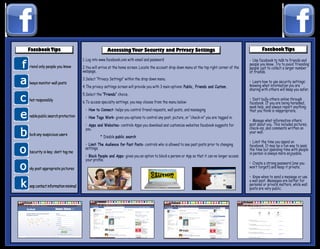
                                  1. Log into www.facebook.com with email and password        Elizabeth Adamski                             • Use facebook to talk to friends and
riend only people you know
                                                                                                  Isabella Diaz                             people you know. Try to avoid ‘friending’
                                  2. You will arrive at the home screen. Locate the account drop down menu at the top right corner of the   people just to collect a larger number
                                  webpage.                                                     Brittany Homcha                              of friends.
                                                                                                Rachel Presley
                                  3. Select “Privacy Settings” within the drop down menu.
lways monitor wall posts                                                                       Kaylyn Schneider                             • Learn how to use security settings:
                                  4. The privacy settings screen will provide you with 3 main options: Public, Friends and Custom.          knowing what information you are
                                                                                                                                            sharing with others will keep you safer.
                                  5. Select the “Friends” choice.
hat responsibly                                                                                                                             • Don’t bully others online through
                                  6. To access specialty settings, you may choose from the menu below:                                      facebook. If you are being harassed,
                                                                                                                                            seek help, and always report anything
                                   	 	 How to Connect- helps you control friend requests, wall posts, and messaging
                                   •                                                                                                        that you think is inappropriate.
nable public search protection     	 	 How Tags Work- gives you options to control any post, picture, or “check-in” you are tagged in.
                                   •
                                                                                                                                            • Manage what information others
                                   	 	 Apps and Websites- controls Apps you download and customize websites facebook suggests for
                                   •                                                                                                        post about you. This includes pictures,
                                   you.                                                                                                     check-ins, and comments written on
                                                                                                                                            your wall.
lock any suspicious users
                                              * Disable public search
                                                                                                                                            • Limit the time you spend on
                                   	•	 Limit The Audience for Past Posts- controls who is allowed to see past posts prior to changing       facebook. It may be a fun way to pass
                                   settings.                                                                                                the time but spending time with people
bscurity is key; don’t tag me                                                                                                               in person is always more enjoyable.
                                   	 Block People and Apps- gives you an option to block a person or App so that it can no longer access
                                   •
                                   your	profile.
                                                                                                                                            • Create a strong password (one you
nly post appropriate pictures                                                                                                               won’t forget!) and keep it private.

                                                                                                                                            • Know when to send a message or use
                                                                                                                                            a wall post. Messages are better for
eep contact information minimal                                                                                                             personal or private matters, while wall
                                                                                                                                            posts are very public.

Facebook poster

  • 1.
    Facebook 101: FollowThese Rules Online, and You’ll Be Just Fine! Presented By: Liz Adamski, Isabella Diaz, Brittany Homcha, Rachel Presley, and Kaylyn Schneider 1. Log into www.facebook.com with email and password Elizabeth Adamski • Use facebook to talk to friends and riend only people you know Isabella Diaz people you know. Try to avoid ‘friending’ 2. You will arrive at the home screen. Locate the account drop down menu at the top right corner of the people just to collect a larger number webpage. Brittany Homcha of friends. Rachel Presley 3. Select “Privacy Settings” within the drop down menu. lways monitor wall posts Kaylyn Schneider • Learn how to use security settings: 4. The privacy settings screen will provide you with 3 main options: Public, Friends and Custom. knowing what information you are sharing with others will keep you safer. 5. Select the “Friends” choice. hat responsibly • Don’t bully others online through 6. To access specialty settings, you may choose from the menu below: facebook. If you are being harassed, seek help, and always report anything How to Connect- helps you control friend requests, wall posts, and messaging • that you think is inappropriate. nable public search protection How Tags Work- gives you options to control any post, picture, or “check-in” you are tagged in. • • Manage what information others Apps and Websites- controls Apps you download and customize websites facebook suggests for • post about you. This includes pictures, you. check-ins, and comments written on your wall. lock any suspicious users * Disable public search • Limit the time you spend on • Limit The Audience for Past Posts- controls who is allowed to see past posts prior to changing facebook. It may be a fun way to pass settings. the time but spending time with people bscurity is key; don’t tag me in person is always more enjoyable. Block People and Apps- gives you an option to block a person or App so that it can no longer access • your profile. • Create a strong password (one you nly post appropriate pictures won’t forget!) and keep it private. • Know when to send a message or use a wall post. Messages are better for eep contact information minimal personal or private matters, while wall posts are very public.