F-STRINGS
@mariatta
F-strings?
The new way to format strings
… starting in Python 3.6
How?
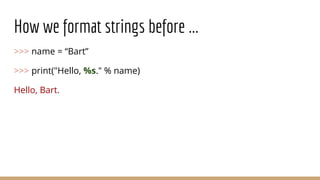
How we format strings before ...
>>> name = “Bart”
>>> print("Hello, %s." % name)
Hello, Bart.
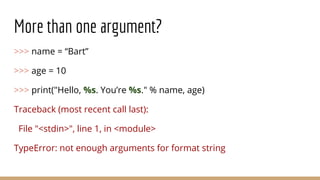
More than one argument?
>>> name = “Bart”
>>> age = 10
>>> print("Hello, %s. You’re %s." % name, age)
Traceback (most recent call last):
File "<stdin>", line 1, in <module>
TypeError: not enough arguments for format string
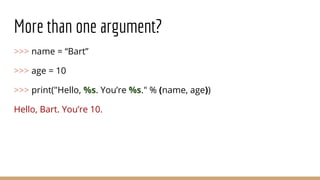
More than one argument?
>>> name = “Bart”
>>> age = 10
>>> print("Hello, %s. You’re %s." % (name, age))
Hello, Bart. You’re 10.
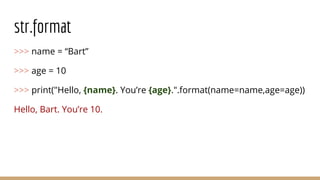
str.format
>>> name = “Bart”
>>> age = 10
>>> print("Hello, {name}. You’re {age}.".format(name=name,age=age))
Hello, Bart. You’re 10.
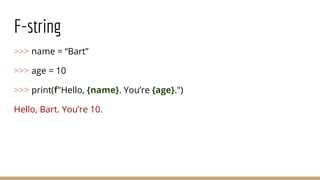
F-string
>>> name = “Bart”
>>> age = 10
>>> print(f"Hello, {name}. You’re {age}.")
Hello, Bart. You’re 10.
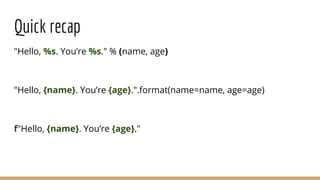
Quick recap
"Hello, %s. You’re %s." % (name, age)
"Hello, {name}. You’re {age}.".format(name=name, age=age)
f"Hello, {name}. You’re {age}."
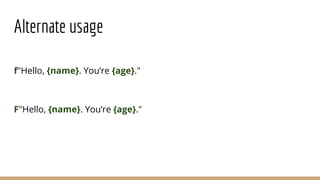
Alternate usage
f"Hello, {name}. You’re {age}."
F"Hello, {name}. You’re {age}."
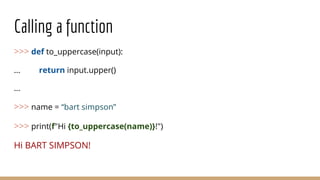
Calling a function
>>> def to_uppercase(input):
... return input.upper()
...
>>> name = “bart simpson”
>>> print(f"Hi {to_uppercase(name)}!")
Hi BART SIMPSON!
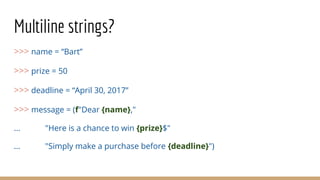
Multiline strings?
>>> name = “Bart”
>>> prize = 50
>>> deadline = “April 30, 2017”
>>> message = (f"Dear {name},"
... "Here is a chance to win {prize}$"
... "Simply make a purchase before {deadline}")
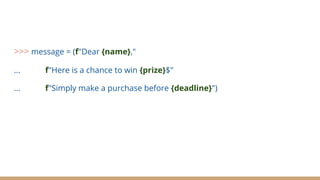
>>> message = (f"Dear {name},"
... f"Here is a chance to win {prize}$"
... f"Simply make a purchase before {deadline}")
F-strings
... faster than str.format
... require Python 3.6
Download at https://www.python.org
v3.6.1 is recommended
… documentation?
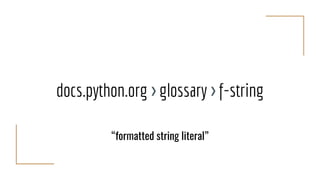
docs.python.org > glossary > f-string
“formatted string literal”
Thank you!
@mariatta | mariatta@python.org
File issues at https://bugs.python.org
(aka the b.p.o)

F strings

  • 1.
  • 2.
  • 3.
    The new wayto format strings … starting in Python 3.6
  • 4.
  • 5.
    How we formatstrings before ... >>> name = “Bart” >>> print("Hello, %s." % name) Hello, Bart.
  • 6.
    More than oneargument? >>> name = “Bart” >>> age = 10 >>> print("Hello, %s. You’re %s." % name, age) Traceback (most recent call last): File "<stdin>", line 1, in <module> TypeError: not enough arguments for format string
  • 7.
    More than oneargument? >>> name = “Bart” >>> age = 10 >>> print("Hello, %s. You’re %s." % (name, age)) Hello, Bart. You’re 10.
  • 8.
    str.format >>> name =“Bart” >>> age = 10 >>> print("Hello, {name}. You’re {age}.".format(name=name,age=age)) Hello, Bart. You’re 10.
  • 9.
    F-string >>> name =“Bart” >>> age = 10 >>> print(f"Hello, {name}. You’re {age}.") Hello, Bart. You’re 10.
  • 10.
    Quick recap "Hello, %s.You’re %s." % (name, age) "Hello, {name}. You’re {age}.".format(name=name, age=age) f"Hello, {name}. You’re {age}."
  • 11.
    Alternate usage f"Hello, {name}.You’re {age}." F"Hello, {name}. You’re {age}."
  • 12.
    Calling a function >>>def to_uppercase(input): ... return input.upper() ... >>> name = “bart simpson” >>> print(f"Hi {to_uppercase(name)}!") Hi BART SIMPSON!
  • 13.
    Multiline strings? >>> name= “Bart” >>> prize = 50 >>> deadline = “April 30, 2017” >>> message = (f"Dear {name}," ... "Here is a chance to win {prize}$" ... "Simply make a purchase before {deadline}")
  • 14.
    >>> message =(f"Dear {name}," ... f"Here is a chance to win {prize}$" ... f"Simply make a purchase before {deadline}")
  • 15.
  • 16.
    ... faster thanstr.format
  • 17.
    ... require Python3.6 Download at https://www.python.org v3.6.1 is recommended
  • 18.
  • 19.
    docs.python.org > glossary> f-string “formatted string literal”
  • 20.
    Thank you! @mariatta |mariatta@python.org File issues at https://bugs.python.org (aka the b.p.o)