Introduzione di base all’estensibilità del sistema a cura di  Francesco Trucchia  < [email_address] > un  phpBreakfast  offerto dal  GrUSP eZ publish, un CMS Open Source di  classe Enterprise
<?php=php_info() ?> Chi sono:  Sviluppatore PHP dal 2001 Laureando in Scienze dell’Informazione Che faccio:  Collaboro per Ser.In.Ar. con il Polo Didattico e Scientifico di Cesena per la realizzazione dei nuovi sit dei Corsi di Laurea del Polo di Cesena. Mi occupo della progettazione e implementazione dei siti sul CMS eZ publish. Sviluppo applicazioni Web, utilizzando architetture Open Source.
Cos’è eZ Publish Un C.M.F. (Content Management Framework) Un C.M.S. (Content Management System)
eZ CMF - Content Management Framework Ez come C.M.F. è un sistema che incorpora elementi avanzati  librerie proprietarie (A.P.I.) una architettura strutturata sul pattern M.V.C. È dotato di un kernel modulare. Ogni modulo si occupa della gestione di una parte di funzionalità e l’ottima divisione lo rende facilmente estendibile, anche grazie alle numerose librerie di cui dispone Dispone di un alto livello di estendibilità attraverso i plug-in. Il sistema è indipendente dalla piattaforma e dal database.
Architettura strutturata su pattern MVC Un framework strutturato su un pattern M.V.C. è un framework che separa completamente la logica di business dalla vista, il tutto gestito da un controller centrale. Model  = dominio informativo View  = template/pagine web Controller  =  dispatcher d’azioni Database + eZPersistentObject() Template Engine + eZTemplate() Index.php + Kernel Function
Architettura d’eZ publish
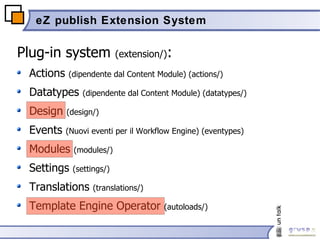
eZ publish Extension System Plug-in system  (extension/) : Actions  (dipendente dal Content Module) (actions/) Datatypes  (dipendente dal Content Module) (datatypes/) Design  (design/) Events  (Nuovi eventi per il Workflow Engine) (eventypes) Modules  (modules/) Settings  (settings/) Translations  (translations/) Template Engine Operator  (autoloads/)
Attivare un’estensione Creare la directory extension/<myextension> Aggiungere il nome dell’estensione alla direttiva ActiveExtensions[] del blocco di configurazione [ExtensionSettings] del file d’override settings/override/site.ini [ExtensionSettings] ActiveExtensions[]=<myExtension> ActiveExtensions[]=<anotherExtension> Se si vuole attivare un’estensione solo per un certo siteaccess, si deve usare la direttiva  ActiveAccessExtensions[] nel file settings/siteaccess/<mydesign>/site.ini.append [ExtensionSettings] ActiveAcccessExtensions[]=<myExtension> ActiveAccessExtensions[]=<anotherExtension>
Template Operator Extension (1/7) Con gli operatori di template è possibile chiamare qualsiasi funzione PHP all’interno dei template dell’applicazione. Creeremo un operatore che prende in input due parametri e un operatore senza parametri. Creiamo le directory: extension/<myextension> extension/<myextension>/autoloads extension/<myextension>/settings Creiamo il file extension/<myextension>/settings/site.ini e inseriamo la seguente direttiva: Questa direttiva dice al sistema di caricare anche gli operatori presenti nella directory della nostra estensione [TemplateSettings] ExtensionAutoloadPath[]=myextension
Template Operator Extension (2/7) Creiamo  il file extension/<myextension>/autoloads/eztemplateautoloads.php con il seguente contenuto: <?php // Operator autoloading $eZTemplateOperatorArray =  array (); $eZTemplateOperatorArray[] =  array (  'script’  =>  'extension/<myextension>/autoloads/mystringoperators.php' , 'class'  =>  'MyStringOperators' , 'operator_names'  => array(  'addstrings' ,  'helloworld'  ) ); ?>
Template Operator Extension (3/7) Creiamo successivamente il file extension/<myextension>/autoloads/mystringoperators.php con il seguente contenuto: <?php class  MyStringOperators { //Constructor function  MyStringOperators() { $this ->Operators =  array ( 'addstrings’, 'helloworld' ); } //Returns the operators in this class function  &operatorList() { return  $this ->Operators; } ……… . } ?>
Template Operator Extension (4/7) <?php class  MyStringOperators { …… /*!\return true to tell the template engine that the parameter list exists per operator type, this is needed for operator classes that have multiple operators.*/ function  namedParameterPerOperator() { return  true; } /*!The first operator has two parameters, the other has none. See eZTemplateOperator::namedParameterList */ function  namedParameterList() { return  array ( 'addstrings' =>  array ( 'string1' => array( 'type' => 'string', 'required' => true, 'default' => '' ),   ’ string2' =>  array ( 'type' => 'string', 'required' => true, 'default' => '' ) ), 'helloworld' =>  array () ); } …… } ?>
Template Operator Extension (5/7) <?php class  MyStringOperators { …… /*!Executes the needed operator(s). Checks operator names, and calls the appropriate functions.*/ function  modify( &$tpl, &$operatorName, &$operatorParameters, &$rootNamespace,   &$currentNamespace, &$operatorValue, &$namedParameters ) { switch  ( $operatorName ){ case  'addstrings': $operatorValue  =  $this ->addStrings( $namedParameters['string1'], $namedParameters['string2'] ); break ; case  'helloworld' $operatorValue  =  $this ->helloWorld();   break ; } } …… } ?>
Template Operator Extension (6/7) <?php class  MyStringOperators { …… //return the sum of two strings function  addStrings( $string1, $string2 ){ return $string1 . $string2; } //return a famous string function  helloWorld() { return 'Hello World!'; } …… } ?>
Template Operator Extension (7/7) Nel template a questo punto è possibile utilizzare i nuovi operatori: <p>{addstrings( 'Forty', 'two' )}</p> <p>{helloworld()}</p>
Module Extension (1/6) Creiamo i seguenti file: extension/<myextension>/settings/module.ini.append extension/<myextension>/modules/mymodule/module.php extension/<myextension>/modules/mymodule/hello.php extension/<myextension>/modules/mymodule/world.php design/standard/templates/mymodule/list.tpl Attiviamo l’estensione nel file settings/override/site.ini.append: Attiviamo il modulo nel file extension/<myextension>/settings/module.ini.append [ExtensionSettings] ActiveExtensions[]=<myextension> [ModuleSettings] ExtensionRepositories[]=<myextension>
Module Extension (2/6) Definiamo il modulo e le sue viste nel file module.php <?php $Module  =  array (  &quot;name&quot;  =>  &quot;MyModule&quot;  ); $ViewList  =  array (); $ViewList [ &quot;hello&quot; ] =  array (  &quot;script&quot;  =>  &quot;hello.php&quot; ); $ViewList [ ”world&quot; ] =  array (  &quot;script&quot;  =>  ”world.php&quot; ); ?>
Module Extension (3/6) Scriviamo il contenuto del file hello.php <?php // Module return value, // normally fetched from template $text  =  'Benvenuti al Linux Day' ; // Build module result array $Result  =  array (); $Result [ 'content' ] =  $text ; $Result [ 'path' ] =  array (  array (  'url'  =>  '/mymodule/hello' , 'text'  =>  &quot;Hello&quot; ) ); ?>
Module Extension (4/6) Scriviamo il contenuto del file world.php <?php $text  =  ’Hello World!!' ; //Include template engine library & set template variable include_once (  'kernel/common/template.php'  ); $tpl  =& templateInit(); $tpl ->setVariable(  ’text' ,  $text  ); // Build module result array $Result  =  array (); $Result [ 'content' ] =  $tpl ->fetch( &quot;design:mymodule/list.tpl&quot; ); $Result [ 'path' ] =  array (  array (  'url'  =>  '/mymodule/world' , 'text'  =>  ”World&quot; ) ); ?>
Module Extension (5/6) Se vogliamo limitare l’accesso alle viste create modifichiamo il file module.php: <?php $Module  =  array (  &quot;name&quot;  =>  &quot;MyModule&quot;  ); $ViewList  =  array (); $ViewList [ &quot;hello&quot; ] =  array ( &quot;script&quot;  =>  &quot;hello.php” , &quot;functions&quot;  =>   array ( 'read_hello' )); $ViewList [ ”world&quot; ] =  array ( &quot;script&quot;  =>  ”world.php” ,   &quot;functions&quot;  =>   array ( 'read_world' )); $FunctionList [ 'read_hello' ] =  array ( ); $FunctionList [ ’read_world' ] =  array ( ); ?>
Module Extension (6/6) A questo punto possiamo accedere alle viste del nostro modulo dall’URL: http://www.example.it/index.php/<mysiteaccess>/<mymodule>/hello http://www.example.it/index.php/<mysiteaccess>/<mymodule>/world
Design Extensio (1/3) Vogliamo aggiungere un nuovo  widget  per le toolbar che mostri gli oggetti correlati ad un certo oggetto. Creiamo il file extension/<myextension>/settings/design.ini.append extension/<myextension>/settings/toolbar.ini.append extension/<myextension>/design/standard/templates/toolbar/full/correlati.tpl Attiviamo l’estensione nel file settings/override/site.ini.append Attiviamo l’estensione del design nel file design.ini.append [ExtensionSettings] ActiveExtensions[]=<myextension> [ExtensionSettings] DesignExtensions[]=<myextension>
Design Extensio (2/3) Definiamo ora il nuovo widget nel file toolbar.ini.append [Tool] AvailableToolArray[]=correlati [Tool_correlati] correlati_classidentifiers= section= title= [Tool_correlati_description] correlati_classidentifiers=Filtro delle classi section=Sezione title=Titolo
Design Extensio (3/3) Creiamo il widget attravero il template correlati.tpl {let node=fetch('content','node',hash( 'node_id' , $module_result.node_id)) related=$:node.object.related_contentobject_array} {set-block name=correlati variable=text} {section name=Related loop=$related} {section show=and($section|eq($:item.section_id), $correlati_classidentifiers|explode( ',' )|contains($:item.class_identifier))} <li>{node_view_gui view=listitem content_node=$:item.main_node}</li> {/section} {/section} {/set-block} {section show=and($related,$allegati:text|eq('')|not)} <div class=”correlati”> <h2>{$title}</h2> <ul >{$correlati:text}</ul> </div> {/section} {/let}
Riferimenti eZ System 	 http://www.ez.no eZ Publish http://ez.no/products/ez_publish_cms eZ documentation   http://ez.no/products/ez_publish_cms/documentation
Contatti Francesco Trucchia [email_address] trucchia http://www.cphp.it http://wiki.grusp.it

eZ publish - Extension

  • 1.
    Introduzione di baseall’estensibilità del sistema a cura di Francesco Trucchia < [email_address] > un phpBreakfast offerto dal GrUSP eZ publish, un CMS Open Source di classe Enterprise
  • 2.
    <?php=php_info() ?> Chisono: Sviluppatore PHP dal 2001 Laureando in Scienze dell’Informazione Che faccio: Collaboro per Ser.In.Ar. con il Polo Didattico e Scientifico di Cesena per la realizzazione dei nuovi sit dei Corsi di Laurea del Polo di Cesena. Mi occupo della progettazione e implementazione dei siti sul CMS eZ publish. Sviluppo applicazioni Web, utilizzando architetture Open Source.
  • 3.
    Cos’è eZ PublishUn C.M.F. (Content Management Framework) Un C.M.S. (Content Management System)
  • 4.
    eZ CMF -Content Management Framework Ez come C.M.F. è un sistema che incorpora elementi avanzati librerie proprietarie (A.P.I.) una architettura strutturata sul pattern M.V.C. È dotato di un kernel modulare. Ogni modulo si occupa della gestione di una parte di funzionalità e l’ottima divisione lo rende facilmente estendibile, anche grazie alle numerose librerie di cui dispone Dispone di un alto livello di estendibilità attraverso i plug-in. Il sistema è indipendente dalla piattaforma e dal database.
  • 5.
    Architettura strutturata supattern MVC Un framework strutturato su un pattern M.V.C. è un framework che separa completamente la logica di business dalla vista, il tutto gestito da un controller centrale. Model = dominio informativo View = template/pagine web Controller = dispatcher d’azioni Database + eZPersistentObject() Template Engine + eZTemplate() Index.php + Kernel Function
  • 6.
  • 7.
    eZ publish ExtensionSystem Plug-in system (extension/) : Actions (dipendente dal Content Module) (actions/) Datatypes (dipendente dal Content Module) (datatypes/) Design (design/) Events (Nuovi eventi per il Workflow Engine) (eventypes) Modules (modules/) Settings (settings/) Translations (translations/) Template Engine Operator (autoloads/)
  • 8.
    Attivare un’estensione Crearela directory extension/<myextension> Aggiungere il nome dell’estensione alla direttiva ActiveExtensions[] del blocco di configurazione [ExtensionSettings] del file d’override settings/override/site.ini [ExtensionSettings] ActiveExtensions[]=<myExtension> ActiveExtensions[]=<anotherExtension> Se si vuole attivare un’estensione solo per un certo siteaccess, si deve usare la direttiva ActiveAccessExtensions[] nel file settings/siteaccess/<mydesign>/site.ini.append [ExtensionSettings] ActiveAcccessExtensions[]=<myExtension> ActiveAccessExtensions[]=<anotherExtension>
  • 9.
    Template Operator Extension(1/7) Con gli operatori di template è possibile chiamare qualsiasi funzione PHP all’interno dei template dell’applicazione. Creeremo un operatore che prende in input due parametri e un operatore senza parametri. Creiamo le directory: extension/<myextension> extension/<myextension>/autoloads extension/<myextension>/settings Creiamo il file extension/<myextension>/settings/site.ini e inseriamo la seguente direttiva: Questa direttiva dice al sistema di caricare anche gli operatori presenti nella directory della nostra estensione [TemplateSettings] ExtensionAutoloadPath[]=myextension
  • 10.
    Template Operator Extension(2/7) Creiamo il file extension/<myextension>/autoloads/eztemplateautoloads.php con il seguente contenuto: <?php // Operator autoloading $eZTemplateOperatorArray = array (); $eZTemplateOperatorArray[] = array ( 'script’ => 'extension/<myextension>/autoloads/mystringoperators.php' , 'class' => 'MyStringOperators' , 'operator_names' => array( 'addstrings' , 'helloworld' ) ); ?>
  • 11.
    Template Operator Extension(3/7) Creiamo successivamente il file extension/<myextension>/autoloads/mystringoperators.php con il seguente contenuto: <?php class MyStringOperators { //Constructor function MyStringOperators() { $this ->Operators = array ( 'addstrings’, 'helloworld' ); } //Returns the operators in this class function &operatorList() { return $this ->Operators; } ……… . } ?>
  • 12.
    Template Operator Extension(4/7) <?php class MyStringOperators { …… /*!\return true to tell the template engine that the parameter list exists per operator type, this is needed for operator classes that have multiple operators.*/ function namedParameterPerOperator() { return true; } /*!The first operator has two parameters, the other has none. See eZTemplateOperator::namedParameterList */ function namedParameterList() { return array ( 'addstrings' => array ( 'string1' => array( 'type' => 'string', 'required' => true, 'default' => '' ), ’ string2' => array ( 'type' => 'string', 'required' => true, 'default' => '' ) ), 'helloworld' => array () ); } …… } ?>
  • 13.
    Template Operator Extension(5/7) <?php class MyStringOperators { …… /*!Executes the needed operator(s). Checks operator names, and calls the appropriate functions.*/ function modify( &$tpl, &$operatorName, &$operatorParameters, &$rootNamespace, &$currentNamespace, &$operatorValue, &$namedParameters ) { switch ( $operatorName ){ case 'addstrings': $operatorValue = $this ->addStrings( $namedParameters['string1'], $namedParameters['string2'] ); break ; case 'helloworld' $operatorValue = $this ->helloWorld(); break ; } } …… } ?>
  • 14.
    Template Operator Extension(6/7) <?php class MyStringOperators { …… //return the sum of two strings function addStrings( $string1, $string2 ){ return $string1 . $string2; } //return a famous string function helloWorld() { return 'Hello World!'; } …… } ?>
  • 15.
    Template Operator Extension(7/7) Nel template a questo punto è possibile utilizzare i nuovi operatori: <p>{addstrings( 'Forty', 'two' )}</p> <p>{helloworld()}</p>
  • 16.
    Module Extension (1/6)Creiamo i seguenti file: extension/<myextension>/settings/module.ini.append extension/<myextension>/modules/mymodule/module.php extension/<myextension>/modules/mymodule/hello.php extension/<myextension>/modules/mymodule/world.php design/standard/templates/mymodule/list.tpl Attiviamo l’estensione nel file settings/override/site.ini.append: Attiviamo il modulo nel file extension/<myextension>/settings/module.ini.append [ExtensionSettings] ActiveExtensions[]=<myextension> [ModuleSettings] ExtensionRepositories[]=<myextension>
  • 17.
    Module Extension (2/6)Definiamo il modulo e le sue viste nel file module.php <?php $Module = array ( &quot;name&quot; => &quot;MyModule&quot; ); $ViewList = array (); $ViewList [ &quot;hello&quot; ] = array ( &quot;script&quot; => &quot;hello.php&quot; ); $ViewList [ ”world&quot; ] = array ( &quot;script&quot; => ”world.php&quot; ); ?>
  • 18.
    Module Extension (3/6)Scriviamo il contenuto del file hello.php <?php // Module return value, // normally fetched from template $text = 'Benvenuti al Linux Day' ; // Build module result array $Result = array (); $Result [ 'content' ] = $text ; $Result [ 'path' ] = array ( array ( 'url' => '/mymodule/hello' , 'text' => &quot;Hello&quot; ) ); ?>
  • 19.
    Module Extension (4/6)Scriviamo il contenuto del file world.php <?php $text = ’Hello World!!' ; //Include template engine library & set template variable include_once ( 'kernel/common/template.php' ); $tpl =& templateInit(); $tpl ->setVariable( ’text' , $text ); // Build module result array $Result = array (); $Result [ 'content' ] = $tpl ->fetch( &quot;design:mymodule/list.tpl&quot; ); $Result [ 'path' ] = array ( array ( 'url' => '/mymodule/world' , 'text' => ”World&quot; ) ); ?>
  • 20.
    Module Extension (5/6)Se vogliamo limitare l’accesso alle viste create modifichiamo il file module.php: <?php $Module = array ( &quot;name&quot; => &quot;MyModule&quot; ); $ViewList = array (); $ViewList [ &quot;hello&quot; ] = array ( &quot;script&quot; => &quot;hello.php” , &quot;functions&quot; => array ( 'read_hello' )); $ViewList [ ”world&quot; ] = array ( &quot;script&quot; => ”world.php” , &quot;functions&quot; => array ( 'read_world' )); $FunctionList [ 'read_hello' ] = array ( ); $FunctionList [ ’read_world' ] = array ( ); ?>
  • 21.
    Module Extension (6/6)A questo punto possiamo accedere alle viste del nostro modulo dall’URL: http://www.example.it/index.php/<mysiteaccess>/<mymodule>/hello http://www.example.it/index.php/<mysiteaccess>/<mymodule>/world
  • 22.
    Design Extensio (1/3)Vogliamo aggiungere un nuovo widget per le toolbar che mostri gli oggetti correlati ad un certo oggetto. Creiamo il file extension/<myextension>/settings/design.ini.append extension/<myextension>/settings/toolbar.ini.append extension/<myextension>/design/standard/templates/toolbar/full/correlati.tpl Attiviamo l’estensione nel file settings/override/site.ini.append Attiviamo l’estensione del design nel file design.ini.append [ExtensionSettings] ActiveExtensions[]=<myextension> [ExtensionSettings] DesignExtensions[]=<myextension>
  • 23.
    Design Extensio (2/3)Definiamo ora il nuovo widget nel file toolbar.ini.append [Tool] AvailableToolArray[]=correlati [Tool_correlati] correlati_classidentifiers= section= title= [Tool_correlati_description] correlati_classidentifiers=Filtro delle classi section=Sezione title=Titolo
  • 24.
    Design Extensio (3/3)Creiamo il widget attravero il template correlati.tpl {let node=fetch('content','node',hash( 'node_id' , $module_result.node_id)) related=$:node.object.related_contentobject_array} {set-block name=correlati variable=text} {section name=Related loop=$related} {section show=and($section|eq($:item.section_id), $correlati_classidentifiers|explode( ',' )|contains($:item.class_identifier))} <li>{node_view_gui view=listitem content_node=$:item.main_node}</li> {/section} {/section} {/set-block} {section show=and($related,$allegati:text|eq('')|not)} <div class=”correlati”> <h2>{$title}</h2> <ul >{$correlati:text}</ul> </div> {/section} {/let}
  • 25.
    Riferimenti eZ System http://www.ez.no eZ Publish http://ez.no/products/ez_publish_cms eZ documentation http://ez.no/products/ez_publish_cms/documentation
  • 26.
    Contatti Francesco Trucchia[email_address] trucchia http://www.cphp.it http://wiki.grusp.it