Export data in Excel
When you download a list to a spreadsheet, the file generated is taking a text file extension
(TXT).
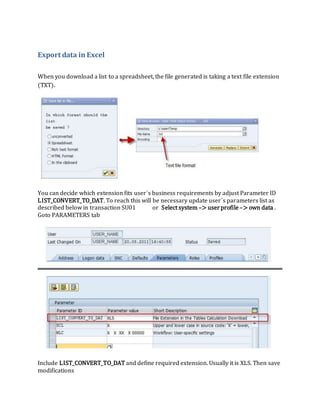
You can decide which extension fits user´s business requirements by adjust Parameter ID
LIST_CONVERT_TO_DAT. To reach this will be necessary update user´s parameters list as
described below in transaction SU01 or Select system –> userprofile–> own data .
Goto PARAMETERS tab
Include LIST_CONVERT_TO_DAT and define required extension. Usually it is XLS. Then save
modifications
Then you will be able to download ABAP lists in Spreadsheet format with XLS extension by
default

Export data in Excel.docx

  • 1.
    Export data inExcel When you download a list to a spreadsheet, the file generated is taking a text file extension (TXT). You can decide which extension fits user´s business requirements by adjust Parameter ID LIST_CONVERT_TO_DAT. To reach this will be necessary update user´s parameters list as described below in transaction SU01 or Select system –> userprofile–> own data . Goto PARAMETERS tab Include LIST_CONVERT_TO_DAT and define required extension. Usually it is XLS. Then save modifications
  • 2.
    Then you willbe able to download ABAP lists in Spreadsheet format with XLS extension by default