By Nathan Jackson
 I believe I have learned how to order clips in a more
proficient way. So that the story makes more sense.
 Also because we experimented with the effects and
transitions, we know which one went best in specific
positions.
 We also learned how to cut valuable seconds out of
certain shots, which helped us get our thriller into
the right time margin.
 We also learned how to render certain parts of the
task, which saved us a lot of time.
 In our preliminary task, we didn’t actually use any
music, we only used sound effects.
 Our preliminary only used diegetic sound.
 So in this task, we created our own sound, which we
hadn’t done before.
 We did this using Mixcraft, which gave us multiple
avenues in which we could explore
 We also had to make sure the music linked with the
shutter sound effect of the camera
 This was because we felt it needed to flow, so it was
all continuous.
 In our preliminary task we didn’t really use many
camera shots, so we wanted to use a variety in our
thriller .
 We included multiple high angle shots to put
emphasis on how inferior the two boys walking
were.
 We also included some point of view shots, so the
audience felt scared for the two boys
 We also included a long shot to show how long the
journey home was for the boys.
 We started with an establishing shot to show that it
would be based in a woods.
 We didn’t have to consider Mise – en –scene very
much in our preliminary task as it didn’t have a
storyline.
 In our thriller on the other hand we thought that the
central antagonist should wear black as this could
connote death.
 The two protagonists on the other hand wore bags to
signify that they were walking home from school.
 We also filmed in the woods as this gave a rather
sinister effect for our location.
This is our
opening
screen
We used this
to show who
made the
video
We used a black
background to
foreshadow the
film is a horror
We also use a cracked
font which we had to
download
The cracked
font again
added to the
horror effect
We also used an
establishing at the
start to show
where it was set.
We also put the
name of the
actor playing
the antagonist
first, to show
this would be
the central
character.
This shot
was also a
pan to
show more
of the
woods.
It also
built
suspense
as you
couldn’t
see what
was
coming
next.
We also learnt
how to use a tint
effect
This helped us
make our
Antagonist look
more sinister
The tint also
helped the
woods look
darker
Which added
to the creepy
and eerie effect
we were trying
to give off
We also included
titles in the 2
minute opening of
our thriller.
We added
titles
through
photos
instead of
footage.
And we added a
camera shutter
sounds effects
over the top of
it.
These photos
were photos
of the
antagonist.
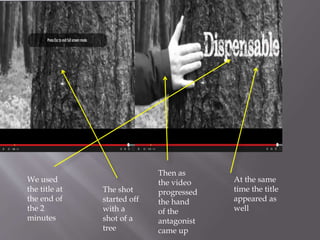
We used
the title at
the end of
the 2
minutes
The shot
started off
with a
shot of a
tree
Then as
the video
progressed
the hand
of the
antagonist
came up
At the same
time the title
appeared as
well
Evaluation question 7

Evaluation question 7

  • 1.
  • 2.
     I believeI have learned how to order clips in a more proficient way. So that the story makes more sense.  Also because we experimented with the effects and transitions, we know which one went best in specific positions.  We also learned how to cut valuable seconds out of certain shots, which helped us get our thriller into the right time margin.  We also learned how to render certain parts of the task, which saved us a lot of time.
  • 3.
     In ourpreliminary task, we didn’t actually use any music, we only used sound effects.  Our preliminary only used diegetic sound.  So in this task, we created our own sound, which we hadn’t done before.  We did this using Mixcraft, which gave us multiple avenues in which we could explore  We also had to make sure the music linked with the shutter sound effect of the camera  This was because we felt it needed to flow, so it was all continuous.
  • 4.
     In ourpreliminary task we didn’t really use many camera shots, so we wanted to use a variety in our thriller .  We included multiple high angle shots to put emphasis on how inferior the two boys walking were.  We also included some point of view shots, so the audience felt scared for the two boys  We also included a long shot to show how long the journey home was for the boys.  We started with an establishing shot to show that it would be based in a woods.
  • 5.
     We didn’thave to consider Mise – en –scene very much in our preliminary task as it didn’t have a storyline.  In our thriller on the other hand we thought that the central antagonist should wear black as this could connote death.  The two protagonists on the other hand wore bags to signify that they were walking home from school.  We also filmed in the woods as this gave a rather sinister effect for our location.
  • 6.
    This is our opening screen Weused this to show who made the video We used a black background to foreshadow the film is a horror We also use a cracked font which we had to download The cracked font again added to the horror effect
  • 7.
    We also usedan establishing at the start to show where it was set. We also put the name of the actor playing the antagonist first, to show this would be the central character. This shot was also a pan to show more of the woods. It also built suspense as you couldn’t see what was coming next.
  • 8.
    We also learnt howto use a tint effect This helped us make our Antagonist look more sinister The tint also helped the woods look darker Which added to the creepy and eerie effect we were trying to give off
  • 9.
    We also included titlesin the 2 minute opening of our thriller. We added titles through photos instead of footage. And we added a camera shutter sounds effects over the top of it. These photos were photos of the antagonist.
  • 10.
    We used the titleat the end of the 2 minutes The shot started off with a shot of a tree Then as the video progressed the hand of the antagonist came up At the same time the title appeared as well