CS 3072
Lab Sheet 06
SUMMARY FROM
PREVIOUS LAB WORKS.
• You can be able to do…
• Making Queries.
• To create data base, tables.
• Generally add values to the table.
• How to create different kind of users.
• Basic knowledge on constraints.
• Grant privileges.
STORED PROCEDURE.
• Lets see how to
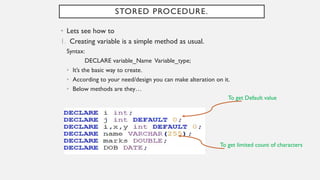
1. Creating variable is a simple method as usual.
Syntax:
DECLARE variable_Name Variable_type;
• It’s the basic way to create.
• According to your need/design you can make alteration on it.
• Below methods are they…
To get Default value
To get limited count of characters
2. Assign value to the variable.
Syntax:
SET variable_name = value;
• It’s the basic way to create.
SET i=59;
SET name= “Mercy”;
• By default, all MySQL clients use a semicolon (;) as a statement delimiter.
• A problem arises when creating functions or procedures because they use semicolons
as statement delimiters within the function body.
• The field delimiter is the character which splits data or text into separate fields and a
field is a column within the database.
• Delimiters are necessary when creating stored procedures or triggers. Using a custom
delimiter can simplify the creation of compound statements.
• Let’s see how to create delimiter.
Delimiter
• Easily get into the point by the example below:
• When you consider the table Account on database Salary,
Delimiter…
As usual you can create
Step1:
Step2:
Consider the semicolon in the end of the query.
• Just I’m going to replace by the symbol (##).
• You can change with any symbols in any count.
• Example:
• $$
• $$$
• #$
Etc…
Syntax:
DELIMITER symbol
Eg:
DELIMITER ##
This is the way to create delimiter
replace by the symbol (##).
Step3:
• Style of the delimiter is applied.
• After that if you write the query in usual method, then it will not give the output
and it will ask termination from us.
• From the figure below you can get it.
Input the query in usual method using
semicolon
Delimiter replaced by the symbol (##).
It is expecting something from us/
waiting for the termination/command.
Note:
As usual according to the query above, it will give the all elements from the table
account.
Step4:
Delimiter changed
Finish the command with new delimiter
• Finish the command with appropriate delimiter.
• It will give the output according to the command;
• It will give the output according to the command with correct
delimiter otherwise it won’t give the output;
This is the perfect way to write query.
CREATING PROCEDURE
• Syntax:
• DELIMITER symbol
• CREATE PROCEDURE procedure_name ()
• BEGIN
• …. QUERY…
• END delimiter Symbol
If you want to change
delimiter symbol then
you can replace it
CALLING PROCEDURE
If you want to change delimiter
symbol then you can replace it , and
you want to call the query with the
particular delimiter symbol..
Delimiter is Changed
Query is called with new delimiter
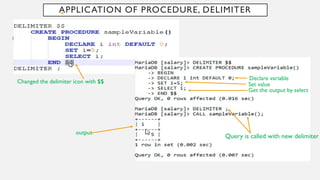
APPLICATION OF PROCEDURE, DELIMITER
Changed the delimiter icon with $$
Declare variable
Get the output by select
Set value
Query is called with new delimiter
output
Find out the difference from
previous example …
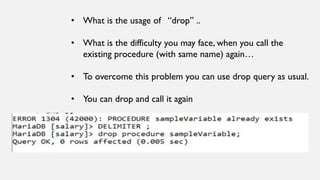
• What is the usage of “drop” ..
• What is the difficulty you may face, when you call the
existing procedure (with same name) again…
• To overcome this problem you can use drop query as usual.
• You can drop and call it again
SIMPLE CALCULATION (SUM)
ARITHMETIC APPLICATIONS…
On-Site Exercise:
1. Write the procedure to get grading system on ADBMS Assessment for 3rd year 2nd semester students.
(Just for sample…)
Consider the key points below:
A+ - Marks >85
A - Marks >75
A- - Marks > 70
B+ - Marks >65
B - Marks >60
B- - Marks > 55
C+ - Marks >50
C - Marks >45
C- - Marks > 40
D+ - Marks >35
D - Marks >30
I - Marks <30
If you entered,
Marks = 100
Then the output should be like,
Grade = A+
Exercise:

Essential SQL Techniques: Variables, Delimiters, and Procedure Creation

  • 1.
  • 2.
    SUMMARY FROM PREVIOUS LABWORKS. • You can be able to do… • Making Queries. • To create data base, tables. • Generally add values to the table. • How to create different kind of users. • Basic knowledge on constraints. • Grant privileges.
  • 3.
    STORED PROCEDURE. • Letssee how to 1. Creating variable is a simple method as usual. Syntax: DECLARE variable_Name Variable_type; • It’s the basic way to create. • According to your need/design you can make alteration on it. • Below methods are they… To get Default value To get limited count of characters
  • 4.
    2. Assign valueto the variable. Syntax: SET variable_name = value; • It’s the basic way to create. SET i=59; SET name= “Mercy”;
  • 5.
    • By default,all MySQL clients use a semicolon (;) as a statement delimiter. • A problem arises when creating functions or procedures because they use semicolons as statement delimiters within the function body. • The field delimiter is the character which splits data or text into separate fields and a field is a column within the database. • Delimiters are necessary when creating stored procedures or triggers. Using a custom delimiter can simplify the creation of compound statements. • Let’s see how to create delimiter. Delimiter
  • 6.
    • Easily getinto the point by the example below: • When you consider the table Account on database Salary, Delimiter… As usual you can create Step1:
  • 7.
    Step2: Consider the semicolonin the end of the query. • Just I’m going to replace by the symbol (##). • You can change with any symbols in any count. • Example: • $$ • $$$ • #$ Etc… Syntax: DELIMITER symbol Eg: DELIMITER ## This is the way to create delimiter replace by the symbol (##).
  • 8.
    Step3: • Style ofthe delimiter is applied. • After that if you write the query in usual method, then it will not give the output and it will ask termination from us. • From the figure below you can get it. Input the query in usual method using semicolon Delimiter replaced by the symbol (##). It is expecting something from us/ waiting for the termination/command. Note: As usual according to the query above, it will give the all elements from the table account.
  • 9.
    Step4: Delimiter changed Finish thecommand with new delimiter • Finish the command with appropriate delimiter. • It will give the output according to the command;
  • 10.
    • It willgive the output according to the command with correct delimiter otherwise it won’t give the output; This is the perfect way to write query.
  • 11.
    CREATING PROCEDURE • Syntax: •DELIMITER symbol • CREATE PROCEDURE procedure_name () • BEGIN • …. QUERY… • END delimiter Symbol If you want to change delimiter symbol then you can replace it
  • 12.
    CALLING PROCEDURE If youwant to change delimiter symbol then you can replace it , and you want to call the query with the particular delimiter symbol.. Delimiter is Changed Query is called with new delimiter
  • 13.
    APPLICATION OF PROCEDURE,DELIMITER Changed the delimiter icon with $$ Declare variable Get the output by select Set value Query is called with new delimiter output
  • 14.
    Find out thedifference from previous example …
  • 15.
    • What isthe usage of “drop” .. • What is the difficulty you may face, when you call the existing procedure (with same name) again… • To overcome this problem you can use drop query as usual. • You can drop and call it again
  • 16.
  • 17.
  • 18.
    On-Site Exercise: 1. Writethe procedure to get grading system on ADBMS Assessment for 3rd year 2nd semester students. (Just for sample…) Consider the key points below: A+ - Marks >85 A - Marks >75 A- - Marks > 70 B+ - Marks >65 B - Marks >60 B- - Marks > 55 C+ - Marks >50 C - Marks >45 C- - Marks > 40 D+ - Marks >35 D - Marks >30 I - Marks <30 If you entered, Marks = 100 Then the output should be like, Grade = A+
  • 19.