APPLICATION
DEVELOPMENT USING
PYTHON
18CS55
Module - 1
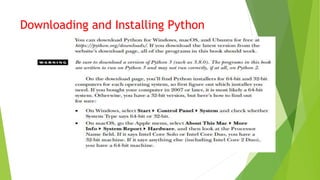
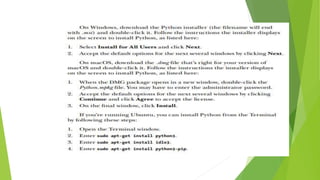
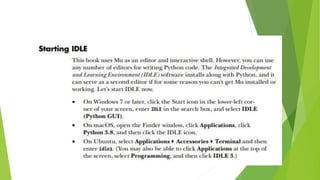
Downloading and Installing Python
Entering Expressions into the Interactive
Shell
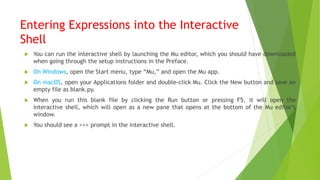
 You can run the interactive shell by launching the Mu editor, which you should have downloaded
when going through the setup instructions in the Preface.
 On Windows, open the Start menu, type “Mu,” and open the Mu app.
 On macOS, open your Applications folder and double-click Mu. Click the New button and save an
empty file as blank.py.
 When you run this blank file by clicking the Run button or pressing F5, it will open the
interactive shell, which will open as a new pane that opens at the bottom of the Mu editor’s
window.
 You should see a >>> prompt in the interactive shell.
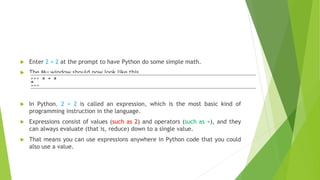
 Enter 2 + 2 at the prompt to have Python do some simple math.
 The Mu window should now look like this
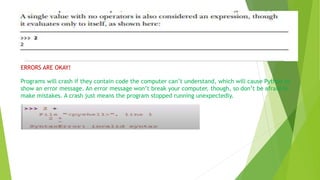
 In Python, 2 + 2 is called an expression, which is the most basic kind of
programming instruction in the language.
 Expressions consist of values (such as 2) and operators (such as +), and they
can always evaluate (that is, reduce) down to a single value.
 That means you can use expressions anywhere in Python code that you could
also use a value.
ERRORS ARE OKAY!
Programs will crash if they contain code the computer can’t understand, which will cause Python to
show an error message. An error message won’t break your computer, though, so don’t be afraid to
make mistakes. A crash just means the program stopped running unexpectedly.
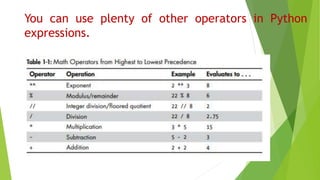
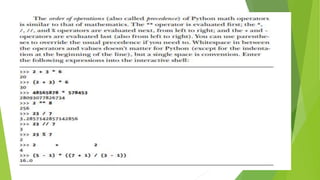
You can use plenty of other operators in Python
expressions.
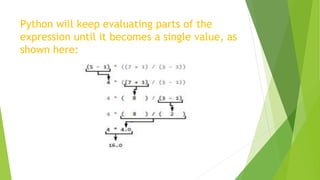
Python will keep evaluating parts of the
expression until it becomes a single value, as
shown here:
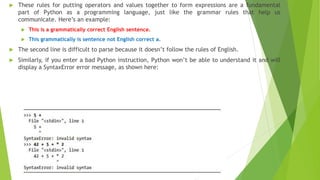
 These rules for putting operators and values together to form expressions are a fundamental
part of Python as a programming language, just like the grammar rules that help us
communicate. Here’s an example:
 This is a grammatically correct English sentence.
 This grammatically is sentence not English correct a.
 The second line is difficult to parse because it doesn’t follow the rules of English.
 Similarly, if you enter a bad Python instruction, Python won’t be able to understand it and will
display a SyntaxError error message, as shown here:
The Integer, Floating-Point, and String
Data Types
 Remember that expressions are just values combined with operators, and
they always evaluate down to a single value.
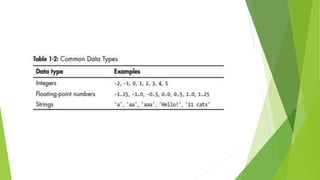
 A data type is a category for values, and every value belongs to exactly one
data type.
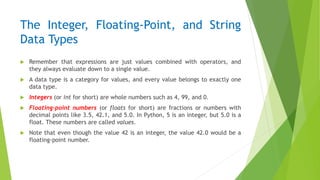
 Integers (or int for short) are whole numbers such as 4, 99, and 0.
 Floating-point numbers (or floats for short) are fractions or numbers with
decimal points like 3.5, 42.1, and 5.0. In Python, 5 is an integer, but 5.0 is a
float. These numbers are called values.
 Note that even though the value 42 is an integer, the value 42.0 would be a
floating-point number.
 Python programs can also have text values called strings, or strs (pronounced “stirs”).
 Always surround your string in single quote (') characters (as in 'Hello' or 'Goodbye cruel world!')
so Python knows where the string begins and ends.
 You can even have a string with no characters in it, '', called a blank string or an empty string.
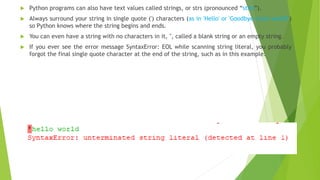
 If you ever see the error message SyntaxError: EOL while scanning string literal, you probably
forgot the final single quote character at the end of the string, such as in this example:
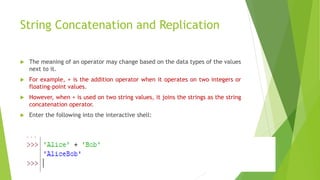
String Concatenation and Replication
 The meaning of an operator may change based on the data types of the values
next to it.
 For example, + is the addition operator when it operates on two integers or
floating-point values.
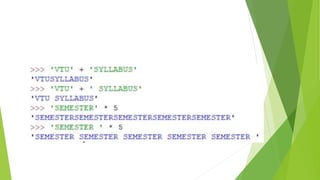
 However, when + is used on two string values, it joins the strings as the string
concatenation operator.
 Enter the following into the interactive shell:
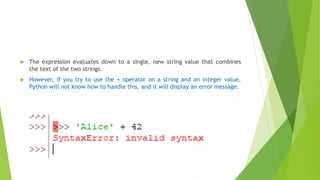
 The expression evaluates down to a single, new string value that combines
the text of the two strings.
 However, if you try to use the + operator on a string and an integer value,
Python will not know how to handle this, and it will display an error message.
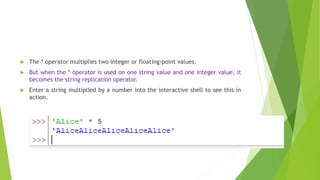
 The * operator multiplies two integer or floating-point values.
 But when the * operator is used on one string value and one integer value, it
becomes the string replication operator.
 Enter a string multiplied by a number into the interactive shell to see this in
action.
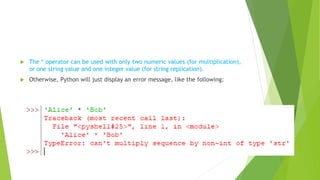
 The * operator can be used with only two numeric values (for multiplication),
or one string value and one integer value (for string replication).
 Otherwise, Python will just display an error message, like the following:
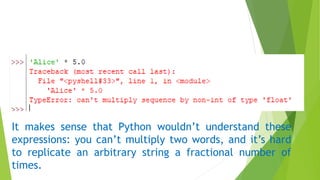
It makes sense that Python wouldn’t understand these
expressions: you can’t multiply two words, and it’s hard
to replicate an arbitrary string a fractional number of
times.
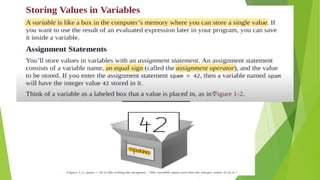
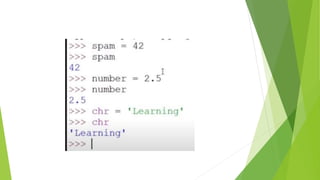
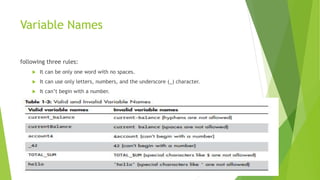
Variable Names
following three rules:
 It can be only one word with no spaces.
 It can use only letters, numbers, and the underscore (_) character.
 It can’t begin with a number.
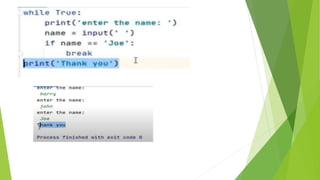
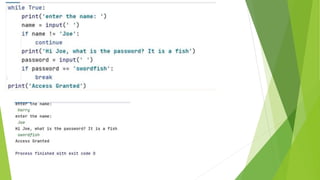
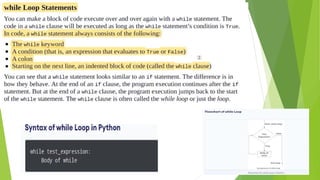
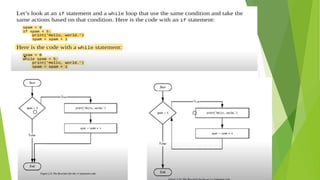
Flow Control
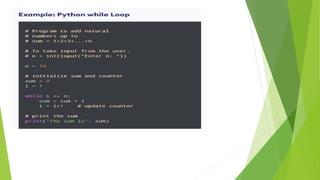
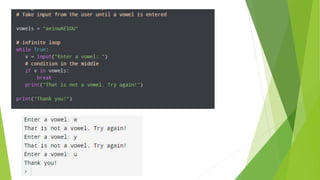
Example
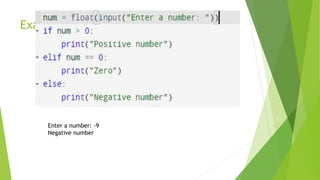
Example:
Enter a number: -9
Negative number
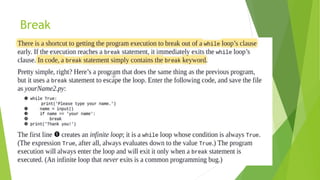
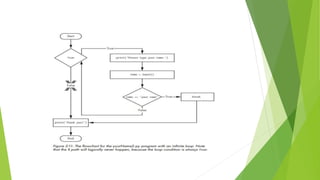
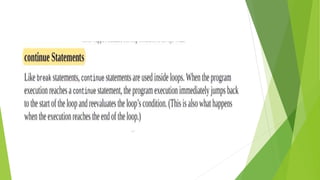
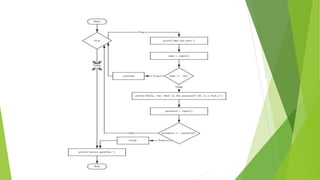
Break
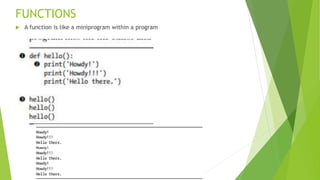
FUNCTIONS
 A function is like a miniprogram within a program
Engineering CS 5th Sem Python Module-1.pptx

Engineering CS 5th Sem Python Module-1.pptx

  • 1.
  • 5.
  • 8.
    Entering Expressions intothe Interactive Shell  You can run the interactive shell by launching the Mu editor, which you should have downloaded when going through the setup instructions in the Preface.  On Windows, open the Start menu, type “Mu,” and open the Mu app.  On macOS, open your Applications folder and double-click Mu. Click the New button and save an empty file as blank.py.  When you run this blank file by clicking the Run button or pressing F5, it will open the interactive shell, which will open as a new pane that opens at the bottom of the Mu editor’s window.  You should see a >>> prompt in the interactive shell.
  • 9.
     Enter 2+ 2 at the prompt to have Python do some simple math.  The Mu window should now look like this  In Python, 2 + 2 is called an expression, which is the most basic kind of programming instruction in the language.  Expressions consist of values (such as 2) and operators (such as +), and they can always evaluate (that is, reduce) down to a single value.  That means you can use expressions anywhere in Python code that you could also use a value.
  • 10.
    ERRORS ARE OKAY! Programswill crash if they contain code the computer can’t understand, which will cause Python to show an error message. An error message won’t break your computer, though, so don’t be afraid to make mistakes. A crash just means the program stopped running unexpectedly.
  • 11.
    You can useplenty of other operators in Python expressions.
  • 13.
    Python will keepevaluating parts of the expression until it becomes a single value, as shown here:
  • 14.
     These rulesfor putting operators and values together to form expressions are a fundamental part of Python as a programming language, just like the grammar rules that help us communicate. Here’s an example:  This is a grammatically correct English sentence.  This grammatically is sentence not English correct a.  The second line is difficult to parse because it doesn’t follow the rules of English.  Similarly, if you enter a bad Python instruction, Python won’t be able to understand it and will display a SyntaxError error message, as shown here:
  • 15.
    The Integer, Floating-Point,and String Data Types  Remember that expressions are just values combined with operators, and they always evaluate down to a single value.  A data type is a category for values, and every value belongs to exactly one data type.  Integers (or int for short) are whole numbers such as 4, 99, and 0.  Floating-point numbers (or floats for short) are fractions or numbers with decimal points like 3.5, 42.1, and 5.0. In Python, 5 is an integer, but 5.0 is a float. These numbers are called values.  Note that even though the value 42 is an integer, the value 42.0 would be a floating-point number.
  • 17.
     Python programscan also have text values called strings, or strs (pronounced “stirs”).  Always surround your string in single quote (') characters (as in 'Hello' or 'Goodbye cruel world!') so Python knows where the string begins and ends.  You can even have a string with no characters in it, '', called a blank string or an empty string.  If you ever see the error message SyntaxError: EOL while scanning string literal, you probably forgot the final single quote character at the end of the string, such as in this example:
  • 18.
    String Concatenation andReplication  The meaning of an operator may change based on the data types of the values next to it.  For example, + is the addition operator when it operates on two integers or floating-point values.  However, when + is used on two string values, it joins the strings as the string concatenation operator.  Enter the following into the interactive shell:
  • 19.
     The expressionevaluates down to a single, new string value that combines the text of the two strings.  However, if you try to use the + operator on a string and an integer value, Python will not know how to handle this, and it will display an error message.
  • 20.
     The *operator multiplies two integer or floating-point values.  But when the * operator is used on one string value and one integer value, it becomes the string replication operator.  Enter a string multiplied by a number into the interactive shell to see this in action.
  • 22.
     The *operator can be used with only two numeric values (for multiplication), or one string value and one integer value (for string replication).  Otherwise, Python will just display an error message, like the following:
  • 23.
    It makes sensethat Python wouldn’t understand these expressions: you can’t multiply two words, and it’s hard to replicate an arbitrary string a fractional number of times.
  • 27.
    Variable Names following threerules:  It can be only one word with no spaces.  It can use only letters, numbers, and the underscore (_) character.  It can’t begin with a number.
  • 47.
  • 51.
  • 56.
    Example: Enter a number:-9 Negative number
  • 58.
  • 87.
    FUNCTIONS  A functionis like a miniprogram within a program