Welcome To  English III
This Open House will cover an overview of the course content. navigating the course. expectations for pace and progress. strategies for success. communicating with your instructor.
Your Instructors!!!! Mrs. Sherrard Mrs. Timmons
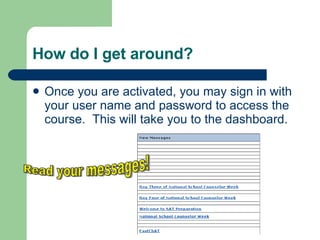
How do I get around? Once you are activated, you may sign in with your user name and password to access the course.  This will take you to the dashboard. Read your messages!
Course Overview Students will spend time at the onset of the course exploring options for a successful future. This course covers non fiction selections, as well as plays, novels, poetry, and short stories. Students will learn to critically examine the literature selections in this course. Vocabulary study is an important segment of each module. All instruction is aligned with the Sunshine State Standards.
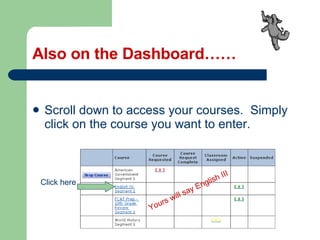
Also on the Dashboard…… Scroll down to access your courses.  Simply click on the course you want to enter. Yours will say English III Click here
Now what? Read the  announcement page. You will see weekly announcements, teacher contact information, schedules, and more. The page changes  weekly. So take a few minutes to check it out.
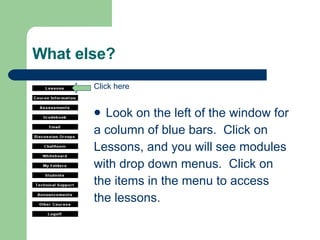
What else? Look on the left of the window for  a column of blue bars.  Click on  Lessons, and you will see modules  with drop down menus.  Click on  the items in the menu to access the lessons. Click here
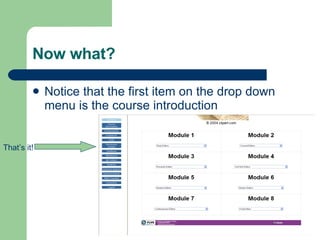
Now what? Notice that the first item on the drop down menu is the course introduction That’s it!
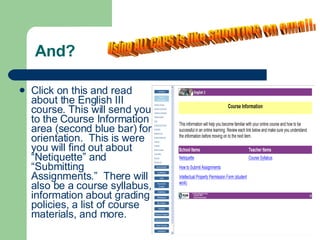
And? Click on this and read about the English III course. This will send you to the Course Information area (second blue bar) for orientation.  This is were you will find out about “Netiquette” and “Submitting Assignments.”  There will also be a course syllabus, information about grading policies, a list of course materials, and more. Using ALL CAPS is like SHOUTING on email.
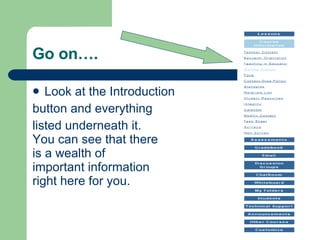
Go on…. Look at the Introduction  button and everything  listed underneath it. You can see that there  is a wealth of  important information right here for you.
Will I be up and running? After you decide on a pace, you will start the lessons in the modules. There will be vocabulary for each Module. There will be a review at the end of each Module. There are a lot of interactive parts for you to experience. Some modules will require discussions and/or oral quizzes, and tests.
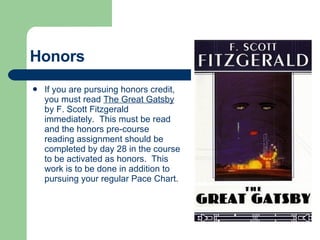
Honors If you are pursuing honors credit, you must read  The Great Gatsby  by F. Scott Fitzgerald immediately.  This must be read and the honors pre-course reading assignment should be completed by day 28 in the course to be activated as honors.  This work is to be done in addition to pursuing your regular Pace Chart.
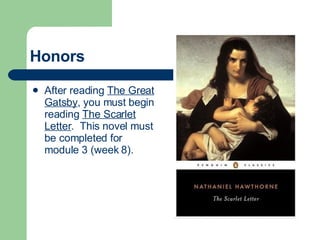
Honors After reading  The Great Gatsby , you must begin reading  The Scarlet Letter .  This novel must be completed for module 3 (week 8).
Regular If you are aiming for regular English III course credit, all materials are available to you within the course.  You will just click and read. Module 1 should be completed by the end of the 28 day grace period. (Segment 2 students - Module 5 should be completed by the end of the 28 day grace period.) For June 4 th  starters, your grace period ends July 1 st !
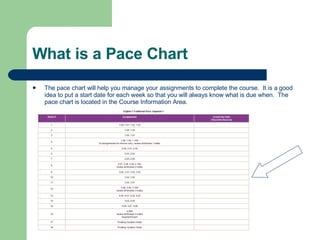
What is a Pace Chart The pace chart will help you manage your assignments to complete the course.  It is a good idea to put a start date for each week so that you will always know what is due when.  The pace chart is located in the Course Information Area.
What do I need to do? After you have read the lesson, you will have an assignment to complete.  Sometimes the assignments are notebook assignments.  These are similar to class work that you might get in a “brick and mortar” school classroom.  It is extremely important to complete these assignments.  Even though you may not submit them for a grade, they will prepare you to complete the assignments that are graded.
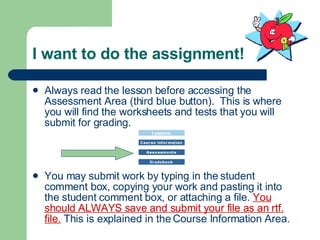
I want to do the assignment! Always read the lesson before accessing the Assessment Area (third blue button).  This is where you will find the worksheets and tests that you will submit for grading. You may submit work by typing in the student comment box, copying your work and pasting it into the student comment box, or attaching a file.  You should ALWAYS save and submit your file as an rtf. file.  This is explained in the Course Information Area.
FLVS Code of Ethics and School policies on academic integrity  Each student signs this integrity code when registering. Submit authentic work, meaning work that is not copied from another student or from another source without giving credit to that source. If a student chooses not to abide by the policies set forth, then consequences  may resul t in removal from the course.
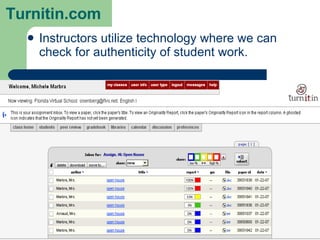
Turnitin.com Instructors utilize technology where we can check for authenticity of student work.
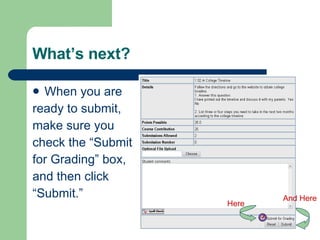
What’s next? When you are  ready to submit,  make sure you  check the “Submit  for Grading” box,  and then click  “Submit.” And Here Here
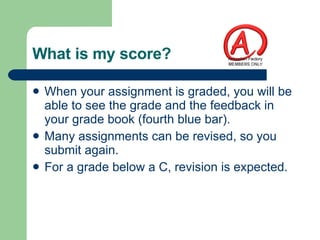
What is my score? When your assignment is graded, you will be able to see the grade and the feedback in your grade book (fourth blue bar). Many assignments can be revised, so you submit again. For a grade below a C, revision is expected.
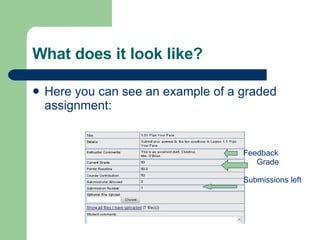
What does it look like? Here you can see an example of a graded assignment: Feedback Grade Submissions left
Please read your email! The email area is the fifth blue bar. You can email your teachers or other students in the course,  but use it only for emailing information relevant to course.   This is a great way to contact your teacher with a problem or a request. Your assignment feedback often comes in your email.
Posting a Discussion To Post a Discussion:  1. Click on the blue bar "Discussion Groups."  2. Click on "Module #."  3. Scroll down and click on "New Message."  4. Type the subject of your discussion in the subject box: ex “Vietnam War" or “Newspaper Reporters."  5. Type your discussion in the box.  6. Make sure you spell check. This may require a double click.  7. Click "submit."  To respond to someone else's discussion:   1. Click on the blue "Discussion Groups" bar.  2. Click on "Module #."  3. Click on one of the subjects posted by one of the students.  4. Scroll down and click on "Reply To This Message."  5. Enter your message in the box.  6. Spell check.  7. Click "Submit."
What else am I required to do? Oral assessments occur periodically during the course.  You should contact your teacher by phone or send an email indicating that you are ready for your oral quiz.  Taking oral assessments is a requirement of the course.  They may not be skipped!
How can I be successful Do assignments in order.  The assignments are sequential. Complete all assignments. This is a “mastery course,” so take advantage of the opportunity to redo some assignments for a higher grade. Stay on pace. Contact your teacher if you need help.  You may call your teacher, or email your teacher to call you.
When will I talk to the instructor? You may call me between 8 a.m. and 8 p.m. If you hear the voice mail, please leave a message.  One of us will get back to you as soon as possible. Or you may send an email requesting a call. You and a parent will receive a call at least once a month.
How will my progress be monitored? You will receive an email each week with a comment on your pace. You will receive a progress report on or before the 15 th  of the every month. Your parents/guardians may also monitor your progress by signing up for a Guardian Account.
What is a Guardian Account? A Guardian Account gives parents access to all areas of the course.  They can access all lessons, assignments, grades, and pace/progress information relevant to their student’s  coursework. To sign up, go to  http://www.flvs.net/students_parents/access_to_student_info.php
The amazing thing is…. Most students are gratified by how much they learn and how dramatically their skills improve by the end of this course.  Have fun and learn!

Eng 3 Open House

  • 1.
    Welcome To English III
  • 2.
    This Open Housewill cover an overview of the course content. navigating the course. expectations for pace and progress. strategies for success. communicating with your instructor.
  • 3.
    Your Instructors!!!! Mrs.Sherrard Mrs. Timmons
  • 4.
    How do Iget around? Once you are activated, you may sign in with your user name and password to access the course. This will take you to the dashboard. Read your messages!
  • 5.
    Course Overview Studentswill spend time at the onset of the course exploring options for a successful future. This course covers non fiction selections, as well as plays, novels, poetry, and short stories. Students will learn to critically examine the literature selections in this course. Vocabulary study is an important segment of each module. All instruction is aligned with the Sunshine State Standards.
  • 6.
    Also on theDashboard…… Scroll down to access your courses. Simply click on the course you want to enter. Yours will say English III Click here
  • 7.
    Now what? Readthe announcement page. You will see weekly announcements, teacher contact information, schedules, and more. The page changes weekly. So take a few minutes to check it out.
  • 8.
    What else? Lookon the left of the window for a column of blue bars. Click on Lessons, and you will see modules with drop down menus. Click on the items in the menu to access the lessons. Click here
  • 9.
    Now what? Noticethat the first item on the drop down menu is the course introduction That’s it!
  • 10.
    And? Click onthis and read about the English III course. This will send you to the Course Information area (second blue bar) for orientation. This is were you will find out about “Netiquette” and “Submitting Assignments.” There will also be a course syllabus, information about grading policies, a list of course materials, and more. Using ALL CAPS is like SHOUTING on email.
  • 11.
    Go on…. Lookat the Introduction button and everything listed underneath it. You can see that there is a wealth of important information right here for you.
  • 12.
    Will I beup and running? After you decide on a pace, you will start the lessons in the modules. There will be vocabulary for each Module. There will be a review at the end of each Module. There are a lot of interactive parts for you to experience. Some modules will require discussions and/or oral quizzes, and tests.
  • 13.
    Honors If youare pursuing honors credit, you must read The Great Gatsby by F. Scott Fitzgerald immediately. This must be read and the honors pre-course reading assignment should be completed by day 28 in the course to be activated as honors. This work is to be done in addition to pursuing your regular Pace Chart.
  • 14.
    Honors After reading The Great Gatsby , you must begin reading The Scarlet Letter . This novel must be completed for module 3 (week 8).
  • 15.
    Regular If youare aiming for regular English III course credit, all materials are available to you within the course. You will just click and read. Module 1 should be completed by the end of the 28 day grace period. (Segment 2 students - Module 5 should be completed by the end of the 28 day grace period.) For June 4 th starters, your grace period ends July 1 st !
  • 16.
    What is aPace Chart The pace chart will help you manage your assignments to complete the course. It is a good idea to put a start date for each week so that you will always know what is due when. The pace chart is located in the Course Information Area.
  • 17.
    What do Ineed to do? After you have read the lesson, you will have an assignment to complete. Sometimes the assignments are notebook assignments. These are similar to class work that you might get in a “brick and mortar” school classroom. It is extremely important to complete these assignments. Even though you may not submit them for a grade, they will prepare you to complete the assignments that are graded.
  • 18.
    I want todo the assignment! Always read the lesson before accessing the Assessment Area (third blue button). This is where you will find the worksheets and tests that you will submit for grading. You may submit work by typing in the student comment box, copying your work and pasting it into the student comment box, or attaching a file. You should ALWAYS save and submit your file as an rtf. file. This is explained in the Course Information Area.
  • 19.
    FLVS Code ofEthics and School policies on academic integrity Each student signs this integrity code when registering. Submit authentic work, meaning work that is not copied from another student or from another source without giving credit to that source. If a student chooses not to abide by the policies set forth, then consequences may resul t in removal from the course.
  • 20.
    Turnitin.com Instructors utilizetechnology where we can check for authenticity of student work.
  • 21.
    What’s next? Whenyou are ready to submit, make sure you check the “Submit for Grading” box, and then click “Submit.” And Here Here
  • 22.
    What is myscore? When your assignment is graded, you will be able to see the grade and the feedback in your grade book (fourth blue bar). Many assignments can be revised, so you submit again. For a grade below a C, revision is expected.
  • 23.
    What does itlook like? Here you can see an example of a graded assignment: Feedback Grade Submissions left
  • 24.
    Please read youremail! The email area is the fifth blue bar. You can email your teachers or other students in the course, but use it only for emailing information relevant to course. This is a great way to contact your teacher with a problem or a request. Your assignment feedback often comes in your email.
  • 25.
    Posting a DiscussionTo Post a Discussion: 1. Click on the blue bar "Discussion Groups." 2. Click on "Module #." 3. Scroll down and click on "New Message." 4. Type the subject of your discussion in the subject box: ex “Vietnam War" or “Newspaper Reporters." 5. Type your discussion in the box. 6. Make sure you spell check. This may require a double click. 7. Click "submit." To respond to someone else's discussion: 1. Click on the blue "Discussion Groups" bar. 2. Click on "Module #." 3. Click on one of the subjects posted by one of the students. 4. Scroll down and click on "Reply To This Message." 5. Enter your message in the box. 6. Spell check. 7. Click "Submit."
  • 26.
    What else amI required to do? Oral assessments occur periodically during the course. You should contact your teacher by phone or send an email indicating that you are ready for your oral quiz. Taking oral assessments is a requirement of the course. They may not be skipped!
  • 27.
    How can Ibe successful Do assignments in order. The assignments are sequential. Complete all assignments. This is a “mastery course,” so take advantage of the opportunity to redo some assignments for a higher grade. Stay on pace. Contact your teacher if you need help. You may call your teacher, or email your teacher to call you.
  • 28.
    When will Italk to the instructor? You may call me between 8 a.m. and 8 p.m. If you hear the voice mail, please leave a message. One of us will get back to you as soon as possible. Or you may send an email requesting a call. You and a parent will receive a call at least once a month.
  • 29.
    How will myprogress be monitored? You will receive an email each week with a comment on your pace. You will receive a progress report on or before the 15 th of the every month. Your parents/guardians may also monitor your progress by signing up for a Guardian Account.
  • 30.
    What is aGuardian Account? A Guardian Account gives parents access to all areas of the course. They can access all lessons, assignments, grades, and pace/progress information relevant to their student’s coursework. To sign up, go to http://www.flvs.net/students_parents/access_to_student_info.php
  • 31.
    The amazing thingis…. Most students are gratified by how much they learn and how dramatically their skills improve by the end of this course. Have fun and learn!