Encrypting E-mail Messages
Introduction
According to case study 2 , All net solutions has a
different offices in several parts of new Zealand ,
they asked for help to create a different types of
email cryptography security options that can be
implemented , what problems this security facing
and best solutions for that and ease of use ,
including packages work with lotus notes ,Pegasus,
Microsoft outlook and Novell GroupWise, rank the
packages according to the criteria :are the easiest to
use and have the most features.
What is Encryption of Email Messages
Sometimes we want additional protection for our
e-mail communication to keep it from unwanted
eyes.
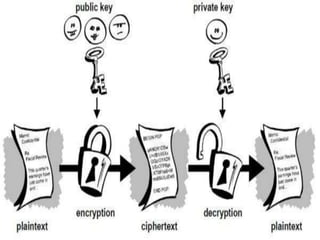
It is the process that protect the privacy of message
by converting it from plaintext(readable) into cipher
text (scrambled).
Only the recipient who has the private key that
matches the public key used to encrypt the
message can decipher the message for reading .
Any recipient without the corresponding private
key would see only garbled (change or alter) text.
Cryptography system used two keys
Public key: known to everyone
Private key :it is the secret key known only to the recipient
of the message.
Example sender wants to send secure message to recipient
,sender use the recipient’s public key to encrypt the message
, then recipient use the private key to decrypt it.
Other high-end encrypted email methods such as:
PGP
S/MIME
PGP
Pretty Good Privacy (PGP) is a data encryption and
decryption computer program that
provides cryptographic privacy and authentication for data
communication.
PGP is often used for signing, encrypting,
and decrypting texts, e-mails, files, directories, and whole
disk partitions and to increase the security of e-mail
communications.
S/MIME
S/MIME (Secure/Multipurpose Internet Mail Extensions) is
a widely accepted method, or more precisely a protocol, for
sending digitally signed and encrypted messages.
S/MIME allows you to encrypt emails and digitally sign
them.
When you use S/MIME with an email message, it helps the
people who receive that message to be certain that what
they see in their inbox is the exact message that started with
the sender.
Encryption email messages facing some challenging or
disadvantages:
Encryption Keys: Without a doubt, data encryption is a monumental
task for an IT specialist. The more data encryption keys there are the
more difficult IT administrative tasks for maintaining all of the keys can
be. If you lose the key to the encryption, you have lost the data
associated with it.
Expense: Data encryption can prove to be quite costly because the
systems that maintain data encryption must have capacity and
upgrades to perform such tasks. Without capable systems, the
reduction of systems operations can be significantly compromised.
 Unrealistic Requirements: If an organization does not understand
some of the restraints imposed by data encryption technology, it is
easy to set unrealistic standards and requirement which could
jeopardize data encryption security.
 Compatibility: Data encryption technology can be tricky when you
are layering it with existing programs and applications. This can
negatively impact routine operations within the system.
Advantages of encryption email messages
 Separation: Data encryption allows the data to remain
separate from the device security where it is stored.
Security is included with the encryption which permits
administrators to store and transmit data via unsecured
means.
 No Data Breaches: Data encryption circumvents the
potential complications that accompany data breaches
which provide ensured protection of intellectual property
and other similar types of data.
 Encryption Is On The Data: Because the encryption is on
the data itself, the data is secure regardless of how it is
transmitted. An exception to the rule can be transmission
tools such as email because sometimes a typical email
account does not provide the necessary security.
 Encryption Equals Confidentiality: A lot of organizations
are required to meet specific confidentiality
requirements and other associated regulations.
Encrypting data means that it can only be read by the
recipient who has the key to opening the data.
Email encryption messages that work with
Lotus notes
Pegasus
Microsoft outlook
Novell Groupwise
Lotus Notes
Security features
Public key infrastructure
 attenuation
 Encryption
Access control levels
Server , database
Document field
Strong reputation
Extremely few vulnerabilities.
Pegasus:
a powerful filtering system, so much so that it is possible to
run a fully automated client-based electronic mailing
list (including processing subscriptions, unsubscriptions
and forwards to moderation) using solely Pegasus Mail;
the ability to automatically select which email address to
send a reply from, based on the mail folder containing the
original received message;
the ability to include custom e-mail header lines (useful for
tracking emails, for example);
the ability to delete attachments without deleting the
message's text body, or to delete the HTML version of a
message while keeping the plain-text version, or vice versa,
saving disk space;
easy access to a message, including all headers, in raw form,
which is difficult or impossible in some other clients;
a "tree view" of the structure of a multipart message with all
its sections and attachments, giving access to view or save any
of the parts separately
support for downloading headers only, then deciding for each
message whether to download, delete, or leave for later
("Selective mail download"). It is possible to download a
message in full without deleting it from the server.
Microsoft outlook:
Outlook includes security features that allow you to send and
receive secure messages over the Internet. To accomplish this,
Outlook incorporates support for the Secure Multi-Purpose
Internet Messaging Extensions (S/MIME) protocol. Using this
standard enables you to send and receive signed or sealed
(encrypted) Internet e-mail.
This article describes how the following information:
 How to get a digital ID for sending secure messages.
 How to back up or copy a digital ID.
 How to move a digital ID to another computer.
 How to send a signed message.
 How to add a digital ID to your Contacts list.
 How to send an encrypted (sealed) message.
 How to sign or encrypt all messages that you send.
Novell GroupWise:
GroupWise is a messaging and collaboration platform
from Novell that supports email, calendaring, personal
information management, instant messaging, and
document management. The GroupWise platform
consists of desktop client software, which is available
for Windows, Mac OS X, and Linux, and the server
software, which is supported on Windows Server and
Linux.
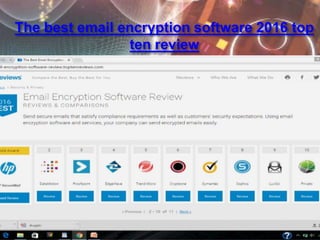
The best email encryption software 2016 top
ten review
As a security level
HP Secure Mail
Pros
:
HP Secure Mail provides compliant email
communications, a wide range of hardware
compatibility and integration with most business
applications. It supports one-click and policy-based
email encryption and includes numerous reporting
options.
Cons
:
If you use Lotus Notes, you have to send inter-office
emails using the Lotus security option. HP Secure Mail
is not compatible with Android Honeycomb.
 Since there are many points both positive and negative to
consider, strategic planning for data encryption within an
organization is the key. Without detailed planning, data
encryption can easily become complex for the IT
administrator to manage and complicated for the end
users.
 organizations should hire professional secure email service
that easily overcomes the challenges of simplicity and
compatibility, offering the best value for your money.

 https://support.office.com/.../Encrypt-e-mail-messa
 searchsecurity.techtarget.com/definition/Pretty-Good-
Privacy
 https://en.wikipedia.org/wiki/S/MIME
 email-encryption-software-review.toptenreviews.com/
Encrypting E-mail Messages

Encrypting E-mail Messages

  • 1.
    Encrypting E-mail Messages Introduction Accordingto case study 2 , All net solutions has a different offices in several parts of new Zealand , they asked for help to create a different types of email cryptography security options that can be implemented , what problems this security facing and best solutions for that and ease of use , including packages work with lotus notes ,Pegasus, Microsoft outlook and Novell GroupWise, rank the packages according to the criteria :are the easiest to use and have the most features.
  • 2.
    What is Encryptionof Email Messages Sometimes we want additional protection for our e-mail communication to keep it from unwanted eyes. It is the process that protect the privacy of message by converting it from plaintext(readable) into cipher text (scrambled). Only the recipient who has the private key that matches the public key used to encrypt the message can decipher the message for reading . Any recipient without the corresponding private key would see only garbled (change or alter) text.
  • 4.
    Cryptography system usedtwo keys Public key: known to everyone Private key :it is the secret key known only to the recipient of the message. Example sender wants to send secure message to recipient ,sender use the recipient’s public key to encrypt the message , then recipient use the private key to decrypt it. Other high-end encrypted email methods such as: PGP S/MIME
  • 5.
    PGP Pretty Good Privacy(PGP) is a data encryption and decryption computer program that provides cryptographic privacy and authentication for data communication. PGP is often used for signing, encrypting, and decrypting texts, e-mails, files, directories, and whole disk partitions and to increase the security of e-mail communications.
  • 7.
    S/MIME S/MIME (Secure/Multipurpose InternetMail Extensions) is a widely accepted method, or more precisely a protocol, for sending digitally signed and encrypted messages. S/MIME allows you to encrypt emails and digitally sign them. When you use S/MIME with an email message, it helps the people who receive that message to be certain that what they see in their inbox is the exact message that started with the sender.
  • 9.
    Encryption email messagesfacing some challenging or disadvantages: Encryption Keys: Without a doubt, data encryption is a monumental task for an IT specialist. The more data encryption keys there are the more difficult IT administrative tasks for maintaining all of the keys can be. If you lose the key to the encryption, you have lost the data associated with it. Expense: Data encryption can prove to be quite costly because the systems that maintain data encryption must have capacity and upgrades to perform such tasks. Without capable systems, the reduction of systems operations can be significantly compromised.
  • 10.
     Unrealistic Requirements:If an organization does not understand some of the restraints imposed by data encryption technology, it is easy to set unrealistic standards and requirement which could jeopardize data encryption security.  Compatibility: Data encryption technology can be tricky when you are layering it with existing programs and applications. This can negatively impact routine operations within the system.
  • 11.
    Advantages of encryptionemail messages  Separation: Data encryption allows the data to remain separate from the device security where it is stored. Security is included with the encryption which permits administrators to store and transmit data via unsecured means.  No Data Breaches: Data encryption circumvents the potential complications that accompany data breaches which provide ensured protection of intellectual property and other similar types of data.
  • 12.
     Encryption IsOn The Data: Because the encryption is on the data itself, the data is secure regardless of how it is transmitted. An exception to the rule can be transmission tools such as email because sometimes a typical email account does not provide the necessary security.  Encryption Equals Confidentiality: A lot of organizations are required to meet specific confidentiality requirements and other associated regulations. Encrypting data means that it can only be read by the recipient who has the key to opening the data.
  • 13.
    Email encryption messagesthat work with Lotus notes Pegasus Microsoft outlook Novell Groupwise
  • 14.
    Lotus Notes Security features Publickey infrastructure  attenuation  Encryption Access control levels Server , database Document field Strong reputation Extremely few vulnerabilities.
  • 15.
    Pegasus: a powerful filteringsystem, so much so that it is possible to run a fully automated client-based electronic mailing list (including processing subscriptions, unsubscriptions and forwards to moderation) using solely Pegasus Mail; the ability to automatically select which email address to send a reply from, based on the mail folder containing the original received message; the ability to include custom e-mail header lines (useful for tracking emails, for example); the ability to delete attachments without deleting the message's text body, or to delete the HTML version of a message while keeping the plain-text version, or vice versa, saving disk space;
  • 16.
    easy access toa message, including all headers, in raw form, which is difficult or impossible in some other clients; a "tree view" of the structure of a multipart message with all its sections and attachments, giving access to view or save any of the parts separately support for downloading headers only, then deciding for each message whether to download, delete, or leave for later ("Selective mail download"). It is possible to download a message in full without deleting it from the server.
  • 17.
    Microsoft outlook: Outlook includessecurity features that allow you to send and receive secure messages over the Internet. To accomplish this, Outlook incorporates support for the Secure Multi-Purpose Internet Messaging Extensions (S/MIME) protocol. Using this standard enables you to send and receive signed or sealed (encrypted) Internet e-mail. This article describes how the following information:  How to get a digital ID for sending secure messages.  How to back up or copy a digital ID.  How to move a digital ID to another computer.  How to send a signed message.  How to add a digital ID to your Contacts list.  How to send an encrypted (sealed) message.  How to sign or encrypt all messages that you send.
  • 18.
    Novell GroupWise: GroupWise isa messaging and collaboration platform from Novell that supports email, calendaring, personal information management, instant messaging, and document management. The GroupWise platform consists of desktop client software, which is available for Windows, Mac OS X, and Linux, and the server software, which is supported on Windows Server and Linux.
  • 19.
    The best emailencryption software 2016 top ten review
  • 20.
  • 21.
    HP Secure Mail Pros : HPSecure Mail provides compliant email communications, a wide range of hardware compatibility and integration with most business applications. It supports one-click and policy-based email encryption and includes numerous reporting options. Cons : If you use Lotus Notes, you have to send inter-office emails using the Lotus security option. HP Secure Mail is not compatible with Android Honeycomb.
  • 22.
     Since thereare many points both positive and negative to consider, strategic planning for data encryption within an organization is the key. Without detailed planning, data encryption can easily become complex for the IT administrator to manage and complicated for the end users.  organizations should hire professional secure email service that easily overcomes the challenges of simplicity and compatibility, offering the best value for your money. 
  • 23.
     https://support.office.com/.../Encrypt-e-mail-messa  searchsecurity.techtarget.com/definition/Pretty-Good- Privacy https://en.wikipedia.org/wiki/S/MIME  email-encryption-software-review.toptenreviews.com/