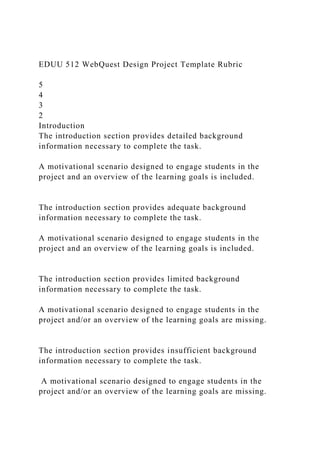
EDUU 512 WebQuest Design Project Template Rubric
5
4
3
2
Introduction
The introduction section provides detailed background
information necessary to complete the task.
A motivational scenario designed to engage students in the
project and an overview of the learning goals is included.
The introduction section provides adequate background
information necessary to complete the task.
A motivational scenario designed to engage students in the
project and an overview of the learning goals is included.
The introduction section provides limited background
information necessary to complete the task.
A motivational scenario designed to engage students in the
project and/or an overview of the learning goals are missing.
The introduction section provides insufficient background
information necessary to complete the task.
A motivational scenario designed to engage students in the
project and/or an overview of the learning goals are missing.
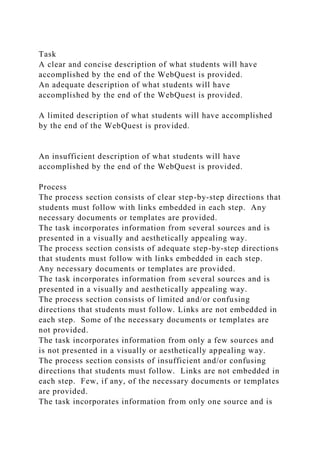
Task
A clear and concise description of what students will have
accomplished by the end of the WebQuest is provided.
An adequate description of what students will have
accomplished by the end of the WebQuest is provided.
A limited description of what students will have accomplished
by the end of the WebQuest is provided.
An insufficient description of what students will have
accomplished by the end of the WebQuest is provided.
Process
The process section consists of clear step-by-step directions that
students must follow with links embedded in each step. Any
necessary documents or templates are provided.
The task incorporates information from several sources and is
presented in a visually and aesthetically appealing way.
The process section consists of adequate step-by-step directions
that students must follow with links embedded in each step.
Any necessary documents or templates are provided.
The task incorporates information from several sources and is
presented in a visually and aesthetically appealing way.
The process section consists of limited and/or confusing
directions that students must follow. Links are not embedded in
each step. Some of the necessary documents or templates are
not provided.
The task incorporates information from only a few sources and
is not presented in a visually or aesthetically appealing way.
The process section consists of insufficient and/or confusing
directions that students must follow. Links are not embedded in
each step. Few, if any, of the necessary documents or templates
are provided.
The task incorporates information from only one source and is
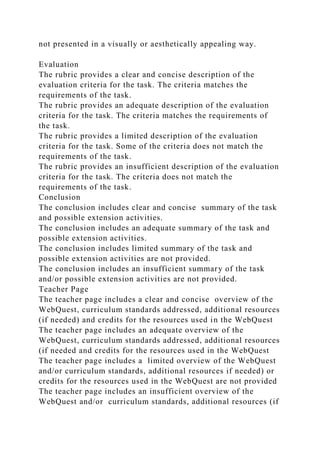
not presented in a visually or aesthetically appealing way.
Evaluation
The rubric provides a clear and concise description of the
evaluation criteria for the task. The criteria matches the
requirements of the task.
The rubric provides an adequate description of the evaluation
criteria for the task. The criteria matches the requirements of
the task.
The rubric provides a limited description of the evaluation
criteria for the task. Some of the criteria does not match the
requirements of the task.
The rubric provides an insufficient description of the evaluation
criteria for the task. The criteria does not match the
requirements of the task.
Conclusion
The conclusion includes clear and concise summary of the task
and possible extension activities.
The conclusion includes an adequate summary of the task and
possible extension activities.
The conclusion includes limited summary of the task and
possible extension activities are not provided.
The conclusion includes an insufficient summary of the task
and/or possible extension activities are not provided.
Teacher Page
The teacher page includes a clear and concise overview of the
WebQuest, curriculum standards addressed, additional resources
(if needed) and credits for the resources used in the WebQuest
The teacher page includes an adequate overview of the
WebQuest, curriculum standards addressed, additional resources
(if needed and credits for the resources used in the WebQuest
The teacher page includes a limited overview of the WebQuest
and/or curriculum standards, additional resources if needed) or
credits for the resources used in the WebQuest are not provided
The teacher page includes an insufficient overview of the
WebQuest and/or curriculum standards, additional resources (if
needed) and credits for the resources used in the WebQuest are
not provided
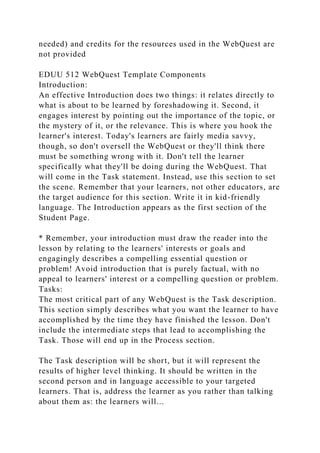
EDUU 512 WebQuest Template Components
Introduction:
An effective Introduction does two things: it relates directly to
what is about to be learned by foreshadowing it. Second, it
engages interest by pointing out the importance of the topic, or
the mystery of it, or the relevance. This is where you hook the
learner's interest. Today's learners are fairly media savvy,
though, so don't oversell the WebQuest or they'll think there
must be something wrong with it. Don't tell the learner
specifically what they'll be doing during the WebQuest. That
will come in the Task statement. Instead, use this section to set
the scene. Remember that your learners, not other educators, are
the target audience for this section. Write it in kid-friendly
language. The Introduction appears as the first section of the
Student Page.
* Remember, your introduction must draw the reader into the
lesson by relating to the learners' interests or goals and
engagingly describes a compelling essential question or
problem! Avoid introduction that is purely factual, with no
appeal to learners' interest or a compelling question or problem.
Tasks:
The most critical part of any WebQuest is the Task description.
This section simply describes what you want the learner to have
accomplished by the time they have finished the lesson. Don't
include the intermediate steps that lead to accomplishing the
Task. Those will end up in the Process section.
The Task description will be short, but it will represent the
results of higher level thinking. It should be written in the
second person and in language accessible to your targeted
learners. That is, address the learner as you rather than talking
about them as: the learners will...
* Remember, the written description of the end/culminating
product must describe clearly the goal of the webquest. Task
should require synthesis of multiple sources of information
(transformative thinking) and it should be highly creative, going
beyond memorization, and engaging. In addition, the task
should be realistic, doable, and appropriate to the
developmental level and other individual differences (age,
social/culture, and individual differences) of students with
whom the webquest will be used.
Process:
The Process section comes closest to looking like a traditional
lesson plan. It spells out step by step what the learners will do,
how they'll interact with you, each other, and with information.
This is where you take advantage of your knowledge of how to
craft collaborative work. Do you assign roles? Do you jigsaw it?
This is where you'll grapple with those questions.
Remember that you are addressing the students directly in this
section since it appears in the Student Page. Use 'you will'
rather than 'the learners will'. The Process is the section that
will take the longest to develop, since it is here that you'll
intersperse relevant online resources for learners to use. Finding
good resources takes time.
There are three phases to the process. In Phase 1, you provide
learners with the information they'll need to perform the task.
You may want to have everyone reading one set of pages, and
then break them into groups with separate roles, each with a
different set of links to look at. In Phase 2 of the Process, the
thinking work takes place. Your students have now examined
the information and now they need to transform it in some way.
Here is where they play with ideas, make decisions, and so on.
In the last Phase of the Process, learners actually produce
something that reflects the thinking they did in Phase 2. They
may be writing a position paper, preparing a debate, creating a
model... the end result was described in the Task section and
might take many forms. Will they need help in producing this
result? You might want to provide some writing prompts or
other forms of guidance to help them act more skilled than they
presently are.
* Remember, if possible, Process page should be divided into
sections or pages where each group/team or student would know
exactly where they were in the process and what to do next.
Every step should be clearly stated. Activities should be clearly
related and designed from basic knowledge to higher level
thinking. Also, ensure that different roles are assigned to help
students understand different perspectives and/or share
responsibility in accomplishing the task.
Evaluation Description:
This section describes the evaluation criteria needed to meet
performance and content standards. Describe to the learners
how their performance will be evaluated. When you assign a 3-
page research report, chances are you have a pretty good idea of
how to grade it. Your learners, too, have probably figured out
what you're looking for. But how do you grade a persuasive
letter to a Senator, a skit portraying civil disobedience, a design
for a new playground, or a poem about global warming? For
your sake and for those you teach, you need to figure out how to
tell great from good from gruesome and communicate that well.
There are many tools available at ZUNAL for evaluating
students' learning. You can create a quiz, rubric, google map
activity, faq, project evaluation report or a game activity. You
can include them all if you want (some tools might require
account upgrade). However, whatever the tools you chose, you
need to explain clearly what the process for the evaluation is.
Use the textbox above to include your evaluation
description/criteria, and add the tools to your webquest
aftwerwards.
* Remember, on this page, criteria for success should be clearly
stated and webquest should apply multiple assessment strategies
(use of rubric or checklist, reflection of project, pre-post
assessments, quiz etc.). There should be strong connection
between the learning goals and standards to be accomplished at
the end of webquest and evaluation process. The evaluation
instrument should clearly measure what students must know and
be able to do to accomplish the task.
Conclusion:
The Conclusion section serves two purposes. First, obviously, it
brings the lesson to a close. Ask the learners to reflect back on
what they learned and about their own process of learning. If
there's a bottom line to the topic, this is a good place to put it.
A second purpose for the conclusion is to look ahead. There
will always be someone in the room whose interest was piqued
by this lesson and is eager to learn more. In developing the
WebQuest you probably found more good links than you had
time to use. This is a good place to put them. In effect you'll be
saying, 'That's all the time we have for this topic, but if you'd
like to pursue it more on your own check these resources out.'
What better way to encourage self-directed lifelong learning?
The Conclusion, logically enough, appears as the last section of
the Student Page, so it should be written in student-friendly
language.
Teacher Page:
This section is not, as you might have thought, the place where
you, teacher, introduce yourself. Instead, this is just a short but
interesting overview aimed at your fellow educators. Just as
with the students, you need to hook the teacher, too, so use this
as a place to express your enthusiasm for what you've put
together for them. In this page, you are expected to list the
curriculum standards your webquest covers, additional
resources if needed, credits for the resources you used in your
webquest and any other information a teacher should now.
Curriculum Standards
What will students learn as a result of this lesson? Describe the
outcomes succinctly. Use the language of existing standards.
For example:
Social Studies Standards Addressed
· Recognize the relationships among the various parts of a
nation's cultural life.
· Learn about the mythology, legends, values and beliefs of a
people.
Remember, common core curriculum standard(s) should be
listed in words, not only numbers, and they should be relevant
and they should be linked back to the standards website.
Most lessons don't just teach a block of content; they also
implicitly teach one or more types of thinking. In addition to
describing learning outcomes within traditional subject areas,
describe what kind of thinking and communications skills were
encouraged by this lesson. Inference-making? Critical thinking?
Creative production? Creative problem-solving? Observation
and categorization? Comparison? Teamwork? Compromise?
Credits
Your WebQuest is probably built on the works of others at least
to some extent. This is the section in which you tip your hat to
them. Were there particular websites, books or people who
helped you line up the content or produce the lesson? Did you
make use of images (with permission) from other sites? Want to
thank the instructor or workshop leader who guided you in your
WebQuest creation? Or cite the class where you learned how to
do it? Mention them here, along with appropriate links so that
others can follow your wisdom back to its roots. NOTE: Don't
include a list a bunch of URLs you used within the WebQuest.
You do not need to list them.
In addition to your fabulous web pages, what else would a
teacher need to implement this WebQuest? A class set of books?
Access to an expert by phone or email? Special software or
other tools?
Other
Teachers need to know how long this WebQuest might take and
different ways to offer it depending on equipment availability,
etc. Use this space to tell them how to pull this off and adapt it
to different circumstances. The more detail you provide, the
more useful this is to other teachers
EDUU 512 WebQuest Assignment Description
You will be creating a WebQuest for a grade level and subject
area of your choosing. You will be using www.zunal.com for
this assignment. Zunal.com makes developing WebQuests easy-
read the notes on their website in each section of the WebQuest
to help guide you! You should explore the website and look at
several examples before starting your own. The WebQuest needs
to be set up to answer a specific question or solve a specific
problem (real or simulated) which aligns with inquiry based
learning. The WebQuest should take a week or less to complete
so do not make the task too complex. The WebQuest must meet
the following criteria:
· involve higher order thinking skills
· involve collaboration between students
· utilize web resources
· be connected to state or national standards
Step 1-Welcome, Introduction, Task (Due Week 5)
1. Create a (free) account at www.zunal.com
2. Decide on a topic or theme for your WebQuest. I recommend
browsing through state standards to help you choose. Select the
grade level and standards that align with your idea.
3. Complete the Welcome tab of the WebQuest on the Zunal
website.
4. Complete the Introduction tab of the WebQuest on the Zunal
website.
5. Begin locating online resources on your topic and decide on a
task or tasks you want your students to accomplish. Complete
the Task tab of the WebQuest on the Zunal Website.
Step 2-Process (Due Week 6)
1. Process is the most detailed portion of the WebQuest. You
will write a detailed set of directions for each step in the
WebQuest process and include links to specific websites/web
resources that apply to each step. Consider how you will include
higher order thinking skills (Bloom’s Taxonomy), collaboration,
and differentiation. Complete the Process tab of the WebQuest
on the Zunal Website.
Step 3- Evaluation, Conclusion, Teacher Page, Final Template
(Due Week 7)
1. Develop a rubric for assessing the final product. Make sure
the rubric delineates specific criteria that the final product must
meet as well as descriptions of the different levels of quality.
Complete the Evaluation tab of the WebQuest on the Zunal
Website.
2. Write a conclusion that summarizes what learners were to
have accomplished and include any extension activities.
Complete the Conclusion tab of the WebQuest on the Zunal
Website.
3. This section includes information for other teacher who may
want to use your WebQuest. It should include content standards
addressed, credits, and other resources that would help a teacher
utilize the Webquest. Complete the Teacher Page tab of the
WebQuest on the Zunal Website.
*For steps 1-2 you will need to copy and paste the information
you are including in your WebQuest onto a Word document in
order to submit for grading. For Week 7 (Step 3) just include a
link in the comments box to your final Webquest for review.
*Academic Integrity- Just a friendly reminder that you must
submit an original WebQuest. While it is fine to get ideas from
the internet and other WebQuests, it is important that most of
the WebQuest is your own work!
Web Quest
Kindergarten Math Lesson
Telling Time
Justin Hedberg
Brandman University
December 1st 2018
Performing a search on the Web Quest database resulted in a
large number of viable lessons. I chose to search for Math
lessons aimed at grades K – 2. I selected a lesson that teaches
children how to tell time. There are many kids out there (and
maybe some adults) who do not know how to read a clock.
They depend on cell phones or digital clocks to tell time. The
students are asked to learn a new song and view some websites
to help them learn what the numbers represent and ultimately
how to tell time. They will be given assignments and a partner
to work with. Once the activity has been mastered, the student
should be able to rebuild a clock.
This lesson spans the length of three days. On the first day, the
students learn a song. Using music helps the student remember
what they are learning using an alternate intelligence from
Gardner’s multiple intelligences. The author also provides two
websites so students can practice at home. The second day, the
teacher uses the internet to show the students another song to
aid them in their retention. This song is called “Hip Hop
Around the Clock”. After listening to the song, the students
practice with the rest of the class. The teacher moves the hour
hand around a clock, and the students sing the corresponding
lyrics. Once the students begin to understand, they view this
tutorial with their partner. Last, the students practice their
newfound knowledge on a worksheet provided by the Web
Quest lesson.
The third day, the students build their own clock using paper
plates, markers, construction paper, fasteners, and scissors.
Next, they set their clocks to a preselected time to display their
comprehension of the lesson. The lesson is evaluated by a three
point rubric. The songs, worksheet, paper plate clock, and
participation are all evaluated. This lesson should meet the
following content standards for California; Number Sense 1.0
and Measurement and Geometry 1.0 – 1.4.
I liked the reinforcement built in to this lesson. It didn’t just
take place one day, with the expectation of complete retention.
Working with the clock over three days would be an optimal
way for the students to hold on to the information. Also, I liked
the use of multiple intelligences. Incorporating a song and an
art project allows the students to be creative, and really
understand the lesson. The only problem I foresee would be the
dependence on internet sites. It’s possible (but not likely) that
the classroom does not have internet access. If that is the case,
the teacher should have a written script of the YouTube videos
just in case. The rubric also seemed a little redundant.
Otherwise this lesson would be a practical lesson I could use.
Reference
Welcome to Zunal.Com. (n.d.). Retrieved from http://zunal.com/
What time is it? Learn to tell time. (n.d.). Retrieved from
http://questgarden.com/146/34/2/120710183028/index.htm

EDUU 512 WebQuest Design Project Template Rubric5432In.docx

  • 1.
    EDUU 512 WebQuestDesign Project Template Rubric 5 4 3 2 Introduction The introduction section provides detailed background information necessary to complete the task. A motivational scenario designed to engage students in the project and an overview of the learning goals is included. The introduction section provides adequate background information necessary to complete the task. A motivational scenario designed to engage students in the project and an overview of the learning goals is included. The introduction section provides limited background information necessary to complete the task. A motivational scenario designed to engage students in the project and/or an overview of the learning goals are missing. The introduction section provides insufficient background information necessary to complete the task. A motivational scenario designed to engage students in the project and/or an overview of the learning goals are missing.
  • 2.
    Task A clear andconcise description of what students will have accomplished by the end of the WebQuest is provided. An adequate description of what students will have accomplished by the end of the WebQuest is provided. A limited description of what students will have accomplished by the end of the WebQuest is provided. An insufficient description of what students will have accomplished by the end of the WebQuest is provided. Process The process section consists of clear step-by-step directions that students must follow with links embedded in each step. Any necessary documents or templates are provided. The task incorporates information from several sources and is presented in a visually and aesthetically appealing way. The process section consists of adequate step-by-step directions that students must follow with links embedded in each step. Any necessary documents or templates are provided. The task incorporates information from several sources and is presented in a visually and aesthetically appealing way. The process section consists of limited and/or confusing directions that students must follow. Links are not embedded in each step. Some of the necessary documents or templates are not provided. The task incorporates information from only a few sources and is not presented in a visually or aesthetically appealing way. The process section consists of insufficient and/or confusing directions that students must follow. Links are not embedded in each step. Few, if any, of the necessary documents or templates are provided. The task incorporates information from only one source and is
  • 3.
    not presented ina visually or aesthetically appealing way. Evaluation The rubric provides a clear and concise description of the evaluation criteria for the task. The criteria matches the requirements of the task. The rubric provides an adequate description of the evaluation criteria for the task. The criteria matches the requirements of the task. The rubric provides a limited description of the evaluation criteria for the task. Some of the criteria does not match the requirements of the task. The rubric provides an insufficient description of the evaluation criteria for the task. The criteria does not match the requirements of the task. Conclusion The conclusion includes clear and concise summary of the task and possible extension activities. The conclusion includes an adequate summary of the task and possible extension activities. The conclusion includes limited summary of the task and possible extension activities are not provided. The conclusion includes an insufficient summary of the task and/or possible extension activities are not provided. Teacher Page The teacher page includes a clear and concise overview of the WebQuest, curriculum standards addressed, additional resources (if needed) and credits for the resources used in the WebQuest The teacher page includes an adequate overview of the WebQuest, curriculum standards addressed, additional resources (if needed and credits for the resources used in the WebQuest The teacher page includes a limited overview of the WebQuest and/or curriculum standards, additional resources if needed) or credits for the resources used in the WebQuest are not provided The teacher page includes an insufficient overview of the WebQuest and/or curriculum standards, additional resources (if
  • 4.
    needed) and creditsfor the resources used in the WebQuest are not provided EDUU 512 WebQuest Template Components Introduction: An effective Introduction does two things: it relates directly to what is about to be learned by foreshadowing it. Second, it engages interest by pointing out the importance of the topic, or the mystery of it, or the relevance. This is where you hook the learner's interest. Today's learners are fairly media savvy, though, so don't oversell the WebQuest or they'll think there must be something wrong with it. Don't tell the learner specifically what they'll be doing during the WebQuest. That will come in the Task statement. Instead, use this section to set the scene. Remember that your learners, not other educators, are the target audience for this section. Write it in kid-friendly language. The Introduction appears as the first section of the Student Page. * Remember, your introduction must draw the reader into the lesson by relating to the learners' interests or goals and engagingly describes a compelling essential question or problem! Avoid introduction that is purely factual, with no appeal to learners' interest or a compelling question or problem. Tasks: The most critical part of any WebQuest is the Task description. This section simply describes what you want the learner to have accomplished by the time they have finished the lesson. Don't include the intermediate steps that lead to accomplishing the Task. Those will end up in the Process section. The Task description will be short, but it will represent the results of higher level thinking. It should be written in the second person and in language accessible to your targeted learners. That is, address the learner as you rather than talking about them as: the learners will...
  • 5.
    * Remember, thewritten description of the end/culminating product must describe clearly the goal of the webquest. Task should require synthesis of multiple sources of information (transformative thinking) and it should be highly creative, going beyond memorization, and engaging. In addition, the task should be realistic, doable, and appropriate to the developmental level and other individual differences (age, social/culture, and individual differences) of students with whom the webquest will be used. Process: The Process section comes closest to looking like a traditional lesson plan. It spells out step by step what the learners will do, how they'll interact with you, each other, and with information. This is where you take advantage of your knowledge of how to craft collaborative work. Do you assign roles? Do you jigsaw it? This is where you'll grapple with those questions. Remember that you are addressing the students directly in this section since it appears in the Student Page. Use 'you will' rather than 'the learners will'. The Process is the section that will take the longest to develop, since it is here that you'll intersperse relevant online resources for learners to use. Finding good resources takes time. There are three phases to the process. In Phase 1, you provide learners with the information they'll need to perform the task. You may want to have everyone reading one set of pages, and then break them into groups with separate roles, each with a different set of links to look at. In Phase 2 of the Process, the thinking work takes place. Your students have now examined the information and now they need to transform it in some way. Here is where they play with ideas, make decisions, and so on. In the last Phase of the Process, learners actually produce something that reflects the thinking they did in Phase 2. They may be writing a position paper, preparing a debate, creating a
  • 6.
    model... the endresult was described in the Task section and might take many forms. Will they need help in producing this result? You might want to provide some writing prompts or other forms of guidance to help them act more skilled than they presently are. * Remember, if possible, Process page should be divided into sections or pages where each group/team or student would know exactly where they were in the process and what to do next. Every step should be clearly stated. Activities should be clearly related and designed from basic knowledge to higher level thinking. Also, ensure that different roles are assigned to help students understand different perspectives and/or share responsibility in accomplishing the task. Evaluation Description: This section describes the evaluation criteria needed to meet performance and content standards. Describe to the learners how their performance will be evaluated. When you assign a 3- page research report, chances are you have a pretty good idea of how to grade it. Your learners, too, have probably figured out what you're looking for. But how do you grade a persuasive letter to a Senator, a skit portraying civil disobedience, a design for a new playground, or a poem about global warming? For your sake and for those you teach, you need to figure out how to tell great from good from gruesome and communicate that well. There are many tools available at ZUNAL for evaluating students' learning. You can create a quiz, rubric, google map activity, faq, project evaluation report or a game activity. You can include them all if you want (some tools might require account upgrade). However, whatever the tools you chose, you need to explain clearly what the process for the evaluation is. Use the textbox above to include your evaluation description/criteria, and add the tools to your webquest aftwerwards.
  • 7.
    * Remember, onthis page, criteria for success should be clearly stated and webquest should apply multiple assessment strategies (use of rubric or checklist, reflection of project, pre-post assessments, quiz etc.). There should be strong connection between the learning goals and standards to be accomplished at the end of webquest and evaluation process. The evaluation instrument should clearly measure what students must know and be able to do to accomplish the task. Conclusion: The Conclusion section serves two purposes. First, obviously, it brings the lesson to a close. Ask the learners to reflect back on what they learned and about their own process of learning. If there's a bottom line to the topic, this is a good place to put it. A second purpose for the conclusion is to look ahead. There will always be someone in the room whose interest was piqued by this lesson and is eager to learn more. In developing the WebQuest you probably found more good links than you had time to use. This is a good place to put them. In effect you'll be saying, 'That's all the time we have for this topic, but if you'd like to pursue it more on your own check these resources out.' What better way to encourage self-directed lifelong learning? The Conclusion, logically enough, appears as the last section of the Student Page, so it should be written in student-friendly language. Teacher Page: This section is not, as you might have thought, the place where you, teacher, introduce yourself. Instead, this is just a short but interesting overview aimed at your fellow educators. Just as with the students, you need to hook the teacher, too, so use this as a place to express your enthusiasm for what you've put together for them. In this page, you are expected to list the curriculum standards your webquest covers, additional resources if needed, credits for the resources you used in your webquest and any other information a teacher should now.
  • 8.
    Curriculum Standards What willstudents learn as a result of this lesson? Describe the outcomes succinctly. Use the language of existing standards. For example: Social Studies Standards Addressed · Recognize the relationships among the various parts of a nation's cultural life. · Learn about the mythology, legends, values and beliefs of a people. Remember, common core curriculum standard(s) should be listed in words, not only numbers, and they should be relevant and they should be linked back to the standards website. Most lessons don't just teach a block of content; they also implicitly teach one or more types of thinking. In addition to describing learning outcomes within traditional subject areas, describe what kind of thinking and communications skills were encouraged by this lesson. Inference-making? Critical thinking? Creative production? Creative problem-solving? Observation and categorization? Comparison? Teamwork? Compromise? Credits Your WebQuest is probably built on the works of others at least to some extent. This is the section in which you tip your hat to them. Were there particular websites, books or people who helped you line up the content or produce the lesson? Did you make use of images (with permission) from other sites? Want to thank the instructor or workshop leader who guided you in your WebQuest creation? Or cite the class where you learned how to do it? Mention them here, along with appropriate links so that others can follow your wisdom back to its roots. NOTE: Don't include a list a bunch of URLs you used within the WebQuest. You do not need to list them. In addition to your fabulous web pages, what else would a teacher need to implement this WebQuest? A class set of books? Access to an expert by phone or email? Special software or
  • 9.
    other tools? Other Teachers needto know how long this WebQuest might take and different ways to offer it depending on equipment availability, etc. Use this space to tell them how to pull this off and adapt it to different circumstances. The more detail you provide, the more useful this is to other teachers EDUU 512 WebQuest Assignment Description You will be creating a WebQuest for a grade level and subject area of your choosing. You will be using www.zunal.com for this assignment. Zunal.com makes developing WebQuests easy- read the notes on their website in each section of the WebQuest to help guide you! You should explore the website and look at several examples before starting your own. The WebQuest needs to be set up to answer a specific question or solve a specific problem (real or simulated) which aligns with inquiry based learning. The WebQuest should take a week or less to complete so do not make the task too complex. The WebQuest must meet the following criteria: · involve higher order thinking skills · involve collaboration between students · utilize web resources · be connected to state or national standards Step 1-Welcome, Introduction, Task (Due Week 5) 1. Create a (free) account at www.zunal.com 2. Decide on a topic or theme for your WebQuest. I recommend browsing through state standards to help you choose. Select the grade level and standards that align with your idea. 3. Complete the Welcome tab of the WebQuest on the Zunal
  • 10.
    website. 4. Complete theIntroduction tab of the WebQuest on the Zunal website. 5. Begin locating online resources on your topic and decide on a task or tasks you want your students to accomplish. Complete the Task tab of the WebQuest on the Zunal Website. Step 2-Process (Due Week 6) 1. Process is the most detailed portion of the WebQuest. You will write a detailed set of directions for each step in the WebQuest process and include links to specific websites/web resources that apply to each step. Consider how you will include higher order thinking skills (Bloom’s Taxonomy), collaboration, and differentiation. Complete the Process tab of the WebQuest on the Zunal Website. Step 3- Evaluation, Conclusion, Teacher Page, Final Template (Due Week 7) 1. Develop a rubric for assessing the final product. Make sure the rubric delineates specific criteria that the final product must meet as well as descriptions of the different levels of quality. Complete the Evaluation tab of the WebQuest on the Zunal Website. 2. Write a conclusion that summarizes what learners were to have accomplished and include any extension activities. Complete the Conclusion tab of the WebQuest on the Zunal Website. 3. This section includes information for other teacher who may want to use your WebQuest. It should include content standards addressed, credits, and other resources that would help a teacher utilize the Webquest. Complete the Teacher Page tab of the WebQuest on the Zunal Website. *For steps 1-2 you will need to copy and paste the information you are including in your WebQuest onto a Word document in order to submit for grading. For Week 7 (Step 3) just include a link in the comments box to your final Webquest for review. *Academic Integrity- Just a friendly reminder that you must
  • 11.
    submit an originalWebQuest. While it is fine to get ideas from the internet and other WebQuests, it is important that most of the WebQuest is your own work! Web Quest Kindergarten Math Lesson Telling Time Justin Hedberg Brandman University December 1st 2018 Performing a search on the Web Quest database resulted in a large number of viable lessons. I chose to search for Math lessons aimed at grades K – 2. I selected a lesson that teaches children how to tell time. There are many kids out there (and maybe some adults) who do not know how to read a clock. They depend on cell phones or digital clocks to tell time. The students are asked to learn a new song and view some websites to help them learn what the numbers represent and ultimately how to tell time. They will be given assignments and a partner to work with. Once the activity has been mastered, the student should be able to rebuild a clock. This lesson spans the length of three days. On the first day, the students learn a song. Using music helps the student remember what they are learning using an alternate intelligence from Gardner’s multiple intelligences. The author also provides two websites so students can practice at home. The second day, the teacher uses the internet to show the students another song to aid them in their retention. This song is called “Hip Hop
  • 12.
    Around the Clock”.After listening to the song, the students practice with the rest of the class. The teacher moves the hour hand around a clock, and the students sing the corresponding lyrics. Once the students begin to understand, they view this tutorial with their partner. Last, the students practice their newfound knowledge on a worksheet provided by the Web Quest lesson. The third day, the students build their own clock using paper plates, markers, construction paper, fasteners, and scissors. Next, they set their clocks to a preselected time to display their comprehension of the lesson. The lesson is evaluated by a three point rubric. The songs, worksheet, paper plate clock, and participation are all evaluated. This lesson should meet the following content standards for California; Number Sense 1.0 and Measurement and Geometry 1.0 – 1.4. I liked the reinforcement built in to this lesson. It didn’t just take place one day, with the expectation of complete retention. Working with the clock over three days would be an optimal way for the students to hold on to the information. Also, I liked the use of multiple intelligences. Incorporating a song and an art project allows the students to be creative, and really understand the lesson. The only problem I foresee would be the dependence on internet sites. It’s possible (but not likely) that the classroom does not have internet access. If that is the case, the teacher should have a written script of the YouTube videos just in case. The rubric also seemed a little redundant. Otherwise this lesson would be a practical lesson I could use. Reference Welcome to Zunal.Com. (n.d.). Retrieved from http://zunal.com/ What time is it? Learn to tell time. (n.d.). Retrieved from
  • 13.