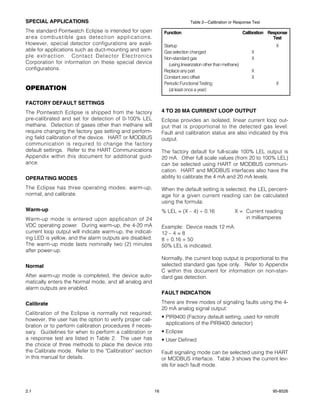
DET-TRONICS
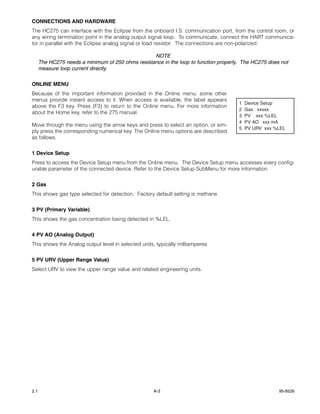
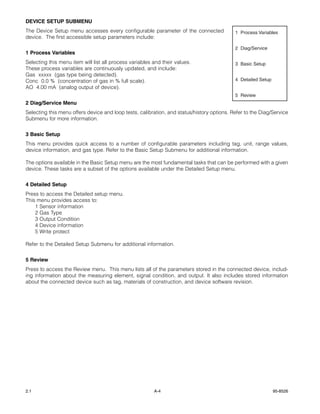
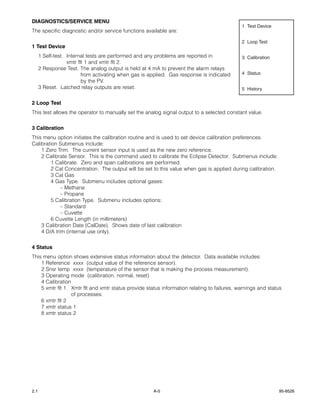
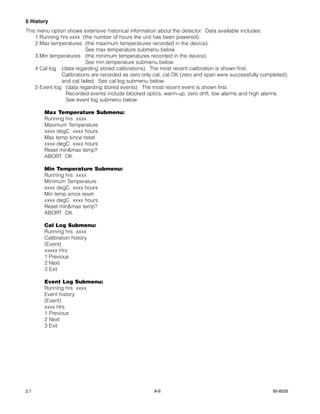
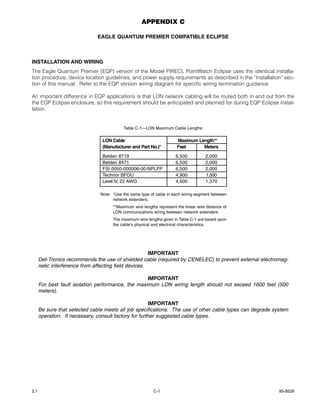
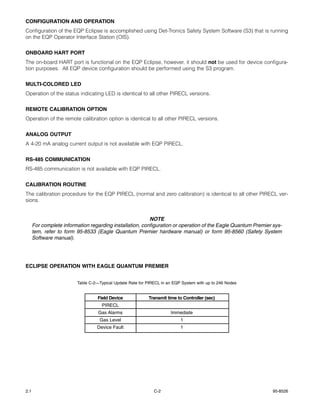
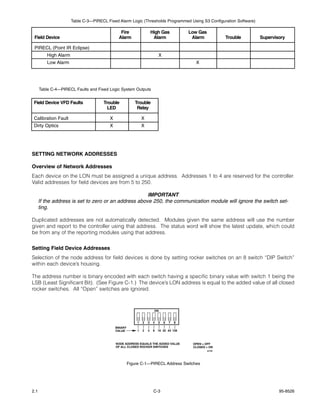
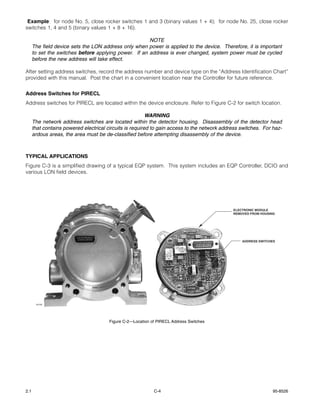
                                               ®
                                                                                       INSTRUCTIONS


                                                          Infrared Hydrocarbon Gas Detector
                                                                                 PointWatch Eclipse™
                                                                                             Model PIRECL


                         IMPORTANT
      Be sure to read and understand the entire
      instruction manual before installing or operating
      the gas detection system. This product is intend-
      ed to provide early warning of the presence of a
      flammable or explosive gas mixture. Proper
      device installation, operation, and maintenance
      is required to ensure safe and effective opera-
      tion.


APPLICATION
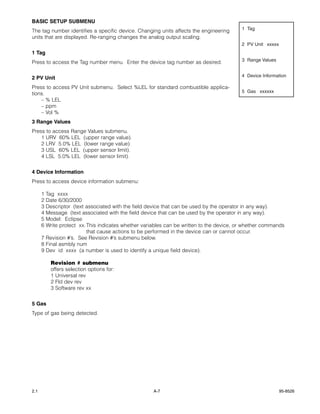
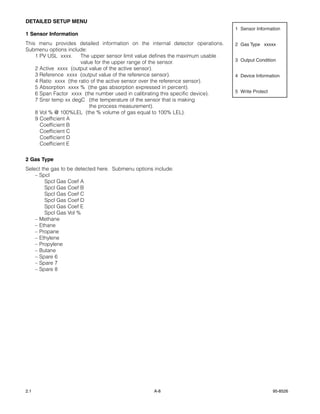
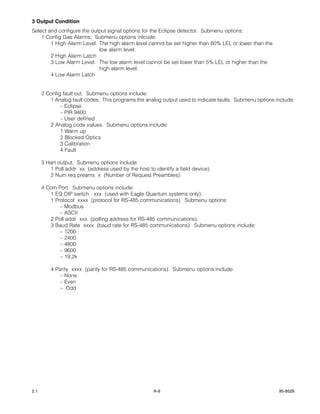
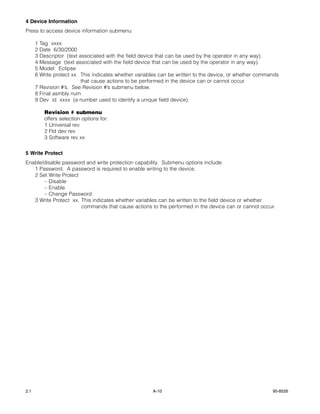
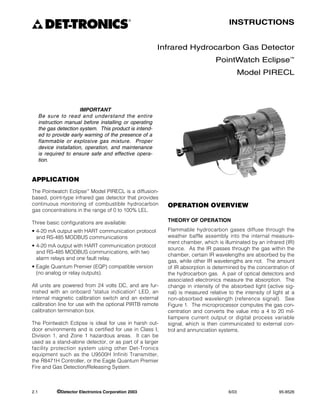
The Pointwatch Eclipse™ Model PIRECL is a diffusion-
based, point-type infrared gas detector that provides
continuous monitoring of combustible hydrocarbon            OPERATION OVERVIEW
gas concentrations in the range of 0 to 100% LEL.

Three basic configurations are available:                   THEORY OF OPERATION

• 4-20 mA output with HART communication protocol           Flammable hydrocarbon gases diffuse through the
  and RS-485 MODBUS communications                          weather baffle assembly into the internal measure-
                                                            ment chamber, which is illuminated by an infrared (IR)
• 4-20 mA output with HART communication protocol
                                                            source. As the IR passes through the gas within the
  and RS-485 MODBUS communications, with two
                                                            chamber, certain IR wavelengths are absorbed by the
  alarm relays and one fault relay.
                                                            gas, while other IR wavelengths are not. The amount
• Eagle Quantum Premier (EQP) compatible version            of IR absorption is determined by the concentration of
  (no analog or relay outputs).                             the hydrocarbon gas. A pair of optical detectors and
                                                            associated electronics measure the absorption. The
All units are powered from 24 volts DC, and are fur-        change in intensity of the absorbed light (active sig-
nished with an onboard "status indication" LED, an          nal) is measured relative to the intensity of light at a
internal magnetic calibration switch and an external        non-absorbed wavelength (reference signal). See
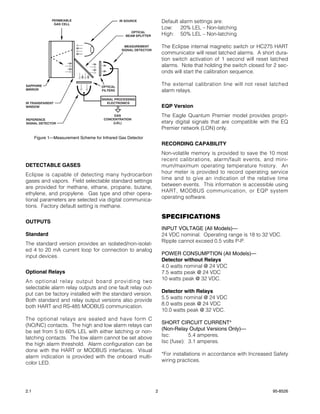
calibration line for use with the optional PIRTB remote     Figure 1. The microprocessor computes the gas con-
calibration termination box.                                centration and converts the value into a 4 to 20 mil-
                                                            liampere current output or digital process variable
The Pointwatch Eclipse is ideal for use in harsh out-       signal, which is then communicated to external con-
door environments and is certified for use in Class I,      trol and annunciation systems.
Division 1, and Zone 1 hazardous areas. It can be
used as a stand-alone detector, or as part of a larger
facility protection system using other Det-Tronics
equipment such as the U9500H Infiniti Transmitter,
the R8471H Controller, or the Eagle Quantum Premier
Fire and Gas Detection/Releasing System.


2.1           ©Detector Electronics Corporation 2003                                  6/03                   95-8526
PERMEABLE
               GAS CELL
                                                IR SOURCE              Default alarm settings are:
                                                                       Low: 20% LEL – Non-latching
                                                      OPTICAL
                                                   BEAM SPLITTER       High: 50% LEL – Non-latching

                                                   MEASUREMENT         The Eclipse internal magnetic switch or HC275 HART
                                                 SIGNAL DETECTOR
                                                                       communicator will reset latched alarms. A short dura-
                                                                       tion switch activation of 1 second will reset latched
                                                                       alarms. Note that holding the switch closed for 2 sec-
                                                                       onds will start the calibration sequence.

SAPPHIRE                              OPTICAL
                                                                       The external calibration line will not reset latched
MIRROR                                FILTERS                          alarm relays.
                                      SIGNAL PROCESSING
IR TRANSPARENT                           ELECTRONICS
WINDOW                                                                 EQP Version
                                            GAS                        The Eagle Quantum Premier model provides propri-
REFERENCE                              CONCENTRATION
SIGNAL DETECTOR                            (LEL)                       etary digital signals that are compatible with the EQ
                                                                       Premier network (LON) only.
      Figure 1—Measurement Scheme for Infrared Gas Detector
                                                                       RECORDING CAPABILITY
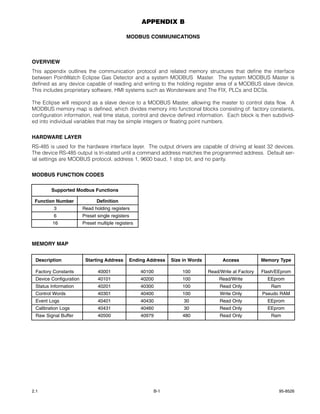
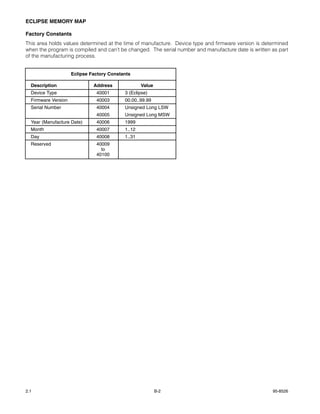
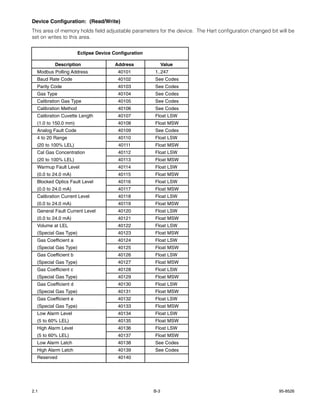
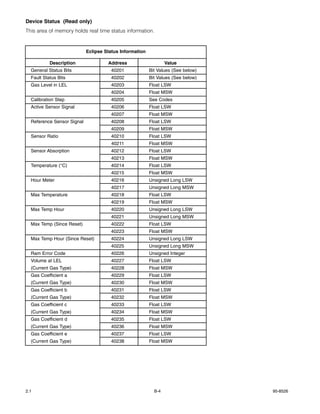
                                                                       Non-volatile memory is provided to save the 10 most
                                                                       recent calibrations, alarm/fault events, and mini-
DETECTABLE GASES                                                       mum/maximum operating temperature history. An
                                                                       hour meter is provided to record operating service
Eclipse is capable of detecting many hydrocarbon
                                                                       time and to give an indication of the relative time
gases and vapors. Field selectable standard settings
                                                                       between events. This information is accessible using
are provided for methane, ethane, propane, butane,
                                                                       HART, MODBUS communication, or EQP system
ethylene, and propylene. Gas type and other opera-
                                                                       operating software.
tional parameters are selected via digital communica-
tions. Factory default setting is methane.

                                                                       SPECIFICATIONS
OUTPUTS
                                                                       INPUT VOLTAGE (All Models)—
Standard                                                               24 VDC nominal. Operating range is 18 to 32 VDC.
                                                                       Ripple cannot exceed 0.5 volts P-P.
The standard version provides an isolated/non-isolat-
ed 4 to 20 mA current loop for connection to analog
                                                                       POWER CONSUMPTION (All Models)—
input devices.
                                                                       Detector without Relays
                                                                       4.0 watts nominal @ 24 VDC
Optional Relays                                                        7.5 watts peak @ 24 VDC
                                                                       10 watts peak @ 32 VDC.
An optional relay output board providing two
selectable alarm relay outputs and one fault relay out-
                                                                       Detector with Relays
put can be factory installed with the standard version.
                                                                       5.5 watts nominal @ 24 VDC
Both standard and relay output versions also provide
                                                                       8.0 watts peak @ 24 VDC
both HART and RS-485 MODBUS communication.
                                                                       10.0 watts peak @ 32 VDC.
The optional relays are sealed and have form C
                                                                       SHORT CIRCUIT CURRENT*
(NO/NC) contacts. The high and low alarm relays can
                                                                       (Non-Relay Output Versions Only)—
be set from 5 to 60% LEL with either latching or non-
                                                                       Isc:        5.4 amperes.
latching contacts. The low alarm cannot be set above
                                                                       Isc (fuse): 3.1 amperes.
the high alarm threshold. Alarm configuration can be
done with the HART or MODBUS interfaces. Visual
                                                                       *For installations in accordance with Increased Safety
alarm indication is provided with the onboard multi-
                                                                       wiring practices.
color LED.


2.1                                                                2                                                  95-8526
WARMUP TIME (All Models)—                                    DEVICE CONFIGURATION—
Two minutes from cold power-up to normal mode;               Configuration parameters include gas type, measure-
1 hour minimum recommended.                                  ment range, alarm setpoints, gas signal processing
                                                             algorithm, device tag number, and other selectable
CURRENT OUTPUT (Standard Models Only)—                       parameters. Three configuration methods are avail-
Linear 4 to 20 mA (current source/sink, isolated/non-        able:
isolated) rated at 600 ohms maximum loop resistance          – HART
@ 24 VDC operating voltage.
                                                             – MODBUS
VISUAL STATUS INDICATOR (All Models)—                        – EQP System Operating Software.
Tri-color LED:
   Red =     alarm                                           CALIBRATION—
   Green = power on / OK                                     All units are methane-calibrated at the factory. Field
   Yellow = fault.                                           calibration is not required for methane detection
                                                             applications.
ALARM SETPOINT RANGE (All Models)—
Low Alarm: 5 to 60% LEL                                      Device configuration and field calibration are required
High Alarm: 5 to 60% LEL.                                    for detection of vapors other than methane. Refer to
                                                             the “Calibration” section of this manual for details.
Alarm setpoint is programmable using HART or MOD-
BUS communications, or EQP software.                         Four calibration methods are available:
                                                               - HART
RELAYS (Optional)—                                             - MODBUS
(Available on Ex d approved model only, not available          - On-Board magnetic reed switch
on Eagle Premier model).                                       - Remote calibration line for remote switch.

Provides two programmable alarm relays and one               RESPONSE TIME (Seconds)—
general fault relay. HART or MODBUS communica-               Without Hydrophobic Filter: T90 ≤ 9 sec.
tion is required for programming alarm relay setpoints       With Hydrophobic Filter:    T90 ≤ 12 sec.
and operation. Relay contacts rated 5 amperes at 30          Note: Add 1 second to response time for EQP model.
VDC.
                                                             TEMPERATURE RANGE—
Alarm relays are de-energized, and energize on an            Operating: –40°C to +75°C (–40°F to +167°F).
alarm condition. The fault relay is energized when no        Storage:   –55°C to +85°C (–67°F to +185°F).
fault exists, and de-energizes on a fault condition.
                                                             HUMIDITY—
DIGITAL OUTPUT (Optional)—                                   Unaffected by relative humidity (Det-Tronics verified)
Digital communication, transformer isolated (78.5            5 to 95% relative humidity (FM/CSA/DEMKO verified).
kbps).
                                                             ACCURACY—
                            NOTE                             ±3% from 0 to 50% LEL, ±5% from 51 to 100% LEL.
      Low and high alarm setpoints may be of latching
      or non-latching type via configuration software.       SELF-DIAGNOSTIC TEST—
                                                             Fail-Safe operation ensured by performing all critical
DETECTION RANGE—                                             tests once per second.
0 to 100% LEL standard. Other ranges are config-
urable (down to 20% full scale).                             INGRESS PROTECTION—
                                                             IP66 (DEMKO Verified).
DETECTABLE GASES—
Most flammable hydrocarbon vapors are detectable.            ELECTRO-MAGNETIC COMPATIBILITY—
Standard gases include methane, ethane, ethylene,            EN50081-1 (Emissions – Light Industrial),
propane, butane and propylene. Detection of non-             EN50082-1 (Immunity – Light Industrial),
standard gases is configurable using HART or MOD-            EN50082-2 (Immunity – Heavy Industrial),
BUS communication.                                           EN50270. (Emissions & Immunity for Gas Detectors).
                                                             (ETL verified).
                                                             Operates properly with 5 watt walkie talkie keyed at 1
                                                             meter.


2.1                                                      3                                                     95-8526
DETECTOR HOUSING MATERIAL—                                                  -- OR --
CF8M stainless steel (castable 316 equivalent).                                0539      II 2 G
                                                                            EEx d [ib] IIC T4-T5
CONDUIT ENTRY OPTIONS—                                                      DEMKO 01 ATEX 129485X.
Two entries, 3/4 inch NPT or 25 mm.                                         T5 (Tamb –40°C to +40°C)
                                                                            T4 (Tamb –40°C to +75°C)
HART COMMUNICATION PORT—                                                    IP66.
Explosion-proof (FM/CSA)
Intrinsically safe (CENELEC/CE).                               Special Conditions for Safe Use (‘X’):
                                                               • The following warning is on the product:
OPTICS PROTECTION—
Three-layer weather baffle assembly is Polythalimide            Warning: Do not open when an explosive gas atmo-
plastic, UV-resistant, static dissipating black.                sphere may be present.
Optional internal hydrophobic filter is recommended             For ambient temperature above 60°C use field
for areas with high levels of airborne particulates or          wiring suitable for maximum ambient temperature.
humidity.                                                       For temperature below –10°C use suitable field
                                                                wiring for the lowest temperature.
WIRING—                                                        • Cable, bushings and the conduit entries shall be of
Field wiring screw terminals are UL/CSA rated for up             a type already certified according to relevant CEN-
to 14 AWG wire, and are DIN/VDE rated for 2.5 mm2                ELEC standard, so the protection principle
wire. Screw terminal required torque range is 3.5–4.4            employed will not be impaired.
in.-lbs. (0.4-0.5 N·m).
                                                               • Blanking elements shall be used for closing unused
ELECTRICAL SAFETY CLASSIFICATION—                                holes and they shall be certified to the protection
Installation Category (Overvoltage Category) II                  principle employed. The blanking elements or the
& Pollution Degree 2 per ANSI/ISA-S82.02.01,                     device may only be removed with the aid of a tool.
EN 61010-1 & IEC 61010-1.                                      • The field wiring connections are terminals certified
                                                                 for increased safety according to the CENELEC
CERTIFICATIONS—                                                  standard EN50019 and is certified for a single wire
FM & CSA: Class I, Div. 1, Groups C & D (T4).                    in size from 0.2 to 2.5 mm2, (two conductors with
          Class I, Div. 2, Groups A, B, C & D (T4).              same cross section 02. to 0.75 mm2). The torque
          Performance verified.                                  0.4 to 0.5 Nm.
                                                               • The Eclipse metal housing must be electrically con-
                           NOTE                                  nected to earth ground.
      Approval of the Model PIRECL does not include
      or imply approval of the apparatus to which the          • The temperature code is linked to the ambient tem-
      detector may be connected and which processes              perature as the following:
      the electronic signal for eventual end use.               Code T5 for use in Tamb from –40°C to +50°C
                                                                Code T4 for use in Tamb from –40°C to +75°C
                           NOTE
      This Approval does not include or imply Approval         • The terminal compartment for Eclipse without relays
      of the communications protocol or functions pro-           is designed for either an increased safety “e” termi-
      vided by the software of this instrument or of the         nation or a flameproof “d” termination of the supply
      communications apparatus or software connect-              cable. If a flameproof connection is chosen, then a
      ed to this instrument.                                     CENELEC certified cable entry device certified to
                                                                 EN50018 must be used. The Eclipse with relays
CENELEC:            0539     II 2 G                              requires Ex d cable entry devices only.
                 EEx de [ib] IIC T4-T5
                 DEMKO 01 ATEX 129485X.
                 (Performance verified.)
                 T5 (Tamb –40°C to +40°C)
                 T4 (Tamb –40°C to +75°C)
                 IP66.


2.1                                                        4                                                    95-8526
CE:              Conforms to:                                            IMPORTANT SAFETY NOTES
                   Low Voltage Directive: 73/23/EEC,
                   EMC Directive: 89/336/EEC,
                   ATEX Directive: 94/9/EC.                                                    CAUTION
                                                                          The wiring procedures in this manual are intend-
                          WARNING                                         ed to ensure proper functioning of the device
      Always ensure that the detector/junction box                        under normal conditions. However, because of
      hazardous (classified) location ratings are appli-                  the many variations in wiring codes and regula-
      cable for the intended use.                                         tions, total compliance to these ordinances can-
                                                                          not be guaranteed. Be certain that all wiring
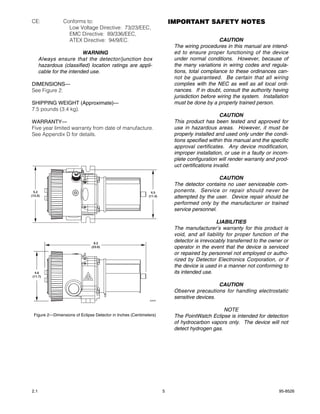
DIMENSIONS—                                                               complies with the NEC as well as all local ordi-
See Figure 2.                                                             nances. If in doubt, consult the authority having
                                                                          jurisdiction before wiring the system. Installation
SHIPPING WEIGHT (Approximate)—                                            must be done by a properly trained person.
7.5 pounds (3.4 kg).
                                                                                                CAUTION
WARRANTY—                                                                 This product has been tested and approved for
Five year limited warranty from date of manufacture.                      use in hazardous areas. However, it must be
See Appendix D for details.                                               properly installed and used only under the condi-
                                                                          tions specified within this manual and the specific
                                                                          approval certificates. Any device modification,
                                                                          improper installation, or use in a faulty or incom-
                                                                          plete configuration will render warranty and prod-
                                                                          uct certifications invalid.

                                                                                             CAUTION
                                                                          The detector contains no user serviceable com-
  5.2                                                         4.5         ponents. Service or repair should never be
(13.2)                                                      (11.4)        attempted by the user. Device repair should be
                                                                          performed only by the manufacturer or trained
                                                                          service personnel.

                                                                                             LIABILITIES
                                                                          The manufacturer’s warranty for this product is
                                                                          void, and all liability for proper function of the
                                9.3
                                                                          detector is irrevocably transferred to the owner or
                              (23.6)                                      operator in the event that the device is serviced
                                                                          or repaired by personnel not employed or autho-
                                                                          rized by Detector Electronics Corporation, or if
                                                                          the device is used in a manner not conforming to
  4.6                                                                     its intended use.
(11.7)

                                                                                             CAUTION
                                                                          Observe precautions for handling electrostatic
                                                                          sensitive devices.
                                                            A2055


                                                                                               NOTE
 Figure 2—Dimensions of Eclipse Detector in Inches (Centimeters)          The PointWatch Eclipse is intended for detection
                                                                          of hydrocarbon vapors only. The device will not
                                                                          detect hydrogen gas.


2.1                                                                  5                                                  95-8526
INSTALLATION                                                     Final suitability of possible gas detector locations
                                                                 should be verified by a job site survey. Gas detector
Before installing the Pointwatch Eclipse, define the             area of coverage is a subjective evaluation, and may
following application details:                                   require long-term empirical data to confirm effective-
                                                                 ness. A typical rule of thumb is that one detector can
                                                                 cover a 900 square foot area. However, this rule of
IDENTIFICATION OF FLAMMABLE VAPOR(S) TO
                                                                 thumb is subject to change depending upon specific
BE DETECTED
                                                                 application properties and requirements.
It is necessary to always identify the flammable
vapor(s) of interest at the job site in order to deter-                                   NOTE
mine the proper calibration gas setting for Pointwatch             For additional information on determining the
Eclipse. In addition, the fire hazard properties of the            quantity and placement of gas detectors in a
vapor, such as vapor density, flashpoint, and vapor                specific application, refer to the article titled "The
pressure should be identified and used to assist in                Use of Combustible Detectors in Protecting
selecting the optimum detector mounting location                   Facilities from Flammable Hazards" contained in
within the area.                                                   the Instrumentation, Systems and Automation
                                                                   Society (ISA) Transaction, Volume 20, Number
The detector must be installed per local installation              2.
practices. For IEC/CENELEC hazardous areas, it may
be acceptable to utilize EEx e wiring practices with
                                                                 PHYSICAL INSTALLATION REQUIREMENTS
the Eclipse (non-relay versions).
                                                                 Pointwatch Eclipse is provided with built-in mounting
                                                                 feet that will accept 3/8 inch (M8) diameter mounting
IDENTIFICATION OF DETECTOR MOUNTING
                                                                 bolts. Always ensure that the mounting surface is
LOCATIONS
                                                                 vibration-free and can suitably support the total
Identification of the most likely leak sources and leak          weight of the Pointwatch Eclipse without assistance
accumulation areas is typically the first step in identi-        from electrical cabling or conduit system.
fying the best detector mounting locations. In addi-
tion, identification of air current / wind patterns within       The detector must be installed per local installation
the protected area is useful in predicting gas leak dis-         practices. For IEC/CENELEC hazardous areas, it may
persion behavior. This information should be used to             be acceptable to utilize EEx e wiring practices with
identify optimum sensor installation points.                     the Eclipse.

If the vapor of interest is lighter than air, place the
                                                                 Device Mounting Orientation
sensor above the potential gas leak. Place the sensor
close to the floor for gases that are heavier than air.          Pointwatch Eclipse is not position-sensitive in terms of
For heavy vapors, typically locate Pointwatch Eclipse            its ability to detect gas. However, the weather baffle
at 2-4 cm above grade elevation. Note that air cur-              assembly provides superior performance when the
rents may cause a gas that is slightly heavier than air          Eclipse is installed with the baffle in a horizontal posi-
to rise under some conditions. Heated gases may                  tion. For this reason, it is highly recommended that
also exhibit the same phenomenon.                                the Eclipse be positioned horizontally.

The most effective number and placement of detec-
                                                                 LED Visibility
tors varies depending on the conditions at the job
site. The individual designing the installation must             Select a mounting orientation where the Pointwatch
often rely on experience and common sense to deter-              Eclipse status indication LED is visible to personnel
mine the detector quantity and best locations to ade-            within the area.
quately protect the area. Note that it is typically
advantageous to locate detectors where they are
                                                                 Calibration Gas Port Cover
accessible for maintenance, and also where the
Eclipse status indication LED can easily be seen.                A protective cover for the calibration gas injection
Locations near excessive heat / vibration sources                port is provided to ensure that contaminants are not
should be avoided if possible.                                   accidently indroduced into the Eclipse optics. Ensure
                                                                 that this cover is properly installed over the port when
                                                                 calibration is not being performed.


2.1                                                          6                                                      95-8526
24 VDC POWER SUPPLY REQUIREMENTS                                 The maximum distance between the Eclipse detector
                                                                 and its power supply is determined by the maximum
Calculate the total gas detection system power con-
                                                                 allowable voltage drop for the power wiring loop. If
sumption rate in watts from cold start-up. Select a
                                                                 the voltage drop is exceeded, the device will not
power supply with adequate capability for the calcu-
                                                                 operate. To determine the maximum power loop volt-
lated load. Ensure that the selected power supply
                                                                 age drop, subtract the minimum operating voltage for
provides regulated and filtered 24 VDC output power
                                                                 the device (18 Vdc) from the minimum output voltage
for the entire system. If a back-up power system is
                                                                 of the power supply.
required, a float-type battery charging system is rec-
ommended. If an existing source of 24 VDC power is
being utilized, verify that system requirements are                                           Power Supply Voltage
                                                                  Maximum Power Loop
met.                                                                                                  Minus
                                                                    Voltage Drop =
                                                                                            Minimum Operating Voltage
WIRING CABLE REQUIREMENTS
                                                                 To determine the actual maximum wire length:
Always use proper cabling type and diameter for
input power as well as output signal wiring. 14 to 18            (1) Divide the maximum allowable voltage drop by the
AWG shielded stranded copper wire is recommend-                  maximum current draw of the Eclipse (0.31 A),
ed.                                                              (2) Divide by the resistance of the wire (ohms/foot
                                                                 value available in wire manufacturer’s specification
Always install a properly sized, master power fuse or            data sheet),
breaker on the system power circuit.                             (3) Divide by 2.

                              NOTE
                                                                                             Maximum Voltage Drop
      The use of shielded cable in conduit or shielded
                                                                                                      ÷
      armored cable is recommended for optimum
                                                                                               Maximum Current
      RFI/EMI protection. In applications where the
                                                                                                      ÷
      wiring is installed in conduit, dedicated conduit is       Maximum Wire Length =
                                                                                              Wire Resistance in
      recommended. Avoid low frequency, high volt-
                                                                                                  Ohms/Foot
      age, and non-signaling conductors to prevent
                                                                                                      ÷
      nuisance EMI problems.
                                                                                                      2
                         CAUTION
      The use of proper conduit installation techniques,         For example: Consider an installation using 18 AWG
      breathers, glands, and seals is required to pre-           wiring with a power supply providing 24 Vdc.
      vent water ingress and/or maintain the explosion-
      proof rating.                                              Power supply voltage = 24 Vdc,
                                                                 Eclipse minimum operating voltage = 18 Vdc
POWER WIRING SIZE AND MAXIMUM LENGTH
                                                                                    24 – 18 = 6 Vdc
1. The Eclipse detector must receive 18 Vdc mini-
   mum to operate properly. 24 Vdc minimum is                    Maximum Voltage Drop = 6
   recommended.                                                  Maximum Current = 0.31 A
                                                                 Wire Resistance in Ohms/Foot = 0.006523
2. Always determine voltage drops that will occur to
   ensure that 24 Vdc is delivered to the Eclipse.                     6 ÷ 0.31 ÷ 0.006523 ÷ 2 = 1484 feet

3. Normally, nothing smaller than 18 AWG (0.75                                         NOTE
   mm2) is recommended by Det-Tronics for Eclipse                  For FM/CSA/CENELEC Certified systems using
   power cabling.                                                  HART communication, the maximum wiring dis-
                                                                   tance is 2000 feet.
Wire size requirements are dependent upon power
supply voltage and wire length.


2.1                                                          7                                                95-8526
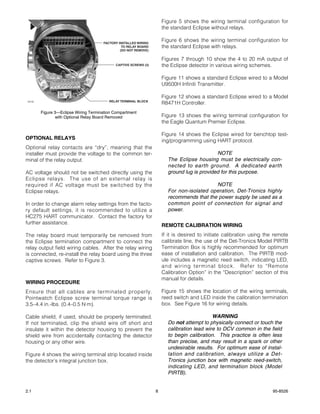
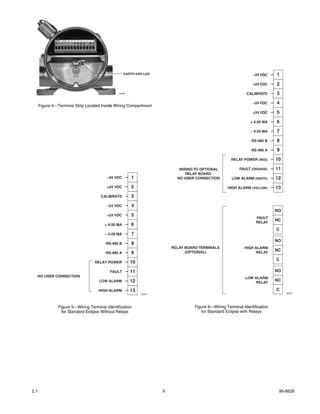
Figure 5 shows the wiring terminal configuration for
                                                                      the standard Eclipse without relays.

                                       FACTORY INSTALLED WIRING
                                                                      Figure 6 shows the wiring terminal configuration for
                                                 TO RELAY BOARD       the standard Eclipse with relays.
                                                (DO NOT REMOVE)

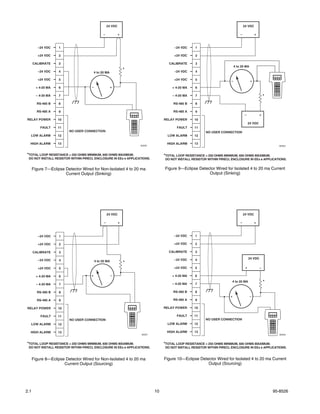
                                                                      Figures 7 through 10 show the 4 to 20 mA output of
                                             CAPTIVE SCREWS (3)       the Eclipse detector in various wiring schemes.

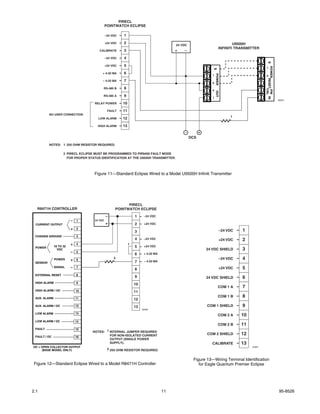
                                                                      Figure 11 shows a standard Eclipse wired to a Model
                                                                      U9500H Infiniti Transmitter.

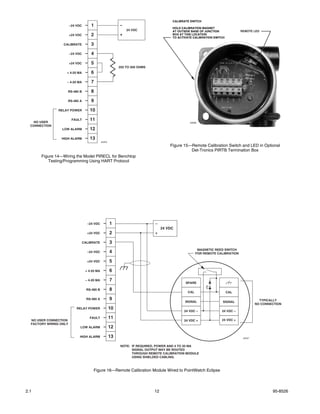
                                                                      Figure 12 shows a standard Eclipse wired to a Model
                                          RELAY TERMINAL BLOCK
 A2133
                                                                      R8471H Controller.
         Figure 3—Eclipse Wiring Termination Compartment
                with Optional Relay Board Removed                     Figure 13 shows the wiring terminal configuration for
                                                                      the Eagle Quantum Premier Eclipse.

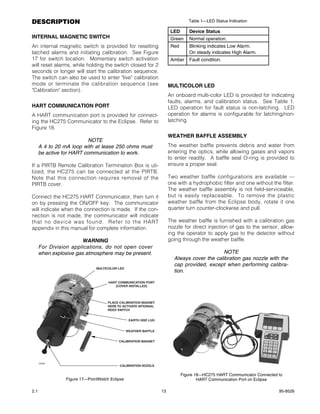
                                                                      Figure 14 shows the Eclipse wired for benchtop test-
OPTIONAL RELAYS                                                       ing/programming using HART protocol.
Optional relay contacts are “dry”, meaning that the
installer must provide the voltage to the common ter-                                        NOTE
minal of the relay output.                                              The Eclipse housing must be electrically con-
                                                                        nected to earth ground. A dedicated earth
AC voltage should not be switched directly using the                    ground lug is provided for this purpose.
Eclipse relays. The use of an external relay is
required if AC voltage must be switched by the                                             NOTE
Eclipse relays.                                                         For non-isolated operation, Det-Tronics highly
                                                                        recommends that the power supply be used as a
In order to change alarm relay settings from the facto-                 common point of connection for signal and
ry default settings, it is recommended to utilize a                     power.
HC275 HART communicator. Contact the factory for
further assistance.                                                   REMOTE CALIBRATION WIRING
The relay board must temporarily be removed from                      If it is desired to initiate calibration using the remote
the Eclipse termination compartment to connect the                    calibrate line, the use of the Det-Tronics Model PIRTB
relay output field wiring cables. After the relay wiring              Termination Box is highly recommended for optimum
is connected, re-install the relay board using the three              ease of installation and calibration. The PIRTB mod-
captive screws. Refer to Figure 3.                                    ule includes a magnetic reed switch, indicating LED,
                                                                      and wiring terminal block. Refer to “Remote
                                                                      Calibration Option” in the “Description” section of this
                                                                      manual for details.
WIRING PROCEDURE
Ensure that all cables are terminated properly.                       Figure 15 shows the location of the wiring terminals,
Pointwatch Eclipse screw terminal torque range is                     reed switch and LED inside the calibration termination
3.5–4.4 in.-lbs. (0.4–0.5 N·m).                                       box. See Figure 16 for wiring details.

Cable shield, if used, should be properly terminated.                                       WARNING
If not terminated, clip the shield wire off short and                   Do not attempt to physically connect or touch the
insulate it within the detector housing to prevent the                  calibration lead wire to DCV common in the field
shield wire from accidentally contacting the detector                   to begin calibration. This practice is often less
housing or any other wire.                                              than precise, and may result in a spark or other
                                                                        undesirable results. For optimum ease of instal-
Figure 4 shows the wiring terminal strip located inside                 lation and calibration, always utilize a Det-
the detector’s integral junction box.                                   Tronics junction box with magnetic reed-switch,
                                                                        indicating LED, and termination block (Model
                                                                        PIRTB).


2.1                                                               8                                                     95-8526
EARTH GND LUG                                                –24 VDC     1
                                                                                                                 +24 VDC     2
                                                A2084                                                         CALIBRATE      3
                                                                                                                 –24 VDC     4
      Figure 4—Terminal Strip Located Inside Wiring Compartment
                                                                                                                 +24 VDC     5
                                                                                                                + 4-20 MA    6
                                                                                                                – 4-20 MA    7
                                                                                                                 RS-485 B    8
                                                                                                                 RS-485 A    9
                                                                                                      RELAY POWER (RED)      10

                                                                            WIRING TO OPTIONAL            FAULT (ORANGE)     11
                                                                               RELAY BOARD
                                         –24 VDC        1                  NO USER CONNECTION         LOW ALARM (WHITE)      12
                                         +24 VDC        2                                           HIGH ALARM (YELLOW)      13
                                      CALIBRATE         3
                                         –24 VDC        4
                                                                                                                             NO
                                         +24 VDC        5
                                                                                                                   FAULT
                                                                                                                   RELAY
                                                                                                                             NC
                                        + 4-20 MA       6
                                                                                                                             C
                                        – 4-20 MA       7
                                                                                                                             NO
                                         RS-485 B       8
                                                                         RELAY BOARD TERMINALS               HIGH ALARM
                                                                               (OPTIONAL)
                                                                                                                             NC
                                         RS-485 A       9                                                         RELAY

                                                                                                                             C
                                   RELAY POWER          10
                                           FAULT        11                                                                   NO
  NO USER CONNECTION                                                                                         LOW ALARM
                                     LOW ALARM          12                                                                   NC
                                                                                                                 RELAY

                                     HIGH ALARM         13                                                                   C
                                                             A2054                                                                B2054


                Figure 5—Wiring Terminal Identification                            Figure 6—Wiring Terminal Identification
                  for Standard Eclipse Without Relays                                 for Standard Eclipse with Relays


2.1                                                                  9                                                        95-8526
24 VDC                                                                          24 VDC

                                               –            +                                                                  –             +


         –24 VDC    1                                                                  –24 VDC    1

         +24 VDC    2                                                                  +24 VDC    2

      CALIBRATE     3                                                               CALIBRATE     3
                                                                                                                           4 to 20 MA
         –24 VDC    4
                                                                *                      –24 VDC    4
                                         4 to 20 MA

         +24 VDC    5                                                                  +24 VDC    5                                      +
                                                                                                                       –

        + 4-20 MA   6                –                +                              + 4-20 MA    6

        – 4-20 MA   7                                                                – 4-20 MA    7                                                  *
        RS-485 B    8                                                                 RS-485 B    8

        RS-485 A    9                                                                 RS-485 A    9
                                                                                                                                   –             +
RELAY POWER         10                                                           RELAY POWER      10
                                                                                                                                        24 VDC
          FAULT     11                                                                  FAULT     11
                         NO USER CONNECTION                                                             NO USER CONNECTION
  LOW ALARM         12                                                             LOW ALARM      12

  HIGH ALARM        13                                                            HIGH ALARM      13
                                                                    B2050                                                                                   B2052


*TOTAL LOOP RESISTANCE = 250 OHMS MINIMUM, 600 OHMS MAXIMUM.                     *TOTAL LOOP RESISTANCE = 250 OHMS MINIMUM, 600 OHMS MAXIMUM.
 DO NOT INSTALL RESISTOR WITHIN PIRECL ENCLOSURE IN EEx e APPLICATIONS.          DO NOT INSTALL RESISTOR WITHIN PIRECL ENCLOSURE IN EEx e APPLICATIONS.


      Figure 7—Eclipse Detector Wired for Non-Isolated 4 to 20 ma                Figure 9—Eclipse Detector Wired for Isolated 4 to 20 ma Current
                       Current Output (Sinking)                                                        Output (Sinking)


                                                   24 VDC                                                                          24 VDC

                                               –            +                                                                  –             +


         –24 VDC    1                                                                  –24 VDC    1

         +24 VDC    2                                                                 +24 VDC     2

      CALIBRATE     3                                                              CALIBRATE      3

                                                                                       –24 VDC    4                                     24 VDC
         –24 VDC    4                    4 to 20 MA             *
         +24 VDC    5                                                                 +24 VDC     5                                 +            –

        + 4-20 MA   6                +                –                              + 4-20 MA    6

                                                                                     – 4-20 MA    7
                                                                                                                       4 to 20 MA                    *
        – 4-20 MA   7

        RS-485 B    8                                                                 RS-485 B    8
                                                                                                                      +                  –
        RS-485 A    9                                                                 RS-485 A    9

RELAY POWER         10                                                           RELAY POWER      10

          FAULT     11                                                                  FAULT     11
                         NO USER CONNECTION                                                             NO USER CONNECTION
  LOW ALARM         12                                                             LOW ALARM      12

  HIGH ALARM        13                                                            HIGH ALARM      13
                                                                    B2051                                                                                   B2053


*TOTAL LOOP RESISTANCE = 250 OHMS MINIMUM, 600 OHMS MAXIMUM.                     *TOTAL LOOP RESISTANCE = 250 OHMS MINIMUM, 600 OHMS MAXIMUM.
 DO NOT INSTALL RESISTOR WITHIN PIRECL ENCLOSURE IN EEx e APPLICATIONS.          DO NOT INSTALL RESISTOR WITHIN PIRECL ENCLOSURE IN EEx e APPLICATIONS.


      Figure 8—Eclipse Detector Wired for Non-Isolated 4 to 20 ma                Figure 10—Eclipse Detector Wired for Isolated 4 to 20 ma Current
                      Current Output (Sourcing)                                                        Output (Sourcing)


2.1                                                                         10                                                                           95-8526
PIRECL
                                              POINTWATCH ECLIPSE

                                              –24 VDC   1


                                                                                                                                                NO COM NC
                                                                                                                                                FLT RELAY
                                              +24 VDC   2                                                                    U9500H
                                                                                        24 VDC
                                                                                                                     INFINITI TRANSMITTER
                                        CALIBRATE       3                               +   –

                                              –24 VDC   4


                                                                                                                                                   S
                                              +24 VDC   5


                                                                                                                                                      POWER
                                                                                                                                                –
                                                                                                              S
                                          + 4-20 MA     6


                                                                                                                 POWER
                                                                                                             –


                                                                                                                                                +
                                                                                                                                                RESET
                                          – 4-20 MA     7


                                                                                                             +
                                          RS-485 B      8


                                                                                                                                                     CAL
                                                                                                                                                      PW
                                                                                                             +
                                                                                                                 OUT
                                          RS-485 A      9


                                                                                                                                                         IN
                                                                                                             –
                                                                                                                                                              A2201
                                     RELAY POWER        10
                                               FAULT    11
          NO USER CONNECTION
                                                                                                                              1
                                       LOW ALARM        12
                                      HIGH ALARM        13
                                                                                            -          +
                                                                                                 DCS
          NOTES: 1 250 OHM RESISTOR REQUIRED.

                    2 PIRECL ECLIPSE MUST BE PROGRAMMED TO PIR9400 FAULT MODE
                      FOR PROPER STATUS IDENTIFICATION AT THE U9500H TRANSMITTER.


                                    Figure 11—Standard Eclipse Wired to a Model U9500H Infiniti Transmitter


                                                          PIRECL
  R8471H CONTROLLER                                 POINTWATCH ECLIPSE
                                              –                  1     –24 VDC
                         –   1       24 VDC
 CURRENT OUTPUT                               +                  2     +24 VDC
                         +   2
                                                                                                                         –24 VDC   1
                                                                 3
 CHASSIS GROUND              3
                                                                 4     –24 VDC                                           +24 VDC   2
                         +   4                               1
 POWER        18 TO 32                                           5     +24 VDC
                VDC                                                                                        24 VDC SHIELD           3
                         –   5
                                                                 6     + 4-20 MA
              POWER      +   6
                                                   2                                                                     –24 VDC   4
 SENSOR                                                          7     – 4-20 MA
              SIGNAL     –   7
                                                                 8                                                       +24 VDC   5
 EXTERNAL RESET              8
                                                                 9                                         24 VDC SHIELD           6
 HIGH ALARM                  9
                                                                 10
                                                                                                                     COM 1 A       7
 HIGH ALARM / OC             10                                  11
 AUX. ALARM                  11
                                                                                                                     COM 1 B       8
                                                                 12
 AUX. ALARM / OC             12                                  13                                        COM 1 SHIELD            9
                                                                      A2202

 LOW ALARM                   13
                                                                                                                     COM 2 A       10
 LOW ALARM / OC              14
                                                                                                                     COM 2 B       11
 FAULT                       15
                                    NOTES: 1 INTERNAL JUMPER REQUIRED
                                             FOR NON-ISOLATED CURRENT                                      COM 2 SHIELD            12
 FAULT / OC                  16
                                             OUTPUT (SINGLE POWER
                                             SUPPLY).                                                        CALIBRATE             13
OC = OPEN COLLECTOR OUTPUT                                                                                                              A2087
     (BASE MODEL ONLY)                         2 250 OHM RESISTOR REQUIRED.


                                                                                                  Figure 13—Wiring Terminal Identification
 Figure 12—Standard Eclipse Wired to a Model R8471H Controller                                       for Eagle Quantum Premier Eclipse


2.1                                                                                11                                                                         95-8526
CALIBRATE SWITCH
                        –24 VDC       1                     –
                                                                                        HOLD CALIBRATION MAGNET
                                                                24 VDC                  AT OUTSIDE BASE OF JUNCTION            REMOTE LED
                        +24 VDC       2                     +                           BOX AT THIS LOCATION
                                                                                        TO ACTIVATE CALIBRATION SWITCH

                  CALIBRATE           3
                        –24 VDC       4
                        +24 VDC       5
                                                            250 TO 500 OHMS
                    + 4-20 MA         6
                    – 4-20 MA         7
                    RS-485 B          8
                    RS-485 A          9
                RELAY POWER           10

   NO USER
                         FAULT        11
                                                                                                  A2056
  CONNECTION
                  LOW ALARM           12
                 HIGH ALARM           13
                                               A2203
                                                                                       Figure 15—Remote Calibration Switch and LED in Optional
                                                                                                 Det-Tronics PIRTB Termination Box
       Figure 14—Wiring the Model PIRECL for Benchtop
          Testing/Programming Using HART Protocol


                                    –24 VDC            1                      –
                                                                                   24 VDC
                                    +24 VDC            2                      +

                                  CALIBRATE            3
                                                                                                       MAGNETIC REED SWITCH
                                    –24 VDC            4                                              FOR REMOTE CALIBRATION

                                    +24 VDC            5
                                   + 4-20 MA           6
                                   – 4-20 MA           7
                                                                                               SPARE

                                    RS-485 B           8
                                                                                                CAL                      CAL

                                    RS-485 A           9                                                                                  TYPICALLY
                                                                                               SIGNAL                SIGNAL
                                                                                                                                        NO CONNECTION
                            RELAY POWER                10
                                                                                              24 VDC –              24 VDC –

                                      FAULT            11                                                           24 VDC +
  NO USER CONNECTION                                                                          24 VDC +
  FACTORY WIRING ONLY
                              LOW ALARM                12
                             HIGH ALARM                13                                                                       A2057


                                                            NOTE: IF REQUIRED, POWER AND 4 TO 20 MA
                                                                  SIGNAL OUTPUT MAY BE ROUTED
                                                                  THROUGH REMOTE CALIBRATION MODULE
                                                                  USING SHIELDED CABLING.


                                        Figure 16—Remote Calibration Module Wired to PointWatch Eclipse


2.1                                                                           12                                                                95-8526
DESCRIPTION                                                                    Table 1—LED Status Indication

                                                                      LED      Device Status
INTERNAL MAGNETIC SWITCH                                              Green    Normal operation.
An internal magnetic switch is provided for resetting                 Red      Blinking indicates Low Alarm.
latched alarms and initiating calibration. See Figure                          On steady indicates High Alarm.
17 for switch location. Momentary switch activation                   Amber    Fault condition.
will reset alarms, while holding the switch closed for 2
seconds or longer will start the calibration sequence.
The switch can also be used to enter "live" calibration
mode or terminate the calibration sequence (see                      MULTICOLOR LED
"Calibration" section).
                                                                     An onboard multi-color LED is provided for indicating
                                                                     faults, alarms, and calibration status. See Table 1.
HART COMMUNICATION PORT                                              LED operation for fault status is non-latching. LED
A HART communication port is provided for connect-                   operation for alarms is configurable for latching/non-
ing the HC275 Communicator to the Eclipse. Refer to                  latching.
Figure 18.
                                                                     WEATHER BAFFLE ASSEMBLY
                           NOTE
      A 4 to 20 mA loop with at lease 250 ohms must                  The weather baffle prevents debris and water from
      be active for HART communication to work.                      entering the optics, while allowing gases and vapors
                                                                     to enter readily. A baffle seal O-ring is provided to
If a PIRTB Remote Calibration Termination Box is uti-                ensure a proper seal.
lized, the HC275 can be connected at the PIRTB.
Note that this connection requires removal of the                    Two weather baffle configurations are available —
PIRTB cover.                                                         one with a hydrophobic filter and one without the filter.
                                                                     The weather baffle assembly is not field-serviceable,
Connect the HC275 HART Communicator, then turn it                    but is easily replaceable. To remove the plastic
on by pressing the ON/OFF key. The communicator                      weather baffle from the Eclipse body, rotate it one
will indicate when the connection is made. If the con-               quarter turn counter-clockwise and pull.
nection is not made, the communicator will indicate
that no device was found. Refer to the HART                          The weather baffle is furnished with a calibration gas
appendix in this manual for complete information.                    nozzle for direct injection of gas to the sensor, allow-
                                                                     ing the operator to apply gas to the detector without
                       WARNING                                       going through the weather baffle.
      For Division applications, do not open cover
      when explosive gas atmosphere may be present.                                         NOTE
                                                                       Always cover the calibration gas nozzle with the
                                                                       cap provided, except when performing calibra-
                              MULTICOLOR LED
                                                                       tion.

                                    HART COMMUNICATION PORT
                                       (COVER INSTALLED)


                                    PLACE CALIBRATION MAGNET
                                    HERE TO ACTIVATE INTERNAL
                                    REED SWITCH


                                                EARTH GND LUG


                                               WEATHER BAFFLE


                                         CALIBRATION MAGNET


      A2058
                                          CALIBRATION NOZZLE

                                                                            Figure 18—HC275 HART Communicator Connected to
                Figure 17—PointWatch Eclipse                                        HART Communication Port on Eclipse

2.1                                                             13                                                      95-8526
CLOCK                                                          The PIRTB consists of a termination/circuit board,
                                                               housed within an explosion-proof junction box. The
An hour meter is provided to give a relative indication
                                                               circuit board contains a magnetic reed switch for initi-
of time for historical logs. The meter is zeroed at the
                                                               ating calibration, an indicating LED to signal the oper-
time of manufacture and only increments while power
                                                               ator when to apply and remove the calibration gas,
is applied. HART or MODBUS communication is
                                                               and a wiring terminal block. The junction box cover is
required to view the running hours.
                                                               furnished with a small viewing window that enables
                                                               calibration to be performed without hazardous area
HISTORY LOGS                                                   de-classification. The PIRTB may be installed up to
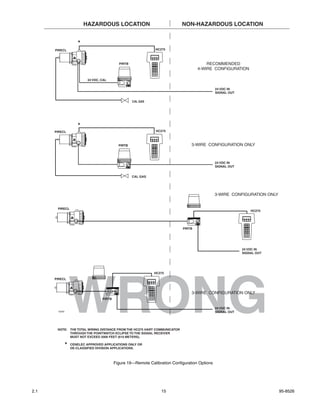
                                                               100 feet away from the Eclipse. Refer to Figure 19 for
All history logs are saved in non-volatile memory and
                                                               remote calibration configuration options.
retained through power cycles. HART or MODBUS
communication is required to view the history logs.
                                                                                       NOTE
                                                                 The remote calibration switch is intended for initi-
Event Log (Alarms and Faults)                                    ating calibration only. Resetting latching alarm
                                                                 outputs using the remote calibration switch can-
An event log saves the ten most recent alarms and a
                                                                 not be accomplished without entering the
selected group of faults with an hour meter time
                                                                 Calibration mode.
stamp. HART or MODBUS communication is required
to view the log. Types of logged events include:
                                                               The following recommendations are provided to
• Low Alarms                                                   enhance operator ease and convenience of remote
• High Alarms                                                  calibration configurations:
• Blocked Beam Fault
                                                               1. Install the Eclipse in such a manner that the
• Warm-up                                                         onboard LED is visible whenever possible. This
• Calibration Fault                                               will aid in checking device status "at a glance."

                                                               2. The Eclipse is provided with a calibration gas
Calibration Log                                                   nozzle on the weather baffle, which allows the use
A log of the ten most recent calibrations with time               of permanently attached calibration gas delivery
stamp is saved. HART or MODBUS communication is                   tubing (either polyethylene or stainless steel).
required to view the log. Types of calibration records            The tubing is typically routed in parallel with the
include:                                                          remote calibration cabling to the same location as
                                                                  the PIRTB termination box. This arrangement
• Zero Only Calibration
                                                                  enables a technician to initiate calibration and
• Complete Calibration                                            deliver the calibration gas to the Eclipse from a
• Failed Calibration                                              single location.

                                                               3. When permanently installed calibration gas tubing
Min/Max Temperature History                                       is utilized, always install a shut-off valve at the
The all-time highest and lowest ambient temperatures              open end to prevent unwanted vapors or debris
are stored with a time stamp. A second pair of                    from entering the tubing.
min/max temperatures, which can be reset by the
user, is also provided. HART or MODBUS communi-                4. Always purge the permanent tubing with clean,
cation is required to view the log.                               dry compressed air prior to and immediately after
                                                                  calibration to ensure that residual combustible
                                                                  gases are cleared. Always close the shutoff valve
REMOTE CALIBRATION OPTION                                         after post-calibration purging is complete. This
In most applications, it is recommended to install the            will ensure that all hydrocarbon vapors are elimi-
Pointwatch Eclipse where it will contact the vapor of             nated from the Eclipse optics.
interest as quickly as possible. Unfortunately, the
best location for early warning can often result in            5. Note that permanently installed calibration gas
accessibility problems for the operator when calibra-             tubing will increase the calibration gas consump-
tion is required. In these applications, the Model                tion rate as a function of total tubing length.
PIRTB Termination Box is highly recommended to
provide the ability to calibrate the Pointwatch Eclipse        Other methods of remote Eclipse calibration include
from a remote location.                                        utilizing HART or MODBUS communications. Refer to
                                                               the HART and MODBUS appendices for details.

2.1                                                       14                                                    95-8526
HAZARDOUS LOCATION                                 NON-HAZARDOUS LOCATION


                      *
      PIRECL                                                    HC275


                                             PIRTB                                       RECOMMENDED
                                                                                     4-WIRE CONFIGURATION

                           24 VDC, CAL

                                                                                                24 VDC IN
                                                                                                SIGNAL OUT

                                                     CAL GAS


                      *
      PIRECL                                                    HC275


                                             PIRTB                                3-WIRE CONFIGURATION ONLY


                                                                                                24 VDC IN
                                                                                                SIGNAL OUT


                                                     CAL GAS


                                                                                                3-WIRE CONFIGURATION ONLY


       PIRECL
                                                                                                                 HC275


                                                                             PIRTB


                                                                                                             24 VDC IN
                                                                                                             SIGNAL OUT


                                                               HC275


                   WRONG
      PIRECL


                                                                                  3-WIRE CONFIGURATION ONLY
                                   PIRTB

                                                                                                24 VDC IN
       A2060                                                                                    SIGNAL OUT


       NOTE: THE TOTAL WIRING DISTANCE FROM THE HC275 HART COMMUNICATOR
             THROUGH THE POINTWATCH ECLIPSE TO THE SIGNAL RECEIVER
             MUST NOT EXCEED 2000 FEET (610 METERS).

               *   CENELEC APPROVED APPLICATIONS ONLY OR
                   DE-CLASSIFIED DIVISION APPLICATIONS.


                                           Figure 19—Remote Calibration Configuration Options


2.1                                                                15                                                       95-8526
SPECIAL APPLICATIONS                                                           Table 2—Calibration or Response Test

The standard Pointwatch Eclipse is intended for open            Function                                      Calibration Response
area combustible gas detection applications.                                                                                Test
However, special detector configurations are avail-             Startup                                                     X
able for applications such as duct-mounting and sam-            Gas selection changed                             X
ple extraction. Contact Detector Electronics                    Non-standard gas                                  X
Corporation for information on these special device                (using linearization other than methane)
configurations.                                                 Replace any part                                  X
                                                                Constant zero offset                              X
                                                                Periodic Functional Testing                                 X
OPERATION                                                          (at least once a year)

FACTORY DEFAULT SETTINGS
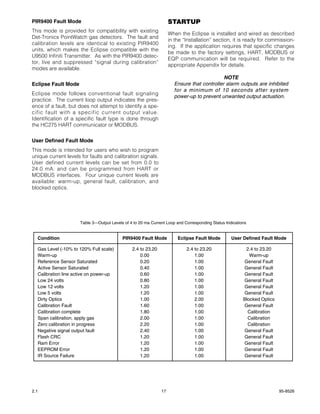
The Pointwatch Eclipse is shipped from the factory             4 TO 20 MA CURRENT LOOP OUTPUT
pre-calibrated and set for detection of 0-100% LEL             Eclipse provides an isolated, linear current loop out-
methane. Detection of gases other than methane will            put that is proportional to the detected gas level.
require changing the factory gas setting and perform-          Fault and calibration status are also indicated by this
ing field calibration of the device. HART or MODBUS            output.
communication is required to change the factory
default settings. Refer to the HART Communications             The factory default for full-scale 100% LEL output is
Appendix within this document for additional guid-             20 mA. Other full scale values (from 20 to 100% LEL)
ance.                                                          can be selected using HART or MODBUS communi-
                                                               cation. HART and MODBUS interfaces also have the
OPERATING MODES                                                ability to calibrate the 4 mA and 20 mA levels.

The Eclipse has three operating modes: warm-up,                When the default setting is selected, the LEL percent-
normal, and calibrate.                                         age for a given current reading can be calculated
                                                               using the formula:
Warm-up                                                        % LEL = (X – 4) ÷ 0.16                   X = Current reading
Warm-up mode is entered upon application of 24                                                              in milliamperes
VDC operating power. During warm-up, the 4-20 mA               Example: Device reads 12 mA.
current loop output will indicate warm-up, the indicat-        12 – 4 = 8
ing LED is yellow, and the alarm outputs are disabled.         8 ÷ 0.16 = 50
The warm-up mode lasts nominally two (2) minutes               50% LEL is indicated.
after power-up.
                                                               Normally, the current loop output is proportional to the
Normal                                                         selected standard gas type only. Refer to Appendix
                                                               C within this document for information on non-stan-
After warm-up mode is completed, the device auto-              dard gas detection.
matically enters the Normal mode, and all analog and
alarm outputs are enabled.
                                                               FAULT INDICATION

Calibrate                                                      There are three modes of signaling faults using the 4-
                                                               20 mA analog signal output:
Calibration of the Eclipse is normally not required;
however, the user has the option to verify proper cali-        • PIR9400 (Factory default setting, used for retrofit
bration or to perform calibration procedures if neces-           applications of the PIR9400 detector)
sary. Guidelines for when to perform a calibration or          • Eclipse
a response test are listed in Table 2. The user has            • User Defined
the choice of three methods to place the device into
the Calibrate mode. Refer to the "Calibration" section         Fault signaling mode can be selected using the HART
in this manual for details.                                    or MODBUS interface. Table 3 shows the current lev-
                                                               els for each fault mode.


2.1                                                       16                                                               95-8526
PIR9400 Fault Mode                                                 STARTUP
This mode is provided for compatibility with existing
                                                                   When the Eclipse is installed and wired as described
Det-Tronics PointWatch gas detectors. The fault and
                                                                   in the “Installation” section, it is ready for commission-
calibration levels are identical to existing PIR9400
                                                                   ing. If the application requires that specific changes
units, which makes the Eclipse compatible with the
                                                                   be made to the factory settings, HART, MODBUS or
U9500 Infiniti Transmitter. As with the PIR9400 detec-
                                                                   EQP communication will be required. Refer to the
tor, live and suppressed “signal during calibration”
                                                                   appropriate Appendix for details.
modes are available.
                                                                                           NOTE
Eclipse Fault Mode                                                   Ensure that controller alarm outputs are inhibited
                                                                     for a minimum of 10 seconds after system
Eclipse mode follows conventional fault signaling
                                                                     power-up to prevent unwanted output actuation.
practice. The current loop output indicates the pres-
ence of a fault, but does not attempt to identify a spe-
cific fault with a specific current output value.
Identification of a specific fault type is done through
the HC275 HART communicator or MODBUS.


User Defined Fault Mode
This mode is intended for users who wish to program
unique current levels for faults and calibration signals.
User defined current levels can be set from 0.0 to
24.0 mA. and can be programmed from HART or
MODBUS interfaces. Four unique current levels are
available: warm-up, general fault, calibration, and
blocked optics.


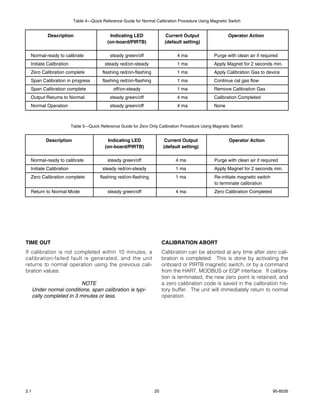
                     Table 3—Output Levels of 4 to 20 ma Current Loop and Corresponding Status Indications


  Condition                               PIR9400 Fault Mode           Eclipse Fault Mode         User Defined Fault Mode

  Gas Level (-10% to 120% Full scale)          2.4 to 23.20                2.4 to 23.20                  2.4 to 23.20
  Warm-up                                          0.00                        1.00                        Warm-up
  Reference Sensor Saturated                       0.20                        1.00                     General Fault
  Active Sensor Saturated                          0.40                        1.00                     General Fault
  Calibration line active on power-up              0.60                        1.00                     General Fault
  Low 24 volts                                     0.80                        1.00                     General Fault
  Low 12 volts                                     1.20                        1.00                     General Fault
  Low 5 volts                                      1.20                        1.00                     General Fault
  Dirty Optics                                     1.00                        2.00                     Blocked Optics
  Calibration Fault                                1.60                        1.00                     General Fault
  Calibration complete                             1.80                        1.00                       Calibration
  Span calibration, apply gas                      2.00                        1.00                       Calibration
  Zero calibration in progress                     2.20                        1.00                       Calibration
  Negative signal output fault                     2.40                        1.00                     General Fault
  Flash CRC                                        1.20                        1.00                     General Fault
  Ram Error                                        1.20                        1.00                     General Fault
  EEPROM Error                                     1.20                        1.00                     General Fault
  IR Source Failure                                1.20                        1.00                     General Fault


2.1                                                           17                                                         95-8526
CALIBRATION                                                     ADDITIONAL CALIBRATION NOTES

CALIBRATION OVERVIEW                                                              IMPORTANT
                                                                 Always ensure that the correct gas type is used
Although routine calibration of the Pointwatch Eclipse
                                                                 for calibration. (2.5 LPM flow rate is recom-
is normally not required, the device supports non-
                                                                 mended.)
intrusive field calibration capability. Two (2) calibra-
tion procedure options are provided:
                                                                                       NOTE
                                                                 Ensure that the detector has been operating for
1. Normal Calibration is a two-step process con-
                                                                 at least two hours before calibrating.
   sisting of clean air (zero) condition and mid-scale
   (span) adjustment. Calibration gas must be
                                                                                         NOTE
   applied by the operator to enable span adjust-
                                                                 Always ensure that the Eclipse optics are totally
   ment. Normal calibration is required whenever
                                                                 free of all hydrocarbons before initiating calibra-
   the gas type setting has been changed from the
                                                                 tion. This may require purging of the Eclipse
   factory-default methane setting. Purge the
                                                                 with pure air prior to initiating calibration.
   Eclipse optics with clean, dry air prior to calibra-
   tion initiation to ensure that an accurate zero
                                                                                       NOTE
   (clean air) condition is present.
                                                                 Under very windy conditions, it may not be possi-
                                                                 ble to successfully calibrate the Eclipse. This sit-
      The following Normal Calibration guidelines
                                                                 uation is easily corrected by using the Eclipse
      always apply:
                                                                 Calibration Bag (P/N 006672-002), available
                                                                 from Det-Tronics.
      A. The Eclipse is factory set for detection of
         methane. If the gas setting is changed (using                                NOTE
         HART, MODBUS or EQP communication), the                 Always place the protective cap back on the cali-
         Eclipse must be re-calibrated (normally with            bration nozzle after completion of span calibra-
         the matching gas type).                                 tion.
      B. The calibration gas type normally should
         match the selected gas setting for the
         Eclipse. Different calibration gas types are
         selectable using HART, MODBUS or EQP
         communication. The factory default calibra-
         tion gas is methane.
      C. The recommended calibration gas concentra-
         tion is 50% LEL, although other calibration
         concentrations may be utilized if previously
         defined in the Eclipse using HART, MODBUS
         or EQP communication.

2. Zero Only Calibration is a one-step process con-
   sisting of clean air (zero) condition adjustment
   only, which is performed automatically by the
   device. This procedure adjusts the "clean air" sig-
   nal output only, and is normally used if the 4 mil-
   liampere signal level has drifted. The cause of
   drift is typically due to the presence of back-
   ground gas during calibration. Purge the Eclipse
   optics with clean, dry compressed air prior to cali-
   bration initiation to ensure an accurate zero (clean
   air) condition is present.


2.1                                                        18                                                   95-8526
CALIBRATION INITIATION                                            DETAILED CALIBRATION PROCEDURE USING
                                                                  MAGNETIC SWITCH
Eclipse calibration may be initiated by any of the fol-
lowing means:                                                     Refer to Tables 4 and 5 for a quick summary of the
• The onboard magnetic calibration switch                         standard calibration sequence.
• The magnetic calibration switch in the remote termi-            1. Apply magnet for 2 seconds minimum to initiate
  nation box                                                         calibration.
• HART communication.                                                A. The onboard LED turns to steady red.
                                                                     B. The LED within the PIRTB (if used) turns on.
Calibration using Magnetic Switch
                                                                     C. The Eclipse current output decreases from 4
1. Onboard Switch and LED                                               mA to 1 mA when the default Eclipse calibra-
   The Pointwatch Eclipse provides an onboard                           tion routine is used.
   magnetic calibration/reset switch for non-intrusive
   calibration capability. The magnetic switch is
                                                                  2. When zero calibration is complete:
   located on the device bulkhead. See Figure 17
   for switch location. An onboard tri-color LED is                  A. The onboard LED changes from steady red to
   also provided to signal the operator when to                         flashing red.
   apply and remove calibration gas.                                 B. The LED within the PIRTB (if used) begins
                                                                        flashing.
2. Remote Switch and Indicating LED
   A special Remote Termination Box (Model PIRTB)                    C. The Eclipse current output does not change
   is available for initiating calibration from a remote                from the 1 mA level when the default Eclipse
   location. The PIRTB provides an internal magnet-                     calibration routine is used.
   ic switch and indicating LED (LED is on/off only,                 D. The operator should now apply the appropri-
   not tri-color). The PIRTB is provided with a clear                   ate calibration gas to the Eclipse if conduct-
   window on the cover, enabling non-intrusive cali-                    ing Normal Calibration.
   bration capability.
                                                                     E. If conducting Zero Only Calibration, the oper-
Either magnetic switch must be actuated for 2 sec-                      ator should re-apply the magnet to the switch.
onds using a calibration magnet to initiate Eclipse cal-                This will conclude the Zero Only calibration
ibration. Upon initiation, the Eclipse automatically                    sequence.
performs the zero calibration adjustment, and then
signals the operator when it is time to apply calibra-            3. When Span Calibration is complete:
tion gas. Upon completion of the span adjustment,                    A. The onboard LED changes from flashing red
the Eclipse returns to normal mode after the calibra-                   to “off”.
tion gas has cleared. The indicating LED (either
onboard LED or PIRTB LED, if used) provides visual                   B. The LED within the PIRTB (if used) changes
signals to the operator regarding the proper time to                    to steady on.
apply and remove the calibration gas.                                C. The Eclipse current output does not change
                                                                        from the 1 mA level when the default Eclipse
For Zero Only Calibration, the operator must re-actu-                   calibration routine is used.
ate the magnetic switch upon LED signal to apply cal-
ibration gas. This action instructs the Eclipse to utilize           D. The operator should now remove the calibra-
the previous span setting, and return to normal mode                    tion gas from the Eclipse.
without requiring application of calibration gas.
                                                                  4. Return to Normal is complete when:
Digital Communication Calibration                                    A. The onboard LED changes from “off” to
HART, MODBUS or EQP communication may be uti-                            steady green.
lized to initiate Eclipse calibration. Refer to the appro-           B. The LED within the PIRTB (if used) turns off.
priate appendix for details.
                                                                     C. The Eclipse current output returns to 4 mA
                                                                        after detected calibration gas level drops
                                                                        below 5% LEL or the calibration abort signal
                                                                        is provided.


2.1                                                          19                                                 95-8526
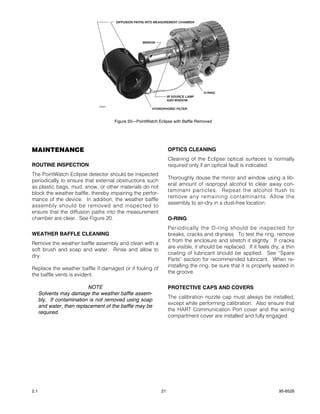
Table 4—Quick Reference Guide for Normal Calibration Procedure Using Magnetic Switch


            Description                     Indicating LED                Current Output                Operator Action
                                           (on-board/PIRTB)               (default setting)

  Normal-ready to calibrate                 steady green/off                   4 ma              Purge with clean air if required
  Initiate Calibration                    steady red/on-steady                 1 ma              Apply Magnet for 2 seconds min.
  Zero Calibration complete              flashing red/on-flashing              1 ma              Apply Calibration Gas to device
  Span Calibration in progress           flashing red/on-flashing              1 ma              Continue cal gas flow
  Span Calibration complete                   off/on-steady                    1 ma              Remove Calibration Gas
  Output Returns to Normal                  steady green/off                   4 ma              Calibration Completed
  Normal Operation                          steady green/off                   4 ma              None


                         Table 5—Quick Reference Guide for Zero Only Calibration Procedure Using Magnetic Switch


            Description                    Indicating LED                Current Output                 Operator Action
                                          (on-board/PIRTB)               (default setting)

  Normal-ready to calibrate                steady green/off                    4 ma              Purge with clean air if required
  Initiate Calibration                   steady red/on-steady                  1 ma              Apply Magnet for 2 seconds min.
  Zero Calibration complete            flashing red/on-flashing                1 ma              Re-initiate magnetic switch
                                                                                                 to terminate calibration
  Return to Normal Mode                    steady green/off                    4 ma              Zero Calibration Completed


TIME OUT                                                                 CALIBRATION ABORT
If calibration is not completed within 10 minutes, a                     Calibration can be aborted at any time after zero cali-
calibration-failed fault is generated, and the unit                      bration is completed. This is done by activating the
returns to normal operation using the previous cali-                     onboard or PIRTB magnetic switch, or by a command
bration values.                                                          from the HART, MODBUS or EQP interface. If calibra-
                                                                         tion is terminated, the new zero point is retained, and
                            NOTE                                         a zero calibration code is saved in the calibration his-
      Under normal conditions, span calibration is typi-                 tory buffer. The unit will immediately return to normal
      cally completed in 3 minutes or less.                              operation.


2.1                                                                 20                                                         95-8526
DIFFUSION PATHS INTO MEASUREMENT CHAMBER


                                                    MIRROR


                                                                                    O-RING
                                                                   IR SOURCE LAMP
                                                                   AND WINDOW
                               A2059
                                                         HYDROPHOBIC FILTER


                                       Figure 20—PointWatch Eclipse with Baffle Removed


MAINTENANCE                                                        OPTICS CLEANING
                                                                   Cleaning of the Eclipse optical surfaces is normally
ROUTINE INSPECTION                                                 required only if an optical fault is indicated.
The PointWatch Eclipse detector should be inspected
                                                                   Thoroughly douse the mirror and window using a lib-
periodically to ensure that external obstructions such
                                                                   eral amount of isopropyl alcohol to clear away con-
as plastic bags, mud, snow, or other materials do not
                                                                   taminant particles. Repeat the alcohol flush to
block the weather baffle, thereby impairing the perfor-
                                                                   remove any remaining contaminants. Allow the
mance of the device. In addition, the weather baffle
                                                                   assembly to air-dry in a dust-free location.
assembly should be removed and inspected to
ensure that the diffusion paths into the measurement
chamber are clear. See Figure 20.                                  O-RING
                                                                   Periodically the O-ring should be inspected for
WEATHER BAFFLE CLEANING                                            breaks, cracks and dryness. To test the ring, remove
                                                                   it from the enclosure and stretch it slightly. If cracks
Remove the weather baffle assembly and clean with a
                                                                   are visible, it should be replaced. If it feels dry, a thin
soft brush and soap and water. Rinse and allow to
                                                                   coating of lubricant should be applied. See “Spare
dry.
                                                                   Parts” section for recommended lubricant. When re-
                                                                   installing the ring, be sure that it is properly seated in
Replace the weather baffle if damaged or if fouling of
                                                                   the groove.
the baffle vents is evident.

                           NOTE                                    PROTECTIVE CAPS AND COVERS
      Solvents may damage the weather baffle assem-
                                                                   The calibration nozzle cap must always be installed,
      bly. If contamination is not removed using soap
                                                                   except while performing calibration. Also ensure that
      and water, then replacement of the baffle may be
                                                                   the HART Communication Port cover and the wiring
      required.
                                                                   compartment cover are installed and fully engaged.


2.1                                                           21                                                      95-8526
TROUBLESHOOTING                                                    DEVICE REPAIR AND RETURN
                                                                   The Pointwatch Eclipse IR Hydrocarbon Gas Detector
A Fault status is indicated by a yellow LED and also               is not designed to be repaired in the field. If a prob-
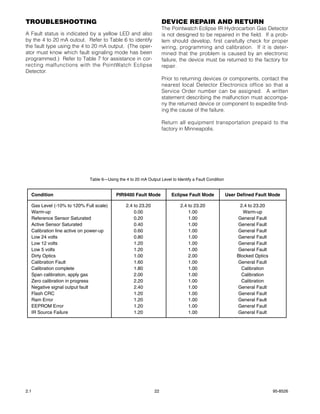
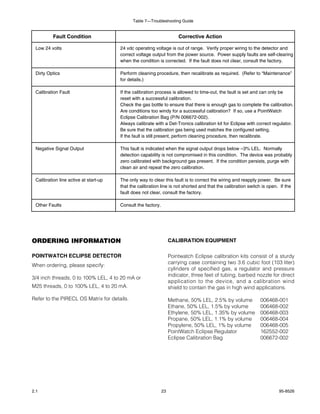
by the 4 to 20 mA outout. Refer to Table 6 to identify             lem should develop, first carefully check for proper
the fault type using the 4 to 20 mA output. (The oper-             wiring, programming and calibration. If it is deter-
ator must know which fault signaling mode has been                 mined that the problem is caused by an electronic
programmed.) Refer to Table 7 for assistance in cor-               failure, the device must be returned to the factory for
recting malfunctions with the PointWatch Eclipse                   repair.
Detector.
                                                                   Prior to returning devices or components, contact the
                                                                   nearest local Detector Electronics office so that a
                                                                   Service Order number can be assigned. A written
                                                                   statement describing the malfunction must accompa-
                                                                   ny the returned device or component to expedite find-
                                                                   ing the cause of the failure.

                                                                   Return all equipment transportation prepaid to the
                                                                   factory in Minneapolis.


                            Table 6—Using the 4 to 20 mA Output Level to Identify a Fault Condition


  Condition                              PIR9400 Fault Mode            Eclipse Fault Mode             User Defined Fault Mode

  Gas Level (-10% to 120% Full scale)          2.4 to 23.20                2.4 to 23.20                    2.4 to 23.20
  Warm-up                                          0.00                        1.00                          Warm-up
  Reference Sensor Saturated                       0.20                        1.00                       General Fault
  Active Sensor Saturated                          0.40                        1.00                       General Fault
  Calibration line active on power-up              0.60                        1.00                       General Fault
  Low 24 volts                                     0.80                        1.00                       General Fault
  Low 12 volts                                     1.20                        1.00                       General Fault
  Low 5 volts                                      1.20                        1.00                       General Fault
  Dirty Optics                                     1.00                        2.00                       Blocked Optics
  Calibration Fault                                1.60                        1.00                       General Fault
  Calibration complete                             1.80                        1.00                         Calibration
  Span calibration, apply gas                      2.00                        1.00                         Calibration
  Zero calibration in progress                     2.20                        1.00                         Calibration
  Negative signal output fault                     2.40                        1.00                       General Fault
  Flash CRC                                        1.20                        1.00                       General Fault
  Ram Error                                        1.20                        1.00                       General Fault
  EEPROM Error                                     1.20                        1.00                       General Fault
  IR Source Failure                                1.20                        1.00                       General Fault


2.1                                                           22                                                           95-8526
Table 7—Troubleshooting Guide


          Fault Condition                                              Corrective Action

 Low 24 volts                          24 vdc operating voltage is out of range. Verify proper wiring to the detector and
                                       correct voltage output from the power source. Power supply faults are self-clearing
                                       when the condition is corrected. If the fault does not clear, consult the factory.

 Dirty Optics                          Perform cleaning procedure, then recalibrate as required. (Refer to “Maintenance”
                                       for details.)

 Calibration Fault                     If the calibration process is allowed to time-out, the fault is set and can only be
                                       reset with a successful calibration.
                                       Check the gas bottle to ensure that there is enough gas to complete the calibration.
                                       Are conditions too windy for a successful calibration? If so, use a PointWatch
                                       Eclipse Calibration Bag (P/N 006672-002).
                                       Always calibrate with a Det-Tronics calibration kit for Eclipse with correct regulator.
                                       Be sure that the calibration gas being used matches the configured setting.
                                       If the fault is still present, perform cleaning procedure, then recalibrate.

 Negative Signal Output                This fault is indicated when the signal output drops below –3% LEL. Normally
                                       detection capability is not compromised in this condition. The device was probably
                                       zero calibrated with background gas present. If the condition persists, purge with
                                       clean air and repeat the zero calibration.

 Calibration line active at start-up   The only way to clear this fault is to correct the wiring and reapply power. Be sure
                                       that the calibration line is not shorted and that the calibration switch is open. If the
                                       fault does not clear, consult the factory.

 Other Faults                          Consult the factory.


ORDERING INFORMATION                                               CALIBRATION EQUIPMENT

POINTWATCH ECLIPSE DETECTOR                                        Pointwatch Eclipse calibration kits consist of a sturdy
                                                                   carrying case containing two 3.6 cubic foot (103 liter)
When ordering, please specify:
                                                                   cylinders of specified gas, a regulator and pressure
                                                                   indicator, three feet of tubing, barbed nozzle for direct
3/4 inch threads, 0 to 100% LEL, 4 to 20 mA or
                                                                   application to the device, and a calibration wind
M25 threads, 0 to 100% LEL, 4 to 20 mA.                            shield to contain the gas in high wind applications.

Refer to the PIRECL OS Matrix for details.                         Methane, 50% LEL, 2.5% by volume            006468-001
                                                                   Ethane, 50% LEL, 1.5% by volume             006468-002
                                                                   Ethylene, 50% LEL, 1.35% by volume          006468-003
                                                                   Propane, 50% LEL, 1.1% by volume            006468-004
                                                                   Propylene, 50% LEL, 1% by volume            006468-005
                                                                   PointWatch Eclipse Regulator                162552-002
                                                                   Eclipse Calibration Bag                     006672-002


2.1                                                           23                                                        95-8526
SPARE PARTS                                                     ASSISTANCE
Weather Baffle with Inlet Nozzle,                               For assistance in ordering a system to meet the
with Hydrophobic Filter                 007165-002              needs of a specific application, contact:
Weather Baffle with Inlet Nozzle,
without Hydrophobic Filter              007165-001              Detector Electronics Corporation
Weather Baffle w 1/8” NPT cal gas inlet,                        6901 West 110th Street
with Hydrophobic Filter                 007165-004              Minneapolis, Minnesota 55438 USA
Weather Baffle w 1/8” NPT cal gas inlet,                        Operator: (952) 941-5665 or (800) 765-FIRE
without Hydrophobic Filter              007165-003              Customer Service: (952) 946-6491
Cal gas fitting cap, black              103035-001              Fax: (952) 829-8750
Calibration Magnet                      102740-002              Web site: www.detronics.com
Silicone Free Grease                    005003-001              E-mail: detronics@detronics.com
O-Ring, 3.75” i.d., for wiring
compartment cover                       107427-040
O-Ring, 3.25” i.d., for front
flange (internal)                       107427-052
O-Ring, 2.43” i.d., for weather baffle  107427-053


PIRECL OS Matrix
  MODEL     DESCRIPTION
  PIRECL    Point Infrared Eclipse Gas Detector
            TYPE      THREAD TYPE
             A        3/4" NPT
             B        M25
                     TYPE        OUTPUT & MEASUREMENT OPTIONS
                        1        4-20 mA with HART protocol & RS-485: 0-100% LEL Full Scale Range
                       4         Eagle Premier Compatible Only: 0-100% LEL Full Scale Range
                                 TYPE     RELAY OUTPUT OPTION
                                  A       No Alarm & Relay Option Board Installed
                                  B       Alarm & Fault Relay Option Board Installed (Not compatible with Eagle Premier)
                                          TYPE      WEATHER PROTECTION
                                            1       Standard External Black Plastic Weather Baffle with Hydrophobic Filter
                                            2        Standard External Black Plastic Weather Baffle without Hydrophobic Filter
                                            3       Plastic sample draw cup w/compression fittings & hydrophobic filter
                                            4       Plastic sample draw cup w/compression fittings & no hydrophobic filter
                                            5       No weather protection installed
                                                    TYPE          APPROVALS
                                                       A          Americas (FM, CSA)
                                                       E          European (CENELEC, ATEX, CE)
                                                       S          SSA
                                                       R          Russian
                                                       B          CEPEI-Brazil
                                                      N           Autronica Private Labeled Version


2.1                                                        24                                                          95-8526
APPENDIX A

                                               HART COMMUNICATION


Digital communication with the Pointwatch Eclipse is necessary to monitor internal status and to modify the fac-
tory settings. This appendix provides guidance on establishing HART communication, and describes the com-
munication menu structure when using the Eclipse with the HART 275 handheld communicator.


HART HC275 HANDHELD INTERCONNECTION WITH ECLIPSE
Unscrew the protective cap from the HART communication port on the side of the Eclipse gas detector. Connect
the HC275 to the two terminals inside the port. Press the "on" key to switch on the HC275 handheld communi-
cator. The Online menu is the first menu to appear when the Communicator is properly connected to the Eclipse.
This menu is structured to provide important information about the connected device immediately on powering
up the Communicator. This menu displays up-to-date device information including primary variable, analog out-
put, lower range value, and upper range value.

                                                           NOTE
      The HART protocol incorporates a concept called the "Device Description Language" that enables all sup-
      pliers of HART instruments to define and document their products in a single consistent format. This format
      is readable by handheld communicators, PC's and other process interface devices that support DDL. DDL
      enables full interoperability of devices, regardless of manufacturer, allowing full functionality from any HART
      device.

In the event that your Communicator does not establish communications with the Eclipse, you may need to ensure
that the appropriate DDL’s for the Eclipse are included within your Communicator. To review the device descrip-
tions programmed into your HART Communicator:

1. From the Main menu, press to access Offline menu.

2. From the Offline menu, press New Configurations to access the list of device descriptions programmed into
   your HART Communicator. The Manufacturer menu displays a list of each manufacturer with device descrip-
   tions currently installed in your Communicator’s Memory Module. The standard 12 MB Memory Module is rec-
   ommended, as it allows for more device descriptions.

3. Select a manufacturer, and the Model menu displays, containing a list of currently installed device models
   provided by the selected manufacturer.

4. Review the different manufacturers and models to determine the installed HART-compatible devices in your
   Communicator.

If you cannot find the Eclipse device on your Communicator, the device revision you are looking for is not pro-
grammed into the Memory Module. In this instance, you are limited to what is available using the generic inter-
face built into your HART Communicator.

The HART Communication Foundation (www.ccsi.com/hart) manages a library of Manufacturer Device
Descriptions which are distributed to programming sites for inclusion in master devices. A complete listing of the
HCF DD Library is available for download in manufacturer and device type sequence.

                                                       NOTE
      If a device is found, the HART Communicator displays the Online menu. If no device is found, the
      Communicator displays the Main menu. If no device is found, check the connections, verify the presence of
      a minimum of 250 ohms load resistance in series in the loop, and retry by selecting ‘Online.’ To poll multiple
      devices in the loop, refer to 275 Handheld communicator manual.


2.1                                                      A-1                                                    95-8526
ECLIPSE HART MENU STRUCTURE
This section displays the menu trees for the Pointwatch Eclipse. The Menu tree shows the primary commands
and options available when using menu selections.

                                                   1 Gas xxxxxxxx                 1 Self Test
                             1 Process Variables   2 Conc 0.0% LEL                2 Response Test
                                                   3 AO    4.00 mA                3 Reset
                                                                                                           1   Calibrate           Same
                                                   1 Test Device                  1   4 mA                 2   Cal Conc xxxx       Methane
                                                                                  2   20 mA                3   Cal Gas xxxx        Propane
                             2 Diag/Service
                                                   2 Loop Test                    3   Other                4   Gas Type xxxx
                                                                                  4   End                  5   Calib Type xxxx     Std
                                                                                                           6   Cuvette Length      Cuvette
                                                                                  1   Zero Trim
                                                   3 Calibration                  2   Calibrate Sensor     Running Hrs xxxxx
                                                                                  3   Cal Date 12/2/2000   Maximum Temperature
                                                                                  4   D/A Trim             xxxx Deg C xxxx Hours
                                                                                                           Max Temp Since Reset
                                                                                  1   Reference xxxx       xxxx Deg C xxxx Hours
                                                                                  2   Snsr Temp xxxx       Reset Min & Max Temp?
                                                   4 Status                       3   Operating Mode                 ABORT OK
                                                                                  4   Calibration
      1   Device Setup                                                            5   xmtr flt 1           Running Hrs xxxxx
      2   Gas xxxxxxx                                                             6   xmtr flt 2           Minimum Temperature
                                                                                  7   xmtr status 1        xxxx Deg C xxxx Hours
      3   PV xxx %LEL                                                             8   xmtr status 2        Min Temp Since Reset
      4   PV AO xxx mA                                                                                     xxxx Deg C xxxx Hours
      5   PV URV xxx % LEL                         5 History                      1   Running hrs xxxx     Reset Min & Max Temp?
                                                                                  2   Max Temperatures               ABORT OK
                                                                                  3   Min Temperatures
                                                                                  4   Cal Log              Running Hrs xxxxx
                                                   1 Tag       xxxxxx             5   Event Log            Calibration History
                                                                                                           (Event)
                             3 Basic Setup         2 PV Unit       xxxxxx         % LEL                    xxxxx Hrs
                                                                                  ppm                      1 Previous
                                                                                  Vol %                    2 Next
                                                                                                           3 Exit
                                                   3 Range Values                 1   URV   20-100% LEL
                                                                                  2   LRV   0% LEL         Running Hrs xxxxx
                                                                                  3   USL   100% LEL       Event History
                                                                                  4   LSL   0% LEL         (Event)
                                                                                                           xxxxx Hrs
                                                                                  1   Tag xxxxxx           1 Previous
                                                   4 Device Information           2   Date: 6/30/2000      2 Next
                                                                                  3   Descriptor           3 Exit
                                                                                  4   Message
                                                   5 Gas xxxxxxxx                 5   Model: Eclipse
                                                                                  6   Write Protect xx
                                                                                  7   Revision #'s         1 Universal Rev 5
                                                                                  8   Final Assembly #     2 Fld Dev Rev 1
                                                                                  9   Dev id xxxxxx        3 Software Rev xxx

                                                                                  1   PV USL xxxx unit
                                                                                  2   Active xxxx
                                                                                  3   Reference xxxx
                                                                                  4   Ratio xxxx
                                                                                  5   Absorption xxxx%
                                                   1 Sensor Information           6   Span Factor xxxxx    Spcl Gas Coef A
                                                                                  7   Snsr Temp xx degC    Spcl Gas Coef B
                             4 Detailed Setup                                     8   Vol % @ 100% LEL     Spcl Gas Coef C
                                                                                  9   Coefficient A        Spcl Gas Coef D
                                                                                      Coefficient B        Spcl Gas Coef E
                                                                                      Coefficient C        Spcl Gas Vol %
                                                                                      Coefficient D                                Eclipse
                                                                                      Coefficient E        1   High Alarm Level    PIR 9400
                                                                                                           2   High Alarm Latch    User Defined
                                                                                  Spcl                     3   Low Alarm Level
                             5 Review              2 Gas Type xxxxx               Methane                  4   Low Alarm Latch     1   Warm Up
                                                                                  Ethane                                           2   Blocked Optics
                                                                                  Propane                  1 Analog Fault Codes    3   Calibration
                                                                                  Ethylene                 2 Analog Code Values    4   Fault
                                                                                  Propylene
                                                                                  Butane
                                                                                  Spare 6                  1 Poll Addr xx          Modbus
                                                                                  Spare 7                  2 Num Req preams x      ASCII
                                                                                  Spare 8
                                                                                                           1 EQ DIP Switch xxx     1200
                                                                                  1   Config Gas Alarms    1 Protocol xxxxx        2400
                                                   3 Output Condition             2   Config Fault Out     2 Poll Addr xxx         4800
                                                                                  3   Hart Output          3 Baud Rate xxxx        9600
                                                                                  4   Com Port             4 Parity xxxx           19.2K
                                                   4 Device Information

                                                   5 Write Protect                1 Password               Disable                 None
                                                                                  2 Set Write Protect      Enable                  Even
                                                                                  3 Write Protect xx       Change Password         Odd


2.1                                                                         A-2                                                                95-8526
CONNECTIONS AND HARDWARE
The HC275 can interface with the Eclipse from the onboard I.S. communication port, from the control room, or
any wiring termination point in the analog output signal loop. To communicate, connect the HART communica-
tor in parallel with the Eclipse analog signal or load resistor. The connections are non-polarized.

                                                   NOTE
      The HC275 needs a minimum of 250 ohms resistance in the loop to function properly, The HC275 does not
      measure loop current directly.


ONLINE MENU
Because of the important information provided in the Online menu, some other
menus provide instant access to it. When access is available, the label appears
                                                                                       1   Device Setup
above the F3 key. Press (F3) to return to the Online menu. For more information
                                                                                       2   Gas xxxxx
about the Home key, refer to the 275 manual.
                                                                                       3   PV xxx %LEL
                                                                                       4   PV AO xxx mA
Move through the menu using the arrow keys and press to select an option, or sim-
                                                                                       5   PV URV xxx %LEL
ply press the corresponding numerical key. The Online menu options are described
as follows.

1 Device Setup
Press to access the Device Setup menu from the Online menu. The Device Setup menu accesses every config-
urable parameter of the connected device. Refer to the Device Setup SubMenu for more information.


2 Gas
This shows gas type selected for detection. Factory default setting is methane.


3 PV (Primary Variable)
This shows the gas concentration being detected in %LEL.

4 PV AO (Analog Output)
This shows the Analog output level in selected units, typically milliamperes


5 PV URV (Upper Range Value)
Select URV to view the upper range value and related engineering units.


2.1                                                 A-3                                                95-8526
DEVICE SETUP SUBMENU
The Device Setup menu accesses every configurable parameter of the connected                1 Process Variables
device. The first accessible setup parameters include:

                                                                                            2 Diag/Service
1 Process Variables
Selecting this menu item will list all process variables and their values.                  3 Basic Setup
These process variables are continuously updated, and include:
Gas xxxxx (gas type being detected).
Conc 0.0 % (concentration of gas in % full scale).                                          4 Detailed Setup
AO 4.00 mA (analog output of device).
                                                                                            5 Review
2 Diag/Service Menu
Selecting this menu offers device and loop tests, calibration, and status/history options. Refer to the Diag/Service
Submenu for more information.


3 Basic Setup
This menu provides quick access to a number of configurable parameters including tag, unit, range values,
device information, and gas type. Refer to the Basic Setup Submenu for additional information.

The options available in the Basic Setup menu are the most fundamental tasks that can be performed with a given
device. These tasks are a subset of the options available under the Detailed Setup menu.


4 Detailed Setup
Press to access the Detailed setup menu.
This menu provides access to:
    1 Sensor information
    2 Gas Type
    3 Output Condition
    4 Device information
    5 Write protect

Refer to the Detailed Setup Submenu for additional information.


5 Review
Press to access the Review menu. This menu lists all of the parameters stored in the connected device, includ-
ing information about the measuring element, signal condition, and output. It also includes stored information
about the connected device such as tag, materials of construction, and device software revision.


2.1                                                      A-4                                                   95-8526
DIAGNOSTICS/SERVICE MENU
                                                                                             1 Test Device
The specific diagnostic and/or service functions available are:

                                                                                             2 Loop Test
1 Test Device
      1 Self-test. Internal tests are performed and any problems are reported in             3 Calibration
                   xmtr flt 1 and xmtr flt 2.
      2 Response Test. The analog output is held at 4 mA to prevent the alarm relays
                          from activating when gas is applied. Gas response is indicated     4 Status
                          by the PV.
      3 Reset. Latched relay outputs are reset.                                              5 History


2 Loop Test
This test allows the operator to manually set the analog signal output to a selected constant value.


3 Calibration
This menu option initiates the calibration routine and is used to set device calibration preferences.
Calibration Submenus include:
    1 Zero Trim. The current sensor input is used as the new zero reference.
    2 Calibrate Sensor. This is the command used to calibrate the Eclipse Detector. Submenus include:
        1 Calibrate. Zero and span calibrations are performed.
        2 Cal Concentration. The output will be set to this value when gas is applied during calibration.
        3 Cal Gas
        4 Gas Type. Submenu includes optional gases:
             – Methane
             – Propane
        5 Calibration Type. Submenu includes options:
             – Standard
             – Cuvette
        6 Cuvette Length (in millimeters)
    3 Calibration Date (CalDate). Shows date of last calibration
    4 D/A trim (internal use only).


4 Status
This menu option shows extensive status information about the detector. Data available includes:
    1 Reference xxxx (output value of the reference sensor).
    2 Snsr temp xxxx (temperature of the sensor that is making the process measurement).
    3 Operating mode (calibration, normal, reset)
    4 Calibration
    5 xmtr flt 1. Xmtr flt and xmtr status provide status information relating to failures, warnings and status
                  of processes.
    6 xmtr flt 2
    7 xmtr status 1
    8 xmtr status 2


2.1                                                    A-5                                                   95-8526
5 History
This menu option shows extensive historical information about the detector. Data available includes:
    1 Running hrs xxxx (the number of hours the unit has been powered).
    2 Max temperatures (the maximum temperatures recorded in the device).
                         See max temperature submenu below.
    3 Min temperatures (the minimum temperatures recorded in the device).
                         See min temperature submenu below.
    4 Cal log (data regarding stored calibrations). The most recent calibration is shown first.
               Calibrations are recorded as zero only cal, cal OK (zero and span were successfully completed),
               and cal failed. See cal log submenu below.
    5 Event log (data regarding stored events). The most recent event is shown first.
                Recorded events include blocked optics, warm-up, zero drift, low alarms and high alarms.
                See event log submenu below.

       Max Temperature Submenu:
       Running hrs xxxx
       Maximum Temperature
       xxxx degC xxxx hours
       Max temp since reset
       xxxx degC xxxx hours
       Reset min&max temp?
       ABORT OK

       Min Temperature Submenu:
       Running hrs xxxx
       Minimum Temperature
       xxxx degC xxxx hours
       Min temp since reset
       xxxx degC xxxx hours
       Reset min&max temp?
       ABORT OK

       Cal Log Submenu:
       Running hrs xxxx
       Calibration history
       (Event)
       xxxxx Hrs
       1 Previous
       2 Next
       3 Exit

       Event Log Submenu:
       Running hrs xxxx
       Event history
       (Event)
       xxxx Hrs
       1 Previous
       2 Next
       3 Exit


2.1                                                  A-6                                               95-8526
BASIC SETUP SUBMENU
The tag number identifies a specific device. Changing units affects the engineering       1 Tag
units that are displayed. Re-ranging changes the analog output scaling.
                                                                                          2 PV Unit xxxxx
1 Tag
Press to access the Tag number menu. Enter the device tag number as desired.              3 Range Values


2 PV Unit                                                                                 4 Device Information

Press to access PV Unit submenu. Select %LEL for standard combustible applica-
tions.                                                                                    5 Gas xxxxxx
    – % LEL
    – ppm
    – Vol %
3 Range Values
Press to access Range Values submenu.
    1 URV 60% LEL (upper range value).
    2 LRV 5.0% LEL (lower range value).
    3 USL 60% LEL (upper sensor limit).
    4 LSL 5.0% LEL (lower sensor limit).


4 Device Information
Press to access device information submenu:

      1 Tag xxxx
      2 Date 6/30/2000
      3 Descriptor (text associated with the field device that can be used by the operator in any way).
      4 Message (text associated with the field device that can be used by the operator in any way).
      5 Model: Eclipse
      6 Write protect xx. This indicates whether variables can be written to the device, or whether commands
                          that cause actions to be performed in the device can or cannot occur.
      7 Revision #’s. See Revision #’s submenu below.
      8 Final asmbly num
      9 Dev id xxxx (a number is used to identify a unique field device).

          Revision # submenu
          offers selection options for:
          1 Universal rev
          2 Fld dev rev
          3 Software rev xx


5 Gas
Type of gas being detected.


2.1                                                  A-7                                                    95-8526
DETAILED SETUP MENU
                                                                                 1 Sensor Information
1 Sensor Information
This menu provides detailed information on the internal detector operations.     2 Gas Type xxxxx
Submenu options include:
    1 PV USL xxxx.     The upper sensor limit value defines the maximum usable
                       value for the upper range of the sensor.                  3 Output Condition
    2 Active xxxx (output value of the active sensor).
    3 Reference xxxx (output value of the reference sensor).                     4 Device Information
    4 Ratio xxxx (the ratio of the active sensor over the reference sensor).
    5 Absorption xxxx % (the gas absorption expressed in percent).
    6 Span Factor xxxx (the number used in calibrating this specific device).    5 Write Protect
    7 Snsr temp xx degC (the temperature of the sensor that is making
                           the process measurement).
    8 Vol % @ 100%LEL (the % volume of gas equal to 100% LEL).
    9 Coefficient A
      Coefficient B
      Coefficient C
      Coefficient D
      Coefficient E


2 Gas Type
Select the gas to be detected here. Submenu options include:
    – Spcl
        Spcl Gas Coef A
        Spcl Gas Coef B
        Spcl Gas Coef C
        Spcl Gas Coef D
        Spcl Gas Coef E
        Spcl Gas Vol %
    – Methane
    – Ethane
    – Propane
    – Ethylene
    – Propylene
    – Butane
    – Spare 6
    – Spare 7
    – Spare 8


2.1                                                 A-8                                            95-8526
3 Output Condition
Select and configure the output signal options for the Eclipse detector. Submenu options:
    1 Config Gas Alarms. Submenu options inlcude:
        1 High Alarm Level. The high alarm level cannot be set higher than 60% LEL or lower than the
                            low alarm level.
        2 High Alarm Latch
        3 Low Alarm Level. The low alarm level cannot be set lower than 5% LEL or higher than the
                            high alarm level.
        4 Low Alarm Latch


      2 Config fault out. Submenu options include:
         1 Analog fault codes. This programs the analog output used to indicate faults. Submenu options include:
              – Eclipse
              – PIR 9400
              – User defined
         2 Analog code values. Submenu options include:
              1 Warm up
              2 Blocked Optics
              3 Calibration
              4 Fault

      3 Hart output. Submenu options include:
         1 Poll addr xx (address used by the host to identify a field device).
         2 Num req preams x (Number of Request Preambles).

      4 Com Port. Submenu options include:
         1 EQ DIP switch xxx (used with Eagle Quantum systems only).
         1 Protocol xxxx (protocol for RS-485 communications). Submenu options:
             – Modbus
             – ASCII
         2 Poll addr xxx (polling address for RS-485 communications).
         3 Baud Rate xxxx (baud rate for RS-485 communications). Submenu options include:
             – 1200
             – 2400
             – 4800
             – 9600
             – 19.2k

          4 Parity xxxx (parity for RS-485 communications). Submenu options include:
              – None
              – Even
              – Odd


2.1                                                  A-9                                                 95-8526
4 Device Information
Press to access device information submenu:

      1 Tag xxxx
      2 Date 6/30/2000
      3 Descriptor (text associated with the field device that can be used by the operator in any way).
      4 Message (text associated with the field device that can be used by the operator in any way).
      5 Model: Eclipse
      6 Write protect xx. This indicates whether variables can be written to the device, or whether commands
                          that cause actions to be performed in the device can or cannot occur.
      7 Revision #’s. See Revision #’s submenu below.
      8 Final asmbly num
      9 Dev id xxxx (a number used to identify a unique field device).

          Revision # submenu
          offers selection options for:
          1 Universal rev
          2 Fld dev rev
          3 Software rev xx


5 Write Protect
Enable/disable password and write protection capability. Submenu options include:
   1 Password. A password is required to enable writing to the device.
   2 Set Write Protect
       – Disable
       – Enable
       – Change Password
   3 Write Protect xx. This indicates whether variables can be written to the field device or whether
                       commands that cause actions to the performed in the device can or cannot occur.


2.1                                                    A-10                                              95-8526
APPENDIX B

                                             MODBUS COMMUNICATIONS


OVERVIEW
This appendix outlines the communication protocol and related memory structures that define the interface
between PointWatch Eclipse Gas Detector and a system MODBUS Master. The system MODBUS Master is
defined as any device capable of reading and writing to the holding register area of a MODBUS slave device.
This includes proprietary software, HMI systems such as Wonderware and The FIX, PLCs and DCSs.

The Eclipse will respond as a slave device to a MODBUS Master, allowing the master to control data flow. A
MODBUS memory map is defined, which divides memory into functional blocks consisting of: factory constants,
configuration information, real time status, control and device defined information. Each block is then subdivid-
ed into individual variables that may be simple integers or floating point numbers.


HARDWARE LAYER
RS-485 is used for the hardware interface layer. The output drivers are capable of driving at least 32 devices.
The device RS-485 output is tri-stated until a command address matches the programmed address. Default ser-
ial settings are MODBUS protocol, address 1, 9600 baud, 1 stop bit, and no parity.


MODBUS FUNCTION CODES

        Supported Modbus Functions

 Function Number               Definition
         3              Read holding registers
         6              Preset single registers
        16              Preset multiple registers


MEMORY MAP


 Description             Starting Address      Ending Address   Size in Words         Access            Memory Type

 Factory Constants             40001                40100           100         Read/Write at Factory   Flash/EEprom
 Device Configuration          40101                40200           100              Read/Write           EEprom
 Status Information            40201                40300           100              Read Only              Ram
 Control Words                 40301                40400           100              Write Only         Pseudo RAM
 Event Logs                    40401                40430            30              Read Only            EEprom
 Calibration Logs              40431                40460            30              Read Only            EEprom
 Raw Signal Buffer             40500                40979           480              Read Only             Ram


2.1                                                     B-1                                                    95-8526
ECLIPSE MEMORY MAP

Factory Constants
This area holds values determined at the time of manufacture. Device type and firmware version is determined
when the program is compiled and can’t be changed. The serial number and manufacture date is written as part
of the manufacturing process.


                     Eclipse Factory Constants

  Description                 Address              Value
  Device Type                  40001       3 (Eclipse)
  Firmware Version             40003       00.00..99.99
  Serial Number                40004       Unsigned Long LSW
                               40005       Unsigned Long MSW
  Year (Manufacture Date)      40006       1999
  Month                        40007       1..12
  Day                          40008       1..31
  Reserved                     40009
                                 to
                               40100


2.1                                                        B-2                                       95-8526
Device Configuration: (Read/Write)
This area of memory holds field adjustable parameters for the device. The Hart configuration changed bit will be
set on writes to this area.


                       Eclipse Device Configuration

          Description                  Address              Value
  Modbus Polling Address                40101         1..247
  Baud Rate Code                        40102         See Codes
  Parity Code                           40103         See Codes
  Gas Type                              40104         See Codes
  Calibration Gas Type                  40105         See Codes
  Calibration Method                    40106         See Codes
  Calibration Cuvette Length            40107         Float LSW
  (1.0 to 150.0 mm)                     40108         Float MSW
  Analog Fault Code                     40109         See Codes
  4 to 20 Range                         40110         Float LSW
  (20 to 100% LEL)                      40111         Float MSW
  Cal Gas Concentration                 40112         Float LSW
  (20 to 100% LEL)                      40113         Float MSW
  Warmup Fault Level                    40114         Float LSW
  (0.0 to 24.0 mA)                      40115         Float MSW
  Blocked Optics Fault Level            40116         Float LSW
  (0.0 to 24.0 mA)                      40117         Float MSW
  Calibration Current Level             40118         Float LSW
  (0.0 to 24.0 mA)                      40119         Float MSW
  General Fault Current Level           40120         Float LSW
  (0.0 to 24.0 mA)                      40121         Float MSW
  Volume at LEL                         40122         Float LSW
  (Special Gas Type)                    40123         Float MSW
  Gas Coefficient a                     40124         Float LSW
  (Special Gas Type)                    40125         Float MSW
  Gas Coefficient b                     40126         Float LSW
  (Special Gas Type)                    40127         Float MSW
  Gas Coefficient c                     40128         Float LSW
  (Special Gas Type)                    40129         Float MSW
  Gas Coefficient d                     40130         Float LSW
  (Special Gas Type)                    40131         Float MSW
  Gas Coefficient e                     40132         Float LSW
  (Special Gas Type)                    40133         Float MSW
  Low Alarm Level                       40134         Float LSW
  (5 to 60% LEL)                        40135         Float MSW
  High Alarm Level                      40136         Float LSW
  (5 to 60% LEL)                        40137         Float MSW
  Low Alarm Latch                       40138         See Codes
  High Alarm Latch                      40139         See Codes
  Reserved                              40140


2.1                                                   B-3                                                95-8526
Device Status (Read only)
This area of memory holds real time status information.


                            Eclipse Status Information

           Description               Address                     Value
  General Status Bits                 40201              Bit Values (See below)
  Fault Status Bits                   40202              Bit Values (See below)
  Gas Level in LEL                    40203              Float LSW
                                      40204              Float MSW
  Calibration Step                    40205              See Codes
  Active Sensor Signal                40206              Float LSW
                                      40207              Float MSW
  Reference Sensor Signal             40208              Float LSW
                                      40209              Float MSW
  Sensor Ratio                        40210              Float LSW
                                       40211             Float MSW
  Sensor Absorption                   40212              Float LSW
                                      40213              Float MSW
  Temperature (°C)                    40214              Float LSW
                                      40215              Float MSW
  Hour Meter                          40216              Unsigned Long LSW
                                      40217              Unsigned Long MSW
  Max Temperature                     40218              Float LSW
                                      40219              Float MSW
  Max Temp Hour                       40220              Unsigned Long LSW
                                      40221              Unsigned Long MSW
  Max Temp (Since Reset)              40222              Float LSW
                                      40223              Float MSW
  Max Temp Hour (Since Reset)         40224              Unsigned Long LSW
                                      40225              Unsigned Long MSW
  Ram Error Code                      40226              Unsigned Integer
  Volume at LEL                       40227              Float LSW
  (Current Gas Type)                  40228              Float MSW
  Gas Coefficient a                   40229              Float LSW
  (Current Gas Type)                  40230              Float MSW
  Gas Coefficient b                   40231              Float LSW
  (Current Gas Type)                  40232              Float MSW
  Gas Coefficient c                   40233              Float LSW
  (Current Gas Type)                  40234              Float MSW
  Gas Coefficient d                   40235              Float LSW
  (Current Gas Type)                  40236              Float MSW
  Gas Coefficient e                   40237              Float LSW
  (Current Gas Type)                  40238              Float MSW


2.1                                                        B-4                    95-8526
Eclipse Status Information (continued)

               Description                    Address                        Value
  Min Temperature                              40239           Float LSW
                                               40240           Float MSW
  Min Temp Hour                                40241           Unsigned Long LSW
                                               40242           Unsigned Long MSW
  Min Temp (Since Reset)                       40243           Float LSW
                                               40244           Float MSW
  Min Temp Hour (Since Reset)                  40245           Unsigned Long LSW
                                               40246           Unsigned Long MSW
  Fixed 4 to 20 mA Value                       40247           Float LSW
                                               40248           Float MSW
  Reserved                                     40249
  Reserved                                     40250
  Reserved                                     40251
  Reserved                                     40252
  Zero Ratio                                   40253           Float LSW
                                               40254           Float MSW
  Span Factor                                  40255           Float LSW
                                               40256           Float MSW
  5 Volt Power Supply Value                    40257           Float LSW
  (As read by ADC)                             40258           Float MSW
  12 Volt Power Supply Value                   40259           Float LSW
  (As read by ADC)                             40260           Float MSW
  24 Volt Power Supply Value                   40261           Float LSW
  (As read by ADC)                             40262           Float MSW


General Status Bits
These bits are used to signal the current operating mode of the device.


           Name                       Bit                             Description

  Device Fault (any fault)             0         Set for all fault conditions
  Calibration Active                   1         Set during calibration
  Warm up Mode                         2         Set during warm-up
  Low Alarm Active                     3         Set while alarm is active
  High Alarm Active                    4         Set while alarm is active
  Output Current Fixed                 5         Set when output current is fixed
  Modbus Write Protect                 6         0 = Locked 1 = Unlocked
  Calibration Input Active             7         True while the cal line is active
  Magnetic Switch Active               8         True while the onboard magnetic switch is active
  Hart Initiated Self Test             9         True when self test is initiated from the Hart interface
  Reserved                            10
  Response Test Active                11         True during the gas response test.
  Manual Self Test Active             12         True during manual self test


2.1                                                          B-5                                            95-8526
Fault Status Word
These bits are used to signal the active faults of the device.


          Name                 Bit

  Calibration Fault             0
  Dirty Optics                  1
  Open Lamp                     2
  Cal Active at start           3
  EE Error 1                    4
  EE Error 2                    5
  Ref ADC Saturated             6
  Active ADC Saturated          7
  Bad 24 volts                  8
  Bad 12 volts                  9
  Bad 5 volts                   10
  Zero Drift                    11
  Flash CRC Error               12
  Ram Error                     13


Control Words
Setting values in this area of memory initiates action in the device. For example, it may start a calibration
sequence. The device automatically clears command word bits after the function is performed.


                        Eclipse Control Words

           Description               Address         Value
  Command Word 1                       40301        See below
  Command Word 2 (Reserved)            40302
  Reserved                             40303
                                         to
                                       40306


2.1                                                     B-6                                           95-8526
Command Word 1


                      Description                     Bit

  Start Calibration                                    0
  Abort Calibration                                    1
  Reset Min/Max Temperatures                           2
  Reset Latched Alarms                                 3
  Reserved                                             4
  Reserved                                             5
  Reserved                                             6
  Reserved                                             7
  Reserved                                             8
  Reserved                                             9
  Reserved                                            10
  Reserved                                            11
  Start Response Test                                 12
  End Response Test                                   13
  Reserved                                            14
  Start Manual Self Test                              15


Event Logs
Fault and calibration logs are held in this area of memory.


                                      Eclipse Event Logs

        Description                 Address            Value           Notes
  Event Hour                         40401       Unsigned Long LSW
                                     40402       Unsigned Long MSW   1 of 10 logs
  Event ID 1                         40403       See Codes
  Event Hour                         40428       Unsigned Long LSW
                                     40429       Unsigned Long MSW   Last of 10
  Event ID 10                        40430       See Codes
  Event Hour                         40431       Unsigned Long LSW
                                     40432       Unsigned Long MSW   1 of 10 logs
  Calibration Event ID 1             40433       See Codes
  Event Hour                         40458       Unsigned Long LSW
                                     40459       Unsigned Long MSW   Last of 10
  Calibration Event ID 10            40460       See Codes


2.1                                                         B-7                     95-8526
VALUE CODES

Baud Rate Code


      Description   Code

  1200                0
  2400                1
  4800                2
  9600 (Default)      3
  19200               4


Parity Code


      Description    Code

  None (Default)         0
  Even                   1
  Odd                    2


Gas Type


  Description       Code

  Methane            0
  Ethane             1
  Propane            2
  Ethylene           3
  Propylene          4
  Butane             5
  Reserved           6
  Reserved           7
  Reserved           8
  Special            9


2.1                          B-8   95-8526
Calibration Gas Type

  Description                 Code

  Same as Measured             0
  Methane                      1
  Propane                      2


Calibration Method

  Description          Code

  Standard              0
  Cuvette               1


Analog Fault Code

  Description          Code

  Eclipse               0
  PIR 9400              1
  User Defined          2


Calibration Step


       Description             Code

  Waiting to Start                 0
  Waiting for Zero                 1
  Waiting for Signal               2
  Waiting for Gas                  3
  Waiting for Span                 4
  Waiting for End                  5
  Calibration Terminated           6
  Calibration Complete             7


2.1                                    B-9   95-8526
Alarm Latch Configuration

  Description     Code

  Non-Latching      0
  Latching          1


Event Log ID Codes

  Description      Code

  Empty              0
  Blocked Beam       1
  Warm-up            2
  Zero Drift         3
  Low Alarm          4
  High Alarm         5


Calibration Log ID Codes


  Description       Code

  Empty                 0
  Zero Cal              1
  Zero and Span         2
  Failed Cal            3


ASCII PROTOCOL
The RS485 serial port can be configured for ASCII protocol, which is intended for applications that don’t require
custom software on the host side. Off the shelf terminal emulation software can be used to receive messages
from the device. Percent LEL and sensor readings are sent once per second and user prompt messages are
sent during the calibration process to guide the user at each step. Default serial settings are 9600 baud, 1 stop
bit, and no parity. Protocol and serial parameters should be selected with the HART handheld communicator.


2.1                                                   B-10                                                95-8526
APPENDIX C

                              EAGLE QUANTUM PREMIER COMPATIBLE ECLIPSE


INSTALLATION AND WIRING
The Eagle Quantum Premier (EQP) version of the Model PIRECL PointWatch Eclipse uses the identical installa-
tion procedure, device location guidelines, and power supply requirements as described in the “Installation” sec-
tion of this manual. Refer to the EQP version wiring diagram for specific wiring termination guidance.

An important difference in EQP applications is that LON network cabling will be routed both in and out from the
the EQP Eclipse enclosure, so this requirement should be anticipated and planned for during EQP Eclipse instal-
lation.


                                           Table C-1—LON Maximum Cable Lengths


                                 LON Cable                             Maximum Length**
                                 (Manufacturer and Part No.)*          Feet      Meters

                                 Belden 8719                           6,500          2,000
                                 Belden 8471                           6,500          2,000
                                 FSI 0050-000006-00-NPLFP              6,500          2,000
                                 Technor BFOU                          4,900          1,500
                                 Level IV, 22 AWG                      4,500          1,370

                                Note: *Use the same type of cable in each wiring segment between
                                      network extenders.
                                      **Maximum wire lengths represent the linear wire distance of
                                      LON communications wiring between network extenders.
                                      The maximum wire lengths given in Table C-1 are based upon
                                      the cable’s physical and electrical characteristics.


                                                       IMPORTANT
      Det-Tronics recommends the use of shielded cable (required by CENELEC) to prevent external electromag-
      netic interference from affecting field devices.

                                                    IMPORTANT
      For best fault isolation performance, the maximum LON wiring length should not exceed 1600 feet (500
      meters).

                                                        IMPORTANT
      Be sure that selected cable meets all job specifications. The use of other cable types can degrade system
      operation. If necessary, consult factory for further suggested cable types.


2.1                                                        C-1                                             95-8526
CONFIGURATION AND OPERATION
Configuration of the EQP Eclipse is accomplished using Det-Tronics Safety System Software (S3) that is running
on the EQP Operator Interface Station (OIS).


ONBOARD HART PORT
The on-board HART port is functional on the EQP Eclipse, however, it should not be used for device configura-
tion purposes. All EQP device configuration should be performed using the S3 program.


MULTI-COLORED LED
Operation of the status indicating LED is identical to all other PIRECL versions.


REMOTE CALIBRATION OPTION
Operation of the remote calibration option is identical to all other PIRECL versions.


ANALOG OUTPUT
A 4-20 mA analog current output is not available with EQP PIRECL.


RS-485 COMMUNICATION
RS-485 communication is not available with EQP PIRECL.


CALIBRATION ROUTINE
The calibration procedure for the EQP PIRECL (normal and zero calibration) is identical to all other PIRECL ver-
sions.


                                                          NOTE
      For complete information regarding installation, configuration or operation of the Eagle Quantum Premier sys-
      tem, refer to form 95-8533 (Eagle Quantum Premier hardware manual) or form 95-8560 (Safety System
      Software manual).


ECLIPSE OPERATION WITH EAGLE QUANTUM PREMIER


                         Table C-2—Typical Update Rate for PIRECL in an EQP System with up to 246 Nodes


                                   Field Device            Transmit time to Controller (sec)
                                     PIRECL
                                   Gas Alarms                         Immediate
                                   Gas Level                               1
                                  Device Fault                             1


2.1                                                           C-2                                              95-8526
Table C-3—PIRECL Fixed Alarm Logic (Thresholds Programmed Using S3 Configuration Software)

                                               Fire                   High Gas             Low Gas
 Field Device                                 Alarm                    Alarm                Alarm            Trouble   Supervisory

 PIRECL (Point IR Eclipse)
         High Alarm                                                        X
         Low Alarm                                                                           X


      Table C-4—PIRECL Faults and Fixed Logic System Outputs


 Field Device VFD Faults             Trouble             Trouble
                                       LED                Relay

 Calibration Fault                       X                    X
 Dirty Optics                            X                    X


SETTING NETWORK ADDRESSES

Overview of Network Addresses
Each device on the LON must be assigned a unique address. Addresses 1 to 4 are reserved for the controller.
Valid addresses for field devices are from 5 to 250.

                                                      IMPORTANT
      If the address is set to zero or an address above 250, the communication module will ignore the switch set-
      ting.

Duplicated addresses are not automatically detected. Modules given the same address will use the number
given and report to the controller using that address. The status word will show the latest update, which could
be from any of the reporting modules using that address.


Setting Field Device Addresses
Selection of the node address for field devices is done by setting rocker switches on an 8 switch “DIP Switch”
within each device’s housing.

The address number is binary encoded with each switch having a specific binary value with switch 1 being the
LSB (Least Significant Bit). (See Figure C-1.) The device’s LON address is equal to the added value of all closed
rocker switches. All “Open” switches are ignored.


                                                                       ON


                                                          1   2   3    4   5   6   7   8
                                             BINARY
                                             VALUE        1   2   4    8   16 32 64 128


                                             NODE ADDRESS EQUALS THE ADDED VALUE            OPEN = OFF
                                             OF ALL CLOSED ROCKER SWITCHES                  CLOSED = ON
                                                                                                     A2190


                                                      Figure C-1—PIRECL Address Switches


2.1                                                                    C-3                                                     95-8526
Example: for node No. 5, close rocker switches 1 and 3 (binary values 1 + 4); for node No. 25, close rocker
switches 1, 4 and 5 (binary values 1 + 8 + 16).

                                                       NOTE
      The field device sets the LON address only when power is applied to the device. Therefore, it is important
      to set the switches before applying power. If an address is ever changed, system power must be cycled
      before the new address will take effect.

After setting address switches, record the address number and device type on the “Address Identification Chart”
provided with this manual. Post the chart in a convenient location near the Controller for future reference.


Address Switches for PIRECL
Address switches for PIRECL are located within the device enclosure. Refer to Figure C-2 for switch location.

                                                          WARNING
      The network address switches are located within the detector housing. Disassembly of the detector head
      that contains powered electrical circuits is required to gain access to the network address switches. For haz-
      ardous areas, the area must be de-classified before attempting disassembly of the device.


TYPICAL APPLICATIONS
Figure C-3 is a simplified drawing of a typical EQP system. This system includes an EQP Controller, DCIO and
various LON field devices.


                                                                                              ELECTRONIC MODULE
                                                                                              REMOVED FROM HOUSING


                                                                                                  ADDRESS SWITCHES


       A2192


                                        Figure C-2—Location of PIRECL Address Switches


2.1                                                          C-4                                                 95-8526
2.1
                                                                                                          +              +
                                                                                                          —              —
                                                                                                          —    POWER     —
                                                                                                          + DISTRIBUTION +
                                                                                                          +
                                                                                                          —
                                                                                                            + —       + —
                           CONTROLLER                                         EQP3700DCIO                                    EQP2100PSM                           EQP2200IDC                            EQPX3301                           EQP2200UVIR                        EQP2200UV
                                    P1                                                 P1
                                                                               6     SHIELD   3                              4      SHIELD       9                                                      13     SHIELD      3

                            4    24 VDC — 2                                    5   24 VDC — 2                                6    24 VDC — 7                      13 24 VDC — 14                        11 24 VDC — 1                       3   24 VDC — 4                    3                24 VDC — 4

                            3    24 VDC +               1                      4   24 VDC +   1                              5    24 VDC +       8                11 24 VDC + 12                        12 24 VDC + 2                       1   24 VDC +      2               1                24 VDC +                    2
                                    P7                                                 P2
                           COM2                       COM1                    COM2          COM1                             COM2              COM1               COM2             COM1                 COM2             COM1              COM2             COM1              COM2                                       COM1

                           51     SHIELD               48                      6     SHIELD   3                              12     SHIELD       1                7      SHIELD       8                 16     SHIELD      6               10     SHIELD      7               10               SHIELD                      7

                           52         B                49                      5       B      2                              11        B         3                6        B          10                14       B         4                9       B         6               9                                  B         6

                           53         A                50                      4       A      1                              10        A         2                5        A          9                 15       A         5                8       A         5               8                                  A         5
                                                        P6
                                                                                                                             BUS BAR             P3
                                                     C 45
                                                                                                                             C                   1        N           CIRCUIT 1 + 1
                                 FAULT NO 46                                  P4              P3
                                                                                                                             B                   2                    CIRCUIT 1 — 2
                                                     NC 47                    A + SUPPLY A                                                            AC LINE
                           P9                           P8                                                                                       3                    CIRCUIT 2 + 3
                                                                              B IN—/OUT+ B                     +     —


                                                                                                   CH 1


                                                                       CH 5
            GND 5          57 GND GND 54                                                                       24 VDC                            4        H           CIRCUIT 2 — 4
                                                                              C COMMON C


C-5
            RXD 2          58 RxD                     B 55                                                     SUPPLY

            TXD 3          59 TxD                     A 56                    A + SUPPLY A
              DB-9                                                                                             H     N
                           P2                           P3
          CONNECTION                                                          B IN—/OUT+ B                     AC LINE


                                                                       CH 6
                                                                                                   CH 2
          TO COM PORT       5 1+                     5+ 13
             OF PC
                            6 1—                     5—14                     C COMMON C
                                                                                                               +     —
                            7 2+                     6+ 15
                                                                              A + SUPPLY A                      24 VDC
                            8 2—                     6—16                                                      BATTERY
                                                                              B IN—/OUT+ B


                                                                                                   CH 3


                                                                       CH 7
                            9 3+                     7+ 17                                                                             EQP2401NE                           EQP2200DCU                            EQP ECLIPSE                        EQP2500ARM                                                   EQP2500SAM
                           10 3—                     7—18                     C COMMON C
                                                                                                                                           4    SHIELD        9                                                      6     SHIELD     3
                           11 4+                     8+ 19


                                    DIGITAL INPUTS
                                                                              A + SUPPLY A
                           12 4—                     8—20                                                                                  6    24 VDC — 7                  13 24 VDC — 14                           4    24 VDC — 1                 13 24 VDC — 14                                              13 24 VDC — 14
                                                                              B IN—/OUT+ B


                                                                                                   CH 4


                                                                       CH 8
                            P4                          P5                                                                                 5    24 VDC +      8             11 24 VDC + 12                           5    24 VDC +    2              11 24 VDC + 12                                              11 24 VDC + 12
                           21 C                       C 33                    C COMMON C
                                                                                                                                       COM2               COM1              COM2               COM1               COM2              COM1             COM2              COM1                                      COM2               COM1
                           22 NO                     NO 34


                 RELAY 5
                                                                                                                                                SHIELD                               SHIELD                                SHIELD                            SHIELD                                                       SHIELD


                                                             RELAY 1
                                                                                                                                       12                     1                7                   8              12                  9                 7                8                                           7                8
                           23 NC                     NC 35

                           24 C                       C 36                                                                             11             B       3                6           B       10             11            B     8                 6          B    10                                           6          B    10
                           25 NO                     NO 37


                 RELAY 6
                                                                                                                                       10             A       2                5           A       9              10            A     7                 5          A     9                                           5          A     9


                                                             RELAY 2
                           26 NC                     NC 38

                           27 C                       C 39                                                                                                                         POINTWATCH
                                                                                                                                                                                    CALIBRATE      1                     CALIBRATE 13                                  + 1                                           OUTPUT 1 + 1
                           28 NO                     NO 40


                 RELAY 7
                                                                                                                                                                                   4 TO 20 MA IN


                                                             RELAY 3
                                                                                                                                                                                                   2                                                                   — 2                                           OUTPUT 1 — 2
                           29 NC                     NC 41
                                                                                                                                                                                               —   3                                                                   + 3                                           OUTPUT 2 + 3
                           30 C                       C 42                                                                                                                           SENSOR
                                                                                                                                                                                                                                                                              DUAL SOLENOIDS
                                                                                                                                                                                                                                                                                               SINGLE SOLENOID


                                                                                                                                                                                     POWER
                           31 NO                     NO 43                                                                                                                                     +   4                                                                   — 4                                           OUTPUT 2 — 4


                                                             RELAY 4


                 RELAY 8
                                                                                                                                                                                                                                                                                                                                           A2100
                           32 NC                     NC 44


95-8526
                                                                                                                                               Figure C-3—A Typical System
APPENDIX D

                                       DETECTION OF OTHER GASES


Pointwatch Eclipse is provided with field-selectable "standard gas" signal processing program settings. These
settings are provided for detection and measurement of methane, ethane, propane, ethylene, and propylene
gases, and are defined as linearized gas measurement outputs. This means that the Eclipse is capable of pro-
viding an analog signal output that is directly proportional to the %LEL concentration for these gases, provided
the proper gas setting has been selected, and the Eclipse has been calibrated with the proper calibration gas
type. The factory default gas setting is methane gas. The HC275 HART communicator is required to confirm the
current setting and change it if required.

In addition to the five standard gases mentioned, the Eclipse is capable of detecting and measuring many other
hydrocarbon gases and vapors. Eclipse can be configured to provide a linear output for detection of non-stan-
dard gases. For detection of many commonly encountered gases, one of the standard settings will usually suf-
fice. Please consult the factory for details.


2.1                                                D-1                                                   95-8526
APPENDIX E

                                                    WARRANTY


Detector Electronics Corporation products are manufactured from high quality components and the completed
device is rigorously inspected and tested before shipment; however, any electronic device is subject to failure
beyond the control of the manufacturer. To ensure system reliability, it is important for the user to maintain the
system as recommended by the instruction manuals and to determine the frequency of functional checking of the
system required for each specific installation. The more frequent the checking, the greater the system reliability.
For the highest reliability, a completely redundant system is necessary. The manufacturer warrants the
PointWatch Eclipse against defective parts and workmanship, and will replace or repair equipment returned to
the manufacturer for these reasons within five years after purchase date. See manufacturer’s Standard Terms and
Conditions on the invoice for complete details. Please note that no other warranties, written or implied, will be
honored by the manufacturer.

                                                   CAUTION
The detector contains no user serviceable components. Service or repair should never be attempted by the user.
The manufacturer’s warranty for this product is void, and all liability for proper function of the detector is irrevo-
cably transferred to the owner or operator in the event that the device is serviced or repaired by personnel not
employed or authorized by Detector Electronics Corporation, or if the device is used in a manner not conforming
to its intended use.


2.1                                                   E-1                                                      95-8526

Eclipse manual

  • 1.
    DET-TRONICS ® INSTRUCTIONS Infrared Hydrocarbon Gas Detector PointWatch Eclipse™ Model PIRECL IMPORTANT Be sure to read and understand the entire instruction manual before installing or operating the gas detection system. This product is intend- ed to provide early warning of the presence of a flammable or explosive gas mixture. Proper device installation, operation, and maintenance is required to ensure safe and effective opera- tion. APPLICATION The Pointwatch Eclipse™ Model PIRECL is a diffusion- based, point-type infrared gas detector that provides continuous monitoring of combustible hydrocarbon OPERATION OVERVIEW gas concentrations in the range of 0 to 100% LEL. Three basic configurations are available: THEORY OF OPERATION • 4-20 mA output with HART communication protocol Flammable hydrocarbon gases diffuse through the and RS-485 MODBUS communications weather baffle assembly into the internal measure- ment chamber, which is illuminated by an infrared (IR) • 4-20 mA output with HART communication protocol source. As the IR passes through the gas within the and RS-485 MODBUS communications, with two chamber, certain IR wavelengths are absorbed by the alarm relays and one fault relay. gas, while other IR wavelengths are not. The amount • Eagle Quantum Premier (EQP) compatible version of IR absorption is determined by the concentration of (no analog or relay outputs). the hydrocarbon gas. A pair of optical detectors and associated electronics measure the absorption. The All units are powered from 24 volts DC, and are fur- change in intensity of the absorbed light (active sig- nished with an onboard "status indication" LED, an nal) is measured relative to the intensity of light at a internal magnetic calibration switch and an external non-absorbed wavelength (reference signal). See calibration line for use with the optional PIRTB remote Figure 1. The microprocessor computes the gas con- calibration termination box. centration and converts the value into a 4 to 20 mil- liampere current output or digital process variable The Pointwatch Eclipse is ideal for use in harsh out- signal, which is then communicated to external con- door environments and is certified for use in Class I, trol and annunciation systems. Division 1, and Zone 1 hazardous areas. It can be used as a stand-alone detector, or as part of a larger facility protection system using other Det-Tronics equipment such as the U9500H Infiniti Transmitter, the R8471H Controller, or the Eagle Quantum Premier Fire and Gas Detection/Releasing System. 2.1 ©Detector Electronics Corporation 2003 6/03 95-8526
  • 2.
    PERMEABLE GAS CELL IR SOURCE Default alarm settings are: Low: 20% LEL – Non-latching OPTICAL BEAM SPLITTER High: 50% LEL – Non-latching MEASUREMENT The Eclipse internal magnetic switch or HC275 HART SIGNAL DETECTOR communicator will reset latched alarms. A short dura- tion switch activation of 1 second will reset latched alarms. Note that holding the switch closed for 2 sec- onds will start the calibration sequence. SAPPHIRE OPTICAL The external calibration line will not reset latched MIRROR FILTERS alarm relays. SIGNAL PROCESSING IR TRANSPARENT ELECTRONICS WINDOW EQP Version GAS The Eagle Quantum Premier model provides propri- REFERENCE CONCENTRATION SIGNAL DETECTOR (LEL) etary digital signals that are compatible with the EQ Premier network (LON) only. Figure 1—Measurement Scheme for Infrared Gas Detector RECORDING CAPABILITY Non-volatile memory is provided to save the 10 most recent calibrations, alarm/fault events, and mini- DETECTABLE GASES mum/maximum operating temperature history. An hour meter is provided to record operating service Eclipse is capable of detecting many hydrocarbon time and to give an indication of the relative time gases and vapors. Field selectable standard settings between events. This information is accessible using are provided for methane, ethane, propane, butane, HART, MODBUS communication, or EQP system ethylene, and propylene. Gas type and other opera- operating software. tional parameters are selected via digital communica- tions. Factory default setting is methane. SPECIFICATIONS OUTPUTS INPUT VOLTAGE (All Models)— Standard 24 VDC nominal. Operating range is 18 to 32 VDC. Ripple cannot exceed 0.5 volts P-P. The standard version provides an isolated/non-isolat- ed 4 to 20 mA current loop for connection to analog POWER CONSUMPTION (All Models)— input devices. Detector without Relays 4.0 watts nominal @ 24 VDC Optional Relays 7.5 watts peak @ 24 VDC 10 watts peak @ 32 VDC. An optional relay output board providing two selectable alarm relay outputs and one fault relay out- Detector with Relays put can be factory installed with the standard version. 5.5 watts nominal @ 24 VDC Both standard and relay output versions also provide 8.0 watts peak @ 24 VDC both HART and RS-485 MODBUS communication. 10.0 watts peak @ 32 VDC. The optional relays are sealed and have form C SHORT CIRCUIT CURRENT* (NO/NC) contacts. The high and low alarm relays can (Non-Relay Output Versions Only)— be set from 5 to 60% LEL with either latching or non- Isc: 5.4 amperes. latching contacts. The low alarm cannot be set above Isc (fuse): 3.1 amperes. the high alarm threshold. Alarm configuration can be done with the HART or MODBUS interfaces. Visual *For installations in accordance with Increased Safety alarm indication is provided with the onboard multi- wiring practices. color LED. 2.1 2 95-8526
  • 3.
    WARMUP TIME (AllModels)— DEVICE CONFIGURATION— Two minutes from cold power-up to normal mode; Configuration parameters include gas type, measure- 1 hour minimum recommended. ment range, alarm setpoints, gas signal processing algorithm, device tag number, and other selectable CURRENT OUTPUT (Standard Models Only)— parameters. Three configuration methods are avail- Linear 4 to 20 mA (current source/sink, isolated/non- able: isolated) rated at 600 ohms maximum loop resistance – HART @ 24 VDC operating voltage. – MODBUS VISUAL STATUS INDICATOR (All Models)— – EQP System Operating Software. Tri-color LED: Red = alarm CALIBRATION— Green = power on / OK All units are methane-calibrated at the factory. Field Yellow = fault. calibration is not required for methane detection applications. ALARM SETPOINT RANGE (All Models)— Low Alarm: 5 to 60% LEL Device configuration and field calibration are required High Alarm: 5 to 60% LEL. for detection of vapors other than methane. Refer to the “Calibration” section of this manual for details. Alarm setpoint is programmable using HART or MOD- BUS communications, or EQP software. Four calibration methods are available: - HART RELAYS (Optional)— - MODBUS (Available on Ex d approved model only, not available - On-Board magnetic reed switch on Eagle Premier model). - Remote calibration line for remote switch. Provides two programmable alarm relays and one RESPONSE TIME (Seconds)— general fault relay. HART or MODBUS communica- Without Hydrophobic Filter: T90 ≤ 9 sec. tion is required for programming alarm relay setpoints With Hydrophobic Filter: T90 ≤ 12 sec. and operation. Relay contacts rated 5 amperes at 30 Note: Add 1 second to response time for EQP model. VDC. TEMPERATURE RANGE— Alarm relays are de-energized, and energize on an Operating: –40°C to +75°C (–40°F to +167°F). alarm condition. The fault relay is energized when no Storage: –55°C to +85°C (–67°F to +185°F). fault exists, and de-energizes on a fault condition. HUMIDITY— DIGITAL OUTPUT (Optional)— Unaffected by relative humidity (Det-Tronics verified) Digital communication, transformer isolated (78.5 5 to 95% relative humidity (FM/CSA/DEMKO verified). kbps). ACCURACY— NOTE ±3% from 0 to 50% LEL, ±5% from 51 to 100% LEL. Low and high alarm setpoints may be of latching or non-latching type via configuration software. SELF-DIAGNOSTIC TEST— Fail-Safe operation ensured by performing all critical DETECTION RANGE— tests once per second. 0 to 100% LEL standard. Other ranges are config- urable (down to 20% full scale). INGRESS PROTECTION— IP66 (DEMKO Verified). DETECTABLE GASES— Most flammable hydrocarbon vapors are detectable. ELECTRO-MAGNETIC COMPATIBILITY— Standard gases include methane, ethane, ethylene, EN50081-1 (Emissions – Light Industrial), propane, butane and propylene. Detection of non- EN50082-1 (Immunity – Light Industrial), standard gases is configurable using HART or MOD- EN50082-2 (Immunity – Heavy Industrial), BUS communication. EN50270. (Emissions & Immunity for Gas Detectors). (ETL verified). Operates properly with 5 watt walkie talkie keyed at 1 meter. 2.1 3 95-8526
  • 4.
    DETECTOR HOUSING MATERIAL— -- OR -- CF8M stainless steel (castable 316 equivalent). 0539 II 2 G EEx d [ib] IIC T4-T5 CONDUIT ENTRY OPTIONS— DEMKO 01 ATEX 129485X. Two entries, 3/4 inch NPT or 25 mm. T5 (Tamb –40°C to +40°C) T4 (Tamb –40°C to +75°C) HART COMMUNICATION PORT— IP66. Explosion-proof (FM/CSA) Intrinsically safe (CENELEC/CE). Special Conditions for Safe Use (‘X’): • The following warning is on the product: OPTICS PROTECTION— Three-layer weather baffle assembly is Polythalimide Warning: Do not open when an explosive gas atmo- plastic, UV-resistant, static dissipating black. sphere may be present. Optional internal hydrophobic filter is recommended For ambient temperature above 60°C use field for areas with high levels of airborne particulates or wiring suitable for maximum ambient temperature. humidity. For temperature below –10°C use suitable field wiring for the lowest temperature. WIRING— • Cable, bushings and the conduit entries shall be of Field wiring screw terminals are UL/CSA rated for up a type already certified according to relevant CEN- to 14 AWG wire, and are DIN/VDE rated for 2.5 mm2 ELEC standard, so the protection principle wire. Screw terminal required torque range is 3.5–4.4 employed will not be impaired. in.-lbs. (0.4-0.5 N·m). • Blanking elements shall be used for closing unused ELECTRICAL SAFETY CLASSIFICATION— holes and they shall be certified to the protection Installation Category (Overvoltage Category) II principle employed. The blanking elements or the & Pollution Degree 2 per ANSI/ISA-S82.02.01, device may only be removed with the aid of a tool. EN 61010-1 & IEC 61010-1. • The field wiring connections are terminals certified for increased safety according to the CENELEC CERTIFICATIONS— standard EN50019 and is certified for a single wire FM & CSA: Class I, Div. 1, Groups C & D (T4). in size from 0.2 to 2.5 mm2, (two conductors with Class I, Div. 2, Groups A, B, C & D (T4). same cross section 02. to 0.75 mm2). The torque Performance verified. 0.4 to 0.5 Nm. • The Eclipse metal housing must be electrically con- NOTE nected to earth ground. Approval of the Model PIRECL does not include or imply approval of the apparatus to which the • The temperature code is linked to the ambient tem- detector may be connected and which processes perature as the following: the electronic signal for eventual end use. Code T5 for use in Tamb from –40°C to +50°C Code T4 for use in Tamb from –40°C to +75°C NOTE This Approval does not include or imply Approval • The terminal compartment for Eclipse without relays of the communications protocol or functions pro- is designed for either an increased safety “e” termi- vided by the software of this instrument or of the nation or a flameproof “d” termination of the supply communications apparatus or software connect- cable. If a flameproof connection is chosen, then a ed to this instrument. CENELEC certified cable entry device certified to EN50018 must be used. The Eclipse with relays CENELEC: 0539 II 2 G requires Ex d cable entry devices only. EEx de [ib] IIC T4-T5 DEMKO 01 ATEX 129485X. (Performance verified.) T5 (Tamb –40°C to +40°C) T4 (Tamb –40°C to +75°C) IP66. 2.1 4 95-8526
  • 5.
    CE: Conforms to: IMPORTANT SAFETY NOTES Low Voltage Directive: 73/23/EEC, EMC Directive: 89/336/EEC, ATEX Directive: 94/9/EC. CAUTION The wiring procedures in this manual are intend- WARNING ed to ensure proper functioning of the device Always ensure that the detector/junction box under normal conditions. However, because of hazardous (classified) location ratings are appli- the many variations in wiring codes and regula- cable for the intended use. tions, total compliance to these ordinances can- not be guaranteed. Be certain that all wiring DIMENSIONS— complies with the NEC as well as all local ordi- See Figure 2. nances. If in doubt, consult the authority having jurisdiction before wiring the system. Installation SHIPPING WEIGHT (Approximate)— must be done by a properly trained person. 7.5 pounds (3.4 kg). CAUTION WARRANTY— This product has been tested and approved for Five year limited warranty from date of manufacture. use in hazardous areas. However, it must be See Appendix D for details. properly installed and used only under the condi- tions specified within this manual and the specific approval certificates. Any device modification, improper installation, or use in a faulty or incom- plete configuration will render warranty and prod- uct certifications invalid. CAUTION The detector contains no user serviceable com- 5.2 4.5 ponents. Service or repair should never be (13.2) (11.4) attempted by the user. Device repair should be performed only by the manufacturer or trained service personnel. LIABILITIES The manufacturer’s warranty for this product is void, and all liability for proper function of the 9.3 detector is irrevocably transferred to the owner or (23.6) operator in the event that the device is serviced or repaired by personnel not employed or autho- rized by Detector Electronics Corporation, or if the device is used in a manner not conforming to 4.6 its intended use. (11.7) CAUTION Observe precautions for handling electrostatic sensitive devices. A2055 NOTE Figure 2—Dimensions of Eclipse Detector in Inches (Centimeters) The PointWatch Eclipse is intended for detection of hydrocarbon vapors only. The device will not detect hydrogen gas. 2.1 5 95-8526
  • 6.
    INSTALLATION Final suitability of possible gas detector locations should be verified by a job site survey. Gas detector Before installing the Pointwatch Eclipse, define the area of coverage is a subjective evaluation, and may following application details: require long-term empirical data to confirm effective- ness. A typical rule of thumb is that one detector can cover a 900 square foot area. However, this rule of IDENTIFICATION OF FLAMMABLE VAPOR(S) TO thumb is subject to change depending upon specific BE DETECTED application properties and requirements. It is necessary to always identify the flammable vapor(s) of interest at the job site in order to deter- NOTE mine the proper calibration gas setting for Pointwatch For additional information on determining the Eclipse. In addition, the fire hazard properties of the quantity and placement of gas detectors in a vapor, such as vapor density, flashpoint, and vapor specific application, refer to the article titled "The pressure should be identified and used to assist in Use of Combustible Detectors in Protecting selecting the optimum detector mounting location Facilities from Flammable Hazards" contained in within the area. the Instrumentation, Systems and Automation Society (ISA) Transaction, Volume 20, Number The detector must be installed per local installation 2. practices. For IEC/CENELEC hazardous areas, it may be acceptable to utilize EEx e wiring practices with PHYSICAL INSTALLATION REQUIREMENTS the Eclipse (non-relay versions). Pointwatch Eclipse is provided with built-in mounting feet that will accept 3/8 inch (M8) diameter mounting IDENTIFICATION OF DETECTOR MOUNTING bolts. Always ensure that the mounting surface is LOCATIONS vibration-free and can suitably support the total Identification of the most likely leak sources and leak weight of the Pointwatch Eclipse without assistance accumulation areas is typically the first step in identi- from electrical cabling or conduit system. fying the best detector mounting locations. In addi- tion, identification of air current / wind patterns within The detector must be installed per local installation the protected area is useful in predicting gas leak dis- practices. For IEC/CENELEC hazardous areas, it may persion behavior. This information should be used to be acceptable to utilize EEx e wiring practices with identify optimum sensor installation points. the Eclipse. If the vapor of interest is lighter than air, place the Device Mounting Orientation sensor above the potential gas leak. Place the sensor close to the floor for gases that are heavier than air. Pointwatch Eclipse is not position-sensitive in terms of For heavy vapors, typically locate Pointwatch Eclipse its ability to detect gas. However, the weather baffle at 2-4 cm above grade elevation. Note that air cur- assembly provides superior performance when the rents may cause a gas that is slightly heavier than air Eclipse is installed with the baffle in a horizontal posi- to rise under some conditions. Heated gases may tion. For this reason, it is highly recommended that also exhibit the same phenomenon. the Eclipse be positioned horizontally. The most effective number and placement of detec- LED Visibility tors varies depending on the conditions at the job site. The individual designing the installation must Select a mounting orientation where the Pointwatch often rely on experience and common sense to deter- Eclipse status indication LED is visible to personnel mine the detector quantity and best locations to ade- within the area. quately protect the area. Note that it is typically advantageous to locate detectors where they are Calibration Gas Port Cover accessible for maintenance, and also where the Eclipse status indication LED can easily be seen. A protective cover for the calibration gas injection Locations near excessive heat / vibration sources port is provided to ensure that contaminants are not should be avoided if possible. accidently indroduced into the Eclipse optics. Ensure that this cover is properly installed over the port when calibration is not being performed. 2.1 6 95-8526
  • 7.
    24 VDC POWERSUPPLY REQUIREMENTS The maximum distance between the Eclipse detector and its power supply is determined by the maximum Calculate the total gas detection system power con- allowable voltage drop for the power wiring loop. If sumption rate in watts from cold start-up. Select a the voltage drop is exceeded, the device will not power supply with adequate capability for the calcu- operate. To determine the maximum power loop volt- lated load. Ensure that the selected power supply age drop, subtract the minimum operating voltage for provides regulated and filtered 24 VDC output power the device (18 Vdc) from the minimum output voltage for the entire system. If a back-up power system is of the power supply. required, a float-type battery charging system is rec- ommended. If an existing source of 24 VDC power is being utilized, verify that system requirements are Power Supply Voltage Maximum Power Loop met. Minus Voltage Drop = Minimum Operating Voltage WIRING CABLE REQUIREMENTS To determine the actual maximum wire length: Always use proper cabling type and diameter for input power as well as output signal wiring. 14 to 18 (1) Divide the maximum allowable voltage drop by the AWG shielded stranded copper wire is recommend- maximum current draw of the Eclipse (0.31 A), ed. (2) Divide by the resistance of the wire (ohms/foot value available in wire manufacturer’s specification Always install a properly sized, master power fuse or data sheet), breaker on the system power circuit. (3) Divide by 2. NOTE Maximum Voltage Drop The use of shielded cable in conduit or shielded ÷ armored cable is recommended for optimum Maximum Current RFI/EMI protection. In applications where the ÷ wiring is installed in conduit, dedicated conduit is Maximum Wire Length = Wire Resistance in recommended. Avoid low frequency, high volt- Ohms/Foot age, and non-signaling conductors to prevent ÷ nuisance EMI problems. 2 CAUTION The use of proper conduit installation techniques, For example: Consider an installation using 18 AWG breathers, glands, and seals is required to pre- wiring with a power supply providing 24 Vdc. vent water ingress and/or maintain the explosion- proof rating. Power supply voltage = 24 Vdc, Eclipse minimum operating voltage = 18 Vdc POWER WIRING SIZE AND MAXIMUM LENGTH 24 – 18 = 6 Vdc 1. The Eclipse detector must receive 18 Vdc mini- mum to operate properly. 24 Vdc minimum is Maximum Voltage Drop = 6 recommended. Maximum Current = 0.31 A Wire Resistance in Ohms/Foot = 0.006523 2. Always determine voltage drops that will occur to ensure that 24 Vdc is delivered to the Eclipse. 6 ÷ 0.31 ÷ 0.006523 ÷ 2 = 1484 feet 3. Normally, nothing smaller than 18 AWG (0.75 NOTE mm2) is recommended by Det-Tronics for Eclipse For FM/CSA/CENELEC Certified systems using power cabling. HART communication, the maximum wiring dis- tance is 2000 feet. Wire size requirements are dependent upon power supply voltage and wire length. 2.1 7 95-8526
  • 8.
    Figure 5 showsthe wiring terminal configuration for the standard Eclipse without relays. FACTORY INSTALLED WIRING Figure 6 shows the wiring terminal configuration for TO RELAY BOARD the standard Eclipse with relays. (DO NOT REMOVE) Figures 7 through 10 show the 4 to 20 mA output of CAPTIVE SCREWS (3) the Eclipse detector in various wiring schemes. Figure 11 shows a standard Eclipse wired to a Model U9500H Infiniti Transmitter. Figure 12 shows a standard Eclipse wired to a Model RELAY TERMINAL BLOCK A2133 R8471H Controller. Figure 3—Eclipse Wiring Termination Compartment with Optional Relay Board Removed Figure 13 shows the wiring terminal configuration for the Eagle Quantum Premier Eclipse. Figure 14 shows the Eclipse wired for benchtop test- OPTIONAL RELAYS ing/programming using HART protocol. Optional relay contacts are “dry”, meaning that the installer must provide the voltage to the common ter- NOTE minal of the relay output. The Eclipse housing must be electrically con- nected to earth ground. A dedicated earth AC voltage should not be switched directly using the ground lug is provided for this purpose. Eclipse relays. The use of an external relay is required if AC voltage must be switched by the NOTE Eclipse relays. For non-isolated operation, Det-Tronics highly recommends that the power supply be used as a In order to change alarm relay settings from the facto- common point of connection for signal and ry default settings, it is recommended to utilize a power. HC275 HART communicator. Contact the factory for further assistance. REMOTE CALIBRATION WIRING The relay board must temporarily be removed from If it is desired to initiate calibration using the remote the Eclipse termination compartment to connect the calibrate line, the use of the Det-Tronics Model PIRTB relay output field wiring cables. After the relay wiring Termination Box is highly recommended for optimum is connected, re-install the relay board using the three ease of installation and calibration. The PIRTB mod- captive screws. Refer to Figure 3. ule includes a magnetic reed switch, indicating LED, and wiring terminal block. Refer to “Remote Calibration Option” in the “Description” section of this manual for details. WIRING PROCEDURE Ensure that all cables are terminated properly. Figure 15 shows the location of the wiring terminals, Pointwatch Eclipse screw terminal torque range is reed switch and LED inside the calibration termination 3.5–4.4 in.-lbs. (0.4–0.5 N·m). box. See Figure 16 for wiring details. Cable shield, if used, should be properly terminated. WARNING If not terminated, clip the shield wire off short and Do not attempt to physically connect or touch the insulate it within the detector housing to prevent the calibration lead wire to DCV common in the field shield wire from accidentally contacting the detector to begin calibration. This practice is often less housing or any other wire. than precise, and may result in a spark or other undesirable results. For optimum ease of instal- Figure 4 shows the wiring terminal strip located inside lation and calibration, always utilize a Det- the detector’s integral junction box. Tronics junction box with magnetic reed-switch, indicating LED, and termination block (Model PIRTB). 2.1 8 95-8526
  • 9.
    EARTH GND LUG –24 VDC 1 +24 VDC 2 A2084 CALIBRATE 3 –24 VDC 4 Figure 4—Terminal Strip Located Inside Wiring Compartment +24 VDC 5 + 4-20 MA 6 – 4-20 MA 7 RS-485 B 8 RS-485 A 9 RELAY POWER (RED) 10 WIRING TO OPTIONAL FAULT (ORANGE) 11 RELAY BOARD –24 VDC 1 NO USER CONNECTION LOW ALARM (WHITE) 12 +24 VDC 2 HIGH ALARM (YELLOW) 13 CALIBRATE 3 –24 VDC 4 NO +24 VDC 5 FAULT RELAY NC + 4-20 MA 6 C – 4-20 MA 7 NO RS-485 B 8 RELAY BOARD TERMINALS HIGH ALARM (OPTIONAL) NC RS-485 A 9 RELAY C RELAY POWER 10 FAULT 11 NO NO USER CONNECTION LOW ALARM LOW ALARM 12 NC RELAY HIGH ALARM 13 C A2054 B2054 Figure 5—Wiring Terminal Identification Figure 6—Wiring Terminal Identification for Standard Eclipse Without Relays for Standard Eclipse with Relays 2.1 9 95-8526
  • 10.
    24 VDC 24 VDC – + – + –24 VDC 1 –24 VDC 1 +24 VDC 2 +24 VDC 2 CALIBRATE 3 CALIBRATE 3 4 to 20 MA –24 VDC 4 * –24 VDC 4 4 to 20 MA +24 VDC 5 +24 VDC 5 + – + 4-20 MA 6 – + + 4-20 MA 6 – 4-20 MA 7 – 4-20 MA 7 * RS-485 B 8 RS-485 B 8 RS-485 A 9 RS-485 A 9 – + RELAY POWER 10 RELAY POWER 10 24 VDC FAULT 11 FAULT 11 NO USER CONNECTION NO USER CONNECTION LOW ALARM 12 LOW ALARM 12 HIGH ALARM 13 HIGH ALARM 13 B2050 B2052 *TOTAL LOOP RESISTANCE = 250 OHMS MINIMUM, 600 OHMS MAXIMUM. *TOTAL LOOP RESISTANCE = 250 OHMS MINIMUM, 600 OHMS MAXIMUM. DO NOT INSTALL RESISTOR WITHIN PIRECL ENCLOSURE IN EEx e APPLICATIONS. DO NOT INSTALL RESISTOR WITHIN PIRECL ENCLOSURE IN EEx e APPLICATIONS. Figure 7—Eclipse Detector Wired for Non-Isolated 4 to 20 ma Figure 9—Eclipse Detector Wired for Isolated 4 to 20 ma Current Current Output (Sinking) Output (Sinking) 24 VDC 24 VDC – + – + –24 VDC 1 –24 VDC 1 +24 VDC 2 +24 VDC 2 CALIBRATE 3 CALIBRATE 3 –24 VDC 4 24 VDC –24 VDC 4 4 to 20 MA * +24 VDC 5 +24 VDC 5 + – + 4-20 MA 6 + – + 4-20 MA 6 – 4-20 MA 7 4 to 20 MA * – 4-20 MA 7 RS-485 B 8 RS-485 B 8 + – RS-485 A 9 RS-485 A 9 RELAY POWER 10 RELAY POWER 10 FAULT 11 FAULT 11 NO USER CONNECTION NO USER CONNECTION LOW ALARM 12 LOW ALARM 12 HIGH ALARM 13 HIGH ALARM 13 B2051 B2053 *TOTAL LOOP RESISTANCE = 250 OHMS MINIMUM, 600 OHMS MAXIMUM. *TOTAL LOOP RESISTANCE = 250 OHMS MINIMUM, 600 OHMS MAXIMUM. DO NOT INSTALL RESISTOR WITHIN PIRECL ENCLOSURE IN EEx e APPLICATIONS. DO NOT INSTALL RESISTOR WITHIN PIRECL ENCLOSURE IN EEx e APPLICATIONS. Figure 8—Eclipse Detector Wired for Non-Isolated 4 to 20 ma Figure 10—Eclipse Detector Wired for Isolated 4 to 20 ma Current Current Output (Sourcing) Output (Sourcing) 2.1 10 95-8526
  • 11.
    PIRECL POINTWATCH ECLIPSE –24 VDC 1 NO COM NC FLT RELAY +24 VDC 2 U9500H 24 VDC INFINITI TRANSMITTER CALIBRATE 3 + – –24 VDC 4 S +24 VDC 5 POWER – S + 4-20 MA 6 POWER – + RESET – 4-20 MA 7 + RS-485 B 8 CAL PW + OUT RS-485 A 9 IN – A2201 RELAY POWER 10 FAULT 11 NO USER CONNECTION 1 LOW ALARM 12 HIGH ALARM 13 - + DCS NOTES: 1 250 OHM RESISTOR REQUIRED. 2 PIRECL ECLIPSE MUST BE PROGRAMMED TO PIR9400 FAULT MODE FOR PROPER STATUS IDENTIFICATION AT THE U9500H TRANSMITTER. Figure 11—Standard Eclipse Wired to a Model U9500H Infiniti Transmitter PIRECL R8471H CONTROLLER POINTWATCH ECLIPSE – 1 –24 VDC – 1 24 VDC CURRENT OUTPUT + 2 +24 VDC + 2 –24 VDC 1 3 CHASSIS GROUND 3 4 –24 VDC +24 VDC 2 + 4 1 POWER 18 TO 32 5 +24 VDC VDC 24 VDC SHIELD 3 – 5 6 + 4-20 MA POWER + 6 2 –24 VDC 4 SENSOR 7 – 4-20 MA SIGNAL – 7 8 +24 VDC 5 EXTERNAL RESET 8 9 24 VDC SHIELD 6 HIGH ALARM 9 10 COM 1 A 7 HIGH ALARM / OC 10 11 AUX. ALARM 11 COM 1 B 8 12 AUX. ALARM / OC 12 13 COM 1 SHIELD 9 A2202 LOW ALARM 13 COM 2 A 10 LOW ALARM / OC 14 COM 2 B 11 FAULT 15 NOTES: 1 INTERNAL JUMPER REQUIRED FOR NON-ISOLATED CURRENT COM 2 SHIELD 12 FAULT / OC 16 OUTPUT (SINGLE POWER SUPPLY). CALIBRATE 13 OC = OPEN COLLECTOR OUTPUT A2087 (BASE MODEL ONLY) 2 250 OHM RESISTOR REQUIRED. Figure 13—Wiring Terminal Identification Figure 12—Standard Eclipse Wired to a Model R8471H Controller for Eagle Quantum Premier Eclipse 2.1 11 95-8526
  • 12.
    CALIBRATE SWITCH –24 VDC 1 – HOLD CALIBRATION MAGNET 24 VDC AT OUTSIDE BASE OF JUNCTION REMOTE LED +24 VDC 2 + BOX AT THIS LOCATION TO ACTIVATE CALIBRATION SWITCH CALIBRATE 3 –24 VDC 4 +24 VDC 5 250 TO 500 OHMS + 4-20 MA 6 – 4-20 MA 7 RS-485 B 8 RS-485 A 9 RELAY POWER 10 NO USER FAULT 11 A2056 CONNECTION LOW ALARM 12 HIGH ALARM 13 A2203 Figure 15—Remote Calibration Switch and LED in Optional Det-Tronics PIRTB Termination Box Figure 14—Wiring the Model PIRECL for Benchtop Testing/Programming Using HART Protocol –24 VDC 1 – 24 VDC +24 VDC 2 + CALIBRATE 3 MAGNETIC REED SWITCH –24 VDC 4 FOR REMOTE CALIBRATION +24 VDC 5 + 4-20 MA 6 – 4-20 MA 7 SPARE RS-485 B 8 CAL CAL RS-485 A 9 TYPICALLY SIGNAL SIGNAL NO CONNECTION RELAY POWER 10 24 VDC – 24 VDC – FAULT 11 24 VDC + NO USER CONNECTION 24 VDC + FACTORY WIRING ONLY LOW ALARM 12 HIGH ALARM 13 A2057 NOTE: IF REQUIRED, POWER AND 4 TO 20 MA SIGNAL OUTPUT MAY BE ROUTED THROUGH REMOTE CALIBRATION MODULE USING SHIELDED CABLING. Figure 16—Remote Calibration Module Wired to PointWatch Eclipse 2.1 12 95-8526
  • 13.
    DESCRIPTION Table 1—LED Status Indication LED Device Status INTERNAL MAGNETIC SWITCH Green Normal operation. An internal magnetic switch is provided for resetting Red Blinking indicates Low Alarm. latched alarms and initiating calibration. See Figure On steady indicates High Alarm. 17 for switch location. Momentary switch activation Amber Fault condition. will reset alarms, while holding the switch closed for 2 seconds or longer will start the calibration sequence. The switch can also be used to enter "live" calibration mode or terminate the calibration sequence (see MULTICOLOR LED "Calibration" section). An onboard multi-color LED is provided for indicating faults, alarms, and calibration status. See Table 1. HART COMMUNICATION PORT LED operation for fault status is non-latching. LED A HART communication port is provided for connect- operation for alarms is configurable for latching/non- ing the HC275 Communicator to the Eclipse. Refer to latching. Figure 18. WEATHER BAFFLE ASSEMBLY NOTE A 4 to 20 mA loop with at lease 250 ohms must The weather baffle prevents debris and water from be active for HART communication to work. entering the optics, while allowing gases and vapors to enter readily. A baffle seal O-ring is provided to If a PIRTB Remote Calibration Termination Box is uti- ensure a proper seal. lized, the HC275 can be connected at the PIRTB. Note that this connection requires removal of the Two weather baffle configurations are available — PIRTB cover. one with a hydrophobic filter and one without the filter. The weather baffle assembly is not field-serviceable, Connect the HC275 HART Communicator, then turn it but is easily replaceable. To remove the plastic on by pressing the ON/OFF key. The communicator weather baffle from the Eclipse body, rotate it one will indicate when the connection is made. If the con- quarter turn counter-clockwise and pull. nection is not made, the communicator will indicate that no device was found. Refer to the HART The weather baffle is furnished with a calibration gas appendix in this manual for complete information. nozzle for direct injection of gas to the sensor, allow- ing the operator to apply gas to the detector without WARNING going through the weather baffle. For Division applications, do not open cover when explosive gas atmosphere may be present. NOTE Always cover the calibration gas nozzle with the cap provided, except when performing calibra- MULTICOLOR LED tion. HART COMMUNICATION PORT (COVER INSTALLED) PLACE CALIBRATION MAGNET HERE TO ACTIVATE INTERNAL REED SWITCH EARTH GND LUG WEATHER BAFFLE CALIBRATION MAGNET A2058 CALIBRATION NOZZLE Figure 18—HC275 HART Communicator Connected to Figure 17—PointWatch Eclipse HART Communication Port on Eclipse 2.1 13 95-8526
  • 14.
    CLOCK The PIRTB consists of a termination/circuit board, housed within an explosion-proof junction box. The An hour meter is provided to give a relative indication circuit board contains a magnetic reed switch for initi- of time for historical logs. The meter is zeroed at the ating calibration, an indicating LED to signal the oper- time of manufacture and only increments while power ator when to apply and remove the calibration gas, is applied. HART or MODBUS communication is and a wiring terminal block. The junction box cover is required to view the running hours. furnished with a small viewing window that enables calibration to be performed without hazardous area HISTORY LOGS de-classification. The PIRTB may be installed up to 100 feet away from the Eclipse. Refer to Figure 19 for All history logs are saved in non-volatile memory and remote calibration configuration options. retained through power cycles. HART or MODBUS communication is required to view the history logs. NOTE The remote calibration switch is intended for initi- Event Log (Alarms and Faults) ating calibration only. Resetting latching alarm outputs using the remote calibration switch can- An event log saves the ten most recent alarms and a not be accomplished without entering the selected group of faults with an hour meter time Calibration mode. stamp. HART or MODBUS communication is required to view the log. Types of logged events include: The following recommendations are provided to • Low Alarms enhance operator ease and convenience of remote • High Alarms calibration configurations: • Blocked Beam Fault 1. Install the Eclipse in such a manner that the • Warm-up onboard LED is visible whenever possible. This • Calibration Fault will aid in checking device status "at a glance." 2. The Eclipse is provided with a calibration gas Calibration Log nozzle on the weather baffle, which allows the use A log of the ten most recent calibrations with time of permanently attached calibration gas delivery stamp is saved. HART or MODBUS communication is tubing (either polyethylene or stainless steel). required to view the log. Types of calibration records The tubing is typically routed in parallel with the include: remote calibration cabling to the same location as the PIRTB termination box. This arrangement • Zero Only Calibration enables a technician to initiate calibration and • Complete Calibration deliver the calibration gas to the Eclipse from a • Failed Calibration single location. 3. When permanently installed calibration gas tubing Min/Max Temperature History is utilized, always install a shut-off valve at the The all-time highest and lowest ambient temperatures open end to prevent unwanted vapors or debris are stored with a time stamp. A second pair of from entering the tubing. min/max temperatures, which can be reset by the user, is also provided. HART or MODBUS communi- 4. Always purge the permanent tubing with clean, cation is required to view the log. dry compressed air prior to and immediately after calibration to ensure that residual combustible gases are cleared. Always close the shutoff valve REMOTE CALIBRATION OPTION after post-calibration purging is complete. This In most applications, it is recommended to install the will ensure that all hydrocarbon vapors are elimi- Pointwatch Eclipse where it will contact the vapor of nated from the Eclipse optics. interest as quickly as possible. Unfortunately, the best location for early warning can often result in 5. Note that permanently installed calibration gas accessibility problems for the operator when calibra- tubing will increase the calibration gas consump- tion is required. In these applications, the Model tion rate as a function of total tubing length. PIRTB Termination Box is highly recommended to provide the ability to calibrate the Pointwatch Eclipse Other methods of remote Eclipse calibration include from a remote location. utilizing HART or MODBUS communications. Refer to the HART and MODBUS appendices for details. 2.1 14 95-8526
  • 15.
    HAZARDOUS LOCATION NON-HAZARDOUS LOCATION * PIRECL HC275 PIRTB RECOMMENDED 4-WIRE CONFIGURATION 24 VDC, CAL 24 VDC IN SIGNAL OUT CAL GAS * PIRECL HC275 PIRTB 3-WIRE CONFIGURATION ONLY 24 VDC IN SIGNAL OUT CAL GAS 3-WIRE CONFIGURATION ONLY PIRECL HC275 PIRTB 24 VDC IN SIGNAL OUT HC275 WRONG PIRECL 3-WIRE CONFIGURATION ONLY PIRTB 24 VDC IN A2060 SIGNAL OUT NOTE: THE TOTAL WIRING DISTANCE FROM THE HC275 HART COMMUNICATOR THROUGH THE POINTWATCH ECLIPSE TO THE SIGNAL RECEIVER MUST NOT EXCEED 2000 FEET (610 METERS). * CENELEC APPROVED APPLICATIONS ONLY OR DE-CLASSIFIED DIVISION APPLICATIONS. Figure 19—Remote Calibration Configuration Options 2.1 15 95-8526
  • 16.
    SPECIAL APPLICATIONS Table 2—Calibration or Response Test The standard Pointwatch Eclipse is intended for open Function Calibration Response area combustible gas detection applications. Test However, special detector configurations are avail- Startup X able for applications such as duct-mounting and sam- Gas selection changed X ple extraction. Contact Detector Electronics Non-standard gas X Corporation for information on these special device (using linearization other than methane) configurations. Replace any part X Constant zero offset X Periodic Functional Testing X OPERATION (at least once a year) FACTORY DEFAULT SETTINGS The Pointwatch Eclipse is shipped from the factory 4 TO 20 MA CURRENT LOOP OUTPUT pre-calibrated and set for detection of 0-100% LEL Eclipse provides an isolated, linear current loop out- methane. Detection of gases other than methane will put that is proportional to the detected gas level. require changing the factory gas setting and perform- Fault and calibration status are also indicated by this ing field calibration of the device. HART or MODBUS output. communication is required to change the factory default settings. Refer to the HART Communications The factory default for full-scale 100% LEL output is Appendix within this document for additional guid- 20 mA. Other full scale values (from 20 to 100% LEL) ance. can be selected using HART or MODBUS communi- cation. HART and MODBUS interfaces also have the OPERATING MODES ability to calibrate the 4 mA and 20 mA levels. The Eclipse has three operating modes: warm-up, When the default setting is selected, the LEL percent- normal, and calibrate. age for a given current reading can be calculated using the formula: Warm-up % LEL = (X – 4) ÷ 0.16 X = Current reading Warm-up mode is entered upon application of 24 in milliamperes VDC operating power. During warm-up, the 4-20 mA Example: Device reads 12 mA. current loop output will indicate warm-up, the indicat- 12 – 4 = 8 ing LED is yellow, and the alarm outputs are disabled. 8 ÷ 0.16 = 50 The warm-up mode lasts nominally two (2) minutes 50% LEL is indicated. after power-up. Normally, the current loop output is proportional to the Normal selected standard gas type only. Refer to Appendix C within this document for information on non-stan- After warm-up mode is completed, the device auto- dard gas detection. matically enters the Normal mode, and all analog and alarm outputs are enabled. FAULT INDICATION Calibrate There are three modes of signaling faults using the 4- 20 mA analog signal output: Calibration of the Eclipse is normally not required; however, the user has the option to verify proper cali- • PIR9400 (Factory default setting, used for retrofit bration or to perform calibration procedures if neces- applications of the PIR9400 detector) sary. Guidelines for when to perform a calibration or • Eclipse a response test are listed in Table 2. The user has • User Defined the choice of three methods to place the device into the Calibrate mode. Refer to the "Calibration" section Fault signaling mode can be selected using the HART in this manual for details. or MODBUS interface. Table 3 shows the current lev- els for each fault mode. 2.1 16 95-8526
  • 17.
    PIR9400 Fault Mode STARTUP This mode is provided for compatibility with existing When the Eclipse is installed and wired as described Det-Tronics PointWatch gas detectors. The fault and in the “Installation” section, it is ready for commission- calibration levels are identical to existing PIR9400 ing. If the application requires that specific changes units, which makes the Eclipse compatible with the be made to the factory settings, HART, MODBUS or U9500 Infiniti Transmitter. As with the PIR9400 detec- EQP communication will be required. Refer to the tor, live and suppressed “signal during calibration” appropriate Appendix for details. modes are available. NOTE Eclipse Fault Mode Ensure that controller alarm outputs are inhibited for a minimum of 10 seconds after system Eclipse mode follows conventional fault signaling power-up to prevent unwanted output actuation. practice. The current loop output indicates the pres- ence of a fault, but does not attempt to identify a spe- cific fault with a specific current output value. Identification of a specific fault type is done through the HC275 HART communicator or MODBUS. User Defined Fault Mode This mode is intended for users who wish to program unique current levels for faults and calibration signals. User defined current levels can be set from 0.0 to 24.0 mA. and can be programmed from HART or MODBUS interfaces. Four unique current levels are available: warm-up, general fault, calibration, and blocked optics. Table 3—Output Levels of 4 to 20 ma Current Loop and Corresponding Status Indications Condition PIR9400 Fault Mode Eclipse Fault Mode User Defined Fault Mode Gas Level (-10% to 120% Full scale) 2.4 to 23.20 2.4 to 23.20 2.4 to 23.20 Warm-up 0.00 1.00 Warm-up Reference Sensor Saturated 0.20 1.00 General Fault Active Sensor Saturated 0.40 1.00 General Fault Calibration line active on power-up 0.60 1.00 General Fault Low 24 volts 0.80 1.00 General Fault Low 12 volts 1.20 1.00 General Fault Low 5 volts 1.20 1.00 General Fault Dirty Optics 1.00 2.00 Blocked Optics Calibration Fault 1.60 1.00 General Fault Calibration complete 1.80 1.00 Calibration Span calibration, apply gas 2.00 1.00 Calibration Zero calibration in progress 2.20 1.00 Calibration Negative signal output fault 2.40 1.00 General Fault Flash CRC 1.20 1.00 General Fault Ram Error 1.20 1.00 General Fault EEPROM Error 1.20 1.00 General Fault IR Source Failure 1.20 1.00 General Fault 2.1 17 95-8526
  • 18.
    CALIBRATION ADDITIONAL CALIBRATION NOTES CALIBRATION OVERVIEW IMPORTANT Always ensure that the correct gas type is used Although routine calibration of the Pointwatch Eclipse for calibration. (2.5 LPM flow rate is recom- is normally not required, the device supports non- mended.) intrusive field calibration capability. Two (2) calibra- tion procedure options are provided: NOTE Ensure that the detector has been operating for 1. Normal Calibration is a two-step process con- at least two hours before calibrating. sisting of clean air (zero) condition and mid-scale (span) adjustment. Calibration gas must be NOTE applied by the operator to enable span adjust- Always ensure that the Eclipse optics are totally ment. Normal calibration is required whenever free of all hydrocarbons before initiating calibra- the gas type setting has been changed from the tion. This may require purging of the Eclipse factory-default methane setting. Purge the with pure air prior to initiating calibration. Eclipse optics with clean, dry air prior to calibra- tion initiation to ensure that an accurate zero NOTE (clean air) condition is present. Under very windy conditions, it may not be possi- ble to successfully calibrate the Eclipse. This sit- The following Normal Calibration guidelines uation is easily corrected by using the Eclipse always apply: Calibration Bag (P/N 006672-002), available from Det-Tronics. A. The Eclipse is factory set for detection of methane. If the gas setting is changed (using NOTE HART, MODBUS or EQP communication), the Always place the protective cap back on the cali- Eclipse must be re-calibrated (normally with bration nozzle after completion of span calibra- the matching gas type). tion. B. The calibration gas type normally should match the selected gas setting for the Eclipse. Different calibration gas types are selectable using HART, MODBUS or EQP communication. The factory default calibra- tion gas is methane. C. The recommended calibration gas concentra- tion is 50% LEL, although other calibration concentrations may be utilized if previously defined in the Eclipse using HART, MODBUS or EQP communication. 2. Zero Only Calibration is a one-step process con- sisting of clean air (zero) condition adjustment only, which is performed automatically by the device. This procedure adjusts the "clean air" sig- nal output only, and is normally used if the 4 mil- liampere signal level has drifted. The cause of drift is typically due to the presence of back- ground gas during calibration. Purge the Eclipse optics with clean, dry compressed air prior to cali- bration initiation to ensure an accurate zero (clean air) condition is present. 2.1 18 95-8526
  • 19.
    CALIBRATION INITIATION DETAILED CALIBRATION PROCEDURE USING MAGNETIC SWITCH Eclipse calibration may be initiated by any of the fol- lowing means: Refer to Tables 4 and 5 for a quick summary of the • The onboard magnetic calibration switch standard calibration sequence. • The magnetic calibration switch in the remote termi- 1. Apply magnet for 2 seconds minimum to initiate nation box calibration. • HART communication. A. The onboard LED turns to steady red. B. The LED within the PIRTB (if used) turns on. Calibration using Magnetic Switch C. The Eclipse current output decreases from 4 1. Onboard Switch and LED mA to 1 mA when the default Eclipse calibra- The Pointwatch Eclipse provides an onboard tion routine is used. magnetic calibration/reset switch for non-intrusive calibration capability. The magnetic switch is 2. When zero calibration is complete: located on the device bulkhead. See Figure 17 for switch location. An onboard tri-color LED is A. The onboard LED changes from steady red to also provided to signal the operator when to flashing red. apply and remove calibration gas. B. The LED within the PIRTB (if used) begins flashing. 2. Remote Switch and Indicating LED A special Remote Termination Box (Model PIRTB) C. The Eclipse current output does not change is available for initiating calibration from a remote from the 1 mA level when the default Eclipse location. The PIRTB provides an internal magnet- calibration routine is used. ic switch and indicating LED (LED is on/off only, D. The operator should now apply the appropri- not tri-color). The PIRTB is provided with a clear ate calibration gas to the Eclipse if conduct- window on the cover, enabling non-intrusive cali- ing Normal Calibration. bration capability. E. If conducting Zero Only Calibration, the oper- Either magnetic switch must be actuated for 2 sec- ator should re-apply the magnet to the switch. onds using a calibration magnet to initiate Eclipse cal- This will conclude the Zero Only calibration ibration. Upon initiation, the Eclipse automatically sequence. performs the zero calibration adjustment, and then signals the operator when it is time to apply calibra- 3. When Span Calibration is complete: tion gas. Upon completion of the span adjustment, A. The onboard LED changes from flashing red the Eclipse returns to normal mode after the calibra- to “off”. tion gas has cleared. The indicating LED (either onboard LED or PIRTB LED, if used) provides visual B. The LED within the PIRTB (if used) changes signals to the operator regarding the proper time to to steady on. apply and remove the calibration gas. C. The Eclipse current output does not change from the 1 mA level when the default Eclipse For Zero Only Calibration, the operator must re-actu- calibration routine is used. ate the magnetic switch upon LED signal to apply cal- ibration gas. This action instructs the Eclipse to utilize D. The operator should now remove the calibra- the previous span setting, and return to normal mode tion gas from the Eclipse. without requiring application of calibration gas. 4. Return to Normal is complete when: Digital Communication Calibration A. The onboard LED changes from “off” to HART, MODBUS or EQP communication may be uti- steady green. lized to initiate Eclipse calibration. Refer to the appro- B. The LED within the PIRTB (if used) turns off. priate appendix for details. C. The Eclipse current output returns to 4 mA after detected calibration gas level drops below 5% LEL or the calibration abort signal is provided. 2.1 19 95-8526
  • 20.
    Table 4—Quick ReferenceGuide for Normal Calibration Procedure Using Magnetic Switch Description Indicating LED Current Output Operator Action (on-board/PIRTB) (default setting) Normal-ready to calibrate steady green/off 4 ma Purge with clean air if required Initiate Calibration steady red/on-steady 1 ma Apply Magnet for 2 seconds min. Zero Calibration complete flashing red/on-flashing 1 ma Apply Calibration Gas to device Span Calibration in progress flashing red/on-flashing 1 ma Continue cal gas flow Span Calibration complete off/on-steady 1 ma Remove Calibration Gas Output Returns to Normal steady green/off 4 ma Calibration Completed Normal Operation steady green/off 4 ma None Table 5—Quick Reference Guide for Zero Only Calibration Procedure Using Magnetic Switch Description Indicating LED Current Output Operator Action (on-board/PIRTB) (default setting) Normal-ready to calibrate steady green/off 4 ma Purge with clean air if required Initiate Calibration steady red/on-steady 1 ma Apply Magnet for 2 seconds min. Zero Calibration complete flashing red/on-flashing 1 ma Re-initiate magnetic switch to terminate calibration Return to Normal Mode steady green/off 4 ma Zero Calibration Completed TIME OUT CALIBRATION ABORT If calibration is not completed within 10 minutes, a Calibration can be aborted at any time after zero cali- calibration-failed fault is generated, and the unit bration is completed. This is done by activating the returns to normal operation using the previous cali- onboard or PIRTB magnetic switch, or by a command bration values. from the HART, MODBUS or EQP interface. If calibra- tion is terminated, the new zero point is retained, and NOTE a zero calibration code is saved in the calibration his- Under normal conditions, span calibration is typi- tory buffer. The unit will immediately return to normal cally completed in 3 minutes or less. operation. 2.1 20 95-8526
  • 21.
    DIFFUSION PATHS INTOMEASUREMENT CHAMBER MIRROR O-RING IR SOURCE LAMP AND WINDOW A2059 HYDROPHOBIC FILTER Figure 20—PointWatch Eclipse with Baffle Removed MAINTENANCE OPTICS CLEANING Cleaning of the Eclipse optical surfaces is normally ROUTINE INSPECTION required only if an optical fault is indicated. The PointWatch Eclipse detector should be inspected Thoroughly douse the mirror and window using a lib- periodically to ensure that external obstructions such eral amount of isopropyl alcohol to clear away con- as plastic bags, mud, snow, or other materials do not taminant particles. Repeat the alcohol flush to block the weather baffle, thereby impairing the perfor- remove any remaining contaminants. Allow the mance of the device. In addition, the weather baffle assembly to air-dry in a dust-free location. assembly should be removed and inspected to ensure that the diffusion paths into the measurement chamber are clear. See Figure 20. O-RING Periodically the O-ring should be inspected for WEATHER BAFFLE CLEANING breaks, cracks and dryness. To test the ring, remove it from the enclosure and stretch it slightly. If cracks Remove the weather baffle assembly and clean with a are visible, it should be replaced. If it feels dry, a thin soft brush and soap and water. Rinse and allow to coating of lubricant should be applied. See “Spare dry. Parts” section for recommended lubricant. When re- installing the ring, be sure that it is properly seated in Replace the weather baffle if damaged or if fouling of the groove. the baffle vents is evident. NOTE PROTECTIVE CAPS AND COVERS Solvents may damage the weather baffle assem- The calibration nozzle cap must always be installed, bly. If contamination is not removed using soap except while performing calibration. Also ensure that and water, then replacement of the baffle may be the HART Communication Port cover and the wiring required. compartment cover are installed and fully engaged. 2.1 21 95-8526
  • 22.
    TROUBLESHOOTING DEVICE REPAIR AND RETURN The Pointwatch Eclipse IR Hydrocarbon Gas Detector A Fault status is indicated by a yellow LED and also is not designed to be repaired in the field. If a prob- by the 4 to 20 mA outout. Refer to Table 6 to identify lem should develop, first carefully check for proper the fault type using the 4 to 20 mA output. (The oper- wiring, programming and calibration. If it is deter- ator must know which fault signaling mode has been mined that the problem is caused by an electronic programmed.) Refer to Table 7 for assistance in cor- failure, the device must be returned to the factory for recting malfunctions with the PointWatch Eclipse repair. Detector. Prior to returning devices or components, contact the nearest local Detector Electronics office so that a Service Order number can be assigned. A written statement describing the malfunction must accompa- ny the returned device or component to expedite find- ing the cause of the failure. Return all equipment transportation prepaid to the factory in Minneapolis. Table 6—Using the 4 to 20 mA Output Level to Identify a Fault Condition Condition PIR9400 Fault Mode Eclipse Fault Mode User Defined Fault Mode Gas Level (-10% to 120% Full scale) 2.4 to 23.20 2.4 to 23.20 2.4 to 23.20 Warm-up 0.00 1.00 Warm-up Reference Sensor Saturated 0.20 1.00 General Fault Active Sensor Saturated 0.40 1.00 General Fault Calibration line active on power-up 0.60 1.00 General Fault Low 24 volts 0.80 1.00 General Fault Low 12 volts 1.20 1.00 General Fault Low 5 volts 1.20 1.00 General Fault Dirty Optics 1.00 2.00 Blocked Optics Calibration Fault 1.60 1.00 General Fault Calibration complete 1.80 1.00 Calibration Span calibration, apply gas 2.00 1.00 Calibration Zero calibration in progress 2.20 1.00 Calibration Negative signal output fault 2.40 1.00 General Fault Flash CRC 1.20 1.00 General Fault Ram Error 1.20 1.00 General Fault EEPROM Error 1.20 1.00 General Fault IR Source Failure 1.20 1.00 General Fault 2.1 22 95-8526
  • 23.
    Table 7—Troubleshooting Guide Fault Condition Corrective Action Low 24 volts 24 vdc operating voltage is out of range. Verify proper wiring to the detector and correct voltage output from the power source. Power supply faults are self-clearing when the condition is corrected. If the fault does not clear, consult the factory. Dirty Optics Perform cleaning procedure, then recalibrate as required. (Refer to “Maintenance” for details.) Calibration Fault If the calibration process is allowed to time-out, the fault is set and can only be reset with a successful calibration. Check the gas bottle to ensure that there is enough gas to complete the calibration. Are conditions too windy for a successful calibration? If so, use a PointWatch Eclipse Calibration Bag (P/N 006672-002). Always calibrate with a Det-Tronics calibration kit for Eclipse with correct regulator. Be sure that the calibration gas being used matches the configured setting. If the fault is still present, perform cleaning procedure, then recalibrate. Negative Signal Output This fault is indicated when the signal output drops below –3% LEL. Normally detection capability is not compromised in this condition. The device was probably zero calibrated with background gas present. If the condition persists, purge with clean air and repeat the zero calibration. Calibration line active at start-up The only way to clear this fault is to correct the wiring and reapply power. Be sure that the calibration line is not shorted and that the calibration switch is open. If the fault does not clear, consult the factory. Other Faults Consult the factory. ORDERING INFORMATION CALIBRATION EQUIPMENT POINTWATCH ECLIPSE DETECTOR Pointwatch Eclipse calibration kits consist of a sturdy carrying case containing two 3.6 cubic foot (103 liter) When ordering, please specify: cylinders of specified gas, a regulator and pressure indicator, three feet of tubing, barbed nozzle for direct 3/4 inch threads, 0 to 100% LEL, 4 to 20 mA or application to the device, and a calibration wind M25 threads, 0 to 100% LEL, 4 to 20 mA. shield to contain the gas in high wind applications. Refer to the PIRECL OS Matrix for details. Methane, 50% LEL, 2.5% by volume 006468-001 Ethane, 50% LEL, 1.5% by volume 006468-002 Ethylene, 50% LEL, 1.35% by volume 006468-003 Propane, 50% LEL, 1.1% by volume 006468-004 Propylene, 50% LEL, 1% by volume 006468-005 PointWatch Eclipse Regulator 162552-002 Eclipse Calibration Bag 006672-002 2.1 23 95-8526
  • 24.
    SPARE PARTS ASSISTANCE Weather Baffle with Inlet Nozzle, For assistance in ordering a system to meet the with Hydrophobic Filter 007165-002 needs of a specific application, contact: Weather Baffle with Inlet Nozzle, without Hydrophobic Filter 007165-001 Detector Electronics Corporation Weather Baffle w 1/8” NPT cal gas inlet, 6901 West 110th Street with Hydrophobic Filter 007165-004 Minneapolis, Minnesota 55438 USA Weather Baffle w 1/8” NPT cal gas inlet, Operator: (952) 941-5665 or (800) 765-FIRE without Hydrophobic Filter 007165-003 Customer Service: (952) 946-6491 Cal gas fitting cap, black 103035-001 Fax: (952) 829-8750 Calibration Magnet 102740-002 Web site: www.detronics.com Silicone Free Grease 005003-001 E-mail: detronics@detronics.com O-Ring, 3.75” i.d., for wiring compartment cover 107427-040 O-Ring, 3.25” i.d., for front flange (internal) 107427-052 O-Ring, 2.43” i.d., for weather baffle 107427-053 PIRECL OS Matrix MODEL DESCRIPTION PIRECL Point Infrared Eclipse Gas Detector TYPE THREAD TYPE A 3/4" NPT B M25 TYPE OUTPUT & MEASUREMENT OPTIONS 1 4-20 mA with HART protocol & RS-485: 0-100% LEL Full Scale Range 4 Eagle Premier Compatible Only: 0-100% LEL Full Scale Range TYPE RELAY OUTPUT OPTION A No Alarm & Relay Option Board Installed B Alarm & Fault Relay Option Board Installed (Not compatible with Eagle Premier) TYPE WEATHER PROTECTION 1 Standard External Black Plastic Weather Baffle with Hydrophobic Filter 2 Standard External Black Plastic Weather Baffle without Hydrophobic Filter 3 Plastic sample draw cup w/compression fittings & hydrophobic filter 4 Plastic sample draw cup w/compression fittings & no hydrophobic filter 5 No weather protection installed TYPE APPROVALS A Americas (FM, CSA) E European (CENELEC, ATEX, CE) S SSA R Russian B CEPEI-Brazil N Autronica Private Labeled Version 2.1 24 95-8526
  • 25.
    APPENDIX A HART COMMUNICATION Digital communication with the Pointwatch Eclipse is necessary to monitor internal status and to modify the fac- tory settings. This appendix provides guidance on establishing HART communication, and describes the com- munication menu structure when using the Eclipse with the HART 275 handheld communicator. HART HC275 HANDHELD INTERCONNECTION WITH ECLIPSE Unscrew the protective cap from the HART communication port on the side of the Eclipse gas detector. Connect the HC275 to the two terminals inside the port. Press the "on" key to switch on the HC275 handheld communi- cator. The Online menu is the first menu to appear when the Communicator is properly connected to the Eclipse. This menu is structured to provide important information about the connected device immediately on powering up the Communicator. This menu displays up-to-date device information including primary variable, analog out- put, lower range value, and upper range value. NOTE The HART protocol incorporates a concept called the "Device Description Language" that enables all sup- pliers of HART instruments to define and document their products in a single consistent format. This format is readable by handheld communicators, PC's and other process interface devices that support DDL. DDL enables full interoperability of devices, regardless of manufacturer, allowing full functionality from any HART device. In the event that your Communicator does not establish communications with the Eclipse, you may need to ensure that the appropriate DDL’s for the Eclipse are included within your Communicator. To review the device descrip- tions programmed into your HART Communicator: 1. From the Main menu, press to access Offline menu. 2. From the Offline menu, press New Configurations to access the list of device descriptions programmed into your HART Communicator. The Manufacturer menu displays a list of each manufacturer with device descrip- tions currently installed in your Communicator’s Memory Module. The standard 12 MB Memory Module is rec- ommended, as it allows for more device descriptions. 3. Select a manufacturer, and the Model menu displays, containing a list of currently installed device models provided by the selected manufacturer. 4. Review the different manufacturers and models to determine the installed HART-compatible devices in your Communicator. If you cannot find the Eclipse device on your Communicator, the device revision you are looking for is not pro- grammed into the Memory Module. In this instance, you are limited to what is available using the generic inter- face built into your HART Communicator. The HART Communication Foundation (www.ccsi.com/hart) manages a library of Manufacturer Device Descriptions which are distributed to programming sites for inclusion in master devices. A complete listing of the HCF DD Library is available for download in manufacturer and device type sequence. NOTE If a device is found, the HART Communicator displays the Online menu. If no device is found, the Communicator displays the Main menu. If no device is found, check the connections, verify the presence of a minimum of 250 ohms load resistance in series in the loop, and retry by selecting ‘Online.’ To poll multiple devices in the loop, refer to 275 Handheld communicator manual. 2.1 A-1 95-8526
  • 26.
    ECLIPSE HART MENUSTRUCTURE This section displays the menu trees for the Pointwatch Eclipse. The Menu tree shows the primary commands and options available when using menu selections. 1 Gas xxxxxxxx 1 Self Test 1 Process Variables 2 Conc 0.0% LEL 2 Response Test 3 AO 4.00 mA 3 Reset 1 Calibrate Same 1 Test Device 1 4 mA 2 Cal Conc xxxx Methane 2 20 mA 3 Cal Gas xxxx Propane 2 Diag/Service 2 Loop Test 3 Other 4 Gas Type xxxx 4 End 5 Calib Type xxxx Std 6 Cuvette Length Cuvette 1 Zero Trim 3 Calibration 2 Calibrate Sensor Running Hrs xxxxx 3 Cal Date 12/2/2000 Maximum Temperature 4 D/A Trim xxxx Deg C xxxx Hours Max Temp Since Reset 1 Reference xxxx xxxx Deg C xxxx Hours 2 Snsr Temp xxxx Reset Min & Max Temp? 4 Status 3 Operating Mode ABORT OK 4 Calibration 1 Device Setup 5 xmtr flt 1 Running Hrs xxxxx 2 Gas xxxxxxx 6 xmtr flt 2 Minimum Temperature 7 xmtr status 1 xxxx Deg C xxxx Hours 3 PV xxx %LEL 8 xmtr status 2 Min Temp Since Reset 4 PV AO xxx mA xxxx Deg C xxxx Hours 5 PV URV xxx % LEL 5 History 1 Running hrs xxxx Reset Min & Max Temp? 2 Max Temperatures ABORT OK 3 Min Temperatures 4 Cal Log Running Hrs xxxxx 1 Tag xxxxxx 5 Event Log Calibration History (Event) 3 Basic Setup 2 PV Unit xxxxxx % LEL xxxxx Hrs ppm 1 Previous Vol % 2 Next 3 Exit 3 Range Values 1 URV 20-100% LEL 2 LRV 0% LEL Running Hrs xxxxx 3 USL 100% LEL Event History 4 LSL 0% LEL (Event) xxxxx Hrs 1 Tag xxxxxx 1 Previous 4 Device Information 2 Date: 6/30/2000 2 Next 3 Descriptor 3 Exit 4 Message 5 Gas xxxxxxxx 5 Model: Eclipse 6 Write Protect xx 7 Revision #'s 1 Universal Rev 5 8 Final Assembly # 2 Fld Dev Rev 1 9 Dev id xxxxxx 3 Software Rev xxx 1 PV USL xxxx unit 2 Active xxxx 3 Reference xxxx 4 Ratio xxxx 5 Absorption xxxx% 1 Sensor Information 6 Span Factor xxxxx Spcl Gas Coef A 7 Snsr Temp xx degC Spcl Gas Coef B 4 Detailed Setup 8 Vol % @ 100% LEL Spcl Gas Coef C 9 Coefficient A Spcl Gas Coef D Coefficient B Spcl Gas Coef E Coefficient C Spcl Gas Vol % Coefficient D Eclipse Coefficient E 1 High Alarm Level PIR 9400 2 High Alarm Latch User Defined Spcl 3 Low Alarm Level 5 Review 2 Gas Type xxxxx Methane 4 Low Alarm Latch 1 Warm Up Ethane 2 Blocked Optics Propane 1 Analog Fault Codes 3 Calibration Ethylene 2 Analog Code Values 4 Fault Propylene Butane Spare 6 1 Poll Addr xx Modbus Spare 7 2 Num Req preams x ASCII Spare 8 1 EQ DIP Switch xxx 1200 1 Config Gas Alarms 1 Protocol xxxxx 2400 3 Output Condition 2 Config Fault Out 2 Poll Addr xxx 4800 3 Hart Output 3 Baud Rate xxxx 9600 4 Com Port 4 Parity xxxx 19.2K 4 Device Information 5 Write Protect 1 Password Disable None 2 Set Write Protect Enable Even 3 Write Protect xx Change Password Odd 2.1 A-2 95-8526
  • 27.
    CONNECTIONS AND HARDWARE TheHC275 can interface with the Eclipse from the onboard I.S. communication port, from the control room, or any wiring termination point in the analog output signal loop. To communicate, connect the HART communica- tor in parallel with the Eclipse analog signal or load resistor. The connections are non-polarized. NOTE The HC275 needs a minimum of 250 ohms resistance in the loop to function properly, The HC275 does not measure loop current directly. ONLINE MENU Because of the important information provided in the Online menu, some other menus provide instant access to it. When access is available, the label appears 1 Device Setup above the F3 key. Press (F3) to return to the Online menu. For more information 2 Gas xxxxx about the Home key, refer to the 275 manual. 3 PV xxx %LEL 4 PV AO xxx mA Move through the menu using the arrow keys and press to select an option, or sim- 5 PV URV xxx %LEL ply press the corresponding numerical key. The Online menu options are described as follows. 1 Device Setup Press to access the Device Setup menu from the Online menu. The Device Setup menu accesses every config- urable parameter of the connected device. Refer to the Device Setup SubMenu for more information. 2 Gas This shows gas type selected for detection. Factory default setting is methane. 3 PV (Primary Variable) This shows the gas concentration being detected in %LEL. 4 PV AO (Analog Output) This shows the Analog output level in selected units, typically milliamperes 5 PV URV (Upper Range Value) Select URV to view the upper range value and related engineering units. 2.1 A-3 95-8526
  • 28.
    DEVICE SETUP SUBMENU TheDevice Setup menu accesses every configurable parameter of the connected 1 Process Variables device. The first accessible setup parameters include: 2 Diag/Service 1 Process Variables Selecting this menu item will list all process variables and their values. 3 Basic Setup These process variables are continuously updated, and include: Gas xxxxx (gas type being detected). Conc 0.0 % (concentration of gas in % full scale). 4 Detailed Setup AO 4.00 mA (analog output of device). 5 Review 2 Diag/Service Menu Selecting this menu offers device and loop tests, calibration, and status/history options. Refer to the Diag/Service Submenu for more information. 3 Basic Setup This menu provides quick access to a number of configurable parameters including tag, unit, range values, device information, and gas type. Refer to the Basic Setup Submenu for additional information. The options available in the Basic Setup menu are the most fundamental tasks that can be performed with a given device. These tasks are a subset of the options available under the Detailed Setup menu. 4 Detailed Setup Press to access the Detailed setup menu. This menu provides access to: 1 Sensor information 2 Gas Type 3 Output Condition 4 Device information 5 Write protect Refer to the Detailed Setup Submenu for additional information. 5 Review Press to access the Review menu. This menu lists all of the parameters stored in the connected device, includ- ing information about the measuring element, signal condition, and output. It also includes stored information about the connected device such as tag, materials of construction, and device software revision. 2.1 A-4 95-8526
  • 29.
    DIAGNOSTICS/SERVICE MENU 1 Test Device The specific diagnostic and/or service functions available are: 2 Loop Test 1 Test Device 1 Self-test. Internal tests are performed and any problems are reported in 3 Calibration xmtr flt 1 and xmtr flt 2. 2 Response Test. The analog output is held at 4 mA to prevent the alarm relays from activating when gas is applied. Gas response is indicated 4 Status by the PV. 3 Reset. Latched relay outputs are reset. 5 History 2 Loop Test This test allows the operator to manually set the analog signal output to a selected constant value. 3 Calibration This menu option initiates the calibration routine and is used to set device calibration preferences. Calibration Submenus include: 1 Zero Trim. The current sensor input is used as the new zero reference. 2 Calibrate Sensor. This is the command used to calibrate the Eclipse Detector. Submenus include: 1 Calibrate. Zero and span calibrations are performed. 2 Cal Concentration. The output will be set to this value when gas is applied during calibration. 3 Cal Gas 4 Gas Type. Submenu includes optional gases: – Methane – Propane 5 Calibration Type. Submenu includes options: – Standard – Cuvette 6 Cuvette Length (in millimeters) 3 Calibration Date (CalDate). Shows date of last calibration 4 D/A trim (internal use only). 4 Status This menu option shows extensive status information about the detector. Data available includes: 1 Reference xxxx (output value of the reference sensor). 2 Snsr temp xxxx (temperature of the sensor that is making the process measurement). 3 Operating mode (calibration, normal, reset) 4 Calibration 5 xmtr flt 1. Xmtr flt and xmtr status provide status information relating to failures, warnings and status of processes. 6 xmtr flt 2 7 xmtr status 1 8 xmtr status 2 2.1 A-5 95-8526
  • 30.
    5 History This menuoption shows extensive historical information about the detector. Data available includes: 1 Running hrs xxxx (the number of hours the unit has been powered). 2 Max temperatures (the maximum temperatures recorded in the device). See max temperature submenu below. 3 Min temperatures (the minimum temperatures recorded in the device). See min temperature submenu below. 4 Cal log (data regarding stored calibrations). The most recent calibration is shown first. Calibrations are recorded as zero only cal, cal OK (zero and span were successfully completed), and cal failed. See cal log submenu below. 5 Event log (data regarding stored events). The most recent event is shown first. Recorded events include blocked optics, warm-up, zero drift, low alarms and high alarms. See event log submenu below. Max Temperature Submenu: Running hrs xxxx Maximum Temperature xxxx degC xxxx hours Max temp since reset xxxx degC xxxx hours Reset min&max temp? ABORT OK Min Temperature Submenu: Running hrs xxxx Minimum Temperature xxxx degC xxxx hours Min temp since reset xxxx degC xxxx hours Reset min&max temp? ABORT OK Cal Log Submenu: Running hrs xxxx Calibration history (Event) xxxxx Hrs 1 Previous 2 Next 3 Exit Event Log Submenu: Running hrs xxxx Event history (Event) xxxx Hrs 1 Previous 2 Next 3 Exit 2.1 A-6 95-8526
  • 31.
    BASIC SETUP SUBMENU Thetag number identifies a specific device. Changing units affects the engineering 1 Tag units that are displayed. Re-ranging changes the analog output scaling. 2 PV Unit xxxxx 1 Tag Press to access the Tag number menu. Enter the device tag number as desired. 3 Range Values 2 PV Unit 4 Device Information Press to access PV Unit submenu. Select %LEL for standard combustible applica- tions. 5 Gas xxxxxx – % LEL – ppm – Vol % 3 Range Values Press to access Range Values submenu. 1 URV 60% LEL (upper range value). 2 LRV 5.0% LEL (lower range value). 3 USL 60% LEL (upper sensor limit). 4 LSL 5.0% LEL (lower sensor limit). 4 Device Information Press to access device information submenu: 1 Tag xxxx 2 Date 6/30/2000 3 Descriptor (text associated with the field device that can be used by the operator in any way). 4 Message (text associated with the field device that can be used by the operator in any way). 5 Model: Eclipse 6 Write protect xx. This indicates whether variables can be written to the device, or whether commands that cause actions to be performed in the device can or cannot occur. 7 Revision #’s. See Revision #’s submenu below. 8 Final asmbly num 9 Dev id xxxx (a number is used to identify a unique field device). Revision # submenu offers selection options for: 1 Universal rev 2 Fld dev rev 3 Software rev xx 5 Gas Type of gas being detected. 2.1 A-7 95-8526
  • 32.
    DETAILED SETUP MENU 1 Sensor Information 1 Sensor Information This menu provides detailed information on the internal detector operations. 2 Gas Type xxxxx Submenu options include: 1 PV USL xxxx. The upper sensor limit value defines the maximum usable value for the upper range of the sensor. 3 Output Condition 2 Active xxxx (output value of the active sensor). 3 Reference xxxx (output value of the reference sensor). 4 Device Information 4 Ratio xxxx (the ratio of the active sensor over the reference sensor). 5 Absorption xxxx % (the gas absorption expressed in percent). 6 Span Factor xxxx (the number used in calibrating this specific device). 5 Write Protect 7 Snsr temp xx degC (the temperature of the sensor that is making the process measurement). 8 Vol % @ 100%LEL (the % volume of gas equal to 100% LEL). 9 Coefficient A Coefficient B Coefficient C Coefficient D Coefficient E 2 Gas Type Select the gas to be detected here. Submenu options include: – Spcl Spcl Gas Coef A Spcl Gas Coef B Spcl Gas Coef C Spcl Gas Coef D Spcl Gas Coef E Spcl Gas Vol % – Methane – Ethane – Propane – Ethylene – Propylene – Butane – Spare 6 – Spare 7 – Spare 8 2.1 A-8 95-8526
  • 33.
    3 Output Condition Selectand configure the output signal options for the Eclipse detector. Submenu options: 1 Config Gas Alarms. Submenu options inlcude: 1 High Alarm Level. The high alarm level cannot be set higher than 60% LEL or lower than the low alarm level. 2 High Alarm Latch 3 Low Alarm Level. The low alarm level cannot be set lower than 5% LEL or higher than the high alarm level. 4 Low Alarm Latch 2 Config fault out. Submenu options include: 1 Analog fault codes. This programs the analog output used to indicate faults. Submenu options include: – Eclipse – PIR 9400 – User defined 2 Analog code values. Submenu options include: 1 Warm up 2 Blocked Optics 3 Calibration 4 Fault 3 Hart output. Submenu options include: 1 Poll addr xx (address used by the host to identify a field device). 2 Num req preams x (Number of Request Preambles). 4 Com Port. Submenu options include: 1 EQ DIP switch xxx (used with Eagle Quantum systems only). 1 Protocol xxxx (protocol for RS-485 communications). Submenu options: – Modbus – ASCII 2 Poll addr xxx (polling address for RS-485 communications). 3 Baud Rate xxxx (baud rate for RS-485 communications). Submenu options include: – 1200 – 2400 – 4800 – 9600 – 19.2k 4 Parity xxxx (parity for RS-485 communications). Submenu options include: – None – Even – Odd 2.1 A-9 95-8526
  • 34.
    4 Device Information Pressto access device information submenu: 1 Tag xxxx 2 Date 6/30/2000 3 Descriptor (text associated with the field device that can be used by the operator in any way). 4 Message (text associated with the field device that can be used by the operator in any way). 5 Model: Eclipse 6 Write protect xx. This indicates whether variables can be written to the device, or whether commands that cause actions to be performed in the device can or cannot occur. 7 Revision #’s. See Revision #’s submenu below. 8 Final asmbly num 9 Dev id xxxx (a number used to identify a unique field device). Revision # submenu offers selection options for: 1 Universal rev 2 Fld dev rev 3 Software rev xx 5 Write Protect Enable/disable password and write protection capability. Submenu options include: 1 Password. A password is required to enable writing to the device. 2 Set Write Protect – Disable – Enable – Change Password 3 Write Protect xx. This indicates whether variables can be written to the field device or whether commands that cause actions to the performed in the device can or cannot occur. 2.1 A-10 95-8526
  • 35.
    APPENDIX B MODBUS COMMUNICATIONS OVERVIEW This appendix outlines the communication protocol and related memory structures that define the interface between PointWatch Eclipse Gas Detector and a system MODBUS Master. The system MODBUS Master is defined as any device capable of reading and writing to the holding register area of a MODBUS slave device. This includes proprietary software, HMI systems such as Wonderware and The FIX, PLCs and DCSs. The Eclipse will respond as a slave device to a MODBUS Master, allowing the master to control data flow. A MODBUS memory map is defined, which divides memory into functional blocks consisting of: factory constants, configuration information, real time status, control and device defined information. Each block is then subdivid- ed into individual variables that may be simple integers or floating point numbers. HARDWARE LAYER RS-485 is used for the hardware interface layer. The output drivers are capable of driving at least 32 devices. The device RS-485 output is tri-stated until a command address matches the programmed address. Default ser- ial settings are MODBUS protocol, address 1, 9600 baud, 1 stop bit, and no parity. MODBUS FUNCTION CODES Supported Modbus Functions Function Number Definition 3 Read holding registers 6 Preset single registers 16 Preset multiple registers MEMORY MAP Description Starting Address Ending Address Size in Words Access Memory Type Factory Constants 40001 40100 100 Read/Write at Factory Flash/EEprom Device Configuration 40101 40200 100 Read/Write EEprom Status Information 40201 40300 100 Read Only Ram Control Words 40301 40400 100 Write Only Pseudo RAM Event Logs 40401 40430 30 Read Only EEprom Calibration Logs 40431 40460 30 Read Only EEprom Raw Signal Buffer 40500 40979 480 Read Only Ram 2.1 B-1 95-8526
  • 36.
    ECLIPSE MEMORY MAP FactoryConstants This area holds values determined at the time of manufacture. Device type and firmware version is determined when the program is compiled and can’t be changed. The serial number and manufacture date is written as part of the manufacturing process. Eclipse Factory Constants Description Address Value Device Type 40001 3 (Eclipse) Firmware Version 40003 00.00..99.99 Serial Number 40004 Unsigned Long LSW 40005 Unsigned Long MSW Year (Manufacture Date) 40006 1999 Month 40007 1..12 Day 40008 1..31 Reserved 40009 to 40100 2.1 B-2 95-8526
  • 37.
    Device Configuration: (Read/Write) Thisarea of memory holds field adjustable parameters for the device. The Hart configuration changed bit will be set on writes to this area. Eclipse Device Configuration Description Address Value Modbus Polling Address 40101 1..247 Baud Rate Code 40102 See Codes Parity Code 40103 See Codes Gas Type 40104 See Codes Calibration Gas Type 40105 See Codes Calibration Method 40106 See Codes Calibration Cuvette Length 40107 Float LSW (1.0 to 150.0 mm) 40108 Float MSW Analog Fault Code 40109 See Codes 4 to 20 Range 40110 Float LSW (20 to 100% LEL) 40111 Float MSW Cal Gas Concentration 40112 Float LSW (20 to 100% LEL) 40113 Float MSW Warmup Fault Level 40114 Float LSW (0.0 to 24.0 mA) 40115 Float MSW Blocked Optics Fault Level 40116 Float LSW (0.0 to 24.0 mA) 40117 Float MSW Calibration Current Level 40118 Float LSW (0.0 to 24.0 mA) 40119 Float MSW General Fault Current Level 40120 Float LSW (0.0 to 24.0 mA) 40121 Float MSW Volume at LEL 40122 Float LSW (Special Gas Type) 40123 Float MSW Gas Coefficient a 40124 Float LSW (Special Gas Type) 40125 Float MSW Gas Coefficient b 40126 Float LSW (Special Gas Type) 40127 Float MSW Gas Coefficient c 40128 Float LSW (Special Gas Type) 40129 Float MSW Gas Coefficient d 40130 Float LSW (Special Gas Type) 40131 Float MSW Gas Coefficient e 40132 Float LSW (Special Gas Type) 40133 Float MSW Low Alarm Level 40134 Float LSW (5 to 60% LEL) 40135 Float MSW High Alarm Level 40136 Float LSW (5 to 60% LEL) 40137 Float MSW Low Alarm Latch 40138 See Codes High Alarm Latch 40139 See Codes Reserved 40140 2.1 B-3 95-8526
  • 38.
    Device Status (Readonly) This area of memory holds real time status information. Eclipse Status Information Description Address Value General Status Bits 40201 Bit Values (See below) Fault Status Bits 40202 Bit Values (See below) Gas Level in LEL 40203 Float LSW 40204 Float MSW Calibration Step 40205 See Codes Active Sensor Signal 40206 Float LSW 40207 Float MSW Reference Sensor Signal 40208 Float LSW 40209 Float MSW Sensor Ratio 40210 Float LSW 40211 Float MSW Sensor Absorption 40212 Float LSW 40213 Float MSW Temperature (°C) 40214 Float LSW 40215 Float MSW Hour Meter 40216 Unsigned Long LSW 40217 Unsigned Long MSW Max Temperature 40218 Float LSW 40219 Float MSW Max Temp Hour 40220 Unsigned Long LSW 40221 Unsigned Long MSW Max Temp (Since Reset) 40222 Float LSW 40223 Float MSW Max Temp Hour (Since Reset) 40224 Unsigned Long LSW 40225 Unsigned Long MSW Ram Error Code 40226 Unsigned Integer Volume at LEL 40227 Float LSW (Current Gas Type) 40228 Float MSW Gas Coefficient a 40229 Float LSW (Current Gas Type) 40230 Float MSW Gas Coefficient b 40231 Float LSW (Current Gas Type) 40232 Float MSW Gas Coefficient c 40233 Float LSW (Current Gas Type) 40234 Float MSW Gas Coefficient d 40235 Float LSW (Current Gas Type) 40236 Float MSW Gas Coefficient e 40237 Float LSW (Current Gas Type) 40238 Float MSW 2.1 B-4 95-8526
  • 39.
    Eclipse Status Information(continued) Description Address Value Min Temperature 40239 Float LSW 40240 Float MSW Min Temp Hour 40241 Unsigned Long LSW 40242 Unsigned Long MSW Min Temp (Since Reset) 40243 Float LSW 40244 Float MSW Min Temp Hour (Since Reset) 40245 Unsigned Long LSW 40246 Unsigned Long MSW Fixed 4 to 20 mA Value 40247 Float LSW 40248 Float MSW Reserved 40249 Reserved 40250 Reserved 40251 Reserved 40252 Zero Ratio 40253 Float LSW 40254 Float MSW Span Factor 40255 Float LSW 40256 Float MSW 5 Volt Power Supply Value 40257 Float LSW (As read by ADC) 40258 Float MSW 12 Volt Power Supply Value 40259 Float LSW (As read by ADC) 40260 Float MSW 24 Volt Power Supply Value 40261 Float LSW (As read by ADC) 40262 Float MSW General Status Bits These bits are used to signal the current operating mode of the device. Name Bit Description Device Fault (any fault) 0 Set for all fault conditions Calibration Active 1 Set during calibration Warm up Mode 2 Set during warm-up Low Alarm Active 3 Set while alarm is active High Alarm Active 4 Set while alarm is active Output Current Fixed 5 Set when output current is fixed Modbus Write Protect 6 0 = Locked 1 = Unlocked Calibration Input Active 7 True while the cal line is active Magnetic Switch Active 8 True while the onboard magnetic switch is active Hart Initiated Self Test 9 True when self test is initiated from the Hart interface Reserved 10 Response Test Active 11 True during the gas response test. Manual Self Test Active 12 True during manual self test 2.1 B-5 95-8526
  • 40.
    Fault Status Word Thesebits are used to signal the active faults of the device. Name Bit Calibration Fault 0 Dirty Optics 1 Open Lamp 2 Cal Active at start 3 EE Error 1 4 EE Error 2 5 Ref ADC Saturated 6 Active ADC Saturated 7 Bad 24 volts 8 Bad 12 volts 9 Bad 5 volts 10 Zero Drift 11 Flash CRC Error 12 Ram Error 13 Control Words Setting values in this area of memory initiates action in the device. For example, it may start a calibration sequence. The device automatically clears command word bits after the function is performed. Eclipse Control Words Description Address Value Command Word 1 40301 See below Command Word 2 (Reserved) 40302 Reserved 40303 to 40306 2.1 B-6 95-8526
  • 41.
    Command Word 1 Description Bit Start Calibration 0 Abort Calibration 1 Reset Min/Max Temperatures 2 Reset Latched Alarms 3 Reserved 4 Reserved 5 Reserved 6 Reserved 7 Reserved 8 Reserved 9 Reserved 10 Reserved 11 Start Response Test 12 End Response Test 13 Reserved 14 Start Manual Self Test 15 Event Logs Fault and calibration logs are held in this area of memory. Eclipse Event Logs Description Address Value Notes Event Hour 40401 Unsigned Long LSW 40402 Unsigned Long MSW 1 of 10 logs Event ID 1 40403 See Codes Event Hour 40428 Unsigned Long LSW 40429 Unsigned Long MSW Last of 10 Event ID 10 40430 See Codes Event Hour 40431 Unsigned Long LSW 40432 Unsigned Long MSW 1 of 10 logs Calibration Event ID 1 40433 See Codes Event Hour 40458 Unsigned Long LSW 40459 Unsigned Long MSW Last of 10 Calibration Event ID 10 40460 See Codes 2.1 B-7 95-8526
  • 42.
    VALUE CODES Baud RateCode Description Code 1200 0 2400 1 4800 2 9600 (Default) 3 19200 4 Parity Code Description Code None (Default) 0 Even 1 Odd 2 Gas Type Description Code Methane 0 Ethane 1 Propane 2 Ethylene 3 Propylene 4 Butane 5 Reserved 6 Reserved 7 Reserved 8 Special 9 2.1 B-8 95-8526
  • 43.
    Calibration Gas Type Description Code Same as Measured 0 Methane 1 Propane 2 Calibration Method Description Code Standard 0 Cuvette 1 Analog Fault Code Description Code Eclipse 0 PIR 9400 1 User Defined 2 Calibration Step Description Code Waiting to Start 0 Waiting for Zero 1 Waiting for Signal 2 Waiting for Gas 3 Waiting for Span 4 Waiting for End 5 Calibration Terminated 6 Calibration Complete 7 2.1 B-9 95-8526
  • 44.
    Alarm Latch Configuration Description Code Non-Latching 0 Latching 1 Event Log ID Codes Description Code Empty 0 Blocked Beam 1 Warm-up 2 Zero Drift 3 Low Alarm 4 High Alarm 5 Calibration Log ID Codes Description Code Empty 0 Zero Cal 1 Zero and Span 2 Failed Cal 3 ASCII PROTOCOL The RS485 serial port can be configured for ASCII protocol, which is intended for applications that don’t require custom software on the host side. Off the shelf terminal emulation software can be used to receive messages from the device. Percent LEL and sensor readings are sent once per second and user prompt messages are sent during the calibration process to guide the user at each step. Default serial settings are 9600 baud, 1 stop bit, and no parity. Protocol and serial parameters should be selected with the HART handheld communicator. 2.1 B-10 95-8526
  • 45.
    APPENDIX C EAGLE QUANTUM PREMIER COMPATIBLE ECLIPSE INSTALLATION AND WIRING The Eagle Quantum Premier (EQP) version of the Model PIRECL PointWatch Eclipse uses the identical installa- tion procedure, device location guidelines, and power supply requirements as described in the “Installation” sec- tion of this manual. Refer to the EQP version wiring diagram for specific wiring termination guidance. An important difference in EQP applications is that LON network cabling will be routed both in and out from the the EQP Eclipse enclosure, so this requirement should be anticipated and planned for during EQP Eclipse instal- lation. Table C-1—LON Maximum Cable Lengths LON Cable Maximum Length** (Manufacturer and Part No.)* Feet Meters Belden 8719 6,500 2,000 Belden 8471 6,500 2,000 FSI 0050-000006-00-NPLFP 6,500 2,000 Technor BFOU 4,900 1,500 Level IV, 22 AWG 4,500 1,370 Note: *Use the same type of cable in each wiring segment between network extenders. **Maximum wire lengths represent the linear wire distance of LON communications wiring between network extenders. The maximum wire lengths given in Table C-1 are based upon the cable’s physical and electrical characteristics. IMPORTANT Det-Tronics recommends the use of shielded cable (required by CENELEC) to prevent external electromag- netic interference from affecting field devices. IMPORTANT For best fault isolation performance, the maximum LON wiring length should not exceed 1600 feet (500 meters). IMPORTANT Be sure that selected cable meets all job specifications. The use of other cable types can degrade system operation. If necessary, consult factory for further suggested cable types. 2.1 C-1 95-8526
  • 46.
    CONFIGURATION AND OPERATION Configurationof the EQP Eclipse is accomplished using Det-Tronics Safety System Software (S3) that is running on the EQP Operator Interface Station (OIS). ONBOARD HART PORT The on-board HART port is functional on the EQP Eclipse, however, it should not be used for device configura- tion purposes. All EQP device configuration should be performed using the S3 program. MULTI-COLORED LED Operation of the status indicating LED is identical to all other PIRECL versions. REMOTE CALIBRATION OPTION Operation of the remote calibration option is identical to all other PIRECL versions. ANALOG OUTPUT A 4-20 mA analog current output is not available with EQP PIRECL. RS-485 COMMUNICATION RS-485 communication is not available with EQP PIRECL. CALIBRATION ROUTINE The calibration procedure for the EQP PIRECL (normal and zero calibration) is identical to all other PIRECL ver- sions. NOTE For complete information regarding installation, configuration or operation of the Eagle Quantum Premier sys- tem, refer to form 95-8533 (Eagle Quantum Premier hardware manual) or form 95-8560 (Safety System Software manual). ECLIPSE OPERATION WITH EAGLE QUANTUM PREMIER Table C-2—Typical Update Rate for PIRECL in an EQP System with up to 246 Nodes Field Device Transmit time to Controller (sec) PIRECL Gas Alarms Immediate Gas Level 1 Device Fault 1 2.1 C-2 95-8526
  • 47.
    Table C-3—PIRECL FixedAlarm Logic (Thresholds Programmed Using S3 Configuration Software) Fire High Gas Low Gas Field Device Alarm Alarm Alarm Trouble Supervisory PIRECL (Point IR Eclipse) High Alarm X Low Alarm X Table C-4—PIRECL Faults and Fixed Logic System Outputs Field Device VFD Faults Trouble Trouble LED Relay Calibration Fault X X Dirty Optics X X SETTING NETWORK ADDRESSES Overview of Network Addresses Each device on the LON must be assigned a unique address. Addresses 1 to 4 are reserved for the controller. Valid addresses for field devices are from 5 to 250. IMPORTANT If the address is set to zero or an address above 250, the communication module will ignore the switch set- ting. Duplicated addresses are not automatically detected. Modules given the same address will use the number given and report to the controller using that address. The status word will show the latest update, which could be from any of the reporting modules using that address. Setting Field Device Addresses Selection of the node address for field devices is done by setting rocker switches on an 8 switch “DIP Switch” within each device’s housing. The address number is binary encoded with each switch having a specific binary value with switch 1 being the LSB (Least Significant Bit). (See Figure C-1.) The device’s LON address is equal to the added value of all closed rocker switches. All “Open” switches are ignored. ON 1 2 3 4 5 6 7 8 BINARY VALUE 1 2 4 8 16 32 64 128 NODE ADDRESS EQUALS THE ADDED VALUE OPEN = OFF OF ALL CLOSED ROCKER SWITCHES CLOSED = ON A2190 Figure C-1—PIRECL Address Switches 2.1 C-3 95-8526
  • 48.
    Example: for nodeNo. 5, close rocker switches 1 and 3 (binary values 1 + 4); for node No. 25, close rocker switches 1, 4 and 5 (binary values 1 + 8 + 16). NOTE The field device sets the LON address only when power is applied to the device. Therefore, it is important to set the switches before applying power. If an address is ever changed, system power must be cycled before the new address will take effect. After setting address switches, record the address number and device type on the “Address Identification Chart” provided with this manual. Post the chart in a convenient location near the Controller for future reference. Address Switches for PIRECL Address switches for PIRECL are located within the device enclosure. Refer to Figure C-2 for switch location. WARNING The network address switches are located within the detector housing. Disassembly of the detector head that contains powered electrical circuits is required to gain access to the network address switches. For haz- ardous areas, the area must be de-classified before attempting disassembly of the device. TYPICAL APPLICATIONS Figure C-3 is a simplified drawing of a typical EQP system. This system includes an EQP Controller, DCIO and various LON field devices. ELECTRONIC MODULE REMOVED FROM HOUSING ADDRESS SWITCHES A2192 Figure C-2—Location of PIRECL Address Switches 2.1 C-4 95-8526
  • 49.
    2.1 + + — — — POWER — + DISTRIBUTION + + — + — + — CONTROLLER EQP3700DCIO EQP2100PSM EQP2200IDC EQPX3301 EQP2200UVIR EQP2200UV P1 P1 6 SHIELD 3 4 SHIELD 9 13 SHIELD 3 4 24 VDC — 2 5 24 VDC — 2 6 24 VDC — 7 13 24 VDC — 14 11 24 VDC — 1 3 24 VDC — 4 3 24 VDC — 4 3 24 VDC + 1 4 24 VDC + 1 5 24 VDC + 8 11 24 VDC + 12 12 24 VDC + 2 1 24 VDC + 2 1 24 VDC + 2 P7 P2 COM2 COM1 COM2 COM1 COM2 COM1 COM2 COM1 COM2 COM1 COM2 COM1 COM2 COM1 51 SHIELD 48 6 SHIELD 3 12 SHIELD 1 7 SHIELD 8 16 SHIELD 6 10 SHIELD 7 10 SHIELD 7 52 B 49 5 B 2 11 B 3 6 B 10 14 B 4 9 B 6 9 B 6 53 A 50 4 A 1 10 A 2 5 A 9 15 A 5 8 A 5 8 A 5 P6 BUS BAR P3 C 45 C 1 N CIRCUIT 1 + 1 FAULT NO 46 P4 P3 B 2 CIRCUIT 1 — 2 NC 47 A + SUPPLY A AC LINE P9 P8 3 CIRCUIT 2 + 3 B IN—/OUT+ B + — CH 1 CH 5 GND 5 57 GND GND 54 24 VDC 4 H CIRCUIT 2 — 4 C COMMON C C-5 RXD 2 58 RxD B 55 SUPPLY TXD 3 59 TxD A 56 A + SUPPLY A DB-9 H N P2 P3 CONNECTION B IN—/OUT+ B AC LINE CH 6 CH 2 TO COM PORT 5 1+ 5+ 13 OF PC 6 1— 5—14 C COMMON C + — 7 2+ 6+ 15 A + SUPPLY A 24 VDC 8 2— 6—16 BATTERY B IN—/OUT+ B CH 3 CH 7 9 3+ 7+ 17 EQP2401NE EQP2200DCU EQP ECLIPSE EQP2500ARM EQP2500SAM 10 3— 7—18 C COMMON C 4 SHIELD 9 6 SHIELD 3 11 4+ 8+ 19 DIGITAL INPUTS A + SUPPLY A 12 4— 8—20 6 24 VDC — 7 13 24 VDC — 14 4 24 VDC — 1 13 24 VDC — 14 13 24 VDC — 14 B IN—/OUT+ B CH 4 CH 8 P4 P5 5 24 VDC + 8 11 24 VDC + 12 5 24 VDC + 2 11 24 VDC + 12 11 24 VDC + 12 21 C C 33 C COMMON C COM2 COM1 COM2 COM1 COM2 COM1 COM2 COM1 COM2 COM1 22 NO NO 34 RELAY 5 SHIELD SHIELD SHIELD SHIELD SHIELD RELAY 1 12 1 7 8 12 9 7 8 7 8 23 NC NC 35 24 C C 36 11 B 3 6 B 10 11 B 8 6 B 10 6 B 10 25 NO NO 37 RELAY 6 10 A 2 5 A 9 10 A 7 5 A 9 5 A 9 RELAY 2 26 NC NC 38 27 C C 39 POINTWATCH CALIBRATE 1 CALIBRATE 13 + 1 OUTPUT 1 + 1 28 NO NO 40 RELAY 7 4 TO 20 MA IN RELAY 3 2 — 2 OUTPUT 1 — 2 29 NC NC 41 — 3 + 3 OUTPUT 2 + 3 30 C C 42 SENSOR DUAL SOLENOIDS SINGLE SOLENOID POWER 31 NO NO 43 + 4 — 4 OUTPUT 2 — 4 RELAY 4 RELAY 8 A2100 32 NC NC 44 95-8526 Figure C-3—A Typical System
  • 50.
    APPENDIX D DETECTION OF OTHER GASES Pointwatch Eclipse is provided with field-selectable "standard gas" signal processing program settings. These settings are provided for detection and measurement of methane, ethane, propane, ethylene, and propylene gases, and are defined as linearized gas measurement outputs. This means that the Eclipse is capable of pro- viding an analog signal output that is directly proportional to the %LEL concentration for these gases, provided the proper gas setting has been selected, and the Eclipse has been calibrated with the proper calibration gas type. The factory default gas setting is methane gas. The HC275 HART communicator is required to confirm the current setting and change it if required. In addition to the five standard gases mentioned, the Eclipse is capable of detecting and measuring many other hydrocarbon gases and vapors. Eclipse can be configured to provide a linear output for detection of non-stan- dard gases. For detection of many commonly encountered gases, one of the standard settings will usually suf- fice. Please consult the factory for details. 2.1 D-1 95-8526
  • 51.
    APPENDIX E WARRANTY Detector Electronics Corporation products are manufactured from high quality components and the completed device is rigorously inspected and tested before shipment; however, any electronic device is subject to failure beyond the control of the manufacturer. To ensure system reliability, it is important for the user to maintain the system as recommended by the instruction manuals and to determine the frequency of functional checking of the system required for each specific installation. The more frequent the checking, the greater the system reliability. For the highest reliability, a completely redundant system is necessary. The manufacturer warrants the PointWatch Eclipse against defective parts and workmanship, and will replace or repair equipment returned to the manufacturer for these reasons within five years after purchase date. See manufacturer’s Standard Terms and Conditions on the invoice for complete details. Please note that no other warranties, written or implied, will be honored by the manufacturer. CAUTION The detector contains no user serviceable components. Service or repair should never be attempted by the user. The manufacturer’s warranty for this product is void, and all liability for proper function of the detector is irrevo- cably transferred to the owner or operator in the event that the device is serviced or repaired by personnel not employed or authorized by Detector Electronics Corporation, or if the device is used in a manner not conforming to its intended use. 2.1 E-1 95-8526