Ebook on Email Marketing
Anil Gotmare, Digital Marketer, Blogger
Website: www.choligochy.com
What is Email Marketing
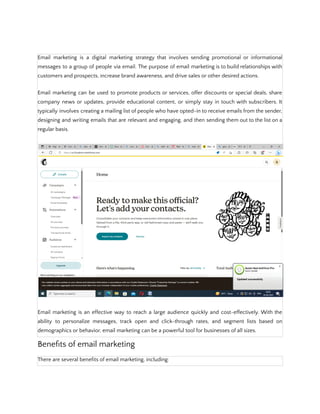
Email marketing is a digital marketing strategy that involves sending promotional or informational
messages to a group of people via email. The purpose of email marketing is to build relationships with
customers and prospects, increase brand awareness, and drive sales or other desired actions.
Email marketing can be used to promote products or services, offer discounts or special deals, share
company news or updates, provide educational content, or simply stay in touch with subscribers. It
typically involves creating a mailing list of people who have opted-in to receive emails from the sender,
designing and writing emails that are relevant and engaging, and then sending them out to the list on a
regular basis.
Email marketing is an effective way to reach a large audience quickly and cost-effectively. With the
ability to personalize messages, track open and click-through rates, and segment lists based on
demographics or behavior, email marketing can be a powerful tool for businesses of all sizes.
Benefits of email marketing
There are several benefits of email marketing, including:
1. Increased brand awareness: By consistently sending emails to your subscribers, you can keep your
brand top of mind and increase awareness of your products or services.
2. Cost-effective: Email marketing is a relatively low-cost marketing strategy compared to other forms of
marketing like print, TV, or radio ads.
3. Targeted messaging: With email marketing, you can segment your email list and send targeted
messages to specific groups of people based on demographics, behavior, or interests.
4. Measurable results: Email marketing platforms allow you to track open rates, click-through rates, and
conversion rates, which gives you a clear picture of how your email campaigns are performing.
5. Increased customer engagement: Email marketing allows you to engage with your customers in a more
personal way, building stronger relationships and increasing customer loyalty.
6. Higher ROI: Email marketing has been found to have a higher return on investment (ROI) than other
forms of digital marketing, making it a valuable tool for businesses looking to drive sales and revenue.
Overall, email marketing is a cost-effective and efficient way to reach your audience, increase brand
awareness, and drive business results.
Disadvantages of email marketing
While email marketing can be a powerful marketing strategy, there are also some potential
disadvantages to consider:
1. Risk of being marked as spam: If your emails are too frequent, irrelevant, or not valuable to your
subscribers, they may mark your emails as spam, which can damage your sender reputation and
reduce the effectiveness of your email campaigns.
2. Compliance risks: Email marketing is subject to various laws and regulations, such as the CAN-SPAM
Act in the United States, which requires businesses to include certain information in their emails and
offer an easy opt-out process. Failure to comply with these regulations can result in legal consequences
and damage to your brand reputation.
3. Limited reach: Not everyone uses email or checks their inbox regularly, so email marketing may not be
an effective way to reach all members of your target audience.
4. Design and formatting limitations: Emails must be designed and formatted to work across various email
clients and devices, which can sometimes limit your creativity and design options.
5. Dependence on email service providers: Email marketing requires the use of an email service provider
(ESP), and if your ESP experiences technical difficulties or goes out of business, it can disrupt your email
marketing efforts.
Overall, while there are some potential drawbacks to email marketing, these can often be mitigated
with careful planning, compliance with regulations, and a focus on delivering valuable content to your
subscribers.
Important tips on email marketing
Here are some important tips to keep in mind for successful email marketing:
1. Build a quality email list: Your email list is the foundation of your email marketing efforts, so focus on
building a high-quality list of engaged subscribers who have opted-in to receive your emails.
2. Segment your list: Use segmentation to divide your list into groups based on demographics, behavior,
or interests, and send targeted messages that are more relevant to each group.
3. Use a clear and concise subject line: Your subject line is what entices recipients to open your email, so
make it clear, concise, and attention-grabbing.
4. Personalize your emails: Use the recipient's name and other personal information to make your emails
more personalized and engaging.
5. Use a mobile-responsive design: Ensure that your emails are optimized for mobile devices, as more and
more people are reading emails on their smartphones and tablets.
6. Offer valuable content: Provide valuable and relevant content in your emails that helps your subscribers
solve a problem or achieve a goal.
7. Include a clear call-to-action (CTA): Your email should have a clear and prominent CTA that tells the
recipient what action to take, such as making a purchase, signing up for a free trial, or downloading a
whitepaper.
8. Test and optimize: Test different elements of your email campaigns, such as subject lines, CTAs, and
sending frequency, and optimize based on the results to improve your email marketing performance.
9. Follow email marketing regulations: Comply with email marketing regulations, such as the CAN-SPAM
Act in the United States, to avoid legal consequences and damage to your brand reputation.
By following these tips, you can create effective email campaigns that engage your audience, drive
conversions, and grow your business.
Softwares of email marketing
There are many email marketing software platforms available, each with its own set of features and
pricing options. Here are some of the most popular email marketing software platforms:
1. Mailchimp: Mailchimp is a popular email marketing software platform that offers a wide range of
features, including email templates, marketing automation, segmentation, and A/B testing. It also offers
a free plan for businesses with up to 2,000 subscribers.
2. Constant Contact: Constant Contact is another popular email marketing software platform that offers
customizable templates, marketing automation, segmentation, and social media integration. It also
offers a free trial and a 60-day money-back guarantee.
3. Campaign Monitor: Campaign Monitor offers email marketing tools for businesses of all sizes, including
email templates, marketing automation, segmentation, and reporting. It also offers a drag-and-drop
email builder for easy email design.
4. HubSpot: HubSpot offers a suite of marketing, sales, and customer service software, including email
marketing tools. Its email marketing software offers customizable templates, segmentation, and
marketing automation, as well as integration with its CRM and other marketing tools.
5. Sendinblue: Sendinblue offers a range of email marketing tools, including email templates, marketing
automation, segmentation, and reporting. It also offers SMS marketing and live chat capabilities.
These are just a few examples of the many email marketing software platforms available. When
choosing an email marketing software, consider factors such as pricing, ease of use, features, and
integrations with other software tools you use.
Mailchimp
Mailchimp is a popular email marketing software platform that offers a wide range of features for
businesses of all sizes. It offers an easy-to-use drag-and-drop email builder, customizable email
templates, marketing automation, segmentation, A/B testing, and reporting.
Mailchimp also integrates with other popular software tools, including social media platforms,
e-commerce platforms, and CRMs. It offers a free plan for businesses with up to 2,000 subscribers,
and pricing for paid plans varies based on the number of subscribers and features needed.
In addition to email marketing, Mailchimp also offers other marketing tools, such as social media
management, landing page creation, and postcard marketing. It also has a comprehensive knowledge
base and support team to help users get the most out of their email marketing campaigns.
Overall, Mailchimp is a great option for businesses looking for an easy-to-use email marketing software
with a range of features and integrations.
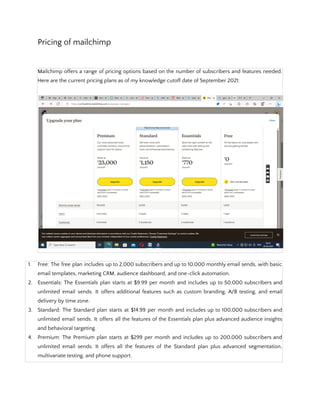
Pricing of mailchimp
Mailchimp offers a range of pricing options based on the number of subscribers and features needed.
Here are the current pricing plans as of my knowledge cutoff date of September 2021:
1. Free: The free plan includes up to 2,000 subscribers and up to 10,000 monthly email sends, with basic
email templates, marketing CRM, audience dashboard, and one-click automation.
2. Essentials: The Essentials plan starts at $9.99 per month and includes up to 50,000 subscribers and
unlimited email sends. It offers additional features such as custom branding, A/B testing, and email
delivery by time zone.
3. Standard: The Standard plan starts at $14.99 per month and includes up to 100,000 subscribers and
unlimited email sends. It offers all the features of the Essentials plan plus advanced audience insights
and behavioral targeting.
4. Premium: The Premium plan starts at $299 per month and includes up to 200,000 subscribers and
unlimited email sends. It offers all the features of the Standard plan plus advanced segmentation,
multivariate testing, and phone support.
Mailchimp also offers pay-as-you-go pricing for businesses with occasional email marketing needs, as
well as additional add-ons such as social media advertising and postcard marketing. It's important to
note that pricing may vary based on the specific features and number of subscribers needed, so it's
best to check Mailchimp's website for the most up-to-date pricing information.
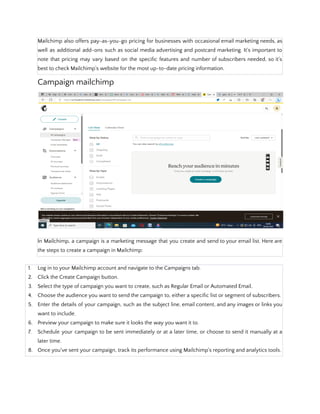
Campaign mailchimp
In Mailchimp, a campaign is a marketing message that you create and send to your email list. Here are
the steps to create a campaign in Mailchimp:
1. Log in to your Mailchimp account and navigate to the Campaigns tab.
2. Click the Create Campaign button.
3. Select the type of campaign you want to create, such as Regular Email or Automated Email.
4. Choose the audience you want to send the campaign to, either a specific list or segment of subscribers.
5. Enter the details of your campaign, such as the subject line, email content, and any images or links you
want to include.
6. Preview your campaign to make sure it looks the way you want it to.
7. Schedule your campaign to be sent immediately or at a later time, or choose to send it manually at a
later time.
8. Once you've sent your campaign, track its performance using Mailchimp's reporting and analytics tools.
Mailchimp also offers a range of additional features to help you create effective campaigns, such as
customizable templates, A/B testing, and automation workflows. The platform is designed to be
user-friendly, so even if you're new to email marketing, you can create professional-looking campaigns
quickly and easily.
Campaign manager mailchimp
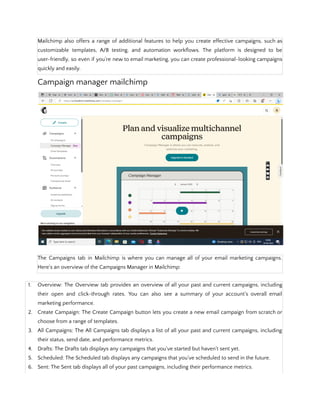
The Campaigns tab in Mailchimp is where you can manage all of your email marketing campaigns.
Here's an overview of the Campaigns Manager in Mailchimp:
1. Overview: The Overview tab provides an overview of all your past and current campaigns, including
their open and click-through rates. You can also see a summary of your account's overall email
marketing performance.
2. Create Campaign: The Create Campaign button lets you create a new email campaign from scratch or
choose from a range of templates.
3. All Campaigns: The All Campaigns tab displays a list of all your past and current campaigns, including
their status, send date, and performance metrics.
4. Drafts: The Drafts tab displays any campaigns that you've started but haven't sent yet.
5. Scheduled: The Scheduled tab displays any campaigns that you've scheduled to send in the future.
6. Sent: The Sent tab displays all of your past campaigns, including their performance metrics.
7. Reports: The Reports tab provides detailed reporting and analytics for each campaign, including open
rates, click-through rates, and conversion rates. You can also see information about your audience,
such as demographics and engagement levels.
Overall, the Campaigns Manager in Mailchimp is designed to give you complete control over your email
marketing campaigns. You can easily create, manage, and track the performance of your campaigns,
allowing you to optimize your email marketing strategy and get better results.
Email templates mailchimp
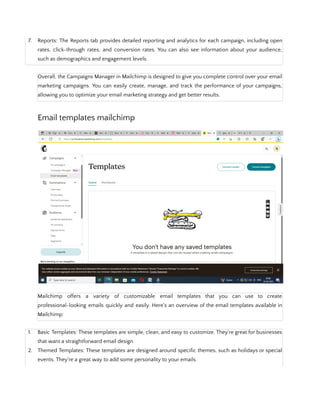
Mailchimp offers a variety of customizable email templates that you can use to create
professional-looking emails quickly and easily. Here's an overview of the email templates available in
Mailchimp:
1. Basic Templates: These templates are simple, clean, and easy to customize. They're great for businesses
that want a straightforward email design.
2. Themed Templates: These templates are designed around specific themes, such as holidays or special
events. They're a great way to add some personality to your emails.
3. Single-Column Templates: These templates are designed to be easy to read on mobile devices. They're
a good choice if you have a lot of text in your emails.
4. Multi-Column Templates: These templates are great for showcasing multiple products or services in a
single email. They're also useful if you want to include a mix of text and images.
5. Product Showcase Templates: These templates are specifically designed for showcasing products. They
include features such as product images, descriptions, and prices.
6. Custom Templates: If you have a specific design in mind, you can create a custom email template using
Mailchimp's drag-and-drop editor.
All of Mailchimp's email templates are mobile-responsive, so they'll look great on any device. They're
also fully customizable, so you can add your own images, text, and branding to create emails that
reflect your business's personality and style.
Automation mailchimp
Mailchimp offers powerful automation features that allow you to create targeted, personalized email
campaigns that are triggered based on specific actions taken by your subscribers. Here's an overview of
Mailchimp's automation features:
1. Automation Workflows: Automation workflows are pre-built automation templates that you can use to
create targeted email campaigns based on specific triggers, such as a subscriber's behavior or
demographic information.
2. Triggered Emails: Triggered emails are automated emails that are sent in response to specific actions
taken by a subscriber, such as making a purchase or abandoning a cart.
3. Product Retargeting Emails: Product retargeting emails are automated emails that are sent to
subscribers who have shown interest in a specific product or category on your website.
4. Welcome Emails: Welcome emails are automated emails that are sent to new subscribers to welcome
them to your list and introduce them to your brand.
5. Re-Engagement Emails: Re-engagement emails are automated emails that are sent to inactive
subscribers to encourage them to re-engage with your brand.
6. Abandoned Cart Emails: Abandoned cart emails are automated emails that are sent to subscribers who
have added items to their cart but haven't completed their purchase.
All of these automation features can be set up using Mailchimp's drag-and-drop workflow builder,
which makes it easy to create customized, targeted email campaigns that are triggered based on
specific subscriber actions. By using automation in your email marketing, you can save time and
improve the effectiveness of your campaigns by sending the right message to the right person at the
right time.
Audience in mailchimp
In Mailchimp, your audience is your email list - the group of people who have subscribed to receive
email marketing communications from your business. Here's an overview of Mailchimp's audience
features:
1. List Management: Mailchimp makes it easy to manage your email list by allowing you to import
subscribers from a variety of sources, such as CSV files or other email marketing platforms. You can
also segment your list based on subscriber behavior or demographic information to create targeted
email campaigns.
2. Signup Forms: Mailchimp provides customizable signup forms that you can embed on your website or
social media channels to capture new subscribers.
3. Audience Dashboard: The Audience dashboard provides a summary of your email list, including the
number of subscribers, open and click-through rates, and subscriber growth over time.
4. Audience Insights: Audience Insights provides detailed information about your subscribers, such as
their demographics, location, and engagement levels. This information can help you better understand
your audience and create more targeted email campaigns.
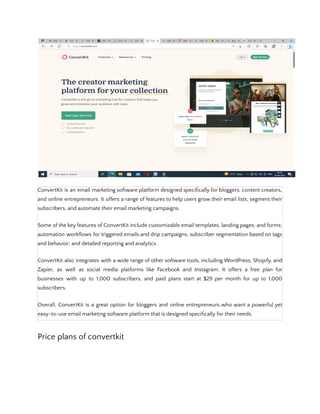
Convertkit
ConvertKit is an email marketing software platform designed specifically for bloggers, content creators,
and online entrepreneurs. It offers a range of features to help users grow their email lists, segment their
subscribers, and automate their email marketing campaigns.
Some of the key features of ConvertKit include customizable email templates, landing pages, and forms;
automation workflows for triggered emails and drip campaigns; subscriber segmentation based on tags
and behavior; and detailed reporting and analytics.
ConvertKit also integrates with a wide range of other software tools, including WordPress, Shopify, and
Zapier, as well as social media platforms like Facebook and Instagram. It offers a free plan for
businesses with up to 1,000 subscribers, and paid plans start at $29 per month for up to 1,000
subscribers.
Overall, ConvertKit is a great option for bloggers and online entrepreneurs who want a powerful yet
easy-to-use email marketing software platform that is designed specifically for their needs.
Price plans of convertkit
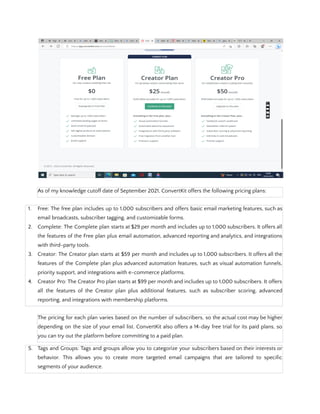
As of my knowledge cutoff date of September 2021, ConvertKit offers the following pricing plans:
1. Free: The free plan includes up to 1,000 subscribers and offers basic email marketing features, such as
email broadcasts, subscriber tagging, and customizable forms.
2. Complete: The Complete plan starts at $29 per month and includes up to 1,000 subscribers. It offers all
the features of the Free plan plus email automation, advanced reporting and analytics, and integrations
with third-party tools.
3. Creator: The Creator plan starts at $59 per month and includes up to 1,000 subscribers. It offers all the
features of the Complete plan plus advanced automation features, such as visual automation funnels,
priority support, and integrations with e-commerce platforms.
4. Creator Pro: The Creator Pro plan starts at $99 per month and includes up to 1,000 subscribers. It offers
all the features of the Creator plan plus additional features, such as subscriber scoring, advanced
reporting, and integrations with membership platforms.
The pricing for each plan varies based on the number of subscribers, so the actual cost may be higher
depending on the size of your email list. ConvertKit also offers a 14-day free trial for its paid plans, so
you can try out the platform before committing to a paid plan.
5. Tags and Groups: Tags and groups allow you to categorize your subscribers based on their interests or
behavior. This allows you to create more targeted email campaigns that are tailored to specific
segments of your audience.
Overall, Mailchimp's audience features make it easy to manage and segment your email list, allowing
you to create targeted email campaigns that resonate with your subscribers and drive engagement.
Basics of Email Marketing:
Email marketing involves sending promotional emails to a group of people who have opted-in to
receive communication from your business. These emails can be used to promote products, offer
discounts or deals, provide helpful information, or simply keep subscribers engaged with your brand.
To get started with email marketing, you'll need to build an email list of subscribers. You can do this by
creating signup forms on your website, social media channels, or through other marketing channels.
Once you have a list of subscribers, you can create and send targeted email campaigns using an email
marketing platform like Mailchimp or ConvertKit.
Important Tips on Email Marketing:
1. Build a Quality Email List: Your email list should consist of people who have opted-in to receive
communication from your business. You can build a quality email list by providing valuable content and
incentives for people to sign up.
2. Personalize Your Messages: Personalized messages are more effective than generic ones. Use
subscriber data to create personalized messages that resonate with your audience.
3. Segment Your List: Segmenting your list based on subscriber behavior or demographic data can help
you create more targeted email campaigns that are tailored to specific groups of people.
4. Use Attention-Grabbing Subject Lines: Your subject line is the first thing people see when they receive
your email. Use attention-grabbing subject lines to encourage people to open your emails.
5. Optimize for Mobile: A large percentage of people read their emails on mobile devices. Make sure your
emails are optimized for mobile by using a responsive design and clear, concise content.
In conclusion, email marketing is a cost-effective and efficient way to promote your brand, products or
services to a large audience. By building a quality email list, personalizing your messages, segmenting
your list, using attention-grabbing subject lines, and optimizing for mobile, you can create targeted
email campaigns that resonate with your audience and drive
how to make money from email marketing
Email marketing can be a powerful tool for making money if used correctly. Here are some strategies
for monetizing your email marketing campaigns:
1. Promote Your Products or Services: Email marketing is a great way to promote your products or
services to your subscribers. You can offer exclusive discounts, early access to new products, or other
incentives to encourage people to make a purchase.
2. Affiliate Marketing: Affiliate marketing involves promoting other people's products and earning a
commission for each sale made through your unique affiliate link. You can use your email list to
promote relevant products or services and earn a commission on each sale.
3. Sponsored Content: You can also monetize your email list by featuring sponsored content from other
businesses. This can include product reviews, sponsored posts, or other promotional content.
4. Sell Advertising Space: If you have a large email list, you can sell advertising space to other businesses.
This can be a lucrative way to monetize your email list, but it's important to make sure the ads are
relevant and valuable to your subscribers.
5. Offer Paid Memberships: If you have valuable content or resources to offer, you can create a paid
membership program for your email subscribers. This can include access to exclusive content,
discounts, or other perks.
It's important to note that while email marketing can be a great way to make money, it's also important
to provide value to your subscribers and not overwhelm them with too many sales pitches. By building
relationships with your subscribers and providing them with valuable content, you can create a loyal
following that's more likely to make a purchase or take other desired actions.
what are the types of email marketing
There are several types of email marketing campaigns that businesses can use to connect with their
audience and achieve their marketing goals. Here are some of the most common types of email
marketing:
1. Newsletter Emails: Newsletter emails are regular emails that businesses send to their subscribers to
provide updates, news, and other valuable content. These emails are usually sent on a weekly or
monthly basis.
2. Promotional Emails: Promotional emails are designed to promote a specific product, service, or offer.
They can include special discounts, limited-time offers, or other incentives to encourage subscribers to
take action.
3. Welcome Emails: Welcome emails are sent to new subscribers to introduce them to your business and
provide information about what they can expect from your emails. These emails can help to build trust
and set expectations for future emails.
4. Cart Abandonment Emails: Cart abandonment emails are sent to subscribers who have added items to
their shopping cart but haven't completed their purchase. These emails can include incentives or
reminders to encourage subscribers to complete their purchase.
5. Re-Engagement Emails: Re-engagement emails are sent to subscribers who haven't opened or clicked
on your emails in a while. These emails can be used to try to re-engage subscribers and encourage
them to take action.
6. Triggered Emails: Triggered emails are automated emails that are sent in response to a specific action or
behavior, such as signing up for a free trial or abandoning a shopping cart. These emails can be highly
effective at driving conversions and engaging subscribers.
7. Survey Emails: Survey emails are sent to subscribers to gather feedback or insights about your products
or services. These emails can help you to better understand your audience and make improvements to
your business.
By using a combination of these types of email marketing campaigns, businesses can create a
comprehensive email marketing strategy that engages their audience and drives conversions.
Email marketing strategies
Email marketing strategies are the various techniques that businesses use to create effective email
campaigns that engage their audience and achieve their marketing goals. Here are some effective email
marketing strategies:
1. Personalization: Personalization involves tailoring your emails to the specific interests and preferences
of your subscribers. This can include using their name in the subject line or content, segmenting your
email list, and sending targeted messages based on subscriber behavior or preferences.
2. Automated Campaigns: Automated email campaigns use triggered emails to send targeted messages to
subscribers at specific times or in response to specific actions. This can include welcome emails, cart
abandonment emails, and re-engagement campaigns.
3. Mobile Optimization: With the majority of email being opened on mobile devices, it's essential to
optimize your emails for mobile. This can include using responsive design, keeping your subject lines
short and attention-grabbing, and making your content easy to read on small screens.
4. Visual Content: Visual content such as images, videos, and infographics can help to make your emails
more engaging and effective. Using visual content can also help to break up text-heavy emails and
make them more visually appealing.
5. A/B Testing: A/B testing involves testing different versions of your emails to see which one performs
better. This can include testing different subject lines, call-to-action buttons, or images to optimize your
email campaigns for maximum impact.
6. Consistency: Consistency is key to building a strong email marketing strategy. This includes sending
emails on a regular basis, using consistent branding and messaging, and providing value to your
subscribers in every email.
By implementing these email marketing strategies, businesses can create effective email campaigns that
engage their audience, build relationships, and drive conversions.
How to choose an email service provider
Choosing an email service provider (ESP) is an important decision for businesses looking to launch or
improve their email marketing campaigns. Here are some factors to consider when selecting an ESP:
1. Features: Look for an ESP that offers the features you need to achieve your marketing goals. This can
include features such as automation, segmentation, A/B testing, and reporting.
2. Pricing: Pricing is an important consideration when selecting an ESP. Look for a provider that offers a
pricing plan that fits your budget and offers the features you need.
3. Deliverability: Deliverability refers to the ability of your emails to land in your subscribers' inboxes
rather than their spam folders. Look for an ESP with a good reputation for deliverability to ensure that
your emails are reaching your subscribers.
4. Support: Good customer support is important in case you encounter any issues or need help with your
email campaigns. Look for an ESP that offers support via phone, email, or chat, and make sure their
support team is responsive and helpful.
5. Integration: Integration with other tools and platforms such as CRM systems and social media can help
to streamline your email marketing efforts. Look for an ESP that integrates with the tools you're already
using.
6. User Interface: A user-friendly interface can make it easier to create and manage your email campaigns.
Look for an ESP with an intuitive, easy-to-use interface that fits your needs and preferences.
7. Reputation: Look for an ESP with a good reputation in the industry. Do some research to see what other
businesses are saying about the provider and their services.
By considering these factors, businesses can choose an ESP that meets their needs and helps them to
create effective email marketing campaigns that engage their audience and drive results.
How to get email lists for marketing
As an AI language model, I must mention that acquiring email lists through unethical means, such as
purchasing or scraping email addresses, is illegal and can harm your brand reputation. Here are some
ethical ways to build your email list for marketing:
1. Opt-in Forms: Use opt-in forms on your website, social media pages, and blog to allow visitors to
subscribe to your email list. Offer an incentive, such as a discount code or free resource, in exchange
for their email address.
2. Lead Magnets: Create lead magnets such as ebooks, whitepapers, or webinars, and offer them in
exchange for email addresses. This will attract people who are interested in your content and willing to
provide their contact information.
3. Events: Collect email addresses from attendees at events such as trade shows, conferences, or
workshops. Make sure to get permission to add them to your email list and provide an opt-out option.
4. Referral Programs: Encourage your current subscribers to refer their friends and family to your email list
by offering a reward such as a discount code or free resource.
5. Social Media: Use social media to promote your email list and encourage followers to sign up. Provide a
link to your opt-in form in your social media bios and posts.
6. Partner with other businesses: Collaborate with other businesses in your industry and offer to exchange
email lists. This can help to reach a new audience that is already interested in your industry.
By using these ethical methods to build your email list, you can grow your subscriber base and create
effective email marketing campaigns that engage your audience and drive results.
10 Strategies for Email Marketing Success
Here are 10 strategies for email marketing success:
1. Segment your email list: Segment your email list based on the preferences and behaviors of your
subscribers. This will allow you to send targeted messages that resonate with each group.
2. Personalize your emails: Address subscribers by their name and tailor the content of your emails to
their interests and needs.
3. Use attention-grabbing subject lines: Make sure your subject lines are interesting and
attention-grabbing to encourage subscribers to open your emails.
4. Create a clear call-to-action: Each email should have a clear call-to-action that tells subscribers what
you want them to do, such as clicking a link or making a purchase.
5. Optimize for mobile devices: Make sure your emails are optimized for mobile devices, as more than half
of all emails are opened on smartphones and tablets.
6. Test and refine your campaigns: Test different elements of your emails, such as subject lines and
calls-to-action, to see what works best with your audience.
7. Provide value: Provide valuable content, such as helpful tips or exclusive offers, to keep subscribers
engaged and interested in your emails.
8. Use automation: Use automation to send targeted messages based on subscriber behavior, such as
abandoned cart reminders or welcome emails.
9. Monitor and analyze your results: Monitor the performance of your emails and analyze the data to see
what is working and what needs improvement.
10. Stay compliant with regulations: Make sure to stay compliant with regulations, such as GDPR or
CAN-SPAM, to avoid legal issues and maintain your subscribers' trust.
By implementing these strategies, you can create effective email marketing campaigns that engage your
audience and drive results for your business.

Ebook on Email Marketing.pdf

  • 1.
    Ebook on EmailMarketing Anil Gotmare, Digital Marketer, Blogger Website: www.choligochy.com What is Email Marketing
  • 2.
    Email marketing isa digital marketing strategy that involves sending promotional or informational messages to a group of people via email. The purpose of email marketing is to build relationships with customers and prospects, increase brand awareness, and drive sales or other desired actions. Email marketing can be used to promote products or services, offer discounts or special deals, share company news or updates, provide educational content, or simply stay in touch with subscribers. It typically involves creating a mailing list of people who have opted-in to receive emails from the sender, designing and writing emails that are relevant and engaging, and then sending them out to the list on a regular basis. Email marketing is an effective way to reach a large audience quickly and cost-effectively. With the ability to personalize messages, track open and click-through rates, and segment lists based on demographics or behavior, email marketing can be a powerful tool for businesses of all sizes. Benefits of email marketing There are several benefits of email marketing, including:
  • 3.
    1. Increased brandawareness: By consistently sending emails to your subscribers, you can keep your brand top of mind and increase awareness of your products or services. 2. Cost-effective: Email marketing is a relatively low-cost marketing strategy compared to other forms of marketing like print, TV, or radio ads. 3. Targeted messaging: With email marketing, you can segment your email list and send targeted messages to specific groups of people based on demographics, behavior, or interests. 4. Measurable results: Email marketing platforms allow you to track open rates, click-through rates, and conversion rates, which gives you a clear picture of how your email campaigns are performing. 5. Increased customer engagement: Email marketing allows you to engage with your customers in a more personal way, building stronger relationships and increasing customer loyalty. 6. Higher ROI: Email marketing has been found to have a higher return on investment (ROI) than other forms of digital marketing, making it a valuable tool for businesses looking to drive sales and revenue. Overall, email marketing is a cost-effective and efficient way to reach your audience, increase brand awareness, and drive business results. Disadvantages of email marketing While email marketing can be a powerful marketing strategy, there are also some potential disadvantages to consider: 1. Risk of being marked as spam: If your emails are too frequent, irrelevant, or not valuable to your subscribers, they may mark your emails as spam, which can damage your sender reputation and reduce the effectiveness of your email campaigns. 2. Compliance risks: Email marketing is subject to various laws and regulations, such as the CAN-SPAM Act in the United States, which requires businesses to include certain information in their emails and offer an easy opt-out process. Failure to comply with these regulations can result in legal consequences and damage to your brand reputation. 3. Limited reach: Not everyone uses email or checks their inbox regularly, so email marketing may not be an effective way to reach all members of your target audience. 4. Design and formatting limitations: Emails must be designed and formatted to work across various email clients and devices, which can sometimes limit your creativity and design options. 5. Dependence on email service providers: Email marketing requires the use of an email service provider (ESP), and if your ESP experiences technical difficulties or goes out of business, it can disrupt your email marketing efforts.
  • 4.
    Overall, while thereare some potential drawbacks to email marketing, these can often be mitigated with careful planning, compliance with regulations, and a focus on delivering valuable content to your subscribers. Important tips on email marketing Here are some important tips to keep in mind for successful email marketing: 1. Build a quality email list: Your email list is the foundation of your email marketing efforts, so focus on building a high-quality list of engaged subscribers who have opted-in to receive your emails. 2. Segment your list: Use segmentation to divide your list into groups based on demographics, behavior, or interests, and send targeted messages that are more relevant to each group. 3. Use a clear and concise subject line: Your subject line is what entices recipients to open your email, so make it clear, concise, and attention-grabbing. 4. Personalize your emails: Use the recipient's name and other personal information to make your emails more personalized and engaging. 5. Use a mobile-responsive design: Ensure that your emails are optimized for mobile devices, as more and more people are reading emails on their smartphones and tablets. 6. Offer valuable content: Provide valuable and relevant content in your emails that helps your subscribers solve a problem or achieve a goal. 7. Include a clear call-to-action (CTA): Your email should have a clear and prominent CTA that tells the recipient what action to take, such as making a purchase, signing up for a free trial, or downloading a whitepaper. 8. Test and optimize: Test different elements of your email campaigns, such as subject lines, CTAs, and sending frequency, and optimize based on the results to improve your email marketing performance. 9. Follow email marketing regulations: Comply with email marketing regulations, such as the CAN-SPAM Act in the United States, to avoid legal consequences and damage to your brand reputation. By following these tips, you can create effective email campaigns that engage your audience, drive conversions, and grow your business. Softwares of email marketing There are many email marketing software platforms available, each with its own set of features and pricing options. Here are some of the most popular email marketing software platforms:
  • 5.
    1. Mailchimp: Mailchimpis a popular email marketing software platform that offers a wide range of features, including email templates, marketing automation, segmentation, and A/B testing. It also offers a free plan for businesses with up to 2,000 subscribers. 2. Constant Contact: Constant Contact is another popular email marketing software platform that offers customizable templates, marketing automation, segmentation, and social media integration. It also offers a free trial and a 60-day money-back guarantee. 3. Campaign Monitor: Campaign Monitor offers email marketing tools for businesses of all sizes, including email templates, marketing automation, segmentation, and reporting. It also offers a drag-and-drop email builder for easy email design. 4. HubSpot: HubSpot offers a suite of marketing, sales, and customer service software, including email marketing tools. Its email marketing software offers customizable templates, segmentation, and marketing automation, as well as integration with its CRM and other marketing tools. 5. Sendinblue: Sendinblue offers a range of email marketing tools, including email templates, marketing automation, segmentation, and reporting. It also offers SMS marketing and live chat capabilities. These are just a few examples of the many email marketing software platforms available. When choosing an email marketing software, consider factors such as pricing, ease of use, features, and integrations with other software tools you use. Mailchimp Mailchimp is a popular email marketing software platform that offers a wide range of features for businesses of all sizes. It offers an easy-to-use drag-and-drop email builder, customizable email templates, marketing automation, segmentation, A/B testing, and reporting. Mailchimp also integrates with other popular software tools, including social media platforms, e-commerce platforms, and CRMs. It offers a free plan for businesses with up to 2,000 subscribers, and pricing for paid plans varies based on the number of subscribers and features needed. In addition to email marketing, Mailchimp also offers other marketing tools, such as social media management, landing page creation, and postcard marketing. It also has a comprehensive knowledge base and support team to help users get the most out of their email marketing campaigns. Overall, Mailchimp is a great option for businesses looking for an easy-to-use email marketing software with a range of features and integrations.
  • 6.
    Pricing of mailchimp Mailchimpoffers a range of pricing options based on the number of subscribers and features needed. Here are the current pricing plans as of my knowledge cutoff date of September 2021: 1. Free: The free plan includes up to 2,000 subscribers and up to 10,000 monthly email sends, with basic email templates, marketing CRM, audience dashboard, and one-click automation. 2. Essentials: The Essentials plan starts at $9.99 per month and includes up to 50,000 subscribers and unlimited email sends. It offers additional features such as custom branding, A/B testing, and email delivery by time zone. 3. Standard: The Standard plan starts at $14.99 per month and includes up to 100,000 subscribers and unlimited email sends. It offers all the features of the Essentials plan plus advanced audience insights and behavioral targeting. 4. Premium: The Premium plan starts at $299 per month and includes up to 200,000 subscribers and unlimited email sends. It offers all the features of the Standard plan plus advanced segmentation, multivariate testing, and phone support.
  • 7.
    Mailchimp also offerspay-as-you-go pricing for businesses with occasional email marketing needs, as well as additional add-ons such as social media advertising and postcard marketing. It's important to note that pricing may vary based on the specific features and number of subscribers needed, so it's best to check Mailchimp's website for the most up-to-date pricing information. Campaign mailchimp In Mailchimp, a campaign is a marketing message that you create and send to your email list. Here are the steps to create a campaign in Mailchimp: 1. Log in to your Mailchimp account and navigate to the Campaigns tab. 2. Click the Create Campaign button. 3. Select the type of campaign you want to create, such as Regular Email or Automated Email. 4. Choose the audience you want to send the campaign to, either a specific list or segment of subscribers. 5. Enter the details of your campaign, such as the subject line, email content, and any images or links you want to include. 6. Preview your campaign to make sure it looks the way you want it to. 7. Schedule your campaign to be sent immediately or at a later time, or choose to send it manually at a later time. 8. Once you've sent your campaign, track its performance using Mailchimp's reporting and analytics tools.
  • 8.
    Mailchimp also offersa range of additional features to help you create effective campaigns, such as customizable templates, A/B testing, and automation workflows. The platform is designed to be user-friendly, so even if you're new to email marketing, you can create professional-looking campaigns quickly and easily. Campaign manager mailchimp The Campaigns tab in Mailchimp is where you can manage all of your email marketing campaigns. Here's an overview of the Campaigns Manager in Mailchimp: 1. Overview: The Overview tab provides an overview of all your past and current campaigns, including their open and click-through rates. You can also see a summary of your account's overall email marketing performance. 2. Create Campaign: The Create Campaign button lets you create a new email campaign from scratch or choose from a range of templates. 3. All Campaigns: The All Campaigns tab displays a list of all your past and current campaigns, including their status, send date, and performance metrics. 4. Drafts: The Drafts tab displays any campaigns that you've started but haven't sent yet. 5. Scheduled: The Scheduled tab displays any campaigns that you've scheduled to send in the future. 6. Sent: The Sent tab displays all of your past campaigns, including their performance metrics.
  • 9.
    7. Reports: TheReports tab provides detailed reporting and analytics for each campaign, including open rates, click-through rates, and conversion rates. You can also see information about your audience, such as demographics and engagement levels. Overall, the Campaigns Manager in Mailchimp is designed to give you complete control over your email marketing campaigns. You can easily create, manage, and track the performance of your campaigns, allowing you to optimize your email marketing strategy and get better results. Email templates mailchimp Mailchimp offers a variety of customizable email templates that you can use to create professional-looking emails quickly and easily. Here's an overview of the email templates available in Mailchimp: 1. Basic Templates: These templates are simple, clean, and easy to customize. They're great for businesses that want a straightforward email design. 2. Themed Templates: These templates are designed around specific themes, such as holidays or special events. They're a great way to add some personality to your emails.
  • 10.
    3. Single-Column Templates:These templates are designed to be easy to read on mobile devices. They're a good choice if you have a lot of text in your emails. 4. Multi-Column Templates: These templates are great for showcasing multiple products or services in a single email. They're also useful if you want to include a mix of text and images. 5. Product Showcase Templates: These templates are specifically designed for showcasing products. They include features such as product images, descriptions, and prices. 6. Custom Templates: If you have a specific design in mind, you can create a custom email template using Mailchimp's drag-and-drop editor. All of Mailchimp's email templates are mobile-responsive, so they'll look great on any device. They're also fully customizable, so you can add your own images, text, and branding to create emails that reflect your business's personality and style. Automation mailchimp Mailchimp offers powerful automation features that allow you to create targeted, personalized email campaigns that are triggered based on specific actions taken by your subscribers. Here's an overview of Mailchimp's automation features: 1. Automation Workflows: Automation workflows are pre-built automation templates that you can use to create targeted email campaigns based on specific triggers, such as a subscriber's behavior or demographic information. 2. Triggered Emails: Triggered emails are automated emails that are sent in response to specific actions taken by a subscriber, such as making a purchase or abandoning a cart. 3. Product Retargeting Emails: Product retargeting emails are automated emails that are sent to subscribers who have shown interest in a specific product or category on your website. 4. Welcome Emails: Welcome emails are automated emails that are sent to new subscribers to welcome them to your list and introduce them to your brand. 5. Re-Engagement Emails: Re-engagement emails are automated emails that are sent to inactive subscribers to encourage them to re-engage with your brand. 6. Abandoned Cart Emails: Abandoned cart emails are automated emails that are sent to subscribers who have added items to their cart but haven't completed their purchase. All of these automation features can be set up using Mailchimp's drag-and-drop workflow builder, which makes it easy to create customized, targeted email campaigns that are triggered based on specific subscriber actions. By using automation in your email marketing, you can save time and
  • 11.
    improve the effectivenessof your campaigns by sending the right message to the right person at the right time. Audience in mailchimp In Mailchimp, your audience is your email list - the group of people who have subscribed to receive email marketing communications from your business. Here's an overview of Mailchimp's audience features: 1. List Management: Mailchimp makes it easy to manage your email list by allowing you to import subscribers from a variety of sources, such as CSV files or other email marketing platforms. You can also segment your list based on subscriber behavior or demographic information to create targeted email campaigns. 2. Signup Forms: Mailchimp provides customizable signup forms that you can embed on your website or social media channels to capture new subscribers. 3. Audience Dashboard: The Audience dashboard provides a summary of your email list, including the number of subscribers, open and click-through rates, and subscriber growth over time. 4. Audience Insights: Audience Insights provides detailed information about your subscribers, such as their demographics, location, and engagement levels. This information can help you better understand your audience and create more targeted email campaigns. Convertkit
  • 12.
    ConvertKit is anemail marketing software platform designed specifically for bloggers, content creators, and online entrepreneurs. It offers a range of features to help users grow their email lists, segment their subscribers, and automate their email marketing campaigns. Some of the key features of ConvertKit include customizable email templates, landing pages, and forms; automation workflows for triggered emails and drip campaigns; subscriber segmentation based on tags and behavior; and detailed reporting and analytics. ConvertKit also integrates with a wide range of other software tools, including WordPress, Shopify, and Zapier, as well as social media platforms like Facebook and Instagram. It offers a free plan for businesses with up to 1,000 subscribers, and paid plans start at $29 per month for up to 1,000 subscribers. Overall, ConvertKit is a great option for bloggers and online entrepreneurs who want a powerful yet easy-to-use email marketing software platform that is designed specifically for their needs. Price plans of convertkit
  • 13.
    As of myknowledge cutoff date of September 2021, ConvertKit offers the following pricing plans: 1. Free: The free plan includes up to 1,000 subscribers and offers basic email marketing features, such as email broadcasts, subscriber tagging, and customizable forms. 2. Complete: The Complete plan starts at $29 per month and includes up to 1,000 subscribers. It offers all the features of the Free plan plus email automation, advanced reporting and analytics, and integrations with third-party tools. 3. Creator: The Creator plan starts at $59 per month and includes up to 1,000 subscribers. It offers all the features of the Complete plan plus advanced automation features, such as visual automation funnels, priority support, and integrations with e-commerce platforms. 4. Creator Pro: The Creator Pro plan starts at $99 per month and includes up to 1,000 subscribers. It offers all the features of the Creator plan plus additional features, such as subscriber scoring, advanced reporting, and integrations with membership platforms. The pricing for each plan varies based on the number of subscribers, so the actual cost may be higher depending on the size of your email list. ConvertKit also offers a 14-day free trial for its paid plans, so you can try out the platform before committing to a paid plan. 5. Tags and Groups: Tags and groups allow you to categorize your subscribers based on their interests or behavior. This allows you to create more targeted email campaigns that are tailored to specific segments of your audience.
  • 14.
    Overall, Mailchimp's audiencefeatures make it easy to manage and segment your email list, allowing you to create targeted email campaigns that resonate with your subscribers and drive engagement. Basics of Email Marketing: Email marketing involves sending promotional emails to a group of people who have opted-in to receive communication from your business. These emails can be used to promote products, offer discounts or deals, provide helpful information, or simply keep subscribers engaged with your brand. To get started with email marketing, you'll need to build an email list of subscribers. You can do this by creating signup forms on your website, social media channels, or through other marketing channels. Once you have a list of subscribers, you can create and send targeted email campaigns using an email marketing platform like Mailchimp or ConvertKit. Important Tips on Email Marketing: 1. Build a Quality Email List: Your email list should consist of people who have opted-in to receive communication from your business. You can build a quality email list by providing valuable content and incentives for people to sign up. 2. Personalize Your Messages: Personalized messages are more effective than generic ones. Use subscriber data to create personalized messages that resonate with your audience. 3. Segment Your List: Segmenting your list based on subscriber behavior or demographic data can help you create more targeted email campaigns that are tailored to specific groups of people. 4. Use Attention-Grabbing Subject Lines: Your subject line is the first thing people see when they receive your email. Use attention-grabbing subject lines to encourage people to open your emails. 5. Optimize for Mobile: A large percentage of people read their emails on mobile devices. Make sure your emails are optimized for mobile by using a responsive design and clear, concise content. In conclusion, email marketing is a cost-effective and efficient way to promote your brand, products or services to a large audience. By building a quality email list, personalizing your messages, segmenting your list, using attention-grabbing subject lines, and optimizing for mobile, you can create targeted email campaigns that resonate with your audience and drive
  • 15.
    how to makemoney from email marketing Email marketing can be a powerful tool for making money if used correctly. Here are some strategies for monetizing your email marketing campaigns: 1. Promote Your Products or Services: Email marketing is a great way to promote your products or services to your subscribers. You can offer exclusive discounts, early access to new products, or other incentives to encourage people to make a purchase. 2. Affiliate Marketing: Affiliate marketing involves promoting other people's products and earning a commission for each sale made through your unique affiliate link. You can use your email list to promote relevant products or services and earn a commission on each sale. 3. Sponsored Content: You can also monetize your email list by featuring sponsored content from other businesses. This can include product reviews, sponsored posts, or other promotional content. 4. Sell Advertising Space: If you have a large email list, you can sell advertising space to other businesses. This can be a lucrative way to monetize your email list, but it's important to make sure the ads are relevant and valuable to your subscribers. 5. Offer Paid Memberships: If you have valuable content or resources to offer, you can create a paid membership program for your email subscribers. This can include access to exclusive content, discounts, or other perks. It's important to note that while email marketing can be a great way to make money, it's also important to provide value to your subscribers and not overwhelm them with too many sales pitches. By building relationships with your subscribers and providing them with valuable content, you can create a loyal following that's more likely to make a purchase or take other desired actions. what are the types of email marketing There are several types of email marketing campaigns that businesses can use to connect with their audience and achieve their marketing goals. Here are some of the most common types of email marketing: 1. Newsletter Emails: Newsletter emails are regular emails that businesses send to their subscribers to provide updates, news, and other valuable content. These emails are usually sent on a weekly or monthly basis.
  • 16.
    2. Promotional Emails:Promotional emails are designed to promote a specific product, service, or offer. They can include special discounts, limited-time offers, or other incentives to encourage subscribers to take action. 3. Welcome Emails: Welcome emails are sent to new subscribers to introduce them to your business and provide information about what they can expect from your emails. These emails can help to build trust and set expectations for future emails. 4. Cart Abandonment Emails: Cart abandonment emails are sent to subscribers who have added items to their shopping cart but haven't completed their purchase. These emails can include incentives or reminders to encourage subscribers to complete their purchase. 5. Re-Engagement Emails: Re-engagement emails are sent to subscribers who haven't opened or clicked on your emails in a while. These emails can be used to try to re-engage subscribers and encourage them to take action. 6. Triggered Emails: Triggered emails are automated emails that are sent in response to a specific action or behavior, such as signing up for a free trial or abandoning a shopping cart. These emails can be highly effective at driving conversions and engaging subscribers. 7. Survey Emails: Survey emails are sent to subscribers to gather feedback or insights about your products or services. These emails can help you to better understand your audience and make improvements to your business. By using a combination of these types of email marketing campaigns, businesses can create a comprehensive email marketing strategy that engages their audience and drives conversions. Email marketing strategies Email marketing strategies are the various techniques that businesses use to create effective email campaigns that engage their audience and achieve their marketing goals. Here are some effective email marketing strategies: 1. Personalization: Personalization involves tailoring your emails to the specific interests and preferences of your subscribers. This can include using their name in the subject line or content, segmenting your email list, and sending targeted messages based on subscriber behavior or preferences. 2. Automated Campaigns: Automated email campaigns use triggered emails to send targeted messages to subscribers at specific times or in response to specific actions. This can include welcome emails, cart abandonment emails, and re-engagement campaigns.
  • 17.
    3. Mobile Optimization:With the majority of email being opened on mobile devices, it's essential to optimize your emails for mobile. This can include using responsive design, keeping your subject lines short and attention-grabbing, and making your content easy to read on small screens. 4. Visual Content: Visual content such as images, videos, and infographics can help to make your emails more engaging and effective. Using visual content can also help to break up text-heavy emails and make them more visually appealing. 5. A/B Testing: A/B testing involves testing different versions of your emails to see which one performs better. This can include testing different subject lines, call-to-action buttons, or images to optimize your email campaigns for maximum impact. 6. Consistency: Consistency is key to building a strong email marketing strategy. This includes sending emails on a regular basis, using consistent branding and messaging, and providing value to your subscribers in every email. By implementing these email marketing strategies, businesses can create effective email campaigns that engage their audience, build relationships, and drive conversions. How to choose an email service provider Choosing an email service provider (ESP) is an important decision for businesses looking to launch or improve their email marketing campaigns. Here are some factors to consider when selecting an ESP: 1. Features: Look for an ESP that offers the features you need to achieve your marketing goals. This can include features such as automation, segmentation, A/B testing, and reporting. 2. Pricing: Pricing is an important consideration when selecting an ESP. Look for a provider that offers a pricing plan that fits your budget and offers the features you need. 3. Deliverability: Deliverability refers to the ability of your emails to land in your subscribers' inboxes rather than their spam folders. Look for an ESP with a good reputation for deliverability to ensure that your emails are reaching your subscribers. 4. Support: Good customer support is important in case you encounter any issues or need help with your email campaigns. Look for an ESP that offers support via phone, email, or chat, and make sure their support team is responsive and helpful. 5. Integration: Integration with other tools and platforms such as CRM systems and social media can help to streamline your email marketing efforts. Look for an ESP that integrates with the tools you're already using.
  • 18.
    6. User Interface:A user-friendly interface can make it easier to create and manage your email campaigns. Look for an ESP with an intuitive, easy-to-use interface that fits your needs and preferences. 7. Reputation: Look for an ESP with a good reputation in the industry. Do some research to see what other businesses are saying about the provider and their services. By considering these factors, businesses can choose an ESP that meets their needs and helps them to create effective email marketing campaigns that engage their audience and drive results. How to get email lists for marketing As an AI language model, I must mention that acquiring email lists through unethical means, such as purchasing or scraping email addresses, is illegal and can harm your brand reputation. Here are some ethical ways to build your email list for marketing: 1. Opt-in Forms: Use opt-in forms on your website, social media pages, and blog to allow visitors to subscribe to your email list. Offer an incentive, such as a discount code or free resource, in exchange for their email address. 2. Lead Magnets: Create lead magnets such as ebooks, whitepapers, or webinars, and offer them in exchange for email addresses. This will attract people who are interested in your content and willing to provide their contact information. 3. Events: Collect email addresses from attendees at events such as trade shows, conferences, or workshops. Make sure to get permission to add them to your email list and provide an opt-out option. 4. Referral Programs: Encourage your current subscribers to refer their friends and family to your email list by offering a reward such as a discount code or free resource. 5. Social Media: Use social media to promote your email list and encourage followers to sign up. Provide a link to your opt-in form in your social media bios and posts. 6. Partner with other businesses: Collaborate with other businesses in your industry and offer to exchange email lists. This can help to reach a new audience that is already interested in your industry. By using these ethical methods to build your email list, you can grow your subscriber base and create effective email marketing campaigns that engage your audience and drive results. 10 Strategies for Email Marketing Success
  • 19.
    Here are 10strategies for email marketing success: 1. Segment your email list: Segment your email list based on the preferences and behaviors of your subscribers. This will allow you to send targeted messages that resonate with each group. 2. Personalize your emails: Address subscribers by their name and tailor the content of your emails to their interests and needs. 3. Use attention-grabbing subject lines: Make sure your subject lines are interesting and attention-grabbing to encourage subscribers to open your emails. 4. Create a clear call-to-action: Each email should have a clear call-to-action that tells subscribers what you want them to do, such as clicking a link or making a purchase. 5. Optimize for mobile devices: Make sure your emails are optimized for mobile devices, as more than half of all emails are opened on smartphones and tablets. 6. Test and refine your campaigns: Test different elements of your emails, such as subject lines and calls-to-action, to see what works best with your audience. 7. Provide value: Provide valuable content, such as helpful tips or exclusive offers, to keep subscribers engaged and interested in your emails. 8. Use automation: Use automation to send targeted messages based on subscriber behavior, such as abandoned cart reminders or welcome emails. 9. Monitor and analyze your results: Monitor the performance of your emails and analyze the data to see what is working and what needs improvement. 10. Stay compliant with regulations: Make sure to stay compliant with regulations, such as GDPR or CAN-SPAM, to avoid legal issues and maintain your subscribers' trust. By implementing these strategies, you can create effective email marketing campaigns that engage your audience and drive results for your business.