Enterprise Application Integration (EAI) and Attachmate
Part 2: Terminology
Sept. 2000
Jeff Krukin, Corp. Applied Technology Manager
“I’d love to change the world, but they won’t give me the source code.”
- Anonymous
In my first memo, I stated I would do the following in the second memo:
Define EAI terminology and relate it to specific business problems and our solutions. CORBA,
ORB, XML… it isn’t just what they are that’s important, but why they matter.
I used the following sentence to provide context:
…or as complex as integrating that with application servers and transaction monitors using
CORBA-compliant ORB-based message brokers and message queuing software to exchange
XML-formatted data.
I can’t possibly cover every single acronym and term you might encounter, and I’m sure I’ll miss
a few that you want to see. I will review those you’re likely to encounter during conversations
similar to the above sentence. Along the way, I’ll provide websites with more detailed
information. Two final notes: my comments are in black, all text copied from other sources is blue,
and Word should be in print layout view so you can see the diagrams.
Terminology (or, as Dr. Smith often said on Lost in Space, “Oh, the pain, the pain.”)
Let’s start with the high-level framework of software development that supports the creation of
products used in EAI solutions.
OMG
The Object Management Group was founded in April 1989 by eleven companies, including 3Com
Corporation, American Airlines, Canon, Inc., Data General, Hewlett-Packard, Philips Telecommunications
N.V., Sun Microsystems and Unisys Corporation. In October 1989, the OMG began independent
operations as a not-for-profit corporation.
The OMG was formed to create a component-based software marketplace by hastening the introduction
of standardized object software. The organization's charter includes the establishment of industry
guidelines and detailed object management specifications to provide a common framework for application
development. Conformance to these specifications will make it possible to develop a heterogeneous
computing environment across all major hardware platforms and operating systems. Implementations of
OMG specifications can be found on many operating systems across the world today. OMG's series of
specifications detail the necessary standard interfaces for Distributed Object Computing. Its widely
popular Internet protocol IIOP (Internet Inter-ORB Protocol) is being used as the infrastructure for
technology companies like Netscape, Oracle, Sun, IBM and hundreds of others.
(Source: http://www.omg.org/news/about/index.htm)
Think of the OMG as a competitor of Microsoft in the effort to create and promote a
specification for inter-object communication across networks. Microsoft created COM
(Component Object Model), but before that the OMG created….
CORBA
Common Object Request Broker Architecture, OMG's open, vendor-independent architecture and
infrastructure that computer applications use to work together over networks. Using the standard protocol
IIOP, a CORBA-based program from any vendor, on almost any computer, operating system,
programming language, and network, can interoperate with a CORBA-based program from the same or
Entire contents © 2003 by Jeff Krukin
Reproduction of this publication in any form without prior written permission is prohibited.
Contact the author at www.jeffkrukin.com for reproduction rights.
1
another vendor, on almost any other computer, operating system, programming language, and network.
(Source: http://www.omg.org/gettingstarted/corbafaq.htm)
Today, as you discuss EAI with your customers, you are more likely to talk about CORBA and
Java than COM, but it wasn’t always like this. Several years ago, when Attachmate began
developing it’s first thin-client products like HPS and EXTRA! Objects, the Microsoft COM
(Component Object Model) specification was predominant. For a brief time, Microsoft renamed
COM to DNA (Dynamic InterNetwork Architecture), as COM was originally intended for inter-
object communication on the same PC and DNA implied communication across networks. That
term has now been replaced with COM+. Both the COM+ and CORBA specifications provide
standard methods for applications to communicate with each other. COM+ was designed only
for Windows applications ((it evolved from the 16-bit Windows Object Linking and Embedding
(OLE) specification)). Since CORBA is platform-independent, it’s more applicable to multi-
platform EAI environments. Also, as Java’s capabilities and popularity have increased, our
customers, other vendors, and Attachmate have focused more on the Java and CORBA
environments, and so will I in this memo. However, be aware that COM-CORBA bridge
products exist so Windows objects can communicate with non-Windows objects. For a
comparison of COM and CORBA, see the primer at
http://www.adtmag.com/Pub/jun98/fe601.shtml
In the preceding paragraphs were two acronyms, ORB and IIOP. I’ll explain these, and then turn
to Java and it’s relationship with CORBA.
ORB – Object Request Broker
ORB is the heart of CORBA, literally. Remember, we’re talking about software created with
object-oriented development (OOD) methods, intended for use in environments where business
processes (or logic) and data have been encapsulated within an object. If these objects are going
to be easily shared and re-used, a common architecture is needed to support this. And what do
the “C” and “A” of CORBA mean? Yup. So, the OMG created a specification that defines a
common ORB that provides the architecture for inter-object communication. “That’s great,
Jeff,” you’re probably saying with mild sarcasm, “but what does the ORB actually do?” Next
page, please.
Entire contents © 2003 by Jeff Krukin
Reproduction of this publication in any form without prior written permission is prohibited.
Contact the author at www.jeffkrukin.com for reproduction rights.
2
Source: http://www.omg.org/gettingstarted/corbafaq.htm
CORBA applications are composed of
objects, individual units of running software
that combine functionality and data, and that
frequently (but not always) represent
something in the real world. Typically, there
are many instances of an object of a single
type - for example, your e-commerce website
would have many shopping cart object
instances, all identical in functionality but
differing in that each is assigned to a different
customer, and contains data representing the
merchandise that its particular customer has
selected.
For each object type, such as your shopping cart, you define its interface in OMG
IDL (Interface Definition Language). This fixes the operations it will perform,
and the parameters (input and output) for each. This interface definition is
independent of your programming language, but maps to all of the popular
programming languages via a set of OMG standards: OMG has standardized
mappings for C, C++, Java, COBOL, Smalltalk, Ada, Lisp, Python, and
IDLscript.
This is the essence of CORBA - how it enables interoperability, with all of the
transparencies we've claimed. The interface to each object is defined very strictly.
But, in contrast, the implementation of an object - its running code, and its data -
is hidden from the rest of the system (that is, encapsulated) behind a boundary
that the client may not cross.
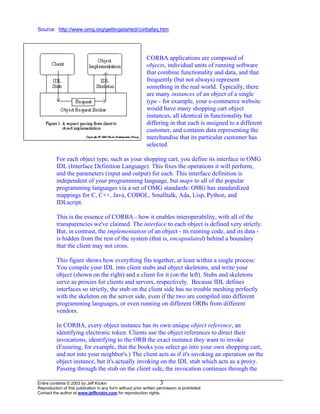
This figure shows how everything fits together, at least within a single process:
You compile your IDL into client stubs and object skeletons, and write your
object (shown on the right) and a client for it (on the left). Stubs and skeletons
serve as proxies for clients and servers, respectively. Because IDL defines
interfaces so strictly, the stub on the client side has no trouble meshing perfectly
with the skeleton on the server side, even if the two are compiled into different
programming languages, or even running on different ORBs from different
vendors.
In CORBA, every object instance has its own unique object reference, an
identifying electronic token. Clients use the object references to direct their
invocations, identifying to the ORB the exact instance they want to invoke
(Ensuring, for example, that the books you select go into your own shopping cart,
and not into your neighbor's.) The client acts as if it's invoking an operation on the
object instance, but it's actually invoking on the IDL stub which acts as a proxy.
Passing through the stub on the client side, the invocation continues through the
Entire contents © 2003 by Jeff Krukin
Reproduction of this publication in any form without prior written permission is prohibited.
Contact the author at www.jeffkrukin.com for reproduction rights.
3
ORB (Object Request Broker), and the skeleton on the implementation side, to get
to the object where it is executed.
IIOP – Internet Inter-ORB Protocol
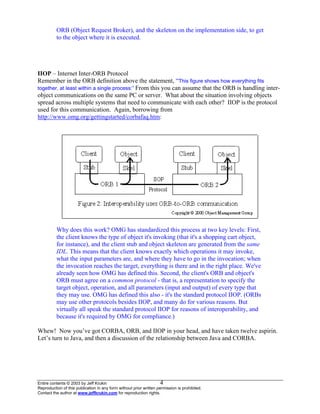
Remember in the ORB definition above the statement, “This figure shows how everything fits
together, at least within a single process:” From this you can assume that the ORB is handling inter-
object communications on the same PC or server. What about the situation involving objects
spread across multiple systems that need to communicate with each other? IIOP is the protocol
used for this communication. Again, borrowing from
http://www.omg.org/gettingstarted/corbafaq.htm:
Why does this work? OMG has standardized this process at two key levels: First,
the client knows the type of object it's invoking (that it's a shopping cart object,
for instance), and the client stub and object skeleton are generated from the same
IDL. This means that the client knows exactly which operations it may invoke,
what the input parameters are, and where they have to go in the invocation; when
the invocation reaches the target, everything is there and in the right place. We've
already seen how OMG has defined this. Second, the client's ORB and object's
ORB must agree on a common protocol - that is, a representation to specify the
target object, operation, and all parameters (input and output) of every type that
they may use. OMG has defined this also - it's the standard protocol IIOP. (ORBs
may use other protocols besides IIOP, and many do for various reasons. But
virtually all speak the standard protocol IIOP for reasons of interoperability, and
because it's required by OMG for compliance.)
Whew! Now you’ve got CORBA, ORB, and IIOP in your head, and have taken twelve aspirin.
Let’s turn to Java, and then a discussion of the relationship between Java and CORBA.
Entire contents © 2003 by Jeff Krukin
Reproduction of this publication in any form without prior written permission is prohibited.
Contact the author at www.jeffkrukin.com for reproduction rights.
4
JAVA
With it’s many components and continued evolution, a discussion of Java could last forever. I
can’t review everything about it here, so I’ll present some key items and provide some websites
for further education. As with CORBA, my goal is to provide a high-level understanding of
Java’s value. First, some history from (http://java.sun.com/features/1998/05/birthday.html): Java
technology was created as a programming tool in a small, closed-door project initiated by Patrick
Naughton, Mike Sheridan, and James Gosling of Sun in 1991. But creating a new language wasn't even
the point of "the Green Project."
The secret "Green Team," fully staffed at 13 people, was chartered by Sun to anticipate and plan
for the "next wave" in computing. Their initial conclusion was that at least one significant trend
would be the convergence of digitally controlled consumer devices and computers. In the
summer of 1992, they emerged with a working demo, an interactive, handheld home-
entertainment device controller with an animated touchscreen user interface.
This product was intended for the digital cable tv market, but it wasn’t exactly what the vendors
wanted so the “Green Team” needed a new market. They concluded that the new Internet was a
perfect match for Java.
Gosling explains: "We had already been developing the kind of `underwear' to make content available at
the same time the Web was being developed. Even though the Web had been around for 20 years or so,
with FTP and telnet, it was difficult to use. Then Mosaic came out in 1993 as an easy-to-use front end to
the Web, and that revolutionized people's perceptions. The Internet was being transformed into exactly
the network that we had been trying to convince the cable companies they ought to be building. All the
stuff we had wanted to do, in generalities, fit perfectly with the way applications were written, delivered,
and used on the Internet. It was just an incredible accident. And it was patently obvious that the Internet
and Java were a match made in heaven. So that's what we did."
The team returned to work up a Java technology-based clone of Mosaic they named "WebRunner" (after
the movie Blade Runner), later to become officially known as the HotJavaTM
browser. It was 1994. Daily,
momentum behind the new vision grew. WebRunner was just a demo, but an impressive one: It brought
to life, for the first time, animated, moving objects and dynamic executable content inside a Web browser.
That had never been done.
Sun now had a direction for Java, but it was focused on the browser, and therefore… the PC. In
1995, when Netscape decided to support Java, Microsoft finally understood the threat to its
control of the PC and the browser war soon began. Microsoft enhanced its OLE (Object Linking
and Embedding) technology and renamed it ActiveX, and with it’s Windows near-monopoly was
able to prevent Java from gaining ground in the Fortune 500 businesses. Also, Java was lacking
the features to make it attractive for enterprise-class applications. The solution: Enterprise
JavaBeans. What is a bean? A single unit of code containing abstracted business logic. There
are two types of beans, and halfway down the page at http://java.sun.com/products/ejb/faq.html
you’ll find SESSION BEAN and ENTITY BEAN. Unfortunately, you won’t find anything
about the unusual MR. BEAN, implemented mostly in British video applications.
Enterprise JavaBeans (EJB)
Unlike the original Java, this is a server-side component architecture. EJB came about for two
reasons: Sun realized it was not going to succeed at the PC, and Java supporters pressed for the
features that the EJB specification provides. http://java.sun.com/products/ejb/ provides the
following description, and while it’s clearly a marketing pitch you can see the distinction
between Java and EJB.
Entire contents © 2003 by Jeff Krukin
Reproduction of this publication in any form without prior written permission is prohibited.
Contact the author at www.jeffkrukin.com for reproduction rights.
5
Since its introduction over two years ago, Enterprise JavaBeansTM
technology has maintained
unprecedented momentum among platform providers and enterprise development teams alike.
That's because the EJBTM
server-side component model simplifies development of middleware
components that are transactional, scalable, and portable. Enterprise JavaBeans servers reduce
the complexity of developing middleware by providing automatic support for middleware
services such as transactions, security, database connectivity, and more.
As an example, consider transaction management. In the past, developers have had to either
write and maintain transaction management code, or rely on third-party transaction management
systems, generally provided through proprietary, vendor specific APIs. In contrast, Enterprise
JavaBeans technology enables components to participate in transactions -- including distributed
transactions -- simply by specifying which objects and methods are transactional. The EJB server
itself handles the underlying transaction management details, so developers can focus
specifically on the business purpose of the objects and methods. And because EJB technology is
based on the Java programming language, components can be deployed on any platform and
operating system that supports the Enterprise JavaBeans standard, and any operating system.
Relationship between EJB and CORBA
Before Java evolved into EJB, it provided no means to work across networks. The CORBA
specification provided industry-standard methods to accomplish this. With the introduction of
EJB, there is now overlap with CORBA and it’s expected the two specifications will continue to
duplicate some functions for a while. However, both Sun and OMG are working to improve the
integration of EJB and CORBA. Here’s what Sun says in the FAQ I mentioned above:
Doesn't EJB technology compete with CORBA? No. In fact, EJB technology complements
CORBA quite nicely. CORBA provides a great Standards-based infrastructure on which to build
EJB servers. EJB technology makes it easier to build application on top of a CORBA
infrastructure. Additionally, the recently released CORBA components specification refers
to EJB as the architecture when building CORBA components in Java.
“EJB Servers” is a more accurate, if not commonly used, term for most application servers.
Think about the function of an application server and it’s clear that EJB is the perfect
specification for them. That’s why BEA, Bluestone, IONA, IBM, and others have built their
servers upon the EJB specification.
Would you use both EJB and CORBA specifications? You don’t have to, but you can. Why
would you? Although they provide overlapping functions, these functions are implemented
differently and one may be more suitable than the other for a given situation. For example,
remember my discussion of IIOP in the OMG section above? EJB provides the Remote Method
Invocation (RMI) that, like IIOP, provides a technology for creating distributed programs.
However, one of the Java platform's most important features is Remote Method Invocation
(RMI). In fact, observers would argue that many questions related to the Java vs. CORBA debate
have been triggered by the introduction of RMI.
RMI lets a Java program call a remote object once it obtains its reference. Conceptually this is
very similar to the way CORBA supports distributed objects. But CORBA presumes a
Entire contents © 2003 by Jeff Krukin
Reproduction of this publication in any form without prior written permission is prohibited.
Contact the author at www.jeffkrukin.com for reproduction rights.
6
multilanguage environment, and must therefore have a language-neutral object model. In
contrast, when RMI was introduced initially, it assumed the homogeneous environment of the
Java Virtual Machine (JVM) and was concerned only with providing the foundation for Java-to-
Java communications across virtual machines. Therefore, it could take advantage of the Java
object model whenever possible.
As with CORBA, a Java RMI client invoking a method on a remote server object actually uses a
stub or proxy for the remote object. This stub is an implementation of the interfaces of the
remote object that forwards the request to the server object. The stubs are static in the sense that
they have to be generated using a compiler before running the application.
(Source: http://www.adtmag.com/Pub/jan99/max-wk.shtml)
See http://java.sun.com/products/rmi-iiop/index.html for Sun’s RMI over IIOP announcement.
There are many EJB specifications I haven’t touched, like JNDI, JDBC, JMS, and so on. Learn
about these at “The Source for Java Technology” http://java.sun.com/
XML – Extensible Markup Language
XSL – Extensible Style Sheet Language
DTD – Document Type Definition
Within an enterprise, the integration of applications is often sufficient to accomplish the business
objective. Consider the use of our Enterprise Access Objects to integrate Siebel with other
applications via a custom GUI. However, sometimes it’s necessary to share data among different
applications, especially when it’s a B2B solution between two companies and neither will
replace its applications to match those of the other. Where CORBA and EJB provide the
foundation for portable applications, XML does this for data. Where HTML represents data for
use by humans, XML represents data for use by applications. Think of an XML document as a
text database that contains descriptions of how to use the data contained within. Developers and
vendors alike say XML as a specification is quite mature and ready for use. But they all seem to agree
that there's one hole left to plug: schemas. Schemas are descriptions of how a document type should be
displayed. That specification is still under development by the World Wide Web Consortium (W3C) but
should be completed by spring. In the meantime, XML developers use a less-powerful alternative called
Document Type Definitions (DTDs) to define what to do with data. A DTD provides applications with
advance notice of what names and structures can be used in a particular document type. Using a DTD
means you can be certain that all documents belonging to a particular type will be constructed and named
in a conformant manner. But DTDs aren't as powerful as schemas. They don't allow you to validate the
semantics of the content, and they won't let you say, for example, that the value of a price should be a
decimal number carried to two decimal places. All you can do is pass a string. If you pass a price of
"#34.L0," the DTD doesn't know better. (Source:
http://www.devx.com/upload/free/features/entdev/2000/03mar00/bl0300/bl0300.asp)
The Business Server supports the “newer” XML Schema format, which provides metadata* information
about XML documents. The “older” DTD format also provides this information but is not as developer-
friendly, and its use is being discouraged by the W3C consortium. Future releases of the Business
Server may support DTD’s, but this will rely on customer and field feedback. (Source: Business Server
Tech Focus draft)
*A model that defines data structure and interaction for multiple data sources.
And what of XSL? If organizations and developers could agree on a single XML vocabulary or
schema, data and document sharing would be much easier. There are, however, many industry-wide
initiatives that promote the sharing of XML vocabularies, such as BizTalk.org, OASIS, and others.
Entire contents © 2003 by Jeff Krukin
Reproduction of this publication in any form without prior written permission is prohibited.
Contact the author at www.jeffkrukin.com for reproduction rights.
7
Organizations will benefit from using domain-specific vocabularies already in place when it’s feasible.
However, most developers realize that the likelihood of a single vocabulary fitting the needs of all
interested organizations is infinitely small. It’s more likely that many organizations will end up using slight
variations of a published vocabulary.
In situations like this, transformations are required to promote interoperability between distinct XML
vocabularies. The W3C developed the XSL Transformations (XSLT) language for describing these
transformations. XSLT makes it possible to transform an XML document into any other text-based
document (XML, HTML, comma-separated, C++ header/source files, and so on). The XSLT language is
just another XML vocabulary that defines a declarative, rules-based language for specifying the
transformation process.
Source: (http://msdn.microsoft.com/library/periodic/period00/xml0500.htm)
To use XML and XSL, they must be processed. Xerces is an XML parser and Xalan is an XSLT
stylesheet processor. Both were developed by IBM and released to the public as part of the Apache
product. These core components are responsible for the workhorse jobs of XML translation and data
mapping. (Source: Business Server Tech Focus draft)
The best articles I’ve read about XML, XSL, DTD, and so forth are:
XML is Not Yet a Cornerstone Technology
http://www.adtmag.com/Pub/apr2000/fe401a.cfm
XML Does for Data What HTML Does for Display
http://www.devx.com/upload/free/features/entdev/1999/03mar99/ch0399/ch0399.asp
XML is Nearly Ready for Business
http://www.devx.com/upload/free/features/entdev/2000/03mar00/bl0300/bl0300.asp
Other sources:
XML FAQ http://www.xml-zone.com/xmlfaq.asp
XML Industry Portal http://www.xml.org/
XML Web Developer’s Library http://www.wdvl.com/Authoring/Languages/XML/
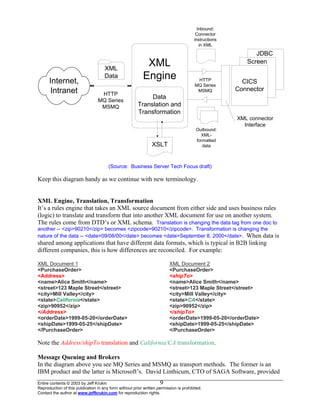
Before moving on to more terminology, let’s create some perspective for what we’ve covered so
far. On the following page is a draft diagram of the Business Server’s architecture. Note the
following:
XML and XSLT, and how they are used for both input and output of data.
JDBC (Java Data Base Connector), the Java version of the ODBC driver used for direct DB
connections.
The connector interface that is XML-only in Release 1.0 will also be available in Release 2.0
as the ITask bean interface.
Entire contents © 2003 by Jeff Krukin
Reproduction of this publication in any form without prior written permission is prohibited.
Contact the author at www.jeffkrukin.com for reproduction rights.
8
CICS
Connector
XML connector
Interface
Screen
JDBC
XML
Engine
HTTP
MQ Series
MSMQ
Internet,
Intranet
Data
Translation and
Transformation
XSLT
XML
Data
Inbound:
Connector
instructions
in XML
Outbound:
XML-
formatted
data
HTTP
MQ Series
MSMQ
(Source: Business Server Tech Focus draft)
Keep this diagram handy as we continue with new terminology.
XML Engine, Translation, Transformation
It’s a rules engine that takes an XML source document from either side and uses business rules
(logic) to translate and transform that into another XML document for use on another system.
The rules come from DTD’s or XML schema. Translation is changing the data tag from one doc to
another -- <zip>90210</zip> becomes <zipcode>90210</zipcode>. Transformation is changing the
nature of the data -- <date>09/08/00</date> becomes <date>September 8, 2000</date>. When data is
shared among applications that have different data formats, which is typical in B2B linking
different companies, this is how differences are reconciled. For example:
XML Document 1 XML Document 2
<PurchaseOrder> <PurchaseOrder>
<Address> <shipTo>
<name>Alice Smith</name> <name>Alice Smith</name>
<street>123 Maple Street</street> <street>123 Maple Street</street>
<city>Mill Valley</city> <city>Mill Valley</city>
<state>California</state> <state>CA</state>
<zip>90952</zip> <zip>90952</zip>
</Address> </shipTo>
<orderDate>1999-05-20</orderDate> <orderDate>1999-05-20</orderDate>
<shipDate>1999-05-25</shipDate> <shipDate>1999-05-25</shipDate>
</PurchaseOrder> </PurchaseOrder>
Note the Address/shipTo translation and California/CA transformation.
Message Queuing and Brokers
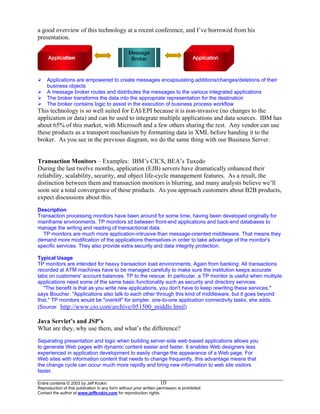
In the diagram above you see MQ Series and MSMQ as transport methods. The former is an
IBM product and the latter is Microsoft’s. David Linthicum, CTO of SAGA Software, provided
Entire contents © 2003 by Jeff Krukin
Reproduction of this publication in any form without prior written permission is prohibited.
Contact the author at www.jeffkrukin.com for reproduction rights.
9
a good overview of this technology at a recent conference, and I’ve borrowed from his
presentation.
AApppplliiccaattiioonn
Message
BrokerAApppplliiccaattiioonn
A
Applications are empowered to create messages encapsulating additions/changes/deletions of their
business objects
A message broker routes and distributes the messages to the various integrated applications
The broker transforms the data into the appropriate representation for the destination
The broker contains logic to assist in the execution of business process workflow
This technology is so well suited for EAI/EPI because it is non-invasive (no changes to the
application or data) and can be used to integrate multiple applications and data sources. IBM has
about 65% of this market, with Microsoft and a few others sharing the rest. Any vendor can use
these products as a transport mechanism by formatting data in XML before handing it to the
broker. As you see in the previous diagram, we do the same thing with our Business Server.
Transaction Monitors – Examples: IBM’s CICS, BEA’s Tuxedo
During the last twelve months, application (EJB) servers have dramatically enhanced their
reliability, scalability, security, and object life-cycle management features. As a result, the
distinction between them and transaction monitors is blurring, and many analysts believe we’ll
soon see a total convergence of these products. As you approach customers about B2B products,
expect discussions about this.
Description
Transaction processing monitors have been around for some time, having been developed originally for
mainframe environments. TP monitors sit between front-end applications and back-end databases to
manage the writing and reading of transactional data.
TP monitors are much more application-intrusive than message-oriented middleware. That means they
demand more modification of the applications themselves in order to take advantage of the monitor's
specific services. They also provide extra security and data integrity protection.
Typical Usage
TP monitors are intended for heavy transaction load environments. Again from banking: All transactions
recorded at ATM machines have to be managed carefully to make sure the institution keeps accurate
tabs on customers' account balances. TP to the rescue. In particular, a TP monitor is useful when multiple
applications need some of the same basic functionality such as security and directory services.
"The benefit is that as you write new applications, you don't have to keep rewriting these services,"
says Boucher. "Applications also talk to each other through this kind of middleware, but it goes beyond
that." TP monitors would be "overkill" for simpler, one-to-one application connectivity tasks, she adds.
(Source: http://www.cio.com/archive/051500_middle.html)
Java Servlet’s and JSP’s
What are they, why use them, and what’s the difference?
Separating presentation and logic when building server-side web-based applications allows you
to generate Web pages with dynamic content easier and faster. It enables Web designers less
experienced in application development to easily change the appearance of a Web page. For
Web sites with information content that needs to change frequently, this advantage means that
the change cycle can occur much more rapidly and bring new information to web site visitors
faster.
Entire contents © 2003 by Jeff Krukin
Reproduction of this publication in any form without prior written permission is prohibited.
Contact the author at www.jeffkrukin.com for reproduction rights.
10
Entire contents © 2003 by Jeff Krukin
Reproduction of this publication in any form without prior written permission is prohibited.
Contact the author at www.jeffkrukin.com for reproduction rights.
11
Early web-based applications were simple and usually contained both presentation and business
logic, which created maintenance problems when changes occurred to either. Separating the two
simplifies maintance and allows faster and easier updates.
This article shows two underlying technologies that can be used for presentation and logic
separation; Java Servlets and JavaServer Pages (JSP). A simple application architecture in the
context of a small demonstration shows how you can achieve this separation and deploy and
change Web applications faster.
The first step is to consider an overview of Java Servlets and JavaServer Pages, and how they
work together in a Web application architecture.
What is a Servlet?
Servlets are platform-independent 100% Pure Java server-side modules that fit seamlessly into
the framework of an application server. They can be used to extend the capabilities of the server
in a variety of ways with minimal overhead, maintenance, and support. Because Servlets are
Java bytecode that can be downloaded or shipped across the network, they are truly "Write
Once, Run Anywhere." Unlike CGI scripts, Servlets involve no platform-specific consideration or
modifications: they are Java application components which are downloaded, on demand, to the
part of the system which needs them.
What is a JavaServer Page?
JSP is the Java platform technology for building applications containing dynamic web content
such as HTML, DHTML or XML. A JSP page is a text based document containing static HTML
and dynamic actions which describe how to process a response to the client. At development
time, JSPs are very different from Servlets, however they are precompiled into Servlets at runtime
and executed by a JSP engine which is installed on a Web enabled application server such as
WebSphere V3.0.
Servlets and JavaServer Pages working together.
It is possible for a Servlet to take an HTTP request from a web browser, generate the request
dynamically (possibly querying backend systems to fulfill the request), and then send a response
containing an HTML or XML document to the browser.
The drawback of this approach is that the creation of the page must be handled in the Java
Servlet. This means that if a web page designer wanted to change the appearance of the page,
they would have to edit and recompile the Servlet. With this approach, generating pages with
dynamic content still requires some application development experience. Clearly the Servlet
request handling logic needs to be separated from the page presentation.
Source: (if you want this, let me know and I’ll send you the PDF)
Separating Presentation from Logic
A Web Application Architecture using Java Servlet & JavaServer Pages Technologies
Barry Tait
PeerLogic, Inc.
Ta Da!
That’s it for this memo, and I hope it’s been helpful. Please let me know if you have any
questions, contributions, or corrections.
Acknowledgements
Thanks to Mike Toot, Advanced Technology Product Manager, and Ron Nunan, Director of
Applied Technology, for their contributions.
And…thank you for reading this.

EAI and Attachmate Pt. 2 9-00

  • 1.
    Enterprise Application Integration(EAI) and Attachmate Part 2: Terminology Sept. 2000 Jeff Krukin, Corp. Applied Technology Manager “I’d love to change the world, but they won’t give me the source code.” - Anonymous In my first memo, I stated I would do the following in the second memo: Define EAI terminology and relate it to specific business problems and our solutions. CORBA, ORB, XML… it isn’t just what they are that’s important, but why they matter. I used the following sentence to provide context: …or as complex as integrating that with application servers and transaction monitors using CORBA-compliant ORB-based message brokers and message queuing software to exchange XML-formatted data. I can’t possibly cover every single acronym and term you might encounter, and I’m sure I’ll miss a few that you want to see. I will review those you’re likely to encounter during conversations similar to the above sentence. Along the way, I’ll provide websites with more detailed information. Two final notes: my comments are in black, all text copied from other sources is blue, and Word should be in print layout view so you can see the diagrams. Terminology (or, as Dr. Smith often said on Lost in Space, “Oh, the pain, the pain.”) Let’s start with the high-level framework of software development that supports the creation of products used in EAI solutions. OMG The Object Management Group was founded in April 1989 by eleven companies, including 3Com Corporation, American Airlines, Canon, Inc., Data General, Hewlett-Packard, Philips Telecommunications N.V., Sun Microsystems and Unisys Corporation. In October 1989, the OMG began independent operations as a not-for-profit corporation. The OMG was formed to create a component-based software marketplace by hastening the introduction of standardized object software. The organization's charter includes the establishment of industry guidelines and detailed object management specifications to provide a common framework for application development. Conformance to these specifications will make it possible to develop a heterogeneous computing environment across all major hardware platforms and operating systems. Implementations of OMG specifications can be found on many operating systems across the world today. OMG's series of specifications detail the necessary standard interfaces for Distributed Object Computing. Its widely popular Internet protocol IIOP (Internet Inter-ORB Protocol) is being used as the infrastructure for technology companies like Netscape, Oracle, Sun, IBM and hundreds of others. (Source: http://www.omg.org/news/about/index.htm) Think of the OMG as a competitor of Microsoft in the effort to create and promote a specification for inter-object communication across networks. Microsoft created COM (Component Object Model), but before that the OMG created…. CORBA Common Object Request Broker Architecture, OMG's open, vendor-independent architecture and infrastructure that computer applications use to work together over networks. Using the standard protocol IIOP, a CORBA-based program from any vendor, on almost any computer, operating system, programming language, and network, can interoperate with a CORBA-based program from the same or Entire contents © 2003 by Jeff Krukin Reproduction of this publication in any form without prior written permission is prohibited. Contact the author at www.jeffkrukin.com for reproduction rights. 1
  • 2.
    another vendor, onalmost any other computer, operating system, programming language, and network. (Source: http://www.omg.org/gettingstarted/corbafaq.htm) Today, as you discuss EAI with your customers, you are more likely to talk about CORBA and Java than COM, but it wasn’t always like this. Several years ago, when Attachmate began developing it’s first thin-client products like HPS and EXTRA! Objects, the Microsoft COM (Component Object Model) specification was predominant. For a brief time, Microsoft renamed COM to DNA (Dynamic InterNetwork Architecture), as COM was originally intended for inter- object communication on the same PC and DNA implied communication across networks. That term has now been replaced with COM+. Both the COM+ and CORBA specifications provide standard methods for applications to communicate with each other. COM+ was designed only for Windows applications ((it evolved from the 16-bit Windows Object Linking and Embedding (OLE) specification)). Since CORBA is platform-independent, it’s more applicable to multi- platform EAI environments. Also, as Java’s capabilities and popularity have increased, our customers, other vendors, and Attachmate have focused more on the Java and CORBA environments, and so will I in this memo. However, be aware that COM-CORBA bridge products exist so Windows objects can communicate with non-Windows objects. For a comparison of COM and CORBA, see the primer at http://www.adtmag.com/Pub/jun98/fe601.shtml In the preceding paragraphs were two acronyms, ORB and IIOP. I’ll explain these, and then turn to Java and it’s relationship with CORBA. ORB – Object Request Broker ORB is the heart of CORBA, literally. Remember, we’re talking about software created with object-oriented development (OOD) methods, intended for use in environments where business processes (or logic) and data have been encapsulated within an object. If these objects are going to be easily shared and re-used, a common architecture is needed to support this. And what do the “C” and “A” of CORBA mean? Yup. So, the OMG created a specification that defines a common ORB that provides the architecture for inter-object communication. “That’s great, Jeff,” you’re probably saying with mild sarcasm, “but what does the ORB actually do?” Next page, please. Entire contents © 2003 by Jeff Krukin Reproduction of this publication in any form without prior written permission is prohibited. Contact the author at www.jeffkrukin.com for reproduction rights. 2
  • 3.
    Source: http://www.omg.org/gettingstarted/corbafaq.htm CORBA applicationsare composed of objects, individual units of running software that combine functionality and data, and that frequently (but not always) represent something in the real world. Typically, there are many instances of an object of a single type - for example, your e-commerce website would have many shopping cart object instances, all identical in functionality but differing in that each is assigned to a different customer, and contains data representing the merchandise that its particular customer has selected. For each object type, such as your shopping cart, you define its interface in OMG IDL (Interface Definition Language). This fixes the operations it will perform, and the parameters (input and output) for each. This interface definition is independent of your programming language, but maps to all of the popular programming languages via a set of OMG standards: OMG has standardized mappings for C, C++, Java, COBOL, Smalltalk, Ada, Lisp, Python, and IDLscript. This is the essence of CORBA - how it enables interoperability, with all of the transparencies we've claimed. The interface to each object is defined very strictly. But, in contrast, the implementation of an object - its running code, and its data - is hidden from the rest of the system (that is, encapsulated) behind a boundary that the client may not cross. This figure shows how everything fits together, at least within a single process: You compile your IDL into client stubs and object skeletons, and write your object (shown on the right) and a client for it (on the left). Stubs and skeletons serve as proxies for clients and servers, respectively. Because IDL defines interfaces so strictly, the stub on the client side has no trouble meshing perfectly with the skeleton on the server side, even if the two are compiled into different programming languages, or even running on different ORBs from different vendors. In CORBA, every object instance has its own unique object reference, an identifying electronic token. Clients use the object references to direct their invocations, identifying to the ORB the exact instance they want to invoke (Ensuring, for example, that the books you select go into your own shopping cart, and not into your neighbor's.) The client acts as if it's invoking an operation on the object instance, but it's actually invoking on the IDL stub which acts as a proxy. Passing through the stub on the client side, the invocation continues through the Entire contents © 2003 by Jeff Krukin Reproduction of this publication in any form without prior written permission is prohibited. Contact the author at www.jeffkrukin.com for reproduction rights. 3
  • 4.
    ORB (Object RequestBroker), and the skeleton on the implementation side, to get to the object where it is executed. IIOP – Internet Inter-ORB Protocol Remember in the ORB definition above the statement, “This figure shows how everything fits together, at least within a single process:” From this you can assume that the ORB is handling inter- object communications on the same PC or server. What about the situation involving objects spread across multiple systems that need to communicate with each other? IIOP is the protocol used for this communication. Again, borrowing from http://www.omg.org/gettingstarted/corbafaq.htm: Why does this work? OMG has standardized this process at two key levels: First, the client knows the type of object it's invoking (that it's a shopping cart object, for instance), and the client stub and object skeleton are generated from the same IDL. This means that the client knows exactly which operations it may invoke, what the input parameters are, and where they have to go in the invocation; when the invocation reaches the target, everything is there and in the right place. We've already seen how OMG has defined this. Second, the client's ORB and object's ORB must agree on a common protocol - that is, a representation to specify the target object, operation, and all parameters (input and output) of every type that they may use. OMG has defined this also - it's the standard protocol IIOP. (ORBs may use other protocols besides IIOP, and many do for various reasons. But virtually all speak the standard protocol IIOP for reasons of interoperability, and because it's required by OMG for compliance.) Whew! Now you’ve got CORBA, ORB, and IIOP in your head, and have taken twelve aspirin. Let’s turn to Java, and then a discussion of the relationship between Java and CORBA. Entire contents © 2003 by Jeff Krukin Reproduction of this publication in any form without prior written permission is prohibited. Contact the author at www.jeffkrukin.com for reproduction rights. 4
  • 5.
    JAVA With it’s manycomponents and continued evolution, a discussion of Java could last forever. I can’t review everything about it here, so I’ll present some key items and provide some websites for further education. As with CORBA, my goal is to provide a high-level understanding of Java’s value. First, some history from (http://java.sun.com/features/1998/05/birthday.html): Java technology was created as a programming tool in a small, closed-door project initiated by Patrick Naughton, Mike Sheridan, and James Gosling of Sun in 1991. But creating a new language wasn't even the point of "the Green Project." The secret "Green Team," fully staffed at 13 people, was chartered by Sun to anticipate and plan for the "next wave" in computing. Their initial conclusion was that at least one significant trend would be the convergence of digitally controlled consumer devices and computers. In the summer of 1992, they emerged with a working demo, an interactive, handheld home- entertainment device controller with an animated touchscreen user interface. This product was intended for the digital cable tv market, but it wasn’t exactly what the vendors wanted so the “Green Team” needed a new market. They concluded that the new Internet was a perfect match for Java. Gosling explains: "We had already been developing the kind of `underwear' to make content available at the same time the Web was being developed. Even though the Web had been around for 20 years or so, with FTP and telnet, it was difficult to use. Then Mosaic came out in 1993 as an easy-to-use front end to the Web, and that revolutionized people's perceptions. The Internet was being transformed into exactly the network that we had been trying to convince the cable companies they ought to be building. All the stuff we had wanted to do, in generalities, fit perfectly with the way applications were written, delivered, and used on the Internet. It was just an incredible accident. And it was patently obvious that the Internet and Java were a match made in heaven. So that's what we did." The team returned to work up a Java technology-based clone of Mosaic they named "WebRunner" (after the movie Blade Runner), later to become officially known as the HotJavaTM browser. It was 1994. Daily, momentum behind the new vision grew. WebRunner was just a demo, but an impressive one: It brought to life, for the first time, animated, moving objects and dynamic executable content inside a Web browser. That had never been done. Sun now had a direction for Java, but it was focused on the browser, and therefore… the PC. In 1995, when Netscape decided to support Java, Microsoft finally understood the threat to its control of the PC and the browser war soon began. Microsoft enhanced its OLE (Object Linking and Embedding) technology and renamed it ActiveX, and with it’s Windows near-monopoly was able to prevent Java from gaining ground in the Fortune 500 businesses. Also, Java was lacking the features to make it attractive for enterprise-class applications. The solution: Enterprise JavaBeans. What is a bean? A single unit of code containing abstracted business logic. There are two types of beans, and halfway down the page at http://java.sun.com/products/ejb/faq.html you’ll find SESSION BEAN and ENTITY BEAN. Unfortunately, you won’t find anything about the unusual MR. BEAN, implemented mostly in British video applications. Enterprise JavaBeans (EJB) Unlike the original Java, this is a server-side component architecture. EJB came about for two reasons: Sun realized it was not going to succeed at the PC, and Java supporters pressed for the features that the EJB specification provides. http://java.sun.com/products/ejb/ provides the following description, and while it’s clearly a marketing pitch you can see the distinction between Java and EJB. Entire contents © 2003 by Jeff Krukin Reproduction of this publication in any form without prior written permission is prohibited. Contact the author at www.jeffkrukin.com for reproduction rights. 5
  • 6.
    Since its introductionover two years ago, Enterprise JavaBeansTM technology has maintained unprecedented momentum among platform providers and enterprise development teams alike. That's because the EJBTM server-side component model simplifies development of middleware components that are transactional, scalable, and portable. Enterprise JavaBeans servers reduce the complexity of developing middleware by providing automatic support for middleware services such as transactions, security, database connectivity, and more. As an example, consider transaction management. In the past, developers have had to either write and maintain transaction management code, or rely on third-party transaction management systems, generally provided through proprietary, vendor specific APIs. In contrast, Enterprise JavaBeans technology enables components to participate in transactions -- including distributed transactions -- simply by specifying which objects and methods are transactional. The EJB server itself handles the underlying transaction management details, so developers can focus specifically on the business purpose of the objects and methods. And because EJB technology is based on the Java programming language, components can be deployed on any platform and operating system that supports the Enterprise JavaBeans standard, and any operating system. Relationship between EJB and CORBA Before Java evolved into EJB, it provided no means to work across networks. The CORBA specification provided industry-standard methods to accomplish this. With the introduction of EJB, there is now overlap with CORBA and it’s expected the two specifications will continue to duplicate some functions for a while. However, both Sun and OMG are working to improve the integration of EJB and CORBA. Here’s what Sun says in the FAQ I mentioned above: Doesn't EJB technology compete with CORBA? No. In fact, EJB technology complements CORBA quite nicely. CORBA provides a great Standards-based infrastructure on which to build EJB servers. EJB technology makes it easier to build application on top of a CORBA infrastructure. Additionally, the recently released CORBA components specification refers to EJB as the architecture when building CORBA components in Java. “EJB Servers” is a more accurate, if not commonly used, term for most application servers. Think about the function of an application server and it’s clear that EJB is the perfect specification for them. That’s why BEA, Bluestone, IONA, IBM, and others have built their servers upon the EJB specification. Would you use both EJB and CORBA specifications? You don’t have to, but you can. Why would you? Although they provide overlapping functions, these functions are implemented differently and one may be more suitable than the other for a given situation. For example, remember my discussion of IIOP in the OMG section above? EJB provides the Remote Method Invocation (RMI) that, like IIOP, provides a technology for creating distributed programs. However, one of the Java platform's most important features is Remote Method Invocation (RMI). In fact, observers would argue that many questions related to the Java vs. CORBA debate have been triggered by the introduction of RMI. RMI lets a Java program call a remote object once it obtains its reference. Conceptually this is very similar to the way CORBA supports distributed objects. But CORBA presumes a Entire contents © 2003 by Jeff Krukin Reproduction of this publication in any form without prior written permission is prohibited. Contact the author at www.jeffkrukin.com for reproduction rights. 6
  • 7.
    multilanguage environment, andmust therefore have a language-neutral object model. In contrast, when RMI was introduced initially, it assumed the homogeneous environment of the Java Virtual Machine (JVM) and was concerned only with providing the foundation for Java-to- Java communications across virtual machines. Therefore, it could take advantage of the Java object model whenever possible. As with CORBA, a Java RMI client invoking a method on a remote server object actually uses a stub or proxy for the remote object. This stub is an implementation of the interfaces of the remote object that forwards the request to the server object. The stubs are static in the sense that they have to be generated using a compiler before running the application. (Source: http://www.adtmag.com/Pub/jan99/max-wk.shtml) See http://java.sun.com/products/rmi-iiop/index.html for Sun’s RMI over IIOP announcement. There are many EJB specifications I haven’t touched, like JNDI, JDBC, JMS, and so on. Learn about these at “The Source for Java Technology” http://java.sun.com/ XML – Extensible Markup Language XSL – Extensible Style Sheet Language DTD – Document Type Definition Within an enterprise, the integration of applications is often sufficient to accomplish the business objective. Consider the use of our Enterprise Access Objects to integrate Siebel with other applications via a custom GUI. However, sometimes it’s necessary to share data among different applications, especially when it’s a B2B solution between two companies and neither will replace its applications to match those of the other. Where CORBA and EJB provide the foundation for portable applications, XML does this for data. Where HTML represents data for use by humans, XML represents data for use by applications. Think of an XML document as a text database that contains descriptions of how to use the data contained within. Developers and vendors alike say XML as a specification is quite mature and ready for use. But they all seem to agree that there's one hole left to plug: schemas. Schemas are descriptions of how a document type should be displayed. That specification is still under development by the World Wide Web Consortium (W3C) but should be completed by spring. In the meantime, XML developers use a less-powerful alternative called Document Type Definitions (DTDs) to define what to do with data. A DTD provides applications with advance notice of what names and structures can be used in a particular document type. Using a DTD means you can be certain that all documents belonging to a particular type will be constructed and named in a conformant manner. But DTDs aren't as powerful as schemas. They don't allow you to validate the semantics of the content, and they won't let you say, for example, that the value of a price should be a decimal number carried to two decimal places. All you can do is pass a string. If you pass a price of "#34.L0," the DTD doesn't know better. (Source: http://www.devx.com/upload/free/features/entdev/2000/03mar00/bl0300/bl0300.asp) The Business Server supports the “newer” XML Schema format, which provides metadata* information about XML documents. The “older” DTD format also provides this information but is not as developer- friendly, and its use is being discouraged by the W3C consortium. Future releases of the Business Server may support DTD’s, but this will rely on customer and field feedback. (Source: Business Server Tech Focus draft) *A model that defines data structure and interaction for multiple data sources. And what of XSL? If organizations and developers could agree on a single XML vocabulary or schema, data and document sharing would be much easier. There are, however, many industry-wide initiatives that promote the sharing of XML vocabularies, such as BizTalk.org, OASIS, and others. Entire contents © 2003 by Jeff Krukin Reproduction of this publication in any form without prior written permission is prohibited. Contact the author at www.jeffkrukin.com for reproduction rights. 7
  • 8.
    Organizations will benefitfrom using domain-specific vocabularies already in place when it’s feasible. However, most developers realize that the likelihood of a single vocabulary fitting the needs of all interested organizations is infinitely small. It’s more likely that many organizations will end up using slight variations of a published vocabulary. In situations like this, transformations are required to promote interoperability between distinct XML vocabularies. The W3C developed the XSL Transformations (XSLT) language for describing these transformations. XSLT makes it possible to transform an XML document into any other text-based document (XML, HTML, comma-separated, C++ header/source files, and so on). The XSLT language is just another XML vocabulary that defines a declarative, rules-based language for specifying the transformation process. Source: (http://msdn.microsoft.com/library/periodic/period00/xml0500.htm) To use XML and XSL, they must be processed. Xerces is an XML parser and Xalan is an XSLT stylesheet processor. Both were developed by IBM and released to the public as part of the Apache product. These core components are responsible for the workhorse jobs of XML translation and data mapping. (Source: Business Server Tech Focus draft) The best articles I’ve read about XML, XSL, DTD, and so forth are: XML is Not Yet a Cornerstone Technology http://www.adtmag.com/Pub/apr2000/fe401a.cfm XML Does for Data What HTML Does for Display http://www.devx.com/upload/free/features/entdev/1999/03mar99/ch0399/ch0399.asp XML is Nearly Ready for Business http://www.devx.com/upload/free/features/entdev/2000/03mar00/bl0300/bl0300.asp Other sources: XML FAQ http://www.xml-zone.com/xmlfaq.asp XML Industry Portal http://www.xml.org/ XML Web Developer’s Library http://www.wdvl.com/Authoring/Languages/XML/ Before moving on to more terminology, let’s create some perspective for what we’ve covered so far. On the following page is a draft diagram of the Business Server’s architecture. Note the following: XML and XSLT, and how they are used for both input and output of data. JDBC (Java Data Base Connector), the Java version of the ODBC driver used for direct DB connections. The connector interface that is XML-only in Release 1.0 will also be available in Release 2.0 as the ITask bean interface. Entire contents © 2003 by Jeff Krukin Reproduction of this publication in any form without prior written permission is prohibited. Contact the author at www.jeffkrukin.com for reproduction rights. 8
  • 9.
    CICS Connector XML connector Interface Screen JDBC XML Engine HTTP MQ Series MSMQ Internet, Intranet Data Translationand Transformation XSLT XML Data Inbound: Connector instructions in XML Outbound: XML- formatted data HTTP MQ Series MSMQ (Source: Business Server Tech Focus draft) Keep this diagram handy as we continue with new terminology. XML Engine, Translation, Transformation It’s a rules engine that takes an XML source document from either side and uses business rules (logic) to translate and transform that into another XML document for use on another system. The rules come from DTD’s or XML schema. Translation is changing the data tag from one doc to another -- <zip>90210</zip> becomes <zipcode>90210</zipcode>. Transformation is changing the nature of the data -- <date>09/08/00</date> becomes <date>September 8, 2000</date>. When data is shared among applications that have different data formats, which is typical in B2B linking different companies, this is how differences are reconciled. For example: XML Document 1 XML Document 2 <PurchaseOrder> <PurchaseOrder> <Address> <shipTo> <name>Alice Smith</name> <name>Alice Smith</name> <street>123 Maple Street</street> <street>123 Maple Street</street> <city>Mill Valley</city> <city>Mill Valley</city> <state>California</state> <state>CA</state> <zip>90952</zip> <zip>90952</zip> </Address> </shipTo> <orderDate>1999-05-20</orderDate> <orderDate>1999-05-20</orderDate> <shipDate>1999-05-25</shipDate> <shipDate>1999-05-25</shipDate> </PurchaseOrder> </PurchaseOrder> Note the Address/shipTo translation and California/CA transformation. Message Queuing and Brokers In the diagram above you see MQ Series and MSMQ as transport methods. The former is an IBM product and the latter is Microsoft’s. David Linthicum, CTO of SAGA Software, provided Entire contents © 2003 by Jeff Krukin Reproduction of this publication in any form without prior written permission is prohibited. Contact the author at www.jeffkrukin.com for reproduction rights. 9
  • 10.
    a good overviewof this technology at a recent conference, and I’ve borrowed from his presentation. AApppplliiccaattiioonn Message BrokerAApppplliiccaattiioonn A Applications are empowered to create messages encapsulating additions/changes/deletions of their business objects A message broker routes and distributes the messages to the various integrated applications The broker transforms the data into the appropriate representation for the destination The broker contains logic to assist in the execution of business process workflow This technology is so well suited for EAI/EPI because it is non-invasive (no changes to the application or data) and can be used to integrate multiple applications and data sources. IBM has about 65% of this market, with Microsoft and a few others sharing the rest. Any vendor can use these products as a transport mechanism by formatting data in XML before handing it to the broker. As you see in the previous diagram, we do the same thing with our Business Server. Transaction Monitors – Examples: IBM’s CICS, BEA’s Tuxedo During the last twelve months, application (EJB) servers have dramatically enhanced their reliability, scalability, security, and object life-cycle management features. As a result, the distinction between them and transaction monitors is blurring, and many analysts believe we’ll soon see a total convergence of these products. As you approach customers about B2B products, expect discussions about this. Description Transaction processing monitors have been around for some time, having been developed originally for mainframe environments. TP monitors sit between front-end applications and back-end databases to manage the writing and reading of transactional data. TP monitors are much more application-intrusive than message-oriented middleware. That means they demand more modification of the applications themselves in order to take advantage of the monitor's specific services. They also provide extra security and data integrity protection. Typical Usage TP monitors are intended for heavy transaction load environments. Again from banking: All transactions recorded at ATM machines have to be managed carefully to make sure the institution keeps accurate tabs on customers' account balances. TP to the rescue. In particular, a TP monitor is useful when multiple applications need some of the same basic functionality such as security and directory services. "The benefit is that as you write new applications, you don't have to keep rewriting these services," says Boucher. "Applications also talk to each other through this kind of middleware, but it goes beyond that." TP monitors would be "overkill" for simpler, one-to-one application connectivity tasks, she adds. (Source: http://www.cio.com/archive/051500_middle.html) Java Servlet’s and JSP’s What are they, why use them, and what’s the difference? Separating presentation and logic when building server-side web-based applications allows you to generate Web pages with dynamic content easier and faster. It enables Web designers less experienced in application development to easily change the appearance of a Web page. For Web sites with information content that needs to change frequently, this advantage means that the change cycle can occur much more rapidly and bring new information to web site visitors faster. Entire contents © 2003 by Jeff Krukin Reproduction of this publication in any form without prior written permission is prohibited. Contact the author at www.jeffkrukin.com for reproduction rights. 10
  • 11.
    Entire contents ©2003 by Jeff Krukin Reproduction of this publication in any form without prior written permission is prohibited. Contact the author at www.jeffkrukin.com for reproduction rights. 11 Early web-based applications were simple and usually contained both presentation and business logic, which created maintenance problems when changes occurred to either. Separating the two simplifies maintance and allows faster and easier updates. This article shows two underlying technologies that can be used for presentation and logic separation; Java Servlets and JavaServer Pages (JSP). A simple application architecture in the context of a small demonstration shows how you can achieve this separation and deploy and change Web applications faster. The first step is to consider an overview of Java Servlets and JavaServer Pages, and how they work together in a Web application architecture. What is a Servlet? Servlets are platform-independent 100% Pure Java server-side modules that fit seamlessly into the framework of an application server. They can be used to extend the capabilities of the server in a variety of ways with minimal overhead, maintenance, and support. Because Servlets are Java bytecode that can be downloaded or shipped across the network, they are truly "Write Once, Run Anywhere." Unlike CGI scripts, Servlets involve no platform-specific consideration or modifications: they are Java application components which are downloaded, on demand, to the part of the system which needs them. What is a JavaServer Page? JSP is the Java platform technology for building applications containing dynamic web content such as HTML, DHTML or XML. A JSP page is a text based document containing static HTML and dynamic actions which describe how to process a response to the client. At development time, JSPs are very different from Servlets, however they are precompiled into Servlets at runtime and executed by a JSP engine which is installed on a Web enabled application server such as WebSphere V3.0. Servlets and JavaServer Pages working together. It is possible for a Servlet to take an HTTP request from a web browser, generate the request dynamically (possibly querying backend systems to fulfill the request), and then send a response containing an HTML or XML document to the browser. The drawback of this approach is that the creation of the page must be handled in the Java Servlet. This means that if a web page designer wanted to change the appearance of the page, they would have to edit and recompile the Servlet. With this approach, generating pages with dynamic content still requires some application development experience. Clearly the Servlet request handling logic needs to be separated from the page presentation. Source: (if you want this, let me know and I’ll send you the PDF) Separating Presentation from Logic A Web Application Architecture using Java Servlet & JavaServer Pages Technologies Barry Tait PeerLogic, Inc. Ta Da! That’s it for this memo, and I hope it’s been helpful. Please let me know if you have any questions, contributions, or corrections. Acknowledgements Thanks to Mike Toot, Advanced Technology Product Manager, and Ron Nunan, Director of Applied Technology, for their contributions. And…thank you for reading this.