Electronic Nursing
Documentation Chart Review
By Nursing Informatics and documentation team
February 2017
Agenda
• Important Rule & Regulations
• General Features and Function
• Case Review
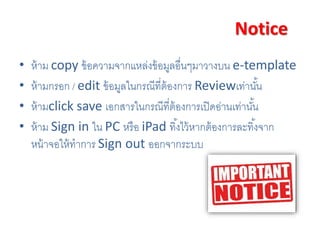
Notice
• ห้าม copy ข้อความจากแหล่งข้อมูลอื่นๆมาวางบน e-template
• ห้ามกรอก / edit ข้อมูลในกรณีที่ต้องการ Reviewเท่านั้น
• ห้ามclick save เอกสารในกรณีที่ต้องการเปิดอ่านเท่านั้น
• ห้าม Sign in ใน PC หรือ iPad ทิ้งไว้หากต้องการละทิ้งจาก
หน้าจอให้ทาการ Sign out ออกจากระบบ
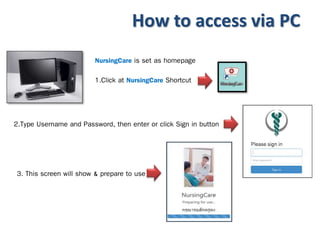
How to access via PC
NursingCare is set as homepage
1.Click at NursingCare Shortcut
2.Type Username and Password, then enter or click Sign in button
3. This screen will show & prepare to use
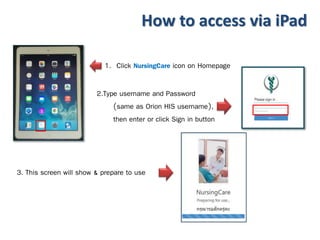
How to access via iPad
1. Click NursingCare icon on Homepage
2.Type username and Password
(same as Orion HIS username),
then enter or click Sign in button
3. This screen will show & prepare to use
Patient list
Discharged from Orion HIS
Ward selection
Assigned nurse
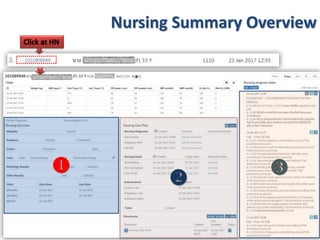
Click at HN
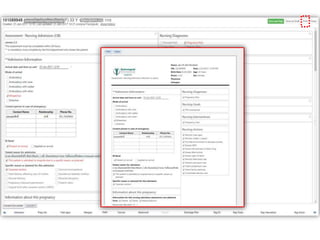
Nursing Summary Overview

 




Navigator Links
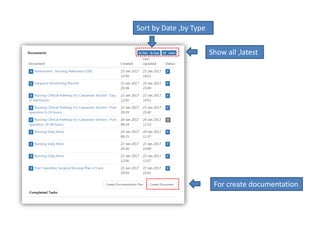
For create documentation
Sort by Date ,by Type
Show all ,latest
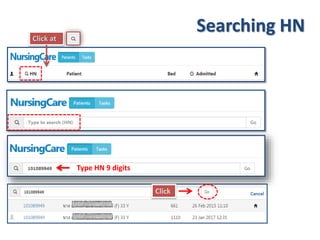
Click at
Type HN 9 digits
Click
Searching HN

e- chart review

  • 1.
    Electronic Nursing Documentation ChartReview By Nursing Informatics and documentation team February 2017
  • 2.
    Agenda • Important Rule& Regulations • General Features and Function • Case Review
  • 3.
    Notice • ห้าม copyข้อความจากแหล่งข้อมูลอื่นๆมาวางบน e-template • ห้ามกรอก / edit ข้อมูลในกรณีที่ต้องการ Reviewเท่านั้น • ห้ามclick save เอกสารในกรณีที่ต้องการเปิดอ่านเท่านั้น • ห้าม Sign in ใน PC หรือ iPad ทิ้งไว้หากต้องการละทิ้งจาก หน้าจอให้ทาการ Sign out ออกจากระบบ
  • 4.
    How to accessvia PC NursingCare is set as homepage 1.Click at NursingCare Shortcut 2.Type Username and Password, then enter or click Sign in button 3. This screen will show & prepare to use
  • 5.
    How to accessvia iPad 1. Click NursingCare icon on Homepage 2.Type username and Password (same as Orion HIS username), then enter or click Sign in button 3. This screen will show & prepare to use
  • 6.
    Patient list Discharged fromOrion HIS Ward selection Assigned nurse
  • 7.
    Click at HN NursingSummary Overview   
  • 8.
  • 10.
    For create documentation Sortby Date ,by Type Show all ,latest
  • 11.
    Click at Type HN9 digits Click Searching HN