Visualize Your Dynamic Data with
Chartkick
Nikki Murry @nikkilizmurray Maggie Epps
@mepptimist
Social Driver
The Problem: A mess of JavaScript
var graticule = d3.geo.graticule();
var svg = d3.select("body").append("svg")
.attr("width", width)
.attr("height", height);
var defs = svg.append("defs");
defs.append("path")
.datum({type: "Sphere"})
.attr("id", "sphere")
.attr("d", path);
defs.append("clipPath")
.attr("id", "clip")
.append("use")
.attr("xlink:href", "#sphere");
We Discovered Chartkick!
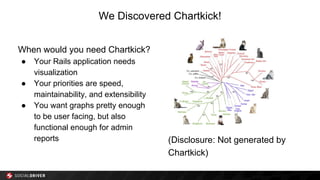
When would you need Chartkick?
● Your Rails application needs
visualization
● Your priorities are speed,
maintainability, and extensibility
● You want graphs pretty enough
to be user facing, but also
functional enough for admin
reports (Disclosure: Not generated by
Chartkick)
About Chartkick
● Andrew Kane (many other cool gems): https:
//rubygems.org/profiles/ankane
● GroupDate (not compatible with SQLite)
● Gem code:
https://github.com/ankane/chartkick
● Documentation:
http://ankane.github.io/chartkick/
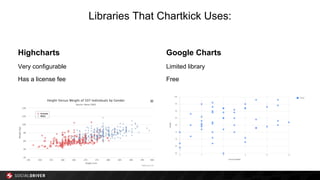
Libraries That Chartkick Uses:
Highcharts
Very configurable
Has a license fee
Google Charts
Limited library
Free
Installation
Add the gem to your Gemfile:
gem ‘chartkick’
Add the script tags to app/views/layouts/application.html.erb
For Google Charts, use:
<%= javascript_include_tag "//www.google.com/jsapi", "chartkick" %>
If you prefer Highcharts, use:
<%= javascript_include_tag "path/to/highcharts.js", "chartkick" %>
But I have a project that’s not in Ruby!!!!!
Not a problem!
Chartkick also has a JavaScript library:
https://github.com/ankane/chartkick.js
And a Python library:
https://github.com/mher/chartkick.py
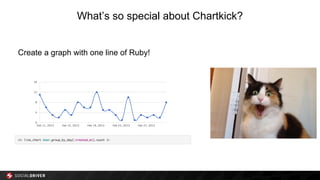
What’s so special about Chartkick?
Create a graph with one line of Ruby!
Getting the data you want
● Important to know which
data specifically you
want to display
● ActiveRecord or other ORM Queries
● Figuring out the best
chart to display that data
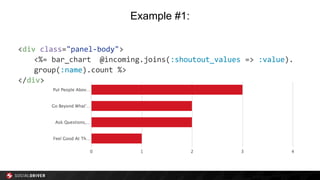
Example #1:
<div class="panel-body">
<%= bar_chart @incoming.joins(:shoutout_values => :value).
group(:name).count %>
</div>
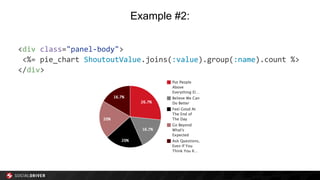
Example #2:
<div class="panel-body">
<%= pie_chart ShoutoutValue.joins(:value).group(:name).count %>
</div>
Customizing Graphs:Standard Options
Inline:
Custom HTML
<%= line_chart data, id: "users-chart", height: "500px" %>
Axis endpoints
<%= line_chart data, min: 1000, max: 5000 %>
Chart colors
<%= line_chart data, colors: ["pink", "#999"] %>
Or in config/initializers/chartkick.rb:
Chartkick.options = { colors: ["#D21724", "gray", "black", "#B27070", "#550000"]}
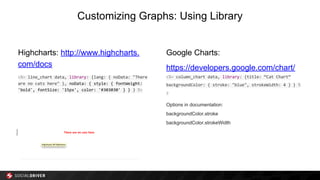
Customizing Graphs: Using Library
Highcharts: http://www.highcharts.
com/docs
<%= line_chart data, library: {lang: { noData: "There
are no cats here" }, noData: { style: { fontWeight:
'bold', fontSize: '15px', color: '#303030' } } } %>
Google Charts:
https://developers.google.com/chart/
<%= column_chart data, library: {title: “Cat Chart”
backgroundColor: { stroke: "blue", strokeWidth: 4 } } %
>
Options in documentation:
backgroundColor.stroke
backgroundColor.strokeWidth
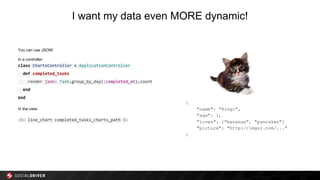
I want my data even MORE dynamic!
You can use JSON!
In a controller:
class ChartsController < ApplicationController
def completed_tasks
render json: Task.group_by_day(:completed_at).count
end
end
In the view:
<%= line_chart completed_tasks_charts_path %>
Pretty graphs!
Examples….
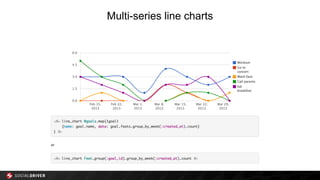
Multi-series line charts
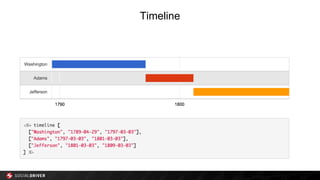
Timeline
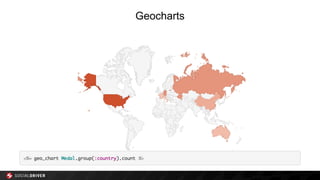
Geocharts
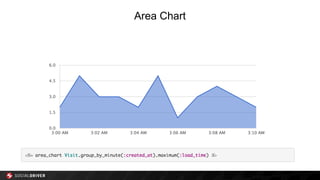
Area Chart
Questions?
Visualize Your Dynamic Data with
Chartkick
Nikki Murry @nikkilizmurray
Maggie Epps @mepptimist
Social Driver

Dynamic Data Visualization With Chartkick

  • 1.
    Visualize Your DynamicData with Chartkick Nikki Murry @nikkilizmurray Maggie Epps @mepptimist Social Driver
  • 2.
    The Problem: Amess of JavaScript var graticule = d3.geo.graticule(); var svg = d3.select("body").append("svg") .attr("width", width) .attr("height", height); var defs = svg.append("defs"); defs.append("path") .datum({type: "Sphere"}) .attr("id", "sphere") .attr("d", path); defs.append("clipPath") .attr("id", "clip") .append("use") .attr("xlink:href", "#sphere");
  • 3.
    We Discovered Chartkick! Whenwould you need Chartkick? ● Your Rails application needs visualization ● Your priorities are speed, maintainability, and extensibility ● You want graphs pretty enough to be user facing, but also functional enough for admin reports (Disclosure: Not generated by Chartkick)
  • 4.
    About Chartkick ● AndrewKane (many other cool gems): https: //rubygems.org/profiles/ankane ● GroupDate (not compatible with SQLite) ● Gem code: https://github.com/ankane/chartkick ● Documentation: http://ankane.github.io/chartkick/
  • 5.
    Libraries That ChartkickUses: Highcharts Very configurable Has a license fee Google Charts Limited library Free
  • 6.
    Installation Add the gemto your Gemfile: gem ‘chartkick’ Add the script tags to app/views/layouts/application.html.erb For Google Charts, use: <%= javascript_include_tag "//www.google.com/jsapi", "chartkick" %> If you prefer Highcharts, use: <%= javascript_include_tag "path/to/highcharts.js", "chartkick" %>
  • 7.
    But I havea project that’s not in Ruby!!!!! Not a problem! Chartkick also has a JavaScript library: https://github.com/ankane/chartkick.js And a Python library: https://github.com/mher/chartkick.py
  • 8.
    What’s so specialabout Chartkick? Create a graph with one line of Ruby!
  • 9.
    Getting the datayou want ● Important to know which data specifically you want to display ● ActiveRecord or other ORM Queries ● Figuring out the best chart to display that data
  • 10.
    Example #1: <div class="panel-body"> <%=bar_chart @incoming.joins(:shoutout_values => :value). group(:name).count %> </div>
  • 11.
    Example #2: <div class="panel-body"> <%=pie_chart ShoutoutValue.joins(:value).group(:name).count %> </div>
  • 12.
    Customizing Graphs:Standard Options Inline: CustomHTML <%= line_chart data, id: "users-chart", height: "500px" %> Axis endpoints <%= line_chart data, min: 1000, max: 5000 %> Chart colors <%= line_chart data, colors: ["pink", "#999"] %> Or in config/initializers/chartkick.rb: Chartkick.options = { colors: ["#D21724", "gray", "black", "#B27070", "#550000"]}
  • 13.
    Customizing Graphs: UsingLibrary Highcharts: http://www.highcharts. com/docs <%= line_chart data, library: {lang: { noData: "There are no cats here" }, noData: { style: { fontWeight: 'bold', fontSize: '15px', color: '#303030' } } } %> Google Charts: https://developers.google.com/chart/ <%= column_chart data, library: {title: “Cat Chart” backgroundColor: { stroke: "blue", strokeWidth: 4 } } % > Options in documentation: backgroundColor.stroke backgroundColor.strokeWidth
  • 14.
    I want mydata even MORE dynamic! You can use JSON! In a controller: class ChartsController < ApplicationController def completed_tasks render json: Task.group_by_day(:completed_at).count end end In the view: <%= line_chart completed_tasks_charts_path %>
  • 15.
  • 16.
  • 17.
  • 18.
  • 19.
  • 20.
  • 21.
    Visualize Your DynamicData with Chartkick Nikki Murry @nikkilizmurray Maggie Epps @mepptimist Social Driver