BUILDING CUSTOM 
CAMERA APPLICATIONS 
Droidcon NYC 2014 
Presented by Huyen Tue Dao 
September 21, 2014 
376dp 
wrap_content 
@+id/randomly_typing
BUILDING A CUSTOM CAMERA APPLICATION 
Where to start 
Camera setup 
Image capture 
Camera information 
Camera parameters 
Camera API in L 
2
ABOUT ME 
Mobile developer: native Android 
and native iOS 
Android developer 4 years 
(personally use one) 
Computer Engineering, University 
of MD, College Park 
Gamer (video, board, card, 
anything): mostly Dota 2, QuizUp 
3 
© 2011 Adam C Beamish
WHERE TO START 
What you want vs what you need 
Balance having critical 
features with supporting 
target user base 
What features 
the API supports 
deciding minimum SDK 
using Build.VERSION 
What features 
the device camera has 
using use-feature and PackageManager 
querying support level from the Camera 
being aware of manufacturer/device quirks 
WANT 
CAN 
You can’t always get what you want. 
But if you try sometimes well you just mind find 
You get what you need.
CAMERA SETUP: THE MANIFEST 
<uses-permission android:name="android.permission.CAMERA" /> 
Without any <uses-feature> specifications, to install a device would require: 
a back-facing camera 
a front-facing camera 
auto-focus 
flash 
From docs: “This will automatically enforce the <uses-feature> manifest element for 
all camera features.” 
If any of the above are not requirements, specify <uses-feature>: 
<uses-feature android:name="android.hardware.camera.autofocus" 
android:required="false"/> 
5
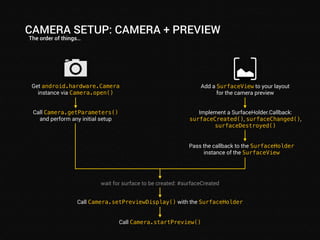
CAMERA SETUP: CAMERA + PREVIEW 
The order of things… 
Add a SurfaceView to your layout 
for the camera preview 
Implement a SurfaceHolder.Callback: 
surfaceCreated(), surfaceChanged(), 
surfaceDestroyed() 
Pass the callback to the SurfaceHolder 
instance of the SurfaceView 
Get android.hardware.Camera 
instance via Camera.open() 
Call Camera.getParameters() 
and perform any initial setup 
wait for surface to be created: #surfaceCreated 
Call Camera.setPreviewDisplay() with the SurfaceHolder 
Call Camera.startPreview()
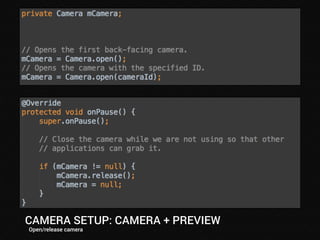
CAMERA SETUP: CAMERA + PREVIEW 
Open/release camera
CAMERA SETUP: CAMERA + PREVIEW 
Implementing SurfaceHolder.Callback
CAMERA SETUP: THINGS TO NOTE 
“Did you speak the exact words?” 
Must call Camera.setPreviewDisplay() after the 
surface is created 
Otherwise, no error, no preview 
Preview size changes must be made between 
Camera.stopPreview()/Camera.startPreview() 
all Camera.release() in onPause() to free up the camera 
The surface is destroyed when SurfaceView is View.INVISIBLE. 
9
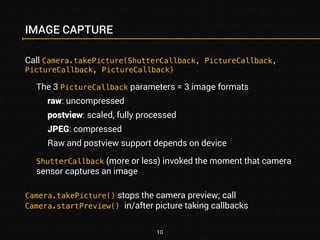
IMAGE CAPTURE 
Call Camera.takePicture(ShutterCallback, PictureCallback, 
PictureCallback, PictureCallback) 
The 3 PictureCallback parameters = 3 image formats 
raw: uncompressed 
postview: scaled, fully processed 
JPEG: compressed 
Raw and postview support depends on device 
ShutterCallback (more or less) invoked the moment that camera 
sensor captures an image 
Camera.takePicture() stops the camera preview; call 
Camera.startPreview() in/after picture taking callbacks 
10
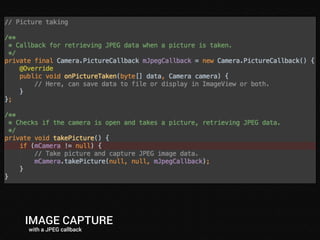
IMAGE CAPTURE 
with a JPEG callback
CAMERA INFO: SWITCHING IT UP 
CameraInfo: per device camera 
orientation: angle of rotation when facing the camera for the 
image to match the natural orientation of the device 
facing: front or back 
whether the shutter sound can be disabled 
Camera.getCameraInfo(): camera IDs are 0-based indices 
Use CameraInfo to swap between front and back 
Use PackageManager to check if a front camera exists if front 
camera is not required by <use-feature> 
Close the current camera before swapping 
12
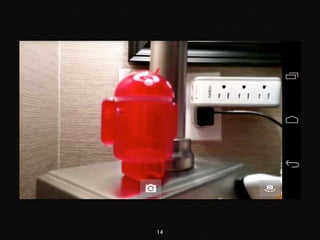
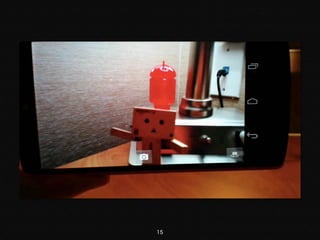
CAMERA INFO 
Finding the right camera
14
15
Natural camera orientation (looking at the device from the front) 
Natural device orientation 
90° 
Camera.Info.orientation = 90 
270° 
Camera.Info.orientation = 270 
DEVICE ORIENTATION VS CAMERA ORIENTATION 
i.e. your camera is sideways
17
CAMERA ROTATION 
Camera/display rotation + configuration changes -> sucks 
Complicated 
Device and camera orientation changes don’t play nice 
Option #1: change activity orientation animation (API 18+): 
WindowManager.LayoutParams.html#rotationAnimation 
Option #2: lock the activity orientation 
18
CAMERA PARAMETERS 
Camera.Parameters information about and access to features 
Device support: 
PackageManager to check for auto-focus and flash 
Otherwise check getter return values in Camera.Parameters 
!isAutoWhiteBalanceLockSupported() 
Or returns 0 or null 
API level also a factor (of course) 
19
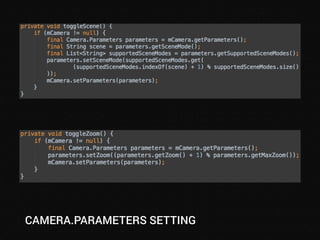
CAMERA.PARAMETERS SETTING
CAMERA SETTINGS: UPDATING 
Camera.Parameters changes happen immediately (mostly) 
Saving/restoring parameters 
Camera.Parameters.flatten() 
Camera.Parameters.unflatten() 
Change values on a Camera.Parameters instance and pass it to 
Camera.setParameters() 
Always call Camera.getParameters() 
Do not hold onto Camera.Parameters instances 
Only flattened string makes it past Camera service 
21
22
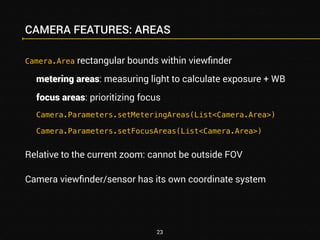
CAMERA FEATURES: AREAS 
Camera.Area rectangular bounds within viewfinder 
metering areas: measuring light to calculate exposure + WB 
focus areas: prioritizing focus 
Camera.Parameters.setMeteringAreas(List<Camera.Area>) 
Camera.Parameters.setFocusAreas(List<Camera.Area>) 
Relative to the current zoom: cannot be outside FOV 
Camera viewfinder/sensor has its own coordinate system 
23
Camera 
-1000 
-1000 1000 
(0,0) 
H 
1000 
W 
View 
Viewfinder 
Full FOV 
Viewfinder 
VIEWFINDER VS VIEW COORDINATES 
Translating between what the camera sees and what the user sees 
zoom = 1.5x 
preview surface in layout
25
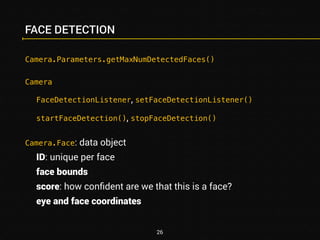
FACE DETECTION 
Camera.Parameters.getMaxNumDetectedFaces() 
Camera 
FaceDetectionListener, setFaceDetectionListener() 
startFaceDetection(), stopFaceDetection() 
Camera.Face: data object 
ID: unique per face 
face bounds 
score: how confident are we that this is a face? 
eye and face coordinates 
26
FACE DETECTION 
FaceDetectionListener.onFaceDetection() is called frequently 
Start only when actually needed 
Avoid intensive work inside the callback 
No event when no faces are detected 
Modifying the UI in response to face detection: timer or 
postDelayed to reset UI after some time without detection event 
27
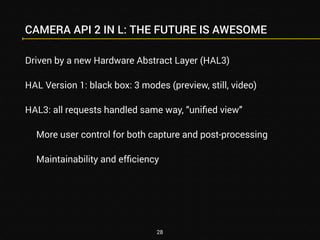
CAMERA API 2 IN L: THE FUTURE IS AWESOME 
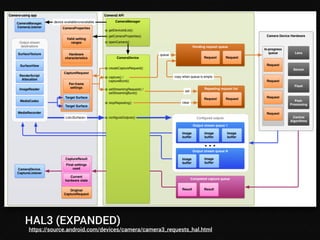
Driven by a new Hardware Abstract Layer (HAL3) 
HAL Version 1: black box: 3 modes (preview, still, video) 
HAL3: all requests handled same way, “unified view” 
More user control for both capture and post-processing 
Maintainability and efficiency 
28
HAL V1 VS HAL V3 
https://source.android.com/devices/camera/camera3.html
HAL3 (EXPANDED) 
https://source.android.com/devices/camera/camera3_requests_hal.html
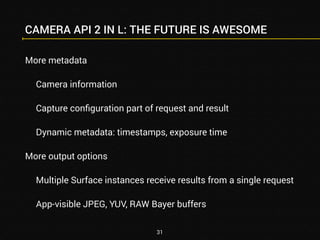
CAMERA API 2 IN L: THE FUTURE IS AWESOME 
More metadata 
Camera information 
Capture configuration part of request and result 
Dynamic metadata: timestamps, exposure time 
More output options 
Multiple Surface instances receive results from a single request 
App-visible JPEG, YUV, RAW Bayer buffers 
31
CAMERA API 2 IN L: THE FUTURE IS AWESOME 
Camera (static bits) -> CameraManager 
AvailabilityListener: removable cameras 
Asynchronous opening + CameraDevice.StateListener 
Camera (function access) -> CameraDevice 
Actually get the ID of the camera! 
CameraCaptureSession/CaptureRequest 
Parameters -> CaptureRequest.Builder.set() to configure 
CameraInfo -> CameraCharacteristics 
CameraMetadata parent of CameraCharacteristics, CaptureRequest, 
CaptureResult, TotalCaptureResult 
32
CAMERA API 2 IN L: THE FUTURE IS AWESOME 
Lessons from API 1 do not go away (remember the words) 
More complex… but more is still better 
More control and performance 
More consistency in the API 
More for developers to leverage 
It’s going to be… 
33
THANK YOU + 
QUESTIONS? 
Huyen Tue Dao 
Lead developer | Owner 
Randomly Typing 
! 
@queencodemonkey 
! 
huyen@randomlytyping.com 
randomlytyping.com 
! 
speakerdeck.com/randomlytyping 
slideshare.net/randomlytyping 
34 
Code will coming to github 
! 
Things To check out 
! 
Building Apps with Multimedia: Capturing Photos 
developer.android.com/training/camera/ 
index.html 
! 
Android Design in Action: Camera Apps 
youtube.com/watch?v=OLSa7fErTAM 
! 
Standford Digital Image Processing Class 
stanford.edu/class/ee368/Android/index.html 
! 
DevBytes: Android L - Camera2 API 
youtube.com/watch?v=Xtp3tH27OFs 
! 
Sample Camera 2 API app: 
github.com/googlesamples/android- 
Camera2Basic/blob/master/Camera2BasicSample 
! 
Digital Camera Sensor Sizes 
gizmag.com/camera-sensor-size-guide/26684/

Droidcon NYC 2014: Building Custom Camera Applications

  • 1.
    BUILDING CUSTOM CAMERAAPPLICATIONS Droidcon NYC 2014 Presented by Huyen Tue Dao September 21, 2014 376dp wrap_content @+id/randomly_typing
  • 2.
    BUILDING A CUSTOMCAMERA APPLICATION Where to start Camera setup Image capture Camera information Camera parameters Camera API in L 2
  • 3.
    ABOUT ME Mobiledeveloper: native Android and native iOS Android developer 4 years (personally use one) Computer Engineering, University of MD, College Park Gamer (video, board, card, anything): mostly Dota 2, QuizUp 3 © 2011 Adam C Beamish
  • 4.
    WHERE TO START What you want vs what you need Balance having critical features with supporting target user base What features the API supports deciding minimum SDK using Build.VERSION What features the device camera has using use-feature and PackageManager querying support level from the Camera being aware of manufacturer/device quirks WANT CAN You can’t always get what you want. But if you try sometimes well you just mind find You get what you need.
  • 5.
    CAMERA SETUP: THEMANIFEST <uses-permission android:name="android.permission.CAMERA" /> Without any <uses-feature> specifications, to install a device would require: a back-facing camera a front-facing camera auto-focus flash From docs: “This will automatically enforce the <uses-feature> manifest element for all camera features.” If any of the above are not requirements, specify <uses-feature>: <uses-feature android:name="android.hardware.camera.autofocus" android:required="false"/> 5
  • 6.
    CAMERA SETUP: CAMERA+ PREVIEW The order of things… Add a SurfaceView to your layout for the camera preview Implement a SurfaceHolder.Callback: surfaceCreated(), surfaceChanged(), surfaceDestroyed() Pass the callback to the SurfaceHolder instance of the SurfaceView Get android.hardware.Camera instance via Camera.open() Call Camera.getParameters() and perform any initial setup wait for surface to be created: #surfaceCreated Call Camera.setPreviewDisplay() with the SurfaceHolder Call Camera.startPreview()
  • 7.
    CAMERA SETUP: CAMERA+ PREVIEW Open/release camera
  • 8.
    CAMERA SETUP: CAMERA+ PREVIEW Implementing SurfaceHolder.Callback
  • 9.
    CAMERA SETUP: THINGSTO NOTE “Did you speak the exact words?” Must call Camera.setPreviewDisplay() after the surface is created Otherwise, no error, no preview Preview size changes must be made between Camera.stopPreview()/Camera.startPreview() all Camera.release() in onPause() to free up the camera The surface is destroyed when SurfaceView is View.INVISIBLE. 9
  • 10.
    IMAGE CAPTURE CallCamera.takePicture(ShutterCallback, PictureCallback, PictureCallback, PictureCallback) The 3 PictureCallback parameters = 3 image formats raw: uncompressed postview: scaled, fully processed JPEG: compressed Raw and postview support depends on device ShutterCallback (more or less) invoked the moment that camera sensor captures an image Camera.takePicture() stops the camera preview; call Camera.startPreview() in/after picture taking callbacks 10
  • 11.
    IMAGE CAPTURE witha JPEG callback
  • 12.
    CAMERA INFO: SWITCHINGIT UP CameraInfo: per device camera orientation: angle of rotation when facing the camera for the image to match the natural orientation of the device facing: front or back whether the shutter sound can be disabled Camera.getCameraInfo(): camera IDs are 0-based indices Use CameraInfo to swap between front and back Use PackageManager to check if a front camera exists if front camera is not required by <use-feature> Close the current camera before swapping 12
  • 13.
    CAMERA INFO Findingthe right camera
  • 14.
  • 15.
  • 16.
    Natural camera orientation(looking at the device from the front) Natural device orientation 90° Camera.Info.orientation = 90 270° Camera.Info.orientation = 270 DEVICE ORIENTATION VS CAMERA ORIENTATION i.e. your camera is sideways
  • 17.
  • 18.
    CAMERA ROTATION Camera/displayrotation + configuration changes -> sucks Complicated Device and camera orientation changes don’t play nice Option #1: change activity orientation animation (API 18+): WindowManager.LayoutParams.html#rotationAnimation Option #2: lock the activity orientation 18
  • 19.
    CAMERA PARAMETERS Camera.Parametersinformation about and access to features Device support: PackageManager to check for auto-focus and flash Otherwise check getter return values in Camera.Parameters !isAutoWhiteBalanceLockSupported() Or returns 0 or null API level also a factor (of course) 19
  • 20.
  • 21.
    CAMERA SETTINGS: UPDATING Camera.Parameters changes happen immediately (mostly) Saving/restoring parameters Camera.Parameters.flatten() Camera.Parameters.unflatten() Change values on a Camera.Parameters instance and pass it to Camera.setParameters() Always call Camera.getParameters() Do not hold onto Camera.Parameters instances Only flattened string makes it past Camera service 21
  • 22.
  • 23.
    CAMERA FEATURES: AREAS Camera.Area rectangular bounds within viewfinder metering areas: measuring light to calculate exposure + WB focus areas: prioritizing focus Camera.Parameters.setMeteringAreas(List<Camera.Area>) Camera.Parameters.setFocusAreas(List<Camera.Area>) Relative to the current zoom: cannot be outside FOV Camera viewfinder/sensor has its own coordinate system 23
  • 24.
    Camera -1000 -10001000 (0,0) H 1000 W View Viewfinder Full FOV Viewfinder VIEWFINDER VS VIEW COORDINATES Translating between what the camera sees and what the user sees zoom = 1.5x preview surface in layout
  • 25.
  • 26.
    FACE DETECTION Camera.Parameters.getMaxNumDetectedFaces() Camera FaceDetectionListener, setFaceDetectionListener() startFaceDetection(), stopFaceDetection() Camera.Face: data object ID: unique per face face bounds score: how confident are we that this is a face? eye and face coordinates 26
  • 27.
    FACE DETECTION FaceDetectionListener.onFaceDetection()is called frequently Start only when actually needed Avoid intensive work inside the callback No event when no faces are detected Modifying the UI in response to face detection: timer or postDelayed to reset UI after some time without detection event 27
  • 28.
    CAMERA API 2IN L: THE FUTURE IS AWESOME Driven by a new Hardware Abstract Layer (HAL3) HAL Version 1: black box: 3 modes (preview, still, video) HAL3: all requests handled same way, “unified view” More user control for both capture and post-processing Maintainability and efficiency 28
  • 29.
    HAL V1 VSHAL V3 https://source.android.com/devices/camera/camera3.html
  • 30.
  • 31.
    CAMERA API 2IN L: THE FUTURE IS AWESOME More metadata Camera information Capture configuration part of request and result Dynamic metadata: timestamps, exposure time More output options Multiple Surface instances receive results from a single request App-visible JPEG, YUV, RAW Bayer buffers 31
  • 32.
    CAMERA API 2IN L: THE FUTURE IS AWESOME Camera (static bits) -> CameraManager AvailabilityListener: removable cameras Asynchronous opening + CameraDevice.StateListener Camera (function access) -> CameraDevice Actually get the ID of the camera! CameraCaptureSession/CaptureRequest Parameters -> CaptureRequest.Builder.set() to configure CameraInfo -> CameraCharacteristics CameraMetadata parent of CameraCharacteristics, CaptureRequest, CaptureResult, TotalCaptureResult 32
  • 33.
    CAMERA API 2IN L: THE FUTURE IS AWESOME Lessons from API 1 do not go away (remember the words) More complex… but more is still better More control and performance More consistency in the API More for developers to leverage It’s going to be… 33
  • 34.
    THANK YOU + QUESTIONS? Huyen Tue Dao Lead developer | Owner Randomly Typing ! @queencodemonkey ! huyen@randomlytyping.com randomlytyping.com ! speakerdeck.com/randomlytyping slideshare.net/randomlytyping 34 Code will coming to github ! Things To check out ! Building Apps with Multimedia: Capturing Photos developer.android.com/training/camera/ index.html ! Android Design in Action: Camera Apps youtube.com/watch?v=OLSa7fErTAM ! Standford Digital Image Processing Class stanford.edu/class/ee368/Android/index.html ! DevBytes: Android L - Camera2 API youtube.com/watch?v=Xtp3tH27OFs ! Sample Camera 2 API app: github.com/googlesamples/android- Camera2Basic/blob/master/Camera2BasicSample ! Digital Camera Sensor Sizes gizmag.com/camera-sensor-size-guide/26684/