Useful Apex
Development Tools
Daniel Ballinger
Salesforce MVP
@FishOfPrey | fishofprey.com
• Running anonymous apex in a testing context
• Running a single test method in isolation
• Adding eval() support to Apex
• Catching the uncatchable
• Becoming an MVP
• Dreamforce 2015
Topics
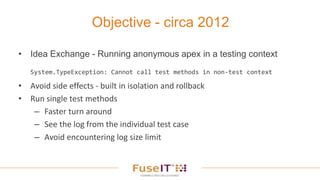
• Idea Exchange - Running anonymous apex in a testing context
System.TypeException: Cannot call test methods in non-test context
• Avoid side effects - built in isolation and rollback
• Run single test methods
– Faster turn around
– See the log from the individual test case
– Avoid encountering log size limit
Objective - circa 2012
The hard way - Using the Metadata API
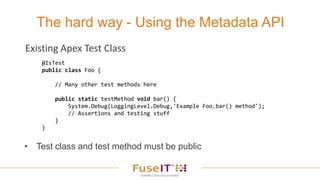
• Test class and test method must be public
@IsTest
public class Foo {
// Many other test methods here
public static testMethod void bar() {
System.Debug(LoggingLevel.Debug,'Example Foo.bar() method');
// Assertions and testing stuff
}
}
Existing Apex Test Class
• Create a wrapper class and call the test method
• Zip generated files
• Metadata API deploy()
– DeployOptions
• checkOnly = true
• runTests = array with generated class name
• testLevel = RunSpecifiedTests (v34.0)
• DebuggingHeader to control logging for transaction
@IsTest
public class FooWrapper {
public static testMethod void barWrapper() {
Foo.bar();
}
}
FooWrapper.cls
FooWrapper.cls-meta.xml
Demo
Running a single test method via the Metadata API
The easy way - REST API
• REST API only at this stage (Summer `15)
• Accepts classIds (01p) and test method names
• Support for:
– @testSetup annotation
– private methods
• Winter `16 Dev Console
POST
/runTestsAsynchronous/
Body
{
"tests":[
{
"classId":"<classId 1>",
"testMethods":[
"testMethod1",
"testMethod2",
"testMethod3"
]
},
{
"classId":"<classId 2>",
"testMethods":[
"testMethod1",
"testMethod2"
]
}
]
}
Demo
Running a single test method via the REST API
• The same technique can be used for anonymous apex
• Deploy it as an Apex Test
Anonymous Apex in a testing context
Demo
Testing context anonymous apex
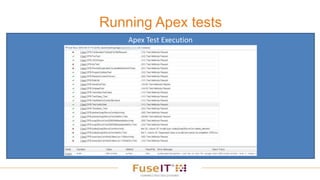
• An alternative view of Apex test execution to highlight failures
– Focus on failures first – successes are just noise
• Filter to select the tests you want to run
• Ability to start a new test run from previous result *
• Rerun the last selection *
• Start single method runs *
• Monitor progress using the Streaming API
Running Apex tests
* Winter `16
Developer
Console
Running Apex tests
Developer Console Test Results
Running Apex tests
Apex Test Execution
Demo
Running Apex Tests
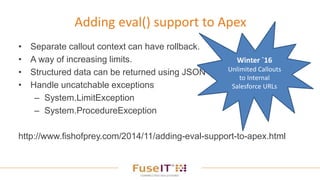
• Separate callout context can have rollback.
• A way of increasing limits.
• Structured data can be returned using JSON
• Handle uncatchable exceptions
– System.LimitException
– System.ProcedureException
http://www.fishofprey.com/2014/11/adding-eval-support-to-apex.html
Adding eval() support to Apex
Winter `16
Unlimited Callouts
to Internal
Salesforce URLs
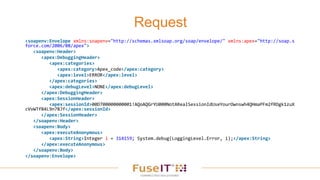
Request
<soapenv:Envelope xmlns:soapenv="http://schemas.xmlsoap.org/soap/envelope/" xmlns:apex="http://soap.s
force.com/2006/08/apex">
<soapenv:Header>
<apex:DebuggingHeader>
<apex:categories>
<apex:category>Apex_code</apex:category>
<apex:level>ERROR</apex:level>
</apex:categories>
<apex:debugLevel>NONE</apex:debugLevel>
</apex:DebuggingHeader>
<apex:SessionHeader>
<apex:sessionId>00D700000000001!AQoAQGrYU000NotARealSessionIdUseYourOwnswh4QHmaPFm2fRDgk1zuX
cVvWTfB4L9n7BJf</apex:sessionId>
</apex:SessionHeader>
</soapenv:Header>
<soapenv:Body>
<apex:executeAnonymous>
<apex:String>Integer i = 314159; System.debug(LoggingLevel.Error, i);</apex:String>
</apex:executeAnonymous>
</soapenv:Body>
</soapenv:Envelope>
Response
<soapenv:Envelope xmlns:soapenv="http://schemas.xmlsoap.org/soap/envelope/"
xmlns="http://soap.sforce.com/2006/08/apex" xmlns:xsi="http://www.w3.org/2001/XMLSchema-
instance">
<soapenv:Header>
<DebuggingInfo>
<debugLog>31.0 APEX_CODE,ERROR
Execute Anonymous: Integer i = 314159; System.debug(LoggingLevel.Error, i);
13:24:24.027 (27564504)|EXECUTION_STARTED
13:24:24.027 (27573409)|CODE_UNIT_STARTED|[EXTERNAL]|execute_anonymous_apex
13:24:24.028 (28065096)|USER_DEBUG|[1]|ERROR|314159
13:24:24.028 (28098385)|CODE_UNIT_FINISHED|execute_anonymous_apex
13:24:24.029 (29024086)|EXECUTION_FINISHED</debugLog>
</DebuggingInfo>
</soapenv:Header>
<soapenv:Body>
<executeAnonymousResponse>
<result>
<column>-1</column> <compileProblem xsi:nil="true"/> <compiled>true</compiled>
<exceptionMessage xsi:nil="true"/> <exceptionStackTrace xsi:nil="true"/> <line>-
1</line> <success>true</success>
</result>
</executeAnonymousResponse>
</soapenv:Body>
</soapenv:Envelope>
Demo
Apex eval()
Limit Bypass technique
• What if you could catch
the uncatchable?
• https://twitter.com/ca_peterson/
status/629057120931962885
// https://gist.github.com/capeterson/860984f889a56f1adf06
public class Unbreakable {
public static String somethingFragile() {
while(true) {
List<Account> a = [SELECT id FROM Account LIMIT 1];
}
return null;
}
// Attempt to serialize this
private String it {
get {
return somethingFragile();
}
}
public static void catchTheUncatchable() {
String val;
try {
//The system namespaced JSON.serialize implementation catches *any* type,
//and surfaces it as a JSONException, which we can catch back in apex land
val = JSON.serialize(new Unbreakable());
} catch(JSONException e) {
System.debug(LoggingLevel.INFO, 'A LimitException was caught as a
JSONException! n' + e);
}
}
}
Demo
Uncatchable
Deploying multiple files at once
• Creating Metadata API deploy package
Becoming an MVP
• Presented at Auckland User Group - 2014
• Presented at Dreamforce 2014
• Wsdl2Apex Hackathon
• Helped numerous people with SOAP integrations
• Answered and asked questions on Salesforce StackExchange
• Blogged – FishOfPrey.com
• Tweeted
• Feedback to the Salesforce Docs team
• Visual Studio - Salesforce Connected Services
Dreamforce 2015 Sessions
• Welkin Suite
• Meet the developers
• Foosball IoT
• My unconference/campfire conversation
9 am DevZone
Q&A
• Download: free FuseIT SFDC Explorer Tool
http://www.fuseit.com/explorer
www.fuseit.com
@FishOfPrey
www.fishofprey.com

Dreamforce Campfire - Apex Testing Tips and Tricks

Editor's Notes

  • #4 https://success.salesforce.com/ideaView?id=08730000000inJZAAY Sometimes it would be ideal to just try some code out and know that any DML operations that get performed won't be committed. I wouldn't expect callouts to occur or emails to be sent. Logs from multiple test methods can easily exceed the log limit. Especially when combined with Entering_Managed_Package or using finer logging levels.MAXIMUM DEBUG LOG SIZE REACHED Focus in on the one test case that is failing. Avoid needing to comment out the test methods that aren't of interest. Run a single test method, check the result, inspect the log. Went to Dreamforce 2014. Spoke to Josh Kaplan and other Salesforce developers. 2,500 voting point threshold Meet the Developers – feature is on the roadmap
  • #5 @IsTest(SeeAllData=true) http://www.fishofprey.com/2015/06/using-salesforce-metadata-api-to-run.html
  • #6 Create a Zip from FooWrapper.cls and generate a metadata xml file. checkOnly to avoid actually deploying anything runTests to execute the wrapper class Once v34.0 is widely available the testLevel should also be set to RunSpecifiedTests. Monitoring the AsyncResult and DeployResult until it complete and then extracting the RunTestsResult. issues if the @testSetup annotation is being used in the target class.
  • #7 ExampleTestCases Use Run Sync Manual package for command line deployment will be in working directory
  • #8 Need to monitor debug log via TraceFlag If you are using the Force.com IDE v34.0.0.20150511 Beta Version you can use the new API to run a specific test method.
  • #12 Deliberately different to what the Developer Console offers. Improved developer console support coming in Winter 16 http://releasenotes.docs.salesforce.com/en-us/winter16/release-notes/rn_developer_console_tests.htm?edition=&impact=
  • #13 Deliberately different to what the Developer Console offers. Improved developer console support coming in Winter 16 http://releasenotes.docs.salesforce.com/en-us/winter16/release-notes/rn_developer_console_tests.htm?edition=&impact=
  • #14 Deliberately different to what the Developer Console offers. Improved developer console support coming in Winter 16 http://releasenotes.docs.salesforce.com/en-us/winter16/release-notes/rn_developer_console_tests.htm?edition=&impact=
  • #15 Run All Tests Async
  • #16 Older APEX API executeAnonymous method – returns DEBUG log in the response. Set logging level in the debug header to ERROR only. Pass in all required data. Kevin Poorman – eval() with result via exception throwing. Where a rollback may be required the separate context via the callout doesn't require the invoking Apex to rollback. You can still progress and make further callouts and subsequent DML operations. An odd way of increasing limits. E.g. Each anonymous apex context gets a new set of limits. JSON can be used in the response message to return structured data. You can handle classes of exception that would otherwise be uncatchable, such as System.LimitException and System.ProcedureException (System.Version v = System.requestVersion(); - managed package only) http://releasenotes.docs.salesforce.com/en-us/winter16/release-notes/rn_apex_internal_callouts.htm
  • #17 Need to pass in parameters.
  • #20 Queuing batch jobs and detecting if batch queue was active.