

Do Some SOLR
Searching in .NET
DAVID HOERSTER
About Me
C# MVP (Since April 2011)
Director of Web Solutions at RGP
Co-Founder of BrainCredits (braincredits.com)
Conference Director for Pittsburgh TechFest
Past President of Pittsburgh .NET Users Group
Organizer of recent Pittsburgh Code Camps and other Tech Events
Twitter - @DavidHoerster
Blog – http://geekswithblogs.net/DavidHoerster
Email – david@agileways.com
Take Aways
What is SOLR
When You May Use SOLR
How to Integrate SOLR in a .NET Application
Strategies for Managing RDBMS and SOLR transactions
Agenda
Searching in Apps
Hello SOLR
Installing and Running SOLR
Admin Interface
Using SOLR in .NET
◦ Retrieving Data
◦ Modifying Collections
◦ Interesting Features
◦ Highlighting, Snippets, Facets
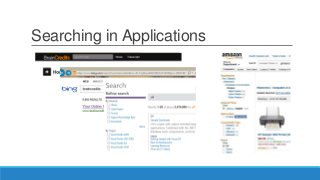
Searching in Applications
How do we accomplish these?
◦ Stored Procs?
◦ Bunch of LIKE’s?
◦ SQL Server Full-Text?
◦ Something else?
Lots of solutions
SOLR could be one
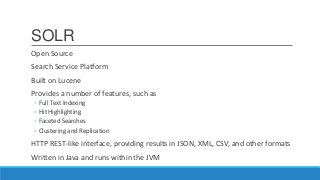
SOLR
Open Source
Search Service Platform
Built on Lucene
Provides a number of features, such as
◦ Full Text Indexing
◦ Hit Highlighting
◦ Faceted Searches
◦ Clustering and Replication
HTTP REST-like interface, providing results in JSON, XML, CSV, and other formats
Written in Java and runs within the JVM
Why Use SOLR?
Small application or prototype environment
Mixed environment or maybe non-SQL Server environment
NoSQL usage that doesn’t have full-text indexing
Features required such as faceted search, highlighting, more-like-this
Extensible search features and data types
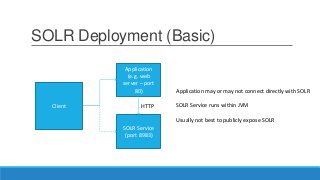
SOLR Deployment (Basic)
Application
(e.g. web
server – port
80)
SOLR Service
(port 8983)
Client
Application may or may not connect directly with SOLR
SOLR Service runs within JVM
Usually not best to publicly expose SOLR
HTTP
Some Things to Remember
SOLR does not have authentication built in
◦ Treat it as a service to your application
◦ Do not expose externally unless you want the world to search
SOLR is not a document database in the league of MongoDB
◦ Some NoSQL features
◦ Flat structures (MongoDB has some depth)
◦ Some examples use SOLR like a DB…
◦ More for expedience and simplicity
◦ Not a recommendation
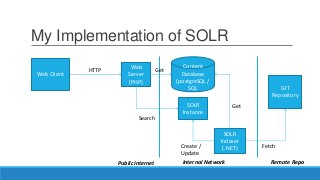
My Implementation of SOLR
Web Client
Web
Server
(PHP)
SOLR
Instance
Content
Database
(postgreSQL /
SQL
SOLR
Indexer
(.NET)
GIT
Repository
Fetch
Get
Create /
Update
Search
Get
Internal NetworkPublic Internet
HTTP
Remote Repo
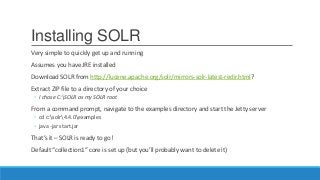
Installing SOLR
Very simple to quickly get up and running
Assumes you have JRE installed
Download SOLR from http://lucene.apache.org/solr/mirrors-solr-latest-redir.html?
Extract ZIP file to a directory of your choice
◦ I chose C:SOLR as my SOLR root
From a command prompt, navigate to the examples directory and start the Jetty server
◦ cd c:solr4.4.0examples
◦ java -jar start.jar
That’s it – SOLR is ready to go!
Default “collection1” core is set up (but you’ll probably want to delete it)
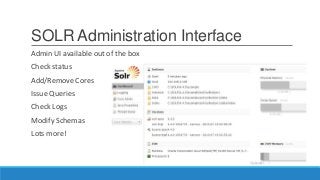
SOLR Administration Interface
Admin UI available out of the box
Check status
Add/Remove Cores
Issue Queries
Check Logs
Modify Schemas
Lots more!
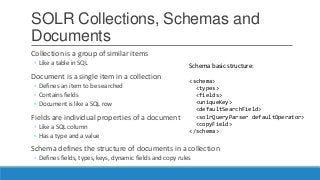
SOLR Collections, Schemas and
Documents
Collection is a group of similar items
◦ Like a table in SQL
Document is a single item in a collection
◦ Defines an item to be searched
◦ Contains fields
◦ Document is like a SQL row
Fields are individual properties of a document
◦ Like a SQL column
◦ Has a type and a value
Schema defines the structure of documents in a collection
◦ Defines fields, types, keys, dynamic fields and copy rules
Schema basic structure:
<schema>
<types>
<fields>
<uniqueKey>
<defaultSearchField>
<solrQueryParser defaultOperator>
<copyField>
</schema>
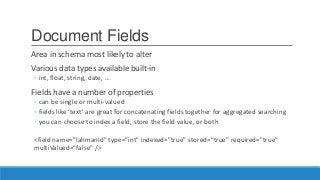
Document Fields
Area in schema most likely to alter
Various data types available built-in
◦ int, float, string, date, …
Fields have a number of properties
◦ can be single or multi-valued
◦ fields like ‘text’ are great for concatenating fields together for aggregated searching
◦ you can choose to index a field, store the field value, or both
<field name="lahmanId" type="int" indexed="true" stored="true" required="true"
multiValued="false" />
Querying
Let’s Get Some Data!!
SOLR is based on Inverted Index concept
◦ Instead of ID’s mapped to entries, words are mapped to ID’s.
◦ Analyzers then traverse inverted index and evaluates relevance
Admin UI provides a quick and dirty interface to retrieve data
Most query options available
Can also specify format
Once parameters issued, URL is available as reference
Querying
Basic parameter is `q`
◦ http://localhost:8983/solr/<collection>?q=<field>:<value>
Other basic parameters include:
◦ Query Fields (qf) – selects the fields to return
◦ Sorting (sort) – specifies the fields to sort on and direction
◦ Row Offset (start) – which row to start with when returning results (default is
0)
◦ Caching (cache) – tells SOLR whether to cache the results (default is true)
◦ Rows to return (rows) – how many rows to return in the call (default is 10)
These are all query string parameters.
Demo
USING THE ADMIN INTERFACE
Working with SOLR in .NET
solrnet library
◦ https://code.google.com/p/solrnet/
◦ Source: https://github.com/mausch/SolrNet/tree/master/SolrNet
WARNING: If you’re using SOLR 4+
◦ Committing in solrnet will throw an error
◦ Need to download latest code from GitHub and compile
◦ Or download a package’s code and remove the initialization of the waitFlush property from
solr/commands/parameters/CommitOptions.cs
Set Up Typed Entities
public class Quote{
[SolrUniqueKey("id")]
public String Id { get; set; }
[SolrField("title")]
public String Title { get; set; }
[SolrField("articleBody")]
public String ArticleBody { get; set; }
[SolrField("year")]
public Int32 Year { get; set; }
[SolrField("abstract")]
public String Abstract { get; set; }
[SolrField("source")]
public String Source { get; set; }
}
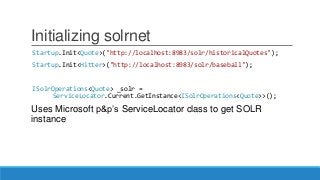
Initializing solrnet
Startup.Init<Quote>("http://localhost:8983/solr/historicalQuotes");
Startup.Init<Hitter>("http://localhost:8983/solr/baseball");
ISolrOperations<Quote> _solr =
ServiceLocator.Current.GetInstance<ISolrOperations<Quote>>();
Uses Microsoft p&p’s ServiceLocator class to get SOLR
instance
Issuing a Query
Basic query, as it selects everything:
var quotes = _solr.Query(new SolrQuery("*:*"));
Returns just those records with an id of 12345:
var quotes = _solr.Query(new SolrQuery(“id:12345”));
Searches for specific text, and only returns 3 fields:
var query = new SolrQuery("text:" + id);
var options = new QueryOptions() {
Fields = new[] { "id", "title", "source" }
};
var results = _solr.Query(query, options);
Filter Queries
‘fq’ parameter
Runs the filter against the entire index and caches the results
Can help speed up searching if you know of common, recurring searches
In solrnet, use the FilterQueries QueryOption
_solr.Query(“*:*”, new QueryOptions {
FilterQueries = new ISolrQuery[] {
new SolrQueryByField(“HR”, “[50 TO *]”),
…
}
}
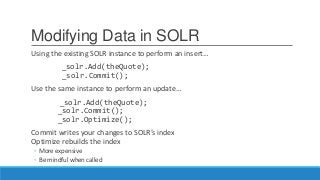
Modifying Data in SOLR
Using the existing SOLR instance to perform an insert…
_solr.Add(theQuote);
_solr.Commit();
Use the same instance to perform an update…
_solr.Add(theQuote);
_solr.Commit();
_solr.Optimize();
Commit writes your changes to SOLR’s index
Optimize rebuilds the index
◦ More expensive
◦ Be mindful when called
Search Features (Query Options)
Highlighting
Highlight = new HighlightingParameters() {
Fields = new[] { "articleBody", "abstract" },
Fragsize = 200,
AfterTerm = "</em></strong>",
BeforeTerm = "<em><strong>",
UsePhraseHighlighter = true
//, AlternateField = "source"
}
More Like This
MoreLikeThis = new MoreLikeThisParameters(
new[] { "articlebody", "source" })
{ MinDocFreq = 1, MinTermFreq = 1 }
Search Features (Query Options)
Faceted Search
Facet = new FacetParameters() {
Queries = FacetQueryCategories(minHomeRuns)
}
private SolrFacetQuery[] FacetQueryCategories(Int32 minHomeRuns) {
var salaryFacet1 =
new SolrQueryByRange<Int32>("salary", 0, 1000000);
...
return new[] { salaryFacet1 };
}
Demo
USING SOLR FEATURES TO ENHANCE YOUR SEARCH
EXPERIENCE
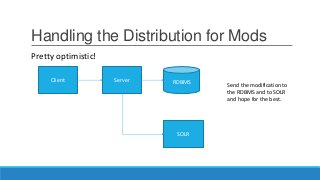
Handling the Distribution for Mods
Client Server
SOLR
RDBMS
Send the modification to
the RDBMS and to SOLR
and hope for the best.
Pretty optimistic!
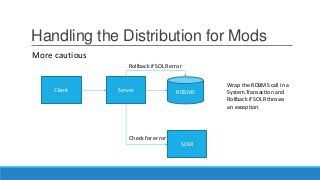
Handling the Distribution for Mods
Client Server
SOLR
RDBMS
Wrap the RDBMS call in a
System.Transaction and
Rollback if SOLR throws
an exception.
Rollback if SOLR error
Check for error
More cautious
Handling the Distribution for Mods
Client Server
SOLR
RDBMS
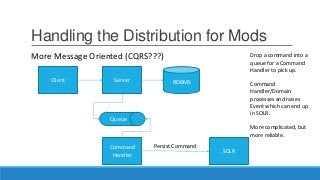
Drop a command into a
queue for a Command
Handler to pick up.
Command
Handler/Domain
processes and raises
Event which can end up
in SOLR.
More complicated, but
more reliable.
Queue
Command
Handler
Persist Command
More Message Oriented (CQRS???)
SOLR as a Windows Service
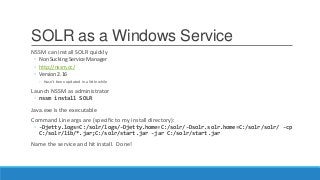
NSSM can install SOLR quickly
◦ Non Sucking Service Manager
◦ http://nssm.cc/
◦ Version 2.16
◦ Hasn’t been updated in a little while
Launch NSSM as administrator
◦ nssm install SOLR
Java.exe is the executable
Command Line args are (specific to my install directory):
◦ -Djetty.logs=C:/solr/logs/-Djetty.home=C:/solr/-Dsolr.solr.home=C:/solr/solr/ -cp
C:/solr/lib/*.jar;C:/solr/start.jar -jar C:/solr/start.jar
Name the service and hit install. Done!
What’s Next
Other query techniques
◦ Boosting
◦ http://localhost:8983/solr/historicalQuotes/select/?defType=dismax&q=text&qf=source^20.0+te
xt^0.3
◦ Spatial
◦ Sounds like
SOLR Cloud
◦ SOLR replication and sharding
◦ Moving to the enterprise space
Extending SOLR Behaviors and Using Other Parsers
Using Dynamic Properties
Using SOLR in a full NoSQL Environment
Resources
SOLR Reference Guide
https://cwiki.apache.org/confluence/display/solr/Apache+Solr+Reference+Guide
SOLR Tutorial
http://lucene.apache.org/solr/4_4_0/tutorial.html
Nice SOLR Walk-Through
http://www.solrtutorial.com/
Books
Apache Solr 4 Cookbook (Packt Publishing)
Apache Solr 4 In Action (Manning – MEAP)

Do Some Solr Searching

  • 1.
    Do Some SOLR Searchingin .NET DAVID HOERSTER
  • 2.
    About Me C# MVP(Since April 2011) Director of Web Solutions at RGP Co-Founder of BrainCredits (braincredits.com) Conference Director for Pittsburgh TechFest Past President of Pittsburgh .NET Users Group Organizer of recent Pittsburgh Code Camps and other Tech Events Twitter - @DavidHoerster Blog – http://geekswithblogs.net/DavidHoerster Email – david@agileways.com
  • 3.
    Take Aways What isSOLR When You May Use SOLR How to Integrate SOLR in a .NET Application Strategies for Managing RDBMS and SOLR transactions
  • 4.
    Agenda Searching in Apps HelloSOLR Installing and Running SOLR Admin Interface Using SOLR in .NET ◦ Retrieving Data ◦ Modifying Collections ◦ Interesting Features ◦ Highlighting, Snippets, Facets
  • 5.
  • 6.
    Searching in Applications Howdo we accomplish these? ◦ Stored Procs? ◦ Bunch of LIKE’s? ◦ SQL Server Full-Text? ◦ Something else? Lots of solutions SOLR could be one
  • 7.
    SOLR Open Source Search ServicePlatform Built on Lucene Provides a number of features, such as ◦ Full Text Indexing ◦ Hit Highlighting ◦ Faceted Searches ◦ Clustering and Replication HTTP REST-like interface, providing results in JSON, XML, CSV, and other formats Written in Java and runs within the JVM
  • 8.
    Why Use SOLR? Smallapplication or prototype environment Mixed environment or maybe non-SQL Server environment NoSQL usage that doesn’t have full-text indexing Features required such as faceted search, highlighting, more-like-this Extensible search features and data types
  • 9.
    SOLR Deployment (Basic) Application (e.g.web server – port 80) SOLR Service (port 8983) Client Application may or may not connect directly with SOLR SOLR Service runs within JVM Usually not best to publicly expose SOLR HTTP
  • 10.
    Some Things toRemember SOLR does not have authentication built in ◦ Treat it as a service to your application ◦ Do not expose externally unless you want the world to search SOLR is not a document database in the league of MongoDB ◦ Some NoSQL features ◦ Flat structures (MongoDB has some depth) ◦ Some examples use SOLR like a DB… ◦ More for expedience and simplicity ◦ Not a recommendation
  • 11.
    My Implementation ofSOLR Web Client Web Server (PHP) SOLR Instance Content Database (postgreSQL / SQL SOLR Indexer (.NET) GIT Repository Fetch Get Create / Update Search Get Internal NetworkPublic Internet HTTP Remote Repo
  • 12.
    Installing SOLR Very simpleto quickly get up and running Assumes you have JRE installed Download SOLR from http://lucene.apache.org/solr/mirrors-solr-latest-redir.html? Extract ZIP file to a directory of your choice ◦ I chose C:SOLR as my SOLR root From a command prompt, navigate to the examples directory and start the Jetty server ◦ cd c:solr4.4.0examples ◦ java -jar start.jar That’s it – SOLR is ready to go! Default “collection1” core is set up (but you’ll probably want to delete it)
  • 13.
    SOLR Administration Interface AdminUI available out of the box Check status Add/Remove Cores Issue Queries Check Logs Modify Schemas Lots more!
  • 14.
    SOLR Collections, Schemasand Documents Collection is a group of similar items ◦ Like a table in SQL Document is a single item in a collection ◦ Defines an item to be searched ◦ Contains fields ◦ Document is like a SQL row Fields are individual properties of a document ◦ Like a SQL column ◦ Has a type and a value Schema defines the structure of documents in a collection ◦ Defines fields, types, keys, dynamic fields and copy rules Schema basic structure: <schema> <types> <fields> <uniqueKey> <defaultSearchField> <solrQueryParser defaultOperator> <copyField> </schema>
  • 15.
    Document Fields Area inschema most likely to alter Various data types available built-in ◦ int, float, string, date, … Fields have a number of properties ◦ can be single or multi-valued ◦ fields like ‘text’ are great for concatenating fields together for aggregated searching ◦ you can choose to index a field, store the field value, or both <field name="lahmanId" type="int" indexed="true" stored="true" required="true" multiValued="false" />
  • 16.
    Querying Let’s Get SomeData!! SOLR is based on Inverted Index concept ◦ Instead of ID’s mapped to entries, words are mapped to ID’s. ◦ Analyzers then traverse inverted index and evaluates relevance Admin UI provides a quick and dirty interface to retrieve data Most query options available Can also specify format Once parameters issued, URL is available as reference
  • 17.
    Querying Basic parameter is`q` ◦ http://localhost:8983/solr/<collection>?q=<field>:<value> Other basic parameters include: ◦ Query Fields (qf) – selects the fields to return ◦ Sorting (sort) – specifies the fields to sort on and direction ◦ Row Offset (start) – which row to start with when returning results (default is 0) ◦ Caching (cache) – tells SOLR whether to cache the results (default is true) ◦ Rows to return (rows) – how many rows to return in the call (default is 10) These are all query string parameters.
  • 18.
  • 19.
    Working with SOLRin .NET solrnet library ◦ https://code.google.com/p/solrnet/ ◦ Source: https://github.com/mausch/SolrNet/tree/master/SolrNet WARNING: If you’re using SOLR 4+ ◦ Committing in solrnet will throw an error ◦ Need to download latest code from GitHub and compile ◦ Or download a package’s code and remove the initialization of the waitFlush property from solr/commands/parameters/CommitOptions.cs
  • 20.
    Set Up TypedEntities public class Quote{ [SolrUniqueKey("id")] public String Id { get; set; } [SolrField("title")] public String Title { get; set; } [SolrField("articleBody")] public String ArticleBody { get; set; } [SolrField("year")] public Int32 Year { get; set; } [SolrField("abstract")] public String Abstract { get; set; } [SolrField("source")] public String Source { get; set; } }
  • 21.
    Initializing solrnet Startup.Init<Quote>("http://localhost:8983/solr/historicalQuotes"); Startup.Init<Hitter>("http://localhost:8983/solr/baseball"); ISolrOperations<Quote> _solr= ServiceLocator.Current.GetInstance<ISolrOperations<Quote>>(); Uses Microsoft p&p’s ServiceLocator class to get SOLR instance
  • 22.
    Issuing a Query Basicquery, as it selects everything: var quotes = _solr.Query(new SolrQuery("*:*")); Returns just those records with an id of 12345: var quotes = _solr.Query(new SolrQuery(“id:12345”)); Searches for specific text, and only returns 3 fields: var query = new SolrQuery("text:" + id); var options = new QueryOptions() { Fields = new[] { "id", "title", "source" } }; var results = _solr.Query(query, options);
  • 23.
    Filter Queries ‘fq’ parameter Runsthe filter against the entire index and caches the results Can help speed up searching if you know of common, recurring searches In solrnet, use the FilterQueries QueryOption _solr.Query(“*:*”, new QueryOptions { FilterQueries = new ISolrQuery[] { new SolrQueryByField(“HR”, “[50 TO *]”), … } }
  • 24.
    Modifying Data inSOLR Using the existing SOLR instance to perform an insert… _solr.Add(theQuote); _solr.Commit(); Use the same instance to perform an update… _solr.Add(theQuote); _solr.Commit(); _solr.Optimize(); Commit writes your changes to SOLR’s index Optimize rebuilds the index ◦ More expensive ◦ Be mindful when called
  • 25.
    Search Features (QueryOptions) Highlighting Highlight = new HighlightingParameters() { Fields = new[] { "articleBody", "abstract" }, Fragsize = 200, AfterTerm = "</em></strong>", BeforeTerm = "<em><strong>", UsePhraseHighlighter = true //, AlternateField = "source" } More Like This MoreLikeThis = new MoreLikeThisParameters( new[] { "articlebody", "source" }) { MinDocFreq = 1, MinTermFreq = 1 }
  • 26.
    Search Features (QueryOptions) Faceted Search Facet = new FacetParameters() { Queries = FacetQueryCategories(minHomeRuns) } private SolrFacetQuery[] FacetQueryCategories(Int32 minHomeRuns) { var salaryFacet1 = new SolrQueryByRange<Int32>("salary", 0, 1000000); ... return new[] { salaryFacet1 }; }
  • 27.
    Demo USING SOLR FEATURESTO ENHANCE YOUR SEARCH EXPERIENCE
  • 28.
    Handling the Distributionfor Mods Client Server SOLR RDBMS Send the modification to the RDBMS and to SOLR and hope for the best. Pretty optimistic!
  • 29.
    Handling the Distributionfor Mods Client Server SOLR RDBMS Wrap the RDBMS call in a System.Transaction and Rollback if SOLR throws an exception. Rollback if SOLR error Check for error More cautious
  • 30.
    Handling the Distributionfor Mods Client Server SOLR RDBMS Drop a command into a queue for a Command Handler to pick up. Command Handler/Domain processes and raises Event which can end up in SOLR. More complicated, but more reliable. Queue Command Handler Persist Command More Message Oriented (CQRS???)
  • 31.
    SOLR as aWindows Service NSSM can install SOLR quickly ◦ Non Sucking Service Manager ◦ http://nssm.cc/ ◦ Version 2.16 ◦ Hasn’t been updated in a little while Launch NSSM as administrator ◦ nssm install SOLR Java.exe is the executable Command Line args are (specific to my install directory): ◦ -Djetty.logs=C:/solr/logs/-Djetty.home=C:/solr/-Dsolr.solr.home=C:/solr/solr/ -cp C:/solr/lib/*.jar;C:/solr/start.jar -jar C:/solr/start.jar Name the service and hit install. Done!
  • 32.
    What’s Next Other querytechniques ◦ Boosting ◦ http://localhost:8983/solr/historicalQuotes/select/?defType=dismax&q=text&qf=source^20.0+te xt^0.3 ◦ Spatial ◦ Sounds like SOLR Cloud ◦ SOLR replication and sharding ◦ Moving to the enterprise space Extending SOLR Behaviors and Using Other Parsers Using Dynamic Properties Using SOLR in a full NoSQL Environment
  • 33.
    Resources SOLR Reference Guide https://cwiki.apache.org/confluence/display/solr/Apache+Solr+Reference+Guide SOLRTutorial http://lucene.apache.org/solr/4_4_0/tutorial.html Nice SOLR Walk-Through http://www.solrtutorial.com/ Books Apache Solr 4 Cookbook (Packt Publishing) Apache Solr 4 In Action (Manning – MEAP)