DIY
Home Smart Lighting
System with Micropython
August 26th, 2018 - By Tegar Imansyah
Hello!
I am Tegar Imansyah
IoT Enthusiast Enthusiast
You can find me at @tegarimansyah
2
Today’s Agenda
● What is Smart Lighting System?
● Electronics Part
● Connecting Device
● Controlling from Worldwide
3
What is it?
We will learn What is the difference of Smart Lighting System, Smart
Home and IoT.
1
What is it?
5
Source: https://blogs.intel.com/iot/2015/04/01/all-for-one-and-one-
for-all-how-the-iot-is-centralizing-intelligence-across-industries/
Source:
http://condorestates.co.uk/featured/smart-homes-ready-or-not/
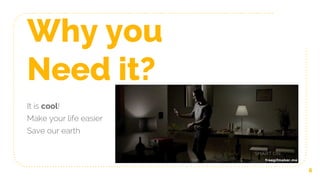
Why you
Need it?
It is cool!
Make your life easier
Save our earth
6
Why not
Implement it?
Spend Extra Money!
You have no time to DIY.
7
Electronics Part
Let’s start with the first set of technical slides
2
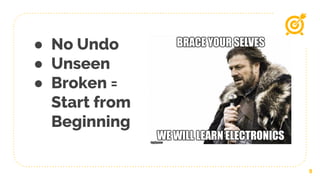
● No Undo
● Unseen
● Broken =
Start from
Beginning
9
“ Even your code is perfect, if you are not
sure with your circuit, and your code will
not works properly
--
Tegar, 2018
10
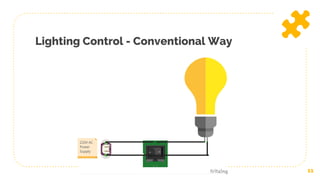
Lighting Control - Conventional Way
11
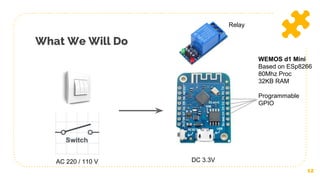
What We Will Do
12
WEMOS d1 Mini
Based on ESp8266
80Mhz Proc
32KB RAM
Programmable
GPIO
AC 220 / 110 V DC 3.3V
Relay
13
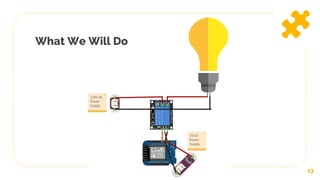
What We Will Do
MicroPython
14
● Python programming language that is optimised to run on
microcontrollers.
● Created by Damien P. George at 2013
● Learn more https://micropython.org/
● Micropython is Installed on your microcontroller instead of
your computer
● Support REPL, Run from file and standalone.
Getting Started (on Ubuntu)
15
● Install Tools = [ esptools.py, Adafruit MicroPython Tool (ampy),
Serial Terminal ]
● Download images (http://micropython.org/download#esp8266)
● Install
○ Plug in microcontroller to your computer
○ $ esptool.py --port /dev/ttyUSB0 erase_flash
○ $ esptool.py --port /dev/ttyUSB0 --baud 460800 write_flash
--flash_size=detect 0 esp8266-20170108-v1.8.7.bin
Getting Started (on Ubuntu)
16
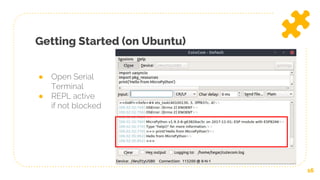
● Open Serial
Terminal
● REPL active
if not blocked
Getting Started (on Ubuntu)
17
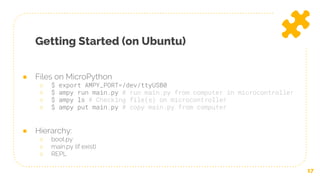
● Files on MicroPython
○ $ export AMPY_PORT=/dev/ttyUSB0
○ $ ampy run main.py # run main.py from computer in microcontroller
○ $ ampy ls # Checking file(s) on microcontroller
○ $ ampy put main.py # copy main.py from computer
● Hierarchy:
○ boot.py
○ main.py (if exist)
○ REPL
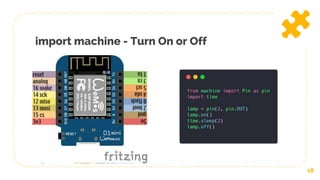
import machine - Turn On or Off
18
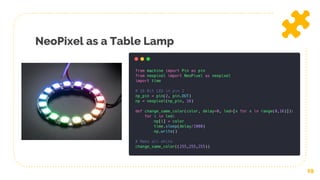
NeoPixel as a Table Lamp
19
Connecting Device
Connecting to the outside world
3
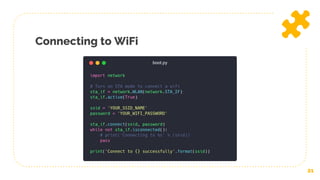
Connecting to WiFi
21
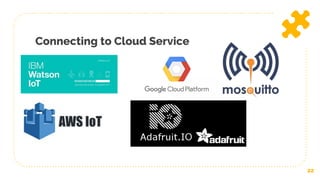
Connecting to Cloud Service
22
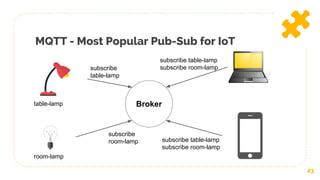
MQTT - Most Popular Pub-Sub for IoT
23
Brokertable-lamp
room-lamp
subscribe
table-lamp
subscribe
room-lamp
subscribe table-lamp
subscribe room-lamp
subscribe table-lamp
subscribe room-lamp
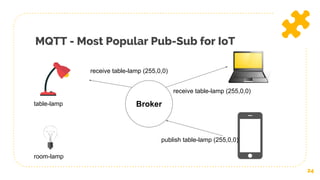
MQTT - Most Popular Pub-Sub for IoT
24
Brokertable-lamp
room-lamp
publish table-lamp (255,0,0)
receive table-lamp (255,0,0)
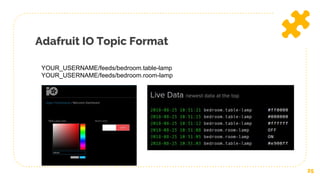
Adafruit IO Topic Format
25
YOUR_USERNAME/feeds/bedroom.table-lamp
YOUR_USERNAME/feeds/bedroom.room-lamp
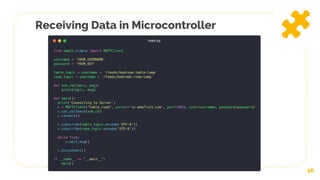
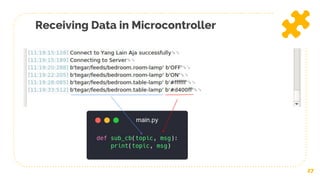
Receiving Data in Microcontroller
26
Receiving Data in Microcontroller
27
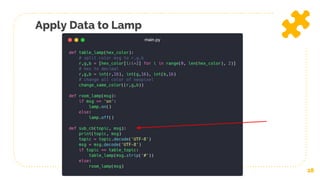
Apply Data to Lamp
28
Controlling from
Worldwide
The Cool Part starts here
4
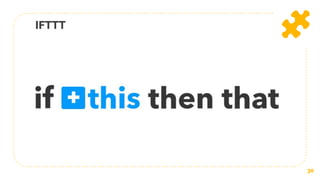
IFTTT
30
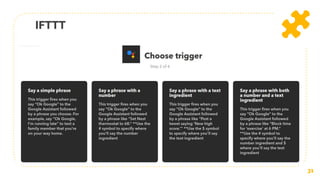
IFTTT
31
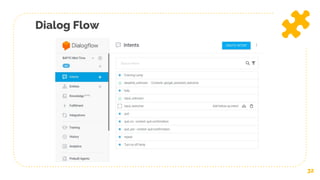
Dialog Flow
32
Future Works
● Make Your Own
● Design your favourite case
● Use it for your daily
● Be creative
33
What Next?
● WiFi Setup Over The Air - Using Pico Web
● Digital Input - Physical Button
● Sensor Input (ADC, UART, I2C, etc) - Light Sensor,
PIR Sensor, Infrared Sensor
● Actuator Output (PWM) - Electrical Motor, Servo,
etc
34
35
Thanks!
Any questions?
You can find me at @tegarimansyah
Get slide and code:
https://github.com/tegarimansyah/presentation/tree/PyCon-MY-2018

DIY Home Smart Lighting System with Micropython - PyCon MY 2018

  • 1.
    DIY Home Smart Lighting Systemwith Micropython August 26th, 2018 - By Tegar Imansyah
  • 2.
    Hello! I am TegarImansyah IoT Enthusiast Enthusiast You can find me at @tegarimansyah 2
  • 3.
    Today’s Agenda ● Whatis Smart Lighting System? ● Electronics Part ● Connecting Device ● Controlling from Worldwide 3
  • 4.
    What is it? Wewill learn What is the difference of Smart Lighting System, Smart Home and IoT. 1
  • 5.
    What is it? 5 Source:https://blogs.intel.com/iot/2015/04/01/all-for-one-and-one- for-all-how-the-iot-is-centralizing-intelligence-across-industries/ Source: http://condorestates.co.uk/featured/smart-homes-ready-or-not/
  • 6.
    Why you Need it? Itis cool! Make your life easier Save our earth 6
  • 7.
    Why not Implement it? SpendExtra Money! You have no time to DIY. 7
  • 8.
    Electronics Part Let’s startwith the first set of technical slides 2
  • 9.
    ● No Undo ●Unseen ● Broken = Start from Beginning 9
  • 10.
    “ Even yourcode is perfect, if you are not sure with your circuit, and your code will not works properly -- Tegar, 2018 10
  • 11.
    Lighting Control -Conventional Way 11
  • 12.
    What We WillDo 12 WEMOS d1 Mini Based on ESp8266 80Mhz Proc 32KB RAM Programmable GPIO AC 220 / 110 V DC 3.3V Relay
  • 13.
  • 14.
    MicroPython 14 ● Python programminglanguage that is optimised to run on microcontrollers. ● Created by Damien P. George at 2013 ● Learn more https://micropython.org/ ● Micropython is Installed on your microcontroller instead of your computer ● Support REPL, Run from file and standalone.
  • 15.
    Getting Started (onUbuntu) 15 ● Install Tools = [ esptools.py, Adafruit MicroPython Tool (ampy), Serial Terminal ] ● Download images (http://micropython.org/download#esp8266) ● Install ○ Plug in microcontroller to your computer ○ $ esptool.py --port /dev/ttyUSB0 erase_flash ○ $ esptool.py --port /dev/ttyUSB0 --baud 460800 write_flash --flash_size=detect 0 esp8266-20170108-v1.8.7.bin
  • 16.
    Getting Started (onUbuntu) 16 ● Open Serial Terminal ● REPL active if not blocked
  • 17.
    Getting Started (onUbuntu) 17 ● Files on MicroPython ○ $ export AMPY_PORT=/dev/ttyUSB0 ○ $ ampy run main.py # run main.py from computer in microcontroller ○ $ ampy ls # Checking file(s) on microcontroller ○ $ ampy put main.py # copy main.py from computer ● Hierarchy: ○ boot.py ○ main.py (if exist) ○ REPL
  • 18.
    import machine -Turn On or Off 18
  • 19.
    NeoPixel as aTable Lamp 19
  • 20.
  • 21.
  • 22.
  • 23.
    MQTT - MostPopular Pub-Sub for IoT 23 Brokertable-lamp room-lamp subscribe table-lamp subscribe room-lamp subscribe table-lamp subscribe room-lamp subscribe table-lamp subscribe room-lamp
  • 24.
    MQTT - MostPopular Pub-Sub for IoT 24 Brokertable-lamp room-lamp publish table-lamp (255,0,0) receive table-lamp (255,0,0) receive table-lamp (255,0,0)
  • 25.
    Adafruit IO TopicFormat 25 YOUR_USERNAME/feeds/bedroom.table-lamp YOUR_USERNAME/feeds/bedroom.room-lamp
  • 26.
    Receiving Data inMicrocontroller 26
  • 27.
    Receiving Data inMicrocontroller 27
  • 28.
  • 29.
  • 30.
  • 31.
  • 32.
  • 33.
    Future Works ● MakeYour Own ● Design your favourite case ● Use it for your daily ● Be creative 33
  • 34.
    What Next? ● WiFiSetup Over The Air - Using Pico Web ● Digital Input - Physical Button ● Sensor Input (ADC, UART, I2C, etc) - Light Sensor, PIR Sensor, Infrared Sensor ● Actuator Output (PWM) - Electrical Motor, Servo, etc 34
  • 35.
    35 Thanks! Any questions? You canfind me at @tegarimansyah Get slide and code: https://github.com/tegarimansyah/presentation/tree/PyCon-MY-2018