Digital Differential Analyzer
1
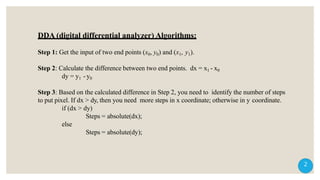
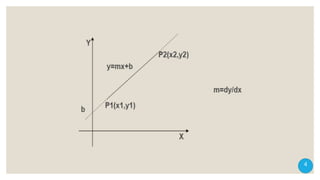
DDA (digital differential analyzer) Algorithms:
Step 1: Get the input of two end points (x0, y0) and (x1, y1).
Step 2: Calculate the difference between two end points. dx = x1 - x0
dy = y1 -y0
Step 3: Based on the calculated difference in Step 2, you need to identify the number of steps
to put pixel. If dx > dy, then you need more steps in x coordinate; otherwise in y coordinate.
if (dx > dy)
Steps = absolute(dx);
else
Steps = absolute(dy);
2
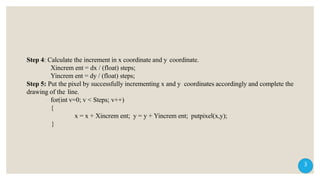
Step 4: Calculate the increment in x coordinate and y coordinate.
Xincrem ent = dx / (float) steps;
Yincrem ent = dy / (float) steps;
Step 5: Put the pixel by successfully incrementing x and y coordinates accordingly and complete the
drawing of the line.
for(int v=0; v < Steps; v++)
{
x = x + Xincrem ent; y = y + Yincrem ent; putpixel(x,y);
}
3
4
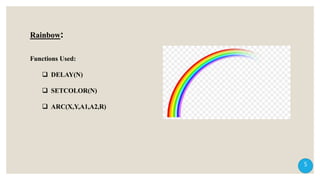
Rainbow:
Functions Used:
 DELAY(N)
 SETCOLOR(N)
 ARC(X,Y,A1,A2,R)
5
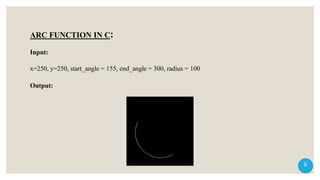
ARC FUNCTION IN C:
Input:
x=250, y=250, start_angle = 155, end_angle = 300, radius = 100
Output:
6
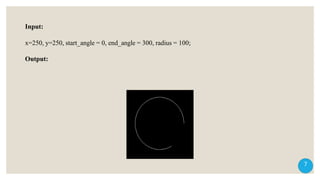
Input:
x=250, y=250, start_angle = 0, end_angle = 300, radius = 100;
Output:
7
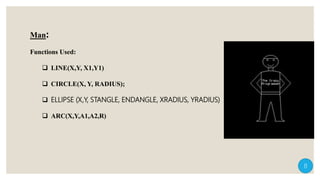
Functions Used:
 LINE(X,Y, X1,Y1)
 CIRCLE(X, Y, RADIUS);
 ELLIPSE (X,Y, STANGLE, ENDANGLE, XRADIUS, YRADIUS)
 ARC(X,Y,A1,A2,R)
Man:
8
Digital differential analyzer

Digital differential analyzer

  • 1.
  • 2.
    DDA (digital differentialanalyzer) Algorithms: Step 1: Get the input of two end points (x0, y0) and (x1, y1). Step 2: Calculate the difference between two end points. dx = x1 - x0 dy = y1 -y0 Step 3: Based on the calculated difference in Step 2, you need to identify the number of steps to put pixel. If dx > dy, then you need more steps in x coordinate; otherwise in y coordinate. if (dx > dy) Steps = absolute(dx); else Steps = absolute(dy); 2
  • 3.
    Step 4: Calculatethe increment in x coordinate and y coordinate. Xincrem ent = dx / (float) steps; Yincrem ent = dy / (float) steps; Step 5: Put the pixel by successfully incrementing x and y coordinates accordingly and complete the drawing of the line. for(int v=0; v < Steps; v++) { x = x + Xincrem ent; y = y + Yincrem ent; putpixel(x,y); } 3
  • 4.
  • 5.
    Rainbow: Functions Used:  DELAY(N) SETCOLOR(N)  ARC(X,Y,A1,A2,R) 5
  • 6.
    ARC FUNCTION INC: Input: x=250, y=250, start_angle = 155, end_angle = 300, radius = 100 Output: 6
  • 7.
    Input: x=250, y=250, start_angle= 0, end_angle = 300, radius = 100; Output: 7
  • 8.
    Functions Used:  LINE(X,Y,X1,Y1)  CIRCLE(X, Y, RADIUS);  ELLIPSE (X,Y, STANGLE, ENDANGLE, XRADIUS, YRADIUS)  ARC(X,Y,A1,A2,R) Man: 8