#MDBE17
Andrew Morgan
Developing with the modern App
Stack: MEAN and MERN
@andrewmorgan
#MDBE17
Andrew Morgan
Developing with the modern App
Stack: MEAN and MERN + Stitch
@andrewmorgan
#MDBE17
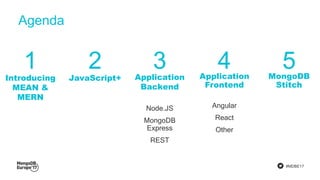
Agenda
Introducing
MEAN &
MERN
JavaScript+ Application
Backend
Node.JS
MongoDB
Express
REST
Application
Frontend
Angular
React
Other
MongoDB
Stitch
1 2 3 4 5
#MDBE17
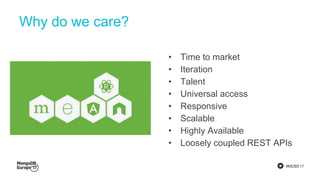
Why do we care?
• Time to market
• Iteration
• Talent
• Universal access
• Responsive
• Scalable
• Highly Available
• Loosely coupled REST APIs
#MDBE17
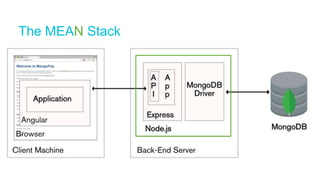
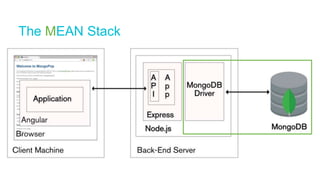
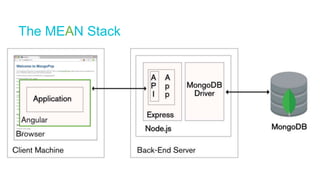
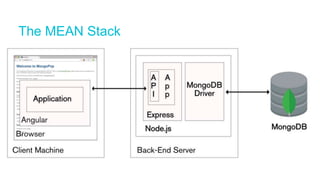
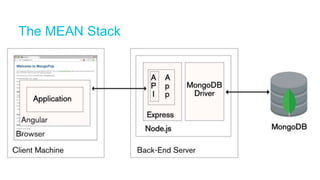
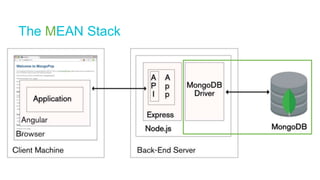
The MEAN Stack
#MDBE17
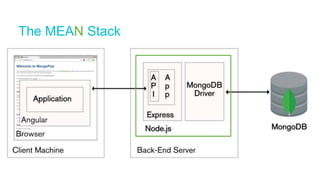
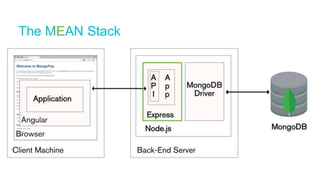
The MEAN Stack
#MDBE17
The MEAN Stack
#MDBE17
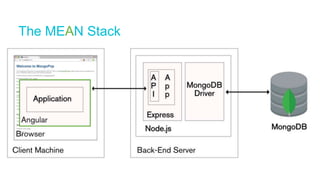
The MEAN Stack
#MDBE17
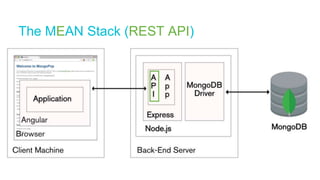
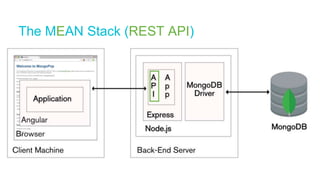
The MEAN Stack (REST API)
#MDBE17
The MEAN Stack
#MDBE17
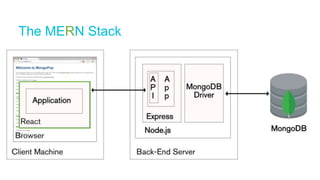
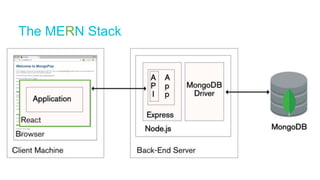
The MERN Stack
#MDBE17
"JavaScript" & JSON {
"firstName": "Ben",
"lastName": "Dixon",
"country": "UK",
"dependents" : [
{
"name" : "Ben",
"birthday" : "12-Apr-1994"
},
{
"name" : "Erik",
"birthday" : "05-Jul-2005"
}
],
"birthday" : "02-Jul-1964",
"salary" : 50000,
"skills" : [
{
"skill" : "MongoDB"
},
{
"skill" : "Node.js"
}
]
}
ES6
classes
modules
promises
iterators
generators
typed arrays
Typescript
static type checking
JSX
Java
Script
#MDBE17
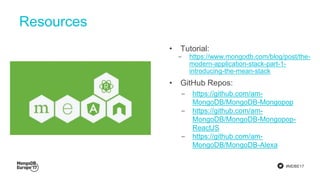
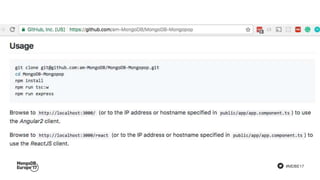
Resources
• Tutorial:
‒ https://www.mongodb.com/blog/post/the-
modern-application-stack-part-1-
introducing-the-mean-stack
• GitHub Repos:
‒ https://github.com/am-
MongoDB/MongoDB-Mongopop
‒ https://github.com/am-
MongoDB/MongoDB-Mongopop-
ReactJS
‒ https://github.com/am-
MongoDB/MongoDB-Alexa
#MDBE17
The MEAN Stack
#MDBE17
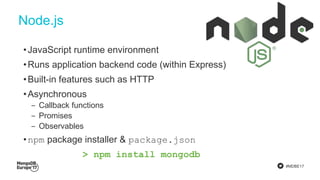
Node.js
•JavaScript runtime environment
•Runs application backend code (within Express)
•Built-in features such as HTTP
•Asynchronous
‒ Callback functions
‒ Promises
‒ Observables
•npm package installer & package.json
> npm install mongodb
#MDBE17
#MDBE17
The MEAN Stack
#MDBE17
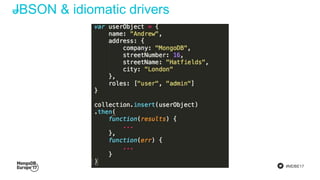
JBSON & idiomatic drivers
#MDBE17
The MEAN Stack
#MDBE17
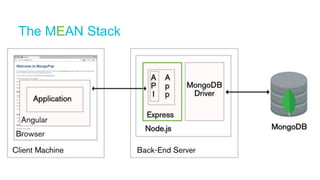
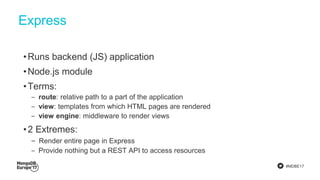
Express
•Runs backend (JS) application
•Node.js module
•Terms:
‒ route: relative path to a part of the application
‒ view: templates from which HTML pages are rendered
‒ view engine: middleware to render views
•2 Extremes:
‒ Render entire page in Express
‒ Provide nothing but a REST API to access resources
#MDBE17
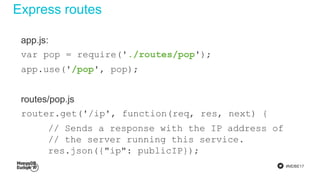
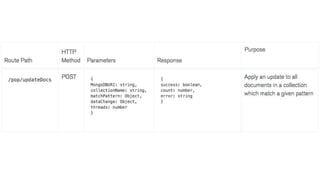
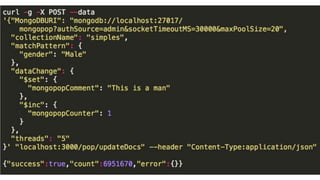
Express routes
app.js:
var pop = require('./routes/pop');
app.use('/pop', pop);
routes/pop.js
router.get('/ip', function(req, res, next) {
// Sends a response with the IP address of
// the server running this service.
res.json({"ip": publicIP});
});
#MDBE17
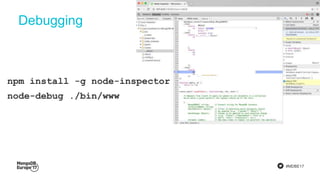
Debugging
npm install -g node-inspector
node-debug ./bin/www
#MDBE17
The MEAN Stack (REST API)
#MDBE17
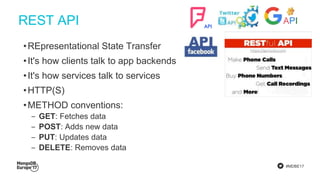
REST API
•REpresentational State Transfer
•It's how clients talk to app backends
•It's how services talk to services
•HTTP(S)
•METHOD conventions:
‒ GET: Fetches data
‒ POST: Adds new data
‒ PUT: Updates data
‒ DELETE: Removes data
#MDBE17
The MEAN Stack
#MDBE17
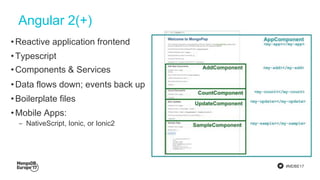
Angular 2(+)
•Reactive application frontend
•Typescript
•Components & Services
•Data flows down; events back up
•Boilerplate files
•Mobile Apps:
‒ NativeScript, Ionic, or Ionic2
#MDBE17
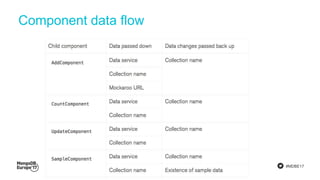
Component data flow
#MDBE17
index.html:
<script src="systemjs.config.js"></script>
<body>
<my-app>Loading MongoPop client app</my-app>
</body>
app.component.ts:
@Component({
selector: 'my-app',
templateUrl: 'app/app.component.html',
styleUrls: ['stylesheets/style.css']})
onCollection(CollName: string) {
this.MongoDBCollectionName = CollName;}
app.component.html:
<my-add
[dataService]="dataService"
[MongoDBCollectionName]="MongoDBCollectionName"
[MockarooURL]="defaultMockarooURI"
(onCollection)="onCollection($event)">
</my-add>
#MDBE17
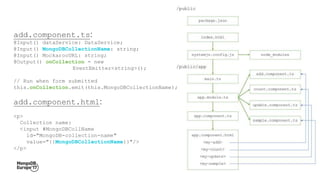
add.component.ts:
@Input() dataService: DataService;
@Input() MongoDBCollectionName: string;
@Input() MockarooURL: string;
@Output() onCollection = new
EventEmitter<string>();
// Run when form submitted
this.onCollection.emit(this.MongoDBCollectionName);
add.component.html:
<p>
Collection name:
<input #MongoDBCollName
id="MongoDB-collection-name"
value="{{MongoDBCollectionName}}"/>
</p>
#MDBE17
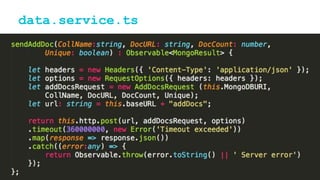
data.service.ts
#MDBE17
The MERN Stack
#MDBE17
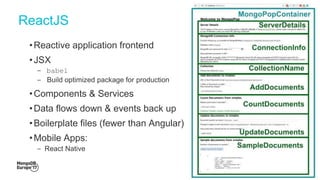
ReactJS
•Reactive application frontend
•JSX
‒ babel
‒ Build optimized package for production
•Components & Services
•Data flows down & events back up
•Boilerplate files (fewer than Angular)
•Mobile Apps:
‒ React Native
#MDBE17
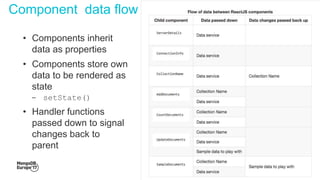
• Components inherit
data as properties
• Components store own
data to be rendered as
state
‒ setState()
• Handler functions
passed down to signal
changes back to
parent
Component data flow
#MDBE17
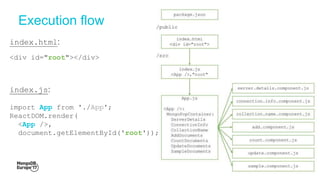
Execution flow
index.html:
<div id="root"></div>
index.js:
import App from './App';
ReactDOM.render(
<App />,
document.getElementById('root'));
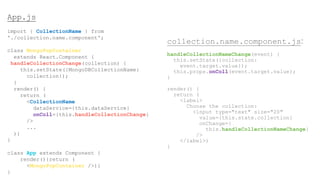
App.js
import { CollectionName } from
'./collection.name.component';
class MongoPopContainer
extends React.Component {
handleCollectionChange(collection) {
this.setState({MongoDBCollectionName:
collection});
}
render() {
return (
<CollectionName
dataService={this.dataService}
onColl={this.handleCollectionChange}
/>
...
)}
}
class App extends Component {
render(){return (
<MongoPopContainer />)}
}
collection.name.component.js:
handleCollectionNameChange(event) {
this.setState({collection:
event.target.value});
this.props.onColl(event.target.value);
}
render() {
return (
<label>
Choose the collection:
<input type="text" size="20"
value={this.state.collection}
onChange={
this.handleCollectionNameChange}
/>
</label>)
}
#MDBE17
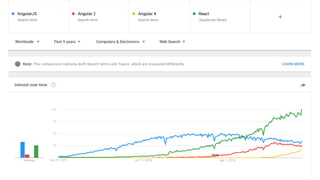
Angular 2 vs. ReactJS
#MDBE17
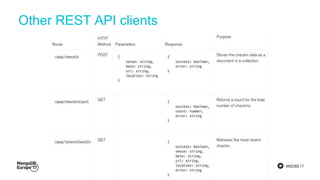
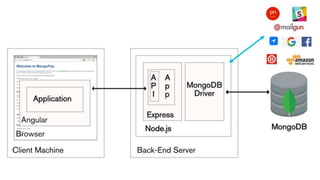
Other REST API clients
#MDBE17
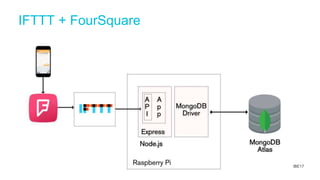
IFTTT + FourSquare
#MDBE17
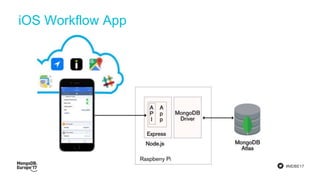
iOS Workflow App
#MDBE17
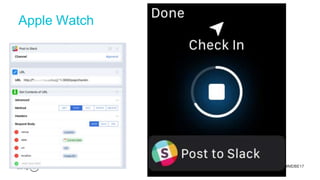
Apple Watch
#MDBE17
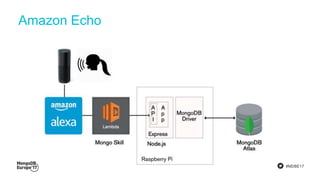
Amazon Echo
#MDBE17
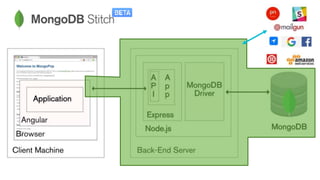
The MEAN Stack
#MDBE17
#MDBE17
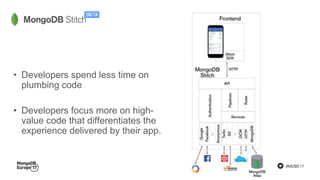
• Developers spend less time on
plumbing code
• Developers focus more on high-
value code that differentiates the
experience delivered by their app.
#MDBE17
Resources
• Tutorial:
‒ https://www.mongodb.com/blog/post/the-
modern-application-stack-part-1-
introducing-the-mean-stack
• GitHub Repos:
‒ https://github.com/am-
MongoDB/MongoDB-Mongopop
‒ https://github.com/am-
MongoDB/MongoDB-Mongopop-
ReactJS
‒ https://github.com/am-
MongoDB/MongoDB-Alexa
Developing with the Modern App Stack: MEAN and MERN (with Angular2 and ReactJS)

Developing with the Modern App Stack: MEAN and MERN (with Angular2 and ReactJS)