S U B T I T L E H E R E
YOUR TITLE
GOES HERE
Dev Containers Customization
D ev c o n t a i n e r s を 使 用 し た 開 発 環 境 い ろ い ろ
PROFILE
システム構築のプロセス評価、改善、策定、開発フレームワーク
の設計、実装管理、プリセールスやプロジェクトの立ち上げなど
ブログ
https://blog.processtune.com
プロフィール
Tetsuro Takao on Facebook, Twitter or http://mvp.microsoft.com
コミュニティ
.NETラボの運営スタッフ https://dotnetlab.connpass.com
Microsoft MVP
Developer Technologies [July 2010 – June 2025]
Friday Five
Microsoft Graph API provides several grant types of The OAuth 2.0 Authorization
Framework
MVP’s Favorite Content
The Microsoft 365 Maturity Model – Governance, Risk, and Compliance Competency |
Microsoft Learn
Agenda
初歩 1: Microsoft Learn のコンテンツ
→ Microsoft が準備している Dev containers アーキテクチャの紹介
初歩 2: Configuration を追加し Dev containers 化
→既存プログラムに dev containers: add dev container configuration を適用
初歩 3: Dev containers イメージに Features を後から
追加
→機能を自由に組み合わせて開発環境を配布する
M i c ro s o f t が 準 備 し て い る D ev c o n t a i n e r s ア ー キ テ ク チ ャ の 紹 介
Microsoft Learn のコンテン
ツ
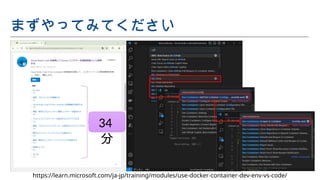
まずやってみてください
https://learn.microsoft.com/ja-jp/training/modules/use-docker-container-dev-env-vs-code/
34
分
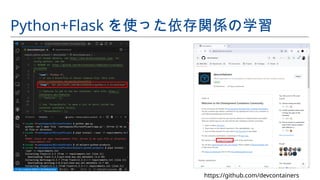
Python+Flask を使った依存関係の学習
https://github.com/devcontainers
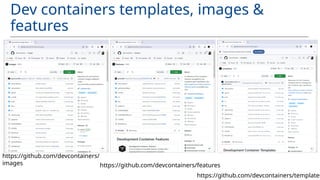
Dev containers templates, images &
features
https://github.com/devcontainers/features
https://github.com/devcontainers/
images
https://github.com/devcontainers/templates
• Dev container configuration で環境とコードの
IaS ( Infrastructure as Software )での再現を行ってい
る。
• ベースとなるイメージと機能群の Features で環境を構築
し、構築前後のコマンドを設定して起動初期の動作を定
義。
• 既存コードに Dev container configuration を追加し Dev
containers 化する。 Dev containers イメージに
Features を後から追加。 .NET テンプレートをベースに
学習のポイント(基本構造の学習)
既 存 プ ロ グ ラ ム に d e v c o n t a i n e r s : a d d d e v c o n t a i n e r c o n fi g u ra t i o n を 適 用
Configuration を追加し
Dev containers 化
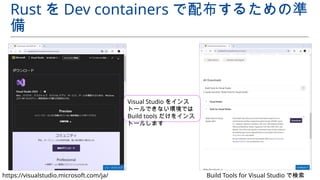
Rust を Dev containers で配布するための準
備
https://visualstudio.microsoft.com/ja/ Build Tools for Visual Studio で検索
Visual Studio をインス
トールできない環境では
Build tools だけをインス
トールします
fn handle_connection(mut stream: TcpStream, content: &str) {
let mut buffer = [0; 1024];
stream.read(&mut buffer).unwrap();
let request_content = str::from_utf8(&buffer).unwrap();
let mut request_header:Vec<&str> = Vec::new();
for line in request_content.lines(){
if line.contains("HTTP") {
let v: Vec<&str> = line.split(' ').collect();
request_header.push(v[0]);
request_header.push(v[1]);
} else if line.contains(":") {
let kv: Vec<&str> = line.split(":").collect();
if kv[0] == "Host"{
request_header.push(kv[1]);
request_header.push(kv[2]);
}
} else if line.len() == 0 {
} else {
let _body = line;
}
}
let contents = format!("<!DOCTYPE html><html
lang="ja"><head><meta
charset="utf-8"><title>{}</title></head><body><div> 【メソッド】
{} 【ホスト】 {} 【ポート】 {}
【パス】 {}</div><p>{}</p><p>{}</p></body></html>"," デバッグ画
面 ",request_header[0],request_header[2],request_header[3],reques
t_header[1],content,request_content);
let status_line = "HTTP/1.1 201 QR Code created";
let response = format!("{}rnContent-Length: {}rnrn{}",
status_line,
contents.len(),
contents
);
stream.write(response.as_bytes()).unwrap();
stream.flush().unwrap();
}
Rust プログラムダウンロード
https://github.com/TetsuroTakao/QRCodeCreation
vscode-remote-try-rust: GitHub
https://github.com/microsoft/vscode-remote-try-rust
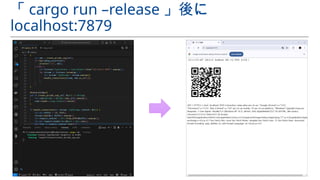
「 cargo run –release 」後に
localhost:7879
Dev containers configuration 追加
何も選択せず
[OK] ボタンで進
みます。
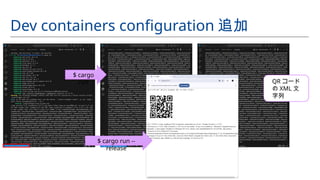
Dev containers configuration 追加
$ cargo
run
$ cargo run --
release
QR コード
の XML 文
字列
• Linker 、 WASM 、他フレームワーク等のエコシステムを
利用してマルチ言語の実行環境に対応可能。
• Visual Studio をインストールせずともマイクロソフトは
Build tool を提供してくれている。
• worm+tokio や WASM 、 Node の Express や Python の
Flask 、 Django 等を使わずとも開発のためのブラウザ出
力ならあらゆる言語で TCP Listener ライブラリがある
( Minimum Viable Product )。
既存コードの改造のポイント
機 能 を 自 由 に 組 み 合 わ せ て 開 発 環 境 を 配 布 す る
Dev containers イメージに
Features を後から追加
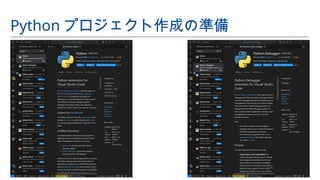
Python プロジェクト作成の準備
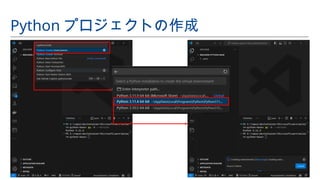
Python プロジェクトの作成
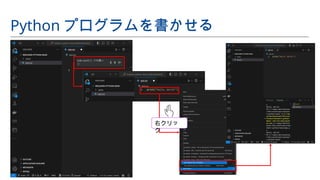
Python プログラムを書かせる
右クリッ
ク
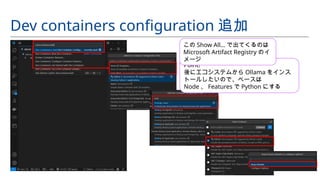
Dev containers configuration 追加
Point!
後にエコシステムから Ollama をインス
トールしたいので、ベースは
Node 、 Features で Python にする
この Show All… で出てくるのは
Microsoft Artifact Registry のイ
メージ
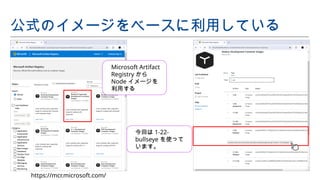
Microsoft Artifact
Registry から
Node イメージを
利用する
公式のイメージをベースに利用している
https://mcr.microsoft.com/
今回は 1-22-
bullseye を使って
います。
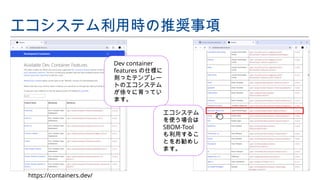
Dev container
features の仕様に
則ったテンプレー
トのエコシステム
が徐々に育ってい
ます。
エコシステム利用時の推奨事項
https://containers.dev/
エコシステム
を使う場合は
SBOM-Tool
も利用するこ
とをお勧めし
ます。
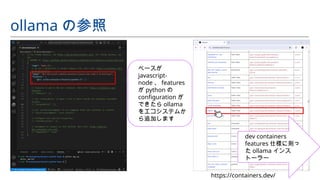
ベースが
javascript-
node 、 features
が python の
configuration が
できたら ollama
をエコシステムか
ら追加します
ollama の参照
dev containers
features 仕様に則っ
た ollama インス
トーラー
https://containers.dev/
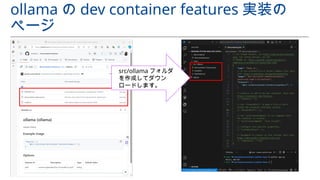
ollama の dev container features 実装の
ページ
src/ollama フォルダ
を作成してダウン
ロードします。
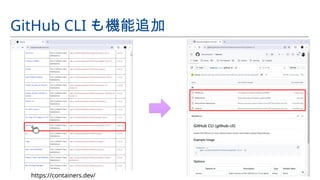
GitHub CLI も機能追加
https://containers.dev/
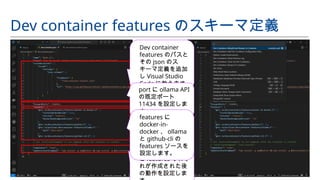
Dev container features のスキーマ定義
Dev container
features のパスと
その json のス
キーマ定義を追加
し Visual Studio
Code に教えます。
container の user
と features それぞ
れが作成された後
の動作を設定しま
port に ollama API
の既定ポート
11434 を設定しま
す。
features に
docker-in-
docker 、 ollama
と github-cli の
features ソースを
設定します。
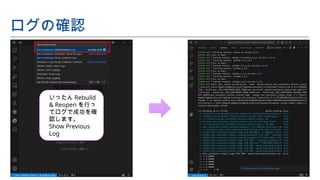
ログの確認
いったん Rebuild
& Reopen を行っ
てログで成功を確
認します。
Show Previous
Log
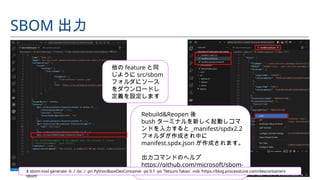
他の feature と同
じように src/sbom
フォルダにソース
をダウンロードし
定義を設定します
SBOM 出力
Rebuild&Reopen 後
bush ターミナルを新しく起動しコマ
ンドを入力すると _manifest/spdx2.2
フォルダが作成され中に
manifest.spdx.json が作成されます。
出力コマンドのヘルプ
https://github.com/microsoft/sbom-
tool
$ sbom-tool generate -b ./ -bc ./ -pn PythonBaseDevContainer -pv 0.1 -ps 'Tetsuro Takao' -nsb 'https://blog.processtune.com/devcontainers-
sbom'
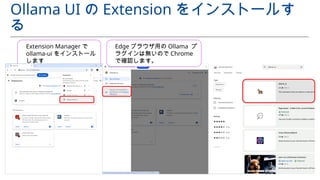
Ollama UI の Extension をインストールす
る
Extension Manager で
ollama-ui をインストール
します
Edge ブラウザ用の Ollama プ
ラグインは無いので Chrome
で確認します。
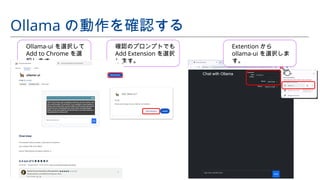
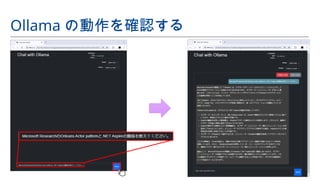
Ollama の動作を確認する
Ollama-ui を選択して
Add to Chrome を選
択します。
確認のプロンプトでも
Add Extension を選択
します。
Extention から
ollama-ui を選択しま
す。
Ollama の動作を確認する
• Features のエコシステムの多くは GitHub のソースをダ
ウンロードすることがあるので、 GitHub CLI が動くよう
にする(今回はベースに Node イメージを利用した)。
• Dev containers 仕様準拠であっても公式でないエコシス
テムを利用する場合、 SBOM などでプログラム部品表の
明示を推奨。
• %product%/ 各ファイル、ログなどを参照してカスタマ
イズを計画していく。
Features を使ったカスタマイズのポイント
. N E T A s p i re の D ev c o n t a i n e r s
.NET テンプレートをベースに Dev
containers 配布
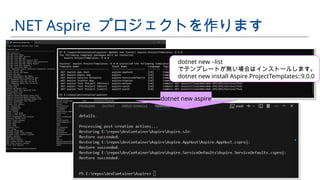
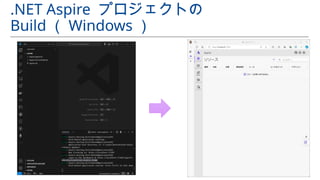
.NET Aspire プロジェクトを作ります
dotnet new –list
でテンプレートが無い場合はインストールします。
dotnet new install Aspire.ProjectTemplates::9.0.0
dotnet new aspire
.NET Aspire プロジェクトの
Build ( Windows )
Reference
初級者シリーズ : Dev コンテナー : Microsoft Learn
https://learn.microsoft.com/ja-jp/shows/beginners-series-to-dev-containers/
Dev Containers Community: GitHub
https://github.com/devcontainers-community
vscode-dev-containers/containers/: GitHub
https://github.com/microsoft/vscode-dev-containers
Development Containers (エコシステム)
https://containers.dev/
Available Dev Container Features
https://containers.dev/features
Visual Studio Code を使用して Docker コンテナーを開発環境として使用する
https://learn.microsoft.com/ja-jp/training/modules/use-docker-container-dev-env-vs-code/
The Cargo Book
https://doc.rust-lang.org/cargo/index.html
library: Ollama models
https://ollama.com/library
.NET Aspire templates: Microsoft Learn
https://learn.microsoft.com/en-us/dotnet/aspire/fundamentals/aspire-sdk-templates?pivots=dotnet-cli
What's new in .NET Aspire 9.0: Microsoft Learn
https://learn.microsoft.com/en-us/dotnet/aspire/whats-new/dotnet-aspire-9?tabs=windows
Reference
Create a Dev Container
https://code.visualstudio.com/docs/devcontainers/create-dev-container
Microsoft Artifact Registry (「 development containers 」検索)
https://mcr.microsoft.com/en-us/catalog?search=development%20containers&type=partial
Microsoft SBOM-Tool (sbom)
https://github.com/JasonTheDeveloper/features/tree/main/src/sbom
Quickstart: Create Python project from a template in Visual Studio
https://learn.microsoft.com/en-us/visualstudio/python/quickstart-02-python-in-visual-studio-project-from-template?view=vs-2022
Getting Started with Python in VS Code
https://code.visualstudio.com/docs/python/python-tutorial
Introduction to Python (高校生向け)
https://vscodeedu.com/courses/intro-to-python
Python for Programmers (プログラマー向け)
https://wiki.python.org/moin/BeginnersGuide/Programmers
Data Science in VS Code tutorial (データ分析者、サイエンティスト向け)
https://code.visualstudio.com/docs/datascience/data-science-tutorial
vscode-remote-try-rust: GitHub
https://github.com/microsoft/vscode-remote-try-rust
.NET Aspire templates
https://learn.microsoft.com/en-us/dotnet/aspire/fundamentals/aspire-sdk-templates?pivots=vscode
Reference
Download Win32/Win64 OpenSSL
https://slproweb.com/products/Win32OpenSSL.html
Dotnet CLI Install Script: GitHub
https://github.com/microsoft/vscode-dev-containers/blob/main/script-library/docs/dotnet.md
Microsoft SBOM-Tool (sbom)
https://github.com/JasonTheDeveloper/features/tree/main/src/sbom
Quickstart: Create Python project from a template in Visual Studio
https://learn.microsoft.com/en-us/visualstudio/python/quickstart-02-python-in-visual-studio-project-from-template?view=vs-2022
Getting Started with Python in VS Code
https://code.visualstudio.com/docs/python/python-tutorial
Introduction to Python (高校生向け)
https://vscodeedu.com/courses/intro-to-python
Python for Programmers (プログラマー向け)
https://wiki.python.org/moin/BeginnersGuide/Programmers
Data Science in VS Code tutorial (データ分析者、サイエンティスト向け)
https://code.visualstudio.com/docs/datascience/data-science-tutorial
vscode-remote-try-rust: GitHub
https://github.com/microsoft/vscode-remote-try-rust
.NET Aspire templates
https://learn.microsoft.com/en-us/dotnet/aspire/fundamentals/aspire-sdk-templates?pivots=vscode

Dev Containers Customization Short version

  • 1.
    S U BT I T L E H E R E YOUR TITLE GOES HERE Dev Containers Customization D ev c o n t a i n e r s を 使 用 し た 開 発 環 境 い ろ い ろ
  • 2.
    PROFILE システム構築のプロセス評価、改善、策定、開発フレームワーク の設計、実装管理、プリセールスやプロジェクトの立ち上げなど ブログ https://blog.processtune.com プロフィール Tetsuro Takao onFacebook, Twitter or http://mvp.microsoft.com コミュニティ .NETラボの運営スタッフ https://dotnetlab.connpass.com Microsoft MVP Developer Technologies [July 2010 – June 2025] Friday Five Microsoft Graph API provides several grant types of The OAuth 2.0 Authorization Framework MVP’s Favorite Content The Microsoft 365 Maturity Model – Governance, Risk, and Compliance Competency | Microsoft Learn
  • 3.
    Agenda 初歩 1: MicrosoftLearn のコンテンツ → Microsoft が準備している Dev containers アーキテクチャの紹介 初歩 2: Configuration を追加し Dev containers 化 →既存プログラムに dev containers: add dev container configuration を適用 初歩 3: Dev containers イメージに Features を後から 追加 →機能を自由に組み合わせて開発環境を配布する
  • 4.
    M i cro s o f t が 準 備 し て い る D ev c o n t a i n e r s ア ー キ テ ク チ ャ の 紹 介 Microsoft Learn のコンテン ツ
  • 5.
  • 6.
  • 7.
    Dev containers templates,images & features https://github.com/devcontainers/features https://github.com/devcontainers/ images https://github.com/devcontainers/templates
  • 8.
    • Dev containerconfiguration で環境とコードの IaS ( Infrastructure as Software )での再現を行ってい る。 • ベースとなるイメージと機能群の Features で環境を構築 し、構築前後のコマンドを設定して起動初期の動作を定 義。 • 既存コードに Dev container configuration を追加し Dev containers 化する。 Dev containers イメージに Features を後から追加。 .NET テンプレートをベースに 学習のポイント(基本構造の学習)
  • 9.
    既 存 プロ グ ラ ム に d e v c o n t a i n e r s : a d d d e v c o n t a i n e r c o n fi g u ra t i o n を 適 用 Configuration を追加し Dev containers 化
  • 10.
    Rust を Devcontainers で配布するための準 備 https://visualstudio.microsoft.com/ja/ Build Tools for Visual Studio で検索 Visual Studio をインス トールできない環境では Build tools だけをインス トールします
  • 11.
    fn handle_connection(mut stream:TcpStream, content: &str) { let mut buffer = [0; 1024]; stream.read(&mut buffer).unwrap(); let request_content = str::from_utf8(&buffer).unwrap(); let mut request_header:Vec<&str> = Vec::new(); for line in request_content.lines(){ if line.contains("HTTP") { let v: Vec<&str> = line.split(' ').collect(); request_header.push(v[0]); request_header.push(v[1]); } else if line.contains(":") { let kv: Vec<&str> = line.split(":").collect(); if kv[0] == "Host"{ request_header.push(kv[1]); request_header.push(kv[2]); } } else if line.len() == 0 { } else { let _body = line; } } let contents = format!("<!DOCTYPE html><html lang="ja"><head><meta charset="utf-8"><title>{}</title></head><body><div> 【メソッド】 {} 【ホスト】 {} 【ポート】 {} 【パス】 {}</div><p>{}</p><p>{}</p></body></html>"," デバッグ画 面 ",request_header[0],request_header[2],request_header[3],reques t_header[1],content,request_content); let status_line = "HTTP/1.1 201 QR Code created"; let response = format!("{}rnContent-Length: {}rnrn{}", status_line, contents.len(), contents ); stream.write(response.as_bytes()).unwrap(); stream.flush().unwrap(); } Rust プログラムダウンロード https://github.com/TetsuroTakao/QRCodeCreation vscode-remote-try-rust: GitHub https://github.com/microsoft/vscode-remote-try-rust
  • 12.
    「 cargo run–release 」後に localhost:7879
  • 13.
    Dev containers configuration追加 何も選択せず [OK] ボタンで進 みます。
  • 14.
    Dev containers configuration追加 $ cargo run $ cargo run -- release QR コード の XML 文 字列
  • 15.
    • Linker 、WASM 、他フレームワーク等のエコシステムを 利用してマルチ言語の実行環境に対応可能。 • Visual Studio をインストールせずともマイクロソフトは Build tool を提供してくれている。 • worm+tokio や WASM 、 Node の Express や Python の Flask 、 Django 等を使わずとも開発のためのブラウザ出 力ならあらゆる言語で TCP Listener ライブラリがある ( Minimum Viable Product )。 既存コードの改造のポイント
  • 16.
    機 能 を自 由 に 組 み 合 わ せ て 開 発 環 境 を 配 布 す る Dev containers イメージに Features を後から追加
  • 17.
  • 18.
  • 19.
  • 20.
    Dev containers configuration追加 Point! 後にエコシステムから Ollama をインス トールしたいので、ベースは Node 、 Features で Python にする この Show All… で出てくるのは Microsoft Artifact Registry のイ メージ
  • 21.
    Microsoft Artifact Registry から Nodeイメージを 利用する 公式のイメージをベースに利用している https://mcr.microsoft.com/ 今回は 1-22- bullseye を使って います。
  • 22.
  • 23.
    ベースが javascript- node 、 features がpython の configuration が できたら ollama をエコシステムか ら追加します ollama の参照 dev containers features 仕様に則っ た ollama インス トーラー https://containers.dev/
  • 24.
    ollama の devcontainer features 実装の ページ src/ollama フォルダ を作成してダウン ロードします。
  • 25.
  • 26.
    Dev container featuresのスキーマ定義 Dev container features のパスと その json のス キーマ定義を追加 し Visual Studio Code に教えます。 container の user と features それぞ れが作成された後 の動作を設定しま port に ollama API の既定ポート 11434 を設定しま す。 features に docker-in- docker 、 ollama と github-cli の features ソースを 設定します。
  • 27.
    ログの確認 いったん Rebuild & Reopenを行っ てログで成功を確 認します。 Show Previous Log
  • 28.
    他の feature と同 じようにsrc/sbom フォルダにソース をダウンロードし 定義を設定します SBOM 出力 Rebuild&Reopen 後 bush ターミナルを新しく起動しコマ ンドを入力すると _manifest/spdx2.2 フォルダが作成され中に manifest.spdx.json が作成されます。 出力コマンドのヘルプ https://github.com/microsoft/sbom- tool $ sbom-tool generate -b ./ -bc ./ -pn PythonBaseDevContainer -pv 0.1 -ps 'Tetsuro Takao' -nsb 'https://blog.processtune.com/devcontainers- sbom'
  • 29.
    Ollama UI のExtension をインストールす る Extension Manager で ollama-ui をインストール します Edge ブラウザ用の Ollama プ ラグインは無いので Chrome で確認します。
  • 30.
    Ollama の動作を確認する Ollama-ui を選択して Addto Chrome を選 択します。 確認のプロンプトでも Add Extension を選択 します。 Extention から ollama-ui を選択しま す。
  • 31.
  • 32.
    • Features のエコシステムの多くはGitHub のソースをダ ウンロードすることがあるので、 GitHub CLI が動くよう にする(今回はベースに Node イメージを利用した)。 • Dev containers 仕様準拠であっても公式でないエコシス テムを利用する場合、 SBOM などでプログラム部品表の 明示を推奨。 • %product%/ 各ファイル、ログなどを参照してカスタマ イズを計画していく。 Features を使ったカスタマイズのポイント
  • 33.
    . N ET A s p i re の D ev c o n t a i n e r s .NET テンプレートをベースに Dev containers 配布
  • 34.
    .NET Aspire プロジェクトを作ります dotnetnew –list でテンプレートが無い場合はインストールします。 dotnet new install Aspire.ProjectTemplates::9.0.0 dotnet new aspire
  • 35.
  • 36.
    Reference 初級者シリーズ : Devコンテナー : Microsoft Learn https://learn.microsoft.com/ja-jp/shows/beginners-series-to-dev-containers/ Dev Containers Community: GitHub https://github.com/devcontainers-community vscode-dev-containers/containers/: GitHub https://github.com/microsoft/vscode-dev-containers Development Containers (エコシステム) https://containers.dev/ Available Dev Container Features https://containers.dev/features Visual Studio Code を使用して Docker コンテナーを開発環境として使用する https://learn.microsoft.com/ja-jp/training/modules/use-docker-container-dev-env-vs-code/ The Cargo Book https://doc.rust-lang.org/cargo/index.html library: Ollama models https://ollama.com/library .NET Aspire templates: Microsoft Learn https://learn.microsoft.com/en-us/dotnet/aspire/fundamentals/aspire-sdk-templates?pivots=dotnet-cli What's new in .NET Aspire 9.0: Microsoft Learn https://learn.microsoft.com/en-us/dotnet/aspire/whats-new/dotnet-aspire-9?tabs=windows
  • 37.
    Reference Create a DevContainer https://code.visualstudio.com/docs/devcontainers/create-dev-container Microsoft Artifact Registry (「 development containers 」検索) https://mcr.microsoft.com/en-us/catalog?search=development%20containers&type=partial Microsoft SBOM-Tool (sbom) https://github.com/JasonTheDeveloper/features/tree/main/src/sbom Quickstart: Create Python project from a template in Visual Studio https://learn.microsoft.com/en-us/visualstudio/python/quickstart-02-python-in-visual-studio-project-from-template?view=vs-2022 Getting Started with Python in VS Code https://code.visualstudio.com/docs/python/python-tutorial Introduction to Python (高校生向け) https://vscodeedu.com/courses/intro-to-python Python for Programmers (プログラマー向け) https://wiki.python.org/moin/BeginnersGuide/Programmers Data Science in VS Code tutorial (データ分析者、サイエンティスト向け) https://code.visualstudio.com/docs/datascience/data-science-tutorial vscode-remote-try-rust: GitHub https://github.com/microsoft/vscode-remote-try-rust .NET Aspire templates https://learn.microsoft.com/en-us/dotnet/aspire/fundamentals/aspire-sdk-templates?pivots=vscode
  • 38.
    Reference Download Win32/Win64 OpenSSL https://slproweb.com/products/Win32OpenSSL.html DotnetCLI Install Script: GitHub https://github.com/microsoft/vscode-dev-containers/blob/main/script-library/docs/dotnet.md Microsoft SBOM-Tool (sbom) https://github.com/JasonTheDeveloper/features/tree/main/src/sbom Quickstart: Create Python project from a template in Visual Studio https://learn.microsoft.com/en-us/visualstudio/python/quickstart-02-python-in-visual-studio-project-from-template?view=vs-2022 Getting Started with Python in VS Code https://code.visualstudio.com/docs/python/python-tutorial Introduction to Python (高校生向け) https://vscodeedu.com/courses/intro-to-python Python for Programmers (プログラマー向け) https://wiki.python.org/moin/BeginnersGuide/Programmers Data Science in VS Code tutorial (データ分析者、サイエンティスト向け) https://code.visualstudio.com/docs/datascience/data-science-tutorial vscode-remote-try-rust: GitHub https://github.com/microsoft/vscode-remote-try-rust .NET Aspire templates https://learn.microsoft.com/en-us/dotnet/aspire/fundamentals/aspire-sdk-templates?pivots=vscode

Editor's Notes

  • #1 Development containers(aka. Dev containers)は、チーム開発を効率化させる選択肢の一つです。皆さんの開発に合致した開発環境をVisual Studio Codeで非常に簡単に作成することができます。このセッションでは、いくつかの開発環境を作成する手順を例示し、Dev Containersのコミュニティなど、情報収集のソースについても解説します。
  • #2 【読む】
  • #3 【読む】
  • #4 【読む】
  • #5 Microsoft Learnでは、コンテナにVisual Studio Codeのサーバーを単に差し込んだDev containersの学習のために、事前構築済みのPythonプログラムをPythonランタイムのイメージとブラウザで動作を確認できるようFlask Frameworkを後から追加する方法を学習できます。後述するDev containers featuresのエコシステムを使った機能追加ができないときに利用するといいかと思います。
  • #6 あらかじめ用意されているDev containers用のイメージは、GitHubで公開されています。そのため皆さんのプロジェクトの必要に応じてDev containersを用意し迅速に配布することができます。
  • #7 あらかじめ用意されているDev containers用のイメージは、GitHubで公開されています。そのため皆さんのプロジェクトの必要に応じてDev containersを用意し迅速に配布することができます。
  • #8 【読む】
  • #9 【読む】
  • #10 RustはWasm(WebAssembly)で動かすので、WindowsやMac、LinuxのVisual StudioをインストールしていないPCには、Build toolsの「C++によるデスクトップ開発」をインストールするか、Visual Studioの「C++によるデスクトップ開発」を有効にしたインストールを行ってLinkerを使えるようにしておきます。
  • #11 apt install build-essential
  • #12 RustはWasm(WebAssembly)で動かすので、WindowsやMac、LinuxのVisual StudioをインストールしていないPCには、Build toolsの「C++によるデスクトップ開発」をインストールするか、Visual Studioの「C++によるデスクトップ開発」を有効にしたインストールを行ってLinkerを使えるようにしておきます。
  • #13 Rustのプログラムを動かすだけなのでRustのイメージを使ってFeaturesは何も指定しません。
  • #14 Cargo runでコンソール出力、cargo run –releaseでブラウザ出力できるようにしてあります。
  • #15 【読む】
  • #26 featuresが作成された後のコマンドでは
  • #32 【読む】
  • #33 マイクロサービスに使えるツールはたくさんありますが、ここではチーム開発に役立つ使い方をご紹介します。