DBMS Security
In This Lecture
• Database Security
• Aspects of security
• Access to databases
• Privileges and views
• Database Integrity
• View updating, Integrity constraints
Database Security
• Database security is
about controlling
access to
information
• Some information
should be available
freely
• Other information
should only be
available to certain
people or groups
• Many aspects to
consider for security
• Legal issues
• Physical security
• OS/Network security
• Security policies and
protocols
• Encryption and
passwords
• DBMS security
DBMS Security Support
• DBMS can provide
some security
• Each user has an
account, username
and password
• These are used to
identify a user and
control their access to
information
• DBMS verifies
password and checks
a user’s permissions
when they try to
• Retrieve data
• Modify data
• Modify the database
structure
Permissions and Privilege
• SQL uses privileges
to control access to
tables and other
database objects
• SELECT privilege
• INSERT privilege
• UPDATE privilege
• DELETE privilege
• The owner (creator)
of a database has all
privileges on all
objects in the
database, and can
grant these to others
• The owner (creator)
of an object has all
privileges on that
object and can pass
them on to others
Privileges in SQL
GRANT <privileges>
ON <object>
TO <users>
[WITH GRANT OPTION]
• <privileges> is a list of
SELECT <columns>,
INSERT <columns>,
DELETE, and
UPDATE <columns>, or
simply ALL
• <users> is a list of user
names or PUBLIC
• <object> is the name of
a table or view (later)
• WITH GRANT OPTION
means that the users can
pass their privileges on
to others
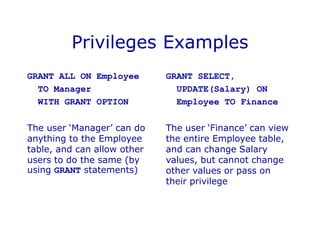
Privileges Examples
GRANT ALL ON Employee
TO Manager
WITH GRANT OPTION
The user ‘Manager’ can do
anything to the Employee
table, and can allow other
users to do the same (by
using GRANT statements)
GRANT SELECT,
UPDATE(Salary) ON
Employee TO Finance
The user ‘Finance’ can view
the entire Employee table,
and can change Salary
values, but cannot change
other values or pass on
their privilege
Removing Privileges
• If you want to
remove a privilege
you have granted
you use
REVOKE <privileges>
ON <object>
FROM <users>
• If a user has the
same privilege from
other users then
they keep it
• All privileges
dependent on the
revoked one are also
revoked
Removing Privileges
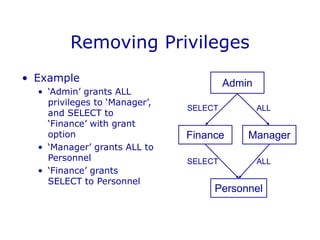
• Example
• ‘Admin’ grants ALL
privileges to ‘Manager’,
and SELECT to
‘Finance’ with grant
option
• ‘Manager’ grants ALL to
Personnel
• ‘Finance’ grants
SELECT to Personnel
Admin
Finance Manager
Personnel
SELECT
SELECT
ALL
ALL
ALL
SELECT
SELECT
Removing Privileges
Admin
Finance Manager
Personnel
ALL
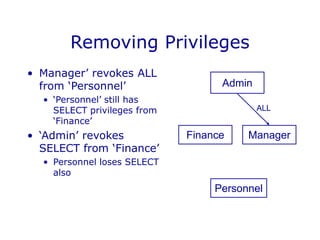
• Manager’ revokes ALL
from ‘Personnel’
• ‘Personnel’ still has
SELECT privileges from
‘Finance’
• ‘Admin’ revokes
SELECT from ‘Finance’
• Personnel loses SELECT
also
Views
• Privileges work at
the level of tables
• You can restrict
access by column
• You cannot restrict
access by row
• Views, along with
privileges, allow for
customised access
• Views provide
‘derived’ tables
• A view is the result of
a SELECT statement
which is treated like a
table
• You can SELECT from
(and sometimes
UPDATE etc) views
just like tables
View Example
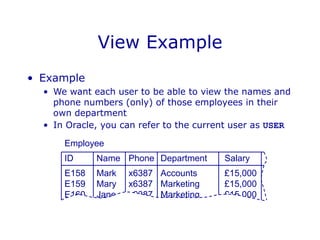
• Example
• We want each user to be able to view the names and
phone numbers (only) of those employees in their
own department
• In Oracle, you can refer to the current user as USER
Employee
ID Name Phone Department Salary
E158 Mark x6387 Accounts £15,000
E159 Mary x6387 Marketing £15,000
E160 Jane x6387 Marketing £15,000
View Example
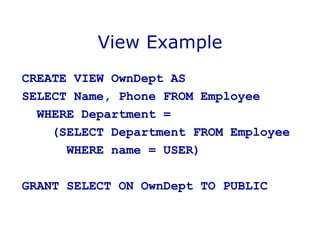
CREATE VIEW OwnDept AS
SELECT Name, Phone FROM Employee
WHERE Department =
(SELECT Department FROM Employee
WHERE name = USER)
GRANT SELECT ON OwnDept TO PUBLIC
Using Views and Privileges
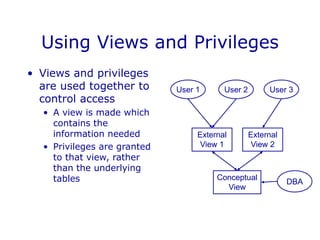
Conceptual
View
External
View 1
External
View 2
User 1 User 2 User 3
DBA
• Views and privileges
are used together to
control access
• A view is made which
contains the
information needed
• Privileges are granted
to that view, rather
than the underlying
tables
View Updating
• Views are like virtual
tables
• Their value depends
on the ‘base’ tables
that they are defined
from
• You can select from
views just like a table
• What about update,
insert, and delete?
• Updating views
• Updates to the base
tables change the
views and vice-versa
• It is often not clear
how to change the
base tables to make
the desired change to
the view
View Updating
• For a view to be updatable, the defining
query of the view should satisfy certain
conditions:
• Every element in SELECT is a column name
• Should not use DISTINCT
• View should be defined on a single table (no
join, union, etc. used in FROM)
• WHERE should not have nested SELECTs
• Should not use GROUP BY or HAVING
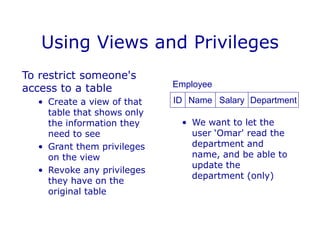
Using Views and Privileges
To restrict someone's
access to a table
• Create a view of that
table that shows only
the information they
need to see
• Grant them privileges
on the view
• Revoke any privileges
they have on the
original table
ID Name Salary Department
Employee
• We want to let the
user ‘Omar' read the
department and
name, and be able to
update the
department (only)
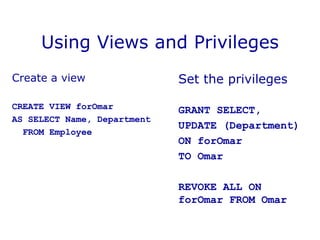
Using Views and Privileges
Create a view
CREATE VIEW forOmar
AS SELECT Name, Department
FROM Employee
Set the privileges
GRANT SELECT,
UPDATE (Department)
ON forOmar
TO Omar
REVOKE ALL ON
forOmar FROM Omar

DBMS Security.ppt

  • 1.
  • 2.
    In This Lecture •Database Security • Aspects of security • Access to databases • Privileges and views • Database Integrity • View updating, Integrity constraints
  • 3.
    Database Security • Databasesecurity is about controlling access to information • Some information should be available freely • Other information should only be available to certain people or groups • Many aspects to consider for security • Legal issues • Physical security • OS/Network security • Security policies and protocols • Encryption and passwords • DBMS security
  • 4.
    DBMS Security Support •DBMS can provide some security • Each user has an account, username and password • These are used to identify a user and control their access to information • DBMS verifies password and checks a user’s permissions when they try to • Retrieve data • Modify data • Modify the database structure
  • 5.
    Permissions and Privilege •SQL uses privileges to control access to tables and other database objects • SELECT privilege • INSERT privilege • UPDATE privilege • DELETE privilege • The owner (creator) of a database has all privileges on all objects in the database, and can grant these to others • The owner (creator) of an object has all privileges on that object and can pass them on to others
  • 6.
    Privileges in SQL GRANT<privileges> ON <object> TO <users> [WITH GRANT OPTION] • <privileges> is a list of SELECT <columns>, INSERT <columns>, DELETE, and UPDATE <columns>, or simply ALL • <users> is a list of user names or PUBLIC • <object> is the name of a table or view (later) • WITH GRANT OPTION means that the users can pass their privileges on to others
  • 7.
    Privileges Examples GRANT ALLON Employee TO Manager WITH GRANT OPTION The user ‘Manager’ can do anything to the Employee table, and can allow other users to do the same (by using GRANT statements) GRANT SELECT, UPDATE(Salary) ON Employee TO Finance The user ‘Finance’ can view the entire Employee table, and can change Salary values, but cannot change other values or pass on their privilege
  • 8.
    Removing Privileges • Ifyou want to remove a privilege you have granted you use REVOKE <privileges> ON <object> FROM <users> • If a user has the same privilege from other users then they keep it • All privileges dependent on the revoked one are also revoked
  • 9.
    Removing Privileges • Example •‘Admin’ grants ALL privileges to ‘Manager’, and SELECT to ‘Finance’ with grant option • ‘Manager’ grants ALL to Personnel • ‘Finance’ grants SELECT to Personnel Admin Finance Manager Personnel SELECT SELECT ALL ALL
  • 10.
    ALL SELECT SELECT Removing Privileges Admin Finance Manager Personnel ALL •Manager’ revokes ALL from ‘Personnel’ • ‘Personnel’ still has SELECT privileges from ‘Finance’ • ‘Admin’ revokes SELECT from ‘Finance’ • Personnel loses SELECT also
  • 11.
    Views • Privileges workat the level of tables • You can restrict access by column • You cannot restrict access by row • Views, along with privileges, allow for customised access • Views provide ‘derived’ tables • A view is the result of a SELECT statement which is treated like a table • You can SELECT from (and sometimes UPDATE etc) views just like tables
  • 12.
    View Example • Example •We want each user to be able to view the names and phone numbers (only) of those employees in their own department • In Oracle, you can refer to the current user as USER Employee ID Name Phone Department Salary E158 Mark x6387 Accounts £15,000 E159 Mary x6387 Marketing £15,000 E160 Jane x6387 Marketing £15,000
  • 13.
    View Example CREATE VIEWOwnDept AS SELECT Name, Phone FROM Employee WHERE Department = (SELECT Department FROM Employee WHERE name = USER) GRANT SELECT ON OwnDept TO PUBLIC
  • 14.
    Using Views andPrivileges Conceptual View External View 1 External View 2 User 1 User 2 User 3 DBA • Views and privileges are used together to control access • A view is made which contains the information needed • Privileges are granted to that view, rather than the underlying tables
  • 15.
    View Updating • Viewsare like virtual tables • Their value depends on the ‘base’ tables that they are defined from • You can select from views just like a table • What about update, insert, and delete? • Updating views • Updates to the base tables change the views and vice-versa • It is often not clear how to change the base tables to make the desired change to the view
  • 16.
    View Updating • Fora view to be updatable, the defining query of the view should satisfy certain conditions: • Every element in SELECT is a column name • Should not use DISTINCT • View should be defined on a single table (no join, union, etc. used in FROM) • WHERE should not have nested SELECTs • Should not use GROUP BY or HAVING
  • 17.
    Using Views andPrivileges To restrict someone's access to a table • Create a view of that table that shows only the information they need to see • Grant them privileges on the view • Revoke any privileges they have on the original table ID Name Salary Department Employee • We want to let the user ‘Omar' read the department and name, and be able to update the department (only)
  • 18.
    Using Views andPrivileges Create a view CREATE VIEW forOmar AS SELECT Name, Department FROM Employee Set the privileges GRANT SELECT, UPDATE (Department) ON forOmar TO Omar REVOKE ALL ON forOmar FROM Omar