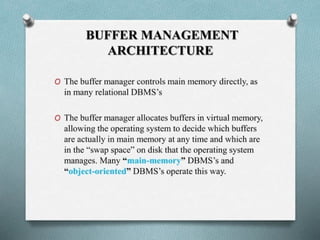
1
Introduction to Transaction Processing
Concepts and Theory
2
Outline
• Introduction to transaction processing
• Transaction and system concepts
• Desirable properties of transactions
• Schedules and recoverability
• Schedules and Serializability
• Transaction support in SQL
• Summary
3
Introduction to Transaction Processing
• Single-user VS multi-user systems
• A DBMS is single-user if at most one user can use the
system at a time
• A DBMS is multi-user if many users can use the system
concurrently
• Problem
How to make the simultaneous interactions of multiple
users with the database safe, consistent, correct, and
efficient?
4
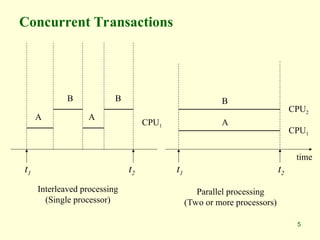
Introduction to Transaction Processing
• Computing systems
• Single-processor computer system
• Multiprogramming
• Inter-leaved Execution
• Pseudo-parallel processing
• Multi-processor computer system
• Parallel processing
5
Concurrent Transactions
Interleaved processing
(Single processor)
Parallel processing
(Two or more processors)
t1 t2 t1 t2
time
CPU1
CPU2
A
B
A
B
CPU1
A
B
6
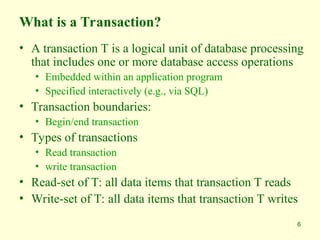
What is a Transaction?
• A transaction T is a logical unit of database processing
that includes one or more database access operations
• Embedded within an application program
• Specified interactively (e.g., via SQL)
• Transaction boundaries:
• Begin/end transaction
• Types of transactions
• Read transaction
• write transaction
• Read-set of T: all data items that transaction T reads
• Write-set of T: all data items that transaction T writes
7
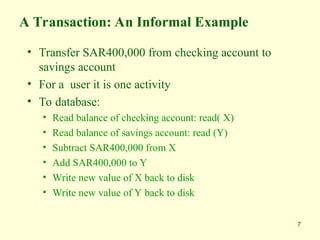
A Transaction: An Informal Example
• Transfer SAR400,000 from checking account to
savings account
• For a user it is one activity
• To database:
• Read balance of checking account: read( X)
• Read balance of savings account: read (Y)
• Subtract SAR400,000 from X
• Add SAR400,000 to Y
• Write new value of X back to disk
• Write new value of Y back to disk
8
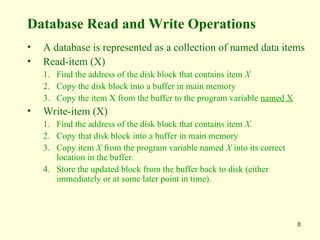
Database Read and Write Operations
• A database is represented as a collection of named data items
• Read-item (X)
1. Find the address of the disk block that contains item X
2. Copy the disk block into a buffer in main memory
3. Copy the item X from the buffer to the program variable named X
• Write-item (X)
1. Find the address of the disk block that contains item X.
2. Copy that disk block into a buffer in main memory
3. Copy item X from the program variable named X into its correct
location in the buffer.
4. Store the updated block from the buffer back to disk (either
immediately or at some later point in time).
9
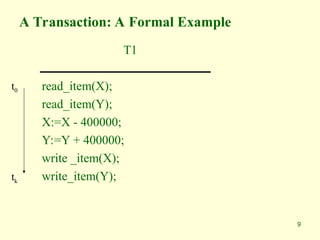
A Transaction: A Formal Example
T1
read_item(X);
read_item(Y);
X:=X - 400000;
Y:=Y + 400000;
write _item(X);
write_item(Y);
t0
tk
10
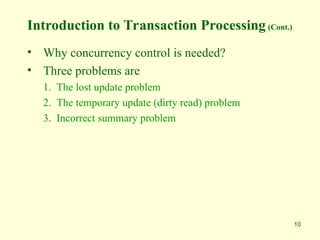
Introduction to Transaction Processing (Cont.)
• Why concurrency control is needed?
• Three problems are
1. The lost update problem
2. The temporary update (dirty read) problem
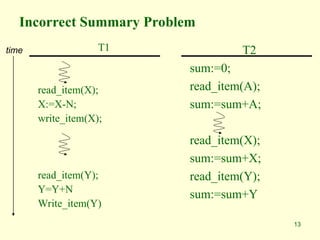
3. Incorrect summary problem
11
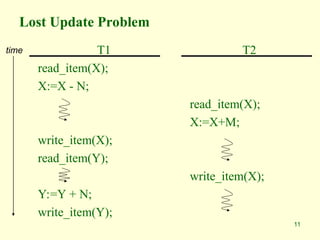
Lost Update Problem
T1
read_item(X);
X:=X - N;
write_item(X);
read_item(Y);
Y:=Y + N;
write_item(Y);
T2
read_item(X);
X:=X+M;
write_item(X);
time
12
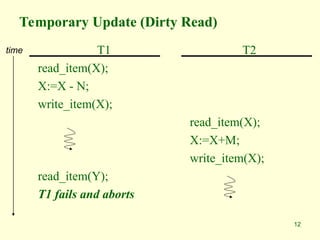
Temporary Update (Dirty Read)
T1
read_item(X);
X:=X - N;
write_item(X);
read_item(Y);
T1 fails and aborts
T2
read_item(X);
X:=X+M;
write_item(X);
time
13
Incorrect Summary Problem
T1
read_item(X);
X:=X-N;
write_item(X);
read_item(Y);
Y=Y+N
Write_item(Y)
T2
sum:=0;
read_item(A);
sum:=sum+A;
read_item(X);
sum:=sum+X;
read_item(Y);
sum:=sum+Y
time
14
What Can Go Wrong?
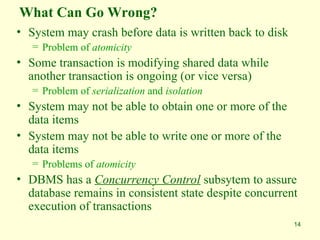
• System may crash before data is written back to disk
= Problem of atomicity
• Some transaction is modifying shared data while
another transaction is ongoing (or vice versa)
= Problem of serialization and isolation
• System may not be able to obtain one or more of the
data items
• System may not be able to write one or more of the
data items
= Problems of atomicity
• DBMS has a Concurrency Control subsytem to assure
database remains in consistent state despite concurrent
execution of transactions
15
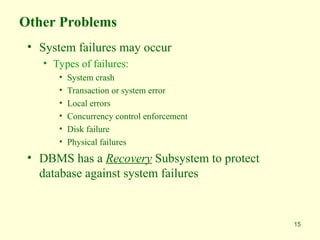
Other Problems
• System failures may occur
• Types of failures:
• System crash
• Transaction or system error
• Local errors
• Concurrency control enforcement
• Disk failure
• Physical failures
• DBMS has a Recovery Subsystem to protect
database against system failures
16
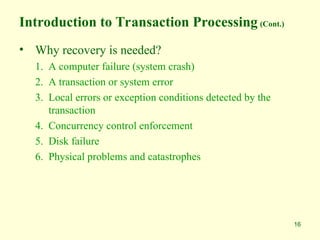
Introduction to Transaction Processing (Cont.)
• Why recovery is needed?
1. A computer failure (system crash)
2. A transaction or system error
3. Local errors or exception conditions detected by the
transaction
4. Concurrency control enforcement
5. Disk failure
6. Physical problems and catastrophes
17
Transaction and System Concepts
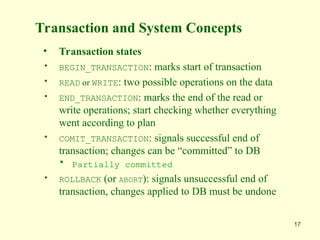
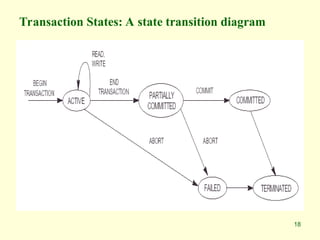
• Transaction states
• BEGIN_TRANSACTION: marks start of transaction
• READ or WRITE: two possible operations on the data
• END_TRANSACTION: marks the end of the read or
write operations; start checking whether everything
went according to plan
• COMIT_TRANSACTION: signals successful end of
transaction; changes can be “committed” to DB
• Partially committed
• ROLLBACK (or ABORT): signals unsuccessful end of
transaction, changes applied to DB must be undone
18
Transaction States: A state transition diagram
19
The System Log
• Transaction –id
• System log
• Multiple record-type file
• Log is kept on disk
• Periodically backed up
• Log records
1. [start_transaction, T]
2. [write_item, T,X,old_value,new_value]:
3. [read_item, T,X]
4. [commit,T]
5. [abort,T]
6. [checkpoint]
• Commit point of a transaction
20
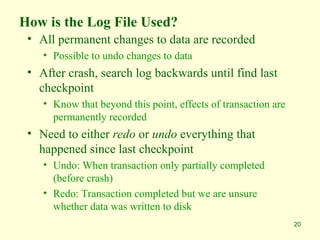
How is the Log File Used?
• All permanent changes to data are recorded
• Possible to undo changes to data
• After crash, search log backwards until find last
checkpoint
• Know that beyond this point, effects of transaction are
permanently recorded
• Need to either redo or undo everything that
happened since last checkpoint
• Undo: When transaction only partially completed
(before crash)
• Redo: Transaction completed but we are unsure
whether data was written to disk
21
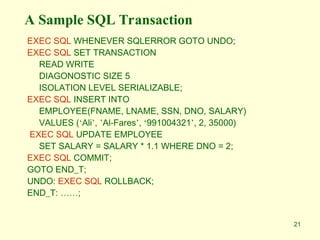
A Sample SQL Transaction
EXEC SQL WHENEVER SQLERROR GOTO UNDO;
EXEC SQL SET TRANSACTION
READ WRITE
DIAGONOSTIC SIZE 5
ISOLATION LEVEL SERIALIZABLE;
EXEC SQL INSERT INTO
EMPLOYEE(FNAME, LNAME, SSN, DNO, SALARY)
VALUES (‘Ali’, ’Al-Fares’, ‘991004321’, 2, 35000)
EXEC SQL UPDATE EMPLOYEE
SET SALARY = SALARY * 1.1 WHERE DNO = 2;
EXEC SQL COMMIT;
GOTO END_T;
UNDO: EXEC SQL ROLLBACK;
END_T: ……;
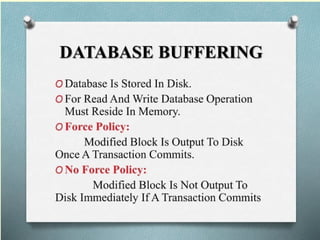
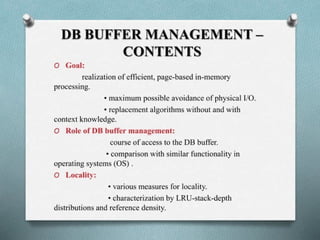
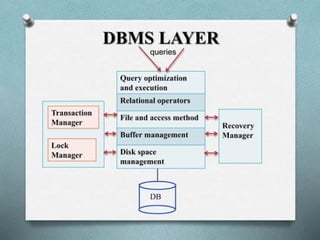
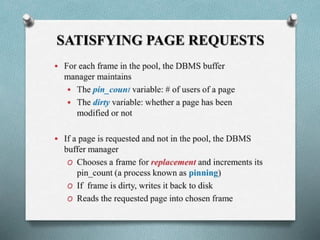
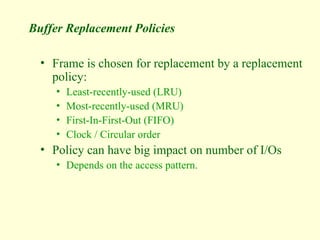
Buffer Replacement Policies
• Frame is chosen for replacement by a replacement
policy:
• Least-recently-used (LRU)
• Most-recently-used (MRU)
• First-In-First-Out (FIFO)
• Clock / Circular order
• Policy can have big impact on number of I/Os
• Depends on the access pattern.
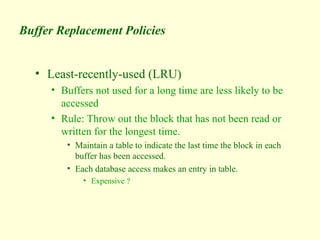
Buffer Replacement Policies
• Least-recently-used (LRU)
• Buffers not used for a long time are less likely to be
accessed
• Rule: Throw out the block that has not been read or
written for the longest time.
• Maintain a table to indicate the last time the block in each
buffer has been accessed.
• Each database access makes an entry in table.
• Expensive ?
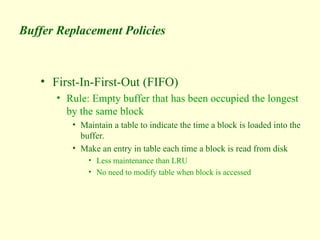
Buffer Replacement Policies
• First-In-First-Out (FIFO)
• Rule: Empty buffer that has been occupied the longest
by the same block
• Maintain a table to indicate the time a block is loaded into the
buffer.
• Make an entry in table each time a block is read from disk
• Less maintenance than LRU
• No need to modify table when block is accessed
Buffer Replacement Policies
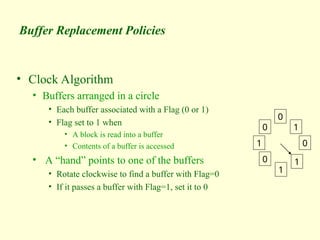
• Clock Algorithm
• Buffers arranged in a circle
• Each buffer associated with a Flag (0 or 1)
• Flag set to 1 when
• A block is read into a buffer
• Contents of a buffer is accessed
• A “hand” points to one of the buffers
• Rotate clockwise to find a buffer with Flag=0
• If it passes a buffer with Flag=1, set it to 0
0
1
0
1
1
0
1
0
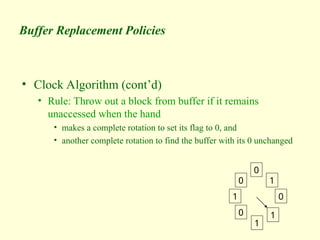
Buffer Replacement Policies
• Clock Algorithm (cont’d)
• Rule: Throw out a block from buffer if it remains
unaccessed when the hand
• makes a complete rotation to set its flag to 0, and
• another complete rotation to find the buffer with its 0 unchanged
0
1
0
1
1
0
1
0
33
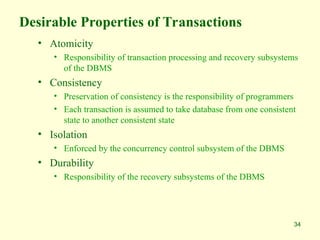
Desirable Properties of Transactions
• ACID properties
1. Atomicity
A transaction is an atomic unit of processing; it is either
performed in its entirety or not performed at all.
2. Consistency preservation
A transaction is consistency preserving if its complete execution
takes the database from one consistent state to another
3. Isolation
The execution of a transaction should not be interfered with by any
other transactions executing concurrently
4. Durability
The changes applied to the database by a committed transaction must
persist in the database. These changes must not be lost because of any
failure
34
Desirable Properties of Transactions
• Atomicity
• Responsibility of transaction processing and recovery subsystems
of the DBMS
• Consistency
• Preservation of consistency is the responsibility of programmers
• Each transaction is assumed to take database from one consistent
state to another consistent state
• Isolation
• Enforced by the concurrency control subsystem of the DBMS
• Durability
• Responsibility of the recovery subsystems of the DBMS
35
Transaction Processing
• We have discussed that
• Multiple transactions can be executed concurrently by
interleaving their operations
• Schedule
• Ordering of execution of operations from various
transactions T1, T2, … , Tn is called a schedule S
36
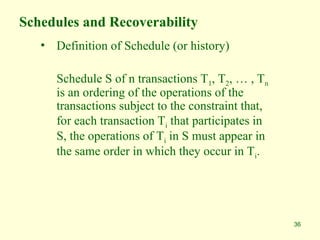
Schedules and Recoverability
• Definition of Schedule (or history)
Schedule S of n transactions T1, T2, … , Tn
is an ordering of the operations of the
transactions subject to the constraint that,
for each transaction Ti that participates in
S, the operations of Ti in S must appear in
the same order in which they occur in Ti.
37
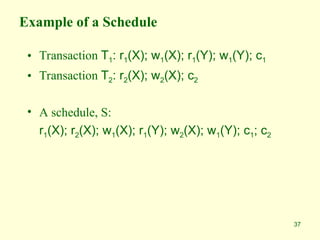
Example of a Schedule
• Transaction T1: r1(X); w1(X); r1(Y); w1(Y); c1
• Transaction T2: r2(X); w2(X); c2
• A schedule, S:
r1(X); r2(X); w1(X); r1(Y); w2(X); w1(Y); c1; c2
38
Conflicts
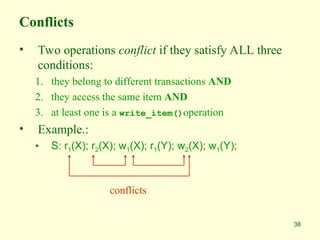
• Two operations conflict if they satisfy ALL three
conditions:
1. they belong to different transactions AND
2. they access the same item AND
3. at least one is a write_item()operation
• Example.:
• S: r1(X); r2(X); w1(X); r1(Y); w2(X); w1(Y);
conflicts
39
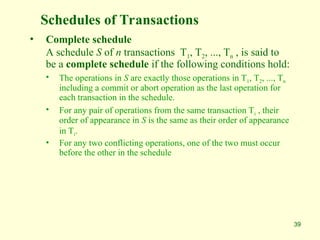
Schedules of Transactions
• Complete schedule
A schedule S of n transactions T1, T2, ..., Tn , is said to
be a complete schedule if the following conditions hold:
• The operations in S are exactly those operations in T1, T2, ..., Tn
including a commit or abort operation as the last operation for
each transaction in the schedule.
• For any pair of operations from the same transaction Ti , their
order of appearance in S is the same as their order of appearance
in Ti.
• For any two conflicting operations, one of the two must occur
before the other in the schedule
40
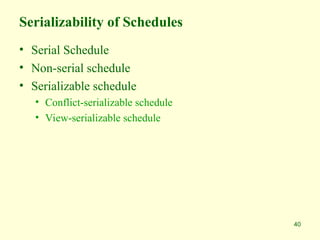
Serializability of Schedules
• Serial Schedule
• Non-serial schedule
• Serializable schedule
• Conflict-serializable schedule
• View-serializable schedule
41
42
Serializability of Schedules (Cont.)
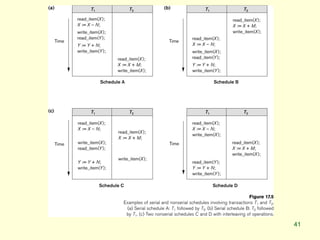
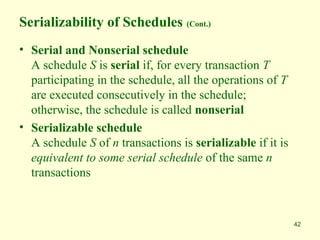
• Serial and Nonserial schedule
A schedule S is serial if, for every transaction T
participating in the schedule, all the operations of T
are executed consecutively in the schedule;
otherwise, the schedule is called nonserial
• Serializable schedule
A schedule S of n transactions is serializable if it is
equivalent to some serial schedule of the same n
transactions
43
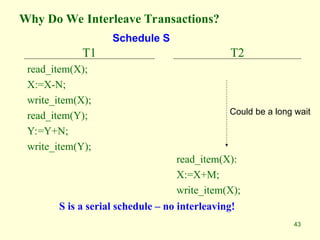
Why Do We Interleave Transactions?
T1
read_item(X);
X:=X-N;
write_item(X);
read_item(Y);
Y:=Y+N;
write_item(Y);
T2
read_item(X):
X:=X+M;
write_item(X);
Could be a long wait
S is a serial schedule – no interleaving!
Schedule S
44
Serial Schedule
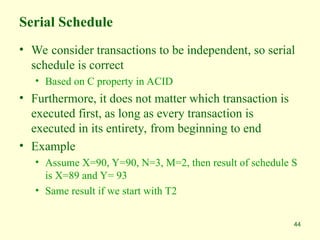
• We consider transactions to be independent, so serial
schedule is correct
• Based on C property in ACID
• Furthermore, it does not matter which transaction is
executed first, as long as every transaction is
executed in its entirety, from beginning to end
• Example
• Assume X=90, Y=90, N=3, M=2, then result of schedule S
is X=89 and Y= 93
• Same result if we start with T2
45
Another Schedule
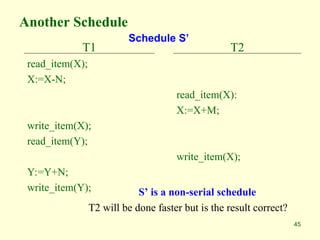
T1
read_item(X);
X:=X-N;
write_item(X);
read_item(Y);
Y:=Y+N;
write_item(Y);
T2
read_item(X):
X:=X+M;
write_item(X);
S’ is a non-serial schedule
T2 will be done faster but is the result correct?
Schedule S’
46
Concurrent Executions
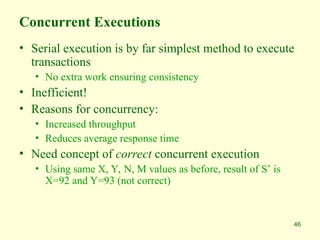
• Serial execution is by far simplest method to execute
transactions
• No extra work ensuring consistency
• Inefficient!
• Reasons for concurrency:
• Increased throughput
• Reduces average response time
• Need concept of correct concurrent execution
• Using same X, Y, N, M values as before, result of S’ is
X=92 and Y=93 (not correct)
47
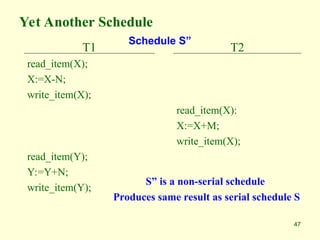
Yet Another Schedule
T1
read_item(X);
X:=X-N;
write_item(X);
read_item(Y);
Y:=Y+N;
write_item(Y);
T2
read_item(X):
X:=X+M;
write_item(X);
S” is a non-serial schedule
Produces same result as serial schedule S
Schedule S”
48
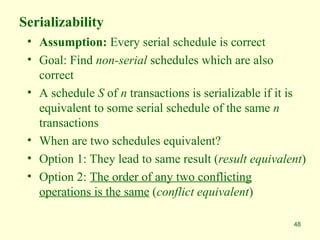
Serializability
• Assumption: Every serial schedule is correct
• Goal: Find non-serial schedules which are also
correct
• A schedule S of n transactions is serializable if it is
equivalent to some serial schedule of the same n
transactions
• When are two schedules equivalent?
• Option 1: They lead to same result (result equivalent)
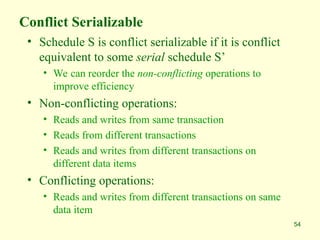
• Option 2: The order of any two conflicting
operations is the same (conflict equivalent)
49
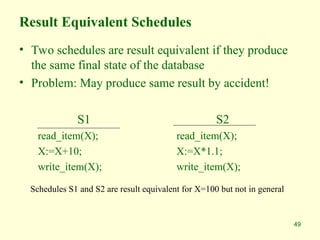
Result Equivalent Schedules
• Two schedules are result equivalent if they produce
the same final state of the database
• Problem: May produce same result by accident!
S1
read_item(X);
X:=X+10;
write_item(X);
S2
read_item(X);
X:=X*1.1;
write_item(X);
Schedules S1 and S2 are result equivalent for X=100 but not in general
50
Conflict Equivalent Schedules
• Two schedules are conflict equivalent, if the order of
any two conflicting operations is the same in both
schedules
51
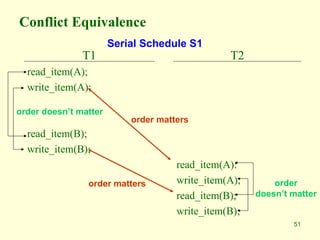
Conflict Equivalence
T1
read_item(A);
write_item(A);
read_item(B);
write_item(B);
T2
read_item(A):
write_item(A);
read_item(B);
write_item(B);
order matters
order doesn’t matter
order matters
Serial Schedule S1
order
doesn’t matter
52
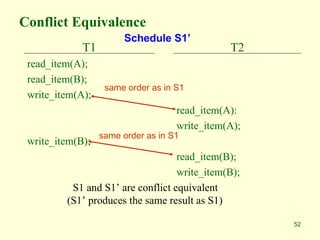
Conflict Equivalence
T1
read_item(A);
read_item(B);
write_item(A);
write_item(B);
T2
read_item(A):
write_item(A);
read_item(B);
write_item(B);
S1 and S1’ are conflict equivalent
(S1’ produces the same result as S1)
Schedule S1’
same order as in S1
same order as in S1
53
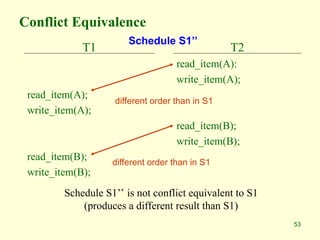
Conflict Equivalence
T1
read_item(A);
write_item(A);
read_item(B);
write_item(B);
T2
read_item(A):
write_item(A);
read_item(B);
write_item(B);
Schedule S1’’ is not conflict equivalent to S1
(produces a different result than S1)
Schedule S1’’
different order than in S1
54
Conflict Serializable
• Schedule S is conflict serializable if it is conflict
equivalent to some serial schedule S’
• We can reorder the non-conflicting operations to
improve efficiency
• Non-conflicting operations:
• Reads and writes from same transaction
• Reads from different transactions
• Reads and writes from different transactions on
different data items
• Conflicting operations:
• Reads and writes from different transactions on same
data item
55
Example
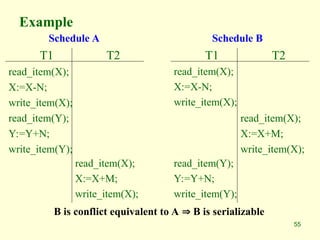
T1
read_item(X);
X:=X-N;
write_item(X);
read_item(Y);
Y:=Y+N;
write_item(Y);
T2
read_item(X);
X:=X+M;
write_item(X);
T1
read_item(X);
X:=X-N;
write_item(X);
read_item(Y);
Y:=Y+N;
write_item(Y);
T2
read_item(X);
X:=X+M;
write_item(X);
Schedule A Schedule B
B is conflict equivalent to A  B is serializable
56
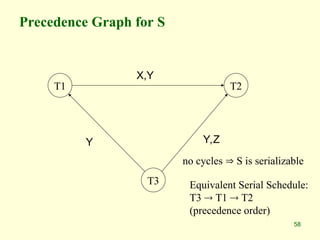
Test for Serializability
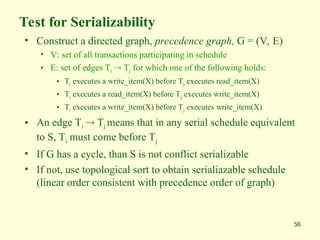
• Construct a directed graph, precedence graph, G = (V, E)
• V: set of all transactions participating in schedule
• E: set of edges Ti  Tj for which one of the following holds:
• Ti executes a write_item(X) before Tj executes read_item(X)
• Ti executes a read_item(X) before Tj executes write_item(X)
• Ti executes a write_item(X) before Tj executes write_item(X)
• An edge Ti  Tj means that in any serial schedule equivalent
to S, Ti must come before Tj
• If G has a cycle, than S is not conflict serializable
• If not, use topological sort to obtain serialiazable schedule
(linear order consistent with precedence order of graph)
57
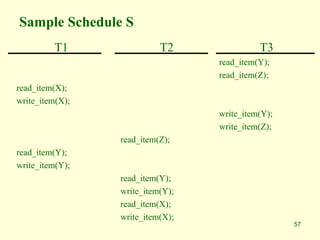
Sample Schedule S
T1
read_item(X);
write_item(X);
read_item(Y);
write_item(Y);
T2
read_item(Z);
read_item(Y);
write_item(Y);
read_item(X);
write_item(X);
T3
read_item(Y);
read_item(Z);
write_item(Y);
write_item(Z);
58
Precedence Graph for S
T1 T2
T3
X,Y
Y Y,Z
Equivalent Serial Schedule:
T3  T1  T2
(precedence order)
no cycles  S is serializable
59
Characterizing Schedules based on
Serializability
• Being serializable is not the same as being serial
• Being serializable implies that the schedule is a
correct schedule.
• It will leave the database in a consistent state.
• The interleaving is appropriate and will result in a
state as if the transactions were serially executed, yet
will achieve efficiency due to concurrent execution.
60
Characterizing Schedules based on
Serializability
• Serializability is hard to check.
• Interleaving of operations occurs in an operating system
through some scheduler
• Difficult to determine before hand how the operations in a
schedule will be interleaved.
61
Characterizing Schedules based on
Serializability
Practical approach:
• Come up with methods (protocols) to ensure serializability.
• It’s not possible to determine when a schedule begins and when
it ends. Hence, we reduce the problem of checking the whole
schedule to checking only a committed project of the schedule
(i.e. operations from only the committed transactions.)
• Current approach used in most DBMSs:
• Concurrency control techniques
• Examples
• Two-phase locking technique
• Timestamp ordering technique
62
Characterizing Schedules based on
Serializability
• View equivalence: A less restrictive definition of equivalence
of schedules
• View serializability (
• Definition of serializability based on view equivalence.
A schedule is view serializable if it is view equivalent to a
serial schedule.
63
Characterizing Schedules based on
Serializability
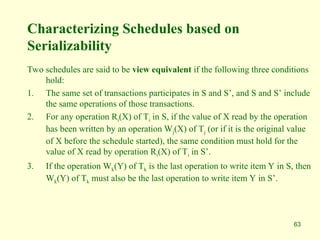
Two schedules are said to be view equivalent if the following three conditions
hold:
1. The same set of transactions participates in S and S’, and S and S’ include
the same operations of those transactions.
2. For any operation Ri(X) of Ti in S, if the value of X read by the operation
has been written by an operation Wj(X) of Tj (or if it is the original value
of X before the schedule started), the same condition must hold for the
value of X read by operation Ri(X) of Ti in S’.
3. If the operation Wk(Y) of Tk is the last operation to write item Y in S, then
Wk(Y) of Tk must also be the last operation to write item Y in S’.
64
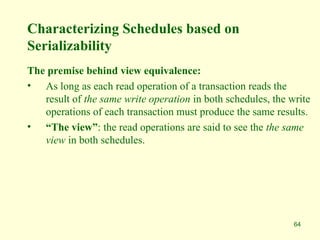
Characterizing Schedules based on
Serializability
The premise behind view equivalence:
• As long as each read operation of a transaction reads the
result of the same write operation in both schedules, the write
operations of each transaction must produce the same results.
• “The view”: the read operations are said to see the the same
view in both schedules.
65
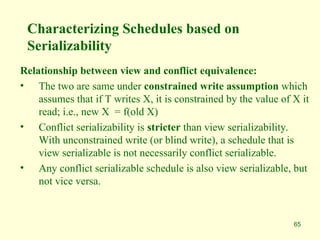
Characterizing Schedules based on
Serializability
Relationship between view and conflict equivalence:
• The two are same under constrained write assumption which
assumes that if T writes X, it is constrained by the value of X it
read; i.e., new X = f(old X)
• Conflict serializability is stricter than view serializability.
With unconstrained write (or blind write), a schedule that is
view serializable is not necessarily conflict serializable.
• Any conflict serializable schedule is also view serializable, but
not vice versa.
66
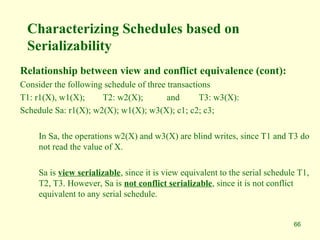
Characterizing Schedules based on
Serializability
Relationship between view and conflict equivalence (cont):
Consider the following schedule of three transactions
T1: r1(X), w1(X); T2: w2(X); and T3: w3(X):
Schedule Sa: r1(X); w2(X); w1(X); w3(X); c1; c2; c3;
In Sa, the operations w2(X) and w3(X) are blind writes, since T1 and T3 do
not read the value of X.
Sa is view serializable, since it is view equivalent to the serial schedule T1,
T2, T3. However, Sa is not conflict serializable, since it is not conflict
equivalent to any serial schedule.
67
Transaction Support in SQL
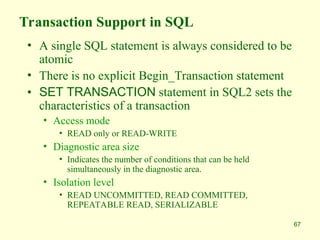
• A single SQL statement is always considered to be
atomic
• There is no explicit Begin_Transaction statement
• SET TRANSACTION statement in SQL2 sets the
characteristics of a transaction
• Access mode
• READ only or READ-WRITE
• Diagnostic area size
• Indicates the number of conditions that can be held
simultaneously in the diagnostic area.
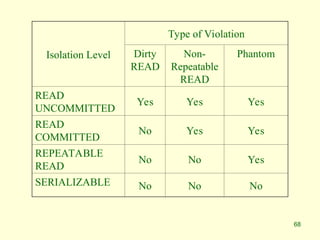
• Isolation level
• READ UNCOMMITTED, READ COMMITTED,
REPEATABLE READ, SERIALIZABLE
68
Isolation Level
Type of Violation
Dirty
READ
Non-
Repeatable
READ
Phantom
READ
UNCOMMITTED
Yes Yes Yes
READ
COMMITTED
No Yes Yes
REPEATABLE
READ
No No Yes
SERIALIZABLE No No No
69
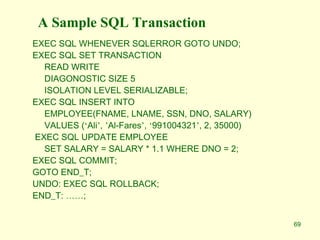
A Sample SQL Transaction
EXEC SQL WHENEVER SQLERROR GOTO UNDO;
EXEC SQL SET TRANSACTION
READ WRITE
DIAGONOSTIC SIZE 5
ISOLATION LEVEL SERIALIZABLE;
EXEC SQL INSERT INTO
EMPLOYEE(FNAME, LNAME, SSN, DNO, SALARY)
VALUES (‘Ali’, ’Al-Fares’, ‘991004321’, 2, 35000)
EXEC SQL UPDATE EMPLOYEE
SET SALARY = SALARY * 1.1 WHERE DNO = 2;
EXEC SQL COMMIT;
GOTO END_T;
UNDO: EXEC SQL ROLLBACK;
END_T: ……;
70
Summary
• Introduction to transaction processing
• Transaction and system concepts
• Desirable properties of transactions
• Schedules and recoverability
• Serializability of schedules
• Transaction support in SQL
Thank you

DBMS CIIT Ch8.pptasddddddddddddddddddddd

  • 1.
    1 Introduction to TransactionProcessing Concepts and Theory
  • 2.
    2 Outline • Introduction totransaction processing • Transaction and system concepts • Desirable properties of transactions • Schedules and recoverability • Schedules and Serializability • Transaction support in SQL • Summary
  • 3.
    3 Introduction to TransactionProcessing • Single-user VS multi-user systems • A DBMS is single-user if at most one user can use the system at a time • A DBMS is multi-user if many users can use the system concurrently • Problem How to make the simultaneous interactions of multiple users with the database safe, consistent, correct, and efficient?
  • 4.
    4 Introduction to TransactionProcessing • Computing systems • Single-processor computer system • Multiprogramming • Inter-leaved Execution • Pseudo-parallel processing • Multi-processor computer system • Parallel processing
  • 5.
    5 Concurrent Transactions Interleaved processing (Singleprocessor) Parallel processing (Two or more processors) t1 t2 t1 t2 time CPU1 CPU2 A B A B CPU1 A B
  • 6.
    6 What is aTransaction? • A transaction T is a logical unit of database processing that includes one or more database access operations • Embedded within an application program • Specified interactively (e.g., via SQL) • Transaction boundaries: • Begin/end transaction • Types of transactions • Read transaction • write transaction • Read-set of T: all data items that transaction T reads • Write-set of T: all data items that transaction T writes
  • 7.
    7 A Transaction: AnInformal Example • Transfer SAR400,000 from checking account to savings account • For a user it is one activity • To database: • Read balance of checking account: read( X) • Read balance of savings account: read (Y) • Subtract SAR400,000 from X • Add SAR400,000 to Y • Write new value of X back to disk • Write new value of Y back to disk
  • 8.
    8 Database Read andWrite Operations • A database is represented as a collection of named data items • Read-item (X) 1. Find the address of the disk block that contains item X 2. Copy the disk block into a buffer in main memory 3. Copy the item X from the buffer to the program variable named X • Write-item (X) 1. Find the address of the disk block that contains item X. 2. Copy that disk block into a buffer in main memory 3. Copy item X from the program variable named X into its correct location in the buffer. 4. Store the updated block from the buffer back to disk (either immediately or at some later point in time).
  • 9.
    9 A Transaction: AFormal Example T1 read_item(X); read_item(Y); X:=X - 400000; Y:=Y + 400000; write _item(X); write_item(Y); t0 tk
  • 10.
    10 Introduction to TransactionProcessing (Cont.) • Why concurrency control is needed? • Three problems are 1. The lost update problem 2. The temporary update (dirty read) problem 3. Incorrect summary problem
  • 11.
    11 Lost Update Problem T1 read_item(X); X:=X- N; write_item(X); read_item(Y); Y:=Y + N; write_item(Y); T2 read_item(X); X:=X+M; write_item(X); time
  • 12.
    12 Temporary Update (DirtyRead) T1 read_item(X); X:=X - N; write_item(X); read_item(Y); T1 fails and aborts T2 read_item(X); X:=X+M; write_item(X); time
  • 13.
  • 14.
    14 What Can GoWrong? • System may crash before data is written back to disk = Problem of atomicity • Some transaction is modifying shared data while another transaction is ongoing (or vice versa) = Problem of serialization and isolation • System may not be able to obtain one or more of the data items • System may not be able to write one or more of the data items = Problems of atomicity • DBMS has a Concurrency Control subsytem to assure database remains in consistent state despite concurrent execution of transactions
  • 15.
    15 Other Problems • Systemfailures may occur • Types of failures: • System crash • Transaction or system error • Local errors • Concurrency control enforcement • Disk failure • Physical failures • DBMS has a Recovery Subsystem to protect database against system failures
  • 16.
    16 Introduction to TransactionProcessing (Cont.) • Why recovery is needed? 1. A computer failure (system crash) 2. A transaction or system error 3. Local errors or exception conditions detected by the transaction 4. Concurrency control enforcement 5. Disk failure 6. Physical problems and catastrophes
  • 17.
    17 Transaction and SystemConcepts • Transaction states • BEGIN_TRANSACTION: marks start of transaction • READ or WRITE: two possible operations on the data • END_TRANSACTION: marks the end of the read or write operations; start checking whether everything went according to plan • COMIT_TRANSACTION: signals successful end of transaction; changes can be “committed” to DB • Partially committed • ROLLBACK (or ABORT): signals unsuccessful end of transaction, changes applied to DB must be undone
  • 18.
    18 Transaction States: Astate transition diagram
  • 19.
    19 The System Log •Transaction –id • System log • Multiple record-type file • Log is kept on disk • Periodically backed up • Log records 1. [start_transaction, T] 2. [write_item, T,X,old_value,new_value]: 3. [read_item, T,X] 4. [commit,T] 5. [abort,T] 6. [checkpoint] • Commit point of a transaction
  • 20.
    20 How is theLog File Used? • All permanent changes to data are recorded • Possible to undo changes to data • After crash, search log backwards until find last checkpoint • Know that beyond this point, effects of transaction are permanently recorded • Need to either redo or undo everything that happened since last checkpoint • Undo: When transaction only partially completed (before crash) • Redo: Transaction completed but we are unsure whether data was written to disk
  • 21.
    21 A Sample SQLTransaction EXEC SQL WHENEVER SQLERROR GOTO UNDO; EXEC SQL SET TRANSACTION READ WRITE DIAGONOSTIC SIZE 5 ISOLATION LEVEL SERIALIZABLE; EXEC SQL INSERT INTO EMPLOYEE(FNAME, LNAME, SSN, DNO, SALARY) VALUES (‘Ali’, ’Al-Fares’, ‘991004321’, 2, 35000) EXEC SQL UPDATE EMPLOYEE SET SALARY = SALARY * 1.1 WHERE DNO = 2; EXEC SQL COMMIT; GOTO END_T; UNDO: EXEC SQL ROLLBACK; END_T: ……;
  • 27.
    Buffer Replacement Policies •Frame is chosen for replacement by a replacement policy: • Least-recently-used (LRU) • Most-recently-used (MRU) • First-In-First-Out (FIFO) • Clock / Circular order • Policy can have big impact on number of I/Os • Depends on the access pattern.
  • 28.
    Buffer Replacement Policies •Least-recently-used (LRU) • Buffers not used for a long time are less likely to be accessed • Rule: Throw out the block that has not been read or written for the longest time. • Maintain a table to indicate the last time the block in each buffer has been accessed. • Each database access makes an entry in table. • Expensive ?
  • 29.
    Buffer Replacement Policies •First-In-First-Out (FIFO) • Rule: Empty buffer that has been occupied the longest by the same block • Maintain a table to indicate the time a block is loaded into the buffer. • Make an entry in table each time a block is read from disk • Less maintenance than LRU • No need to modify table when block is accessed
  • 30.
    Buffer Replacement Policies •Clock Algorithm • Buffers arranged in a circle • Each buffer associated with a Flag (0 or 1) • Flag set to 1 when • A block is read into a buffer • Contents of a buffer is accessed • A “hand” points to one of the buffers • Rotate clockwise to find a buffer with Flag=0 • If it passes a buffer with Flag=1, set it to 0 0 1 0 1 1 0 1 0
  • 31.
    Buffer Replacement Policies •Clock Algorithm (cont’d) • Rule: Throw out a block from buffer if it remains unaccessed when the hand • makes a complete rotation to set its flag to 0, and • another complete rotation to find the buffer with its 0 unchanged 0 1 0 1 1 0 1 0
  • 33.
    33 Desirable Properties ofTransactions • ACID properties 1. Atomicity A transaction is an atomic unit of processing; it is either performed in its entirety or not performed at all. 2. Consistency preservation A transaction is consistency preserving if its complete execution takes the database from one consistent state to another 3. Isolation The execution of a transaction should not be interfered with by any other transactions executing concurrently 4. Durability The changes applied to the database by a committed transaction must persist in the database. These changes must not be lost because of any failure
  • 34.
    34 Desirable Properties ofTransactions • Atomicity • Responsibility of transaction processing and recovery subsystems of the DBMS • Consistency • Preservation of consistency is the responsibility of programmers • Each transaction is assumed to take database from one consistent state to another consistent state • Isolation • Enforced by the concurrency control subsystem of the DBMS • Durability • Responsibility of the recovery subsystems of the DBMS
  • 35.
    35 Transaction Processing • Wehave discussed that • Multiple transactions can be executed concurrently by interleaving their operations • Schedule • Ordering of execution of operations from various transactions T1, T2, … , Tn is called a schedule S
  • 36.
    36 Schedules and Recoverability •Definition of Schedule (or history) Schedule S of n transactions T1, T2, … , Tn is an ordering of the operations of the transactions subject to the constraint that, for each transaction Ti that participates in S, the operations of Ti in S must appear in the same order in which they occur in Ti.
  • 37.
    37 Example of aSchedule • Transaction T1: r1(X); w1(X); r1(Y); w1(Y); c1 • Transaction T2: r2(X); w2(X); c2 • A schedule, S: r1(X); r2(X); w1(X); r1(Y); w2(X); w1(Y); c1; c2
  • 38.
    38 Conflicts • Two operationsconflict if they satisfy ALL three conditions: 1. they belong to different transactions AND 2. they access the same item AND 3. at least one is a write_item()operation • Example.: • S: r1(X); r2(X); w1(X); r1(Y); w2(X); w1(Y); conflicts
  • 39.
    39 Schedules of Transactions •Complete schedule A schedule S of n transactions T1, T2, ..., Tn , is said to be a complete schedule if the following conditions hold: • The operations in S are exactly those operations in T1, T2, ..., Tn including a commit or abort operation as the last operation for each transaction in the schedule. • For any pair of operations from the same transaction Ti , their order of appearance in S is the same as their order of appearance in Ti. • For any two conflicting operations, one of the two must occur before the other in the schedule
  • 40.
    40 Serializability of Schedules •Serial Schedule • Non-serial schedule • Serializable schedule • Conflict-serializable schedule • View-serializable schedule
  • 41.
  • 42.
    42 Serializability of Schedules(Cont.) • Serial and Nonserial schedule A schedule S is serial if, for every transaction T participating in the schedule, all the operations of T are executed consecutively in the schedule; otherwise, the schedule is called nonserial • Serializable schedule A schedule S of n transactions is serializable if it is equivalent to some serial schedule of the same n transactions
  • 43.
    43 Why Do WeInterleave Transactions? T1 read_item(X); X:=X-N; write_item(X); read_item(Y); Y:=Y+N; write_item(Y); T2 read_item(X): X:=X+M; write_item(X); Could be a long wait S is a serial schedule – no interleaving! Schedule S
  • 44.
    44 Serial Schedule • Weconsider transactions to be independent, so serial schedule is correct • Based on C property in ACID • Furthermore, it does not matter which transaction is executed first, as long as every transaction is executed in its entirety, from beginning to end • Example • Assume X=90, Y=90, N=3, M=2, then result of schedule S is X=89 and Y= 93 • Same result if we start with T2
  • 45.
  • 46.
    46 Concurrent Executions • Serialexecution is by far simplest method to execute transactions • No extra work ensuring consistency • Inefficient! • Reasons for concurrency: • Increased throughput • Reduces average response time • Need concept of correct concurrent execution • Using same X, Y, N, M values as before, result of S’ is X=92 and Y=93 (not correct)
  • 47.
  • 48.
    48 Serializability • Assumption: Everyserial schedule is correct • Goal: Find non-serial schedules which are also correct • A schedule S of n transactions is serializable if it is equivalent to some serial schedule of the same n transactions • When are two schedules equivalent? • Option 1: They lead to same result (result equivalent) • Option 2: The order of any two conflicting operations is the same (conflict equivalent)
  • 49.
    49 Result Equivalent Schedules •Two schedules are result equivalent if they produce the same final state of the database • Problem: May produce same result by accident! S1 read_item(X); X:=X+10; write_item(X); S2 read_item(X); X:=X*1.1; write_item(X); Schedules S1 and S2 are result equivalent for X=100 but not in general
  • 50.
    50 Conflict Equivalent Schedules •Two schedules are conflict equivalent, if the order of any two conflicting operations is the same in both schedules
  • 51.
  • 52.
    52 Conflict Equivalence T1 read_item(A); read_item(B); write_item(A); write_item(B); T2 read_item(A): write_item(A); read_item(B); write_item(B); S1 andS1’ are conflict equivalent (S1’ produces the same result as S1) Schedule S1’ same order as in S1 same order as in S1
  • 53.
    53 Conflict Equivalence T1 read_item(A); write_item(A); read_item(B); write_item(B); T2 read_item(A): write_item(A); read_item(B); write_item(B); Schedule S1’’is not conflict equivalent to S1 (produces a different result than S1) Schedule S1’’ different order than in S1 different order than in S1
  • 54.
    54 Conflict Serializable • ScheduleS is conflict serializable if it is conflict equivalent to some serial schedule S’ • We can reorder the non-conflicting operations to improve efficiency • Non-conflicting operations: • Reads and writes from same transaction • Reads from different transactions • Reads and writes from different transactions on different data items • Conflicting operations: • Reads and writes from different transactions on same data item
  • 55.
  • 56.
    56 Test for Serializability •Construct a directed graph, precedence graph, G = (V, E) • V: set of all transactions participating in schedule • E: set of edges Ti  Tj for which one of the following holds: • Ti executes a write_item(X) before Tj executes read_item(X) • Ti executes a read_item(X) before Tj executes write_item(X) • Ti executes a write_item(X) before Tj executes write_item(X) • An edge Ti  Tj means that in any serial schedule equivalent to S, Ti must come before Tj • If G has a cycle, than S is not conflict serializable • If not, use topological sort to obtain serialiazable schedule (linear order consistent with precedence order of graph)
  • 57.
  • 58.
    58 Precedence Graph forS T1 T2 T3 X,Y Y Y,Z Equivalent Serial Schedule: T3  T1  T2 (precedence order) no cycles  S is serializable
  • 59.
    59 Characterizing Schedules basedon Serializability • Being serializable is not the same as being serial • Being serializable implies that the schedule is a correct schedule. • It will leave the database in a consistent state. • The interleaving is appropriate and will result in a state as if the transactions were serially executed, yet will achieve efficiency due to concurrent execution.
  • 60.
    60 Characterizing Schedules basedon Serializability • Serializability is hard to check. • Interleaving of operations occurs in an operating system through some scheduler • Difficult to determine before hand how the operations in a schedule will be interleaved.
  • 61.
    61 Characterizing Schedules basedon Serializability Practical approach: • Come up with methods (protocols) to ensure serializability. • It’s not possible to determine when a schedule begins and when it ends. Hence, we reduce the problem of checking the whole schedule to checking only a committed project of the schedule (i.e. operations from only the committed transactions.) • Current approach used in most DBMSs: • Concurrency control techniques • Examples • Two-phase locking technique • Timestamp ordering technique
  • 62.
    62 Characterizing Schedules basedon Serializability • View equivalence: A less restrictive definition of equivalence of schedules • View serializability ( • Definition of serializability based on view equivalence. A schedule is view serializable if it is view equivalent to a serial schedule.
  • 63.
    63 Characterizing Schedules basedon Serializability Two schedules are said to be view equivalent if the following three conditions hold: 1. The same set of transactions participates in S and S’, and S and S’ include the same operations of those transactions. 2. For any operation Ri(X) of Ti in S, if the value of X read by the operation has been written by an operation Wj(X) of Tj (or if it is the original value of X before the schedule started), the same condition must hold for the value of X read by operation Ri(X) of Ti in S’. 3. If the operation Wk(Y) of Tk is the last operation to write item Y in S, then Wk(Y) of Tk must also be the last operation to write item Y in S’.
  • 64.
    64 Characterizing Schedules basedon Serializability The premise behind view equivalence: • As long as each read operation of a transaction reads the result of the same write operation in both schedules, the write operations of each transaction must produce the same results. • “The view”: the read operations are said to see the the same view in both schedules.
  • 65.
    65 Characterizing Schedules basedon Serializability Relationship between view and conflict equivalence: • The two are same under constrained write assumption which assumes that if T writes X, it is constrained by the value of X it read; i.e., new X = f(old X) • Conflict serializability is stricter than view serializability. With unconstrained write (or blind write), a schedule that is view serializable is not necessarily conflict serializable. • Any conflict serializable schedule is also view serializable, but not vice versa.
  • 66.
    66 Characterizing Schedules basedon Serializability Relationship between view and conflict equivalence (cont): Consider the following schedule of three transactions T1: r1(X), w1(X); T2: w2(X); and T3: w3(X): Schedule Sa: r1(X); w2(X); w1(X); w3(X); c1; c2; c3; In Sa, the operations w2(X) and w3(X) are blind writes, since T1 and T3 do not read the value of X. Sa is view serializable, since it is view equivalent to the serial schedule T1, T2, T3. However, Sa is not conflict serializable, since it is not conflict equivalent to any serial schedule.
  • 67.
    67 Transaction Support inSQL • A single SQL statement is always considered to be atomic • There is no explicit Begin_Transaction statement • SET TRANSACTION statement in SQL2 sets the characteristics of a transaction • Access mode • READ only or READ-WRITE • Diagnostic area size • Indicates the number of conditions that can be held simultaneously in the diagnostic area. • Isolation level • READ UNCOMMITTED, READ COMMITTED, REPEATABLE READ, SERIALIZABLE
  • 68.
    68 Isolation Level Type ofViolation Dirty READ Non- Repeatable READ Phantom READ UNCOMMITTED Yes Yes Yes READ COMMITTED No Yes Yes REPEATABLE READ No No Yes SERIALIZABLE No No No
  • 69.
    69 A Sample SQLTransaction EXEC SQL WHENEVER SQLERROR GOTO UNDO; EXEC SQL SET TRANSACTION READ WRITE DIAGONOSTIC SIZE 5 ISOLATION LEVEL SERIALIZABLE; EXEC SQL INSERT INTO EMPLOYEE(FNAME, LNAME, SSN, DNO, SALARY) VALUES (‘Ali’, ’Al-Fares’, ‘991004321’, 2, 35000) EXEC SQL UPDATE EMPLOYEE SET SALARY = SALARY * 1.1 WHERE DNO = 2; EXEC SQL COMMIT; GOTO END_T; UNDO: EXEC SQL ROLLBACK; END_T: ……;
  • 70.
    70 Summary • Introduction totransaction processing • Transaction and system concepts • Desirable properties of transactions • Schedules and recoverability • Serializability of schedules • Transaction support in SQL Thank you

Editor's Notes

  • #27 The critical choice that the buffer manager must make is what block to throw out of the buffer pool when a buffer is needed for a newly requested block. The buffer-replacement strategies commonly used may be familiar to you from other applications of scheduling policies, such as in operating systems.
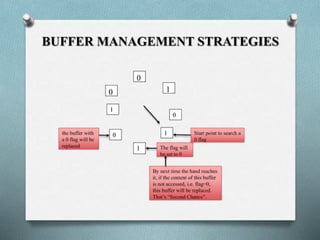
  • #30 Clock algorithm is commonly implemented, efficient approximation to LRU. Think of the buffers as arranged in a circle. A “hand” points to one of the buffers, and will rotate clockwise if it needs to find a buffer in which to place a disk block. Each buffer has an associated flag, 0 or 1. Buffers with 0 flag are vulnerable to having their contents sent back to disk; buffers with a 1 are not. When a block is read into a buffer, its flag is set to 1. Likewise, when the contents of a buffer is accessed, its flag is set to 1. When the BM needs a buffer for a new block, it looks for the first 0 it can find, rotating clockwise. If it passes 1, it sets them to 0. Thus, a block is thrown out of the buffer if it remains unaccessed for the time it takes the hand to make a complete rotation to set its flag to 0, and then make another complete rotation to find the buffer with its 0 unchanged. Eg. Hand will set 0 to 1 in the buffer to its left, and then move clockwise to find the buffer with 0, whose block it will replace and whose flag it will set to 1.