#datasatpn
February 27th, 2021
Data Saturday #1
PBI modeling at warp speed
with TE Advanced Scripting
Riccardo Perico
Riccardo Perico
rperico@lucient.com | @R1k91 |
medium.com/riccardo-perico | slideshare.net/riccardoperico
BI & Power BI Engineer @
+10 years in Microsoft “Data Realm”
Giving my little contribution to the community
Agenda
• What Tabular Editor is?
• Why Tabular Editor?
• Why scripting?
• Modeling Best Practices
• Let’s see it doing the job
• Q&A
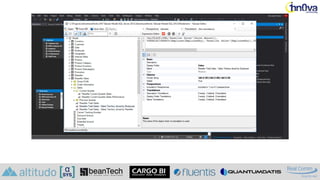
What Tabular Editor Is?
PBI modeling at warp speed with TE Advanced Scripting
Riccardo Perico - Lucient
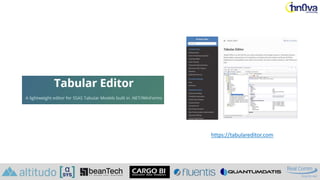
https://tabulareditor.com
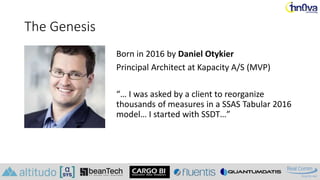
The Genesis
Born in 2016 by Daniel Otykier
Principal Architect at Kapacity A/S (MVP)
“… I was asked by a client to reorganize
thousands of measures in a SSAS Tabular 2016
model… I started with SSDT…”
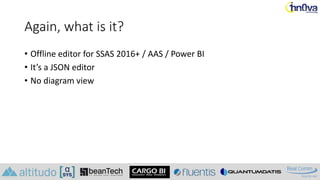
Again, what is it?
• Offline editor for SSAS 2016+ / AAS / Power BI
• It’s a JSON editor
• No diagram view
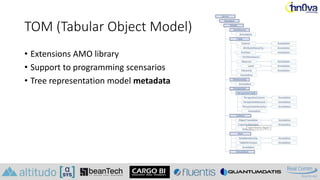
TOM (Tabular Object Model)
• Extensions AMO library
• Support to programming scensarios
• Tree representation model metadata
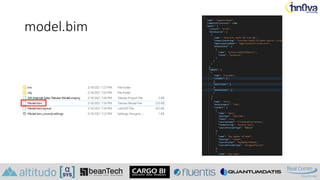
model.bim
Why Tabular Editor?
(3 slides many reasons)
PBI modeling at warp speed with TE Advanced Scripting
Riccardo Perico
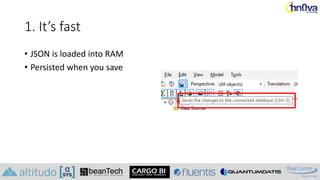
1. It’s fast
• JSON is loaded into RAM
• Persisted when you save
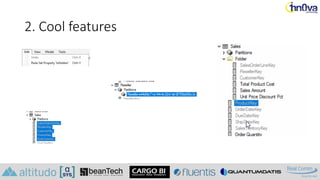
2. Cool features
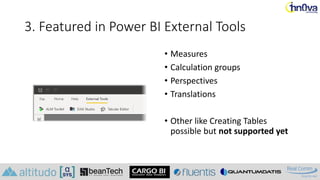
3. Featured in Power BI External Tools
• Measures
• Calculation groups
• Perspectives
• Translations
• Other like Creating Tables
possible but not supported yet
Advanced Scripting
Why scripting?
PBI modeling at warp speed with TE Advanced Scripting
Riccardo Perico - Lucient
Basically to…
• Automation
• Standardization
• Increase productivity
• Push reusability
• Apply Best Practices
Modeling Best Practices
PBI modeling at warp speed with TE Advanced Scripting
Riccardo Perico - Lucient
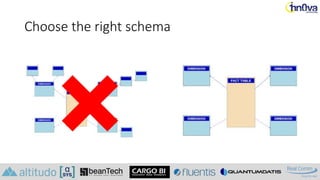
Choose the right schema
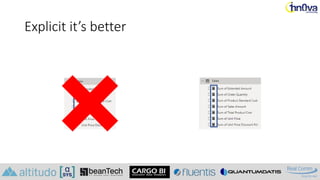
Explicit it’s better
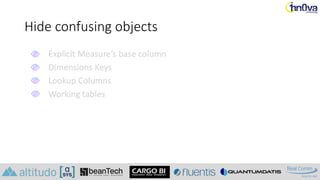
Hide confusing objects
Explicit Measure’s base column
Dimensions Keys
Lookup Columns
Working tables
Explicit Measure’s base column
Dimensions Keys
Lookup Columns
Working tables
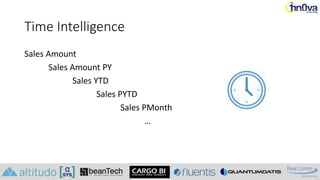
Time Intelligence
Sales Amount
Sales Amount PY
Sales YTD
Sales PYTD
Sales PMonth
…
Format that DAX
EVALUATE
SUMMARIZECOLUMNS (
'Product'[Product],
Manufacturer[Manufacturer],
'Date'[Month],
"sales", Sales[sales],
"PY Sales",
CALCULATE (
Sales[Sales],
SAMEPERIODLASTYEAR ( 'Date'[Date] )
)
)
EVALUATE SUMMARIZECOLUMNS('Product'[Product],
Manufacturer[Manufacturer],'Date'[Month],"sales", Sales[sales], "PY
Sales", CALCULATE(Sales[Sales], SAMEPERIODLASTYEAR('Date'[Date])))
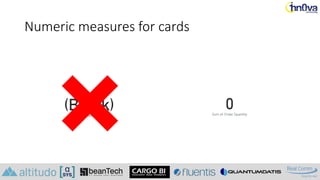
Numeric measures for cards
Demo
PBI modeling at warp speed with TE Advanced Scripting
Riccardo Perico - Lucient
Use case:
Star Schema in 2 Clicks
PBI modeling at warp speed with TE Advanced Scripting
Riccardo Perico - Lucient
Agile Star Schema
• TE to make development faster
• TE to make development more
agile
• TE to standardize development
• TE to lower effort
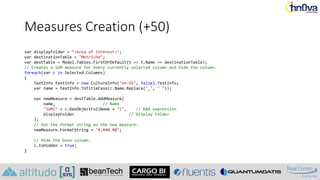
Measures Creation (+50)
var displayFolder = “<Area of Interest>";
var destinationTable = "Metriche";
var destTable = Model.Tables.FirstOrDefault(t => t.Name == destinationTable);
// Creates a SUM measure for every currently selected column and hide the column.
foreach(var c in Selected.Columns)
{
TextInfo textInfo = new CultureInfo("en-US", false).TextInfo;
var name = textInfo.ToTitleCase(c.Name.Replace("_", " "));
var newMeasure = destTable.AddMeasure(
name, // Name
"SUM(" + c.DaxObjectFullName + ")", // DAX expression
displayFolder // Display Folder
);
// Set the format string on the new measure:
newMeasure.FormatString = "#,##0.00";
// Hide the base column:
c.IsHidden = true;
}
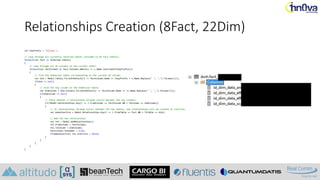
Relationships Creation (8Fact, 22Dim)
var keyPrefix = "id_dim_";
// Loop through all currently selected tables (assumed to be fact tables):
foreach(var fact in Selected.Tables)
{
// Loop through all SK columns on the current table:
foreach(var factColumn in fact.Columns.Where(c => c.Name.StartsWith(keyPrefix)))
{
// Find the dimension table corresponding to the current SK column:
var dim = Model.Tables.FirstOrDefault(t => factColumn.Name == (keyPrefix + t.Name.Replace(" ", "_").ToLower()));
if(dim != null)
{
// Find the key column on the dimension table:
var dimColumn = dim.Columns.FirstOrDefault(c => factColumn.Name == (c.Name.Replace(" ", "_").ToLower()));
if(dimColumn != null)
{
// Check whether a relationship already exists between the two columns:
if(!Model.Relationships.Any(r => r.FromColumn == factColumn && r.ToColumn == dimColumn))
{
// If relationships already exists between the two tables, new relationships will be created as inactive:
var makeInactive = Model.Relationships.Any(r => r.FromTable == fact && r.ToTable == dim);
// Add the new relationship:
var rel = Model.AddRelationship();
rel.FromColumn = factColumn;
rel.ToColumn = dimColumn;
factColumn.IsHidden = true;
if(makeInactive) rel.IsActive = false;
}
}
}
}
}
Useful Links
• Tabular Editor
• Tabular Object Model (TOM) in AMO
• Using external tools in Power BI (preview)
• Useful Script Snippets — Tabular Editor documentation
• Best practice rules to improve your model’s performance
• Chris Webb's BI Blog: IsAvailableInMDX Property
Q&A
PBI modeling at warp speed with TE Advanced Scripting
Riccardo Perico - Lucient
#datasatpn
February 27th, 2021
Data Saturday #1
Thank You
Riccardo Perico

DataSaturday #1 - PBI Modeling At Warp Speed With Tabular Editor Advanced Scripting

  • 1.
    #datasatpn February 27th, 2021 DataSaturday #1 PBI modeling at warp speed with TE Advanced Scripting Riccardo Perico
  • 2.
    Riccardo Perico rperico@lucient.com |@R1k91 | medium.com/riccardo-perico | slideshare.net/riccardoperico BI & Power BI Engineer @ +10 years in Microsoft “Data Realm” Giving my little contribution to the community
  • 3.
    Agenda • What TabularEditor is? • Why Tabular Editor? • Why scripting? • Modeling Best Practices • Let’s see it doing the job • Q&A
  • 4.
    What Tabular EditorIs? PBI modeling at warp speed with TE Advanced Scripting Riccardo Perico - Lucient
  • 5.
  • 6.
    The Genesis Born in2016 by Daniel Otykier Principal Architect at Kapacity A/S (MVP) “… I was asked by a client to reorganize thousands of measures in a SSAS Tabular 2016 model… I started with SSDT…”
  • 8.
    Again, what isit? • Offline editor for SSAS 2016+ / AAS / Power BI • It’s a JSON editor • No diagram view
  • 9.
    TOM (Tabular ObjectModel) • Extensions AMO library • Support to programming scensarios • Tree representation model metadata
  • 10.
  • 11.
    Why Tabular Editor? (3slides many reasons) PBI modeling at warp speed with TE Advanced Scripting Riccardo Perico
  • 12.
    1. It’s fast •JSON is loaded into RAM • Persisted when you save
  • 13.
  • 14.
    3. Featured inPower BI External Tools • Measures • Calculation groups • Perspectives • Translations • Other like Creating Tables possible but not supported yet
  • 15.
  • 16.
    Why scripting? PBI modelingat warp speed with TE Advanced Scripting Riccardo Perico - Lucient
  • 17.
    Basically to… • Automation •Standardization • Increase productivity • Push reusability • Apply Best Practices
  • 18.
    Modeling Best Practices PBImodeling at warp speed with TE Advanced Scripting Riccardo Perico - Lucient
  • 19.
  • 20.
  • 21.
    Hide confusing objects ExplicitMeasure’s base column Dimensions Keys Lookup Columns Working tables Explicit Measure’s base column Dimensions Keys Lookup Columns Working tables
  • 22.
    Time Intelligence Sales Amount SalesAmount PY Sales YTD Sales PYTD Sales PMonth …
  • 23.
    Format that DAX EVALUATE SUMMARIZECOLUMNS( 'Product'[Product], Manufacturer[Manufacturer], 'Date'[Month], "sales", Sales[sales], "PY Sales", CALCULATE ( Sales[Sales], SAMEPERIODLASTYEAR ( 'Date'[Date] ) ) ) EVALUATE SUMMARIZECOLUMNS('Product'[Product], Manufacturer[Manufacturer],'Date'[Month],"sales", Sales[sales], "PY Sales", CALCULATE(Sales[Sales], SAMEPERIODLASTYEAR('Date'[Date])))
  • 24.
  • 25.
    Demo PBI modeling atwarp speed with TE Advanced Scripting Riccardo Perico - Lucient
  • 26.
    Use case: Star Schemain 2 Clicks PBI modeling at warp speed with TE Advanced Scripting Riccardo Perico - Lucient
  • 27.
    Agile Star Schema •TE to make development faster • TE to make development more agile • TE to standardize development • TE to lower effort
  • 28.
    Measures Creation (+50) vardisplayFolder = “<Area of Interest>"; var destinationTable = "Metriche"; var destTable = Model.Tables.FirstOrDefault(t => t.Name == destinationTable); // Creates a SUM measure for every currently selected column and hide the column. foreach(var c in Selected.Columns) { TextInfo textInfo = new CultureInfo("en-US", false).TextInfo; var name = textInfo.ToTitleCase(c.Name.Replace("_", " ")); var newMeasure = destTable.AddMeasure( name, // Name "SUM(" + c.DaxObjectFullName + ")", // DAX expression displayFolder // Display Folder ); // Set the format string on the new measure: newMeasure.FormatString = "#,##0.00"; // Hide the base column: c.IsHidden = true; }
  • 29.
    Relationships Creation (8Fact,22Dim) var keyPrefix = "id_dim_"; // Loop through all currently selected tables (assumed to be fact tables): foreach(var fact in Selected.Tables) { // Loop through all SK columns on the current table: foreach(var factColumn in fact.Columns.Where(c => c.Name.StartsWith(keyPrefix))) { // Find the dimension table corresponding to the current SK column: var dim = Model.Tables.FirstOrDefault(t => factColumn.Name == (keyPrefix + t.Name.Replace(" ", "_").ToLower())); if(dim != null) { // Find the key column on the dimension table: var dimColumn = dim.Columns.FirstOrDefault(c => factColumn.Name == (c.Name.Replace(" ", "_").ToLower())); if(dimColumn != null) { // Check whether a relationship already exists between the two columns: if(!Model.Relationships.Any(r => r.FromColumn == factColumn && r.ToColumn == dimColumn)) { // If relationships already exists between the two tables, new relationships will be created as inactive: var makeInactive = Model.Relationships.Any(r => r.FromTable == fact && r.ToTable == dim); // Add the new relationship: var rel = Model.AddRelationship(); rel.FromColumn = factColumn; rel.ToColumn = dimColumn; factColumn.IsHidden = true; if(makeInactive) rel.IsActive = false; } } } } }
  • 30.
    Useful Links • TabularEditor • Tabular Object Model (TOM) in AMO • Using external tools in Power BI (preview) • Useful Script Snippets — Tabular Editor documentation • Best practice rules to improve your model’s performance • Chris Webb's BI Blog: IsAvailableInMDX Property
  • 31.
    Q&A PBI modeling atwarp speed with TE Advanced Scripting Riccardo Perico - Lucient
  • 32.
    #datasatpn February 27th, 2021 DataSaturday #1 Thank You Riccardo Perico

Editor's Notes

  • #3 Modern architecture
  • #8 Designed to be a replacement of SSDT
  • #9 Microsoft moved from XMLA to TOM You must be a seasoned modeler
  • #14 Undo / Redo Multiselect Drag & Drop See partitions easily Hierarchies managed easily Multiple objects properties change (display folder) Show dependencies Copy and Paste (between models) Go to definition
  • #15 Beginning with the July 2020 release of Power BI Desktop
  • #21 Clearly define the summarization algorithm Clearly define formatting There’s no overlapping with other users Measure reusability Easier DAX Calculation Groups work just with explicit measure
  • #29 foreach (var m in Selected.Measures) { string measure_name = m.Name + " For Cards"; string measure_expr = "COALESCE([" + m.Name + "], 0)"; string display_fld = "For Cards"; Model.Tables["Fact Sale"].AddMeasure(measure_name, measure_expr, display_fld); }