This project is partially funded under the ICT Policy Support Programme (ICT PSP) as part of the
Competitiveness and Innovation Framework Programme by the European Commission under
grant agreement no. 621074
COMPETITIVINESS AND INNOVATION
FRAMEWORK PROGRAMME
CIP-ICT-PSP-2013-7 Pilot Type B
WP4 – Data analysis, modeling and synthesis
D4.2.1: Advanced Rich Interfaces
Deliverable Lead: CTIC
Deliverable due date: 28/02/2015
Actual submission date: 08/04/2015
Version: 1.0
D4.2.1: Advanced Rich Interfaces
http://www.foodie-project.eu Copyright © FOODIE Project Consortium. All Rights Reserved. Grant Agreement No.: 621074 Page:2 / 20
Document Control Page
Title D4.2.1 Advanced Rich Interfaces
Creator Alfonso Noriega (CTIC)
Description This document introduces the first prototypes related to the Advanced Rich Interfaces
Publisher FOODIE Consortium
Contributors
Creation date 27/02/2015
Type Text
Language en-GB
Rights copyright “FOODIE Consortium”
Audience
internal
public
restricted
Review status
Draft
WP leader accepted
Technical Manager accepted
Coordinator accepted
Action requested
to be revised by Partners
for approval by the WP leader
for approval by the Technical Committee
for approval by the Project Coordinator
Requested
deadline
D4.2.1: Advanced Rich Interfaces
http://www.foodie-project.eu Copyright © FOODIE Project Consortium. All Rights Reserved. Grant Agreement No.: 621074 Page:3 / 20
STATEMENT FOR OPEN DOCUMENTS
(c) 2015 FOODIE Consortium
The FOODIE Consortium (http://www.foodie-project.eu) grants third parties the right to use and dis-
tribute all or parts of this document, provided that the FOODIE project and the document are properly
referenced.
THIS DOCUMENT IS PROVIDED BY THE COPYRIGHT HOLDERS AND CONTRIBUTORS "AS IS" AND ANY
EXPRESS OR IMPLIED WARRANTIES, INCLUDING, BUT NOT LIMITED TO, THE IMPLIED WARRANTIES OF
MERCHANTABILITY AND FITNESS FOR A PARTICULAR PURPOSE ARE DISCLAIMED. EXCEPT WHAT SET
FORTH BY MANDATORY PROVISIONS OF LAW IN NO EVENT SHALL THE COPYRIGHT OWNER OR
CONTRIBUTORS BE LIABLE FOR ANY DIRECT, INDIRECT, INCIDENTAL, SPECIAL, EXEMPLARY, OR
CONSEQUENTIAL DAMAGES (INCLUDING, BUT NOT LIMITED TO, PROCUREMENT OF SUBSTITUTE
GOODS OR SERVICES; LOSS OF USE, DATA, OR PROFITS; OR BUSINESS INTERRUPTION) HOWEVER
CAUSED AND ON ANY THEORY OF LIABILITY, WHETHER IN CONTRACT, STRICT LIABILITY, OR TORT
(INCLUDING NEGLIGENCE OR OTHERWISE) ARISING IN ANY WAY OUT OF THE USE OF THIS
DOCUMENT, EVEN IF ADVISED OF THE POSSIBILITY OF SUCH DAMAGE.
About the project
FOODIE project aims at creating a platform hub on the cloud where spatial and non-spatial data related to
agricultural sector is available for agri-food stakeholders groups and interoperable. It will offer: an infrastructure
for the building of an interacting and collaborative network; the integration of existing open datasets related to
agriculture; data publication and data linking of external agriculture data sources, providing specific and high-
value applications and services for the support of planning and decision-making processes.
FOODIE project is addressed to four basic groups of users: a) stakeholders from the agriculture sector as end-
users of final applications, b) public sector for communication with farmers about taxation, subsidies and
regulation, c) researchers for large scale experimentation on real data and d) ICT companies for the
development of new applications for agriculture and food sector, mainly using implemented tools
FOODIE specifically works on three pilots:
 Pilot 1: Precision Viticulture (Spain) will focus on the appropriate management of the inherent
variability of crops,
 Pilot 2: Open Data for Strategic and Tactical Planning (Czech Republic) will focus on improving future
management of agricultural companies (farms) by introducing new tools and management methods,
 Pilot 3: Technology allows integration of logistics via service providers and farm management including
traceability (Germany).
Contact information
Miguel Angel Esbrí
Project Coordinator
Atos Spain, Madrid, Spain
E-mail: miguel.esbri@atos.net
URL: http://www.foodie-project.eu
Twitter: https://twitter.com/FOODIE_Project
D4.2.1: Advanced Rich Interfaces
http://www.foodie-project.eu Copyright © FOODIE Project Consortium. All Rights Reserved. Grant Agreement No.: 621074 Page:4 / 20
Glossary
The glossary of terms used in this deliverable can be found in the public document “FOODIE_Glossary.pdf”
available at: http://www.foodie-project.eu
D4.2.1: Advanced Rich Interfaces
http://www.foodie-project.eu Copyright © FOODIE Project Consortium. All Rights Reserved. Grant Agreement No.: 621074 Page:5 / 20
Abbreviations and Acronyms
Abbreviation /
Acronym
Description
API Application Programming Interface
CPU Central Processing Unit
DBA Database Administrator
DBaaS Database as a Service
DDD Domain-Driven Design
DNS Domain Name System
GTM Global Transaction Manager
HA High Availability
HDD Hard Disk Drive
HTTP Hypertext Transfer Protocol
IaaS Infrastructure as a Service
IDE Integrated Development Environment
JAR Java ARchive
MPP Massive Parallel Processing
OS Operating System
POM Project Object Model
RAM Random Access Memory
RDBMS Relational Database Management System
RDF Resource Description Framework
SLA Service Level Agreement
SQL Structured Query Language
TCP Transmission Control Protocol
TDD Test – Driven Development
VM Virtual Machine
API Application Programming Interface
Table 1: Abbreviations and Acronyms
D4.2.1: Advanced Rich Interfaces
http://www.foodie-project.eu Copyright © FOODIE Project Consortium. All Rights Reserved. Grant Agreement No.: 621074 Page:6 / 20
Executive Summary
This document introduces the first prototypes of Advanced Rich Interfaces.
D4.2.1: Advanced Rich Interfaces
http://www.foodie-project.eu Copyright © FOODIE Project Consortium. All Rights Reserved. Grant Agreement No.: 621074 Page:7 / 20
Library overview
The Advanced Rich Interfaces aim to provide the end user with the means to exploit data on an understandable and
user-friendly oriented way. To fulfil this task the idea is to provide an environment, based on FOODIE services, already
populated with general visualizations in which the creation and integration of new forms of data presentation for a
specific scenario will be reachable for third parties.
In order to reach this functionality, two approaches will be taken:
 The development of a web client dashboard, able to be configured to fit the end user needs and providing the
means to easily develop and integrate new visualization widgets more specific for a given use case.
 The development of a native android application, working both, as mobile visualization tool and as a demon-
strator on how to implement all the generic widget visualizations in a portable device and how to make use
of the FOODIE services.
Visualization Widgets and dashboard
The generic visualization dashboard stands with the idea of providing a tool to enable, given a specific use case, the
configuration of a set of visualizations fitting the exact needs of the end user. To support this target a dashboard and a
set of generic visualizations has been developed, all together being capable of defining which widgets are going to be
deployed and how they are connected between them.
Those end user needs may not be accomplished by generic visualizations, in some cases the requirement of specific
widgets could arise. For those scenarios, the dashboard architecture provides a specification on how to develop ad-
hoc visualizations which will be easily integrated in the dashboard.
Implementation
The visualization widgets and dashboard are being developed using ExtJS5[1] .
The dashboard provides:
 Possibility to select widgets to be shown on the visualization space.
 Input and specific configuration for each widget.
 Change the display position and size of the widgets.
 Add new widgets developed by others and integrate them in the dashboard.
The dashboard will be packaged as a WAR file to its future deployment in any different server.
For the Foodie project it will be deployed on JBoss web server and will be available at: http://foodie-
vm9.man.poznan.pl/FoodieVisualization/
Visualization widgets
There are already a set of widgets working which have been developed under the needs of the Spanish pilot Terras
Gauda. Those widgets are:
 Treatments: Widget to show a list of treatments (figure 1) and details of each of them (figure2). For each
treatment there are information about used product, worker, machine, quantity, treatment plan, plot, status
and date.
D4.2.1: Advanced Rich Interfaces
http://www.foodie-project.eu Copyright © FOODIE Project Consortium. All Rights Reserved. Grant Agreement No.: 621074 Page:8 / 20
1 Treatment list widget
In the detailed view more extensive information can be found for a selected Item.
2 Treatment detail
 Treatment plans: Widget to show a list of existing treatment plans (figure 3) and details about each of them
(figure 4). For each treatment there will be information about the date, type of the treatment, products used
in the treatment and observations.
D4.2.1: Advanced Rich Interfaces
http://www.foodie-project.eu Copyright © FOODIE Project Consortium. All Rights Reserved. Grant Agreement No.: 621074 Page:9 / 20
3 Treatment plan visualization
In the detail view there are more information about the selected treatment plan of the list. In this detailed view the
treatment plan can be edited.
4 Treatment plan detail
 Plot&Crops: Widget that shows a map with the polygons representing the available plots (figure 5) and the
crops of each plot (figure 6).
D4.2.1: Advanced Rich Interfaces
http://www.foodie-project.eu Copyright © FOODIE Project Consortium. All Rights Reserved. Grant Agreement No.: 621074 Page:10 / 20
5 Crops visualization
6 Plots visualization
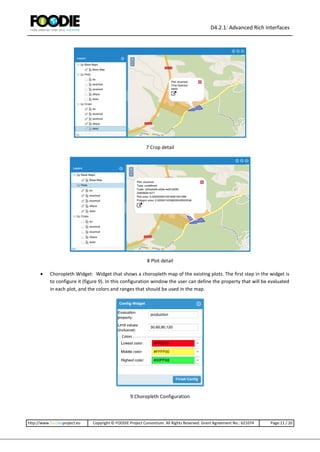
By clicking in each polygon the user can obtain information about the selected plot or crop. If the user clicks a plot the
the information that will be shown is name of the plot, type, identification code, area, and area of the specific polygon
in the case of a multipolygon plot (figure 8). If the user selects a crop, the information that will be shown is the plot
that owns the crop, and the species of the crop (figure 7) .
D4.2.1: Advanced Rich Interfaces
http://www.foodie-project.eu Copyright © FOODIE Project Consortium. All Rights Reserved. Grant Agreement No.: 621074 Page:11 / 20
7 Crop detail
8 Plot detail
 Choropleth Widget: Widget that shows a choropleth map of the existing plots. The first step in the widget is
to configure it (figure 9). In this configuration window the user can define the property that will be evaluated
in each plot, and the colors and ranges that should be used in the map.
9 Choropleth Configuration
D4.2.1: Advanced Rich Interfaces
http://www.foodie-project.eu Copyright © FOODIE Project Consortium. All Rights Reserved. Grant Agreement No.: 621074 Page:12 / 20
Once the widget is configured a map will be shown with each plot represented by the corresponding color. In the left
side, a legend will be shown explaining de meanings of each color (figure 10)
10 Choropleth Widget view
Widget configuration
Each time a widget is added to the dashboard, a configuration window will ask the user about some parameters that
must be fulfilled before render the widget. The first configuration (figure 11) asks the user about the title of the widg-
et, and the kind of input that it will use.
11 First widget config window
Depending on the type of input selected, a second window will be shown. At this time, there are only window for the
case of Web Service input, and the case of Event Input. If the user chooses Web Service input, a window asking for the
URL of the web service and the root property of the response will be shown (figure 12).
D4.2.1: Advanced Rich Interfaces
http://www.foodie-project.eu Copyright © FOODIE Project Consortium. All Rights Reserved. Grant Agreement No.: 621074 Page:13 / 20
12 Web service config window
If the user chooses Widget output a different window will be shown. (figure 13) This window will contain the infor-
mation about the outputs of the existing widgets, which types correspond with the input of the new widget. So if the
user adds a widget that accepts tabular data, all the outputs of existing widgets with type tabular will be shown in the
config window. Then the user will select which outputs want to link as inputs for the new widget.
13 Widget output config window
After these configurations, the widget can add a last config window to be shown asking for widget-specific configura-
tion. An example of this configuration ca be seen in the figure 9
D4.2.1: Advanced Rich Interfaces
http://www.foodie-project.eu Copyright © FOODIE Project Consortium. All Rights Reserved. Grant Agreement No.: 621074 Page:14 / 20
Widget development recommendations
Each Widget should have the following structures:
 The name of the Widget should be WidgetNameWidget (i.e. TableWidget, FormWidget, MapWidget, Time-
LineWidget). For the next steps, the words WidgetName will refer to WidgetNameWidget
 The base namespace for the classes of the widget must be Foodie.widgets.WidgetName (i.e. Food-
ie.widgets.TableWidget)
 The Widget must have a main view, which will be the view that will be use by the dashboard to show the
widget. This view must be named with the template WidgetNameMainView. Its fully qualified name should
be Foodie.widgets.WidgetName.view.main.WidgetNameMainView (i.e. Food-
ie.widgets.TableWidget.view.main.TableWidgetMainView).
 The XType of the main view must be WidgetName.
 The widget must implement a class with information about the widget. This class must be in the widget root
folder, and its name must use the template WidgetNameInfo (i.e. TableWidgetInfo), its qualified name must
be Foodie.widgets.WidgetName.WidgetNameInfo (i.e. Foodie.widgets.TableWidget.TableWidgetInfo). Its al-
ternateClassName must WidgetNameInfo. This class must be compliant with the following requirements:
o This info class must be a singleton class.
o This info class must have a property widgetName, which contains the human readable name of the
widget.
o This info class can contain a property named inputDataType, which will indicate to the system the
kinds of data that accept the widget as input. This property must be an array of strings.
 The different types of data have to be decided, but could be something like:
 record
 tabular
 data model related (plot, crop, treatment,…)
o This info class can contain a property named outputDataType, which will indicate to the system the
kinds of data that this widget will produce as an output. This is an array of objects that must have
the following structure:
 eventName: id of the event that will be used to output data from the widget
 dataType: type of data that will be sent through this event
 description: description of the event
 The widget can have an initial configuration view that will be shown just before the creation of the widget.
This view must be named with the template WidgetNameInitialConfigView. Its full qualified name should be
Foodie.widgets.WidgetName.view.config.WidgetNameInitialConfigView (i.e. Food-
ie.widgets.TableWidget.view.configTableWidgetInitialConfigView).
Also, if this initial configuration exists, there must be a view controller named WidgetNameInitialConfigView-
Controller. Its fully qualified name should be Food-
ie.widgets.WidgetName.view.config.WidgetNameInitialConfig ViewController (i.e. Food-
ie.widgets.TableWidget.view.config.TableWidgetInitial ConfigViewController). This view controller must have
implemented a class called getConfigData(), that return the configuration set in the configuration window.
The format of this object could be anyone, because it will be used internally by the widget.
D4.2.1: Advanced Rich Interfaces
http://www.foodie-project.eu Copyright © FOODIE Project Consortium. All Rights Reserved. Grant Agreement No.: 621074 Page:15 / 20
 The dashboard will set some properties in the widget main view that will help the widget to integrate into the
dashboard. This properties are the following:
o widgetType: xtype of the widget.
o widgetInput: object containing the configuration of the input. The structure of this object will be the
following:
 type: type of the input. Can be “ws” (web service), “event”, “file” or “no”, if there is no in-
put.
 data: the input data. It depends of the type.
 WS
o urlWs: web service URL.
o root: root property in the json response.
 Event
o events: array with the events to subscribe. Each event should have the
following properties.
 eventId: id of the event
 eventType: type of the data served by the event
 widgetId: widget that will fire the event
 File: structure to be decided.
o widgetConfig: object containing the configuration of the widget. The widget developer decides the
structure of this object.
So, the basic folder structure for a widget will be the following:
- WidgetNameWidget
o WidgetNameWidgetInfo.js
o view
 WidgetNameMainView.js
 WidgetNameInitialConfigView.js (optional)
 WidgetNameInitialConfigViewController (optional, but mandatory if the configuration view
exists)
This structure defines the minimal requirements that the dashboard needs to be able to “understand” the widget.
Then, the widget developer could use every model, store, controller, view controller and view model that he would
need.
Native android application
Developed to implement the previous visualizations in native, usable mobile application, it also stands as a showcase
for the Spanish pilot showing how exploit FOODIE API to apply make use of visualizations in mobile devices.
Implementation
The application has been developed using the Android 5.0 Lollipop in order to cover natively a wide range of mobile
devices, providing the user with a better experience when navigating the visualizations. The functionalities have been
decided along with the Spanish pilot stakeholder and SERESCO.
D4.2.1: Advanced Rich Interfaces
http://www.foodie-project.eu Copyright © FOODIE Project Consortium. All Rights Reserved. Grant Agreement No.: 621074 Page:16 / 20
4 Main menu
The features implemented in the application are:
 Annotations visualization. List of annotations and info about them: attachments, plot, supervisor, description.
5 Annotations
D4.2.1: Advanced Rich Interfaces
http://www.foodie-project.eu Copyright © FOODIE Project Consortium. All Rights Reserved. Grant Agreement No.: 621074 Page:17 / 20
 Alerts visualization. List of alerts and info about them: supervisor, description and actions.
6 Alert details
D4.2.1: Advanced Rich Interfaces
http://www.foodie-project.eu Copyright © FOODIE Project Consortium. All Rights Reserved. Grant Agreement No.: 621074 Page:18 / 20
 Prunes visualizations. List of prunes and info about them: supervisor, description and plot.
7 Prune details
 Treatments and treatment plan. List of treatments and treatment details showing info like: supervisor, ma-
chine, liters and security info.
8 Treatment details
D4.2.1: Advanced Rich Interfaces
http://www.foodie-project.eu Copyright © FOODIE Project Consortium. All Rights Reserved. Grant Agreement No.: 621074 Page:19 / 20
It also shows the treatment plans info: Date, description, product list and quantities, and ID.
9 Treatment plan details.
D4.2.1: Advanced Rich Interfaces
http://www.foodie-project.eu Copyright © FOODIE Project Consortium. All Rights Reserved. Grant Agreement No.: 621074 Page:20 / 20
References
References
01 http://www.sencha.com/products/extjs/
Table 2: References

D4.2.1 Advanced rich interfaces

  • 1.
    This project ispartially funded under the ICT Policy Support Programme (ICT PSP) as part of the Competitiveness and Innovation Framework Programme by the European Commission under grant agreement no. 621074 COMPETITIVINESS AND INNOVATION FRAMEWORK PROGRAMME CIP-ICT-PSP-2013-7 Pilot Type B WP4 – Data analysis, modeling and synthesis D4.2.1: Advanced Rich Interfaces Deliverable Lead: CTIC Deliverable due date: 28/02/2015 Actual submission date: 08/04/2015 Version: 1.0
  • 2.
    D4.2.1: Advanced RichInterfaces http://www.foodie-project.eu Copyright © FOODIE Project Consortium. All Rights Reserved. Grant Agreement No.: 621074 Page:2 / 20 Document Control Page Title D4.2.1 Advanced Rich Interfaces Creator Alfonso Noriega (CTIC) Description This document introduces the first prototypes related to the Advanced Rich Interfaces Publisher FOODIE Consortium Contributors Creation date 27/02/2015 Type Text Language en-GB Rights copyright “FOODIE Consortium” Audience internal public restricted Review status Draft WP leader accepted Technical Manager accepted Coordinator accepted Action requested to be revised by Partners for approval by the WP leader for approval by the Technical Committee for approval by the Project Coordinator Requested deadline
  • 3.
    D4.2.1: Advanced RichInterfaces http://www.foodie-project.eu Copyright © FOODIE Project Consortium. All Rights Reserved. Grant Agreement No.: 621074 Page:3 / 20 STATEMENT FOR OPEN DOCUMENTS (c) 2015 FOODIE Consortium The FOODIE Consortium (http://www.foodie-project.eu) grants third parties the right to use and dis- tribute all or parts of this document, provided that the FOODIE project and the document are properly referenced. THIS DOCUMENT IS PROVIDED BY THE COPYRIGHT HOLDERS AND CONTRIBUTORS "AS IS" AND ANY EXPRESS OR IMPLIED WARRANTIES, INCLUDING, BUT NOT LIMITED TO, THE IMPLIED WARRANTIES OF MERCHANTABILITY AND FITNESS FOR A PARTICULAR PURPOSE ARE DISCLAIMED. EXCEPT WHAT SET FORTH BY MANDATORY PROVISIONS OF LAW IN NO EVENT SHALL THE COPYRIGHT OWNER OR CONTRIBUTORS BE LIABLE FOR ANY DIRECT, INDIRECT, INCIDENTAL, SPECIAL, EXEMPLARY, OR CONSEQUENTIAL DAMAGES (INCLUDING, BUT NOT LIMITED TO, PROCUREMENT OF SUBSTITUTE GOODS OR SERVICES; LOSS OF USE, DATA, OR PROFITS; OR BUSINESS INTERRUPTION) HOWEVER CAUSED AND ON ANY THEORY OF LIABILITY, WHETHER IN CONTRACT, STRICT LIABILITY, OR TORT (INCLUDING NEGLIGENCE OR OTHERWISE) ARISING IN ANY WAY OUT OF THE USE OF THIS DOCUMENT, EVEN IF ADVISED OF THE POSSIBILITY OF SUCH DAMAGE. About the project FOODIE project aims at creating a platform hub on the cloud where spatial and non-spatial data related to agricultural sector is available for agri-food stakeholders groups and interoperable. It will offer: an infrastructure for the building of an interacting and collaborative network; the integration of existing open datasets related to agriculture; data publication and data linking of external agriculture data sources, providing specific and high- value applications and services for the support of planning and decision-making processes. FOODIE project is addressed to four basic groups of users: a) stakeholders from the agriculture sector as end- users of final applications, b) public sector for communication with farmers about taxation, subsidies and regulation, c) researchers for large scale experimentation on real data and d) ICT companies for the development of new applications for agriculture and food sector, mainly using implemented tools FOODIE specifically works on three pilots:  Pilot 1: Precision Viticulture (Spain) will focus on the appropriate management of the inherent variability of crops,  Pilot 2: Open Data for Strategic and Tactical Planning (Czech Republic) will focus on improving future management of agricultural companies (farms) by introducing new tools and management methods,  Pilot 3: Technology allows integration of logistics via service providers and farm management including traceability (Germany). Contact information Miguel Angel Esbrí Project Coordinator Atos Spain, Madrid, Spain E-mail: miguel.esbri@atos.net URL: http://www.foodie-project.eu Twitter: https://twitter.com/FOODIE_Project
  • 4.
    D4.2.1: Advanced RichInterfaces http://www.foodie-project.eu Copyright © FOODIE Project Consortium. All Rights Reserved. Grant Agreement No.: 621074 Page:4 / 20 Glossary The glossary of terms used in this deliverable can be found in the public document “FOODIE_Glossary.pdf” available at: http://www.foodie-project.eu
  • 5.
    D4.2.1: Advanced RichInterfaces http://www.foodie-project.eu Copyright © FOODIE Project Consortium. All Rights Reserved. Grant Agreement No.: 621074 Page:5 / 20 Abbreviations and Acronyms Abbreviation / Acronym Description API Application Programming Interface CPU Central Processing Unit DBA Database Administrator DBaaS Database as a Service DDD Domain-Driven Design DNS Domain Name System GTM Global Transaction Manager HA High Availability HDD Hard Disk Drive HTTP Hypertext Transfer Protocol IaaS Infrastructure as a Service IDE Integrated Development Environment JAR Java ARchive MPP Massive Parallel Processing OS Operating System POM Project Object Model RAM Random Access Memory RDBMS Relational Database Management System RDF Resource Description Framework SLA Service Level Agreement SQL Structured Query Language TCP Transmission Control Protocol TDD Test – Driven Development VM Virtual Machine API Application Programming Interface Table 1: Abbreviations and Acronyms
  • 6.
    D4.2.1: Advanced RichInterfaces http://www.foodie-project.eu Copyright © FOODIE Project Consortium. All Rights Reserved. Grant Agreement No.: 621074 Page:6 / 20 Executive Summary This document introduces the first prototypes of Advanced Rich Interfaces.
  • 7.
    D4.2.1: Advanced RichInterfaces http://www.foodie-project.eu Copyright © FOODIE Project Consortium. All Rights Reserved. Grant Agreement No.: 621074 Page:7 / 20 Library overview The Advanced Rich Interfaces aim to provide the end user with the means to exploit data on an understandable and user-friendly oriented way. To fulfil this task the idea is to provide an environment, based on FOODIE services, already populated with general visualizations in which the creation and integration of new forms of data presentation for a specific scenario will be reachable for third parties. In order to reach this functionality, two approaches will be taken:  The development of a web client dashboard, able to be configured to fit the end user needs and providing the means to easily develop and integrate new visualization widgets more specific for a given use case.  The development of a native android application, working both, as mobile visualization tool and as a demon- strator on how to implement all the generic widget visualizations in a portable device and how to make use of the FOODIE services. Visualization Widgets and dashboard The generic visualization dashboard stands with the idea of providing a tool to enable, given a specific use case, the configuration of a set of visualizations fitting the exact needs of the end user. To support this target a dashboard and a set of generic visualizations has been developed, all together being capable of defining which widgets are going to be deployed and how they are connected between them. Those end user needs may not be accomplished by generic visualizations, in some cases the requirement of specific widgets could arise. For those scenarios, the dashboard architecture provides a specification on how to develop ad- hoc visualizations which will be easily integrated in the dashboard. Implementation The visualization widgets and dashboard are being developed using ExtJS5[1] . The dashboard provides:  Possibility to select widgets to be shown on the visualization space.  Input and specific configuration for each widget.  Change the display position and size of the widgets.  Add new widgets developed by others and integrate them in the dashboard. The dashboard will be packaged as a WAR file to its future deployment in any different server. For the Foodie project it will be deployed on JBoss web server and will be available at: http://foodie- vm9.man.poznan.pl/FoodieVisualization/ Visualization widgets There are already a set of widgets working which have been developed under the needs of the Spanish pilot Terras Gauda. Those widgets are:  Treatments: Widget to show a list of treatments (figure 1) and details of each of them (figure2). For each treatment there are information about used product, worker, machine, quantity, treatment plan, plot, status and date.
  • 8.
    D4.2.1: Advanced RichInterfaces http://www.foodie-project.eu Copyright © FOODIE Project Consortium. All Rights Reserved. Grant Agreement No.: 621074 Page:8 / 20 1 Treatment list widget In the detailed view more extensive information can be found for a selected Item. 2 Treatment detail  Treatment plans: Widget to show a list of existing treatment plans (figure 3) and details about each of them (figure 4). For each treatment there will be information about the date, type of the treatment, products used in the treatment and observations.
  • 9.
    D4.2.1: Advanced RichInterfaces http://www.foodie-project.eu Copyright © FOODIE Project Consortium. All Rights Reserved. Grant Agreement No.: 621074 Page:9 / 20 3 Treatment plan visualization In the detail view there are more information about the selected treatment plan of the list. In this detailed view the treatment plan can be edited. 4 Treatment plan detail  Plot&Crops: Widget that shows a map with the polygons representing the available plots (figure 5) and the crops of each plot (figure 6).
  • 10.
    D4.2.1: Advanced RichInterfaces http://www.foodie-project.eu Copyright © FOODIE Project Consortium. All Rights Reserved. Grant Agreement No.: 621074 Page:10 / 20 5 Crops visualization 6 Plots visualization By clicking in each polygon the user can obtain information about the selected plot or crop. If the user clicks a plot the the information that will be shown is name of the plot, type, identification code, area, and area of the specific polygon in the case of a multipolygon plot (figure 8). If the user selects a crop, the information that will be shown is the plot that owns the crop, and the species of the crop (figure 7) .
  • 11.
    D4.2.1: Advanced RichInterfaces http://www.foodie-project.eu Copyright © FOODIE Project Consortium. All Rights Reserved. Grant Agreement No.: 621074 Page:11 / 20 7 Crop detail 8 Plot detail  Choropleth Widget: Widget that shows a choropleth map of the existing plots. The first step in the widget is to configure it (figure 9). In this configuration window the user can define the property that will be evaluated in each plot, and the colors and ranges that should be used in the map. 9 Choropleth Configuration
  • 12.
    D4.2.1: Advanced RichInterfaces http://www.foodie-project.eu Copyright © FOODIE Project Consortium. All Rights Reserved. Grant Agreement No.: 621074 Page:12 / 20 Once the widget is configured a map will be shown with each plot represented by the corresponding color. In the left side, a legend will be shown explaining de meanings of each color (figure 10) 10 Choropleth Widget view Widget configuration Each time a widget is added to the dashboard, a configuration window will ask the user about some parameters that must be fulfilled before render the widget. The first configuration (figure 11) asks the user about the title of the widg- et, and the kind of input that it will use. 11 First widget config window Depending on the type of input selected, a second window will be shown. At this time, there are only window for the case of Web Service input, and the case of Event Input. If the user chooses Web Service input, a window asking for the URL of the web service and the root property of the response will be shown (figure 12).
  • 13.
    D4.2.1: Advanced RichInterfaces http://www.foodie-project.eu Copyright © FOODIE Project Consortium. All Rights Reserved. Grant Agreement No.: 621074 Page:13 / 20 12 Web service config window If the user chooses Widget output a different window will be shown. (figure 13) This window will contain the infor- mation about the outputs of the existing widgets, which types correspond with the input of the new widget. So if the user adds a widget that accepts tabular data, all the outputs of existing widgets with type tabular will be shown in the config window. Then the user will select which outputs want to link as inputs for the new widget. 13 Widget output config window After these configurations, the widget can add a last config window to be shown asking for widget-specific configura- tion. An example of this configuration ca be seen in the figure 9
  • 14.
    D4.2.1: Advanced RichInterfaces http://www.foodie-project.eu Copyright © FOODIE Project Consortium. All Rights Reserved. Grant Agreement No.: 621074 Page:14 / 20 Widget development recommendations Each Widget should have the following structures:  The name of the Widget should be WidgetNameWidget (i.e. TableWidget, FormWidget, MapWidget, Time- LineWidget). For the next steps, the words WidgetName will refer to WidgetNameWidget  The base namespace for the classes of the widget must be Foodie.widgets.WidgetName (i.e. Food- ie.widgets.TableWidget)  The Widget must have a main view, which will be the view that will be use by the dashboard to show the widget. This view must be named with the template WidgetNameMainView. Its fully qualified name should be Foodie.widgets.WidgetName.view.main.WidgetNameMainView (i.e. Food- ie.widgets.TableWidget.view.main.TableWidgetMainView).  The XType of the main view must be WidgetName.  The widget must implement a class with information about the widget. This class must be in the widget root folder, and its name must use the template WidgetNameInfo (i.e. TableWidgetInfo), its qualified name must be Foodie.widgets.WidgetName.WidgetNameInfo (i.e. Foodie.widgets.TableWidget.TableWidgetInfo). Its al- ternateClassName must WidgetNameInfo. This class must be compliant with the following requirements: o This info class must be a singleton class. o This info class must have a property widgetName, which contains the human readable name of the widget. o This info class can contain a property named inputDataType, which will indicate to the system the kinds of data that accept the widget as input. This property must be an array of strings.  The different types of data have to be decided, but could be something like:  record  tabular  data model related (plot, crop, treatment,…) o This info class can contain a property named outputDataType, which will indicate to the system the kinds of data that this widget will produce as an output. This is an array of objects that must have the following structure:  eventName: id of the event that will be used to output data from the widget  dataType: type of data that will be sent through this event  description: description of the event  The widget can have an initial configuration view that will be shown just before the creation of the widget. This view must be named with the template WidgetNameInitialConfigView. Its full qualified name should be Foodie.widgets.WidgetName.view.config.WidgetNameInitialConfigView (i.e. Food- ie.widgets.TableWidget.view.configTableWidgetInitialConfigView). Also, if this initial configuration exists, there must be a view controller named WidgetNameInitialConfigView- Controller. Its fully qualified name should be Food- ie.widgets.WidgetName.view.config.WidgetNameInitialConfig ViewController (i.e. Food- ie.widgets.TableWidget.view.config.TableWidgetInitial ConfigViewController). This view controller must have implemented a class called getConfigData(), that return the configuration set in the configuration window. The format of this object could be anyone, because it will be used internally by the widget.
  • 15.
    D4.2.1: Advanced RichInterfaces http://www.foodie-project.eu Copyright © FOODIE Project Consortium. All Rights Reserved. Grant Agreement No.: 621074 Page:15 / 20  The dashboard will set some properties in the widget main view that will help the widget to integrate into the dashboard. This properties are the following: o widgetType: xtype of the widget. o widgetInput: object containing the configuration of the input. The structure of this object will be the following:  type: type of the input. Can be “ws” (web service), “event”, “file” or “no”, if there is no in- put.  data: the input data. It depends of the type.  WS o urlWs: web service URL. o root: root property in the json response.  Event o events: array with the events to subscribe. Each event should have the following properties.  eventId: id of the event  eventType: type of the data served by the event  widgetId: widget that will fire the event  File: structure to be decided. o widgetConfig: object containing the configuration of the widget. The widget developer decides the structure of this object. So, the basic folder structure for a widget will be the following: - WidgetNameWidget o WidgetNameWidgetInfo.js o view  WidgetNameMainView.js  WidgetNameInitialConfigView.js (optional)  WidgetNameInitialConfigViewController (optional, but mandatory if the configuration view exists) This structure defines the minimal requirements that the dashboard needs to be able to “understand” the widget. Then, the widget developer could use every model, store, controller, view controller and view model that he would need. Native android application Developed to implement the previous visualizations in native, usable mobile application, it also stands as a showcase for the Spanish pilot showing how exploit FOODIE API to apply make use of visualizations in mobile devices. Implementation The application has been developed using the Android 5.0 Lollipop in order to cover natively a wide range of mobile devices, providing the user with a better experience when navigating the visualizations. The functionalities have been decided along with the Spanish pilot stakeholder and SERESCO.
  • 16.
    D4.2.1: Advanced RichInterfaces http://www.foodie-project.eu Copyright © FOODIE Project Consortium. All Rights Reserved. Grant Agreement No.: 621074 Page:16 / 20 4 Main menu The features implemented in the application are:  Annotations visualization. List of annotations and info about them: attachments, plot, supervisor, description. 5 Annotations
  • 17.
    D4.2.1: Advanced RichInterfaces http://www.foodie-project.eu Copyright © FOODIE Project Consortium. All Rights Reserved. Grant Agreement No.: 621074 Page:17 / 20  Alerts visualization. List of alerts and info about them: supervisor, description and actions. 6 Alert details
  • 18.
    D4.2.1: Advanced RichInterfaces http://www.foodie-project.eu Copyright © FOODIE Project Consortium. All Rights Reserved. Grant Agreement No.: 621074 Page:18 / 20  Prunes visualizations. List of prunes and info about them: supervisor, description and plot. 7 Prune details  Treatments and treatment plan. List of treatments and treatment details showing info like: supervisor, ma- chine, liters and security info. 8 Treatment details
  • 19.
    D4.2.1: Advanced RichInterfaces http://www.foodie-project.eu Copyright © FOODIE Project Consortium. All Rights Reserved. Grant Agreement No.: 621074 Page:19 / 20 It also shows the treatment plans info: Date, description, product list and quantities, and ID. 9 Treatment plan details.
  • 20.
    D4.2.1: Advanced RichInterfaces http://www.foodie-project.eu Copyright © FOODIE Project Consortium. All Rights Reserved. Grant Agreement No.: 621074 Page:20 / 20 References References 01 http://www.sencha.com/products/extjs/ Table 2: References