CSS
Cascading Style Sheets
CSS in HTML PAGES
• In-Line
• Tag Style
<html>
<head>
<title>Example</title>
</head>
<body style="background-color: #FF0000;">
<p>This is a red page</p>
</body>
</html>
<html>
<head>
<title>Example</title>
<style type="text/css"> body {background-color: #FF0000;} </style>
</head>
<body>
<p>This is a red page</p>
</body>
</html>
CSS in HTML PAGES
• Link
Style.css:
<html>
<head>
<title>My document</title>
<link rel="stylesheet" type="text/css" href="css/style.css" />
</head>
<body>
<p>This is a red page</p>
</body>
</html>
body {
background-color: #FF0000;
}
CSS Properties
body {
background-color: #FFCC66;
background-image: url("butterfly.gif");
background-repeat: no-repeat;
background-position: right bottom;
}
h1 {
background: #FFCC66 url("butterfly.gif") no-repeat right bottom;
}
p {
color: #990000;
font-style: italic;
font-weight: bold;
font-size: 30px;
font-family: arial, sans-serif;
}
h1 {
text-align: center;
}
p {
text-align: justify;
text-decoration: underline;
text-transform: uppercase;
}
CSS Selectors
Universal:
Type:
Class
* {
padding: 0;
margin: 0;
}
h1 {
font-size: 12px;
}
.header {
height: 200px;
}
<h1 class=“header”>This is text</h1>
CSS Selectors
Identification:
Attribute:
#header {
height: 200px;
}
<h1 id=“header”>This is text</h1>
input[type="submit"] {
background: #0f0;
}
<input type="submit" value=“Send to server"/>
<input type=“button" value=“Press me!"/>
input[type*="submit"] {
background: #0f0;
}
CSS PseudoClass
a:link {
color: blue;
}
a:visited {
color: red;
}
a:hover {
color: orange;
font-style: italic;
}
a:active {
color: green;
}
input:focus {
color: #aabbcc;
}
p:first-child {
color: grey;
}
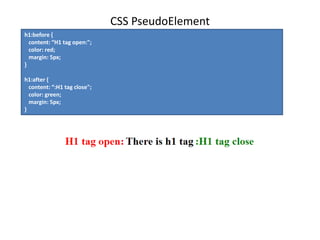
CSS PseudoElement
h1:before {
content: “H1 tag open:";
color: red;
margin: 5px;
}
h1:after {
content: “:H1 tag close";
color: green;
margin: 5px;
}
CSS Selector Combination
Descendant selectors
p span {
color: #333;
}
<p>Черный текст <span>серый текст</span> черный текст </p>
<span>Черный текст</span>
<p>Черный текст <em>Черный текст <span>серый текст</span></em> черный текст</p>
#header .menu div {
text-align: center;
}
CSS Selector Combination
Child selectors
div > span {
color: #aaa;
}
<div>Этот текст будет черного цвета.
<span>А этот серого, ведь этот span — дочерний элемент для div.</span>
<p>Тут опять черный текст. <span>И этот текст тоже черный, так как этот span не дочерний
для div. Его непосредственный родитель — тег p.</span>
</p>
</div>
CSS Selector Combination
Adjacent sibling selectors
h1 + span {
font-weight: bold;
}
<h1>Very useful text</h1>
<span>This text is bold</span>
<p>Some other text</p>
<span>This text is NOT bold</span>
CSS Selector Combination
Grouping selector
h1, h2, h3 {
font-weight: bold;
}
div span, #header {
font-size: 12px
}
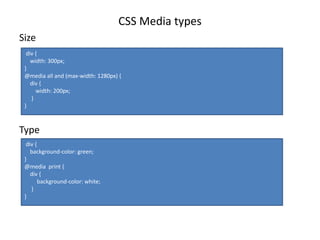
CSS Media types
Size
Type
div {
width: 300px;
}
@media all and (max-width: 1280px) {
div {
width: 200px;
}
}
div {
background-color: green;
}
@media print {
div {
background-color: white;
}
}
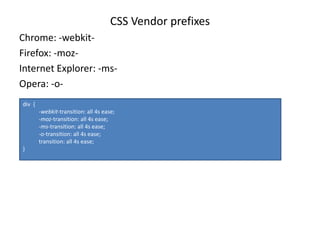
CSS Vendor prefixes
Chrome: -webkit-
Firefox: -moz-
Internet Explorer: -ms-
Opera: -o-
div {
-webkit-transition: all 4s ease;
-moz-transition: all 4s ease;
-ms-transition: all 4s ease;
-o-transition: all 4s ease;
transition: all 4s ease;
}
CSS Measurements
Unit Description Example
% Defines a measurement as a percentage relative to another value, typically an
enclosing element.
p {
font-size: 16pt;
line-height: 125%;}
cm Defines a measurement in centimeters. div {
margin-bottom: 2cm;}
em A relative measurement for the height of a font in em spaces. Because an em unit is
equivalent to the size of a given font, if you assign a font to 12pt, each "em" unit would
be 12pt; thus, 2em would be 24pt.
p {
letter-spacing: 7em;
}
ex This value defines a measurement relative to a font's x-height. The x-height is
determined by the height of the font's lowercase letter x.
p {
font-size: 24pt;
line-height: 3ex;
}
in Defines a measurement in inches. p {word-spacing: .15in;}
mm Defines a measurement in millimeters. p {
word-spacing: 15mm;}
pc Defines a measurement in picas. A pica is equivalent to 12 points; thus, there are 6
picas per inch.
p {
font-size: 20pc;
}
pt Defines a measurement in points. A point is defined as 1/72nd of an inch. body {
font-size: 18pt;}
px Defines a measurement in screen pixels. p {padding: 25px;}
CSS HomeTask
Text

Css1

  • 1.
  • 2.
    CSS in HTMLPAGES • In-Line • Tag Style <html> <head> <title>Example</title> </head> <body style="background-color: #FF0000;"> <p>This is a red page</p> </body> </html> <html> <head> <title>Example</title> <style type="text/css"> body {background-color: #FF0000;} </style> </head> <body> <p>This is a red page</p> </body> </html>
  • 3.
    CSS in HTMLPAGES • Link Style.css: <html> <head> <title>My document</title> <link rel="stylesheet" type="text/css" href="css/style.css" /> </head> <body> <p>This is a red page</p> </body> </html> body { background-color: #FF0000; }
  • 4.
    CSS Properties body { background-color:#FFCC66; background-image: url("butterfly.gif"); background-repeat: no-repeat; background-position: right bottom; } h1 { background: #FFCC66 url("butterfly.gif") no-repeat right bottom; } p { color: #990000; font-style: italic; font-weight: bold; font-size: 30px; font-family: arial, sans-serif; } h1 { text-align: center; } p { text-align: justify; text-decoration: underline; text-transform: uppercase; }
  • 5.
    CSS Selectors Universal: Type: Class * { padding:0; margin: 0; } h1 { font-size: 12px; } .header { height: 200px; } <h1 class=“header”>This is text</h1>
  • 6.
    CSS Selectors Identification: Attribute: #header { height:200px; } <h1 id=“header”>This is text</h1> input[type="submit"] { background: #0f0; } <input type="submit" value=“Send to server"/> <input type=“button" value=“Press me!"/> input[type*="submit"] { background: #0f0; }
  • 7.
    CSS PseudoClass a:link { color:blue; } a:visited { color: red; } a:hover { color: orange; font-style: italic; } a:active { color: green; } input:focus { color: #aabbcc; } p:first-child { color: grey; }
  • 8.
    CSS PseudoElement h1:before { content:“H1 tag open:"; color: red; margin: 5px; } h1:after { content: “:H1 tag close"; color: green; margin: 5px; }
  • 9.
    CSS Selector Combination Descendantselectors p span { color: #333; } <p>Черный текст <span>серый текст</span> черный текст </p> <span>Черный текст</span> <p>Черный текст <em>Черный текст <span>серый текст</span></em> черный текст</p> #header .menu div { text-align: center; }
  • 10.
    CSS Selector Combination Childselectors div > span { color: #aaa; } <div>Этот текст будет черного цвета. <span>А этот серого, ведь этот span — дочерний элемент для div.</span> <p>Тут опять черный текст. <span>И этот текст тоже черный, так как этот span не дочерний для div. Его непосредственный родитель — тег p.</span> </p> </div>
  • 11.
    CSS Selector Combination Adjacentsibling selectors h1 + span { font-weight: bold; } <h1>Very useful text</h1> <span>This text is bold</span> <p>Some other text</p> <span>This text is NOT bold</span>
  • 12.
    CSS Selector Combination Groupingselector h1, h2, h3 { font-weight: bold; } div span, #header { font-size: 12px }
  • 13.
    CSS Media types Size Type div{ width: 300px; } @media all and (max-width: 1280px) { div { width: 200px; } } div { background-color: green; } @media print { div { background-color: white; } }
  • 14.
    CSS Vendor prefixes Chrome:-webkit- Firefox: -moz- Internet Explorer: -ms- Opera: -o- div { -webkit-transition: all 4s ease; -moz-transition: all 4s ease; -ms-transition: all 4s ease; -o-transition: all 4s ease; transition: all 4s ease; }
  • 15.
    CSS Measurements Unit DescriptionExample % Defines a measurement as a percentage relative to another value, typically an enclosing element. p { font-size: 16pt; line-height: 125%;} cm Defines a measurement in centimeters. div { margin-bottom: 2cm;} em A relative measurement for the height of a font in em spaces. Because an em unit is equivalent to the size of a given font, if you assign a font to 12pt, each "em" unit would be 12pt; thus, 2em would be 24pt. p { letter-spacing: 7em; } ex This value defines a measurement relative to a font's x-height. The x-height is determined by the height of the font's lowercase letter x. p { font-size: 24pt; line-height: 3ex; } in Defines a measurement in inches. p {word-spacing: .15in;} mm Defines a measurement in millimeters. p { word-spacing: 15mm;} pc Defines a measurement in picas. A pica is equivalent to 12 points; thus, there are 6 picas per inch. p { font-size: 20pc; } pt Defines a measurement in points. A point is defined as 1/72nd of an inch. body { font-size: 18pt;} px Defines a measurement in screen pixels. p {padding: 25px;}
  • 16.