Csharp.pptx with notes for the purpose of education
1.
C# Introduction
•C# isa modern, general-purpose, object-oriented
programming language developed by Microsoft and
approved by European Computer Manufacturers
Association (ECMA) and International Standards
Organization (ISO).
•C# was developed by Anders Hejlsberg and his team during
the development of .Net Framework.
•C# is designed for Common Language Infrastructure (CLI),
which consists of the executable code and runtime
environment that allows use of various high-level languages
on different computer platforms and architectures.
2.
What is C#?
C#is pronounced "C-Sharp".
It is an object-oriented programming language
created by Microsoft that runs on the .NET
Framework.
C# has roots from the C family, and the language is
close to other popular languages like C++ and Java.
The first version was released in year 2002.
The latest version, C# 13, was released in
November 2024.
Why Use C#?
•Itis one of the most popular programming languages
in the world
•It is easy to learn and simple to use
•It has huge community support
•C# is an object-oriented language which gives a clear
structure to programs and allows code to be reused,
lowering development costs
•As C# is close to C, C++ and Java, it makes it easy for
programmers to switch to C# or vice versa
5.
The following reasonsmake C# a widely used
professional language −
•It is a modern, general-purpose programming language
•It is object oriented.
•It is component oriented.
•It is easy to learn.
•It is a structured language.
•It produces efficient programs.
•It can be compiled on a variety of computer platforms.
•It is a part of .Net Framework.
6.
Key Characteristics ofC#
•C# comes with several key features that make it a
powerful and reliable programming language:
•Object-Oriented: C# follows OOP principles, allowing
the use of classes, inheritance, polymorphism, and
encapsulation.
•Type-Safe: C# is a type-safe programming language that
ensures secure coding by preventing unsafe memory
operations.
•Cross-Platform: C# is a cross-platform programming
language that means C# works on Windows, Linux, and
macOS using .NET Core.
7.
•Scalable & Maintainable:C# is well-suited for
developing large and complex applications.
•Rich Library Support: C# come with many
built-in libraries for UI, database handling, and
networking.
•High Performance: C# compiles to
Intermediate Language (IL) and runs efficiently
on the Common Language Runtime (CLR).
8.
following is thelist of few important features of C#
•Boolean Conditions
•Automatic Garbage Collection
•Standard Library
•Assembly Versioning
•Properties and Events
•Delegates and Events Management
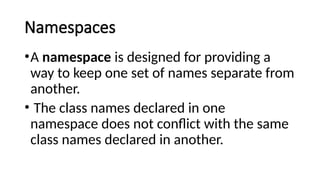
Namespaces
•A namespace isdesigned for providing a
way to keep one set of names separate from
another.
• The class names declared in one
namespace does not conflict with the same
class names declared in another.
11.
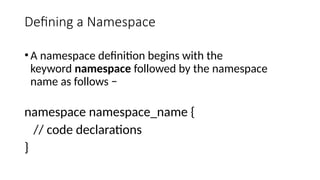
Defining a Namespace
•Anamespace definition begins with the
keyword namespace followed by the namespace
name as follows −
namespace namespace_name {
// code declarations
}
using System;
namespace first_space{
class namespace_cl {
public void func() {
Console.WriteLine("Inside
first_space");
}
}
}
namespace second_space {
class namespace_cl {
public void func() {
Console.WriteLine("Inside
second_space");
}
}
}
class TestClass {
static void Main(string[] args) {
first_space.namespace_cl fc =
new first_space.namespace_cl();
second_space.namespace_cl sc =
new second_space.namespace_cl();
fc.func();
sc.func();
Console.ReadKey();
}
}
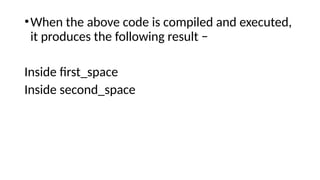
14.
•When the abovecode is compiled and executed,
it produces the following result −
Inside first_space
Inside second_space
15.
Integrated Development Environment(IDE)
for C#
Microsoft provides the following
development tools for C# programming −
•Visual Studio 2010 (VS)
•Visual C# 2010 Express (VCE)
•Visual Web Developer
16.
First C# Program
Heresa simple C# program to display "Hello, World!":
using System;
namespace HelloWorld
{
class Program
{
static void Main(string[] args)
{
Console.WriteLine("Hello World!");
}
}
}
17.
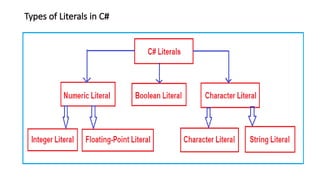
Literals in C#
•TheLiterals in C# are the fixed values (or hard-
coded values) given to your variable and these
values cannot be modified during the execution
of the program.
•The fixed values are called Literals in C#.
•Literal is a value that is used by the variables.
•For example, int x = 100; Here x is a variable,
and 100 is literal.
![using System;
namespace first_space {
class namespace_cl {
public void func() {
Console.WriteLine("Inside
first_space");
}
}
}
namespace second_space {
class namespace_cl {
public void func() {
Console.WriteLine("Inside
second_space");
}
}
}
class TestClass {
static void Main(string[] args) {
first_space.namespace_cl fc =
new first_space.namespace_cl();
second_space.namespace_cl sc =
new second_space.namespace_cl();
fc.func();
sc.func();
Console.ReadKey();
}
}](https://image.slidesharecdn.com/csharp-251006140003-6360884c/85/Csharp-pptx-with-notes-for-the-purpose-of-education-13-320.jpg)
![First C# Program
Heres a simple C# program to display "Hello, World!":
using System;
namespace HelloWorld
{
class Program
{
static void Main(string[] args)
{
Console.WriteLine("Hello World!");
}
}
}](https://image.slidesharecdn.com/csharp-251006140003-6360884c/85/Csharp-pptx-with-notes-for-the-purpose-of-education-16-320.jpg)