CSC 369H1F, Fall 2012                                                                                                                                                       Lecture 1


                                                                                                                    Administrivia
                                       CSC 369H1F                                      • Instructor Contact:
                                                                                                • Email: demke@cs.toronto.edu
                                                                                                • Office: BA 5228
                                                                                                • Office Hours: Wed 2-3 p.m., Fri 10-11 a.m. (may change)
                                                                                       • Webpage:
                                      Operating Systems                                         • http://www.cdf.toronto.edu/~csc369h/fall/
                                           Fall 2012                                   • Calendar:
                                Professor Angela Demke Brown                                    • Check it carefully – some lectures may be in tutorial time!

                                            U of T                                     • Bboard:
                                                                                                • Will be linked from course webpage, not yet available
                                                                                       • Course Info Sheet (due dates, policies, etc.):
                                                                                                • Linked from course webpage


                                                                                       CSC369                                    2                              9/10/2012


                                   Course Overview                                                             Assignments (40%)
            • Objectives:                                                              • Code Reading component:
                     • To understand the role of the OS,                                        • Questions about the code we give you
                     • To become familiar with the major subsystems of a                        • Reinforce lecture concepts, familiarize you with the
                       modern OS, and the design principles and                                   code before you start writing
                       implementations behind them;                                    • Programming component
                     • To understand benefits and dangers of concurrency                        • Language for this course is C
            • How are we going to get there?                                                    • Correctness and performance considerations
                     • Lectures, textbook readings, handouts                           • Design Document component
                     • Tutorial sections (discussion, review, questions, etc.)                  • Think about what you need to build first
                     • Simulated OS development project (OS/161)                                • Tell us in plain English what you were thinking.
                                                                                                • Tell us how to find your code.

            CSC369                               3                         9/10/2012   CSC369                                    4                              9/10/2012
CSC 369H1F, Fall 2012                                                                                                                                           Lecture 1


                                        Workload                                                                Don’t Panic!
            • This course is very work-intensive                                      • Help is available in many forms
            • Lectures cover a lot of new concepts                                             • Your partner(s): Work together
                     • Many of these are very abstract
                     • Only way to really understand how it works is to try
                                                                                               • Lectures/tutorials: Ask questions!
                       doing it yourself                                                       • Office hours: My time dedicated specifically to
            • Assignments build on a realistic OS                                                helping you
                     • There is a lot of existing code given to you                            • Discussion board: Fast response!
                        • You should not expect to understand all of it
                                                                                               • Email: Longer turnaround time
                     • You should be comfortable with prereq material
                        • Unix tools (svn, debugger, scripts)                                  • Anonymous email: for feedback
                        • Computer organization, memory model, etc.
                        • C programming (especially pointers!)

            CSC369                               5                        9/10/2012   CSC369                               6                        9/10/2012


                                      Don’t Copy!                                                                    Exams
            • Academic Dishonesty: Plagiarism and cheating                            • Midterm (20%)
                     • Very serious academic offences                                          • Thursday, Oct 25th, in tutorial time (end of Week 7)
                     • Please don’t. It’s painful for everyone.                                • Covers material up to end of Week 6
                     • Can discuss OS161, tools, concepts with your                   • Final (40%), 40% required to pass
                       classmates                                                              • Will be scheduled by Arts & Sciences
                     • Can discuss solutions to the assignments only with your                    • Will be cumulative
                       partner(s), the TA, or the instructor
                                                                                                  • I will be explicit about what you are responsible for
                        • there is a clear distinction between collaboration                        on the final
                          and cheating.
                                                                                                  • Lots of final exams from 369 are available for study
                        • Ask questions on the bboard, but don’t add details
                          about your solution


            CSC369                               7                        9/10/2012   CSC369                               8                        9/10/2012
CSC 369H1F, Fall 2012                                                                                                                                                             Lecture 1


                                      Course Content                                                                       Introduction
            • List of topics, in order:                                                        • Read Chapter 1
                        • Introduction (Today)                                                          • Some (much?) of this should be review
                        • Processes and Threads
                        • Concurrency and Synchronization                                      • What is an OS and why do I want one?
                        • CPU Scheduling                                                                • How does it relate to the other parts of a computer
                        • Memory Management                                                               system?
                        • File and I/O Systems                                                          • Review some computer organization and C concepts
                        • Security
                        • Deadlock                                                             • What are the major parts of an OS?


            CSC369                                    9                            9/10/2012   CSC369                                  10                             9/10/2012


                                       Roles of the OS                                                                   Goals of the OS
            • An OS is a resource allocator                                                    • Primary: convenience for the user
                     • allows the proper use of resources (hardware, software, data) in           • it must be easier to compute with the OS than without
                       the operation of the computer system                                         it
                     • provides an environment within which other programs can do
                       useful work                                                             • Secondary: efficient operation of the computer system
            • An OS is a control program
                     • controls the execution of user programs to prevent errors and           • The two goals are sometimes contradictory
                       improper use of the computer                                                     • Actually, often contradictory
                     • especially concerned with the operation and control of I/O                       • Which goal takes precedence depends on the purpose of the
                       devices                                                                            computer system


            CSC369                                    11                           9/10/2012   CSC369                                  12                             9/10/2012
CSC 369H1F, Fall 2012                                                                                                                                                                          Lecture 1


                             What Impacts OS Design?                                                         Overview of Computer System
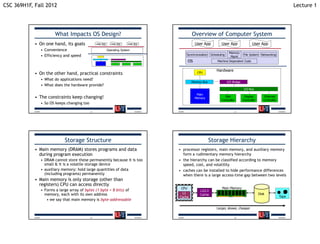
            • On one hand, its goals                   User App      User App   User App                       User App            User App                  User App
                     • Convenience                                Operating System
                                                                                                                                          Memory
                     • Efficiency and speed                                                               Synchronization   Scheduling                File System Networking
                                                                                                                                           Mgmt
                                                                                                          OS                    Machine Dependent Code


                                                                                                                                Hardware
            • On the other hand, practical constraints                                                           CPU

                     • What do applications need?
                                                                                                             Memory Bus                  I/O Bridge
                     • What does the hardware provide?
                                                                                                                                                       I/O Bus
                                                                                                                Main
            • The constraints keep changing!                                                                   Memory
                                                                                                                                     Disk              Display        Ethernet
                                                                                                                                   Controller         Controller      Controller
                     • So OS keeps changing too
            CSC369                                13                                 9/10/2012   CSC369                                         14                                 9/10/2012


                                  Storage Structure                                                                         Storage Hierarchy
            • Main memory (DRAM) stores programs and data                                        • processor registers, main memory, and auxiliary memory
              during program execution                                                             form a rudimentary memory hierarchy
                     • DRAM cannot store these permanently because it is too                     • the hierarchy can be classified according to memory
                       small & it is a volatile storage device                                     speed, cost, and volatility
                     • auxiliary memory: hold large quantities of data                           • caches can be installed to hide performance differences
                       (including programs) permanently                                            when there is a large access-time gap between two levels
            • Main memory is only storage (other than
              registers) CPU can access directly
                                                                                                   CPU                              Main Memory
                     • Forms a large array of bytes (1 byte = 8 bits) of                                           L2/L3
                       memory, each with its own address                                            L1             Cache                                           Disk
                                                                                                  Cache                                                                            Tape
                        • we say that main memory is byte-addressable

                                                                                                                                Larger, slower, cheaper

            CSC369                                15                                 9/10/2012   CSC369                                         16                                 9/10/2012
CSC 369H1F, Fall 2012                                                                                                                                                                                   Lecture 1


                               Hardware Support for OSs                                                                           Protection Domains
            •    Protection domains -> mode bit                                                        • Dual-mode operation: user mode and system mode (a.k.a
                                                                                                         supervisor mode, monitor mode, or privileged mode)
            •    Interrupts
                                                                                                                • Intel actually has 4 “rings” for protection
            •    Timers                                                                                • Add a mode bit to the hardware and designate some
            •    Memory Management unit                                                                  instructions as privileged instructions
                                                                                                                • Attempting to execute privileged instruction from user mode
            •    Other hardware                                                                                   causes protection fault  trap to OS
                                                                                                                • Protects the operating system from access by user programs,
                                                                                                                  and protects user programs from each other
                                                                                                       • What instructions/operations would you expect to be
                                                                                                         privileged?
                                                                                                                 Setting mode bit?                         Writing to device registers?
                                                                                                                 Disabling interrupts?                      Performing DMA?
                                                                                                                Enabling interrupts?                        Halting the CPU?

            CSC369                                              17                         9/10/2012   CSC369                                               18                              9/10/2012


                                                Interrupts                                                                                  Interrupts
            • An interrupt is a signal that causes the CPU to jump to a                                • An interrupt is a signal that causes the CPU to jump to a
              pre-defined instruction called the interrupt handler                                       pre-defined instruction called the interrupt handler
                     • May be caused by software or hardware                                                    • May be caused by software or hardware
                         CPU                                            1. OS fills in Interrupt                    CPU                                               4. CPU changes mode,
                           Fetch      Decode        Execute                Table (at boot time)                        Fetch      Decode        Execute                  disables interrupts
                                                                        2. CPU execution loop:                                                                        5. Interrupted PC value
                          IDTR         User         PC OldPC               fetch instruction at                       IDTR        Kernel        PC OldPC                 is saved
                                                                           PC, decode,                                                                                6. IDTR + interrupt
                                                                           execute... Forever                                                                            number is used to
                                      Handler for                       3. Interrupt occurs                                       Handler for                            set PC to start of
                          Interrupt


                                                                                                                      Interrupt
                                      Interrupt 6                                                                                 Interrupt 6
                           Vectors


                                                                                                                       Vectors
                                                                           (signal from                                                                                  interrupt handler
                                                                           hardware)                                                                                  7. Execution continues
                                                      Program


                                                                                                                                                  Program
                                                                                                                                                                         (saves additional
                                                        Code


                                                                                                                                                    Code
                                                                     Disk                                                                                         Disk   state as first step)
                       Main Memory                                                                                 Main Memory

            CSC369                                              19                         9/10/2012   CSC369                                               20                              9/10/2012
CSC 369H1F, Fall 2012                                                                                                                                                     Lecture 1


                                        Bootstrapping                                                            Operating System Startup
            • Hardware stores small program in non-volatile                                      • Machine starts in system mode, so kernel code
              memory                                                                               can execute immediately
                     • BIOS – Basic Input Output System                                          • OS initialization:
                     • Knows how to access simple hardware devices                                        • Initialize internal data structures
                        • Disk, keyboard, display                                                             • Machine dependent operations are typically done
                                                                                                                first
            • When power is first supplied, this program starts                                           • Create first process
              executing                                                                                   • Switch mode to user and start running first process
            • What does it do?                                                                            • Wait for something to happen
                                                                                                              • OS is entirely driven by external events


            CSC369                                     21                            9/10/2012   CSC369                              22                       9/10/2012


                                          Concurrency                                                                      Next time…
            • Every modern computer is a multiprocessor                                          • Read about processes & threads (Chapter 2.1-2.2)
                     • CPU and device controllers can execute concurrently, competing
                       for memory cycles
                     • A memory controller synchronizes access to shared memory                  • Assignment 1 will be out sometime tomorrow
                     • Hardware Interrupts allow device controllers to signal the CPU              (Tuesday, Sept. 11)
                       that some event has occurred (e.g. disk I/O complete, network                      • Refresh your memory of C, version control, and get
                       packet arrived, etc.)
                                                                                                            started with threads and OS/161 early (before all your
                         • Generated by a hardware device
                                                                                                            courses get busy)
                     • Software Interrupts are used to signal errors (e.g. division by zero)
                       or requests for OS service from a user program (a system call)                     • Should not take more than 6-8 hours to complete
                        • These types of interrupts are also called traps or exceptions                   • But start early so you can bring any questions to
                                                                                                            tutorial on Thursday!
             An Operating System is an event-driven program

            CSC369                                     23                            9/10/2012   CSC369                              24                       9/10/2012

CSC369 - Operating Systems - Lecture 1

  • 1.
    CSC 369H1F, Fall2012 Lecture 1 Administrivia CSC 369H1F • Instructor Contact: • Email: demke@cs.toronto.edu • Office: BA 5228 • Office Hours: Wed 2-3 p.m., Fri 10-11 a.m. (may change) • Webpage: Operating Systems • http://www.cdf.toronto.edu/~csc369h/fall/ Fall 2012 • Calendar: Professor Angela Demke Brown • Check it carefully – some lectures may be in tutorial time! U of T • Bboard: • Will be linked from course webpage, not yet available • Course Info Sheet (due dates, policies, etc.): • Linked from course webpage CSC369 2 9/10/2012 Course Overview Assignments (40%) • Objectives: • Code Reading component: • To understand the role of the OS, • Questions about the code we give you • To become familiar with the major subsystems of a • Reinforce lecture concepts, familiarize you with the modern OS, and the design principles and code before you start writing implementations behind them; • Programming component • To understand benefits and dangers of concurrency • Language for this course is C • How are we going to get there? • Correctness and performance considerations • Lectures, textbook readings, handouts • Design Document component • Tutorial sections (discussion, review, questions, etc.) • Think about what you need to build first • Simulated OS development project (OS/161) • Tell us in plain English what you were thinking. • Tell us how to find your code. CSC369 3 9/10/2012 CSC369 4 9/10/2012
  • 2.
    CSC 369H1F, Fall2012 Lecture 1 Workload Don’t Panic! • This course is very work-intensive • Help is available in many forms • Lectures cover a lot of new concepts • Your partner(s): Work together • Many of these are very abstract • Only way to really understand how it works is to try • Lectures/tutorials: Ask questions! doing it yourself • Office hours: My time dedicated specifically to • Assignments build on a realistic OS helping you • There is a lot of existing code given to you • Discussion board: Fast response! • You should not expect to understand all of it • Email: Longer turnaround time • You should be comfortable with prereq material • Unix tools (svn, debugger, scripts) • Anonymous email: for feedback • Computer organization, memory model, etc. • C programming (especially pointers!) CSC369 5 9/10/2012 CSC369 6 9/10/2012 Don’t Copy! Exams • Academic Dishonesty: Plagiarism and cheating • Midterm (20%) • Very serious academic offences • Thursday, Oct 25th, in tutorial time (end of Week 7) • Please don’t. It’s painful for everyone. • Covers material up to end of Week 6 • Can discuss OS161, tools, concepts with your • Final (40%), 40% required to pass classmates • Will be scheduled by Arts & Sciences • Can discuss solutions to the assignments only with your • Will be cumulative partner(s), the TA, or the instructor • I will be explicit about what you are responsible for • there is a clear distinction between collaboration on the final and cheating. • Lots of final exams from 369 are available for study • Ask questions on the bboard, but don’t add details about your solution CSC369 7 9/10/2012 CSC369 8 9/10/2012
  • 3.
    CSC 369H1F, Fall2012 Lecture 1 Course Content Introduction • List of topics, in order: • Read Chapter 1 • Introduction (Today) • Some (much?) of this should be review • Processes and Threads • Concurrency and Synchronization • What is an OS and why do I want one? • CPU Scheduling • How does it relate to the other parts of a computer • Memory Management system? • File and I/O Systems • Review some computer organization and C concepts • Security • Deadlock • What are the major parts of an OS? CSC369 9 9/10/2012 CSC369 10 9/10/2012 Roles of the OS Goals of the OS • An OS is a resource allocator • Primary: convenience for the user • allows the proper use of resources (hardware, software, data) in • it must be easier to compute with the OS than without the operation of the computer system it • provides an environment within which other programs can do useful work • Secondary: efficient operation of the computer system • An OS is a control program • controls the execution of user programs to prevent errors and • The two goals are sometimes contradictory improper use of the computer • Actually, often contradictory • especially concerned with the operation and control of I/O • Which goal takes precedence depends on the purpose of the devices computer system CSC369 11 9/10/2012 CSC369 12 9/10/2012
  • 4.
    CSC 369H1F, Fall2012 Lecture 1 What Impacts OS Design? Overview of Computer System • On one hand, its goals User App User App User App User App User App User App • Convenience Operating System Memory • Efficiency and speed Synchronization Scheduling File System Networking Mgmt OS Machine Dependent Code Hardware • On the other hand, practical constraints CPU • What do applications need? Memory Bus I/O Bridge • What does the hardware provide? I/O Bus Main • The constraints keep changing! Memory Disk Display Ethernet Controller Controller Controller • So OS keeps changing too CSC369 13 9/10/2012 CSC369 14 9/10/2012 Storage Structure Storage Hierarchy • Main memory (DRAM) stores programs and data • processor registers, main memory, and auxiliary memory during program execution form a rudimentary memory hierarchy • DRAM cannot store these permanently because it is too • the hierarchy can be classified according to memory small & it is a volatile storage device speed, cost, and volatility • auxiliary memory: hold large quantities of data • caches can be installed to hide performance differences (including programs) permanently when there is a large access-time gap between two levels • Main memory is only storage (other than registers) CPU can access directly CPU Main Memory • Forms a large array of bytes (1 byte = 8 bits) of L2/L3 memory, each with its own address L1 Cache Disk Cache Tape • we say that main memory is byte-addressable Larger, slower, cheaper CSC369 15 9/10/2012 CSC369 16 9/10/2012
  • 5.
    CSC 369H1F, Fall2012 Lecture 1 Hardware Support for OSs Protection Domains • Protection domains -> mode bit • Dual-mode operation: user mode and system mode (a.k.a supervisor mode, monitor mode, or privileged mode) • Interrupts • Intel actually has 4 “rings” for protection • Timers • Add a mode bit to the hardware and designate some • Memory Management unit instructions as privileged instructions • Attempting to execute privileged instruction from user mode • Other hardware causes protection fault  trap to OS • Protects the operating system from access by user programs, and protects user programs from each other • What instructions/operations would you expect to be privileged?  Setting mode bit? Writing to device registers?  Disabling interrupts?  Performing DMA? Enabling interrupts?  Halting the CPU? CSC369 17 9/10/2012 CSC369 18 9/10/2012 Interrupts Interrupts • An interrupt is a signal that causes the CPU to jump to a • An interrupt is a signal that causes the CPU to jump to a pre-defined instruction called the interrupt handler pre-defined instruction called the interrupt handler • May be caused by software or hardware • May be caused by software or hardware CPU 1. OS fills in Interrupt CPU 4. CPU changes mode, Fetch Decode Execute Table (at boot time) Fetch Decode Execute disables interrupts 2. CPU execution loop: 5. Interrupted PC value IDTR User PC OldPC fetch instruction at IDTR Kernel PC OldPC is saved PC, decode, 6. IDTR + interrupt execute... Forever number is used to Handler for 3. Interrupt occurs Handler for set PC to start of Interrupt Interrupt Interrupt 6 Interrupt 6 Vectors Vectors (signal from interrupt handler hardware) 7. Execution continues Program Program (saves additional Code Code Disk Disk state as first step) Main Memory Main Memory CSC369 19 9/10/2012 CSC369 20 9/10/2012
  • 6.
    CSC 369H1F, Fall2012 Lecture 1 Bootstrapping Operating System Startup • Hardware stores small program in non-volatile • Machine starts in system mode, so kernel code memory can execute immediately • BIOS – Basic Input Output System • OS initialization: • Knows how to access simple hardware devices • Initialize internal data structures • Disk, keyboard, display • Machine dependent operations are typically done first • When power is first supplied, this program starts • Create first process executing • Switch mode to user and start running first process • What does it do? • Wait for something to happen • OS is entirely driven by external events CSC369 21 9/10/2012 CSC369 22 9/10/2012 Concurrency Next time… • Every modern computer is a multiprocessor • Read about processes & threads (Chapter 2.1-2.2) • CPU and device controllers can execute concurrently, competing for memory cycles • A memory controller synchronizes access to shared memory • Assignment 1 will be out sometime tomorrow • Hardware Interrupts allow device controllers to signal the CPU (Tuesday, Sept. 11) that some event has occurred (e.g. disk I/O complete, network • Refresh your memory of C, version control, and get packet arrived, etc.) started with threads and OS/161 early (before all your • Generated by a hardware device courses get busy) • Software Interrupts are used to signal errors (e.g. division by zero) or requests for OS service from a user program (a system call) • Should not take more than 6-8 hours to complete • These types of interrupts are also called traps or exceptions • But start early so you can bring any questions to tutorial on Thursday!  An Operating System is an event-driven program CSC369 23 9/10/2012 CSC369 24 9/10/2012