Creating Forms

Learning Objective:
Why Forms?
As the Video just explained:
• Friendly efficient tools for end user
• Tables not friendly to work with
• Forms look better then tables
• Ensures integrity by having control, also gives
  security
• Can mimic existing forms
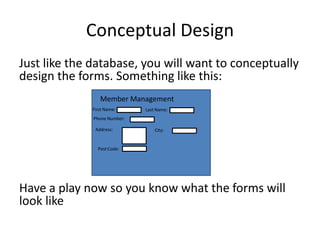
Conceptual Design
Just like the database, you will want to conceptually
design the forms. Something like this:
                Member Management
             First Name:      Last Name:
              Phone Number:

              Address:            City:


               Post Code:


Have a play now so you know what the forms will
look like
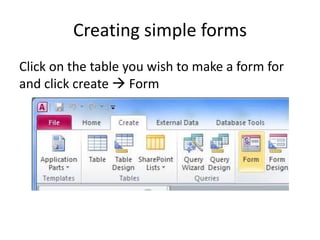
Creating simple forms
Click on the table you wish to make a form for
and click create  Form
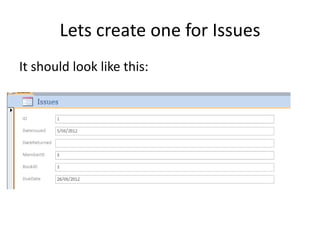
Lets create one for Issues
It should look like this:
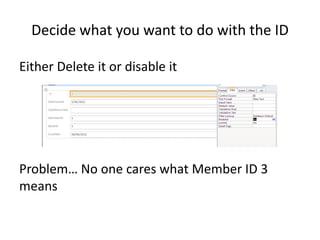
Decide what you want to do with the ID

Either Delete it or disable it


Problem… No one cares what Member ID 3
means
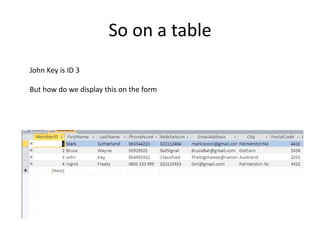
So on a table
John Key is ID 3

But how do we display this on the form
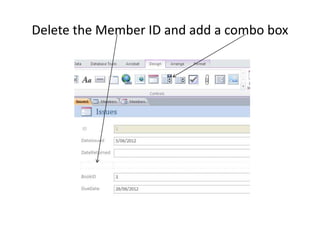
Delete the Member ID and add a combo box
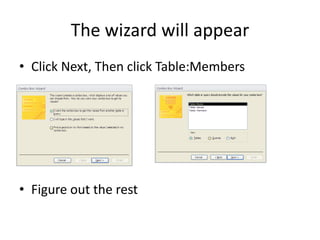
The wizard will appear
• Click Next, Then click Table:Members


• Figure out the rest
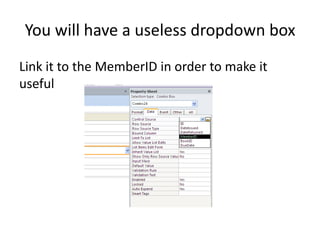
You will have a useless dropdown box
Link it to the MemberID in order to make it
useful
TEST TEST TEST TEST
Ensure that the combo box changes what is in
the issues table

Creating forms

  • 1.
  • 2.
    Why Forms? As theVideo just explained: • Friendly efficient tools for end user • Tables not friendly to work with • Forms look better then tables • Ensures integrity by having control, also gives security • Can mimic existing forms
  • 3.
    Conceptual Design Just likethe database, you will want to conceptually design the forms. Something like this: Member Management First Name: Last Name: Phone Number: Address: City: Post Code: Have a play now so you know what the forms will look like
  • 4.
    Creating simple forms Clickon the table you wish to make a form for and click create  Form
  • 5.
    Lets create onefor Issues It should look like this:
  • 6.
    Decide what youwant to do with the ID Either Delete it or disable it Problem… No one cares what Member ID 3 means
  • 7.
    So on atable John Key is ID 3 But how do we display this on the form
  • 8.
    Delete the MemberID and add a combo box
  • 9.
    The wizard willappear • Click Next, Then click Table:Members • Figure out the rest
  • 10.
    You will havea useless dropdown box Link it to the MemberID in order to make it useful
  • 11.
    TEST TEST TESTTEST Ensure that the combo box changes what is in the issues table