Introduction
Word Cloud Generator creates tag clouds online and transforms
plain content into engaging visuals right from your Chrome
browser. Ideal for students, professionals, and teachers who
want to analyze, summarize, or visualize text efficiently.
This tag cloud generator extension turns any text selection into
vibrant visuals. Click the extension icon, paste the text, and see
your ideas come alive. The extension helps you interpret
information visually.
Key Features
• AI-powered words selection
• Variety of shapes, fonts, and colors
• SVG and high-res PNG download
• Extracts texts from file
• Manually adjust words and phrases if needed
Core Functions
• Generate word cloud instantly from copied text or
dropped file
• Adjust colors, fonts, and overall layout with precision
• Export in several formats to share or embed
wherever needed
• Rebuild visuals dynamically as your text changes for
real-time interaction
How to Generate a Word Cloud
• Install the extension from Chrome Web Store
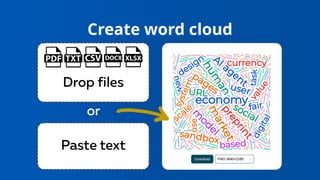
• Paste text, drop a file, or select content directly on a
webpage
• Press Generate Word Cloud
• Edit colors, shapes, and font styles for
personalization
• Save the final image
Create word cloud
Ideal For
• Educators simplifying material
• Students preparing concise summaries
• Researchers analyzing qualitative or open-ended
data responses
• Marketers discovering topic frequency and brand
associations
• Teams collaborating on design or content
visualization projects
Get Word Cloud Generator
Word Cloud Generator
Use Word Cloud Generator to create tag cloud online with phrases. Interactive,
live word cloud generator tool for students or work.

Create word clouds from text - Word Cloud Generator

  • 2.
    Introduction Word Cloud Generatorcreates tag clouds online and transforms plain content into engaging visuals right from your Chrome browser. Ideal for students, professionals, and teachers who want to analyze, summarize, or visualize text efficiently. This tag cloud generator extension turns any text selection into vibrant visuals. Click the extension icon, paste the text, and see your ideas come alive. The extension helps you interpret information visually.
  • 3.
    Key Features • AI-poweredwords selection • Variety of shapes, fonts, and colors • SVG and high-res PNG download • Extracts texts from file • Manually adjust words and phrases if needed
  • 4.
    Core Functions • Generateword cloud instantly from copied text or dropped file • Adjust colors, fonts, and overall layout with precision • Export in several formats to share or embed wherever needed • Rebuild visuals dynamically as your text changes for real-time interaction
  • 5.
    How to Generatea Word Cloud • Install the extension from Chrome Web Store • Paste text, drop a file, or select content directly on a webpage • Press Generate Word Cloud • Edit colors, shapes, and font styles for personalization • Save the final image
  • 6.
  • 7.
    Ideal For • Educatorssimplifying material • Students preparing concise summaries • Researchers analyzing qualitative or open-ended data responses • Marketers discovering topic frequency and brand associations • Teams collaborating on design or content visualization projects
  • 8.
    Get Word CloudGenerator Word Cloud Generator Use Word Cloud Generator to create tag cloud online with phrases. Interactive, live word cloud generator tool for students or work.