Computer Programming & Applications
Iram Abdullah
Course Title
Understand the terms
Computer
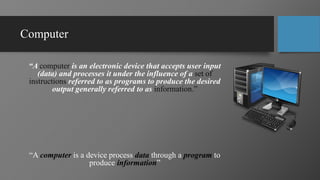
“A computer is an electronic device that accepts user input
(data) and processes it under the influence of a set of
instructions referred to as programs to produce the desired
output generally referred to as information.”
“A computer is a device process data through a program to
produce information”
Important Terms
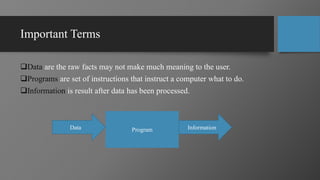
Data are the raw facts may not make much meaning to the user.
Programs are set of instructions that instruct a computer what to do.
Information is result after data has been processed.
Program
Data Information
Programming
“Programming is the act of writing the set of instructions to operate the computer.”
Those who engage in programming as their job are known as programmers.
The language programmers use in instructing the computer is known as Programming
Language.
C, C++, Java, Python, C# and many other
Although there are many programming languages but the constructs are same.
Applications
“The term Application refers to Software which is a set of instructions or
code written in a program for executing a task or an operation in a
Computer. ”
• There are so many examples around you like
• MS Word
• Billing Software at Marts
• Skype etc.
Course Learning Objective
1. Analyze a given program for all possible errors and rewrite the
corrected code.
2. Apply the concepts of programming to solve real world problems.
3. Analyze the program for possible output.
Recommended Books
• Robert Lafore, “Object Oriented Programming in C++”, 4th edition,
Pearson Edition, 2002, ISBN 10: 0672323087
• Dietel and Dietel, “C++ How to Program”, 10th edition, Pearson, 2014,
ISBN: 978-0134448237.
• Schildt. H. “C++ the complete Reference”, McGraw-Hill Latest Edition
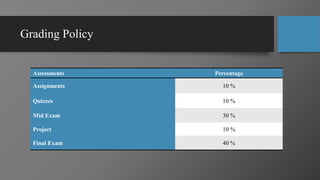
Grading Policy
Assessments Percentage
Assignments 10 %
Quizzes 10 %
Mid Exam 30 %
Project 10 %
Final Exam 40 %
Writing First Program
Iram Abdullah
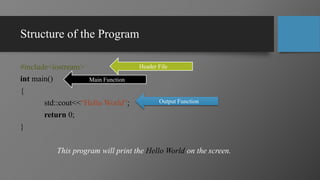
Structure of the Program
#include<iostream>
int main()
{
std::cout<<“Hello World”;
return 0;
}
This program will print the Hello World on the screen.
Header File
Main Function
Output Function
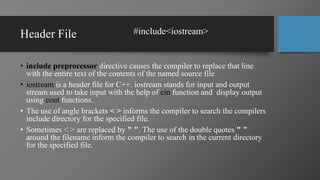
Header File
• include preprocessor directive causes the compiler to replace that line
with the entire text of the contents of the named source file
• iostream is a header file for C++. iostream stands for input and output
stream used to take input with the help of cin function and display output
using cout functions.
• The use of angle brackets < > informs the compiler to search the compilers
include directory for the specified file.
• Sometimes < > are replaced by " ". The use of the double quotes " "
around the filename inform the compiler to search in the current directory
for the specified file.
#include<iostream>
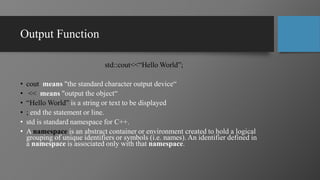
Output Function
std::cout<<“Hello World”;
• cout means "the standard character output device“
• << means "output the object“
• “Hello World” is a string or text to be displayed
• ; end the statement or line.
• std is standard namespace for C++.
• A namespace is an abstract container or environment created to hold a logical
grouping of unique identifiers or symbols (i.e. names). An identifier defined in
a namespace is associated only with that namespace.
Main Function
• main() is a collective name given to a set of statements.
• main( ) is a function. Every function has a pair of parentheses ( ) associated
with it.
• All statements that belong to main() are enclosed within a pair of braces {}
• Every program can have only one main() function.
• Every program starts with the main function.
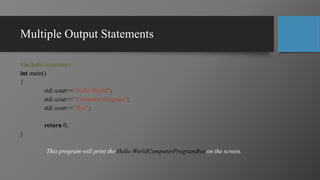
Multiple Output Statements
#include<iostream>
int main()
{
std::cout<<“Hello World”;
std::cout<<“Computer Program”;
std::cout<<“Bye”;
return 0;
}
This program will print the Hello WorldComputerProgramBye on the screen.
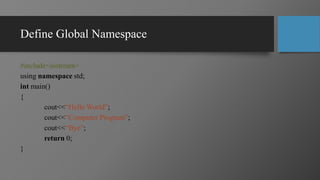
Define Global Namespace
#include<iostream>
using namespace std;
int main()
{
cout<<“Hello World”;
cout<<“Computer Program”;
cout<<“Bye”;
return 0;
}
Thank You 
Attendance Assignment
• Define comments and its types in C++.
• How to write the comments in C++?
Thank You 

Cpa lecture (theory) 01_

  • 1.
    Computer Programming &Applications Iram Abdullah
  • 2.
  • 3.
    Computer “A computer isan electronic device that accepts user input (data) and processes it under the influence of a set of instructions referred to as programs to produce the desired output generally referred to as information.” “A computer is a device process data through a program to produce information”
  • 4.
    Important Terms Data arethe raw facts may not make much meaning to the user. Programs are set of instructions that instruct a computer what to do. Information is result after data has been processed. Program Data Information
  • 5.
    Programming “Programming is theact of writing the set of instructions to operate the computer.” Those who engage in programming as their job are known as programmers. The language programmers use in instructing the computer is known as Programming Language. C, C++, Java, Python, C# and many other Although there are many programming languages but the constructs are same.
  • 6.
    Applications “The term Applicationrefers to Software which is a set of instructions or code written in a program for executing a task or an operation in a Computer. ” • There are so many examples around you like • MS Word • Billing Software at Marts • Skype etc.
  • 7.
  • 8.
    Course Learning Objective 1.Analyze a given program for all possible errors and rewrite the corrected code. 2. Apply the concepts of programming to solve real world problems. 3. Analyze the program for possible output.
  • 9.
    Recommended Books • RobertLafore, “Object Oriented Programming in C++”, 4th edition, Pearson Edition, 2002, ISBN 10: 0672323087 • Dietel and Dietel, “C++ How to Program”, 10th edition, Pearson, 2014, ISBN: 978-0134448237. • Schildt. H. “C++ the complete Reference”, McGraw-Hill Latest Edition
  • 10.
    Grading Policy Assessments Percentage Assignments10 % Quizzes 10 % Mid Exam 30 % Project 10 % Final Exam 40 %
  • 11.
  • 12.
    Structure of theProgram #include<iostream> int main() { std::cout<<“Hello World”; return 0; } This program will print the Hello World on the screen. Header File Main Function Output Function
  • 13.
    Header File • includepreprocessor directive causes the compiler to replace that line with the entire text of the contents of the named source file • iostream is a header file for C++. iostream stands for input and output stream used to take input with the help of cin function and display output using cout functions. • The use of angle brackets < > informs the compiler to search the compilers include directory for the specified file. • Sometimes < > are replaced by " ". The use of the double quotes " " around the filename inform the compiler to search in the current directory for the specified file. #include<iostream>
  • 14.
    Output Function std::cout<<“Hello World”; •cout means "the standard character output device“ • << means "output the object“ • “Hello World” is a string or text to be displayed • ; end the statement or line. • std is standard namespace for C++. • A namespace is an abstract container or environment created to hold a logical grouping of unique identifiers or symbols (i.e. names). An identifier defined in a namespace is associated only with that namespace.
  • 15.
    Main Function • main()is a collective name given to a set of statements. • main( ) is a function. Every function has a pair of parentheses ( ) associated with it. • All statements that belong to main() are enclosed within a pair of braces {} • Every program can have only one main() function. • Every program starts with the main function.
  • 16.
    Multiple Output Statements #include<iostream> intmain() { std::cout<<“Hello World”; std::cout<<“Computer Program”; std::cout<<“Bye”; return 0; } This program will print the Hello WorldComputerProgramBye on the screen.
  • 17.
    Define Global Namespace #include<iostream> usingnamespace std; int main() { cout<<“Hello World”; cout<<“Computer Program”; cout<<“Bye”; return 0; }
  • 18.
  • 19.
    Attendance Assignment • Definecomments and its types in C++. • How to write the comments in C++?
  • 20.