2010 COSA USER CONFERENCE | 26-27 OCTOBER | GOLD COAST
SirsiDynix Symphony Update
Rick Branham | Vice President,
Global Accounts & Alliances
2010 COSA USER CONFERENCE | 26-27 OCTOBER | GOLD COAST
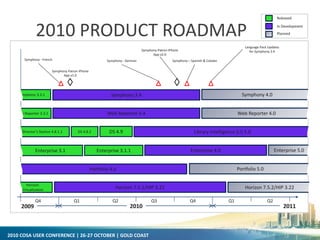
2010 PRODUCT ROADMAP
Q1 Q2 Q3 Q4 Q1 Q2
2010 20112009
Q4
Symphony 3.4 Symphony 4.0Symphony 3.3.1
DS 4.9
Horizon 7.5.1/HIP 3.21 Horizon 7.5.2/HIP 3.22
Horizon
Virtualization
Portfolio 4.0 Portfolio 5.0
Enterprise 3.1 Enterprise 5.0Enterprise 3.1.1
Director’s Station 4.8.1.1 DS 4.8.2
Web Reporter 3.4Web Reporter 3.3.1 Web Reporter 4.0
Symphony - German
Symphony Patron iPhone
App v1.0
Symphony Patron iPhone
App v2.0
Library Intelligence (LI) 5.0
Symphony - French Symphony – Spanish & Catalan
Enterprise 4.0
Language Pack Updates
for Symphony 3.4
Released
In Development
Planned
2010 COSA USER CONFERENCE | 26-27 OCTOBER | GOLD COAST
SYMPHONY 3.4
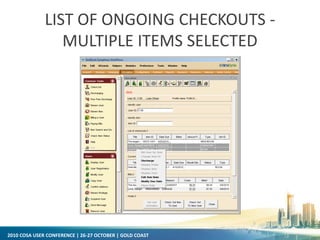
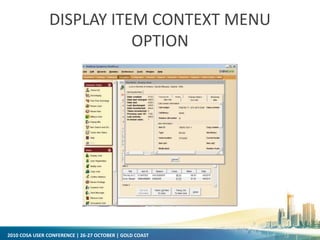
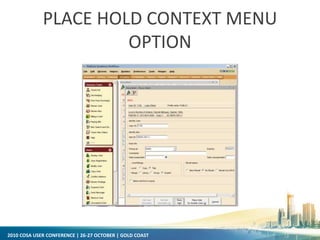
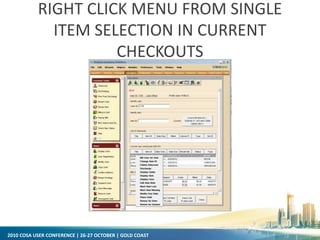
• Power User Tools
– Context menus (right click menus) are available from the circulation
checkout, bill, hold, suspension, booking & reservation lists
– Context menus contain a list of commands that apply to records in the
list that can be launched from a wizard
– This allows staff to perform the majority of workflows without leaving
a single wizard
2010 COSA USER CONFERENCE | 26-27 OCTOBER | GOLD COAST
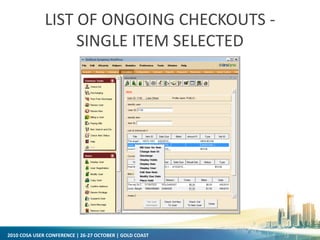
LIST OF ONGOING CHECKOUTS -
SINGLE ITEM SELECTED
2010 COSA USER CONFERENCE | 26-27 OCTOBER | GOLD COAST
LIST OF ONGOING CHECKOUTS -
MULTIPLE ITEMS SELECTED
2010 COSA USER CONFERENCE | 26-27 OCTOBER | GOLD COAST
DISPLAY ITEM CONTEXT MENU
OPTION
2010 COSA USER CONFERENCE | 26-27 OCTOBER | GOLD COAST
PLACE HOLD CONTEXT MENU
OPTION
2010 COSA USER CONFERENCE | 26-27 OCTOBER | GOLD COAST
RIGHT CLICK MENU FROM SINGLE
ITEM SELECTION IN CURRENT
CHECKOUTS
2010 COSA USER CONFERENCE | 26-27 OCTOBER | GOLD COAST
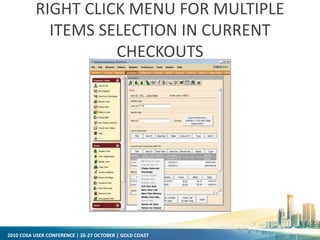
RIGHT CLICK MENU FOR MULTIPLE
ITEMS SELECTION IN CURRENT
CHECKOUTS
2010 COSA USER CONFERENCE | 26-27 OCTOBER | GOLD COAST
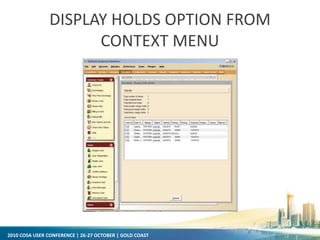
DISPLAY HOLDS OPTION FROM
CONTEXT MENU
2010 COSA USER CONFERENCE | 26-27 OCTOBER | GOLD COAST
SYMPHONY 3.4
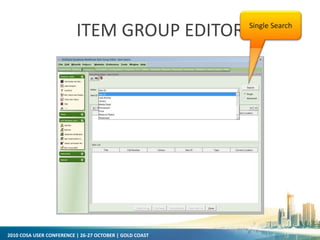
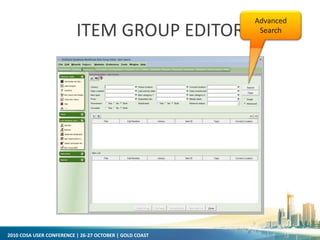
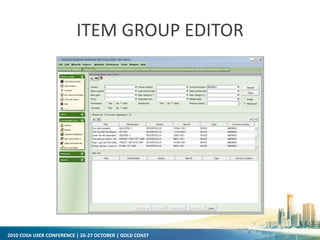
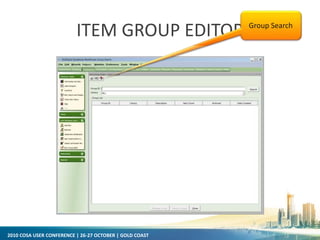
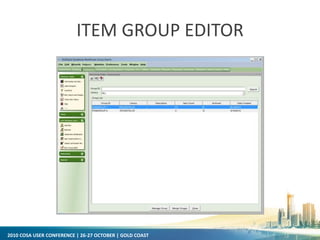
• Item Group Editor
– IGE allows editing items in batch.
– Edit items on the fly (as an unsaved set) or edit items in a saved group
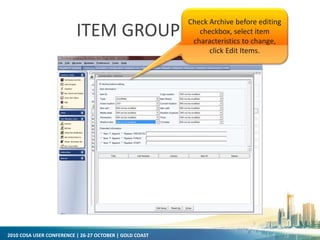
– Archive current (before changes) item values for restoring at a later
date
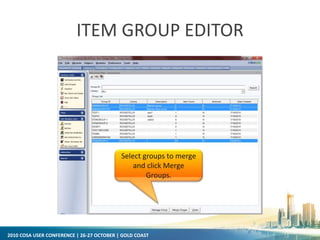
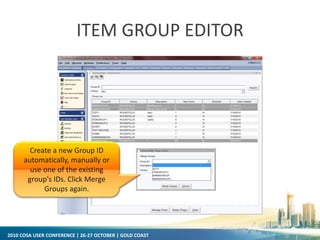
– Merge groups of items
– Add/remove items to/from an existing group
– Delete groups
2010 COSA USER CONFERENCE | 26-27 OCTOBER | GOLD COAST
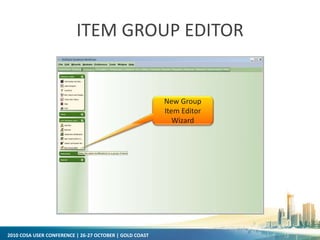
ITEM GROUP EDITOR
New Group
Item Editor
Wizard
2010 COSA USER CONFERENCE | 26-27 OCTOBER | GOLD COAST
ITEM GROUP EDITOR Single Search
2010 COSA USER CONFERENCE | 26-27 OCTOBER | GOLD COAST
ITEM GROUP EDITOR
Advanced
Search
2010 COSA USER CONFERENCE | 26-27 OCTOBER | GOLD COAST
ITEM GROUP EDITOR
2010 COSA USER CONFERENCE | 26-27 OCTOBER | GOLD COAST
ITEM GROUP EDITOR Group Search
2010 COSA USER CONFERENCE | 26-27 OCTOBER | GOLD COAST
ITEM GROUP EDITOR
2010 COSA USER CONFERENCE | 26-27 OCTOBER | GOLD COAST
ITEM GROUP EDITOR
Select groups to merge
and click Merge
Groups.
2010 COSA USER CONFERENCE | 26-27 OCTOBER | GOLD COAST
ITEM GROUP EDITOR
Create a new Group ID
automatically, manually or
use one of the existing
group's IDs. Click Merge
Groups again.
2010 COSA USER CONFERENCE | 26-27 OCTOBER | GOLD COAST
ITEM GROUP EDITOR
Check Archive before editing
checkbox, select item
characteristics to change,
click Edit Items.
2010 COSA USER CONFERENCE | 26-27 OCTOBER | GOLD COAST
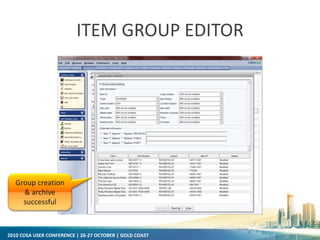
ITEM GROUP EDITOR
Group creation
& archive
successful
2010 COSA USER CONFERENCE | 26-27 OCTOBER | GOLD COAST
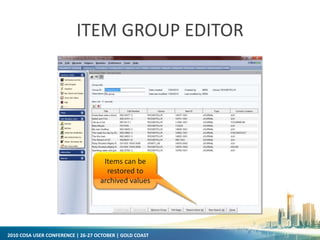
ITEM GROUP EDITOR
Items can be
restored to
archived values
2010 COSA USER CONFERENCE | 26-27 OCTOBER | GOLD COAST
SYMPHONY 3.4
• Item Group Editor
– IGE allows editing items in batch.
– Edit items on the fly (as an unsaved set) or edit items in a saved group
– Archive current (before changes) item values for restoring at a later
date
– Merge groups of items
– Add/remove items to/from an existing group
– Delete groups
• Pull On-shelf Items with Holds Wizard
2010 COSA USER CONFERENCE | 26-27 OCTOBER | GOLD COAST
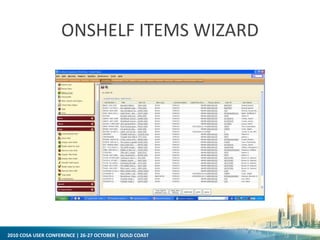
ONSHELF ITEMS WIZARD
2010 COSA USER CONFERENCE | 26-27 OCTOBER | GOLD COAST
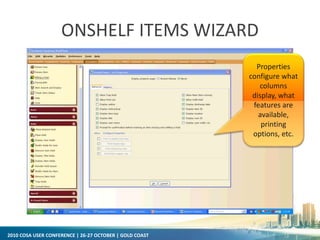
ONSHELF ITEMS WIZARD
Properties
configure what
columns
display, what
features are
available,
printing
options, etc.
2010 COSA USER CONFERENCE | 26-27 OCTOBER | GOLD COAST
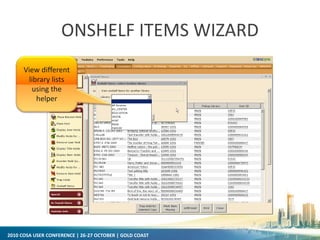
ONSHELF ITEMS WIZARD
View different
library lists
using the
helper
2010 COSA USER CONFERENCE | 26-27 OCTOBER | GOLD COAST
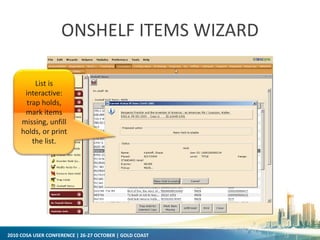
ONSHELF ITEMS WIZARD
List is
interactive:
trap holds,
mark items
missing, unfill
holds, or print
the list.
2010 COSA USER CONFERENCE | 26-27 OCTOBER | GOLD COAST
SYMPHONY 3.4
• Item Group Editor
– IGE allows editing items in batch.
– Edit items on the fly (as an unsaved set) or edit items in a saved group
– Archive current (before changes) item values for restoring at a later
date
– Merge groups of items
– Add/remove items to/from an existing group
– Delete groups
• Pull On-shelf Items with Holds Wizard
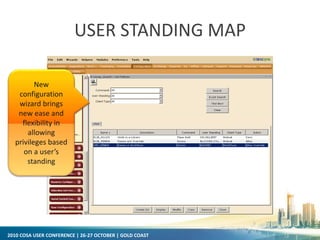
• New User Standing Map configuration wizard
2010 COSA USER CONFERENCE | 26-27 OCTOBER | GOLD COAST
USER STANDING MAP
New
configuration
wizard brings
new ease and
flexibility in
allowing
privileges based
on a user’s
standing
2010 COSA USER CONFERENCE | 26-27 OCTOBER | GOLD COAST
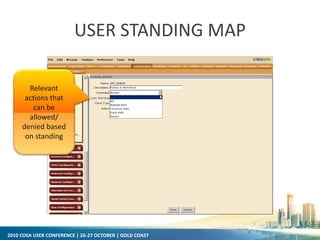
USER STANDING MAP
Relevant
actions that
can be
allowed/
denied based
on standing
2010 COSA USER CONFERENCE | 26-27 OCTOBER | GOLD COAST
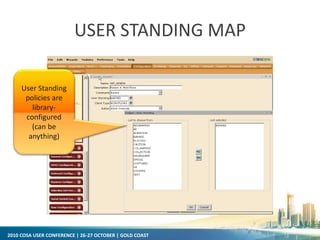
USER STANDING MAP
User Standing
policies are
library-
configured
(can be
anything)
2010 COSA USER CONFERENCE | 26-27 OCTOBER | GOLD COAST
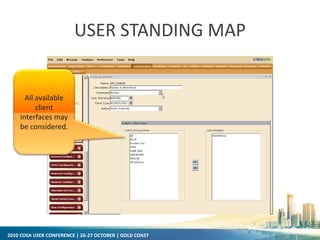
USER STANDING MAP
All available
client
interfaces may
be considered.
2010 COSA USER CONFERENCE | 26-27 OCTOBER | GOLD COAST
SYMPHONY 3.4
• Item Group Editor
– IGE allows editing items in batch.
– Edit items on the fly (as an unsaved set) or edit items in a saved group
– Archive current (before changes) item values for restoring at a later
date
– Merge groups of items
– Add/remove items to/from an existing group
– Delete groups
• Pull On-shelf Items with Holds Wizard
• New User Standing Map configuration wizard
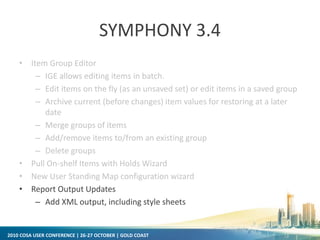
• Report Output Updates
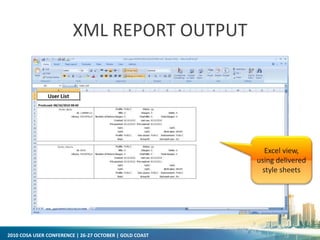
– Add XML output, including style sheets
2010 COSA USER CONFERENCE | 26-27 OCTOBER | GOLD COAST
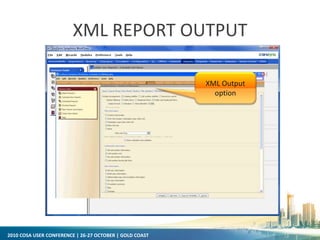
XML REPORT OUTPUT
XML Output
option
2010 COSA USER CONFERENCE | 26-27 OCTOBER | GOLD COAST
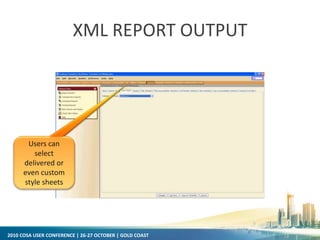
XML REPORT OUTPUT
Users can
select
delivered or
even custom
style sheets
2010 COSA USER CONFERENCE | 26-27 OCTOBER | GOLD COAST
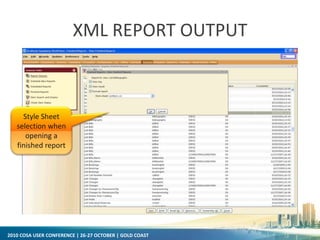
XML REPORT OUTPUT
Style Sheet
selection when
opening a
finished report
2010 COSA USER CONFERENCE | 26-27 OCTOBER | GOLD COAST
XML REPORT OUTPUT
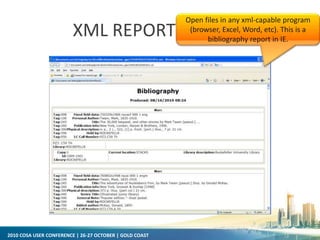
Open files in any xml-capable program
(browser, Excel, Word, etc). This is a
bibliography report in IE.
2010 COSA USER CONFERENCE | 26-27 OCTOBER | GOLD COAST
XML REPORT OUTPUT
Excel view,
using delivered
style sheets
2010 COSA USER CONFERENCE | 26-27 OCTOBER | GOLD COAST
SYMPHONY 3.4
• Additional Circulation Enhancements
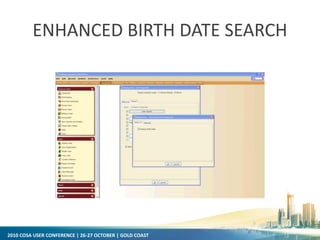
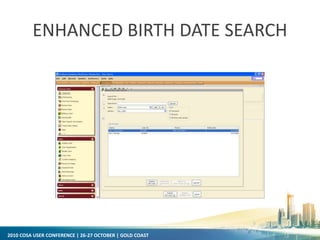
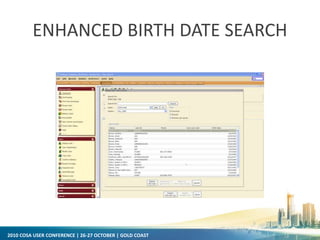
– Enhanced date of birth display and searching
2010 COSA USER CONFERENCE | 26-27 OCTOBER | GOLD COAST
ENHANCED BIRTH DATE SEARCH
2010 COSA USER CONFERENCE | 26-27 OCTOBER | GOLD COAST
ENHANCED BIRTH DATE SEARCH
2010 COSA USER CONFERENCE | 26-27 OCTOBER | GOLD COAST
ENHANCED BIRTH DATE SEARCH
2010 COSA USER CONFERENCE | 26-27 OCTOBER | GOLD COAST
SYMPHONY 3.4
• Additional Circulation Enhancements
– Enhanced date of birth searching
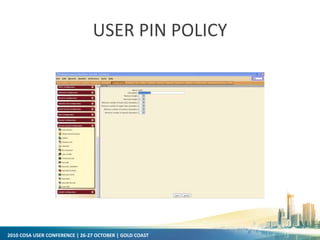
– User PIN policy
2010 COSA USER CONFERENCE | 26-27 OCTOBER | GOLD COAST
USER PIN POLICY
2010 COSA USER CONFERENCE | 26-27 OCTOBER | GOLD COAST
SYMPHONY 3.4
• Additional Circulation Enhancements
– Enhanced date of birth searching
– User PIN policy
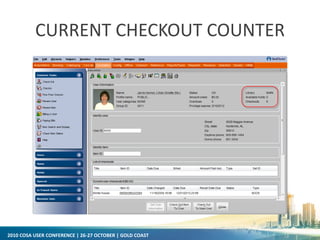
– Current Checkout Counter added to the Checkout Wizard
2010 COSA USER CONFERENCE | 26-27 OCTOBER | GOLD COAST
CURRENT CHECKOUT COUNTER
2010 COSA USER CONFERENCE | 26-27 OCTOBER | GOLD COAST
SYMPHONY 3.4
• Additional Circulation Enhancements
– Enhanced date of birth searching
– User PIN policy
– Current Checkout Counter added to the Checkout Wizard
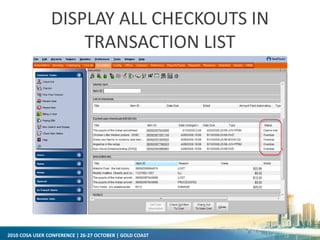
– Display all checkouts in transaction list
2010 COSA USER CONFERENCE | 26-27 OCTOBER | GOLD COAST
DISPLAY ALL CHECKOUTS IN
TRANSACTION LIST
2010 COSA USER CONFERENCE | 26-27 OCTOBER | GOLD COAST
SYMPHONY 3.4
• Additional Circulation Enhancements
– Enhanced date of birth searching
– User PIN policy
– Current Checkout Counter added to the Checkout Wizard
– Display all checkouts in transaction list
– Enhanced Hold Processing
• Ability to set OPAC hold range in hold map
• Enhanced options for filling hold at checkout
– Extended length of name fields
– Configuration option for user name keys and new Rebuild User Name Keys
report
– Item price field added to receipt fields
– Zip code prints on same line as city and state in notices
– Separate bill maintenance settings for Bill User wizard and Pay Bill wizard
2010 COSA USER CONFERENCE | 26-27 OCTOBER | GOLD COAST
SYMPHONY 3.4
• Collection Exchange Enhancements
– New policies added for Exchange Dates and Pending item location
2010 COSA USER CONFERENCE | 26-27 OCTOBER | GOLD COAST
SYMPHONY 3.4
• Collection Exchange Enhancements
– New policies added for Exchange Dates and Pending item location
• e-Library Enhancements
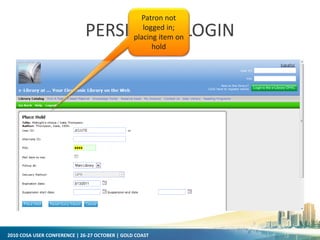
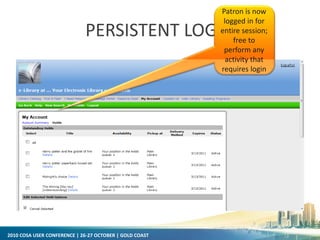
– Persistent User Login for e-Library
– Enhanced Enrichment Content displays
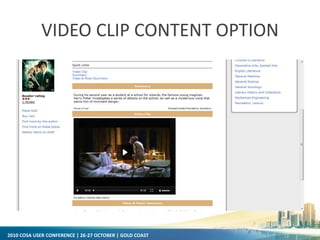
– Added Enrichment Content option: video clips
– New Enterprise integration themes for the e-Library OPAC
2010 COSA USER CONFERENCE | 26-27 OCTOBER | GOLD COAST
PERSISTENT LOGIN
Patron not
logged in;
placing item on
hold
2010 COSA USER CONFERENCE | 26-27 OCTOBER | GOLD COAST
PERSISTENT LOGIN
Patron is now
logged in for
entire session;
free to
perform any
activity that
requires login
2010 COSA USER CONFERENCE | 26-27 OCTOBER | GOLD COAST
VIDEO CLIP CONTENT OPTION
2010 COSA USER CONFERENCE | 26-27 OCTOBER | GOLD COAST
SYMPHONY 3.4
• Wizard name and subsequent wizard actions reflected in main window
captions (helps with screen readers, RFID apps, and macros)
• Symphony System Monitoring Agent
– Automated push of version, license, and detailed configuration information to client care
– Allows for pro-active system monitoring
• SIP checkin sends an audible alert when a LOST item is checked in
• Common Access Card (CAC) Support (military requirement)
• Smartcard Support (based on Scottish MiFare standard)
– Use smartcard reader to scan cards for circ transactions
– User registration wizard/helper will pull all available data from
smartcard to populate user record
• Symphony Implementation Automation
– Streamlined, more efficient
– Goal: reduce average implementation time from 100 to 45 days
2010 COSA USER CONFERENCE | 26-27 OCTOBER | GOLD COAST
SYMPHONY 3.4
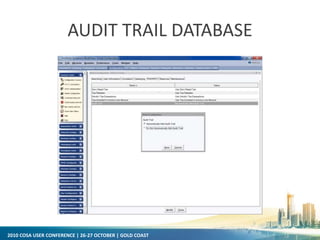
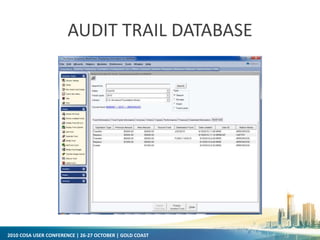
• Audit trail database
– Audit trail data no longer contained in Fund Extended Info.
– Audit trail tab; configured in Global configuration
– Now associated with Fund/cycle combination
– Audit trail records created with changes to fund/cycle budget in Add
fund, Duplicate fund, Add fund cycle, Modify fund, Modify fund
budget, Transfer budget amount and Rollover fund wizards.
2010 COSA USER CONFERENCE | 26-27 OCTOBER | GOLD COAST
AUDIT TRAIL DATABASE
2010 COSA USER CONFERENCE | 26-27 OCTOBER | GOLD COAST
AUDIT TRAIL DATABASE
2010 COSA USER CONFERENCE | 26-27 OCTOBER | GOLD COAST
SYMPHONY 3.4
• Audit Trail Information Now Saved in Its Own Database
– Audit trail information was previously stored in Extended Info fields of
fund records.
– New audit trail records will store this information more effectively and
offer greater options for storage and reporting of this data.
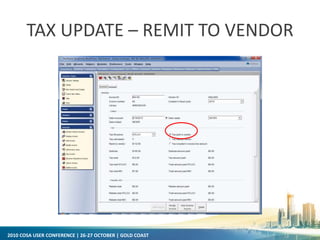
• Tax update: Remit to vendor field in Invoice record
2010 COSA USER CONFERENCE | 26-27 OCTOBER | GOLD COAST
TAX UPDATE – REMIT TO VENDOR
2010 COSA USER CONFERENCE | 26-27 OCTOBER | GOLD COAST
SYMPHONY—FUTURE RELEASES
• Continuations of Usability updates
• Symphony Anywhere
• FRBR/RDA Updates
• SMS Messaging*
• StaffWeb Enhancements
– Academic Reserves
– New reports
– HTML-5 capable platform
• International Support
– German ILL SLNP
– Phase 2 UNIMARC
– Additional Internationalization and localization updates (often abbreviated with the
numeronyms i18n and L10n (i18n: 18 stands for the number of letters between the first I
and last n in internationalization)
2010 COSA USER CONFERENCE | 26-27 OCTOBER | GOLD COAST
SYMPHONY—FUTURE RELEASES
• School Interoperability Framework (SIF) Support
• Operational Efficiency Pack
– Automatic backups of policy and config files
– Getcircinfo for customers and staff troubleshooting
– Remove user report updated for error handling
– Admin user tools for easier support
•Possibly delivered earlier to coincide with release of Horizon 7.5.1
Cosa 2010 symphony update rick branham

Cosa 2010 symphony update rick branham

  • 1.
    2010 COSA USERCONFERENCE | 26-27 OCTOBER | GOLD COAST SirsiDynix Symphony Update Rick Branham | Vice President, Global Accounts & Alliances
  • 2.
    2010 COSA USERCONFERENCE | 26-27 OCTOBER | GOLD COAST 2010 PRODUCT ROADMAP Q1 Q2 Q3 Q4 Q1 Q2 2010 20112009 Q4 Symphony 3.4 Symphony 4.0Symphony 3.3.1 DS 4.9 Horizon 7.5.1/HIP 3.21 Horizon 7.5.2/HIP 3.22 Horizon Virtualization Portfolio 4.0 Portfolio 5.0 Enterprise 3.1 Enterprise 5.0Enterprise 3.1.1 Director’s Station 4.8.1.1 DS 4.8.2 Web Reporter 3.4Web Reporter 3.3.1 Web Reporter 4.0 Symphony - German Symphony Patron iPhone App v1.0 Symphony Patron iPhone App v2.0 Library Intelligence (LI) 5.0 Symphony - French Symphony – Spanish & Catalan Enterprise 4.0 Language Pack Updates for Symphony 3.4 Released In Development Planned
  • 3.
    2010 COSA USERCONFERENCE | 26-27 OCTOBER | GOLD COAST SYMPHONY 3.4 • Power User Tools – Context menus (right click menus) are available from the circulation checkout, bill, hold, suspension, booking & reservation lists – Context menus contain a list of commands that apply to records in the list that can be launched from a wizard – This allows staff to perform the majority of workflows without leaving a single wizard
  • 4.
    2010 COSA USERCONFERENCE | 26-27 OCTOBER | GOLD COAST LIST OF ONGOING CHECKOUTS - SINGLE ITEM SELECTED
  • 5.
    2010 COSA USERCONFERENCE | 26-27 OCTOBER | GOLD COAST LIST OF ONGOING CHECKOUTS - MULTIPLE ITEMS SELECTED
  • 6.
    2010 COSA USERCONFERENCE | 26-27 OCTOBER | GOLD COAST DISPLAY ITEM CONTEXT MENU OPTION
  • 7.
    2010 COSA USERCONFERENCE | 26-27 OCTOBER | GOLD COAST PLACE HOLD CONTEXT MENU OPTION
  • 8.
    2010 COSA USERCONFERENCE | 26-27 OCTOBER | GOLD COAST RIGHT CLICK MENU FROM SINGLE ITEM SELECTION IN CURRENT CHECKOUTS
  • 9.
    2010 COSA USERCONFERENCE | 26-27 OCTOBER | GOLD COAST RIGHT CLICK MENU FOR MULTIPLE ITEMS SELECTION IN CURRENT CHECKOUTS
  • 10.
    2010 COSA USERCONFERENCE | 26-27 OCTOBER | GOLD COAST DISPLAY HOLDS OPTION FROM CONTEXT MENU
  • 11.
    2010 COSA USERCONFERENCE | 26-27 OCTOBER | GOLD COAST SYMPHONY 3.4 • Item Group Editor – IGE allows editing items in batch. – Edit items on the fly (as an unsaved set) or edit items in a saved group – Archive current (before changes) item values for restoring at a later date – Merge groups of items – Add/remove items to/from an existing group – Delete groups
  • 12.
    2010 COSA USERCONFERENCE | 26-27 OCTOBER | GOLD COAST ITEM GROUP EDITOR New Group Item Editor Wizard
  • 13.
    2010 COSA USERCONFERENCE | 26-27 OCTOBER | GOLD COAST ITEM GROUP EDITOR Single Search
  • 14.
    2010 COSA USERCONFERENCE | 26-27 OCTOBER | GOLD COAST ITEM GROUP EDITOR Advanced Search
  • 15.
    2010 COSA USERCONFERENCE | 26-27 OCTOBER | GOLD COAST ITEM GROUP EDITOR
  • 16.
    2010 COSA USERCONFERENCE | 26-27 OCTOBER | GOLD COAST ITEM GROUP EDITOR Group Search
  • 17.
    2010 COSA USERCONFERENCE | 26-27 OCTOBER | GOLD COAST ITEM GROUP EDITOR
  • 18.
    2010 COSA USERCONFERENCE | 26-27 OCTOBER | GOLD COAST ITEM GROUP EDITOR Select groups to merge and click Merge Groups.
  • 19.
    2010 COSA USERCONFERENCE | 26-27 OCTOBER | GOLD COAST ITEM GROUP EDITOR Create a new Group ID automatically, manually or use one of the existing group's IDs. Click Merge Groups again.
  • 20.
    2010 COSA USERCONFERENCE | 26-27 OCTOBER | GOLD COAST ITEM GROUP EDITOR Check Archive before editing checkbox, select item characteristics to change, click Edit Items.
  • 21.
    2010 COSA USERCONFERENCE | 26-27 OCTOBER | GOLD COAST ITEM GROUP EDITOR Group creation & archive successful
  • 22.
    2010 COSA USERCONFERENCE | 26-27 OCTOBER | GOLD COAST ITEM GROUP EDITOR Items can be restored to archived values
  • 23.
    2010 COSA USERCONFERENCE | 26-27 OCTOBER | GOLD COAST SYMPHONY 3.4 • Item Group Editor – IGE allows editing items in batch. – Edit items on the fly (as an unsaved set) or edit items in a saved group – Archive current (before changes) item values for restoring at a later date – Merge groups of items – Add/remove items to/from an existing group – Delete groups • Pull On-shelf Items with Holds Wizard
  • 24.
    2010 COSA USERCONFERENCE | 26-27 OCTOBER | GOLD COAST ONSHELF ITEMS WIZARD
  • 25.
    2010 COSA USERCONFERENCE | 26-27 OCTOBER | GOLD COAST ONSHELF ITEMS WIZARD Properties configure what columns display, what features are available, printing options, etc.
  • 26.
    2010 COSA USERCONFERENCE | 26-27 OCTOBER | GOLD COAST ONSHELF ITEMS WIZARD View different library lists using the helper
  • 27.
    2010 COSA USERCONFERENCE | 26-27 OCTOBER | GOLD COAST ONSHELF ITEMS WIZARD List is interactive: trap holds, mark items missing, unfill holds, or print the list.
  • 28.
    2010 COSA USERCONFERENCE | 26-27 OCTOBER | GOLD COAST SYMPHONY 3.4 • Item Group Editor – IGE allows editing items in batch. – Edit items on the fly (as an unsaved set) or edit items in a saved group – Archive current (before changes) item values for restoring at a later date – Merge groups of items – Add/remove items to/from an existing group – Delete groups • Pull On-shelf Items with Holds Wizard • New User Standing Map configuration wizard
  • 29.
    2010 COSA USERCONFERENCE | 26-27 OCTOBER | GOLD COAST USER STANDING MAP New configuration wizard brings new ease and flexibility in allowing privileges based on a user’s standing
  • 30.
    2010 COSA USERCONFERENCE | 26-27 OCTOBER | GOLD COAST USER STANDING MAP Relevant actions that can be allowed/ denied based on standing
  • 31.
    2010 COSA USERCONFERENCE | 26-27 OCTOBER | GOLD COAST USER STANDING MAP User Standing policies are library- configured (can be anything)
  • 32.
    2010 COSA USERCONFERENCE | 26-27 OCTOBER | GOLD COAST USER STANDING MAP All available client interfaces may be considered.
  • 33.
    2010 COSA USERCONFERENCE | 26-27 OCTOBER | GOLD COAST SYMPHONY 3.4 • Item Group Editor – IGE allows editing items in batch. – Edit items on the fly (as an unsaved set) or edit items in a saved group – Archive current (before changes) item values for restoring at a later date – Merge groups of items – Add/remove items to/from an existing group – Delete groups • Pull On-shelf Items with Holds Wizard • New User Standing Map configuration wizard • Report Output Updates – Add XML output, including style sheets
  • 34.
    2010 COSA USERCONFERENCE | 26-27 OCTOBER | GOLD COAST XML REPORT OUTPUT XML Output option
  • 35.
    2010 COSA USERCONFERENCE | 26-27 OCTOBER | GOLD COAST XML REPORT OUTPUT Users can select delivered or even custom style sheets
  • 36.
    2010 COSA USERCONFERENCE | 26-27 OCTOBER | GOLD COAST XML REPORT OUTPUT Style Sheet selection when opening a finished report
  • 37.
    2010 COSA USERCONFERENCE | 26-27 OCTOBER | GOLD COAST XML REPORT OUTPUT Open files in any xml-capable program (browser, Excel, Word, etc). This is a bibliography report in IE.
  • 38.
    2010 COSA USERCONFERENCE | 26-27 OCTOBER | GOLD COAST XML REPORT OUTPUT Excel view, using delivered style sheets
  • 39.
    2010 COSA USERCONFERENCE | 26-27 OCTOBER | GOLD COAST SYMPHONY 3.4 • Additional Circulation Enhancements – Enhanced date of birth display and searching
  • 40.
    2010 COSA USERCONFERENCE | 26-27 OCTOBER | GOLD COAST ENHANCED BIRTH DATE SEARCH
  • 41.
    2010 COSA USERCONFERENCE | 26-27 OCTOBER | GOLD COAST ENHANCED BIRTH DATE SEARCH
  • 42.
    2010 COSA USERCONFERENCE | 26-27 OCTOBER | GOLD COAST ENHANCED BIRTH DATE SEARCH
  • 43.
    2010 COSA USERCONFERENCE | 26-27 OCTOBER | GOLD COAST SYMPHONY 3.4 • Additional Circulation Enhancements – Enhanced date of birth searching – User PIN policy
  • 44.
    2010 COSA USERCONFERENCE | 26-27 OCTOBER | GOLD COAST USER PIN POLICY
  • 45.
    2010 COSA USERCONFERENCE | 26-27 OCTOBER | GOLD COAST SYMPHONY 3.4 • Additional Circulation Enhancements – Enhanced date of birth searching – User PIN policy – Current Checkout Counter added to the Checkout Wizard
  • 46.
    2010 COSA USERCONFERENCE | 26-27 OCTOBER | GOLD COAST CURRENT CHECKOUT COUNTER
  • 47.
    2010 COSA USERCONFERENCE | 26-27 OCTOBER | GOLD COAST SYMPHONY 3.4 • Additional Circulation Enhancements – Enhanced date of birth searching – User PIN policy – Current Checkout Counter added to the Checkout Wizard – Display all checkouts in transaction list
  • 48.
    2010 COSA USERCONFERENCE | 26-27 OCTOBER | GOLD COAST DISPLAY ALL CHECKOUTS IN TRANSACTION LIST
  • 49.
    2010 COSA USERCONFERENCE | 26-27 OCTOBER | GOLD COAST SYMPHONY 3.4 • Additional Circulation Enhancements – Enhanced date of birth searching – User PIN policy – Current Checkout Counter added to the Checkout Wizard – Display all checkouts in transaction list – Enhanced Hold Processing • Ability to set OPAC hold range in hold map • Enhanced options for filling hold at checkout – Extended length of name fields – Configuration option for user name keys and new Rebuild User Name Keys report – Item price field added to receipt fields – Zip code prints on same line as city and state in notices – Separate bill maintenance settings for Bill User wizard and Pay Bill wizard
  • 50.
    2010 COSA USERCONFERENCE | 26-27 OCTOBER | GOLD COAST SYMPHONY 3.4 • Collection Exchange Enhancements – New policies added for Exchange Dates and Pending item location
  • 51.
    2010 COSA USERCONFERENCE | 26-27 OCTOBER | GOLD COAST SYMPHONY 3.4 • Collection Exchange Enhancements – New policies added for Exchange Dates and Pending item location • e-Library Enhancements – Persistent User Login for e-Library – Enhanced Enrichment Content displays – Added Enrichment Content option: video clips – New Enterprise integration themes for the e-Library OPAC
  • 52.
    2010 COSA USERCONFERENCE | 26-27 OCTOBER | GOLD COAST PERSISTENT LOGIN Patron not logged in; placing item on hold
  • 53.
    2010 COSA USERCONFERENCE | 26-27 OCTOBER | GOLD COAST PERSISTENT LOGIN Patron is now logged in for entire session; free to perform any activity that requires login
  • 54.
    2010 COSA USERCONFERENCE | 26-27 OCTOBER | GOLD COAST VIDEO CLIP CONTENT OPTION
  • 55.
    2010 COSA USERCONFERENCE | 26-27 OCTOBER | GOLD COAST SYMPHONY 3.4 • Wizard name and subsequent wizard actions reflected in main window captions (helps with screen readers, RFID apps, and macros) • Symphony System Monitoring Agent – Automated push of version, license, and detailed configuration information to client care – Allows for pro-active system monitoring • SIP checkin sends an audible alert when a LOST item is checked in • Common Access Card (CAC) Support (military requirement) • Smartcard Support (based on Scottish MiFare standard) – Use smartcard reader to scan cards for circ transactions – User registration wizard/helper will pull all available data from smartcard to populate user record • Symphony Implementation Automation – Streamlined, more efficient – Goal: reduce average implementation time from 100 to 45 days
  • 56.
    2010 COSA USERCONFERENCE | 26-27 OCTOBER | GOLD COAST SYMPHONY 3.4 • Audit trail database – Audit trail data no longer contained in Fund Extended Info. – Audit trail tab; configured in Global configuration – Now associated with Fund/cycle combination – Audit trail records created with changes to fund/cycle budget in Add fund, Duplicate fund, Add fund cycle, Modify fund, Modify fund budget, Transfer budget amount and Rollover fund wizards.
  • 57.
    2010 COSA USERCONFERENCE | 26-27 OCTOBER | GOLD COAST AUDIT TRAIL DATABASE
  • 58.
    2010 COSA USERCONFERENCE | 26-27 OCTOBER | GOLD COAST AUDIT TRAIL DATABASE
  • 59.
    2010 COSA USERCONFERENCE | 26-27 OCTOBER | GOLD COAST SYMPHONY 3.4 • Audit Trail Information Now Saved in Its Own Database – Audit trail information was previously stored in Extended Info fields of fund records. – New audit trail records will store this information more effectively and offer greater options for storage and reporting of this data. • Tax update: Remit to vendor field in Invoice record
  • 60.
    2010 COSA USERCONFERENCE | 26-27 OCTOBER | GOLD COAST TAX UPDATE – REMIT TO VENDOR
  • 61.
    2010 COSA USERCONFERENCE | 26-27 OCTOBER | GOLD COAST SYMPHONY—FUTURE RELEASES • Continuations of Usability updates • Symphony Anywhere • FRBR/RDA Updates • SMS Messaging* • StaffWeb Enhancements – Academic Reserves – New reports – HTML-5 capable platform • International Support – German ILL SLNP – Phase 2 UNIMARC – Additional Internationalization and localization updates (often abbreviated with the numeronyms i18n and L10n (i18n: 18 stands for the number of letters between the first I and last n in internationalization)
  • 62.
    2010 COSA USERCONFERENCE | 26-27 OCTOBER | GOLD COAST SYMPHONY—FUTURE RELEASES • School Interoperability Framework (SIF) Support • Operational Efficiency Pack – Automatic backups of policy and config files – Getcircinfo for customers and staff troubleshooting – Remove user report updated for error handling – Admin user tools for easier support •Possibly delivered earlier to coincide with release of Horizon 7.5.1