COORDINATION
KAYAN
ACADEMY
PRESENTED BY:
ENG/MOHAMED ABDELATY
ENG/MOHAMED HAMID
ENG/AHMED BEBARS
ENG/TAHA AMIN
ENG/SEILM BADAWY
INSTRUCTOR
01
CALSH BY
VISABILITY
02
EXPORT TO
NAVISWORK
03
04
CLASH MATRIX
06
CLASHING TESTS
07
EXTRACTING REPORTS
PREPARING
SETS
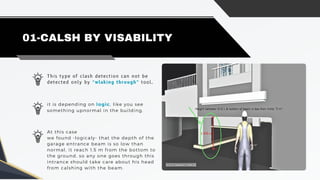
This type of clash detection can not be
detected only by “wlaking through” tool.
01-CALSH BY VISABILITY
it is depending on logic, like you see
something upnormal in the building.
At this case
we found -logicaly- that the depth of the
garage entrance beam is so low than
normal, it reach 1.5 m from the bottom to
the ground, so any one goes through this
intrance should take care about his head
from calshing with the beam.
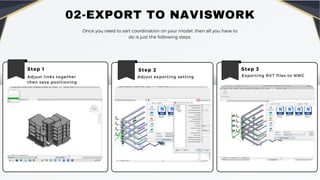
02-EXPORT TO NAVISWORK
Once you need to sart coordination on your model, then all you have to
do is just the following steps.
Step 1
Adjust links together
then save positioning
Step 2
Adjust exporting setting
Step 3
Exporting RVT files to NWC
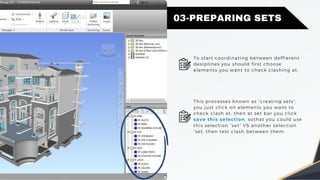
03-PREPARING SETS
To start coordinating between deffierent
desiplines you should first choose
elements you want to check clashing at.
This processes known as “creating sets”,
you just click on elements you want to
check clash at, then at set bar you click
save this selection, sothat you could use
this selection “set” VS another selection
“set, then test clash between them.
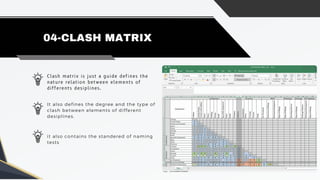
Clash matrix is just a guide defines the
nature relation between elements of
differents desiplines.
04-CLASH MATRIX
It also defines the degree and the type of
clash between elements of different
desiplines.
it also contains the standered of naming
tests
06-CLASHING TESTS
Now your sets is ready for being tested
1st you should adjust clash test settings by naming tests with the standard of
clash matrix, then select the degree of the clash [Hard-Clearance-etc.]
Clash 1
This clash is a “Hard
clash” type which
can not be ignored..
It is between MEP
DUCT VS STR.
FRAMING.
It is preffered to
asign this clash to
MEP engineer, so
he may adjust the
level or change the
design of the Duct.
06-CLASHING TESTS
Now your sets is ready for being tested
1st you should adjust clash test settings by naming tests with the standard of
clash matrix, then select the degree of the clash [Hard-Clearance-etc.]
Clash 2
This clash is a “Hard
clash” type which
can not be ignored..
It is between MEP
DUCTS VS STR.
FRAMING.
It is preffered to
asign this clash to
MEP engineer, so
he may adjust the
level or change the
design of the Duct.
06-CLASHING TESTS
Now your sets is ready for being tested
1st you should adjust clash test settings by naming tests with the standard of
clash matrix, then select the degree of the clash [Hard-Clearance-etc.]
Clash 3
This clash is a “Hard
clash” type which
can not be ignored..
It is between MEP
Duct VS STR.
FRAMING.
This clash is known as
“Grouped clashes” ,it
consists of 2 or more
clashes clashing with
the same element.
06-CLASHING TESTS
Now your sets is ready for being tested
1st you should adjust clash test settings by naming tests with the standard of
clash matrix, then select the degree of the clash [Hard-Clearance-etc.]
Assign clash
This clash is a “Hard
clash” type which
can not be ignored..
This is how you
assign clashes to
the responsible
engineer, you notify
him with a letter
known as “RFI”
It is between MEP
Duct VS STR.
FRAMING.
06-CLASHING TESTS
Now your sets is ready for being tested
1st you should adjust clash test settings by naming tests with the standard of
clash matrix, then select the degree of the clash [Hard-Clearance-etc.]
Clash solving
This clash is a “Hard
clash” type which
can not be ignored..
The statue of clash is
still “new” so we
should adjust the
level of the duct so
that the clash’s
statue changed to
“Resolved”
As shown in figure,
the duct clashes
with the str
framing,
06-CLASHING TESTS
Now your sets is ready for being tested
1st you should adjust clash test settings by naming tests with the standard of
clash matrix, then select the degree of the clash [Hard-Clearance-etc.]
Clash solving
All clashes changed
to “Resolved”.
As shown in figure,
the duct’s level has
been changed.
Re-Run the test.
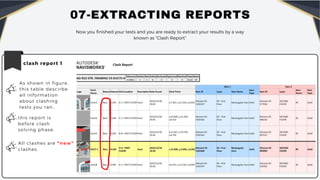
07-EXTRACTING REPORTS
Now you finished your tests and you are ready to extract your results by a way
known as “Clash Report”
clash report 1
All clashes are “new”
clashes.
As shown in figure,
this table descirbe
all information
about clashing
tests you ran..
this report is
before clash
solving phase.
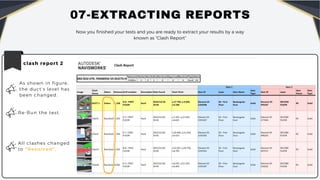
07-EXTRACTING REPORTS
clash report 2
All clashes changed
to “Resolved”.
As shown in figure,
the duct’s level has
been changed.
Re-Run the test.
Now you finished your tests and you are ready to extract your results by a way
known as “Clash Report”
KAYAN ACADEMY

Coordination-Clash detection mepf model.

  • 1.
    COORDINATION KAYAN ACADEMY PRESENTED BY: ENG/MOHAMED ABDELATY ENG/MOHAMEDHAMID ENG/AHMED BEBARS ENG/TAHA AMIN ENG/SEILM BADAWY INSTRUCTOR
  • 2.
    01 CALSH BY VISABILITY 02 EXPORT TO NAVISWORK 03 04 CLASHMATRIX 06 CLASHING TESTS 07 EXTRACTING REPORTS PREPARING SETS
  • 3.
    This type ofclash detection can not be detected only by “wlaking through” tool. 01-CALSH BY VISABILITY it is depending on logic, like you see something upnormal in the building. At this case we found -logicaly- that the depth of the garage entrance beam is so low than normal, it reach 1.5 m from the bottom to the ground, so any one goes through this intrance should take care about his head from calshing with the beam.
  • 4.
    02-EXPORT TO NAVISWORK Onceyou need to sart coordination on your model, then all you have to do is just the following steps. Step 1 Adjust links together then save positioning Step 2 Adjust exporting setting Step 3 Exporting RVT files to NWC
  • 5.
    03-PREPARING SETS To startcoordinating between deffierent desiplines you should first choose elements you want to check clashing at. This processes known as “creating sets”, you just click on elements you want to check clash at, then at set bar you click save this selection, sothat you could use this selection “set” VS another selection “set, then test clash between them.
  • 6.
    Clash matrix isjust a guide defines the nature relation between elements of differents desiplines. 04-CLASH MATRIX It also defines the degree and the type of clash between elements of different desiplines. it also contains the standered of naming tests
  • 7.
    06-CLASHING TESTS Now yoursets is ready for being tested 1st you should adjust clash test settings by naming tests with the standard of clash matrix, then select the degree of the clash [Hard-Clearance-etc.] Clash 1 This clash is a “Hard clash” type which can not be ignored.. It is between MEP DUCT VS STR. FRAMING. It is preffered to asign this clash to MEP engineer, so he may adjust the level or change the design of the Duct.
  • 8.
    06-CLASHING TESTS Now yoursets is ready for being tested 1st you should adjust clash test settings by naming tests with the standard of clash matrix, then select the degree of the clash [Hard-Clearance-etc.] Clash 2 This clash is a “Hard clash” type which can not be ignored.. It is between MEP DUCTS VS STR. FRAMING. It is preffered to asign this clash to MEP engineer, so he may adjust the level or change the design of the Duct.
  • 9.
    06-CLASHING TESTS Now yoursets is ready for being tested 1st you should adjust clash test settings by naming tests with the standard of clash matrix, then select the degree of the clash [Hard-Clearance-etc.] Clash 3 This clash is a “Hard clash” type which can not be ignored.. It is between MEP Duct VS STR. FRAMING. This clash is known as “Grouped clashes” ,it consists of 2 or more clashes clashing with the same element.
  • 10.
    06-CLASHING TESTS Now yoursets is ready for being tested 1st you should adjust clash test settings by naming tests with the standard of clash matrix, then select the degree of the clash [Hard-Clearance-etc.] Assign clash This clash is a “Hard clash” type which can not be ignored.. This is how you assign clashes to the responsible engineer, you notify him with a letter known as “RFI” It is between MEP Duct VS STR. FRAMING.
  • 11.
    06-CLASHING TESTS Now yoursets is ready for being tested 1st you should adjust clash test settings by naming tests with the standard of clash matrix, then select the degree of the clash [Hard-Clearance-etc.] Clash solving This clash is a “Hard clash” type which can not be ignored.. The statue of clash is still “new” so we should adjust the level of the duct so that the clash’s statue changed to “Resolved” As shown in figure, the duct clashes with the str framing,
  • 12.
    06-CLASHING TESTS Now yoursets is ready for being tested 1st you should adjust clash test settings by naming tests with the standard of clash matrix, then select the degree of the clash [Hard-Clearance-etc.] Clash solving All clashes changed to “Resolved”. As shown in figure, the duct’s level has been changed. Re-Run the test.
  • 13.
    07-EXTRACTING REPORTS Now youfinished your tests and you are ready to extract your results by a way known as “Clash Report” clash report 1 All clashes are “new” clashes. As shown in figure, this table descirbe all information about clashing tests you ran.. this report is before clash solving phase.
  • 14.
    07-EXTRACTING REPORTS clash report2 All clashes changed to “Resolved”. As shown in figure, the duct’s level has been changed. Re-Run the test. Now you finished your tests and you are ready to extract your results by a way known as “Clash Report”
  • 15.