Control Procedures
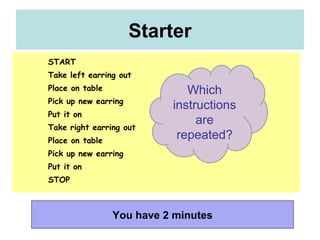
Starter You have 2 minutes START Take left earring out Place on table Pick up new earring Put it on Take right earring out Place on table Pick up new earring Put it on STOP Which instructions are repeated?
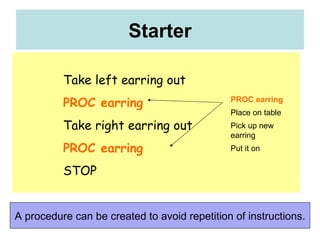
Starter A procedure can be created to avoid repetition of instructions. Take left earring out PROC earring Take right earring out PROC earring STOP PROC earring Place on table Pick up new earring Put it on
Lesson Objectives Identify  procedures  within a system Understand how to  store  and  edit commands  in  procedures Recognize the advantages of storing  commands  for writing  programs
Learning Outcomes Starter –  Identify procedures Task 1 –  Build & Edit a procedure to create a square Task 2 –  Create a procedure to draw a house Task 3 –  Create a procedure to create a street
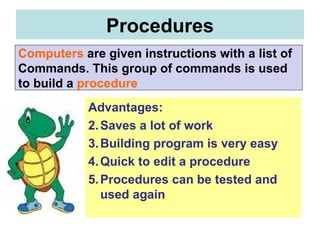
Advantages:  Saves a lot of work Building program is very easy Quick to edit a procedure Procedures can be tested and used again Procedures Computers   are given instructions with a list of  Commands. This group of commands is used  to build a   procedure
Square Procedure : Activate a procedure by clicking on  EDALL  or type  Edit “Square Actions need to be between  To  and  End   e.g.  To  Square Repeat 4 [FD 100 RT] End 3. Test by highlighting the commands -  Repeat 4 [FD 100 RT]  and clicking on  TEST 4. To save your procedures go  FILE  and  Save & EXIT How?
Load LOGO and build and edit a procedure Task 1 You have 10 minutes Build a procedure to create  a  Square  Edit the procedure to make the square smaller
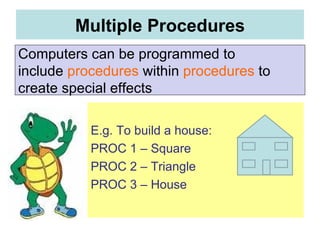
E.g. To build a house: PROC 1 – Square PROC 2 – Triangle PROC 3 – House Multiple Procedures Computers can be programmed to  include  procedures  within  procedures  to create special effects
Using procedures within procedures  Task 2 Create procedures to draw a house Create a procedure called street to draw a row of house You have 10 minutes
Recursions enables you to do continuous repeats by using shapes within shapes Task 3 Create procedures to draw complicated and impressive pictures You have 10 minutes
Lists of commands can be used to create  Procedures . Procedures are  easy  to build and  saves  a lot of work Procedures can be  stored, tested  and  used again . Impressive  pictures  can be programmed using procedures within procedures. What can I remember? Plenary
A  procedure  is a  program  that is created and used in a bigger program. A procedure can be used a number of times. There is a  special symbol  for a procedure. A procedure is also called a  subroutine .  Testing  a program can be made  easier  by creating  procedure  for the various stages and testing them separately first. It also helps to  organize  the way a program looks.

Control lesson 4

  • 1.
  • 2.
    Starter You have2 minutes START Take left earring out Place on table Pick up new earring Put it on Take right earring out Place on table Pick up new earring Put it on STOP Which instructions are repeated?
  • 3.
    Starter A procedurecan be created to avoid repetition of instructions. Take left earring out PROC earring Take right earring out PROC earring STOP PROC earring Place on table Pick up new earring Put it on
  • 4.
    Lesson Objectives Identify procedures within a system Understand how to store and edit commands in procedures Recognize the advantages of storing commands for writing programs
  • 5.
    Learning Outcomes Starter– Identify procedures Task 1 – Build & Edit a procedure to create a square Task 2 – Create a procedure to draw a house Task 3 – Create a procedure to create a street
  • 6.
    Advantages: Savesa lot of work Building program is very easy Quick to edit a procedure Procedures can be tested and used again Procedures Computers are given instructions with a list of Commands. This group of commands is used to build a procedure
  • 7.
    Square Procedure :Activate a procedure by clicking on EDALL or type Edit “Square Actions need to be between To and End e.g. To Square Repeat 4 [FD 100 RT] End 3. Test by highlighting the commands - Repeat 4 [FD 100 RT] and clicking on TEST 4. To save your procedures go FILE and Save & EXIT How?
  • 8.
    Load LOGO andbuild and edit a procedure Task 1 You have 10 minutes Build a procedure to create a Square Edit the procedure to make the square smaller
  • 9.
    E.g. To builda house: PROC 1 – Square PROC 2 – Triangle PROC 3 – House Multiple Procedures Computers can be programmed to include procedures within procedures to create special effects
  • 10.
    Using procedures withinprocedures Task 2 Create procedures to draw a house Create a procedure called street to draw a row of house You have 10 minutes
  • 11.
    Recursions enables youto do continuous repeats by using shapes within shapes Task 3 Create procedures to draw complicated and impressive pictures You have 10 minutes
  • 12.
    Lists of commandscan be used to create Procedures . Procedures are easy to build and saves a lot of work Procedures can be stored, tested and used again . Impressive pictures can be programmed using procedures within procedures. What can I remember? Plenary
  • 13.
    A procedure is a program that is created and used in a bigger program. A procedure can be used a number of times. There is a special symbol for a procedure. A procedure is also called a subroutine . Testing a program can be made easier by creating procedure for the various stages and testing them separately first. It also helps to organize the way a program looks.