Introduction
Most of cloud datacenters use virtualization which is implemented by
hypervisors such as Xen, KVM or Vsphere.
Container as a good alternative to hypervisor
Most of major IT vendors such as Google, Amazon, and Microsoft and
academic researchers have been interested in containerization of cloud
datacenters to overcome drawbacks of traditional hypervisor based
virtualization[02].
Google: 'EVERYTHING at Google runs in a container‘; Two billion containers a
week
 Docker Container, Linux Container(LxC), Warden Container, Open Vz Container.
Container
 “Containerization," an alternative to full machine virtualization in
which an application is encapsulated in a container with its own
operating environment.
 Containerization is an attractive solution that enables developers to
iterate faster.
 It also offers additional benefits that address the overhead associated
with virtual machines, allowing for higher utilization of resources in
the software-defined data center.
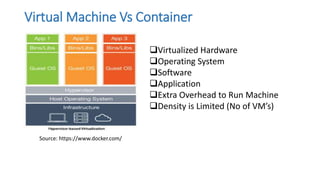
Virtual Machine Vs Container
Source: https://www.docker.com/
Virtualized Hardware
Operating System
Software
Application
Extra Overhead to Run Machine
Density is Limited (No of VM’s)
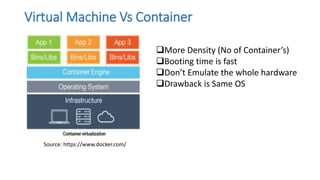
Virtual Machine Vs Container
Source: https://www.docker.com/
More Density (No of Container’s)
Booting time is fast
Don’t Emulate the whole hardware
Drawback is Same OS
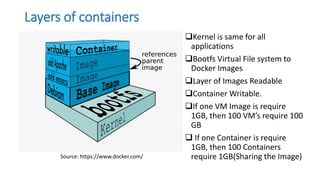
Layers of containers
Kernel is same for all
applications
Bootfs Virtual File system to
Docker Images
Layer of Images Readable
Container Writable.
If one VM Image is require
1GB, then 100 VM’s require 100
GB
 If one Container is require
1GB, then 100 Containers
require 1GB(Sharing the Image)
Source: https://www.docker.com/
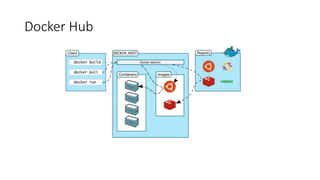
Docker Hub
Linux Containers
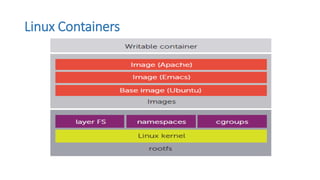
Linux distribution provide kernel mechanisms such as
oNamespaces: Allows groups of processes to be separated,
preventing them from seeing resources in other groups.
oControl groups: cgroups (abbreviated from control groups) is a
Linux kernel feature that limits, accounts, and isolates the resource
usage (CPU, memory, disk I/O, network, etc.) of a collection of
processes.
Documentation of cgroups-v2 first appeared in Linux kernel 4.5 released on
March 14, 2016
Linux Containers
6 Container Technologies
Docker
Docker
Docker Swarm
Linux Container(LxC)
Kubernetes
6.1 Docker
Docker is the world’s leading software container platform.
Docker is an open platform for developers and sysadmins to
build, ship, and run distributed applications, whether on
laptops, data center VMs, or the cloud.
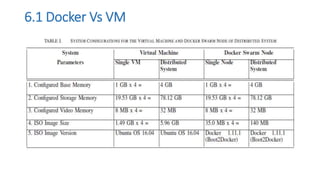
6.1 Docker Vs VM
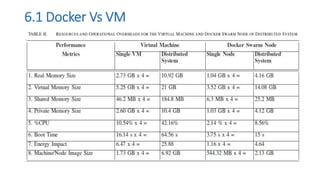
6.1 Docker Vs VM
7. Docker Swarm
Docker swarm mode is Docker’s solution for managing a cluster of Docker
engines running on multiple machines called SWARM, Where you can
deploy application services which are Docker Container.
Scheduler Swarm comes with a built-in scheduler. It currently provides
basic functionalities, such as scheduling containers based on constraints or
affinity (co-scheduling of containers), persistent storage and multiple
scheduling strategies like binpacking or random.
As per the document of Docker swarm they said, “We plan to add more
features to the built-in scheduler such as rebalancing (in case of host
failure) and global scheduling (schedule containers on every node)”
o Virtual Container ID
o Rebalancing
o Global scheduling
Source: https://github.com/docker/swarm/blob/master/ROADMAP.md Posted May 27,2016
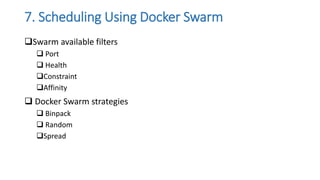
7. Scheduling Using Docker Swarm
Swarm available filters
 Port
 Health
Constraint
Affinity
 Docker Swarm strategies
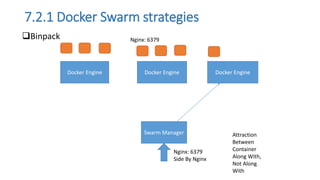
 Binpack
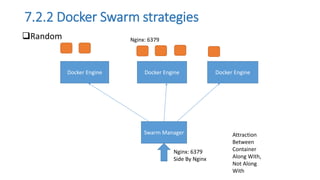
 Random
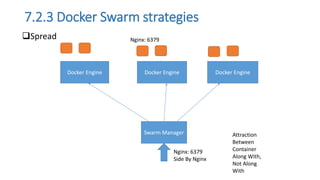
Spread
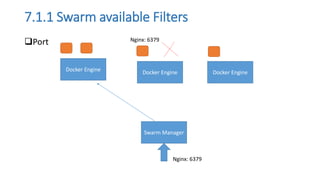
7.1.1 Swarm available Filters
Port
Docker Engine
Docker Engine Docker Engine
Swarm Manager
Nginx: 6379
Nginx: 6379
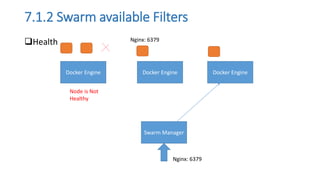
7.1.2 Swarm available Filters
Health
Docker Engine
Docker Engine Docker Engine
Swarm Manager
Nginx: 6379
Nginx: 6379
Node is Not
Healthy
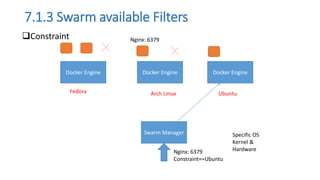
7.1.3 Swarm available Filters
Constraint
Docker Engine
Docker Engine Docker Engine
Swarm Manager
Nginx: 6379
Nginx: 6379
Constraint==Ubuntu
Fedora
Specific OS
Kernel &
Hardware
Arch Linux Ubuntu
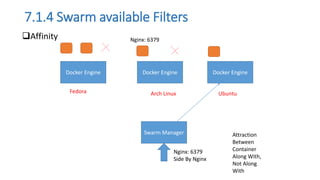
7.1.4 Swarm available Filters
Affinity
Docker Engine
Docker Engine Docker Engine
Swarm Manager
Nginx: 6379
Nginx: 6379
Side By Nginx
Fedora
Attraction
Between
Container
Along With,
Not Along
With
Arch Linux Ubuntu
7.2.1 Docker Swarm strategies
Binpack
Docker Engine
Docker Engine Docker Engine
Swarm Manager
Nginx: 6379
Nginx: 6379
Side By Nginx
Attraction
Between
Container
Along With,
Not Along
With
7.2.2 Docker Swarm strategies
Random
Docker Engine
Docker Engine Docker Engine
Swarm Manager
Nginx: 6379
Nginx: 6379
Side By Nginx
Attraction
Between
Container
Along With,
Not Along
With
7.2.3 Docker Swarm strategies
Spread
Docker Engine
Docker Engine Docker Engine
Swarm Manager
Nginx: 6379
Nginx: 6379
Side By Nginx
Attraction
Between
Container
Along With,
Not Along
With

Containerization

  • 1.
    Introduction Most of clouddatacenters use virtualization which is implemented by hypervisors such as Xen, KVM or Vsphere. Container as a good alternative to hypervisor Most of major IT vendors such as Google, Amazon, and Microsoft and academic researchers have been interested in containerization of cloud datacenters to overcome drawbacks of traditional hypervisor based virtualization[02]. Google: 'EVERYTHING at Google runs in a container‘; Two billion containers a week  Docker Container, Linux Container(LxC), Warden Container, Open Vz Container.
  • 2.
    Container  “Containerization," analternative to full machine virtualization in which an application is encapsulated in a container with its own operating environment.  Containerization is an attractive solution that enables developers to iterate faster.  It also offers additional benefits that address the overhead associated with virtual machines, allowing for higher utilization of resources in the software-defined data center.
  • 3.
    Virtual Machine VsContainer Source: https://www.docker.com/ Virtualized Hardware Operating System Software Application Extra Overhead to Run Machine Density is Limited (No of VM’s)
  • 4.
    Virtual Machine VsContainer Source: https://www.docker.com/ More Density (No of Container’s) Booting time is fast Don’t Emulate the whole hardware Drawback is Same OS
  • 5.
    Layers of containers Kernelis same for all applications Bootfs Virtual File system to Docker Images Layer of Images Readable Container Writable. If one VM Image is require 1GB, then 100 VM’s require 100 GB  If one Container is require 1GB, then 100 Containers require 1GB(Sharing the Image) Source: https://www.docker.com/
  • 6.
  • 7.
    Linux Containers Linux distributionprovide kernel mechanisms such as oNamespaces: Allows groups of processes to be separated, preventing them from seeing resources in other groups. oControl groups: cgroups (abbreviated from control groups) is a Linux kernel feature that limits, accounts, and isolates the resource usage (CPU, memory, disk I/O, network, etc.) of a collection of processes. Documentation of cgroups-v2 first appeared in Linux kernel 4.5 released on March 14, 2016
  • 8.
  • 9.
    6 Container Technologies Docker Docker DockerSwarm Linux Container(LxC) Kubernetes
  • 10.
    6.1 Docker Docker isthe world’s leading software container platform. Docker is an open platform for developers and sysadmins to build, ship, and run distributed applications, whether on laptops, data center VMs, or the cloud.
  • 11.
  • 12.
  • 13.
    7. Docker Swarm Dockerswarm mode is Docker’s solution for managing a cluster of Docker engines running on multiple machines called SWARM, Where you can deploy application services which are Docker Container. Scheduler Swarm comes with a built-in scheduler. It currently provides basic functionalities, such as scheduling containers based on constraints or affinity (co-scheduling of containers), persistent storage and multiple scheduling strategies like binpacking or random. As per the document of Docker swarm they said, “We plan to add more features to the built-in scheduler such as rebalancing (in case of host failure) and global scheduling (schedule containers on every node)” o Virtual Container ID o Rebalancing o Global scheduling Source: https://github.com/docker/swarm/blob/master/ROADMAP.md Posted May 27,2016
  • 14.
    7. Scheduling UsingDocker Swarm Swarm available filters  Port  Health Constraint Affinity  Docker Swarm strategies  Binpack  Random Spread
  • 15.
    7.1.1 Swarm availableFilters Port Docker Engine Docker Engine Docker Engine Swarm Manager Nginx: 6379 Nginx: 6379
  • 16.
    7.1.2 Swarm availableFilters Health Docker Engine Docker Engine Docker Engine Swarm Manager Nginx: 6379 Nginx: 6379 Node is Not Healthy
  • 17.
    7.1.3 Swarm availableFilters Constraint Docker Engine Docker Engine Docker Engine Swarm Manager Nginx: 6379 Nginx: 6379 Constraint==Ubuntu Fedora Specific OS Kernel & Hardware Arch Linux Ubuntu
  • 18.
    7.1.4 Swarm availableFilters Affinity Docker Engine Docker Engine Docker Engine Swarm Manager Nginx: 6379 Nginx: 6379 Side By Nginx Fedora Attraction Between Container Along With, Not Along With Arch Linux Ubuntu
  • 19.
    7.2.1 Docker Swarmstrategies Binpack Docker Engine Docker Engine Docker Engine Swarm Manager Nginx: 6379 Nginx: 6379 Side By Nginx Attraction Between Container Along With, Not Along With
  • 20.
    7.2.2 Docker Swarmstrategies Random Docker Engine Docker Engine Docker Engine Swarm Manager Nginx: 6379 Nginx: 6379 Side By Nginx Attraction Between Container Along With, Not Along With
  • 21.
    7.2.3 Docker Swarmstrategies Spread Docker Engine Docker Engine Docker Engine Swarm Manager Nginx: 6379 Nginx: 6379 Side By Nginx Attraction Between Container Along With, Not Along With