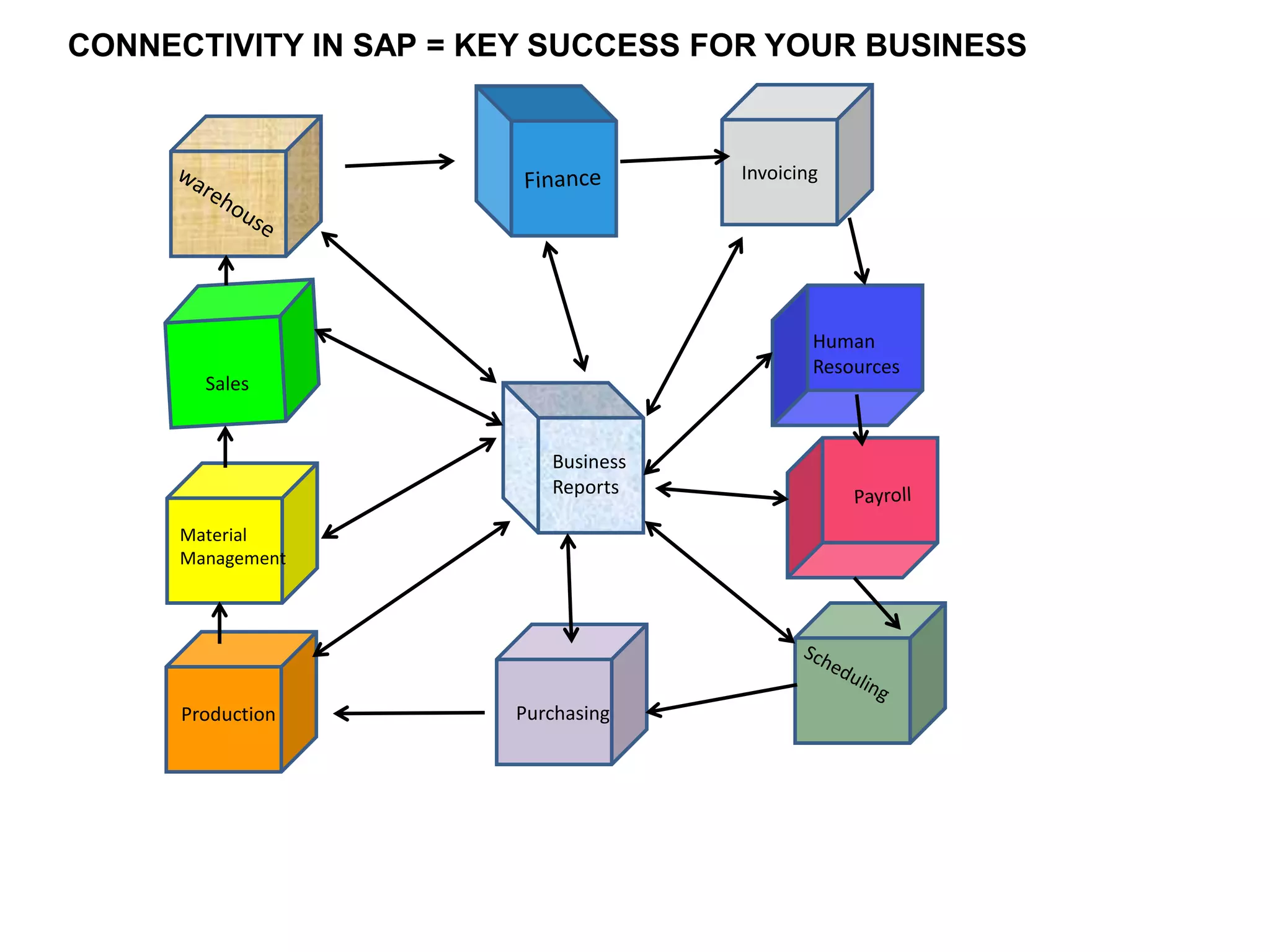
Invoicing
CONNECTIVITY IN SAP = KEY SUCCESS FOR YOUR BUSINESS
Human
Resources
Sales
Material
Management
Production Purchasing
Business
Reports
SAP
Introduction
The System, Applications and Products in data processing is a German multinational software corporation that
makes enterprise software to manage business operations and customer relations. Founded since 1972, has
been the main system that handles entire organizations.
SAP itself cannot operate efficiently without maintaining and updating all company information . It is also
important to consider that when the system is installed all the departments and branches have to be
interconnected in the system
SAP has many versions and offers customized packages for different sizes of organizations and because of all
the information of an entity is within the system the reporting tool is a mechanics that will help management
in decisions for strategy planning and for the future of the business.
This presentation will explain how to interconnect all departments in SAP in a simple way.
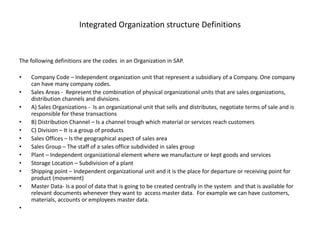
Integrated Organization structure Definitions
The following definitions are the codes in an Organization in SAP.
• Company Code – Independent organization unit that represent a subsidiary of a Company. One company
can have many company codes.
• Sales Areas - Represent the combination of physical organizational units that are sales organizations,
distribution channels and divisions.
• A) Sales Organizations - Is an organizational unit that sells and distributes, negotiate terms of sale and is
responsible for these transactions
• B) Distribution Channel – Is a channel trough which material or services reach customers
• C) Division – It is a group of products
• Sales Offices – Is the geographical aspect of sales area
• Sales Group – The staff of a sales office subdivided in sales group
• Plant – Independent organizational element where we manufacture or kept goods and services
• Storage Location – Subdivision of a plant
• Shipping point – Independent organizational unit and it is the place for departure or receiving point for
product (movement)
• Master Data- Is a pool of data that is going to be created centrally in the system and that is available for
relevant documents whenever they want to access master data. For example we can have customers,
materials, accounts or employees master data.
•
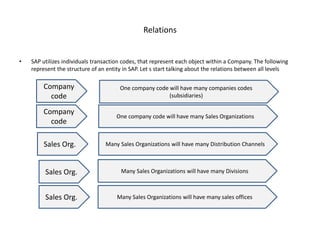
Relations
• SAP utilizes individuals transaction codes, that represent each object within a Company. The following
represent the structure of an entity in SAP. Let s start talking about the relations between all levels
Company
code
One company code will have many companies codes
(subsidiaries)
Company
code
One company code will have many Sales Organizations
Sales Org. Many Sales Organizations will have many Distribution Channels
Sales Org. Many Sales Organizations will have many Divisions
Sales Org. Many Sales Organizations will have many sales offices
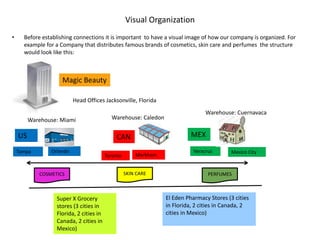
Visual Organization
• Before establishing connections it is important to have a visual image of how our company is organized. For
example for a Company that distributes famous brands of cosmetics, skin care and perfumes the structure
would look like this:
•
Magic Beauty
US CAN MEX
COSMETICS SKIN CARE PERFUMES
Tampa Orlando
Toronto Markham
Mexico CityVeracruz
Warehouse: Miami Warehouse: Caledon
Warehouse: Cuernavaca
Head Offices Jacksonville, Florida
Super X Grocery
stores (3 cities in
Florida, 2 cities in
Canada, 2 cities in
Mexico)
El Eden Pharmacy Stores (3 cities
in Florida, 2 cities in Canada, 2
cities in Mexico)
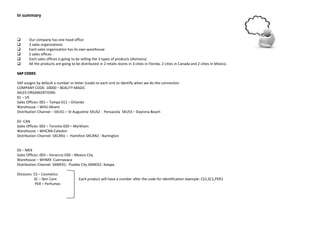
In summary
 Our company has one head office
 3 sales organizations
 Each sales organization has its own warehouse
 2 sales offices
 Each sales offices is going to be selling the 3 types of products (divisions)
 All the products are going to be distributed in 2 retails stores in 3 cities in Florida, 2 cities in Canada and 2 cities in Mexico.
SAP CODES
SAP assigns by default a number or letter (code) to each unit to identify when we do the connection
COMPANY CODE: 10000 – BEAUTY MAGIC
SALES ORGANIZATIONS:
01 – US
Sales Offices: 001 – Tampa 011 – Orlando
Warehouse – WHU-Miami
Distribution Channel – SXUS1 – St Augustine SXUS2 - Pensacola SXUS3 – Daytona Beach
02- CAN
Sales Offices: 002 – Toronto 020 – Markham
Warehouse – WHCAN-Caledon
Distribution Channel: SXCAN1 – Hamilton SXCAN2 - Burlington
03 – MEX
Sales Offices: 003 – Veracruz 030 – Mexico City
Warehouse – WHMX- Cuernavaca
Distribution Channel: SXMEX1- Puebla City SXMEX2- Xalapa
Divisions: CS – Cosmetics
SC – Skin Care Each product will have a number after the code for identification example: CS1,SC1,PER1
PER – Perfumes
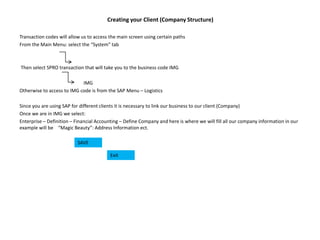
Creating your Client (Company Structure)
Transaction codes will allow us to access the main screen using certain paths
From the Main Menu: select the “System” tab
Then select SPRO transaction that will take you to the business code IMG
IMG
Otherwise to access to IMG code is from the SAP Menu – Logistics
Since you are using SAP for different clients it is necessary to link our business to our client (Company)
Once we are in IMG we select:
Enterprise – Definition – Financial Accounting – Define Company and here is where we will fill all our company information in our
example will be “Magic Beauty”: Address Information ect.
SAVE
Exit
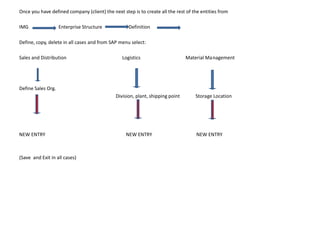
Once you have defined company (client) the next step is to create all the rest of the entities from
IMG Enterprise Structure Definition
Define, copy, delete in all cases and from SAP menu select:
Sales and Distribution Logistics Material Management
Define Sales Org.
Division, plant, shipping point Storage Location
NEW ENTRY NEW ENTRY NEW ENTRY
(Save and Exit in all cases)
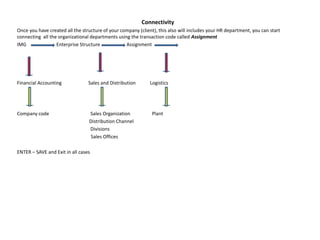
Connectivity
Once you have created all the structure of your company (client), this also will includes your HR department, you can start
connecting all the organizational departments using the transaction code called Assignment
IMG Enterprise Structure Assignment
Financial Accounting Sales and Distribution Logistics
Company code Sales Organization Plant
Distribution Channel
Divisions
Sales Offices
ENTER – SAVE and Exit in all cases
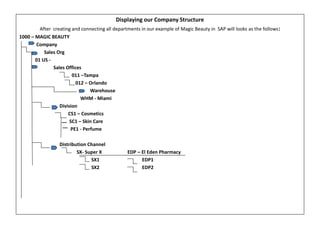
Displaying our Company Structure
After creating and connecting all departments in our example of Magic Beauty in SAP will looks as the follows:
1000 – MAGIC BEAUTY
Company
- Sales Org
01 US -
Sales Offices
011 –Tampa
012 – Orlando
Warehouse
WHM - Miami
Division
CS1 – Cosmetics
SC1 – Skin Care
PE1 - Perfume
Distribution Channel
SX- Super X EDP – El Eden Pharmacy
SX1 EDP1
SX2 EDP2
At this point you have to enter all the Master data that you will collect from your client This information will include:
• Customer lists and accounting information (terms of payment)
• List of products (description), prices, discounts
• Sales Rep
• Employees information
• Salaries
Make sure to test and confirm that all the departments are properly connected .If an step has been missing during the
connectivity process SAP won’t be able to display the Master data when your client tries to start processing transactions
Thank you

Connectivity in sap

  • 1.
    Invoicing CONNECTIVITY IN SAP= KEY SUCCESS FOR YOUR BUSINESS Human Resources Sales Material Management Production Purchasing Business Reports
  • 2.
    SAP Introduction The System, Applicationsand Products in data processing is a German multinational software corporation that makes enterprise software to manage business operations and customer relations. Founded since 1972, has been the main system that handles entire organizations. SAP itself cannot operate efficiently without maintaining and updating all company information . It is also important to consider that when the system is installed all the departments and branches have to be interconnected in the system SAP has many versions and offers customized packages for different sizes of organizations and because of all the information of an entity is within the system the reporting tool is a mechanics that will help management in decisions for strategy planning and for the future of the business. This presentation will explain how to interconnect all departments in SAP in a simple way.
  • 3.
    Integrated Organization structureDefinitions The following definitions are the codes in an Organization in SAP. • Company Code – Independent organization unit that represent a subsidiary of a Company. One company can have many company codes. • Sales Areas - Represent the combination of physical organizational units that are sales organizations, distribution channels and divisions. • A) Sales Organizations - Is an organizational unit that sells and distributes, negotiate terms of sale and is responsible for these transactions • B) Distribution Channel – Is a channel trough which material or services reach customers • C) Division – It is a group of products • Sales Offices – Is the geographical aspect of sales area • Sales Group – The staff of a sales office subdivided in sales group • Plant – Independent organizational element where we manufacture or kept goods and services • Storage Location – Subdivision of a plant • Shipping point – Independent organizational unit and it is the place for departure or receiving point for product (movement) • Master Data- Is a pool of data that is going to be created centrally in the system and that is available for relevant documents whenever they want to access master data. For example we can have customers, materials, accounts or employees master data. •
  • 4.
    Relations • SAP utilizesindividuals transaction codes, that represent each object within a Company. The following represent the structure of an entity in SAP. Let s start talking about the relations between all levels Company code One company code will have many companies codes (subsidiaries) Company code One company code will have many Sales Organizations Sales Org. Many Sales Organizations will have many Distribution Channels Sales Org. Many Sales Organizations will have many Divisions Sales Org. Many Sales Organizations will have many sales offices
  • 5.
    Visual Organization • Beforeestablishing connections it is important to have a visual image of how our company is organized. For example for a Company that distributes famous brands of cosmetics, skin care and perfumes the structure would look like this: • Magic Beauty US CAN MEX COSMETICS SKIN CARE PERFUMES Tampa Orlando Toronto Markham Mexico CityVeracruz Warehouse: Miami Warehouse: Caledon Warehouse: Cuernavaca Head Offices Jacksonville, Florida Super X Grocery stores (3 cities in Florida, 2 cities in Canada, 2 cities in Mexico) El Eden Pharmacy Stores (3 cities in Florida, 2 cities in Canada, 2 cities in Mexico)
  • 6.
    In summary  Ourcompany has one head office  3 sales organizations  Each sales organization has its own warehouse  2 sales offices  Each sales offices is going to be selling the 3 types of products (divisions)  All the products are going to be distributed in 2 retails stores in 3 cities in Florida, 2 cities in Canada and 2 cities in Mexico. SAP CODES SAP assigns by default a number or letter (code) to each unit to identify when we do the connection COMPANY CODE: 10000 – BEAUTY MAGIC SALES ORGANIZATIONS: 01 – US Sales Offices: 001 – Tampa 011 – Orlando Warehouse – WHU-Miami Distribution Channel – SXUS1 – St Augustine SXUS2 - Pensacola SXUS3 – Daytona Beach 02- CAN Sales Offices: 002 – Toronto 020 – Markham Warehouse – WHCAN-Caledon Distribution Channel: SXCAN1 – Hamilton SXCAN2 - Burlington 03 – MEX Sales Offices: 003 – Veracruz 030 – Mexico City Warehouse – WHMX- Cuernavaca Distribution Channel: SXMEX1- Puebla City SXMEX2- Xalapa Divisions: CS – Cosmetics SC – Skin Care Each product will have a number after the code for identification example: CS1,SC1,PER1 PER – Perfumes
  • 7.
    Creating your Client(Company Structure) Transaction codes will allow us to access the main screen using certain paths From the Main Menu: select the “System” tab Then select SPRO transaction that will take you to the business code IMG IMG Otherwise to access to IMG code is from the SAP Menu – Logistics Since you are using SAP for different clients it is necessary to link our business to our client (Company) Once we are in IMG we select: Enterprise – Definition – Financial Accounting – Define Company and here is where we will fill all our company information in our example will be “Magic Beauty”: Address Information ect. SAVE Exit
  • 8.
    Once you havedefined company (client) the next step is to create all the rest of the entities from IMG Enterprise Structure Definition Define, copy, delete in all cases and from SAP menu select: Sales and Distribution Logistics Material Management Define Sales Org. Division, plant, shipping point Storage Location NEW ENTRY NEW ENTRY NEW ENTRY (Save and Exit in all cases)
  • 9.
    Connectivity Once you havecreated all the structure of your company (client), this also will includes your HR department, you can start connecting all the organizational departments using the transaction code called Assignment IMG Enterprise Structure Assignment Financial Accounting Sales and Distribution Logistics Company code Sales Organization Plant Distribution Channel Divisions Sales Offices ENTER – SAVE and Exit in all cases
  • 10.
    Displaying our CompanyStructure After creating and connecting all departments in our example of Magic Beauty in SAP will looks as the follows: 1000 – MAGIC BEAUTY Company - Sales Org 01 US - Sales Offices 011 –Tampa 012 – Orlando Warehouse WHM - Miami Division CS1 – Cosmetics SC1 – Skin Care PE1 - Perfume Distribution Channel SX- Super X EDP – El Eden Pharmacy SX1 EDP1 SX2 EDP2
  • 11.
    At this pointyou have to enter all the Master data that you will collect from your client This information will include: • Customer lists and accounting information (terms of payment) • List of products (description), prices, discounts • Sales Rep • Employees information • Salaries Make sure to test and confirm that all the departments are properly connected .If an step has been missing during the connectivity process SAP won’t be able to display the Master data when your client tries to start processing transactions Thank you