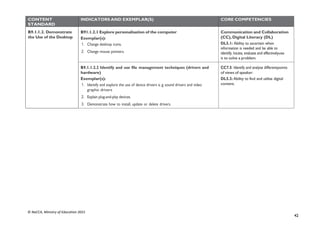
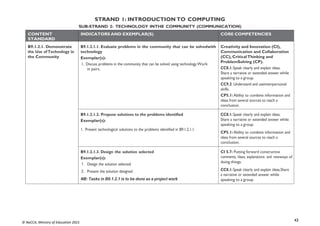
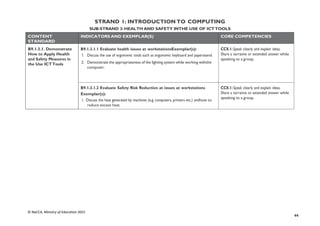
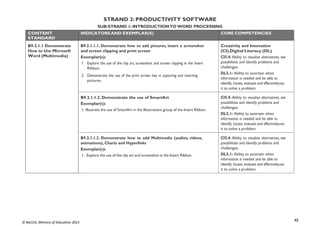
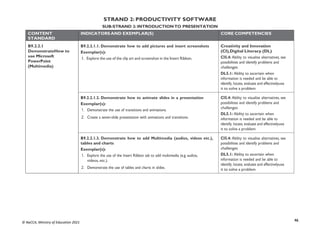
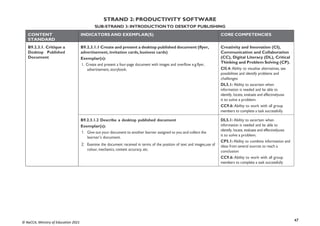
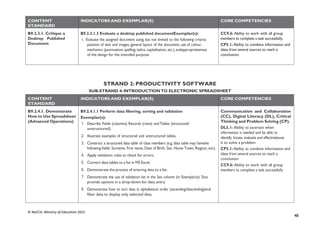
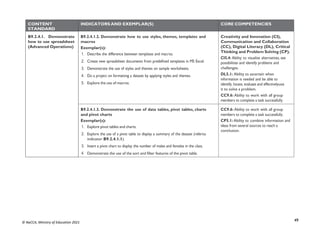
i
© NaCCA, Ministry of Education 2021
NATIONAL COUNCIL FOR
CURRICULUM & ASSESSMENT
(MINISTRY OF EDUCATION)
COMPUTING
COMMON CORE PROGRAMME (CCP)
CURRICULUM FOR JHS1 (B7) - JHS3 (B9)
SEPTEMBER, 2020
MINISTRY OF EDUCATION
REPUBLIC OF GHANA
ii
© NaCCA, Ministry of Education 2021
Computing Curriculum for B7- B9
Enquiries and comments on this Curriculum should be addressed to:
The Director-General
National Council for Curriculum and Assessment (NaCCA)Ministry of Education
P. O. Box CT PMB 77Cantonments Accra
Telephone: 0302909071, 0302909862
Email: info@nacca.gov.gh
Website: www.nacca.gov.gh
©2020 National Council for Curriculum and Assessment (NaCCA)
This publication is not for sale. All rights reserved. No
part of this publication may be reproduced without
prior written permission from the Ministry of
Education, Ghana.
Ministry of Education
Ghana
iii
© NaCCA, Ministry of Education 2021
FOREWORD
The Ministry of Education, acting through the National Council for Curriculum and Assessment (NaCCA) has, in recent times, been working on curriculum and
assessment reforms to improve the quality and relevance of learning experiences in pre-tertiary schools in Ghana. This curriculum, known as the Common Core
Programme (CCP), is a sequel to the Kindergarten-Primary standards-based school curriculum, the implementation of which commenced with the 2019/2020 academic
year. The CCP is carefully designed for learners in Basic 7 to Basic 9 (JHS 1 – JHS 3) as part of a holistic learning experience that prepares them for post-secondary
education, the world of work or both. The curriculum focuses on building character and nurturing values, in addition to ensuring a seamless progression for all
learners in JHS
In the twenty-first century, memorisation of facts and figures is no longer a sufficient learner attribute. Therefore, the CCP focuses on the acquisition of the 4Rs
(Reading, wRiting, aRithmetic and cReativity) and core competencies to afford learners the ability to apply knowledge innovatively to solve everydayproblems. Personal
projects, community projects and community service have been integrated into the CCP as part of a comprehensive assessmentprogramme, including assessment
of knowledge, skills, attitudes and values that mainly emphasise what learners can do. It is hoped that the contentof this curriculum will promote better high
school education that meets the varied learning needs of the young people in the country and addressesthe shortfalls in the current school curriculum in
relation to learning andassessment.
The Ministry of Education is committed to ensuring that our schools develop globally competitive high school graduates who have the requisiteemployable
skills and workplace ethos. The CCP curriculum will, therefore, play an important role in this regard. The Ministry will support the effective implementation of the
CCP to include capacity development of all teachers to ensure improved learning experiences and outcomes for our young people.
Dr Matthew Opoku Prempeh (MP)
The Honourable Minister of Education
iv
© NaCCA, Ministry of Education 2021
ACKNOWLEDGEMENTS
This Common Core Programme (CCP) curriculum was developed together with the National Pre-tertiary Learning Assessment Framework (NPLAF) and
Teacher’s and Learner’s Resource Packs. All these documents were developed by the National Council for Curriculum and Assessment (NaCCA), under the
oversight and strategic direction of the Ministry of Education (MoE) with support from some agencies of the MoE and other relevant stakeholders.
NaCCA, acting on behalf of the Ministry of Education (MoE), would liketo express its sincere gratitude to all its partners who participated inthe
professional conversations and discussions during the course of the development of the CCP curriculum.
NaCCA also extends special commendations to the leadership of the Ghana Education Service (GES), National School Inspectorate Authority (NaSIA), National
Teaching Council (NTC), Commission for Technical and Vocational Education and Training (Commission for TVET) and other agencies of the MoE.
Additionally, NaCCA acknowledges the contributions of staff from various Universities and Colleges of Education as well as teachers and learners within the
Ghana Education Service.
Special thanks go to those who also contributed to shaping this curriculum content through the consultation process, including the national stakeholder
engagement conducted in Accra in February, 2020.
v
© NaCCA, Ministry of Education 2021
CONTENTS
FOREWORD..................................................................................................................................................................................................................................................................................iii
ACKNOWLEDGEMENTS...........................................................................................................................................................................................................................................................iv
INTRODUCTION .................................................................................................................................................................................................................................................................. ix
RATIONALE................................................................................................................................................................................................................................................................................. x
PHILOSOPHY................................................................................................................................................................................................................................................................................ xi
AIMSxii
PROFILE OF EXPECTED LEARNING BEHAVIOURS ....................................................................................................................................................................................................... xiii
ASSESSMENT.............................................................................................................................................................................................................................................................................. xvii
CORE COMPETENCIES.......................................................................................................................................................................................................................................................... xxv
INSTRUCTIONAL EXPECTATIONS............................................................................................................................................................................................................................ xxvi
ORGANISATION AND STRUCTURE OF THE CURRICULUM (Basic 7-9)..........................................................................................................................................................xxvii
SCOPE AND SEQUENCE...................................................................................................................................................................................................................................................... xxviii
BASIC 7.......................................................................................................................................................................................................................................................................................... 1
STRAND 1: INTRODUCTIONTO COMPUTING.......................................................................................................................................................2
SUB-STRAND 1: COMPONENTS OF COMPUTERS AND COMPUTER SYSTEMS........................................................................................................................................ 2
SUB-STRAND 2: TECHNOLOGY INTHE COMMUNITY ................................................................................................................................................................................... 5
SUB-STRAND 3: HEALTH AND SAFETY INTHE USE OF ICTTOOLS.............................................................................................................................................................. 7
STRAND 2: PRODUCTIVITY SOFTWARE...................................................................................................................................................................8
SUB-STRAND 1: INTRODUCTIONTO WORD PROCESSING.......................................................................................................................................................................... 8
vi
© NaCCA, Ministry of Education 2021
SUB-STRAND 2: INTRODUCTIONTO PRESENTATION SOFTWARE.........................................................................................................................................................11
SUB-STRAND 3: INTRODUCTIONTO ELECTRONIC SPREADSHEET .........................................................................................................................................................13
STRAND 3: COMMUNICATION NETWORKS..........................................................................................................................................................16
SUB-STRAND 1: COMPUTER NETWORKS ............................................................................................................................................................................................................ 16
SUB-STRAND 2: INTERNET AND SOCIAL MEDIA .............................................................................................................................................................................................. 17
SUB-STRAND 3: INFORMATION SECURITY.......................................................................................................................................................................................................... 18
SUB-STRAND 4: WEBTECHNOLOGIES ................................................................................................................................................................................................................. 19
STRAND 4: COMPUTATIONALTHINKING .............................................................................................................................................................20
SUB-STRAND 1: INTRODUCTIONTO PROGRAMMING................................................................................................................................................................................. 20
SUB-STRAND 2:ALGORITHM..................................................................................................................................................................................................................................... 21
SUB-STRAND 3: ROBOTICS........................................................................................................................................................................................................................................ 22
SUB-STRAND 4:ARTIFICIAL INTELLIGENCE......................................................................................................................................................................................................... 22
BASIC 8.......................................................................................................................................................................................................................................................................................... 23
STRAND 1: INTRODUCTIONTO COMPUTING.....................................................................................................................................................24
SUB-STRAND 1: COMPONENTS OF COMPUTERS AND COMPUTER SYSTEMS......................................................................................................................................24
SUB-STRAND 2: TECHNOLOGY INTHE COMMUNITY ................................................................................................................................................................................. 26
SUB-STRAND 3: HEALTH AND SAFETY INTHE USE OF ICTTOOLS............................................................................................................................................................27
STRAND 2: PRODUCTIVITY SOFTWARE.................................................................................................................................................................28
SUB-STRAND 1: INTRODUCTIONTO WORD PROCESSING........................................................................................................................................................................ 28
SUB-STRAND 2: INTRODUCTIONTO PRESENTATION.................................................................................................................................................................................. 29
SUB-STRAND 3: INTRODUCTIONTO DESKTOP PUBLISHING....................................................................................................................................................................30
vii
© NaCCA, Ministry of Education 2021
SUB-STRAND 4: INTRODUCTIONTO ELECTRONIC SPREADSHEET .........................................................................................................................................................32
STRAND 3: COMMUNICATION NETWORKS..........................................................................................................................................................33
SUB-STRAND 1: COMPUTER NETWORKS ............................................................................................................................................................................................................ 33
SUB-STRAND 2: INTERNET AND SOCIAL MEDIA.............................................................................................................................................................................................. 34
SUB-STRAND 3: INFORMATION SECURITY.......................................................................................................................................................................................................... 35
SUB-STRAND 4: WEBTECHNOLOGIES ................................................................................................................................................................................................................. 36
STRAND 4: COMPUTATIONALTHINKING .............................................................................................................................................................36
SUB-STRAND 1: INTRODUCTIONTO PROGRAMMING................................................................................................................................................................................. 36
SUB-STRAND 2:ALGORITHM..................................................................................................................................................................................................................................... 37
SUB-STRAND 3: ROBOTICS........................................................................................................................................................................................................................................ 38
SUB-STRAND 4:ARTIFICIAL INTELLIGENCE......................................................................................................................................................................................................... 39
BASIC 9.......................................................................................................................................................................................................................................................................................... 40
STRAND 1: INTRODUCTIONTO COMPUTING.....................................................................................................................................................41
SUB-STRAND 1: COMPONENTS OF COMPUTERS AND COMPUTER SYSTEMS......................................................................................................................................41
SUB-STRAND 2: TECHNOLOGY INTHE COMMUNITY (COMMUNICATION)....................................................................................................................................43
SUB-STRAND 3: HEALTH AND SAFETY INTHE USE OF ICTTOOLS............................................................................................................................................................44
STRAND 2: PRODUCTIVITY SOFTWARE.................................................................................................................................................................45
SUB-STRAND 1: INTRODUCTIONTO WORD PROCESSING........................................................................................................................................................................ 45
SUB-STRAND 2: INTRODUCTIONTO PRESENTATION.................................................................................................................................................................................. 46
SUB-STRAND 3: INTRODUCTIONTO DESKTOP PUBLISHING....................................................................................................................................................................47
SUB-STRAND 4: INTRODUCTIONTO ELECTRONIC SPREADSHEET .........................................................................................................................................................48
viii
© NaCCA, Ministry of Education 2021
STRAND 3: COMMUNICATION NETWORKS..........................................................................................................................................................50
SUB-STRAND 1: COMPUTER NETWORKS ............................................................................................................................................................................................................ 50
SUB-STRAND 2: INTERNET AND SOCIAL MEDIA .............................................................................................................................................................................................. 50
SUB-STRAND 3: INFORMATION SECURITY.......................................................................................................................................................................................................... 51
SUB-STRAND 4: WEBTECHNOLOGIES ................................................................................................................................................................................................................. 52
STRAND 4: COMPUTATIONALTHINKING .............................................................................................................................................................53
SUB-STRAND 1: INTRODUCTIONTO PROGRAMMING................................................................................................................................................................................. 53
SUB-STRAND 2:ALGORITHM..................................................................................................................................................................................................................................... 54
SUB-STRAND 3: ROBOTICS........................................................................................................................................................................................................................................ 55
SUB-STRAND 4:ARTIFICIAL INTELLIGENCE......................................................................................................................................................................................................... 56
GLOSSARY.................................................................................................................................................................................................................................................................................... 57
APPENDICES................................................................................................................................................................................................................................................................................ 58
REFERENCES................................................................................................................................................................................................................................................................................ 64
COMPUTING SUBJECT PANEL MEMBERS AND REVIEWERS ................................................................................................................................................................................... 66
SUPERVISORSAND COORDINATINGTEAM................................................................................................................................................................................................................... 66
ix
© NaCCA, Ministry of Education 2021
INTRODUCTION
In the first four years of high school education, learners are expected to take a Common Core Programme (CCP) that emphasises a set of high,
internationally- benchmarked career and tertiary education readiness standards. Learners need to acquire these for post-secondary education, the workplace or
both. The standards articulate what learners are expected to know, understand and be able to do by focusing on their social, emotional, cognitive and physical
development. The CCP runs from Basic 7 through Basic 9.
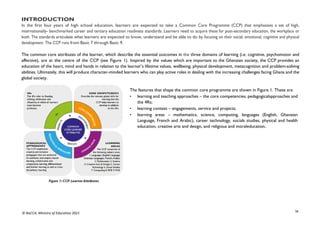
The common core attributes of the learner, which describe the essential outcomes in the three domains of learning (i.e. cognitive, psychomotor and
affective), are at the centre of the CCP (see Figure 1). Inspired by the values which are important to the Ghanaian society, the CCP provides an
education of the heart, mind and hands in relation to the learner’s lifetime values, wellbeing, physical development, metacognition and problem-solving
abilities. Ultimately, this will produce character-minded learners who can play active roles in dealing with the increasing challenges facing Ghana and the
global society.
The features that shape the common core programme are shown in Figure 1. These are
• learning and teaching approaches – the core competencies, pedagogicalapproaches and
the 4Rs;
• learning context – engagements, service and projects;
• learning areas – mathematics, science, computing, languages (English, Ghanaian
Language, French and Arabic), career technology, socials studies, physical and health
education, creative arts and design, and religious and moraleducation.
x
© NaCCA, Ministry of Education 2021
RATIONALE
To facilitate the implementation of a flexible, coherent and diversified curriculum for Basic Schools, the Ministry of Education is continuing with the
implementation of the standard based curriculum for Basic 7 to 9 in the common core programme.
This Curriculum is designed to provide the rationale, philosophy and aims of the curriculum, followed by core competencies, profile of the expected learning
behaviours, attitudes, values and process skills.
The Curriculum encourages creative and inclusive pedagogies that focuses on the building the interest of disadvantaged groups like females to overcome the
assumption that computing is preserve of males. The curriculum further seeks to develop extensive assessments and learner-centred experiences to achieve
the instructional expectations.
Computing is one of the essential school subjects that permeates and can be applied to all areas of learning. This is because it provides learners with access to
important computing ideas, knowledge and skills that they can draw on in their personal and work lives, as well as their learning of other school subjects.
Learning computing provides the opportunity for learners to develop essential skills and competencies, and motivates them to become flexible problem solvers
and life-long learners. In an increasingly technological age, the possession of problem-solving and decision- making skills is an essential pre-requisite and these
are acquired in the learning of computing.
xi
© NaCCA, Ministry of Education 2021
PHILOSOPHY
Teaching Philosophy
The teaching is focused around a supportive, gender responsive and inclusive learning environment by positively engaging teacher-learner relationships.
Teachers/facilitators have the responsibility to create a cooperative learning environment where learners feel safe and secure. In addition, appropriate
improvisation techniques would be used to represent the actual devices when they are not available.
Relevance, engagement and problem-solving best describe the computing teaching philosophy. In other words, teaching of computing adopts the hands
on approach that is, the tactile/kinesthetic approach. Students learn computing subject best when they are actively involved in the learning process, and
that an engaging classroom best facilitates this process. Learners should be engaged in computing by using diverse teaching methods, encouraging the use
of a variety of their cognitive skills. The more learners process data, the more likely they would be able to apply, analyse, synthesise, and evaluate the
information.
Teaching of computing should enable learners know how data can be used to understand themselves, explain situations they find themselves in, describe
the reason why some things happened or predict what might happen in the future.
Learning Philosophy
Computing education develops a wide range of skills including problem solving, design construction, communication, critical thinking, analysis, synthesis
and evaluation. The skills learnt can then be applied to other fields of endeavour. Learners should have freedom of expression and creativity. Learners
should be able to experiment and realise their strengths and weaknesses in the computing subject. Each learner’s learning style should be tied to the
learning of computing to enable learners grow and learn on their own. Learners should be given the chance to pose their own questions and try to
answer them independently. Learners should be encouraged to find information in a variety of ways. Learners should also be encouraged to work on
projects in groups to foster collaborative learning.
xii
© NaCCA, Ministry of Education 2021
AIMS
General Aim
The Computing Curriculum is aimed at developing individuals to become computer literate, good problem solvers, have the ability to think
creatively and have both the confidence and competence to participate fully in the Ghanaian society as responsible local and global citizens.
Specific Aims
The computing curriculum is designed to help learners to:
1. acquire basic ICT literacy;
2. communicate effectively using ICT tools;
3. develop interest and acquire skills in the use of the internet;
4. develop basic ethics in using ICT tools;
5. acquire basic programming and database skills.
xiii
© NaCCA, Ministry of Education 2021
PROFILE OF EXPECTED LEARNING BEHAVIOURS
A central aspect of this curriculum is the concept of three integral learning domains that should be the basis for instruction and assessment.
These are:
- Knowledge, Understanding and Application
- Process Skills
- Attitudes and Values
Knowledge, Understanding and Application
Under this domain, learners acquire knowledge through some learning experiences. They may also show understanding of concepts by comparing,
summarising, re-writing etc. in their own words and constructing meaning from instruction. The learner may also apply the knowledge acquired in
some new contexts. At a higher level of learning behaviour, the learner may be required to analyse an issue or a problem. At higher levels, the learner
may be required to synthesise knowledge by integrating a number of ideas to formulate a plan, solve a problem, compose a story or a piece of music.
Further, the learners may be required to evaluate, estimate and interpret a concept. At the last level, which is the highest, learners may be required to
create, invent, compose, design and construct.
These learning behaviours, “knowing”, “understanding”, “applying”, “analysing”, “synthesising”, “evaluating” and “creating” fall under the domain
“Knowledge, Understanding and Application”.
In this curriculum, learning indicators are stated with action words to show what the learner should know and be able to do. For example, the learner
will be able to describe something. Being able to “describe” something after teaching and learning has been completed means that the learner has
acquired “knowledge” to be able to explain, summarise, and give examples, means that the learner has understood the concept taught.
Similarly, being able to develop, defend, etc. means that the learner can “apply” the knowledge acquired in some new context. You will note that each
of the Indicators in the curriculum contains an “action word” that describes the behaviour the learner will be able to demonstrate after teaching and
learning has taken place. “Knowledge, Understanding and Application” is a domain that should be the prime focus of teaching and learning in schools.
Teaching in most cases has tended to stress knowledge acquisition to the detriment of other higher level behaviours such as applying knowledge.
Each action word in any indicator outlines the underlying expected outcome. Each indicator must be read carefully to know the learning domain
towards which you have to teach. The focus is to move teaching and learning from the didactic acquisition of “knowledge” where there is fact
memorisation, heavy reliance on formulae, remembering facts without critiquing them or relating them to real world – surface learning – to a new
position called – deep learning. Learners are expected to deepen their learning by knowledge application to develop critical thinking skills, explain
reasoning and generate creative ideas to solve real life problems in their school lives and later in their adult lives. This is the position where learning
becomes beneficial to the learner.
xiv
© NaCCA, Ministry of Education 2021
The keywords and explanation involved in the “Knowledge, Understanding and Application” domain are as follows:
Knowing: The ability to remember, recall, identify, define, describe, list, name, match, state principles, facts and concepts. Knowledge is the
ability to remember or recall material already learnt and this constitutes the lowest level of learning.
Understanding: The ability to explain, summarise, translate, rewrite, paraphrase, give examples, generalise, estimate or predict consequences
based on a trend. Understanding is generally the ability to grasp the meaning of some concepts that may be verbal, pictorial, or symbolic.
Applying: This dimension is also referred to as “Use of Knowledge”. Ability to use knowledge or apply knowledge, apply rules, methods, principles,
theories, etc. to situations that are new and unfamiliar. It also involves the ability to produce, solve, plan, demonstrate, discover etc.
Analysing: The ability to break down material/information into its component parts; to differentiate, compare, distinguish, outline, separate, identify
significant points etc., ability to recognise unstated assumptions and logical fallacies; ability to draw inferences from facts etc.
Synthesising: The ability to put parts or ideas together to form a new whole. It involves the ability to combine, compile, compose, devise, plan,
revise, organise, create, generate new ideas and solutions.
Evaluating: The ability to appraise, compare features of different things and make comments or judgement, criticise, justify, support, discuss,
conclude, make recommendations etc. Evaluation refers to the ability to judge the worth or value of some material based on some criteria.
Creating: The ability to use information or materials to plan, compose, produce, manufacture or construct other products.
From the foregoing, creating is the highest form of thinking and learning and is therefore the most important behaviour. This, unfortunately, is the area
where most learners perform poorly. In order to get learners to develop critical thinking, it is advised that you do your best to help your learners to
develop analytical skills and processes as stated previously.
Attitudes, Values and Process Skills
To be effective, competent and reflective citizens who will be willing and capable of solving personal and societal problems, learners should be
exposed to situations that challenge them to raise questions and attempt to solve problems. Learners therefore need to acquire positive
attitudes, values and psychosocial skills that will enable them participate in debates and take a stand on issues affecting them and others. The
computing curriculum thus focuses on the development of attitudes and values.
The computing curriculum aims at helping learners to acquire the following:
1. Commitment: determination to contribute to national development.
2. Tolerance: willingness to respect the views of others
3. Patriotism: readiness to defend the nation.
xv
© NaCCA, Ministry of Education 2021
4. Flexibility in ideas: willingness to change opinion in the face of more plausible evidence.
5. Respect for evidence: willingness to collect and use data on one’s investigation and also have respect for data collected by others.
6. Reflection: the habit of critically reviewing ways in which an investigation or observation has been carried out to see possible
faults and other ways in which the investigation or observation can be improved upon.
7. Comportment conforming to acceptable societal norms.
8. Co-operation the ability to work effectively with others.
9. Responsibility: the ability to act independently and make decisions; morally accountable for one’s action; capable of rational
conduct.
10. Environmental Awareness: being conscious of one’s physical and socio-economic surroundings.
11. Respect for the Rule of Law: obeying the rules and regulations of the land.
12. The teacher should ensure that learners cultivate the above attitudes and skills as basis for living in the nation as effective citizens.
Values
At the heart of this curriculum is the belief in nurturing honest, creative and responsible citizens. As such, every part of this curriculum, including
the related pedagogy, should be consistent with the following set of values.
Respect: This includes respect for the nation of Ghana, its institutions andlaws and the culture and respect among its citizens and friends of Ghana.
Diversity: Ghana is a multicultural society in which every citizen enjoys fundamental rights and responsibilities. Learners must be taught to respect the views
of all persons and to see national diversity as a powerful force fornation development. The curriculum promotes social cohesion.
Equity: The socio-cultural and economic environment is uneven across thecountry. The socio-economic development. Consequently, it is necessary to be
deliberate in addressing the specific needs of learners and to ensure anequitable distribution of resources. Ghana’s learners have varied needs influenced by
their gender, disability and economic circumstances that require the provision of equal opportunities to all.
Commitment to achieving excellence: Learners must be taught to appreciate the opportunities provided through the curriculum and persist in
doing their best in whatever field of endeavour as global citizens. The curriculum encourages innovativeness through creative and critical thinking and the use of
contemporary technology.
Teamwork/Collaboration: Learners are encouraged to be committedto team-oriented working and learning environments. This also means that learners
should have an attitude of tolerance to be able to live peacefully withall persons.
Truth and Integrity: The curriculum aims to develop learners intoindividuals who will consistently tell the truth irrespective of the consequences
xvi
© NaCCA, Ministry of Education 2021
and be morally upright with the attitude of doing the right thing even when no one is watching. Also, be true to themselves and be willing to live the values of
honesty and compassion. Equally important is the practice of positive values as part of the ethos or culture of the workplace, which includes integrity and
perseverance. These values must underpin the learning processes to allow learners to apply skillsand competencies in the world of work.
The action words provided in the learning indicators in each content standard, should help you to structure your teaching and learning to achieve the desired
learning outcomes. Check the learning indicators to ensure that you have given the required emphasis to each learning domain in your instruction and
assessment.
xvii
© NaCCA, Ministry of Education 2021
ASSESSMENT
Assessment is a process of collecting and evaluating information about learners and using the information to make decisions to improve their
learning. Assessment may be formative, summative, diagnostic or evaluative depending on its purpose. It is integral to the teaching-learning process,
promotes leaner learning and improves instruction. In CCP, it is suggested that assessment involves assessment for learning, assessment of learning
and assessment as learning, which are described in the subsequent paragraphs.
Assessment for Learning (AfL)
Assessment for Learning (AfL) is the process of seeking and interpreting evidence for use by learners and their teachers to decide where the learner
is in their learning, where they need to be (the desired goal) and how best to get them there. Assessment for Learning also refers to all the activities
undertaken by teachers and/or learners, which provide information to be used as feedback to modify the teaching and learning activities. AfL can be
achieved through processes such as sharing criteria with learners, effective questioning and feedback.
It is a continuous process that happens at all stages of the instructional process to monitor the progress of a learner and to offer feedback or
change teaching strategies to achieve the goal of a lesson.
Assessment as Learning (AaL)
Assessment as Learning develops and supports learners’ sense of owner- ship and efficacy about their learning through reflective practices. This
form of self- assessment helps in building the competencies of learners to achieve deeper understanding of their own learning and what they are
taught.
Assessment of Learning (AoL)
Assessment of Learning provides a picture of the achieved standards of the teacher and performance of learners at the terminal stage of the
learning process. This information provides data for accountability and educational decisions such as grading, selection and placement and
promotion and certification. Through AoL, stakeholders such as parents and guardians are informed about the extent learners have attained
expected learning outcomes at the end of their grade or programme
What do we assess?
Emphasis in assessment in the CCP is on the Common Core Learner Attributes, which are essential outcomes in the three domains of learning
(i.e. cognitive, psychomotor and affective).
Knowledge and skills with emphasis on the 4Rs in the learning areas
Core competencies with emphasis on attitudes and values developed through the learning and its context as well as the pedagogical
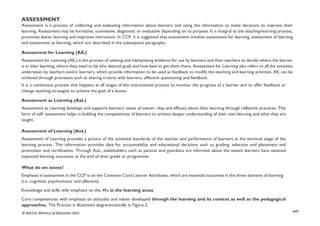
approaches. The Process is illustrated diagrammatically in Figure 2.
xviii
© NaCCA, Ministry of Education 2021
Figure 2: Essential Assessment Features
How do we monitor progress?
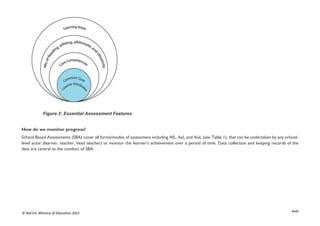
School Based Assessments (SBA) cover all forms/modes of assessment including AfL, AaL and AoL (see Table 1), that can be undertaken by any school-
level actor (learner, teacher, head teacher) to monitor the learner’s achievement over a period of time. Data collection and keeping records of the
data are central to the conduct of SBA.
xix
© NaCCA, Ministry of Education 2021
Table 1 Modes of Assessment
ASSESSMENT FOR LEARNING ASSESSMENT OF LEARNING ASSESSMENT AS LEARNING
Class exercises Class Assessment Task (CAT) Portfolio
Quizzes End of term Journal entries
Class tests (written, oral, aural and/or practical) End of year Project work
Class Assessment Task (CAT) Checklist
Questionnaire
How do we monitor progress?
School Based Assessments (SBA) cover all forms/modes of assessment including AfL, AaL and AoL (see Table 1), that can be undertaken by any
school-level actor (learner, teacher, head teacher) to monitor the learner’s achievement over a period of time. Data collection and keeping records
of the data are central to the conduct of SBA.
The following are samples of relevant records that can be kept on the learner’s learning.
• Learner’s Progress Record (Cumulative Record)
• Learner’s Report Card
• School-Based Assessment Termly Recording Register
Details of guidelines on SBA can be found in the National Pre-tertiary Learning. Assessment Framework (NPLAF) document (Ministry of
Education, 2020a) and the School-Based Assessment Guidelines (Ministry of Education, 2020b).
Reporting School-Based Assessment (SBA) in the CCP
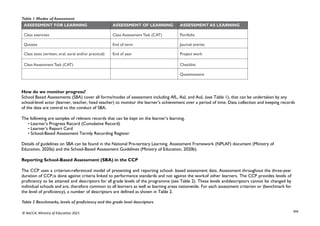
The CCP uses a criterion-referenced model of presenting and reporting school- based assessment data. Assessment throughout the three-year
duration of CCP,is done against criteria linked to performance standards and not against the workof other learners. The CCP provides levels of
proficiency to be attained and descriptors for all grade levels of the programme (see Table 2). These levels anddescriptors cannot be changed by
individual schools and are, therefore common to all learners as well as learning areas nationwide. For each assessment criterion or (benchmark for
the level of proficiency), a number of descriptors are defined as shown in Table 2.
Table 2 Benchmarks, levels of proficiency and the grade level descriptors
xx
© NaCCA, Ministry of Education 2021
LEVEL OF PROFICIENCY BENCHMARK GRADE LEVEL DESCRIPTOR
1: Highly proficient (HP) 80% + Learner shows high level of proficiency in knowledge, skills and values and can transfer
them automatically
and flexibly through authentic performance tasks.
2: Proficient (P) 68-79% Learner demonstrates sufficient level of proficient knowledge, skills and core
understanding; can transfer them independently through authentic performance tasks
3: Approaching
Proficiency (AP)
54-67% Learner is approaching proficiency in terms of knowledge, skills and values with little
guidance and
can transfer understanding through authentic performance tasks
4: Developing (D) 40-53% Learner demonstrates developing level of knowledge, skills and values but needs help
throughout the performance of authentic tasks
5: Emerging (E) 39% and below Learner is emerging with minimal understanding in terms of knowledge, skills, and values
but needs a lot of help.
The grading system presented, shows the letter grade system and equivalentgrade boundaries. In assigning grades to learners’ test results, or any form
ofevaluation, the above grade boundaries and the descriptors may be applied. The descriptors (Highly Proficient [HP], Proficient [P], Approaching
Proficiency[AP], Developing [D], Emerging [E] indicate the meaning of each grade. In addition to the school-based assessment (SBA), a national
standards assessment test is conducted in Basic 8 to provide national level indicators onlearners’ achievement
xxi
© NaCCA, Ministry of Education 2021
CREATIVE PEDAGOGICAL APPROACHES
These are the methods, strategies and relevant teaching and learning resources for ensuring that every learner benefits from the teaching and
learning process. The curriculum emphasises the:
1. creation of learning-centred classrooms through the use of creative approaches to ensure learner empowerment and independent learning;
2. positioning of inclusion and equity at the centre of quality teaching and learning;
3. use of differentiation and scaffolding as teaching and learning strategies for ensuring that no learner is left behind;
4. use of Information Communication Technology (ICT) as a pedagogical tool;
5. identification of subject specific instructional expectations needed for making learning in the subject relevant to learners;
6. integration of assessment as learning, for learning and of learning into the teaching and learning process and as an accountability strategy;
and
7. questioning techniques that promote deep learning.
Learning-Centred Pedagogies
The learner is at the centre of learning. At the heart of the CCP curriculum is the learning progression and improvement of learning outcomes
for Ghana’s young people with a focus on the 4Rs – Reading, wRiting, aRithmetic and cReativity. It is expected that at each curriculum phase,
learners would be offered the essential learning experiences to progress seamlessly to the next phase. Where there are indications that a learner
is not sufficiently ready for the next phase a compensatory provision through differentiation should be provided to ensure that such a learner is
ready to progress with their cohort.
The Curriculum encourages the creation of a learning-centred classroom with the opportunity for learners to engage in meaningful “hands-on”
activities that bring home to the learner what they are learning in school and what they know from outside of school. The learning-centred
classroom is a place for the learners to discuss ideas through the inspiration of the teacher. The learners then become actively engaged in
looking for answers and working in groups to solve problems. They also research information, analyse and evaluate information. The aim of the
learning-centred classroom is to enable learners to take ownership of their learning. It provides the opportunity for deep and profound learning
to take place.
The teacher as a facilitator needs to create a learning environment that:
1. make all learners feel safe and accepted and encouraged to actively participate in the learning process.
2. helps learners to interact with varied sources of information in a variety of ways,
3. helps learners to identify a problem suitable for investigation through project work,
4. connects the problem with the context of the learners’ world so that it presents realistic opportunities for learning,
xxii
© NaCCA, Ministry of Education 2021
5. organises the subject matter around the problem, not the subject,
6. gives learners responsibility for defining their learning experience and planning to solve the problem,
7. encourages learners to collaborate in learning,
8. expects all learners to demonstrate the results of their learning through a product or performance.
It is more productive for learners to find answers to their own questions rather than teachers providing the answers and their opinions in a learning-
centred classroom.
Inclusion
Inclusion is recognising that learners come from diverse background with varied needs and must be uniquely supported through the learning process.
Learners can be disadvantaged based on their gender, ability, ethnic background, economic status, religious affiliation etc. Inclusion is therefore ensuring
access and learning for all learners, especially, those disadvantaged. All learners are entitled to a broad and balanced curriculum in every school in
Ghana. The daily learning activities to which learners are exposed should ensure that learners’ right to equal access and accessibility to quality education
is met. The Curriculum suggests a variety of approaches that addresses learners’ diversity and their special needs in the learning process. When these
approaches are effectively used in lessons, they will contribute to the full development of the learning potential of every learner. Learners have individual
needs and learning experiences and different levels of motivation for learning. Planning, delivery and reflection on daily learning experiences should
take these differences into consideration.
The curriculum therefore promotes:
1. learning that is linked to the learner’s background and to their prior experiences, interests, potential and capacities;
2. learning that is meaningful because it aligns with learners’ ability (e.g. learning that is oriented towards developing general capabilities
and solving the practical problems of everyday life); and
3. the active involvement of the learners in the selection and organisation of learning experiences, making them aware of their importance
and also enabling them to assess their own learning outcomes.
Differentiation and Scaffolding
Differentiation is a process by which differences (learning styles, interest and readiness to learn) between learners are accommodated so that
all learners in a group have the best chance of learning. Differentiation could be by content, tasks, questions, outcome, groupings and support.
Differentiation as a way of ensuring each learner benefits adequately from the delivery of the curriculum can be achieved in the classroom through
(i) Task (ii) Support from the Guidance and Counselling Unit and (iii) Learning outcomes.
xxiii
© NaCCA, Ministry of Education 2021
Differentiation by task involves teachers setting different tasks for learners of different abilities. Example: in sketching the plan and shape of
their classroom some learners could be made to sketch with free hand while others would be made to trace the outline of the plan.
Differentiation by support involves the teacher giving needed support and referring weak learners to the Guidance and Counselling Unit for
academic support.
Differentiation by outcome involves the teacher allowing learners to respond at different levels. Weaker learners are allowed more time for
complicated tasks.
Scaffolding in education refers to the use of a variety of instructional techniques aimed at moving learners progressively towards stronger
understanding and ultimately greater independence in the learning process.
It involves breaking up the learning task, experience or concepts into smaller parts and then providing learners with the support they need to learn
each part. The process may require a teacher assigning an excerpt of a longer text to learners to read and engaging them to discuss the excerpt to
improve comprehension. The teacher goes ahead to guide them through the keywords/ vocabulary to ensure learners have developed a thorough
understanding of the text before engaging them to read the full text.
Common scaffolding strategies available to the teacher are:
1. give learners a simplified version of a lesson, assignment, or reading, and gradually increase the complexity, difficulty or sophistication
over time.
2. describe or illustrate a concept, problem, or process in multiple ways to ensure understanding;
3. give learners an exemplar(s): or model of an assignment they will be asked to complete;
4. give learners a vocabulary lesson before they read a difficult text;
5. describe the purpose of a learning activity clearly and the learning goals they are expected to achieve; and
6. describe explicitly how the new lesson builds on the knowledge and skills learners were taught in a previous lesson
Information Communication Technology
Information Communication Technology (ICT) has been integrated into the computing curriculum as part of the core of education, alongside reading,
writing and numeracy. Thus, the curriculum is designed to use ICT as a teaching and learning tool to enhance deep and independent learning. For
instance, the teacher in certain instances is directed to use multimedia to support the teaching and learning process.
ICT has the potential to innovate, accelerate, enrich, and deepen skills. It also motivates and engages learners to relate school experiences to work
practices. It provides opportunities for learners to fit into the world of work.
xxiv
© NaCCA, Ministry of Education 2021
Some of the expected outcomes that this curriculum aims to achieve are:
1. improved teaching and learning processes;
2. improved consistency and quality of teaching and learning;
3. increased opportunities for more learner-centred pedagogical approaches;
4. improved inclusive education practices;
5. improved collaboration, creativity, higher order thinking skills; and
6. enhanced flexibility and differentiated approach of delivery.
The use of ICT as a teaching and learning tool is to provide learners access to large quantities of information online and offline. It also provides
the frame- work for analysing data to investigate patterns and relationships in the computing context. Once learners have made their findings,
ICT can help them organise, edit and print the information in many different ways.
Learners need to be exposed to various ICT tools around them including calculators, radios, cameras, phones, television sets, computers and
related software like Microsoft Office packages - Word, PowerPoint and Excel as teaching and learning tools. The exposure that learners are
given from Basic 7 – 9 to use ICT in exploiting learning will build their confidence and will increase their level of motivation to apply ICT use
in later years, both within and outside of education. ICT use for teaching and learning is expected to enhance the quality and competence level
of learners.
xxv
© NaCCA, Ministry of Education 2021
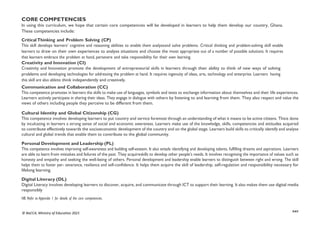
CORE COMPETENCIES
In using this curriculum, we hope that certain core competencies will be developed in learners to help them develop our country, Ghana.
These competencies include:
Critical Thinking and Problem Solving (CP)
This skill develops learners’ cognitive and reasoning abilities to enable them analyseand solve problems. Critical thinking and problem-solving skill enable
learners to draw on their own experiences to analyse situations and choose the most appropriate out of a number of possible solutions. It requires
that learners embrace the problem at hand, persevere and take responsibility for their own learning.
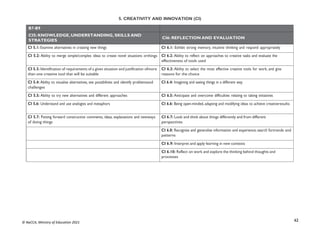
Creativity and Innovation (CI)
Creativity and Innovation promote the development of entrepreneurial skills in learners through their ability to think of new ways of solving
problems and developing technologies for addressing the problem at hand. It requires ingenuity of ideas, arts, technology and enterprise. Learners having
this skill are also ableto think independently and creatively.
Communication and Collaboration (CC)
This competence promotes in learners the skills to make use of languages, symbols and texts to exchange information about themselves and their life experiences.
Learners actively participate in sharing their ideas. They engage in dialogue with others by listening to and learning from them. They also respect and value the
views of others including people they perceive to be different from them.
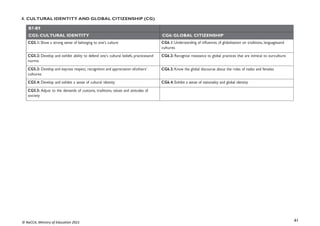
Cultural Identity and Global Citizenship (CG)
This competence involves developing learners to put country and service foremost through an understanding of what it means to be active citizens. Thisis done
by inculcating in learners a strong sense of social and economic awareness. Learners make use of the knowledge, skills, competencies and attitudes acquired
to contribute effectively towards the socioeconomic development of the country and on the global stage. Learners build skills to critically identify and analyse
cultural and global trends that enable them to contribute to the global community.
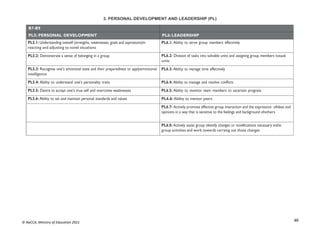
Personal Development and Leadership (PL)
This competence involves improving self-awareness and building self-esteem. It also entails identifying and developing talents, fulfilling dreams and aspirations. Learners
are able to learn from mistakes and failures of the past. They acquireskills to develop other people’s needs. It involves recognising the importance of values such as
honesty and empathy and seeking the well-being of others. Personal development and leadership enable learners to distinguish between right and wrong. The skill
helps them to foster per- severance, resilience and self-confidence. It helps them acquire the skill of leadership, self-regulation and responsibility necessary for
lifelong learning.
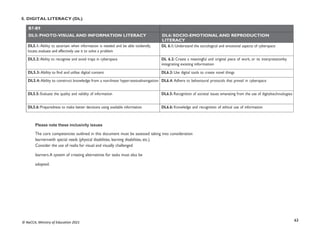
Digital Literacy (DL)
Digital Literacy involves developing learners to discover, acquire, and communicate through ICT to support their learning. It also makes them use digital media
responsibly
NB: Refer to Appendix 1 for details of the core competencies.
xxvi
© NaCCA, Ministry of Education 2021
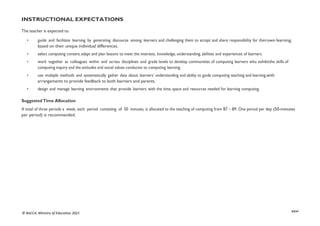
INSTRUCTIONAL EXPECTATIONS
The teacher is expected to:
• guide and facilitate learning by generating discourse among learners and challenging them to accept and share responsibility for theirown learning,
based on their unique individual differences.
• select computing content, adapt and plan lessons to meet the interests, knowledge, understanding, abilities and experiences of learners.
• work together as colleagues within and across disciplines and grade levels to develop communities of computing learners who exhibitthe skills of
computing inquiry and the attitudes and social values conducive to computing learning.
• use multiple methods and systematically gather data about learners’ understanding and ability to guide computing teaching and learning,with
arrangements to provide feedback to both learners and parents.
• design and manage learning environments that provide learners with the time, space and resources needed for learning computing.
Suggested Time Allocation
A total of three periods a week, each period consisting of 50 minutes, is allocated to the teaching of computing from B7 – B9. One period per day (50-minutes
per period) is recommended.
xxvii
© NaCCA, Ministry of Education 2021
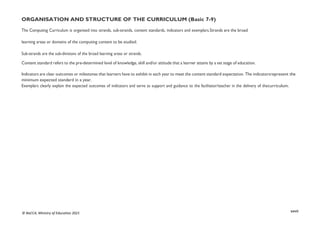
ORGANISATION AND STRUCTURE OF THE CURRICULUM (Basic 7-9)
The Computing Curriculum is organised into strands, sub-strands, content standards, indicators and exemplars.Strands are the broad
learning areas or domains of the computing content to be studied.
Sub-strands are the sub-divisions of the broad learning areas or strands.
Content standard refers to the pre-determined level of knowledge, skill and/or attitude that a learner attains by a set stage of education.
Indicators are clear outcomes or milestones that learners have to exhibit in each year to meet the content standard expectation. The indicatorsrepresent the
minimum expected standard in a year.
Exemplars clearly explain the expected outcomes of indicators and serve as support and guidance to the facilitator/teacher in the delivery of thecurriculum.
xxviii
© NaCCA, Ministry of Education 2021
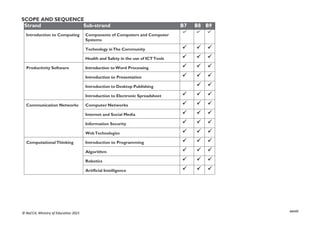
SCOPE AND SEQUENCE
Strand Sub-strand B7 B8 B9
Introduction to Computing Components of Computers and Computer
Systems
  
Technology inThe Community   
Health and Safety in the use of ICTTools   
Productivity Software Introduction to Word Processing   
Introduction to Presentation   
Introduction to Desktop Publishing  
Introduction to Electronic Spreadsheet   
Communication Networks Computer Networks   
Internet and Social Media   
Information Security   
WebTechnologies   
ComputationalThinking Introduction to Programming   
Algorithm   
Robotics   
Artificial Intelligence   
xxix
© NaCCA, Ministry of Education 2021
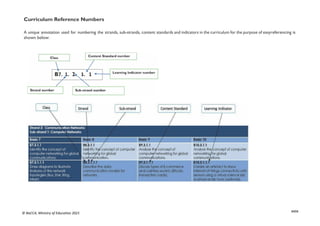
Curriculum Reference Numbers
A unique annotation used for numbering the strands, sub-strands, content standards and indicators in the curriculum for the purpose of easyreferencing is
shown below:
1
© NaCCA, Ministry of Education 2021
BASIC 7
2
© NaCCA, Ministry of Education 2021
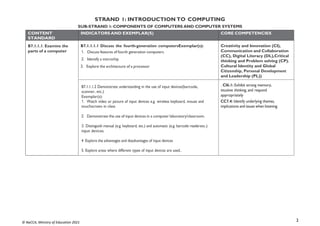
STRAND 1: INTRODUCTION TO COMPUTING
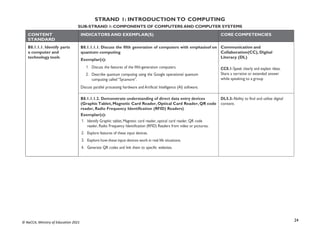
SUB-STRAND 1: COMPONENTS OF COMPUTERS AND COMPUTER SYSTEMS
CONTENT
STANDARD
INDICATORS AND EXEMPLAR(S) CORE COMPETENCIES
B7.1.1.1. Examine the
parts of a computer
B7.1.1.1.1 Discuss the fourth-generation computersExemplar(s):
1. Discuss features of fourth generation computers
2. Identify a microchip
3. Explore the architecture of a processor
Creativity and Innovation (CI),
Communication and Collaboration
(CC), Digital Literacy (DL),Critical
thinking and Problem solving (CP).
Cultural Identity and Global
Citizenship, Personal Development
and Leadership (PL))
B7.1.1.1.2 Demonstrate understanding in the use of input devices(barcode,
scanner, etc.)
Exemplar(s):
1. Watch video or picture of input devices e.g. wireless keyboard, mouse and
touchscreen in class
2. Demonstrate the use of input devices in a computer laboratory/classroom.
3. Distinguish manual (e.g. keyboard, etc.) and automatic (e.g. barcode readeretc.)
input devices.
4 Explore the advantages and disadvantages of input devices
5. Explore areas where different types of input devices are used..
. CI6.1: Exhibit strong memory,
intuitive thinking, and respond
appropriately
CC7.4: Identify underlying themes,
implications and issues when listening.
3
© NaCCA, Ministry of Education 2021
CONTENT
STANDARD
INDICATORS AND EXEMPLAR(S) CORE COMPETENCIES
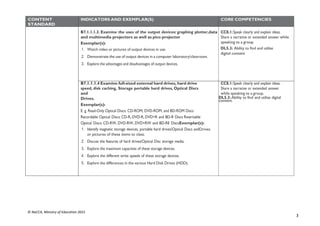
B7.1.1.1.3. Examine the uses of the output devices: graphing plotter,data
and multimedia projectors as well as pico projector
Exemplar(s):
1. Watch video or pictures of output devices in use.
2. Demonstrate the use of output devices in a computer laboratory/classroom.
3. Explore the advantages and disadvantages of output devices.
CC8.1: Speak clearly and explain ideas.
Share a narrative or extended answer while
speaking to a group.
DL5.3: Ability to find and utilise
digital content
B7.1.1.1.4 Examine full-sized external hard drives, hard drive
speed, disk caching, Storage portable hard drives, Optical Discs
and
Drives.
Exemplar(s):
E. g. Read-Only Optical Discs: CD-ROM, DVD-ROM, and BD-ROM Discs
Recordable Optical Discs: CD-R, DVD-R, DVD+R and BD-R Discs Rewritable
Optical Discs: CD-RW, DVD-RW, DVD+RW and BD-RE DiscsExemplar(s):
1. Identify magnetic storage devices, portable hard drives/Optical Discs andDrives
or pictures of these items to class.
2. Discuss the features of hard drives/Optical Disc storage media.
3. Explore the maximum capacities of these storage devices.
4. Explore the different write speeds of these storage devices.
5. Explore the differences in the various Hard Disk Drives (HDD).
CC8.1: Speak clearly and explain ideas.
Share a narrative or extended answer
while speaking to a group.
DL5.3: Ability to find and utilise digital
content.
4
© NaCCA, Ministry of Education 2021
CONTENT
STANDARD
INDICATORS AND EXEMPLAR(S) CORE COMPETENCIES
B7.1.1.2. Demonstrate
theuse of the features of
the Windows Desktop
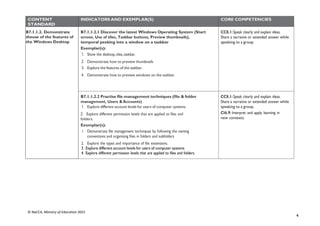
B7.1.1.2.1 Discover the latest Windows Operating System (Start
screen, Use of tiles, Taskbar buttons, Preview thumbnails),
temporal peeking into a window on a taskbar
Exemplar(s):
1. Show the desktop, tiles, taskbar.
2. Demonstrate how to preview thumbnails
3. Explore the features of the taskbar.
4. Demonstrate how to preview windows on the taskbar.
CC8.1: Speak clearly and explain ideas.
Share a narrative or extended answer while
speaking to a group.
B7.1.1.2.2 Practise file management techniques (file & folder
management, Users & Accounts)
1. Explore different account levels for users of computer systems.
2. Explore different permission levels that are applied to files and
folders.
Exemplar(s):
1. Demonstrate file management techniques by following the naming
conventions and organising files in folders and subfolders
2. Explore the types and importance of file extensions.
3. Explore different account levels for users of computer systems
4. Explore different permission levels that are applied to files and folders.
CC8.1: Speak clearly and explain ideas.
Share a narrative or extended answer while
speaking to a group.
CI6.9: Interpret and apply learning in
new contexts.
5
© NaCCA, Ministry of Education 2021
STRAND 1: INTRODUCTION TO COMPUTING
SUB-STRAND 2: TECHNOLOGY INTHE COMMUNITY
CONTENT
STANDARD
INDICATORS AND EXEMPLAR(S) CORE COMPETENCIES
B7.1.2.1. Demonstrate
the use of Technology in
the community.
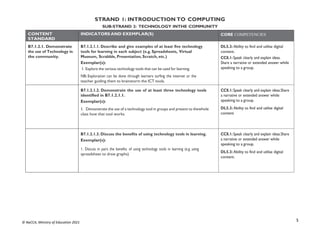
B7.1.2.1.1. Describe and give examples of at least five technology
tools for learning in each subject (e.g. Spreadsheets, Virtual
Museum, Scrabble, Presentation, Scratch, etc.)
Exemplar(s):
1. Explore the various technology tools that can be used for learning.
NB: Exploration can be done through learners surfing the internet or the
teacher guiding them to brainstorm the ICT tools.
DL5.3: Ability to find and utilise digital
content.
CC8.1: Speak clearly and explain ideas.
Share a narrative or extended answer while
speaking to a group.
B7.1.2.1.2. Demonstrate the use of at least three technology tools
identified in B7.1.2.1.1.
Exemplar(s):
1. Demonstrate the use of a technology tool in groups and present to thewhole
class how that tool works.
CC8.1: Speak clearly and explain ideas.Share
a narrative or extended answer while
speaking to a group.
DL5.3: Ability to find and utilise digital
content
B7.1.2.1.3. Discuss the benefits of using technology tools in learning.
Exemplar(s):
1. Discuss in pairs the benefits of using technology tools in learning (e.g. using
spreadsheet to draw graphs)
CC8.1: Speak clearly and explain ideas.Share
a narrative or extended answer while
speaking to a group.
DL5.3: Ability to find and utilise digital
content.
6
© NaCCA, Ministry of Education 2021
CONTENT
STANDARD
INDICATORS AND EXEMPLAR(S) CORE COMPETENCIES
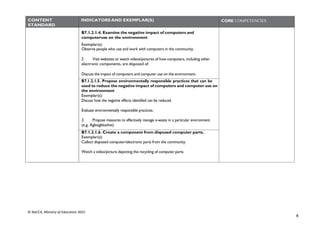
B7.1.2.1.4. Examine the negative impact of computers and
computeruse on the environment
Exemplar(s):
Observe people who use and work with computers in the community.
2. Visit websites or watch videos/pictures of how computers, including other
electronic components, are disposed of.
Discuss the impact of computers and computer use on the environment.
B7.1.2.1.5. Propose environmentally responsible practices that can be
used to reduce the negative impact of computers and computer use on
the environment
Exemplar(s):
Discuss how the negative effects identified can be reduced.
Evaluate environmentally responsible practices.
3. Propose measures to effectively manage e-waste in a particular environment
(e.g. Agbogbloshie).
B7.1.2.1.6. Create a component from disposed computer parts.
Exemplar(s):
Collect disposed computer/electronic parts from the community.
Watch a video/picture depicting the recycling of computer parts.
7
© NaCCA, Ministry of Education 2021
STRAND 1: INTRODUCTION TO COMPUTING
SUB-STRAND 3: HEALTH AND SAFETY INTHE USE OF ICTTOOLS
CONTENT
STANDARD
INDICATORS AND EXEMPLAR(S) CORE COMPETENCIES
B7.1.3.1. Demonstrate
how to apply Health and
Safety measures in using
ICTTools
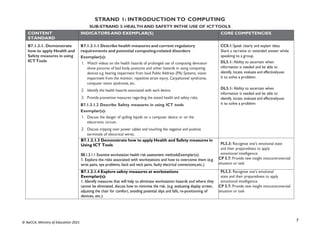
B7.1.3.1.1 Describe health measures and current regulatory
requirements and potential computing-related disorders
Exemplar(s):
1. Watch videos on the health hazards of prolonged use of computing devicesor
show pictures of bad body postures and other hazards in using computing
devices e.g. hearing impairment from loud Public Address (PA) Systems, vision
impairment from the monitor, repetitive strain injury, Carpaltunnel syndrome,
computer vision syndrome, etc.
2. Identify the health hazards associated with each device.
3. Provide preventive measures regarding the stated health and safety risks.
B7.1.3.1.2 Describe Safety measures in using ICT tools
Exemplar(s):
1. Discuss the danger of spilling liquids on a computer device or on the
electronic circuit.
2. Discuss tripping over power cables and touching the negative and positive
terminals of electrical wires.
CC8.1: Speak clearly and explain ideas.
Share a narrative or extended answer while
speaking to a group.
DL5.1: Ability to ascertain when
information is needed and be able to
identify, locate, evaluate and effectivelyuse
it to solve a problem.
DL5.1: Ability to ascertain when
information is needed and be able to
identify, locate, evaluate and effectivelyuse
it to solve a problem
B7.1.3.1.3 Demonstrate how to apply Health and Safety measures in
Using ICT Tools
B8.1.3.1.1 Examine workstation health risk assessment methodsExemplar(s):
1. Explore the risks associated with workstations and how to overcome them (e.g.
wrist pains, eye problems, back and neck pains, faulty electrical connections,etc.)
PL5.3: Recognise one’s emotional state
and their preparedness to apply
emotional intelligence.
CP 5.7: Provide new insight intocontroversial
situation or task
B7.1.3.1.4 Explore safety measures at workstations
Exemplar(s):
1. Identify measures that will help to eliminate workstation hazards and where they
cannot be eliminated, discuss how to minimise the risk. (e.g. evaluating display screen,
adjusting the chair for comfort, avoiding potential slips and falls, re-positioning of
devices, etc.)
PL5.3: Recognise one’s emotional
state and their preparedness to apply
emotional intelligence
CP 5.7: Provide new insight intocontroversial
situation or task
8
© NaCCA, Ministry of Education 2021
STRAND 2: PRODUCTIVITY SOFTWARE
SUB-STRAND 1: INTRODUCTIONTO WORD PROCESSING
CONTENT
STANDARD
INDICATORS AND EXEMPLAR(S) CORE COMPETENCIES
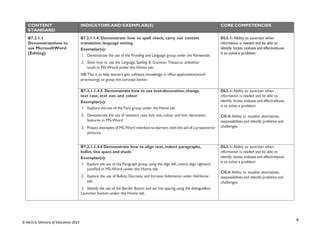
B7.2.1.1
Demonstratehow to
use MicrosoftWord
(Editing)
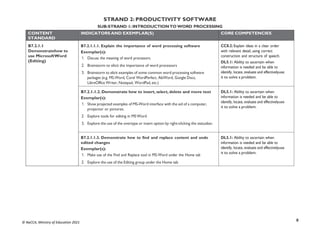
B7.2.1.1.1. Explain the importance of word processing software
Exemplar(s):
1. Discuss the meaning of word processors.
2. Brainstorm to elicit the importance of word processors
3. Brainstorm to elicit examples of some common word processing software
packages (e.g. MS-Word, Corel WordPerfect, AbiWord, Google Docs,
LibreOffice Writer, Notepad, WordPad, etc.)
CC8.2: Explain ideas in a clear order
with relevant detail, using correct
construction and structure of speech.
DL5.1: Ability to ascertain when
information is needed and be able to
identify, locate, evaluate and effectivelyuse
it to solve a problem.
B7.2.1.1.2. Demonstrate how to insert, select, delete and move text
Exemplar(s):
1. Show projected examples of MS-Word interface with the aid of a computer,
projector or pictures.
2. Explore tools for editing in MSWord
3. Explore the use of the overtype or insert option by right-clicking the statusbar.
DL5.1: Ability to ascertain when
information is needed and be able to
identify, locate, evaluate and effectivelyuse
it to solve a problem.
B7.2.1.1.3. Demonstrate how to find and replace content and undo
edited changes
Exemplar(s):
1. Make use of the Find and Replace tool in MS-Word under the Home tab
2. Explore the use of the Editing group under the Home tab
DL5.1: Ability to ascertain when
information is needed and be able to
identify, locate, evaluate and effectivelyuse
it to solve a problem.
9
© NaCCA, Ministry of Education 2021
CONTENT
STANDARD
INDICATORS AND EXEMPLAR(S) CORE COMPETENCIES
B7.2.1.1
Demonstratehow to
use MicrosoftWord
(Editing)
B7.2.1.1.4. Demonstrate how to spell check, carry out content
translation, language setting
Exemplar(s):
1. Demonstrate the use of the Proofing and Language group under the Reviewtab
2. Show how to use the Language, Spelling & Grammar, Thesaurus andother
tools in MS-Word under the Home tab.
NB: This is to help learners gain software knowledge in office applications(word
processing) to grasp the concept better.
DL5.1: Ability to ascertain when
information is needed and be able to
identify, locate, evaluate and effectivelyuse
it to solve a problem.
B7.2.1.1.4.5 Demonstrate how to use text-decoration, change
text case, text size and colour
Exemplar(s):
1. Explore the use of the Font group under the Home tab
2. Demonstrate the use of sentence case, font size, colour and font decoration
features in MS-Word
3. Project examples of MS-Word interface to learners with the aid of a projectoror
pictures.
DL5.1: Ability to ascertain when
information is needed and be able to
identify, locate, evaluate and effectivelyuse
it to solve a problem.
CI5.4: Ability to visualise alternatives,
seepossibilities and identify problems and
challenges
B7.2.1.1.4.6 Demonstrate how to align text, indent paragraphs,
bullet, line space and shade
Exemplar(s):
1. Explore the use of the Paragraph group, using the align left, centre, align rightand
justified in MS-Word under the Home tab.
2. Explore the use of Bullets, Decrease and Increase Indentation under theHome
tab.
3. Identify the use of the Border Button and set line spacing using the dialogueBox
Launcher button under the Home tab.
DL5.1: Ability to ascertain when
information is needed and be able to
identify, locate, evaluate and effectivelyuse
it to solve a problem.
CI5.4: Ability to visualise alternatives,
seepossibilities and identify problems and
challenges
10
© NaCCA, Ministry of Education 2021
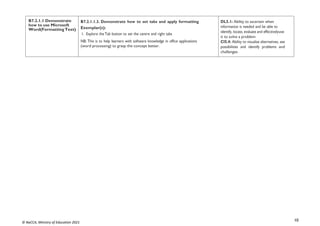
B7.2.1.1 Demonstrate
how to use Microsoft
Word(FormattingText)
B7.2.1.1.3. Demonstrate how to set tabs and apply formatting
Exemplar(s):
1. Explore the Tab button to set the centre and right tabs
NB: This is to help learners with software knowledge in office applications
(word processing) to grasp the concept better.
DL5.1: Ability to ascertain when
information is needed and be able to
identify, locate, evaluate and effectivelyuse
it to solve a problem
CI5.4: Ability to visualise alternatives, see
possibilities and identify problems and
challenges
11
© NaCCA, Ministry of Education 2021
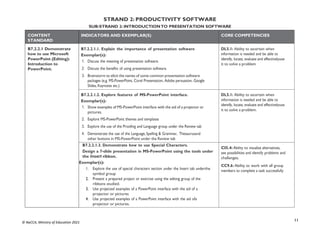
STRAND 2: PRODUCTIVITY SOFTWARE
SUB-STRAND 2: INTRODUCTIONTO PRESENTATION SOFTWARE
CONTENT
STANDARD
INDICATORS AND EXEMPLAR(S) CORE COMPETENCIES
B7.2.2.1 Demonstrate
how to use Microsoft
PowerPoint (Editing):
Introduction to
PowerPoint.
B7.2.2.1.1. Explain the importance of presentation software
Exemplar(s):
1. Discuss the meaning of presentation software.
2. Discuss the benefits of using presentation software.
3. Brainstorm to elicit the names of some common presentation software
packages (e.g. MS-PowerPoint, Corel Presentation, Adobe persuasion, Google
Slides, Keynotes etc.)
DL5.1: Ability to ascertain when
information is needed and be able to
identify, locate, evaluate and effectivelyuse
it to solve a problem
B7.2.2.1.2. Explore features of MS-PowerPoint interface.
Exemplar(s):
1. Show examples of MS-PowerPoint interface with the aid of a projector or
pictures.
2. Explore MS-PowerPoint themes and templates
3. Explore the use of the Proofing and Language group under the Review tab
4. Demonstrate the use of the Language, Spelling & Grammar, Thesaurusand
other buttons in MS-PowerPoint under the Review tab
DL5.1: Ability to ascertain when
information is needed and be able to
identify, locate, evaluate and effectivelyuse
it to solve a problem.
B7.2.2.1.3. Demonstrate how to use Special Characters.
Design a 7-slide presentation in MS-PowerPoint using the tools under
the Insert ribbon.
Exemplar(s):
1. Explore the use of special characters section under the Insert tab underthe
symbol group
2. Present a prepared project or exercise using the editing group of the
ribbons studied.
3. Use projected examples of a PowerPoint interface with the aid of a
projector or pictures
4. Use projected examples of a PowerPoint interface with the aid ofa
projector or pictures.
CI5.4: Ability to visualise alternatives,
see possibilities and identify problems and
challenges.
CC9.6: Ability to work with all group
members to complete a task successfully
12
© NaCCA, Ministry of Education 2021
CONTENT
STANDARD
INDICATORS AND EXEMPLAR(S) CORE COMPETENCIES
B7.2.2.2 Demonstrate
how to use Microsoft
PowerPoint
(Formatting)
B7.2.2.2.1. Demonstrate how to change text case, text size, text
colour and decorate text
Exemplar(s):
1. Explore the use of the Font group under the Home ribbon.
2. Make use of the sentence case, font size, colour and font decoration
features in MS-PowerPoint
3. Project examples of PowerPoint interface to learners with the aid of a
projector or pictures.
DL5.1: Ability to ascertain when
information is needed and be able to
identify, locate, evaluate and effectivelyuse
it to solve a problem.
CI5.4: Ability to visualise alternatives,
see possibilities, and identify problems and
challenges.
B7.2.2.1.2. Demonstrate how to align text, indent paragraphs, borders
and shades.
Exemplar(s):
1. Explore the use of the Proofing and Language Sections under the Review
ribbon.
2. Use the Language, Spelling & Grammar, Thesaurus and other buttons inMS-
PowerPoint under the Review ribbon.
DL5.1: Ability to ascertain when
information is needed and be able to
identify, locate, evaluate and effectivelyuse
it to solve a problem.
CI5.4: Ability to visualise alternatives,
seepossibilities, and identify problems and
challenges.
B7.2.2.1.3. Demonstrate the use of the Slide Master, design template, and
be able to give a 5-slide presentation in MS-PowerPoint using thetools
of the ribbons studied.
Exemplar(s):
1. Explore the use of MasterViews group under theView ribbon
2. Prepare and present a prepared project or exercise using what has been
studied in Indicator 1 and 2.
NB: This is to help the learners with software knowledge in MS-PowerPoint,
Office Applications to grasp the concept well.
DL5.1: Ability to ascertain when
information is needed and be able to
identify, locate, evaluate and effectivelyuse
it to solve a problem
CI5.4: Ability to visualise alternatives,
seepossibilities, and identify problems and
challenges.
13
© NaCCA, Ministry of Education 2021
STRAND 2: PRODUCTIVITY SOFTWARE
SUB-STRAND 3: INTRODUCTIONTO ELECTRONIC SPREADSHEET
CONTENT
STANDARD
INDICATORS AND EXEMPLAR(S) CORE COMPETENCIES
B7.2.3.1.
Demonstratehow to
use the Spreadsheet
(Editing Worksheets)
B7.2.3.1.1. Explain the importance of electronic spreadsheet
Exemplar(s):
1. Discuss the meaning of electronic spreadsheet.
2. Discuss the benefits of using electronic spreadsheet software.
3. Brainstorm to elicit response some common electronic spreadsheet
software packages (e.g. MS Excel, Lotus 1-2-3, LibreOffice Calc, GoogleSheets
etc.)
DL5.1: Ability to ascertain when
information is needed and be able to
identify, locate, evaluate and effectivelyuse
it to solve a problem.
B7.2.3.1.2. Explore features of MS-Excel interface
Exemplar(s):
1. Show projected examples of MS-Excel interface with the aid of a projectoror
pictures.
2. Explore operations of inserting, selecting, deleting and moving data.
3. Demonstrate how to insert, select, delete and move data using a sampledata
set.
DL5.1: Ability to ascertain when
information is needed and be able to
identify, locate, evaluate and effectivelyuse
it to solve a problem.
B7.2.3.1.3. Demonstrate how to set the cell datatype
(General, Number, Currency, etc.).
Exemplar(s):
1. Investigate how to set and modify the cell type of values and text.
2. Enter values, text, dates and time in worksheet cells and change the formatsfor
presentation. E.g. General, Number, Currency, Accounting, Dates, Time, etc.
DL5.1: Ability to ascertain when
information is needed and be able to
identify, locate, evaluate and effectivelyuse
it to solve a problem.
14
© NaCCA, Ministry of Education 2021
B7.2.3.1.4. Demonstrate how to use AlignText, Merge & Wrap,
Borders and Shades
Exemplar(s):
1. Demonstrate how to change text alignment (Horizontal & Vertical), mergecells
and wrap text.
2. Investigate how to access border & shade features and format the
appearance of a worksheet as group work.
DL5.1: Ability to ascertain when
information is needed and be able to
identify, locate, evaluate and effectivelyuse
it to solve a problem.
15
© NaCCA, Ministry of Education 2021
CONTENT
STANDARD
INDICATORS AND EXEMPLAR(S) CORE COMPETENCIES
B7.2.3.2.
Demonstratehow to
format a worksheet
B7.2.3.2.1 Demonstrate how to adjust margins and set page
orientation
Exemplar(s):
1. Demonstrate how to adjust margins and set page orientation for printing.
2. Perform margin adjustment on different page sizes
3. Explore the display of worksheets in different views as listed on theView tab.
DL5.1: Ability to ascertain when
information is needed and be able to
identify, locate, evaluate and effectivelyuse
it to solve a problem.
CI5.4: Ability to visualise alternatives,
seepossibilities and identify problems and
challenges.
B7.2.3.2.2. Demonstrate how to set up a header and a footer.
Exemplar(s):
1. Demonstrate how to set up header and footer elements.
2. Explore the use of page numbers, current date, time and file name in setting up
headers and footers.
DL5.1: Ability to ascertain when
information is needed and be able to
identify, locate, evaluate and effectively use
itto solve a problem
B7.2.3.2.3. Demonstrate the use of the Autofill function in MS-Excel
worksheet
Exemplar(s):
1. Demonstrate the use of the Autofill function e.g. to generate the days of the week,
months of the year, set of numbers (e.g. counting numbers, odd numbers,
multiplication tables etc.).
DL5.1: Ability to ascertain when
information is needed and be able to
identify, locate, evaluate and effectively use
itto solve a problem
B7 2.3.3
Demonstrate howto
use spreadsheet
formula
B7.2.3.3.1. Demonstrate how to create formulas
Exemplar(s):
1. Create simple formulas starting with the equal sign (=)
DL5.1: Ability to ascertain when
information is needed and be able to
identify, locate, evaluate and effectivelyuse
it to solve a problem.
CP5.1: Ability to combine information
andideas from several sources to reach
a conclusion
16
© NaCCA, Ministry of Education 2021
STRAND 3: COMMUNICATION NETWORKS
SUB-STRAND 1: COMPUTER NETWORKS
CONTENT
STANDARD
INDICATORS AND EXEMPLAR(S) CORE COMPETENCIES
B7.3.1.1 Identify the
concept of computer
networking for global
communications
B7.3.1.1.1 Draw diagrams to illustrate features of the network
topologies (Bus, Star, Ring, Mesh)
Exemplar(s):
1. Explore key hardware for setting up network systems (such as server, client,hub,
switch, cable, etc.).
2. Explain network topologies.
3. Discuss the features of each network topology.
4. Present in groups diagrams of well-elaborated network topologies.NB:
Watch any appropriate video on the above
CI6.1: Exhibit strong memory, intuitive
thinking and respond appropriately.
DL5.1: Ability to ascertain when
information is needed and be able to
identify, locate, evaluate and effectivelyuse
it to solve a problem
B7.3.1.1.2 Describe types of networks [Personal Area Network
(PAN),Local Area Network (LAN), Metropolitan Area Network
(MAN), Wide Area Network (WAN)]
Exemplar(s):
1. Explain the various types of networks available (e.g. PAN, LAN, MAN,WAN,
WLAN, INTERNET, etc.).
- A Metropolitan Area Network (MAN) connects local networks across a
larger geographical region.
CI6.6: Being open-minded, adapting and
modifying ideas to achieve creativeresults.
DL5.4: Ability to construct knowledge
from a non-linear hyper textual navigation
B7.3.1.1.3 Discuss the entrepreneurial opportunities in networking
computing devices
Exemplar(s):
1. Discuss the benefits and challenges of networking in different environments
(school, business, health, etc.).
2. Identify different environments where the various types of networks can be
applied
Identify the business aspect of networking and how they can be turned intoa lucrative
business.
DL5.4: Ability to construct knowledge
from a non-linear hyper textual navigation
17
© NaCCA, Ministry of Education 2021
STRAND 3: COMMUNICATION NETWORKS
SUB-STRAND 2: INTERNET AND SOCIAL MEDIA
CONTENT
STANDARD
INDICATORS AND EXEMPLAR(S) CORE COMPETENCIES
B7.3.2.1
Demonstratethe use
of Social Networking
and Electronic Mail
B7.3.2.1.1 Identify the various types and uses of Social Media sites
such as those for Social Networking (Facebook, LinkedIn,
WhatsApp) and Microblogging (Twitter, Tumblr)
Exemplar(s):
1. Illustrate the use of social networking sites such as Facebook, LinkedIn,
WhatsApp, etc.
2. Demonstrate the use of microblogging platforms such as Twitter, Tumblr, etc.
CI 6.3: Ability to select the most effective
creative tools for work, and givereasons
for the choice
DL6.3: Use digital tools to create novel
things
B7.3.2.1.2 Demonstrate the use of the following features of Electronic
mail:Attachment and Address book
Exemplar(s):
1. Demonstrate the steps in creating, sending and receiving email
2. Demonstrate replying to and forwarding email
3. Demonstrate, giving reasons for using From:, To: cc:, bcc: and subject
features when sending an email.
CI 6.3: Ability to select the most effective
creative tools for work, and givereasons
for the choice
DL: Create and use digital content
18
© NaCCA, Ministry of Education 2021
STRAND 3: COMMUNICATION NETWORKS
SUB-STRAND 3: INFORMATION SECURITY
CONTENT
STANDARD
INDICATORS AND EXEMPLAR(S) CORE COMPETENCIES
B7.3.3.1. Recognise
data threats and means
of protection
B7.3.3.1. Recognise data
threats and means of
protection
B7.3.3.1.1 Discuss the key principles of information security
(confidentiality, integrity and availability)
Exemplar(s):
1. Research in pairs the key principles of information security.
2. Discuss the three key principles of information security.
3. Research scenarios involving information security
DL6.5: Recognition of societal issues
emanating from the use of digital
technologies
CC8.1: Speak clearly and explain ideas.
Share a narrative or extended answer
while speaking to a group.
B7.3.3.1.2 Explore the legal issues regarding intellectual property
rights (e.g. Copyright, Patent, Trademark, Piracy, Copyright
Infringement)
Exemplar(s):
1. Discuss issues pertaining to copyright (e.g. freeware, shareware,
crippleware).
2. Differentiate between the various legal issues mentioned.
Discuss the consequences associated with breaking these laws.
DL5.1: Ability to ascertain when
information is needed and be able to
identify, locate, evaluate and effectivelyuse
it to solve a problem.
CC8.4: Anticipate different responses
from the participants and plan for them.
B7.3.3.1.3 Evaluate information security forensic auditing and
criminal laws against offenders
Exemplar(s):
1. Watch a video of how offenders of data security breach are identified.
2. Discuss the laws protecting data and the applicable sanctions for their
breach.
Identify some common occurrences of data security breaches that people inthe
community overlook and their corresponding sanctions.
DL6.6: Knowledge and recognition ofethical
use of information
CC9.5: Appreciate importance of
including all team members in discussions
and actively encourage contributions
from them
19
© NaCCA, Ministry of Education 2021
STRAND 3: COMMUNICATION NETWORKS
SUB-STRAND 4: WEBTECHNOLOGIES
CONTENT
STANDARD
INDICATORS AND EXEMPLAR(S) CORE COMPETENCIES
B7.3.4.1. Demonstrate
the use of a Web
Browser (Search engine)
B7.3.4.1.1 Identify the importance of the web in learning [Virtual
Learning Environments (VLEs)]
Exemplar(s):
1. Explore the importance of VLEs for learning.
• Allow self-paced learning (E-learning).
• Create opportunity to learn new skills without having to use a regular
classroom.
CC6.1: Exhibit strong memory, intuitive
thinking; and respond appropriately
DL5.1: Ability to ascertain when
information is needed and be able to
identify, locate, evaluate and effectivelyuse
it to solve a problem
B7.3.4.1.2 Explore the use of open learning websites in the classroom
Exemplar(s):
1. Explore the uses of open learning websites in the classroom e.g. KhanAcademy,
Coursera, Edx, Saylor, etc.
CI5.4: Ability to visualise alternatives, see
possibilities, and identify problems and
challenges.
DL6.3: Use digital tools to create novel
things.
B7.3.4.1.3 Demonstrate the techniques for evaluating web pages
(Accuracy, Credibility, Content, Current, Functionality)
Exemplar(s):
1. Demonstrate the techniques for evaluating web pages.
• Accuracy: How true is the information?
• Credibility: Who wrote the page? Is the person an expert in the subject
matter?
• Content: Is it on the correct subject matter?
• Current: Is the content up-to-date?When was the last time it was updated?
Functionality: Does the site work well?
DL5.1: Ability to ascertain when information
is needed and be able to identify, locate,
evaluate and effectivelyuse it to solve a
problem
20
© NaCCA, Ministry of Education 2021
STRAND 4: COMPUTATIONAL THINKING
SUB-STRAND 1: INTRODUCTION TO PROGRAMMING
CONTENT
STANDARD
INDICATORS AND EXEMPLAR(S) CORE COMPETENCIES
B7.4.1.1. Show an
understanding of the
concept of programming
B7.4.1.1.1 Demonstrate the correct use of programming
terminologies
Exemplar(s):
1. List the terminologies in alphabetical order or grouping to aid recall
2. Explain each of the terminologies
CC8.1: Speak clearly and explain ideas.
Share a narrative or extended answer while
speaking to a group
DL5.5: Evaluate the quality and validity of
information
B7.4.1.1.2 Demonstrate understanding in the use of data types (e.g.
float, integer, string, char, etc.)
Exemplar(s):
1. Develop key questions around daily activities to identify the data type. Example:
The first name of your best friend is written as a string data type.
CP5.1: Ability to combine information and
ideas from several sources to reach a
conclusion
DL6.5: Recognition of societal issues
emanating from the use of digital
technologies
B7.4.1.1.3 Demonstrate the use of constants and variables used in
programming
Exemplar(s):
1. Show how constants and variables are used in programming.
2. Discuss the benefits of using variables instead of constants.
CC8.2: Explain ideas in a clear order with
relevant detail, using correct construction
and structure of speech.
21
© NaCCA, Ministry of Education 2021
STRAND 4: COMPUTATIONAL THINKING
SUB-STRAND 2:ALGORITHM
CONTENT STANDARD INDICATORS AND EXEMPLAR(S) CORE COMPETENCIES
B7.4.2.1.Analyse the correct
step-by-step procedure in
solving any real-world problem
B7.4.2.1.1 Understand the use of sequence, selection and iteration
in writing a programme. Describe the meanings of theterm’s
algorithm, decomposition and abstraction
Exemplar(s):
1. Write numbers (1-10) in an orderly arrangement to represent
sequence. Write your itinerary for a day in a logical order
(Sequence).
NB: The above should be linear with no branching statements.
2. Present a case study that has more than one option to choose from and
still achieve the same outcome with any option chosen. For example, tea
with or without sugar options can still meet a beverageoutcome
(selection).
2. Develop a solution to a problem which uses iteration to control theflow
of the programme (iteration).
NB: Programs such as lightbot could be used for practical lessons.
CP6.1: Ability to effectively define goals
towards solving a problem
CC8.2: Explain ideas in a clear order with
relevant detail, using correct construction
and structure of speech.
B7.4.2.1.2 Perform a linear search
Exemplar(s):
1. Locate a given value position out of listed values.
2. Arrange some given values or data in increasing and decreasing order.
CP6.1: Ability to effectively define goals
towards solving a problem.
22
© NaCCA, Ministry of Education 2021
STRAND 4: COMPUTATIONAL THINKING
SUB-STRAND 3: ROBOTICS
CONTENT
STANDARD
INDICATORS AND EXEMPLAR(S) CORE COMPETENCIES
B7.4.3.1 Discuss Robot
Intelligence Concepts
B7.4.3.1.1 Review the various applications of robotic machines insociety
Exemplar(s):
1. State the applications and uses of robots in society (e.g. manufacturing, health,
education, assembling and packing, transport, surgery, laboratory research, mass
production of consumer and industrial goods, taking pictures,etc.)
2. Explore prospects and challenges of using robots in various operations
DL6.5: Recognition of societal issues
emanating from the use of digital
technologies
CC8.2: Explain ideas in a clear order with
relevant detail, using correct construction
and structure of speech.
STRAND 4: COMPUTATIONAL THINKING
SUB-STRAND 4:ARTIFICIAL INTELLIGENCE
CONTENT
STANDARD
INDICATORS AND EXEMPLAR(S) CORE COMPETENCIES
B7.4.4.1. Discuss
Artificial intelligence
concepts
B7.4.4.1.1 Discuss the application of various areas of artificial
intelligence (Machine learning, Artificial Neural Networks,
Virtual Reality,Augmented Reality, Mixed Reality, Gamification
Exemplar(s):
1. Compare the key technologies: machine learning, Artificial Neural Networks
(ANN), Reality,Augmented reality, Gamification, Deep Learning,Artificial Data
Mining and Analytics. (NB: general definitions only)
2. Discuss the uses and importance of Artificial Intelligence (AI) to society.
3. Watch video/picture of the use of AI in society (intelligent robots).
DL6.5: Recognition of societal issues
emanating from the use of digital
technologies
CC8.1: Speak clearly and explain ideas.
Share a narrative or extended answer while
speaking to a group
23
© NaCCA, Ministry of Education 2021
BASIC 8
24
© NaCCA, Ministry of Education 2021
STRAND 1: INTRODUCTION TO COMPUTING
SUB-STRAND 1: COMPONENTS OF COMPUTERS AND COMPUTER SYSTEMS
CONTENT
STANDARD
INDICATORS AND EXEMPLAR(S) CORE COMPETENCIES
B8.1.1.1. Identify parts
a computer and
technology tools
B8.1.1.1.1. Discuss the fifth generation of computers with emphasisof on
quantum computing
Exemplar(s):
Communication and
Collaboration(CC), Digital
Literacy (DL)
1. Discuss the features of the fifth-generation computers.
2. Describe quantum computing using the Google operational quantum
computing called “Sycamore”.
Discuss parallel processing hardware and Artificial Intelligence (AI) software.
CC8.1: Speak clearly and explain ideas.
Share a narrative or extended answer
while speaking to a group
B8.1.1.1.2. Demonstrate understanding of direct data entry devices
(GraphicTablet, Magnetic Card Reader, Optical Card Reader, QR code
reader, Radio Frequency Identification (RFID) Readers)
Exemplar(s):
1. Identify Graphic tablet, Magnetic card reader, optical card reader, QR code
reader, Radio Frequency Identification (RFID) Readers from video or pictures.
2. Explore features of these input devices.
3. Explore how these input devices work in real life situations.
4. Generate QR codes and link them to specific websites.
DL5.3: Ability to find and utilise digital
content.
25
© NaCCA, Ministry of Education 2021
CONTENT
STANDARD
INDICATORS AND EXEMPLAR(S) CORE COMPETENCIES
B8.1.1.1. Identify parts
of a computer and
technology tools
B8.1.1.1.3. Examine the uses of the output devices: Braille printers,
Impact, Inkjet, Thermal, Wax, 3D printers
Exemplar(s):
1. Identify Braille printers, Impact, Inkjet, Thermal, Wax, 3D printersfrom
pictures or videos.
2. Explore the features of these output devices.
3. Explore how these output devices work in real life situations.
DL5.3: Ability to find and utilise digital
content
B8.1.1.1.4 Describe storage devices: Flash Memory Storage Systems,
Embedded Flash Memory Cards and Readers, USB Flash Drives, Solid
State Drives and Hybrid hard drives
Exemplar(s):
1. Illustrate the use of Flash Memory Storage Systems, Embedded Flash Memory, Flash
Memory Cards and Readers, USB Flash Drives, Solid StateDrives and Hybrid
hard drives.
2. Discuss the features of Flash Memory Storage Systems, Embedded Flash
Memory Flash Memory Cards and Readers.
CC8.1: Speak clearly and explain ideas.
Share a narrative or extended answer while
speaking to a group.
DL5.3: Ability to find and utilise digital
content
B8.1.1.2. Demonstrate
the use of the Desktop
features.
B8.1.1.2.1 Explore the use of the Charms bar
Exemplar(s):
1. Identify the icons in the Charms bar
2. Describe features of the Charms bar icons
DL5.3: Ability to find and utilise digital
content
B8.1.1.2.2. Practise file management techniques (Drive Management)
Exemplar(s):
1. Demonstrate the file management techniques such as defragmentation,
compression of files, etc.
2. Explore ways of partitioning a hard disk.
DL5.3: Ability to find and utilise digital
content
26
© NaCCA, Ministry of Education 2021
STRAND 1: INTRODUCTION TO COMPUTING
SUB-STRAND 2: TECHNOLOGY INTHE COMMUNITY
CONTENT
STANDARD
INDICATORS AND EXEMPLAR(S) CORE COMPETENCIES
B8.1.2.1. Demonstrate
the use of Technology in
the Community
B8.1.2.1.1. Discuss technologies that help to improve computer
accessibility (adaptive and assistive technologies)
Exemplar(s):
1. Identify the categories of people with special needs.
2. Discuss technologies that can be used to help people with special needs (e.g.
Computer software and hardware such as voice recognition programs,screen
readers, and screen enlargement applications, to help people with mobility and
sensory impairments use computers and mobile devices, etc.)
DL5.3: Ability to find and utilise digital
content
CC8.1: Speak clearly and explain ideas.
Share a narrative or extended answer while
speaking to a group.
B8.1.2.1.2. Describe how portable computing devices affect oureveryday
lives
Exemplar(s):
1. Discuss portable computing devices that we use daily e.g. mobile phones,smart
watches, etc.
2. Describe how these devices affect our daily lives.
DL5.3: Ability to find and utilise digital
content
CC8.1: Speak clearly and explain ideas.
Share a narrative or extended answer while
speaking to a group.
B8.1.2.1.3. Explain the issues associated with online services (e.g.
social media, wikis, blogs, etc.)
Exemplar(s):
1. Identify the online services that learners normally use or have access to.
2. Evaluate issues that are associated with online service delivery.
DL5.3: Ability to find and utilise digital
content
27
© NaCCA, Ministry of Education 2021
STRAND 1: INTRODUCTION TO COMPUTING
SUB-STRAND 3: HEALTH AND SAFETY INTHE USE OF ICTTOOLS
CONTENT
STANDARD
INDICATORS AND EXEMPLAR(S) CORE COMPETENCIES
B8.1.3.1. Demonstrate
How to Apply Health
and Safety measures in
Using ICTTools
B8.1.3.1.1 Discuss health issues at workstations
Exemplar (s):
1. Discuss the importance of taking regular breaks from bulk work (possiblyafter
every hour).
2. Discuss the adoption of good posture while at the computer
3. Discuss the use of document holders to avoid having to lean over and bendyour
neck while looking at paperwork.
PL5.6: Ability to set and maintainpersonal
standards and values.
DL5.3: Ability to find and utilise digital
content.
B8.1.3.1.2 Discuss safety measures in risk reduction at workstations
Exemplar (s):
1. Demonstrate the use of appropriate volumes when using speakers and
earpieces.
2. Demonstrate the use of screen protectors/spectacles to control the
amount of light received by our eyes.
3. Illustrate how not to overload electric sockets but use trailing multi-socket
units rather than plug adapters.
PL5.6: Ability to set and maintainpersonal
standards and values.
28
© NaCCA, Ministry of Education 2021
STRAND 2: PRODUCTIVITY SOFTWARE
SUB-STRAND 1: INTRODUCTIONTO WORD PROCESSING
CONTENT
STANDARD
INDICATORS AND EXEMPLAR(S): CORE COMPETENCIES
B8.2.1.1
DemonstrateHow to
Use MicrosoftWord
(tables and hyperlink
pages)
B982.1.1.1. Demonstrate how to create a table and hyperlinks
Exemplar(s):
1. Explore the use of the Tables group under the Insert tab
2. Create tables, columns and resize them in MS-Word
3. Explore the use of hyperlinks to create non-linear presentations.
CI5.4: Ability to visualise alternatives, see
possibilities and identify problems and
challenges.
DL5.1: Ability to ascertain when
information is needed and be able to
identify, locate, evaluate and effectivelyuse
it to solve a problem.
B8.2.1.1.2. Demonstrate how to merge, split, add formula, borders
and shades
Exemplar(s):
1. Explore merging, splitting, adding formulas, borders and shades in MS-Wordunder
the Insert tab.
2. Explore the use of the bullets; decrease and increase indentation under theHome
tab.
3. Explore the use of the Border Button and set line spacing (e.g. explore theuse of
the dialogue Box Launcher button under the Home tab)
DL5.1: Ability to ascertain when
information is needed and be able to
identify, locate, evaluate and effectivelyuse
it to solve a problem.
B8.2.1.1.3. Demonstrate how to format a page (e.g. page adjustment,
inserting header and footer, page numbers, breaks and orientations)
Exemplar(s):
1. Demonstrate how to format pages by adjusting the header, footer, pagenumbers, and
page orientation
NB. This is to help the learners with software knowledge in office applications(word
processing) to grasp the concept better.
DL5.1: Ability to ascertain when
information is needed and be able to
identify, locate, evaluate and effectivelyuse
it to solve a problem.
29
© NaCCA, Ministry of Education 2021
STRAND 2: PRODUCTIVITY SOFTWARE
SUB-STRAND 2: INTRODUCTIONTO PRESENTATION
CONTENT STANDARD INDICATORS AND EXEMPLAR(S) CORE COMPETENCIES
B82.2.1 Demonstrate how
to use Microsoft PowerPoint
(Multimedia)
B8.2.2.1.1. Demonstrate how to add pictures, screenshot and edit and
format pictures
Exemplar(s):
1. Explore the use of the Images Group under the Insert tab
2. Demonstrate the use of ClipArt, Photo Album and Screenshot
3. Project examples of the PowerPoint interface to learners with the aid of a
projector or pictures.
DL5.1: Ability to ascertain when
information is needed and be able
to identify, locate, evaluate and
effectively use it to solve a
problem.
CC9.6: Ability to work with all
group members to complete a task
successfully.
B8.2.2.1.2. Demonstrate how to add a drawing canvas, shapes, andalso
edit, format and add text to shapes
Exemplar(s):
1. Explore the use of the Illustrations group under the Insert tab
2. Illustrate the use of Shapes and SmartArt
3. Explore the use of the drawing canvas to group shapes.
CI5.4: Ability to visualise
alternatives, see possibilities, and
identify problems and challenges.
DL5.1: Ability to ascertain when
information is needed and be able
to identify, locate, evaluate and
effectively use it to solve a
problem.
B8.2.2.1 Demonstrate how
to use Microsoft PowerPoint
(Multimedia)
B8.2.2.1.3. Demonstrate how to add text to shapes and arrangeshapes.
Exemplar(s):
1. Explore the use of the Format Ribbon once a shape is selected
2. Explore the editing features of the Insert Shapes and Shape Styles.
3. Present a prepared project or exercise using what has been studied in
Indicator 1 and 2.
NB: This is to help the learners with software knowledge in MS PowerPoint,Office
Applications to grasp the concept well.
CC9.6: Ability to work with all
group members to complete a task
successfully
DL5.1: Ability to ascertain when
information is needed and be able
to identify, locate, evaluate and
effectively use it to solve a
problem.
30
© NaCCA, Ministry of Education 2021
STRAND 2: PRODUCTIVITY SOFTWARE
SUB-STRAND 3: INTRODUCTIONTO DESKTOP PUBLISHING
CONTENT
STANDARD
INDICATORS AND EXEMPLAR(S) CORE COMPETENCIES
B8.2.3.1. Demonstrate
how to use MS-Publisher
B8.2.3.1.1. Explain the importance of desktop publishing software
(DTP)
Exemplar(s):
1. Discuss the meaning of desktop publishing software.
2. Brainstorm to elicit the importance of DTP.
3. Brainstorm to elicit responses of some DTP packages. (e.g. MS-Publisher,Adobe
InDesign, LibreOffice Draw, QuarkXpress etc.)
CI5.4: Ability to visualise alternatives, see
possibilities and identify problems and
challenges.
DL5.1: Ability to ascertain when
information is needed and be able to
identify, locate, evaluate and effectivelyuse
it to solve a problem.
B8.2.3.1.2 Create and save a new document from a blank or pre-
designed template
Exemplar(s):
1. Open a desktop publishing software (e.g. MS-Publisher).
2. Create a new document from a blank publication
3. Create a new document from a pre-designed template.
4. Save the document with the appropriate name.
CI5.4: Ability to visualise alternatives, see
possibilities and identify problems and
challenges
DL5.1: Ability to ascertain when
information is needed and be able to
identify, locate, evaluate and effectivelyuse
it to solve a problem
B8.2.3.1. Demonstrate
how to use MS-Publisher
B8.2.3.1.3 Demonstrate the use of the commands in MS-Publisher
ribbons under each tab (Home, Page Design, Mailings, Review, View)
Exemplar(s):
1. Working in pairs, explore the use of the commands in a desktop publishingsoftware
(e.g. MS-Publisher ribbons: Home, Page Design, Mailings, Review,
CC9.6: Ability to work with all group
members to complete a task successfully.
DL5.1: Ability to ascertain when
information is needed and be able to
identify, locate, evaluate and effectivelyuse
it to solve a problem.
31
© NaCCA, Ministry of Education 2021
CONTENT
STANDARD
INDICATORS AND EXEMPLAR(S) CORE COMPETENCIES
B8.2.3.1.4 Change the orientation and margins of a document
Exemplar(s):
1. Explore and change the orientation and margins of your document by
working pairs.
CC9.6: Ability to work with all group
members to complete a task successfully.
DL5.1: Ability to ascertain when
information is needed and be able to
identify, locate, evaluate and effectivelyuse
it to solve a problem.
B8.2.3.1.5 Add and modify pictures from different sources
Exemplar(s):
1. Explore addition and modification of pictures from different sources to your
document by working in pairs.
CI5.4: Ability to visualise alternatives, see
possibilities and identify problems and
challenges
DL5.1: Ability to ascertain when
information is needed and be able to
identify, locate, evaluate and effectivelyuse
it to solve a problem.
B8.2.3.1. Demonstrate
how to use MS-Publisher
B8.2.3.1.6 Add and modify text
Exemplar(s):
1. Explore addition and modification of text using different font types in your
document.
DL5.1: Ability to ascertain when
information is needed and be able to
identify, locate, evaluate and effectivelyuse
it to solve a problem.
B9.2.3.1.7 Create and present a Publisher document (flyer,
advertisement, invitation cards, business cards)
Exemplar(s):
1. Create a one-page Publisher document e.g. flyer, advertisement, invitationcards,
business cards, etc.
2. Present documents to demonstrate creative abilities.
CC9.6: Ability to work with all group
members to complete a task successfully
CI5.4: Ability to visualise alternatives, see
possibilities and identify problems and
challenges.
DL5.1: Ability to ascertain when
information is needed and be able to
identify, locate, evaluate and effectivelyuse
it to solve a problem.
32
© NaCCA, Ministry of Education 2021
STRAND 2: PRODUCTIVITY SOFTWARE
SUB-STRAND 4: INTRODUCTIONTO ELECTRONIC SPREADSHEET
CONTENT
STANDARD
INDICATORS AND EXEMPLAR(S) CORE COMPETENCIES
B8.2.4.1.
DemonstrateHow to
Use the Spreadsheet
(using functions and
complexformulas)
B8.2.4.1.1. Perform operations using functions and Built-in functions
Exemplar(s):
1. Enumerate the difference between formulas and functions.
2. Access built-in functions to perform operations on sample data.
3. Demonstrate the use of common spreadsheet functions such as SUM,
AVERAGE, COUNT, COUNTA, COUNTIF, MAX and MIN.
DL5.1: Ability to ascertain when
information is needed and be able to
identify, locate, evaluate and effectivelyuse
it to solve a problem.
B8.2.4.1.2 Demonstrate how to create complex formulas
Exemplar(s):
1. Create complex formulas (e.g. finding percentages, commissions, interestrates,
etc.).
DL5.1: Ability to ascertain when
information is needed and be able to
identify, locate, evaluate and effectivelyuse
it to solve a problem.
CP5.1: Ability to combine information and
ideas from several sources to reach a
conclusion
B8.2.4.1. Demonstrate
how to use the
Spreadsheet. (using
functions and complex
formulas)
B8.2.4.1.3. Demonstrate how to copy formulas and references
Exemplar(s):
1. Demonstrate the procedure for copying and pasting formulas in a
worksheet.
2. Explore how to reference cells and ranges in a worksheet.
3. Demonstrate the use of relative and absolute cell referencing in creating
formulas.
4. Explore how to correct common formula errors.
5. Complete a project that involves creating a set of formulas with common
functions (e.g. simple interest formula)
DL5.1: Ability to ascertain when
information is needed and be able to
identify, locate, evaluate and effectivelyuse
it to solve a problem
CP5.1: Ability to combine information and
ideas from several sources to reach a
conclusion
33
© NaCCA, Ministry of Education 2021
STRAND 3: COMMUNICATION NETWORKS
SUB-STRAND 1: COMPUTER NETWORKS
CONTENT
STANDARD
INDICATORS AND EXEMPLAR(S) CORE COMPETENCIES
B8.3.1.1. Identify the
concept of computer
networking for global
communication
B8.3.1.1.1 Describe the data communication models for networks.
Exemplar(s):
1. Explain the Open System Interconnection (OSI) model
2. Identify the different layers in the OSI model.
3. Discuss the purpose or benefits of the layers in ensuring interoperability of
different hardware devices.
CC9.1: Demonstrate behaviour and skillsof
working towards group goals
B8.3.1.1.2 Describe the Internet, world wide web (www) and Internet
Protocol (IP) addresses
Exemplar(s):
1. Describe the Internet and the classes of internet addresses.
2. Explain the internet Domain Name Server (DNS), which is equivalent to the
function of a phonebook.
3. Distinguish between IPv4 and IPv6 addresses.
4. Explore the difference between internet and world wide web (www).
CC7.5: Identify and analyse differentpoints
of views of speaker
34
© NaCCA, Ministry of Education 2021
STRAND 3: COMMUNICATION NETWORKS
SUB-STRAND 2: INTERNET AND SOCIAL MEDIA
CONTENT
STANDARD
INDICATORS AND EXEMPLAR(S) CORE COMPETENCIES
B8.3.2.1 Demonstrate
the use of Social
Networking and
Electronic Mail
B8.3.2.1.1 Identify the various types of Social Media sites such as
Photo sharing (Instagram, Snapchat, Pinterest) and Video
sharing (YouTube, Facebook Live,Periscope, Vimeo)
Exemplars
1. Discuss the use of Photo sharing sites such as Instagram, Snapchat, Pinterest etc.
2. Demonstrate the use of video sharing platforms such as YouTube, Facebook
Live, Periscope,Vimeo etc.
3. Illustrate the steps involved in attaching a document to an email.
4. Explore the use of the address book as a feature of email.
Communication and collaboration.
Explain ideas in a clear order with
relevant detail, using conjunctions to
structure and speech.
Digital literacy.
Recognition of societal issues raised by
digital technologies
35
© NaCCA, Ministry of Education 2021
STRAND 3: COMMUNICATION NETWORKS
SUB-STRAND 3: INFORMATION SECURITY
CONTENT
STANDARD
INDICATORS AND EXEMPLAR(S) CORE COMPETENCIES
B8.3.3.1. Recognise data
threats and security
protections
B8.3.3.1.1 Describe the nature of four major data threats
(Interruption, Interception, Modification, Fabrication)
Exemplar(s):
1. Watch a video on threats to data security.
2. Discuss the threats that can prevent information from reaching its
destination.
3. Discuss the threats that can cause data corruption.
4. Describe the nature of the four major data threats.
CC8.2: Explain ideas in a clear order with
relevant detail, using correct construction
and structure of speech.
DL6.5: Recognition of societal issues
emanating from the use of digital
technologies
B8.3.3.1. Recognise data
threats and security
protections
B8.3.3.1.2 Map the protection methods to each of the four identified
data threats (Authorisation, Authentications, Encryption and
Decryption)
Exemplar(s):
1. Brainstorm the methods of protecting data against the four main threats.
2. Describe the threats to data security and the methods of preventing each
threat.
CC9.1: Demonstrate behaviour and skillsof
working towards group goals
CP 5.5: Effectively evaluate the success of
solutions used in an attempt to solve a
complex problem.
36
© NaCCA, Ministry of Education 2021
STRAND 3: COMMUNICATION NETWORKS
SUB-STRAND 4: WEBTECHNOLOGIES
CONTENT
STANDARD
INDICATORS AND EXEMPLAR(S) CORE COMPETENCIES
B8.3.4.1. Demonstrate
the use of a web browser
(Search engine)
B8.3.4.1.1 Demonstrate how to effectively search from a web browser.
Exemplar(s):
1. Identify effective search techniques (e.g. using search phrases with exactspelling,
use of AND, OR, NOT, etc.
2. Demonstrate how to search with any of the techniques or a combination of
techniques.
CP 5.5: Effectively evaluate the success of
solutions used in an attempt to solve a
complex problem
CP6.5: Ability to select alternative(s)that
adequately meet selected criteria
B8.3.4.1.2 Explore the use of more than one search engineExemplar(s):
1. Investigate the use of more than one search engine e.g.Ask, Google, yahoo!
2. Explore different search engines with the same search string/terms and
observe the outcome
3. Discuss the results of your findings in Exemplar(s): 2 above.
DL5.1: Ability to ascertain when
information is needed and be able to
identify, locate, evaluate and effectivelyuse
it to solve a problem
CP5.1: Ability to combine information and
ideas from several sources to reach a
conclusion
STRAND 4: COMPUTATIONAL THINKING
SUB-STRAND 1: INTRODUCTION TO PROGRAMMING
CONTENT
STANDARD
INDICATORS AND EXEMPLAR(S) CORE COMPETENCIES
B8.4.1.1. Show an
understanding of the
concept of programming
B8.4.1.1.1 Describe the basic concepts in programming (Constants,
Variables, Expressions, Statements /Instructions, logical and arithmetic
operators, Operator precedence, etc.)
Exemplar(s):
1. Create a table to compare how the same arithmetic notations arerepresented in
coding and in classroom mathematics.
CP5.1: Ability to combine information and
ideas from several sources to reach a
conclusion.
37
© NaCCA, Ministry of Education 2021
STRAND 4: COMPUTATIONAL THINKING
SUB-STRAND 2:ALGORITHM
CONTENT
STANDARD
INDICATORS AND EXEMPLAR(S) CORE COMPETENCIES
B8.4.2.1.Analyse the
correct step-by-step
procedure in solving any
real-world problem
B8.4.2.1.1 Apply variables, expressions, assignment statements and
operator precedence order (BODMAS rule) to process and store
numbers and text in a programme
Exemplar(s):
CP 5.5: Effectively evaluate the success of
solutions used in an attempt to solve a
complex problem
1. Compute an expression following the operator precedence order (BODMAS)
to exemplify how computers process input data to print out ananswer.
B8.4.2.1.Analyse the
correct step-by-step
procedure in solving any
real-world problem
B8.4.2.1.2 Describe and use sequence, selection and iteration statements
in a programme. Understand the difference between variables and
constants and be able to choose appropriate namingconventions when
writing statements.
Exemplar(s):
1. Draw the four basic symbols representing programme start-stop, input-
output, process and decision.
2. Identify a real case problem in the environment and arrange the symbols to
represent a logical step-by-step sequence in solving that problem. (Example,
illustrate the logical steps to prepare the land for a maize farm).
CP6.5: Ability to select alternative(s)that
adequately meet selected criteria
CP 5.5: Effectively evaluate the success of
solutions used in an attempt to solve a
complex problem
38
© NaCCA, Ministry of Education 2021
STRAND 4: COMPUTATIONAL THINKING
SUB-STRAND 3: ROBOTICS
CONTENT
STANDARD
INDICATORS AND EXEMPLAR(S) CORE COMPETENCIES
B8.4.3.1. Discuss Robot
Intelligence Concepts
B8.4.3.1.1 Describe the principles underlying the operation of the
components of a robot (Controller Mechanical, Sensors)
Exemplar(s):
1. Explain the controller as the “brain” of the robot.
2. Demonstrate understanding of mechanical parts such as motors, pistons, grippers,
wheels and gears that make the robot move, grab, turn around orlift
(Actuators).
3. Watch video/pictures of the various parts of the robot.
4. Describe how a range of sensors can be used to input data into a computer
system, including light, temperature, magnetic field, gas, pressure, moisture,
humidity, pH and motion
5. Describe how these sensors are used in real-life scenarios, for example: street
lights, security devices, pollution control, games, and household andindustrial
applications
NB: Sensors are used to estimate a robot’s condition and environment.The
controller is run by a computer programme
CC8.2: Explain ideas in a clear order
with relevant detail, using correct
construction and structure of speech
CP 5.2: Analyse and make distinct judgement
about viewpoints expressed inan argument
39
© NaCCA, Ministry of Education 2021
STRAND 4: COMPUTATIONAL THINKING
SUB-STRAND 4:ARTIFICIAL INTELLIGENCE
CONTENT
STANDARD
INDICATORS AND EXEMPLAR(S) CORE COMPETENCIES
B8.4.4.1 Discuss
Artificial Intelligence
Concepts
B8.4.4.1.1 Discuss Artificial Neural Networks (ANN) and
compareintelligence in humans, animals and machines
Exemplar(s):
1. Compare intelligence in humans, animals and machines.
2. Compare the limitations and capabilities of the three intelligences in
processing information
3. Discuss the difference between strong and weak artificial intelligence.
4. Discuss hologram science basics and link the application in creating a3-
Dimension mixed reality (MR) intelligence.
CC9.3: Understand roles during group
activities
40
© NaCCA, Ministry of Education 2021
BASIC 9
41
© NaCCA, Ministry of Education 2021
STRAND 1: INTRODUCTION TO COMPUTING
SUB-STRAND 1: COMPONENTS OF COMPUTERS AND COMPUTER SYSTEMS
CONTENT
STANDARD
INDICATORS AND EXEMPLAR(S) CORE COMPETENCIES
B9.1.1.1 Identify parts
of a Computer and
TechnologyTools
B91.1.1.1. Discuss the trends in the next generation of computers
Exemplar(s):
1. Identify features expected to be seen in the next generation of computers.
2. Describe Google quantum computer (sycamore) and compare its
processing power with other supercomputers (focus on processor).
Communication and Collaboration
(CC)
CC7.5: Identify and analyse differentpoints
of views of speaker.
CC7.3: Provide feedback in areas of ideas,
organisation, voice, word choice and
sentence fluency in communication.
B9.1.1.1.2. Examine the concept of Perceptual Computing
Exemplar(s):
1. Discuss the features of Perceptual Computing.
CC7.5: Identify and analyse differentpoints
of views of speaker.
CC7.3: Provide feedback in areas of ideas,
organisation, voice, word choice and
sentence fluency in communication.
B9.1.1.1.3 Discuss the uses of Output devices such as WearableDisplays,
E-Paper, E-Books, Kindle
Exemplar(s):
1. Describe Wearable Displays (e.g. Google Glass), E-Paper, E-Books (e.g.Kindle)
Communication and Collaboration
(CC), Digital Literacy (DL)
CC7.5: Identify and analyse differentpoints
of views of speaker.
B9.1.1.1.4 Describe Storage Systems: Network and Cloud Storage
Systems, Smart Cards, Holographic Storage, Storage Systems for
Large Computer Systems (home servers or media servers)
Exemplar(s):
1. Discuss Network and Cloud Storage Systems, Smart Cards, Holographic Storage,
Storage Systems for Large Computer Systems (home servers or media servers).
2. Explore common cloud storage examples such as Google Drive, One Drive, etc.
3. Discuss the pros and cons of using cloud storage.
DL5.3: Ability to find and utilise digital
content.
CC7.5: Identify and analyse differentpoints
of views of speaker.
42
© NaCCA, Ministry of Education 2021
CONTENT
STANDARD
INDICATORS AND EXEMPLAR(S) CORE COMPETENCIES
B9.1.1.2. Demonstrate
the Use of the Desktop
B91.1.2.1 Explore personalisation of the computer
Exemplar(s):
1. Change desktop icons.
2. Change mouse pointers.
Communication and Collaboration
(CC), Digital Literacy (DL)
DL5.1: Ability to ascertain when
information is needed and be able to
identify, locate, evaluate and effectivelyuse
it to solve a problem.
B9.1.1.2.2 Identify and use file management techniques (drivers and
hardware)
Exemplar(s):
1. Identify and explore the use of device drivers e. g. sound drivers and video
graphic drivers
2. Explain plug-and-play devices.
3. Demonstrate how to install, update or delete drivers.
CC7.5: Identify and analyse differentpoints
of views of speaker.
DL5.3: Ability to find and utilise digital
content.
43
© NaCCA, Ministry of Education 2021
STRAND 1: INTRODUCTION TO COMPUTING
SUB-STRAND 2: TECHNOLOGY INTHE COMMUNITY (COMMUNICATION)
CONTENT
STANDARD
INDICATORS AND EXEMPLAR(S) CORE COMPETENCIES
B9.1.2.1. Demonstrate
the Use of Technology in
the Community
B9.1.2.1.1. Evaluate problems in the community that can be solvedwith
technology
Exemplar(s):
1. Discuss problems in the community that can be solved using technology.Work
in pairs.
Creativity and Innovation (CI),
Communication and Collaboration
(CC), CriticalThinking and
ProblemSolving (CP).
CC8.1: Speak clearly and explain ideas.
Share a narrative or extended answer while
speaking to a group.
CC9.2: Understand and useinterpersonal
skills.
CP5.1: Ability to combine information and
ideas from several sources to reach a
conclusion.
B9.1.2.1.2. Propose solutions to the problems identified
Exemplar(s):
1. Present technological solutions to the problems identified in B9.1.2.1.1.
CC8.1: Speak clearly and explain ideas.
Share a narrative or extended answer while
speaking to a group.
CP5.1: Ability to combine information and
ideas from several sources to reach a
conclusion.
B9.1.2.1.3. Design the solution selected
Exemplar(s):
1. Design the solution selected.
2. Present the solution designed.
NB: Tasks in B9.1.2.1 is to be done as a project work
CI 5.7: Putting forward constructive
comments, ideas, explanations and newways of
doing things.
CC8.1: Speak clearly and explain ideas.Share
a narrative or extended answer while
speaking to a group.
44
© NaCCA, Ministry of Education 2021
STRAND 1: INTRODUCTION TO COMPUTING
SUB-STRAND 3: HEALTH AND SAFETY INTHE USE OF ICTTOOLS
CONTENT
STANDARD
INDICATORS AND EXEMPLAR(S) CORE COMPETENCIES
B9.1.3.1. Demonstrate
How to Apply Health
and Safety Measures in
the Use ICTTools
B9.1.3.1.1 Evaluate health issues at workstationsExemplar(s):
1. Discuss the use of ergonomic tools such as ergonomic keyboard and paperstand.
2. Demonstrate the appropriateness of the lighting system while working withthe
computer.
CC8.1: Speak clearly and explain ideas.
Share a narrative or extended answer while
speaking to a group.
B9.1.3.1.2 Evaluate Safety Risk Reduction at issues at workstations
Exemplar(s):
1. Discuss the heat generated by machines (e.g. computers, printers etc.) andhow to
reduce excess heat.
CC8.1: Speak clearly and explain ideas.
Share a narrative or extended answer while
speaking to a group.
45
© NaCCA, Ministry of Education 2021
STRAND 2: PRODUCTIVITY SOFTWARE
SUB-STRAND 1: INTRODUCTIONTO WORD PROCESSING
CONTENT
STANDARD
INDICATORS AND EXEMPLAR(S) CORE COMPETENCIES
B9.2.1.1 Demonstrate
How to Use Microsoft
Word (Multimedia)
B9.2.1.1.1. Demonstrate how to add pictures, insert a screenshot
and screen clipping and print screen
Exemplar(s):
1. Explore the use of the clip art, screenshot and screen clipping in the Insert
Ribbon.
2. Demonstrate the use of the print screen key in capturing and inserting
pictures.
Creativity and Innovation
(CI),Digital Literacy (DL)
CI5.4: Ability to visualise alternatives, see
possibilities and identify problems and
challenges.
DL5.1: Ability to ascertain when
information is needed and be able to
identify, locate, evaluate and effectivelyuse
it to solve a problem.
B9.2.1.1.2. Demonstrate the use of SmartArt
Exemplar(s):
1. Illustrate the use of SmartArt in the Illustrations group of the Insert Ribbon.
CI5.4: Ability to visualise alternatives, see
possibilities and identify problems and
challenges.
DL5.1: Ability to ascertain when
information is needed and be able to
identify, locate, evaluate and effectivelyuse
it to solve a problem.
B9.2.1.1.3. Demonstrate how to add Multimedia (audios, videos,
animations), Charts and Hyperlinks
Exemplar(s):
1. Explore the use of the clip art and screenshot in the Insert Ribbon.
CI5.4: Ability to visualise alternatives, see
possibilities and identify problems and
challenges.
DL5.1: Ability to ascertain when
information is needed and be able to
identify, locate, evaluate and effectivelyuse
it to solve a problem.
46
© NaCCA, Ministry of Education 2021
STRAND 2: PRODUCTIVITY SOFTWARE
SUB-STRAND 2: INTRODUCTIONTO PRESENTATION
CONTENT
STANDARD
INDICATORS AND EXEMPLAR(S) CORE COMPETENCIES
B9.2.2.1
DemonstrateHow to
use Microsoft
PowerPoint
(Multimedia)
B9.2.2.1.1. Demonstrate how to add pictures and insert screenshots
Exemplar(s):
1. Explore the use of the clip art and screenshot in the Insert Ribbon.
Creativity and Innovation
(CI),Digital Literacy (DL)
CI5.4: Ability to visualise alternatives, see
possibilities and identify problems and
challenges
DL5.1: Ability to ascertain when
information is needed and be able to
identify, locate, evaluate and effectivelyuse
it to solve a problem
B9.2.2.1.2. Demonstrate how to animate slides in a presentation
Exemplar(s):
1. Demonstrate the use of transitions and animations.
2. Create a seven-slide presentation with animations and transitions.
CI5.4: Ability to visualise alternatives, see
possibilities and identify problems and
challenges
DL5.1: Ability to ascertain when
information is needed and be able to
identify, locate, evaluate and effectivelyuse
it to solve a problem
B9.2.2.1.3. Demonstrate how to add Multimedia (audios, videos etc.),
tables and charts
Exemplar(s):
1. Explore the use of the Insert Ribbon tab to add multimedia (e.g. audios,
videos, etc.).
2. Demonstrate the use of tables and charts in slides.
CI5.4: Ability to visualise alternatives, see
possibilities and identify problems and
challenges
DL5.1: Ability to ascertain when
information is needed and be able to
identify, locate, evaluate and effectivelyuse
it to solve a problem
47
© NaCCA, Ministry of Education 2021
STRAND 2: PRODUCTIVITY SOFTWARE
SUB-STRAND 3: INTRODUCTIONTO DESKTOP PUBLISHING
CONTENT
STANDARD
INDICATORS AND EXEMPLAR(S) CORE COMPETENCIES
B9.2.3.1. Critique a
Desktop Published
Document
B9.2.3.1.1 Create and present a desktop published document (flyer,
advertisement, invitation cards, business cards)
Exemplar(s):
1. Create and present a four-page document with images and overflow e.g.flyer,
advertisement, storybook.
Creativity and Innovation (CI),
Communication and Collaboration
(CC), Digital Literacy (DL), Critical
Thinking and Problem Solving (CP).
CI5.4: Ability to visualise alternatives, see
possibilities and identify problems and
challenges
DL5.1: Ability to ascertain when
information is needed and be able to
identify, locate, evaluate and effectivelyuse
it to solve a problem.
CC9.6: Ability to work with all group
members to complete a task successfully.
B9.2.3.1.2 Describe a desktop published document
Exemplar(s):
1. Give out your document to another learner assigned to you and collect the
learner’s document.
2. Examine the document received in terms of the position of text and images,use of
colour, mechanics, content accuracy, etc.
DL5.1: Ability to ascertain when
information is needed and be able to
identify, locate, evaluate and effectivelyuse
it to solve a problem.
CP5.1: Ability to combine information and
ideas from several sources to reach a
conclusion
CC9.6: Ability to work with all group
members to complete a task successfully
48
© NaCCA, Ministry of Education 2021
CONTENT
STANDARD
INDICATORS AND EXEMPLAR(S) CORE COMPETENCIES
B9.2.3.1. Critique a
Desktop Published
Document
B9.2.3.1.3 Evaluate a desktop published documentExemplar(s):
1. Evaluate the assigned document using, but not limited to the following criteria:
position of text and images, general layout of the document, use of colour,
mechanics (punctuation, spelling, italics, capitalisation, etc.), andappropriateness
of the design for the intended purpose.
CC9.6: Ability to work with all group
members to complete a task successfully.
CP5.1: Ability to combine information and
ideas from several sources to reach a
conclusion.
STRAND 2: PRODUCTIVITY SOFTWARE
SUB-STRAND 4: INTRODUCTIONTO ELECTRONIC SPREADSHEET
CONTENT
STANDARD
INDICATORS AND EXEMPLAR(S) CORE COMPETENCIES
B9.2.4.1. Demonstrate
How to Use Spreadsheet
(Advanced Operations)
B9.2.4.1.1 Perform data filtering, sorting and validation
Exemplar(s):
1. Describe Fields (columns), Records (rows) and Tables (structured/
unstructured).
2. Illustrate examples of structured and unstructured tables.
3. Construct a structured data table of class members (e.g. data table may havethe
following fields: Surname, First name, Date of Birth, Sex, Home Town, Region, etc).
4. Apply validation rules to check for errors.
5. Convert data tables to a list in MS Excel.
6. Demonstrate the process of entering data to a list.
7. Demonstrate the use of validation list in the Sex column (in Exemplar(s): 3)to
provide options in a drop-down for data entry.
8. Demonstrate how to sort data in alphabetical order (ascending/descending)and
filter data to display only selected data.
Communication and Collaboration
(CC), Digital Literacy (DL), Critical
Thinking and Problem Solving (CP).
DL5.1: Ability to ascertain when
information is needed and be able to
identify, locate, evaluate and effectivelyuse
it to solve a problem
CP5.1: Ability to combine information and
ideas from several sources to reach a
conclusion
CC9.6: Ability to work with all group
members to complete a task successfully
49
© NaCCA, Ministry of Education 2021
CONTENT
STANDARD
INDICATORS AND EXEMPLAR(S) CORE COMPETENCIES
B9.2.4.1. Demonstrate
how to use spreadsheet
(Advanced Operations)
B9.2.4.1.2. Demonstrate how to use styles, themes, templates and
macros
Exemplar(s):
1. Describe the difference between templates and macros.
2. Create new spreadsheet documents from predefined templates in MS Excel.
3. Demonstrate the use of styles and themes on sample worksheets.
4. Do a project on formatting a dataset by applying styles and themes.
5. Explore the use of macros.
Creativity and Innovation (CI),
Communication and Collaboration
(CC), Digital Literacy (DL), Critical
Thinking and Problem Solving (CP).
CI5.4: Ability to visualise alternatives, see
possibilities and identify problems and
challenges.
DL5.1: Ability to ascertain when
information is needed and be able to
identify, locate, evaluate and effectivelyuse
it to solve a problem.
CC9.6: Ability to work with all group
members to complete a task successfully.
B9.2.4.1.3. Demonstrate the use of data tables, pivot tables, charts
and pivot charts
Exemplar(s):
1. Explore pivot tables and charts.
2. Explore the use of a pivot table to display a summary of the dataset (referto
indicator B9.2.4.1.1).
3. Insert a pivot chart to display the number of males and females in the class.
4. Demonstrate the use of the sort and filter features of the pivot table.
CC9.6: Ability to work with all group
members to complete a task successfully.
CP5.1: Ability to combine information and
ideas from several sources to reach a
conclusion.
50
© NaCCA, Ministry of Education 2021
STRAND 3: COMMUNICATION NETWORKS
SUB-STRAND 1: COMPUTER NETWORKS
CONTENT
STANDARD
INDICATORS AND EXEMPLAR(S) CORE COMPETENCIES
B9.3.1.1. Know the
Concept of Computer
Networking for
Global
Communications
B9.3.1.1.1 Discuss types of e-commerce and the cashless society
(Bitcoin, Transaction cards, Quick Response code (QR) payment
system)
Exemplar(s):
1. Explore the use of the Internet to engage in online business: selling, buyingand
paying for products online.
2. Discuss the use of online banking systems (e.g. using mobile money, bitcoin,the use
of MasterCard, Visa card, QR code payment system, etc.).
Digital Literacy (DL),
Communication and Collaboration
(CC)
DL5.3: Ability to find and utilise digital
content
CC8.5:Vary the level of detail and the
language used when presenting to make it
appropriate to the audience
B9.3.1.1.2 Justify eLearning potentials
Exemplar(s):
1. Explain the concept of eLearning, its benefits and disadvantages.
2. Discuss projects on a collaborative platform (e.g. iBox network, the use ofad
hoc network to share resources, Wikis, Google Docs] etc.)
CC8.1: Speak clearly and explain ideas.
Share a narrative or extended answer while
speaking to a group
DL5.1: Ability to ascertain when
information is needed and be able to
identify, locate, evaluate and effectivelyuse
it to solve a problem
STRAND 3: COMMUNICATION NETWORKS
SUB-STRAND 2: INTERNET AND SOCIAL MEDIA
CONTENT
STANDARD
INDICATORS AND EXEMPLAR(S) CORE COMPETENCIES
B9.3.2.1 Demonstrate
the Use of Social
Networking and
Electronic Mail
B9.3.2.1.1 Identify the advantages and risks in the use of social media
platforms
Exemplar(s):
1. Illustrate the benefits of using social media sites
2. Discuss the issues and risks surrounding the usage of social media platformsand
how to avoid them.
3. Explore reply, reply all, forward and forward all features in the use of emails
DL5.1: Ability to ascertain when
information is needed and be able to
identify, locate, evaluate and effectivelyuse
it to solve a problem.
51
© NaCCA, Ministry of Education 2021
STRAND 3: COMMUNICATION NETWORKS
SUB-STRAND 3: INFORMATION SECURITY
CONTENT
STANDARD
INDICATORS AND EXEMPLAR(S) CORE COMPETENCIES
B9.3.3.1. Recognise data
threats and the means
of protection
B9.3.3.1.1 Discuss cyberbullying, cyberstalking, digital footprint anddigital
shadow on the Internet
Exemplar(s):
1. Watch a film or do a reading on cyberbullying, cyberstalking, digital footprint,digital
shadows.
2. Discuss the nature of cyberbullying, cyberstalking, digital footprint and digital
shadows.
3. Identify examples of cyberbullying, cyberstalking, digital footprint and digital
shadows.
4. Discuss the effects on cyberbullying on individuals
Creativity and Innovation (CI),
Digital Literacy (Dl), Critical
Thinking and Problem Solving (CP),
Communication and Collaboration
(CC)
DL 6.1: Understand the sociological and
emotional aspects of cyberspace
CP 6.4: Ability to identify important and
appropriate criteria and use them to
evaluate available alternatives
CC8.5: Vary the level of detail and the
language used when presenting to make it
appropriate for the audience
B9.3.3.1. Recognise data
threats and the means
of protection
B9.3.3.1.2 Explain ten (10) information hacking techniques on the
Internet environment.
Exemplar(s):
1. Brainstorm information hacking techniques on the internet environment.
2. Explain ten (10) information hacking techniques e.g. phishing, keyloggers,Denial
of Service attack, eavesdropping, etc.
DL5.1: Ability to ascertain when
information is needed and be able to
identify, locate, evaluate and effectivelyuse
it to solve a problem
.
52
© NaCCA, Ministry of Education 2021
STRAND 3: COMMUNICATION NETWORKS
SUB-STRAND 4: WEBTECHNOLOGIES
CONTENT
STANDARD
INDICATORS AND EXEMPLAR(S) CORE COMPETENCIES
B9.3.4.1
Demonstratethe Use
of a Web Browser
(Blogging)
B9.3.4.1.1 Examine the importance of creating blogs
Exemplar(s):
1. Discuss the importance of creating blogs.
Creativity and Innovation
(CI),Digital Literacy (DL).
CI 6.6: Being open-minded, adapting and
modifying ideas to achieve creativeresults.
DL5.3: Ability to find and utilise digital
content
B9.3.4.1.2 Develop a blog for the school or a social club
Exemplar(s):
1. Investigate the items to include in a school or social club blog.
2. Develop a blog for the school or a social club.
DL6.3: Use digital tools to create novel
things
B9.3.4.1.3 Explore the steps in publishing a blogExemplar(s):
1. Identify steps in publishing a blog.
2. Demonstrate the procedure for publishing a blog and invite others to
comment.
DL6.3: Use digital tools to create novel
things
53
© NaCCA, Ministry of Education 2021
STRAND 4: COMPUTATIONAL THINKING
SUB-STRAND 1: INTRODUCTION TO PROGRAMMING
CONTENT
STANDARD
INDICATORS AND EXEMPLAR(S) CORE COMPETENCIES
B9.4.1.1. Show an
Understanding of
the Concept of
Programming
B9.4.1.1.1 Describe the conversion of decimal into binary data typefor
computer to recognise the meaning, process and store
Exemplar(s):
1. Convert decimal, binary and hexadecimal data from one format to another.
2. Show the results of calculating two or more binary numbers using the
mathematical notation or operators in the number base two rule.
Creativity and Innovation
(CI),Critical Thinking and
ProblemSolving (CP).
CP 5.5: Effectively evaluate the success of
solutions used in an attempt to solve a
complex problem
B9.4.1.1.2 Identify the different tools which are accessible in
Integrated Development Environment (IDE) to aid the development
of codes
Exemplar(s):
1. Explore programming languages such as Snap, Scratch and Python to explainthe key
terminologies (variables, operators, controls, events, etc.) around the coding
environment.
Explore a web development programme to create a simple website.
CI 5.5: Ability to try new alternatives and
different approaches.
CP 6.6: Preparedness to recognise
andexplain results after
implementation ofplans.
54
© NaCCA, Ministry of Education 2021
STRAND 4: COMPUTATIONAL THINKING
SUB-STRAND 2:ALGORITHM
CONTENT
STANDARD
INDICATORS AND EXEMPLAR(S) CORE COMPETENCIES
B9.4.2.1.Analyse the
Correct Step-by-step
Procedure in Solving any
Real-world Problem
B9.4.2.1.1 Write a programme using flowchart and Pseudocode
algorithm that includes sequence, selection and iteration choices in
problem-solving
Exemplar(s):
1. Discuss at least three ways to do proper hand-washing and prepare
beverages with or without sugar and/or milk.
2. Write an algorithm for Exemplar(s): 1 that focuses on procedure
correctness and shortest time to execute.
Creativity and Innovation
(CI),Critical Thinking and
ProblemSolving (CP).
CI6.1: Exhibit strong memory, intuitive
thinking; and respond appropriately.
CP 6.4: Ability to identify important and
appropriate criteria and use them to
evaluate available alternatives.
B9.4.2.1.2 Translate a Flowchart algorithm to Pseudocode format andvice
versa
Exemplar(s):
1. Write an algorithm using flowchart format. Convert or translate the same flowchart
algorithm into a Pseudocode format. (do a vice versa translation example to
reinforce critical thinking)
CI5.4: Ability to visualise alternatives, see
possibilities and identify problems and
challenges.
55
© NaCCA, Ministry of Education 2021
STRAND 4: COMPUTATIONAL THINKING
SUB-STRAND 3: ROBOTICS
CONTENT
STANDARD
INDICATORS AND EXEMPLAR(S) CORE COMPETENCIES
B9.4.3.1. Discuss Robot
Intelligence Concepts
B9.4.3.1.1 Construct a robot artefact using available lab componentsand
tools or emulator/simulator software pack.
Exemplar(s):
1. Explain the three basic laws of robotics by Isaac Asimov i.e. Asimov’s
science fiction laws of robotics.
2. Demonstrate how a robot is assembled using real robots’ toolkit/video/
pictures.
3. Explore a robotic software pack, e.g. Scratch, Webot, Snap, Mbot
software, EV3 and Mobile Applications such as lightbot
Creativity and Innovation
(CI),Critical Thinking and
ProblemSolving (CP).
CI 6.3: Ability to select the most effective
creative tools for work and givereasons
for the choice
CP 5.4: Generate hypothesis to help
answer complex problems
56
© NaCCA, Ministry of Education 2021
STRAND 4: COMPUTATIONAL THINKING
SUB-STRAND 4:ARTIFICIAL INTELLIGENCE
CONTENT
STANDARD
INDICATORS AND EXEMPLAR(S) CORE COMPETENCIES
B9.4.4.1 Discuss
Artificial intelligence
Concepts
B9.4.4.1.1. Describe the knowledge-based systems (Expert systems)as
the classical Artificial intelligence
Exemplar(s):
1. Illustrate the use of IF-THEN control structure for querying an expert
system
2. Demonstrate how to input a request in any knowledge-based system to
generate an output or result (e.g. Telemedicine system)
3. Demonstrate how to go onto the web and use Google’s Teachable Machine demo
to get a basic understanding of how machine learning works (e.g. Whatisit as an
open-source cloud-based app which can identify the object inan image/photo)
NB: Demonstrate how data is collected and the extent to which information
can be used. Also discuss thoughts on machine learning. https://
teachablemachine.withgoogle.com
Communication and Collaboration
(CC), CriticalThinking and
ProblemSolving (CP)
CC8.2: Explain ideas in a clear order with
relevant detail, using correct construction
and structure of speech.
CP 6.6: Preparedness to recognise and
explain results after implementation of
plans.
57
© NaCCA, Ministry of Education 2021
GLOSSARY
1. Holographic storage It is a computer storage device that uses beams of light to store three-dimensional digitally created data.
2. Cloud Storage Includes saving data in a remote physical location that can be accessed through the Internet from any device.
3. Wearable computer It is a technology tool that a customer can wear usually to monitor health and fitness-related information.
4. E-Paper It is a technology that makes this easy to read text on an electronic gadget.
5. E-Books An electronic version of a physical book that can be read on a screen or a handheld device specifically designed forreading.
6. Kindle This is the first portable hardware computer released in the U.S. Kindle shows images and text using E ink, and can useSprint’s
Evolution-Data Optimised (EVDO) to get e-books over the Amazon Whispernet.
7. Smart Cards A plastic card with a built-in microprocessor, used typically to perform financial transactions.
8. Sensors A device which detects or measures a physical property and records, indicates, or otherwise responds to it.
9. BODMAS This is an acronym and it stands for Bracket, Of, Division, Multiplication,Addition and Subtraction. It is an order of
operations which includes a collection of rules that reflect conventions about which procedures to perform first inorder
to evaluate a given mathematical expression.
10. Quantum Quantum computing is the use of quantum-mechanical phenomena such as superposition and entanglement to perform
computation. A quantum computer is used to perform such computation, which can be implemented theoretically or physically.
11. Sycamore Sycamore is the name of Google’s quantum processor comprising 54 qubits (quantum bits). Sycamore achieved itsresults
using exactly 53 qubits. A 54th one on the chip failed.
58
© NaCCA, Ministry of Education 2021
APPENDICES
APPENDIX 1: CORE COMPETENCIES AND SUBSKILLS OF THE COMMON CORE PROGRAMME (CCP)
1. COMMUNICATION AN COLLABORATION (CC)
B7-B9
CC7: LISTENING CC8: PRESENTING CC9:TEAMWORK
CC7.1: Identify words or sentences in context
appropriately
CC8.1: Speak clearly and explain ideas. Share a narrative
or extended answer while speaking to agroup
CC9.1: Demonstrate behaviour and skills ofworking
towards group goals
CC7.2: Interpret correctly and respond to non-
verbal communication such as facial expressions,cues
and gestures
CC8.2: Explain ideas in a clear order with relevant
detail, using correct construction and structure of
speech
CC9.2: Understand and use interpersonal skills
CC7.3: Provide feedback in areas of ideas,
organisation, voice, word choice and sentence
fluency in communication
CC8.3:Apply appropriate diction, and structure
sentences correctly for narrative, persuasive, imaginative
and expository purposes
CC9.3: Understand roles during group activities
CC7.4: Identify underlying themes, implicationsand
issues when listening
CC8.4:Anticipate different responses from the
audience and plan for them
CC9.4: Help group work on relevant activities
CC7.5: Identify and analyse different points ofviews of
speaker
CC8.5:Vary the level of detail and the languageused
when presenting to make it appropriate to the
audience
CC9.5:Appreciate the importance of includingall
team members in discussions and actively
encourage contributions from them
CC9.6:Ability to work with all group members to
complete a task successfully
CC9.7: Effectively perform multiple roles within
the group
CC9.8: Demonstrate an awareness of the wider team
dynamics and work to minimise conflicts inthe team
59
© NaCCA, Ministry of Education 2021
2. CRITICAL THINKING AND PROBLEM SOLVING (CP)
B7-B9
CP5: CRITICAL THINKING CP6: PROBLEM SOLVING
CP 5.1: Ability to combine information and ideas from several sources toreach a
conclusion
CP 6.1: Ability to effectively define goals towards solving a problem
CP 5.2: Analyse and make distinct judgement about viewpoints expressed inan
argument
CP 6.2: Ability to explain plans for attaining goals
CP 5.3: Create simple logic trees to think through problems CP 6.3: Identify important and appropriate alternatives
CP 5.4: Generate hypothesis to help answer complex problems CP 6.4: Ability to identify important and appropriate criteria and use themto
evaluate available alternatives
CP 5.5: Effectively evaluate the success of solutions used in an attempt tosolve a
complex problem
CP 6.5: Ability to select alternative(s) that adequately meet selected criteria
CP 5.6: Demonstrate a thorough understanding of a generalised conceptand facts
specific to task or situation
CP 6.6: Preparedness to recognise and explain results after implementationof
plans
CP 5.7: Provide new insight into controversial situation or task CP 6.7: Implement strategies with accuracy
CP 5.8: Identify and prove misconceptions about a generalised concept orfact
specific to a task or situation
CP 5.9: Identify and explain a confusion, uncertainty or a contradiction
surrounding an event
CP 5.10: Develop and defend a logical plausible resolution to a confusion,
uncertainty or contradiction surrounding an event
60
© NaCCA, Ministry of Education 2021
3. PERSONAL DEVELOPMENT AND LEADERSHIP (PL)
B7-B9
PL5: PERSONAL DEVELOPMENT PL6: LEADERSHIP
PL5.1: Understanding oneself (strengths, weaknesses, goals and aspirations)in
reacting and adjusting to novel situations
PL6.1: Ability to serve group members effectively
PL5.2: Demonstrate a sense of belonging in a group PL6.2: Division of tasks into solvable units and assigning group members totask
units
PL5.3: Recognise one’s emotional state and their preparedness to applyemotional
intelligence
PL6.3: Ability to manage time effectively
PL5.4: Ability to understand one’s personality traits PL6.4: Ability to manage and resolve conflicts
PL5.5: Desire to accept one’s true self and overcome weaknesses PL6.5: Ability to monitor team members to ascertain progress
PL5.6: Ability to set and maintain personal standards and values PL6.6: Ability to mentor peers
PL6.7: Actively promote effective group interaction and the expression ofideas and
opinions in a way that is sensitive to the feelings and background ofothers
PL6.8: Actively assist group identify changes or modifications necessary inthe
group activities and work towards carrying out those changes
61
© NaCCA, Ministry of Education 2021
4. CULTURAL IDENTITY AND GLOBAL CITIZENSHIP (CG)
B7-B9
CG5: CULTURAL IDENTITY CG6: GLOBAL CITIZENSHIP
CG5.1: Show a strong sense of belonging to one’s culture CG6.1: Understanding of influences of globalisation on traditions, languagesand
cultures
CG5.2: Develop and exhibit ability to defend one’s cultural beliefs, practicesand
norms
CG6.2: Recognise resistance to global practices that are inimical to ourculture
CG5.3: Develop and express respect, recognition and appreciation ofothers’
cultures
CG6.3: Know the global discourse about the roles of males and females
CG5.4: Develop and exhibit a sense of cultural identity CG6.4: Exhibit a sense of nationality and global identity
CG5.5: Adjust to the demands of customs, traditions, values and attitudes of
society
62
© NaCCA, Ministry of Education 2021
5. CREATIVITY AND INNOVATION (CI)
B7-B9
CI5: KNOWLEDGE, UNDERSTANDING, SKILLS AND
STRATEGIES
CI6: REFLECTION AND EVALUATION
CI 5.1: Examine alternatives in creating new things CI 6.1: Exhibit strong memory, intuitive thinking and respond appropriately
CI 5.2: Ability to merge simple/complex ideas to create novel situations orthings CI 6.2: Ability to reflect on approaches to creative tasks and evaluate the
effectiveness of tools used
CI 5.3: Identification of requirements of a given situation and justification ofmore
than one creative tool that will be suitable
CI 6.3: Ability to select the most effective creative tools for work, and give
reasons for the choice
CI 5.4: Ability to visualise alternatives, see possibilities and identify problemsand
challenges
CI 6.4: Imagining and seeing things in a different way
CI 5.5: Ability to try new alternatives and different approaches CI 6.5: Anticipate and overcome difficulties relating to taking initiatives
CI 5.6: Understand and use analogies and metaphors CI 6.6: Being open-minded, adapting and modifying ideas to achieve creativeresults
CI 5.7: Putting forward constructive comments, ideas, explanations and newways
of doing things
CI 6.7: Look and think about things differently and from different
perspectives
CI 6.8: Recognise and generalise information and experience; search fortrends and
patterns
CI 6.9: Interpret and apply learning in new contexts
CI 6.10: Reflect on work and explore the thinking behind thoughts and
processes
63
© NaCCA, Ministry of Education 2021
6. DIGITAL LITERACY (DL)
B7-B9
DL5: PHOTO-VISUAL AND INFORMATION LITERACY DL6: SOCIO-EMOTIONAL AND REPRODUCTION
LITERACY
DL5.1: Ability to ascertain when information is needed and be able toidentify,
locate, evaluate and effectively use it to solve a problem
DL 6.1: Understand the sociological and emotional aspects of cyberspace
DL5.2: Ability to recognise and avoid traps in cyberspace DL 6.2: Create a meaningful and original piece of work, or its interpretationby
integrating existing information
DL5.3: Ability to find and utilise digital content DL6.3: Use digital tools to create novel things
DL5.4: Ability to construct knowledge from a non-linear hyper-textualnavigation DL6.4: Adhere to behavioural protocols that prevail in cyberspace
DL5.5: Evaluate the quality and validity of information DL6.5: Recognition of societal issues emanating from the use of digitaltechnologies
DL5.6: Preparedness to make better decisions using available information DL6.6: Knowledge and recognition of ethical use of information
Please note these inclusivity issues
The core competencies outlined in this document must be assessed taking into consideration
learnerswith special needs (physical disabilities, learning disabilities, etc.).
Consider the use of realia for visual and visually challenged
learners.A system of creating alternatives for tasks must also be
adopted.
64
© NaCCA, Ministry of Education 2021
REFERENCES
1. Asgari, M. & Kaufman, D. (2004). Relationships among computer games, fantasy, and learning. International Conferences on Imaginationand Education 2004 2nd
International Conference Proceedings on Imagination in Education. Vancouver, BC. Retrieved July 2, 2009, from
http://www.ierg.net/confs/2004/Proceedings/Asgari_Kaufman.pdf
2. Branigan, C. (2003). Schools urged to teach ‘21st-century’skills. eSchoolNews. Retrieved June 30, 2009, from
http://www.eschoolnews.com/news/top-news/index. cfm?i=35232&CFID=18300142&CFTOKEN=87816061
3. Centre for Learning and Professional Development. (2005). Developing your teaching portfolio. Retrieved July 8, 2009, from http://www.
adelaide.edu.au/clpd/lta/download/t_portfolio.pdf
4. eSchool News Online. (2007). 21st-century school represents ‘the will to change’. Retrieved July 2, 2009, from http://www.eschoolnews.com/resources/creating-the-
21st-century-classroom/creating-the-21st- centuryclassroom-articles/index.cfm?rc=1&i=46009
5. eSchool News Online. (2007). Augmented reality helps kids learn:project uses PDAs to teach math,literacy.Retrieved May 15, 2009,from
http://www.eschoolnews.com/resources/collaboration-and-storage/ articlescs/index.cfm?rc=1&i=45713
6. eSchool News Online. (2005).Textbooks give way to digital curriculum. Retrieved July 12, 2009, from http://www.eschoolnews.com/news/
showStoryts.cfm?ArticleID=5781&page=1
7. Flores, A., Knaupp, J. E., Middleton, J. A., & Staley, F. A. (2002). Integrationof technology, science, and mathematics in the middle grades: A teacherpreparation program.
Contemporary Issues in Technology and Teacher Education, 2(1). Retrieved June 28, 2009, from http://www.citejournal. org/vol2/iss1/mathematics/article1.cfm
9. Forcier, R. & Descy, D. (2002). The computer as an educational tool: productivity and problem solving (4th ed.). Columbus, OH: Prentice Hall.
10. Friedman, T.L.(2008).Hot,flat,and crowded. NewYork,NY:Farrar,Strausand Giroux.
11. Friedman, T. L. (2006). The world is flat: A brief history of the twenty-first century. NewYork, NY: Farrar, Straus and Giroux.
12. Garris, R., Ahlers, R., & Driskell, J. E. (2002). Games, motivation, and learning: A research and practice model. Simulation & Gaming, 33(4), 441–467.
13. Gee, J. P. (2005).What would a state of the art instructional video gamelook like? Innovate Journal of Online Education,1(6),Retrieved July 2,2009,from
http://www.innovateonline.info/index.php?view=article&id=80
14. Grable, M. & Grable, C. (2007). Integrating the Internet for meaningful learning (5th ed.). Boston: Houghton Mifflin Company.
15. Gredler, M. (2005). Learning and instruction :Theory into practice (5th ed.). Columbus, OH, Prentice Hall.
16. Gunter,G.A.(2001).Making a difference — using emerging technologiesand teaching strategies to restructure an undergraduate technology course for preservice
teachers. Education Media International, 38(1), 13–20.
17. Gunter, G.A.(May/Jun, 2007).Building student data literacy: An essentialcritical-thinking skill for the 21st century.Multimedia & Internet@Schools, 14(3), 24–28.
18. Gunter, G.A. (2008).The effects of the impact of instructional immediacyon cognition and learning in an online class. International Journal of Social Sciences, 2(3), 196–202. Retrieved
July 31, 2009, from http://www.waset. org/journals/ijss/v2/v2-3-30.pdf
65
© NaCCA, Ministry of Education 2021
19. Ministry of Education, Science and Sports (2007). Teaching syllabusfor ICT (JHS) Accra: Curriculum Research and Development Division (CRDD).
20. Ministry of Education (2018) National Pre-tertiary Education Curriculum Framework. Accra: National Council for Curriculum and Assessment Report (NaCCA).
www.nacca.gov.gh
21. Ministry of Education (2019). Computing Curriculum for Basic Schools. Accra: National Council for Curriculum and Assessment (NaCCA). www.nacca.gov.gh
22. Shelly, G., Cashman, T., Gunter, R., & Gunter, G. (2005). Teachers discovering and integrating Microsoft Office:
23. Essential concepts and techniques (2nd ed.).Boston: Thomson Learning
— Thomson Course Technology
24. Shelly, G., Cashman, T., & Vermaat, M. (2008). Microsoft Office 2007: Advanced concepts and techniques. Boston: Thomson Learning — Thomson CourseTechnology.
25. Shelly, G., Cashman, T., &Vermaat, M. (2011). Discovering computers 2010:Living in a digital world. Boston: CourseTechnology, Cengage Learning.
26. Tapscott,D.(1998).Growing up digital —The rise of the net generation.NewYork: McGraw-Hill.
27. Tapscott, D. (1995). The digital economy: Promise and peril in the age of networked intelligence. NewYork: McGraw-Hill.
28. Taylor, R. & Gunter, G. A. (2006). The k-12 literacy leadership fieldbook.
California: Corwin Press.
29. T.H.E. Journal eNewsletters. (2009). T.H.E. news update, collaboration2.0, T.H.E. SmartClassroom, school security, classroom tools & tips.Retrieved April, 20, 2009,
from http://thejournal.com/pages/the- newsletters.aspx
30. UNICEF SDG (2016). Goal 4: Ensure inclusive and quality educationfor all and promote lifelong learning. Website: http://www.un.org/
sustainabledevelopment/sustainable-development-goals/
66
© NaCCA, Ministry of Education 2021
COMPUTING SUBJECT PANEL MEMBERS AND REVIEWERS
NAME INSTITUTION
WRITING PANEL
Dr Kofi Ayebi-Arthur (Leader) College of Education Studies, University of Cape Coast
Dr Eric Opoku Osei NaCCA
Mr. Frank Appoh Ghana Education Service
Mr. Kwasi Abankwa Anokye Science & ICT Education Unit, Ghana Education Service
Mr. Mark Anibrika Tema Meth. Day Sen. High School
Mr. Desire M. K.Ayite University Basic School-NC, University of Cape Coast
Mr. IsaacYeboah Basic Education Division, Ghana Education Service
Mr. Emmanuel Duncan Sch. of Education, ValleyView University
REVIEWERS
Cambridge International
Dr Ephrem Kwaku Kwaa-Aido University of Education, Winneba
John K. E. Edumadze University of Cape Coast
Mr. Maxwell Aidoo Al-Rayan International School
SUPERVISORS AND COORDINATINGTEAM
NAME INSTITUTION
SUPERVISORS
Dr Prince H.Armah Director-General (Ag.), NaCCA
Prof. Kwame Osei Kwarteng Council Chairman, NaCCA
COORDINATIN
GTEAM
Mr. Johnson BoakyeYiadom NaCCA/EDT
Mr. John Mensah Anang NaCCA
Mr. Cosmos Eminah NaCCA
Mrs. Wilma S. Titus-Glover NaCCA
GRAPHIC DESIGNER Eugene OffeiTettey NaCCA

COMPUTING CURRICULUM.pdf proposed by nacca

  • 1.
    i © NaCCA, Ministryof Education 2021 NATIONAL COUNCIL FOR CURRICULUM & ASSESSMENT (MINISTRY OF EDUCATION) COMPUTING COMMON CORE PROGRAMME (CCP) CURRICULUM FOR JHS1 (B7) - JHS3 (B9) SEPTEMBER, 2020 MINISTRY OF EDUCATION REPUBLIC OF GHANA
  • 2.
    ii © NaCCA, Ministryof Education 2021 Computing Curriculum for B7- B9 Enquiries and comments on this Curriculum should be addressed to: The Director-General National Council for Curriculum and Assessment (NaCCA)Ministry of Education P. O. Box CT PMB 77Cantonments Accra Telephone: 0302909071, 0302909862 Email: info@nacca.gov.gh Website: www.nacca.gov.gh ©2020 National Council for Curriculum and Assessment (NaCCA) This publication is not for sale. All rights reserved. No part of this publication may be reproduced without prior written permission from the Ministry of Education, Ghana. Ministry of Education Ghana
  • 3.
    iii © NaCCA, Ministryof Education 2021 FOREWORD The Ministry of Education, acting through the National Council for Curriculum and Assessment (NaCCA) has, in recent times, been working on curriculum and assessment reforms to improve the quality and relevance of learning experiences in pre-tertiary schools in Ghana. This curriculum, known as the Common Core Programme (CCP), is a sequel to the Kindergarten-Primary standards-based school curriculum, the implementation of which commenced with the 2019/2020 academic year. The CCP is carefully designed for learners in Basic 7 to Basic 9 (JHS 1 – JHS 3) as part of a holistic learning experience that prepares them for post-secondary education, the world of work or both. The curriculum focuses on building character and nurturing values, in addition to ensuring a seamless progression for all learners in JHS In the twenty-first century, memorisation of facts and figures is no longer a sufficient learner attribute. Therefore, the CCP focuses on the acquisition of the 4Rs (Reading, wRiting, aRithmetic and cReativity) and core competencies to afford learners the ability to apply knowledge innovatively to solve everydayproblems. Personal projects, community projects and community service have been integrated into the CCP as part of a comprehensive assessmentprogramme, including assessment of knowledge, skills, attitudes and values that mainly emphasise what learners can do. It is hoped that the contentof this curriculum will promote better high school education that meets the varied learning needs of the young people in the country and addressesthe shortfalls in the current school curriculum in relation to learning andassessment. The Ministry of Education is committed to ensuring that our schools develop globally competitive high school graduates who have the requisiteemployable skills and workplace ethos. The CCP curriculum will, therefore, play an important role in this regard. The Ministry will support the effective implementation of the CCP to include capacity development of all teachers to ensure improved learning experiences and outcomes for our young people. Dr Matthew Opoku Prempeh (MP) The Honourable Minister of Education
  • 4.
    iv © NaCCA, Ministryof Education 2021 ACKNOWLEDGEMENTS This Common Core Programme (CCP) curriculum was developed together with the National Pre-tertiary Learning Assessment Framework (NPLAF) and Teacher’s and Learner’s Resource Packs. All these documents were developed by the National Council for Curriculum and Assessment (NaCCA), under the oversight and strategic direction of the Ministry of Education (MoE) with support from some agencies of the MoE and other relevant stakeholders. NaCCA, acting on behalf of the Ministry of Education (MoE), would liketo express its sincere gratitude to all its partners who participated inthe professional conversations and discussions during the course of the development of the CCP curriculum. NaCCA also extends special commendations to the leadership of the Ghana Education Service (GES), National School Inspectorate Authority (NaSIA), National Teaching Council (NTC), Commission for Technical and Vocational Education and Training (Commission for TVET) and other agencies of the MoE. Additionally, NaCCA acknowledges the contributions of staff from various Universities and Colleges of Education as well as teachers and learners within the Ghana Education Service. Special thanks go to those who also contributed to shaping this curriculum content through the consultation process, including the national stakeholder engagement conducted in Accra in February, 2020.
  • 5.
    v © NaCCA, Ministryof Education 2021 CONTENTS FOREWORD..................................................................................................................................................................................................................................................................................iii ACKNOWLEDGEMENTS...........................................................................................................................................................................................................................................................iv INTRODUCTION .................................................................................................................................................................................................................................................................. ix RATIONALE................................................................................................................................................................................................................................................................................. x PHILOSOPHY................................................................................................................................................................................................................................................................................ xi AIMSxii PROFILE OF EXPECTED LEARNING BEHAVIOURS ....................................................................................................................................................................................................... xiii ASSESSMENT.............................................................................................................................................................................................................................................................................. xvii CORE COMPETENCIES.......................................................................................................................................................................................................................................................... xxv INSTRUCTIONAL EXPECTATIONS............................................................................................................................................................................................................................ xxvi ORGANISATION AND STRUCTURE OF THE CURRICULUM (Basic 7-9)..........................................................................................................................................................xxvii SCOPE AND SEQUENCE...................................................................................................................................................................................................................................................... xxviii BASIC 7.......................................................................................................................................................................................................................................................................................... 1 STRAND 1: INTRODUCTIONTO COMPUTING.......................................................................................................................................................2 SUB-STRAND 1: COMPONENTS OF COMPUTERS AND COMPUTER SYSTEMS........................................................................................................................................ 2 SUB-STRAND 2: TECHNOLOGY INTHE COMMUNITY ................................................................................................................................................................................... 5 SUB-STRAND 3: HEALTH AND SAFETY INTHE USE OF ICTTOOLS.............................................................................................................................................................. 7 STRAND 2: PRODUCTIVITY SOFTWARE...................................................................................................................................................................8 SUB-STRAND 1: INTRODUCTIONTO WORD PROCESSING.......................................................................................................................................................................... 8
  • 6.
    vi © NaCCA, Ministryof Education 2021 SUB-STRAND 2: INTRODUCTIONTO PRESENTATION SOFTWARE.........................................................................................................................................................11 SUB-STRAND 3: INTRODUCTIONTO ELECTRONIC SPREADSHEET .........................................................................................................................................................13 STRAND 3: COMMUNICATION NETWORKS..........................................................................................................................................................16 SUB-STRAND 1: COMPUTER NETWORKS ............................................................................................................................................................................................................ 16 SUB-STRAND 2: INTERNET AND SOCIAL MEDIA .............................................................................................................................................................................................. 17 SUB-STRAND 3: INFORMATION SECURITY.......................................................................................................................................................................................................... 18 SUB-STRAND 4: WEBTECHNOLOGIES ................................................................................................................................................................................................................. 19 STRAND 4: COMPUTATIONALTHINKING .............................................................................................................................................................20 SUB-STRAND 1: INTRODUCTIONTO PROGRAMMING................................................................................................................................................................................. 20 SUB-STRAND 2:ALGORITHM..................................................................................................................................................................................................................................... 21 SUB-STRAND 3: ROBOTICS........................................................................................................................................................................................................................................ 22 SUB-STRAND 4:ARTIFICIAL INTELLIGENCE......................................................................................................................................................................................................... 22 BASIC 8.......................................................................................................................................................................................................................................................................................... 23 STRAND 1: INTRODUCTIONTO COMPUTING.....................................................................................................................................................24 SUB-STRAND 1: COMPONENTS OF COMPUTERS AND COMPUTER SYSTEMS......................................................................................................................................24 SUB-STRAND 2: TECHNOLOGY INTHE COMMUNITY ................................................................................................................................................................................. 26 SUB-STRAND 3: HEALTH AND SAFETY INTHE USE OF ICTTOOLS............................................................................................................................................................27 STRAND 2: PRODUCTIVITY SOFTWARE.................................................................................................................................................................28 SUB-STRAND 1: INTRODUCTIONTO WORD PROCESSING........................................................................................................................................................................ 28 SUB-STRAND 2: INTRODUCTIONTO PRESENTATION.................................................................................................................................................................................. 29 SUB-STRAND 3: INTRODUCTIONTO DESKTOP PUBLISHING....................................................................................................................................................................30
  • 7.
    vii © NaCCA, Ministryof Education 2021 SUB-STRAND 4: INTRODUCTIONTO ELECTRONIC SPREADSHEET .........................................................................................................................................................32 STRAND 3: COMMUNICATION NETWORKS..........................................................................................................................................................33 SUB-STRAND 1: COMPUTER NETWORKS ............................................................................................................................................................................................................ 33 SUB-STRAND 2: INTERNET AND SOCIAL MEDIA.............................................................................................................................................................................................. 34 SUB-STRAND 3: INFORMATION SECURITY.......................................................................................................................................................................................................... 35 SUB-STRAND 4: WEBTECHNOLOGIES ................................................................................................................................................................................................................. 36 STRAND 4: COMPUTATIONALTHINKING .............................................................................................................................................................36 SUB-STRAND 1: INTRODUCTIONTO PROGRAMMING................................................................................................................................................................................. 36 SUB-STRAND 2:ALGORITHM..................................................................................................................................................................................................................................... 37 SUB-STRAND 3: ROBOTICS........................................................................................................................................................................................................................................ 38 SUB-STRAND 4:ARTIFICIAL INTELLIGENCE......................................................................................................................................................................................................... 39 BASIC 9.......................................................................................................................................................................................................................................................................................... 40 STRAND 1: INTRODUCTIONTO COMPUTING.....................................................................................................................................................41 SUB-STRAND 1: COMPONENTS OF COMPUTERS AND COMPUTER SYSTEMS......................................................................................................................................41 SUB-STRAND 2: TECHNOLOGY INTHE COMMUNITY (COMMUNICATION)....................................................................................................................................43 SUB-STRAND 3: HEALTH AND SAFETY INTHE USE OF ICTTOOLS............................................................................................................................................................44 STRAND 2: PRODUCTIVITY SOFTWARE.................................................................................................................................................................45 SUB-STRAND 1: INTRODUCTIONTO WORD PROCESSING........................................................................................................................................................................ 45 SUB-STRAND 2: INTRODUCTIONTO PRESENTATION.................................................................................................................................................................................. 46 SUB-STRAND 3: INTRODUCTIONTO DESKTOP PUBLISHING....................................................................................................................................................................47 SUB-STRAND 4: INTRODUCTIONTO ELECTRONIC SPREADSHEET .........................................................................................................................................................48
  • 8.
    viii © NaCCA, Ministryof Education 2021 STRAND 3: COMMUNICATION NETWORKS..........................................................................................................................................................50 SUB-STRAND 1: COMPUTER NETWORKS ............................................................................................................................................................................................................ 50 SUB-STRAND 2: INTERNET AND SOCIAL MEDIA .............................................................................................................................................................................................. 50 SUB-STRAND 3: INFORMATION SECURITY.......................................................................................................................................................................................................... 51 SUB-STRAND 4: WEBTECHNOLOGIES ................................................................................................................................................................................................................. 52 STRAND 4: COMPUTATIONALTHINKING .............................................................................................................................................................53 SUB-STRAND 1: INTRODUCTIONTO PROGRAMMING................................................................................................................................................................................. 53 SUB-STRAND 2:ALGORITHM..................................................................................................................................................................................................................................... 54 SUB-STRAND 3: ROBOTICS........................................................................................................................................................................................................................................ 55 SUB-STRAND 4:ARTIFICIAL INTELLIGENCE......................................................................................................................................................................................................... 56 GLOSSARY.................................................................................................................................................................................................................................................................................... 57 APPENDICES................................................................................................................................................................................................................................................................................ 58 REFERENCES................................................................................................................................................................................................................................................................................ 64 COMPUTING SUBJECT PANEL MEMBERS AND REVIEWERS ................................................................................................................................................................................... 66 SUPERVISORSAND COORDINATINGTEAM................................................................................................................................................................................................................... 66
  • 9.
    ix © NaCCA, Ministryof Education 2021 INTRODUCTION In the first four years of high school education, learners are expected to take a Common Core Programme (CCP) that emphasises a set of high, internationally- benchmarked career and tertiary education readiness standards. Learners need to acquire these for post-secondary education, the workplace or both. The standards articulate what learners are expected to know, understand and be able to do by focusing on their social, emotional, cognitive and physical development. The CCP runs from Basic 7 through Basic 9. The common core attributes of the learner, which describe the essential outcomes in the three domains of learning (i.e. cognitive, psychomotor and affective), are at the centre of the CCP (see Figure 1). Inspired by the values which are important to the Ghanaian society, the CCP provides an education of the heart, mind and hands in relation to the learner’s lifetime values, wellbeing, physical development, metacognition and problem-solving abilities. Ultimately, this will produce character-minded learners who can play active roles in dealing with the increasing challenges facing Ghana and the global society. The features that shape the common core programme are shown in Figure 1. These are • learning and teaching approaches – the core competencies, pedagogicalapproaches and the 4Rs; • learning context – engagements, service and projects; • learning areas – mathematics, science, computing, languages (English, Ghanaian Language, French and Arabic), career technology, socials studies, physical and health education, creative arts and design, and religious and moraleducation.
  • 10.
    x © NaCCA, Ministryof Education 2021 RATIONALE To facilitate the implementation of a flexible, coherent and diversified curriculum for Basic Schools, the Ministry of Education is continuing with the implementation of the standard based curriculum for Basic 7 to 9 in the common core programme. This Curriculum is designed to provide the rationale, philosophy and aims of the curriculum, followed by core competencies, profile of the expected learning behaviours, attitudes, values and process skills. The Curriculum encourages creative and inclusive pedagogies that focuses on the building the interest of disadvantaged groups like females to overcome the assumption that computing is preserve of males. The curriculum further seeks to develop extensive assessments and learner-centred experiences to achieve the instructional expectations. Computing is one of the essential school subjects that permeates and can be applied to all areas of learning. This is because it provides learners with access to important computing ideas, knowledge and skills that they can draw on in their personal and work lives, as well as their learning of other school subjects. Learning computing provides the opportunity for learners to develop essential skills and competencies, and motivates them to become flexible problem solvers and life-long learners. In an increasingly technological age, the possession of problem-solving and decision- making skills is an essential pre-requisite and these are acquired in the learning of computing.
  • 11.
    xi © NaCCA, Ministryof Education 2021 PHILOSOPHY Teaching Philosophy The teaching is focused around a supportive, gender responsive and inclusive learning environment by positively engaging teacher-learner relationships. Teachers/facilitators have the responsibility to create a cooperative learning environment where learners feel safe and secure. In addition, appropriate improvisation techniques would be used to represent the actual devices when they are not available. Relevance, engagement and problem-solving best describe the computing teaching philosophy. In other words, teaching of computing adopts the hands on approach that is, the tactile/kinesthetic approach. Students learn computing subject best when they are actively involved in the learning process, and that an engaging classroom best facilitates this process. Learners should be engaged in computing by using diverse teaching methods, encouraging the use of a variety of their cognitive skills. The more learners process data, the more likely they would be able to apply, analyse, synthesise, and evaluate the information. Teaching of computing should enable learners know how data can be used to understand themselves, explain situations they find themselves in, describe the reason why some things happened or predict what might happen in the future. Learning Philosophy Computing education develops a wide range of skills including problem solving, design construction, communication, critical thinking, analysis, synthesis and evaluation. The skills learnt can then be applied to other fields of endeavour. Learners should have freedom of expression and creativity. Learners should be able to experiment and realise their strengths and weaknesses in the computing subject. Each learner’s learning style should be tied to the learning of computing to enable learners grow and learn on their own. Learners should be given the chance to pose their own questions and try to answer them independently. Learners should be encouraged to find information in a variety of ways. Learners should also be encouraged to work on projects in groups to foster collaborative learning.
  • 12.
    xii © NaCCA, Ministryof Education 2021 AIMS General Aim The Computing Curriculum is aimed at developing individuals to become computer literate, good problem solvers, have the ability to think creatively and have both the confidence and competence to participate fully in the Ghanaian society as responsible local and global citizens. Specific Aims The computing curriculum is designed to help learners to: 1. acquire basic ICT literacy; 2. communicate effectively using ICT tools; 3. develop interest and acquire skills in the use of the internet; 4. develop basic ethics in using ICT tools; 5. acquire basic programming and database skills.
  • 13.
    xiii © NaCCA, Ministryof Education 2021 PROFILE OF EXPECTED LEARNING BEHAVIOURS A central aspect of this curriculum is the concept of three integral learning domains that should be the basis for instruction and assessment. These are: - Knowledge, Understanding and Application - Process Skills - Attitudes and Values Knowledge, Understanding and Application Under this domain, learners acquire knowledge through some learning experiences. They may also show understanding of concepts by comparing, summarising, re-writing etc. in their own words and constructing meaning from instruction. The learner may also apply the knowledge acquired in some new contexts. At a higher level of learning behaviour, the learner may be required to analyse an issue or a problem. At higher levels, the learner may be required to synthesise knowledge by integrating a number of ideas to formulate a plan, solve a problem, compose a story or a piece of music. Further, the learners may be required to evaluate, estimate and interpret a concept. At the last level, which is the highest, learners may be required to create, invent, compose, design and construct. These learning behaviours, “knowing”, “understanding”, “applying”, “analysing”, “synthesising”, “evaluating” and “creating” fall under the domain “Knowledge, Understanding and Application”. In this curriculum, learning indicators are stated with action words to show what the learner should know and be able to do. For example, the learner will be able to describe something. Being able to “describe” something after teaching and learning has been completed means that the learner has acquired “knowledge” to be able to explain, summarise, and give examples, means that the learner has understood the concept taught. Similarly, being able to develop, defend, etc. means that the learner can “apply” the knowledge acquired in some new context. You will note that each of the Indicators in the curriculum contains an “action word” that describes the behaviour the learner will be able to demonstrate after teaching and learning has taken place. “Knowledge, Understanding and Application” is a domain that should be the prime focus of teaching and learning in schools. Teaching in most cases has tended to stress knowledge acquisition to the detriment of other higher level behaviours such as applying knowledge. Each action word in any indicator outlines the underlying expected outcome. Each indicator must be read carefully to know the learning domain towards which you have to teach. The focus is to move teaching and learning from the didactic acquisition of “knowledge” where there is fact memorisation, heavy reliance on formulae, remembering facts without critiquing them or relating them to real world – surface learning – to a new position called – deep learning. Learners are expected to deepen their learning by knowledge application to develop critical thinking skills, explain reasoning and generate creative ideas to solve real life problems in their school lives and later in their adult lives. This is the position where learning becomes beneficial to the learner.
  • 14.
    xiv © NaCCA, Ministryof Education 2021 The keywords and explanation involved in the “Knowledge, Understanding and Application” domain are as follows: Knowing: The ability to remember, recall, identify, define, describe, list, name, match, state principles, facts and concepts. Knowledge is the ability to remember or recall material already learnt and this constitutes the lowest level of learning. Understanding: The ability to explain, summarise, translate, rewrite, paraphrase, give examples, generalise, estimate or predict consequences based on a trend. Understanding is generally the ability to grasp the meaning of some concepts that may be verbal, pictorial, or symbolic. Applying: This dimension is also referred to as “Use of Knowledge”. Ability to use knowledge or apply knowledge, apply rules, methods, principles, theories, etc. to situations that are new and unfamiliar. It also involves the ability to produce, solve, plan, demonstrate, discover etc. Analysing: The ability to break down material/information into its component parts; to differentiate, compare, distinguish, outline, separate, identify significant points etc., ability to recognise unstated assumptions and logical fallacies; ability to draw inferences from facts etc. Synthesising: The ability to put parts or ideas together to form a new whole. It involves the ability to combine, compile, compose, devise, plan, revise, organise, create, generate new ideas and solutions. Evaluating: The ability to appraise, compare features of different things and make comments or judgement, criticise, justify, support, discuss, conclude, make recommendations etc. Evaluation refers to the ability to judge the worth or value of some material based on some criteria. Creating: The ability to use information or materials to plan, compose, produce, manufacture or construct other products. From the foregoing, creating is the highest form of thinking and learning and is therefore the most important behaviour. This, unfortunately, is the area where most learners perform poorly. In order to get learners to develop critical thinking, it is advised that you do your best to help your learners to develop analytical skills and processes as stated previously. Attitudes, Values and Process Skills To be effective, competent and reflective citizens who will be willing and capable of solving personal and societal problems, learners should be exposed to situations that challenge them to raise questions and attempt to solve problems. Learners therefore need to acquire positive attitudes, values and psychosocial skills that will enable them participate in debates and take a stand on issues affecting them and others. The computing curriculum thus focuses on the development of attitudes and values. The computing curriculum aims at helping learners to acquire the following: 1. Commitment: determination to contribute to national development. 2. Tolerance: willingness to respect the views of others 3. Patriotism: readiness to defend the nation.
  • 15.
    xv © NaCCA, Ministryof Education 2021 4. Flexibility in ideas: willingness to change opinion in the face of more plausible evidence. 5. Respect for evidence: willingness to collect and use data on one’s investigation and also have respect for data collected by others. 6. Reflection: the habit of critically reviewing ways in which an investigation or observation has been carried out to see possible faults and other ways in which the investigation or observation can be improved upon. 7. Comportment conforming to acceptable societal norms. 8. Co-operation the ability to work effectively with others. 9. Responsibility: the ability to act independently and make decisions; morally accountable for one’s action; capable of rational conduct. 10. Environmental Awareness: being conscious of one’s physical and socio-economic surroundings. 11. Respect for the Rule of Law: obeying the rules and regulations of the land. 12. The teacher should ensure that learners cultivate the above attitudes and skills as basis for living in the nation as effective citizens. Values At the heart of this curriculum is the belief in nurturing honest, creative and responsible citizens. As such, every part of this curriculum, including the related pedagogy, should be consistent with the following set of values. Respect: This includes respect for the nation of Ghana, its institutions andlaws and the culture and respect among its citizens and friends of Ghana. Diversity: Ghana is a multicultural society in which every citizen enjoys fundamental rights and responsibilities. Learners must be taught to respect the views of all persons and to see national diversity as a powerful force fornation development. The curriculum promotes social cohesion. Equity: The socio-cultural and economic environment is uneven across thecountry. The socio-economic development. Consequently, it is necessary to be deliberate in addressing the specific needs of learners and to ensure anequitable distribution of resources. Ghana’s learners have varied needs influenced by their gender, disability and economic circumstances that require the provision of equal opportunities to all. Commitment to achieving excellence: Learners must be taught to appreciate the opportunities provided through the curriculum and persist in doing their best in whatever field of endeavour as global citizens. The curriculum encourages innovativeness through creative and critical thinking and the use of contemporary technology. Teamwork/Collaboration: Learners are encouraged to be committedto team-oriented working and learning environments. This also means that learners should have an attitude of tolerance to be able to live peacefully withall persons. Truth and Integrity: The curriculum aims to develop learners intoindividuals who will consistently tell the truth irrespective of the consequences
  • 16.
    xvi © NaCCA, Ministryof Education 2021 and be morally upright with the attitude of doing the right thing even when no one is watching. Also, be true to themselves and be willing to live the values of honesty and compassion. Equally important is the practice of positive values as part of the ethos or culture of the workplace, which includes integrity and perseverance. These values must underpin the learning processes to allow learners to apply skillsand competencies in the world of work. The action words provided in the learning indicators in each content standard, should help you to structure your teaching and learning to achieve the desired learning outcomes. Check the learning indicators to ensure that you have given the required emphasis to each learning domain in your instruction and assessment.
  • 17.
    xvii © NaCCA, Ministryof Education 2021 ASSESSMENT Assessment is a process of collecting and evaluating information about learners and using the information to make decisions to improve their learning. Assessment may be formative, summative, diagnostic or evaluative depending on its purpose. It is integral to the teaching-learning process, promotes leaner learning and improves instruction. In CCP, it is suggested that assessment involves assessment for learning, assessment of learning and assessment as learning, which are described in the subsequent paragraphs. Assessment for Learning (AfL) Assessment for Learning (AfL) is the process of seeking and interpreting evidence for use by learners and their teachers to decide where the learner is in their learning, where they need to be (the desired goal) and how best to get them there. Assessment for Learning also refers to all the activities undertaken by teachers and/or learners, which provide information to be used as feedback to modify the teaching and learning activities. AfL can be achieved through processes such as sharing criteria with learners, effective questioning and feedback. It is a continuous process that happens at all stages of the instructional process to monitor the progress of a learner and to offer feedback or change teaching strategies to achieve the goal of a lesson. Assessment as Learning (AaL) Assessment as Learning develops and supports learners’ sense of owner- ship and efficacy about their learning through reflective practices. This form of self- assessment helps in building the competencies of learners to achieve deeper understanding of their own learning and what they are taught. Assessment of Learning (AoL) Assessment of Learning provides a picture of the achieved standards of the teacher and performance of learners at the terminal stage of the learning process. This information provides data for accountability and educational decisions such as grading, selection and placement and promotion and certification. Through AoL, stakeholders such as parents and guardians are informed about the extent learners have attained expected learning outcomes at the end of their grade or programme What do we assess? Emphasis in assessment in the CCP is on the Common Core Learner Attributes, which are essential outcomes in the three domains of learning (i.e. cognitive, psychomotor and affective). Knowledge and skills with emphasis on the 4Rs in the learning areas Core competencies with emphasis on attitudes and values developed through the learning and its context as well as the pedagogical approaches. The Process is illustrated diagrammatically in Figure 2.
  • 18.
    xviii © NaCCA, Ministryof Education 2021 Figure 2: Essential Assessment Features How do we monitor progress? School Based Assessments (SBA) cover all forms/modes of assessment including AfL, AaL and AoL (see Table 1), that can be undertaken by any school- level actor (learner, teacher, head teacher) to monitor the learner’s achievement over a period of time. Data collection and keeping records of the data are central to the conduct of SBA.
  • 19.
    xix © NaCCA, Ministryof Education 2021 Table 1 Modes of Assessment ASSESSMENT FOR LEARNING ASSESSMENT OF LEARNING ASSESSMENT AS LEARNING Class exercises Class Assessment Task (CAT) Portfolio Quizzes End of term Journal entries Class tests (written, oral, aural and/or practical) End of year Project work Class Assessment Task (CAT) Checklist Questionnaire How do we monitor progress? School Based Assessments (SBA) cover all forms/modes of assessment including AfL, AaL and AoL (see Table 1), that can be undertaken by any school-level actor (learner, teacher, head teacher) to monitor the learner’s achievement over a period of time. Data collection and keeping records of the data are central to the conduct of SBA. The following are samples of relevant records that can be kept on the learner’s learning. • Learner’s Progress Record (Cumulative Record) • Learner’s Report Card • School-Based Assessment Termly Recording Register Details of guidelines on SBA can be found in the National Pre-tertiary Learning. Assessment Framework (NPLAF) document (Ministry of Education, 2020a) and the School-Based Assessment Guidelines (Ministry of Education, 2020b). Reporting School-Based Assessment (SBA) in the CCP The CCP uses a criterion-referenced model of presenting and reporting school- based assessment data. Assessment throughout the three-year duration of CCP,is done against criteria linked to performance standards and not against the workof other learners. The CCP provides levels of proficiency to be attained and descriptors for all grade levels of the programme (see Table 2). These levels anddescriptors cannot be changed by individual schools and are, therefore common to all learners as well as learning areas nationwide. For each assessment criterion or (benchmark for the level of proficiency), a number of descriptors are defined as shown in Table 2. Table 2 Benchmarks, levels of proficiency and the grade level descriptors
  • 20.
    xx © NaCCA, Ministryof Education 2021 LEVEL OF PROFICIENCY BENCHMARK GRADE LEVEL DESCRIPTOR 1: Highly proficient (HP) 80% + Learner shows high level of proficiency in knowledge, skills and values and can transfer them automatically and flexibly through authentic performance tasks. 2: Proficient (P) 68-79% Learner demonstrates sufficient level of proficient knowledge, skills and core understanding; can transfer them independently through authentic performance tasks 3: Approaching Proficiency (AP) 54-67% Learner is approaching proficiency in terms of knowledge, skills and values with little guidance and can transfer understanding through authentic performance tasks 4: Developing (D) 40-53% Learner demonstrates developing level of knowledge, skills and values but needs help throughout the performance of authentic tasks 5: Emerging (E) 39% and below Learner is emerging with minimal understanding in terms of knowledge, skills, and values but needs a lot of help. The grading system presented, shows the letter grade system and equivalentgrade boundaries. In assigning grades to learners’ test results, or any form ofevaluation, the above grade boundaries and the descriptors may be applied. The descriptors (Highly Proficient [HP], Proficient [P], Approaching Proficiency[AP], Developing [D], Emerging [E] indicate the meaning of each grade. In addition to the school-based assessment (SBA), a national standards assessment test is conducted in Basic 8 to provide national level indicators onlearners’ achievement
  • 21.
    xxi © NaCCA, Ministryof Education 2021 CREATIVE PEDAGOGICAL APPROACHES These are the methods, strategies and relevant teaching and learning resources for ensuring that every learner benefits from the teaching and learning process. The curriculum emphasises the: 1. creation of learning-centred classrooms through the use of creative approaches to ensure learner empowerment and independent learning; 2. positioning of inclusion and equity at the centre of quality teaching and learning; 3. use of differentiation and scaffolding as teaching and learning strategies for ensuring that no learner is left behind; 4. use of Information Communication Technology (ICT) as a pedagogical tool; 5. identification of subject specific instructional expectations needed for making learning in the subject relevant to learners; 6. integration of assessment as learning, for learning and of learning into the teaching and learning process and as an accountability strategy; and 7. questioning techniques that promote deep learning. Learning-Centred Pedagogies The learner is at the centre of learning. At the heart of the CCP curriculum is the learning progression and improvement of learning outcomes for Ghana’s young people with a focus on the 4Rs – Reading, wRiting, aRithmetic and cReativity. It is expected that at each curriculum phase, learners would be offered the essential learning experiences to progress seamlessly to the next phase. Where there are indications that a learner is not sufficiently ready for the next phase a compensatory provision through differentiation should be provided to ensure that such a learner is ready to progress with their cohort. The Curriculum encourages the creation of a learning-centred classroom with the opportunity for learners to engage in meaningful “hands-on” activities that bring home to the learner what they are learning in school and what they know from outside of school. The learning-centred classroom is a place for the learners to discuss ideas through the inspiration of the teacher. The learners then become actively engaged in looking for answers and working in groups to solve problems. They also research information, analyse and evaluate information. The aim of the learning-centred classroom is to enable learners to take ownership of their learning. It provides the opportunity for deep and profound learning to take place. The teacher as a facilitator needs to create a learning environment that: 1. make all learners feel safe and accepted and encouraged to actively participate in the learning process. 2. helps learners to interact with varied sources of information in a variety of ways, 3. helps learners to identify a problem suitable for investigation through project work, 4. connects the problem with the context of the learners’ world so that it presents realistic opportunities for learning,
  • 22.
    xxii © NaCCA, Ministryof Education 2021 5. organises the subject matter around the problem, not the subject, 6. gives learners responsibility for defining their learning experience and planning to solve the problem, 7. encourages learners to collaborate in learning, 8. expects all learners to demonstrate the results of their learning through a product or performance. It is more productive for learners to find answers to their own questions rather than teachers providing the answers and their opinions in a learning- centred classroom. Inclusion Inclusion is recognising that learners come from diverse background with varied needs and must be uniquely supported through the learning process. Learners can be disadvantaged based on their gender, ability, ethnic background, economic status, religious affiliation etc. Inclusion is therefore ensuring access and learning for all learners, especially, those disadvantaged. All learners are entitled to a broad and balanced curriculum in every school in Ghana. The daily learning activities to which learners are exposed should ensure that learners’ right to equal access and accessibility to quality education is met. The Curriculum suggests a variety of approaches that addresses learners’ diversity and their special needs in the learning process. When these approaches are effectively used in lessons, they will contribute to the full development of the learning potential of every learner. Learners have individual needs and learning experiences and different levels of motivation for learning. Planning, delivery and reflection on daily learning experiences should take these differences into consideration. The curriculum therefore promotes: 1. learning that is linked to the learner’s background and to their prior experiences, interests, potential and capacities; 2. learning that is meaningful because it aligns with learners’ ability (e.g. learning that is oriented towards developing general capabilities and solving the practical problems of everyday life); and 3. the active involvement of the learners in the selection and organisation of learning experiences, making them aware of their importance and also enabling them to assess their own learning outcomes. Differentiation and Scaffolding Differentiation is a process by which differences (learning styles, interest and readiness to learn) between learners are accommodated so that all learners in a group have the best chance of learning. Differentiation could be by content, tasks, questions, outcome, groupings and support. Differentiation as a way of ensuring each learner benefits adequately from the delivery of the curriculum can be achieved in the classroom through (i) Task (ii) Support from the Guidance and Counselling Unit and (iii) Learning outcomes.
  • 23.
    xxiii © NaCCA, Ministryof Education 2021 Differentiation by task involves teachers setting different tasks for learners of different abilities. Example: in sketching the plan and shape of their classroom some learners could be made to sketch with free hand while others would be made to trace the outline of the plan. Differentiation by support involves the teacher giving needed support and referring weak learners to the Guidance and Counselling Unit for academic support. Differentiation by outcome involves the teacher allowing learners to respond at different levels. Weaker learners are allowed more time for complicated tasks. Scaffolding in education refers to the use of a variety of instructional techniques aimed at moving learners progressively towards stronger understanding and ultimately greater independence in the learning process. It involves breaking up the learning task, experience or concepts into smaller parts and then providing learners with the support they need to learn each part. The process may require a teacher assigning an excerpt of a longer text to learners to read and engaging them to discuss the excerpt to improve comprehension. The teacher goes ahead to guide them through the keywords/ vocabulary to ensure learners have developed a thorough understanding of the text before engaging them to read the full text. Common scaffolding strategies available to the teacher are: 1. give learners a simplified version of a lesson, assignment, or reading, and gradually increase the complexity, difficulty or sophistication over time. 2. describe or illustrate a concept, problem, or process in multiple ways to ensure understanding; 3. give learners an exemplar(s): or model of an assignment they will be asked to complete; 4. give learners a vocabulary lesson before they read a difficult text; 5. describe the purpose of a learning activity clearly and the learning goals they are expected to achieve; and 6. describe explicitly how the new lesson builds on the knowledge and skills learners were taught in a previous lesson Information Communication Technology Information Communication Technology (ICT) has been integrated into the computing curriculum as part of the core of education, alongside reading, writing and numeracy. Thus, the curriculum is designed to use ICT as a teaching and learning tool to enhance deep and independent learning. For instance, the teacher in certain instances is directed to use multimedia to support the teaching and learning process. ICT has the potential to innovate, accelerate, enrich, and deepen skills. It also motivates and engages learners to relate school experiences to work practices. It provides opportunities for learners to fit into the world of work.
  • 24.
    xxiv © NaCCA, Ministryof Education 2021 Some of the expected outcomes that this curriculum aims to achieve are: 1. improved teaching and learning processes; 2. improved consistency and quality of teaching and learning; 3. increased opportunities for more learner-centred pedagogical approaches; 4. improved inclusive education practices; 5. improved collaboration, creativity, higher order thinking skills; and 6. enhanced flexibility and differentiated approach of delivery. The use of ICT as a teaching and learning tool is to provide learners access to large quantities of information online and offline. It also provides the frame- work for analysing data to investigate patterns and relationships in the computing context. Once learners have made their findings, ICT can help them organise, edit and print the information in many different ways. Learners need to be exposed to various ICT tools around them including calculators, radios, cameras, phones, television sets, computers and related software like Microsoft Office packages - Word, PowerPoint and Excel as teaching and learning tools. The exposure that learners are given from Basic 7 – 9 to use ICT in exploiting learning will build their confidence and will increase their level of motivation to apply ICT use in later years, both within and outside of education. ICT use for teaching and learning is expected to enhance the quality and competence level of learners.
  • 25.
    xxv © NaCCA, Ministryof Education 2021 CORE COMPETENCIES In using this curriculum, we hope that certain core competencies will be developed in learners to help them develop our country, Ghana. These competencies include: Critical Thinking and Problem Solving (CP) This skill develops learners’ cognitive and reasoning abilities to enable them analyseand solve problems. Critical thinking and problem-solving skill enable learners to draw on their own experiences to analyse situations and choose the most appropriate out of a number of possible solutions. It requires that learners embrace the problem at hand, persevere and take responsibility for their own learning. Creativity and Innovation (CI) Creativity and Innovation promote the development of entrepreneurial skills in learners through their ability to think of new ways of solving problems and developing technologies for addressing the problem at hand. It requires ingenuity of ideas, arts, technology and enterprise. Learners having this skill are also ableto think independently and creatively. Communication and Collaboration (CC) This competence promotes in learners the skills to make use of languages, symbols and texts to exchange information about themselves and their life experiences. Learners actively participate in sharing their ideas. They engage in dialogue with others by listening to and learning from them. They also respect and value the views of others including people they perceive to be different from them. Cultural Identity and Global Citizenship (CG) This competence involves developing learners to put country and service foremost through an understanding of what it means to be active citizens. Thisis done by inculcating in learners a strong sense of social and economic awareness. Learners make use of the knowledge, skills, competencies and attitudes acquired to contribute effectively towards the socioeconomic development of the country and on the global stage. Learners build skills to critically identify and analyse cultural and global trends that enable them to contribute to the global community. Personal Development and Leadership (PL) This competence involves improving self-awareness and building self-esteem. It also entails identifying and developing talents, fulfilling dreams and aspirations. Learners are able to learn from mistakes and failures of the past. They acquireskills to develop other people’s needs. It involves recognising the importance of values such as honesty and empathy and seeking the well-being of others. Personal development and leadership enable learners to distinguish between right and wrong. The skill helps them to foster per- severance, resilience and self-confidence. It helps them acquire the skill of leadership, self-regulation and responsibility necessary for lifelong learning. Digital Literacy (DL) Digital Literacy involves developing learners to discover, acquire, and communicate through ICT to support their learning. It also makes them use digital media responsibly NB: Refer to Appendix 1 for details of the core competencies.
  • 26.
    xxvi © NaCCA, Ministryof Education 2021 INSTRUCTIONAL EXPECTATIONS The teacher is expected to: • guide and facilitate learning by generating discourse among learners and challenging them to accept and share responsibility for theirown learning, based on their unique individual differences. • select computing content, adapt and plan lessons to meet the interests, knowledge, understanding, abilities and experiences of learners. • work together as colleagues within and across disciplines and grade levels to develop communities of computing learners who exhibitthe skills of computing inquiry and the attitudes and social values conducive to computing learning. • use multiple methods and systematically gather data about learners’ understanding and ability to guide computing teaching and learning,with arrangements to provide feedback to both learners and parents. • design and manage learning environments that provide learners with the time, space and resources needed for learning computing. Suggested Time Allocation A total of three periods a week, each period consisting of 50 minutes, is allocated to the teaching of computing from B7 – B9. One period per day (50-minutes per period) is recommended.
  • 27.
    xxvii © NaCCA, Ministryof Education 2021 ORGANISATION AND STRUCTURE OF THE CURRICULUM (Basic 7-9) The Computing Curriculum is organised into strands, sub-strands, content standards, indicators and exemplars.Strands are the broad learning areas or domains of the computing content to be studied. Sub-strands are the sub-divisions of the broad learning areas or strands. Content standard refers to the pre-determined level of knowledge, skill and/or attitude that a learner attains by a set stage of education. Indicators are clear outcomes or milestones that learners have to exhibit in each year to meet the content standard expectation. The indicatorsrepresent the minimum expected standard in a year. Exemplars clearly explain the expected outcomes of indicators and serve as support and guidance to the facilitator/teacher in the delivery of thecurriculum.
  • 28.
    xxviii © NaCCA, Ministryof Education 2021 SCOPE AND SEQUENCE Strand Sub-strand B7 B8 B9 Introduction to Computing Components of Computers and Computer Systems    Technology inThe Community    Health and Safety in the use of ICTTools    Productivity Software Introduction to Word Processing    Introduction to Presentation    Introduction to Desktop Publishing   Introduction to Electronic Spreadsheet    Communication Networks Computer Networks    Internet and Social Media    Information Security    WebTechnologies    ComputationalThinking Introduction to Programming    Algorithm    Robotics    Artificial Intelligence   
  • 29.
    xxix © NaCCA, Ministryof Education 2021 Curriculum Reference Numbers A unique annotation used for numbering the strands, sub-strands, content standards and indicators in the curriculum for the purpose of easyreferencing is shown below:
  • 30.
    1 © NaCCA, Ministryof Education 2021 BASIC 7
  • 31.
    2 © NaCCA, Ministryof Education 2021 STRAND 1: INTRODUCTION TO COMPUTING SUB-STRAND 1: COMPONENTS OF COMPUTERS AND COMPUTER SYSTEMS CONTENT STANDARD INDICATORS AND EXEMPLAR(S) CORE COMPETENCIES B7.1.1.1. Examine the parts of a computer B7.1.1.1.1 Discuss the fourth-generation computersExemplar(s): 1. Discuss features of fourth generation computers 2. Identify a microchip 3. Explore the architecture of a processor Creativity and Innovation (CI), Communication and Collaboration (CC), Digital Literacy (DL),Critical thinking and Problem solving (CP). Cultural Identity and Global Citizenship, Personal Development and Leadership (PL)) B7.1.1.1.2 Demonstrate understanding in the use of input devices(barcode, scanner, etc.) Exemplar(s): 1. Watch video or picture of input devices e.g. wireless keyboard, mouse and touchscreen in class 2. Demonstrate the use of input devices in a computer laboratory/classroom. 3. Distinguish manual (e.g. keyboard, etc.) and automatic (e.g. barcode readeretc.) input devices. 4 Explore the advantages and disadvantages of input devices 5. Explore areas where different types of input devices are used.. . CI6.1: Exhibit strong memory, intuitive thinking, and respond appropriately CC7.4: Identify underlying themes, implications and issues when listening.
  • 32.
    3 © NaCCA, Ministryof Education 2021 CONTENT STANDARD INDICATORS AND EXEMPLAR(S) CORE COMPETENCIES B7.1.1.1.3. Examine the uses of the output devices: graphing plotter,data and multimedia projectors as well as pico projector Exemplar(s): 1. Watch video or pictures of output devices in use. 2. Demonstrate the use of output devices in a computer laboratory/classroom. 3. Explore the advantages and disadvantages of output devices. CC8.1: Speak clearly and explain ideas. Share a narrative or extended answer while speaking to a group. DL5.3: Ability to find and utilise digital content B7.1.1.1.4 Examine full-sized external hard drives, hard drive speed, disk caching, Storage portable hard drives, Optical Discs and Drives. Exemplar(s): E. g. Read-Only Optical Discs: CD-ROM, DVD-ROM, and BD-ROM Discs Recordable Optical Discs: CD-R, DVD-R, DVD+R and BD-R Discs Rewritable Optical Discs: CD-RW, DVD-RW, DVD+RW and BD-RE DiscsExemplar(s): 1. Identify magnetic storage devices, portable hard drives/Optical Discs andDrives or pictures of these items to class. 2. Discuss the features of hard drives/Optical Disc storage media. 3. Explore the maximum capacities of these storage devices. 4. Explore the different write speeds of these storage devices. 5. Explore the differences in the various Hard Disk Drives (HDD). CC8.1: Speak clearly and explain ideas. Share a narrative or extended answer while speaking to a group. DL5.3: Ability to find and utilise digital content.
  • 33.
    4 © NaCCA, Ministryof Education 2021 CONTENT STANDARD INDICATORS AND EXEMPLAR(S) CORE COMPETENCIES B7.1.1.2. Demonstrate theuse of the features of the Windows Desktop B7.1.1.2.1 Discover the latest Windows Operating System (Start screen, Use of tiles, Taskbar buttons, Preview thumbnails), temporal peeking into a window on a taskbar Exemplar(s): 1. Show the desktop, tiles, taskbar. 2. Demonstrate how to preview thumbnails 3. Explore the features of the taskbar. 4. Demonstrate how to preview windows on the taskbar. CC8.1: Speak clearly and explain ideas. Share a narrative or extended answer while speaking to a group. B7.1.1.2.2 Practise file management techniques (file & folder management, Users & Accounts) 1. Explore different account levels for users of computer systems. 2. Explore different permission levels that are applied to files and folders. Exemplar(s): 1. Demonstrate file management techniques by following the naming conventions and organising files in folders and subfolders 2. Explore the types and importance of file extensions. 3. Explore different account levels for users of computer systems 4. Explore different permission levels that are applied to files and folders. CC8.1: Speak clearly and explain ideas. Share a narrative or extended answer while speaking to a group. CI6.9: Interpret and apply learning in new contexts.
  • 34.
    5 © NaCCA, Ministryof Education 2021 STRAND 1: INTRODUCTION TO COMPUTING SUB-STRAND 2: TECHNOLOGY INTHE COMMUNITY CONTENT STANDARD INDICATORS AND EXEMPLAR(S) CORE COMPETENCIES B7.1.2.1. Demonstrate the use of Technology in the community. B7.1.2.1.1. Describe and give examples of at least five technology tools for learning in each subject (e.g. Spreadsheets, Virtual Museum, Scrabble, Presentation, Scratch, etc.) Exemplar(s): 1. Explore the various technology tools that can be used for learning. NB: Exploration can be done through learners surfing the internet or the teacher guiding them to brainstorm the ICT tools. DL5.3: Ability to find and utilise digital content. CC8.1: Speak clearly and explain ideas. Share a narrative or extended answer while speaking to a group. B7.1.2.1.2. Demonstrate the use of at least three technology tools identified in B7.1.2.1.1. Exemplar(s): 1. Demonstrate the use of a technology tool in groups and present to thewhole class how that tool works. CC8.1: Speak clearly and explain ideas.Share a narrative or extended answer while speaking to a group. DL5.3: Ability to find and utilise digital content B7.1.2.1.3. Discuss the benefits of using technology tools in learning. Exemplar(s): 1. Discuss in pairs the benefits of using technology tools in learning (e.g. using spreadsheet to draw graphs) CC8.1: Speak clearly and explain ideas.Share a narrative or extended answer while speaking to a group. DL5.3: Ability to find and utilise digital content.
  • 35.
    6 © NaCCA, Ministryof Education 2021 CONTENT STANDARD INDICATORS AND EXEMPLAR(S) CORE COMPETENCIES B7.1.2.1.4. Examine the negative impact of computers and computeruse on the environment Exemplar(s): Observe people who use and work with computers in the community. 2. Visit websites or watch videos/pictures of how computers, including other electronic components, are disposed of. Discuss the impact of computers and computer use on the environment. B7.1.2.1.5. Propose environmentally responsible practices that can be used to reduce the negative impact of computers and computer use on the environment Exemplar(s): Discuss how the negative effects identified can be reduced. Evaluate environmentally responsible practices. 3. Propose measures to effectively manage e-waste in a particular environment (e.g. Agbogbloshie). B7.1.2.1.6. Create a component from disposed computer parts. Exemplar(s): Collect disposed computer/electronic parts from the community. Watch a video/picture depicting the recycling of computer parts.
  • 36.
    7 © NaCCA, Ministryof Education 2021 STRAND 1: INTRODUCTION TO COMPUTING SUB-STRAND 3: HEALTH AND SAFETY INTHE USE OF ICTTOOLS CONTENT STANDARD INDICATORS AND EXEMPLAR(S) CORE COMPETENCIES B7.1.3.1. Demonstrate how to apply Health and Safety measures in using ICTTools B7.1.3.1.1 Describe health measures and current regulatory requirements and potential computing-related disorders Exemplar(s): 1. Watch videos on the health hazards of prolonged use of computing devicesor show pictures of bad body postures and other hazards in using computing devices e.g. hearing impairment from loud Public Address (PA) Systems, vision impairment from the monitor, repetitive strain injury, Carpaltunnel syndrome, computer vision syndrome, etc. 2. Identify the health hazards associated with each device. 3. Provide preventive measures regarding the stated health and safety risks. B7.1.3.1.2 Describe Safety measures in using ICT tools Exemplar(s): 1. Discuss the danger of spilling liquids on a computer device or on the electronic circuit. 2. Discuss tripping over power cables and touching the negative and positive terminals of electrical wires. CC8.1: Speak clearly and explain ideas. Share a narrative or extended answer while speaking to a group. DL5.1: Ability to ascertain when information is needed and be able to identify, locate, evaluate and effectivelyuse it to solve a problem. DL5.1: Ability to ascertain when information is needed and be able to identify, locate, evaluate and effectivelyuse it to solve a problem B7.1.3.1.3 Demonstrate how to apply Health and Safety measures in Using ICT Tools B8.1.3.1.1 Examine workstation health risk assessment methodsExemplar(s): 1. Explore the risks associated with workstations and how to overcome them (e.g. wrist pains, eye problems, back and neck pains, faulty electrical connections,etc.) PL5.3: Recognise one’s emotional state and their preparedness to apply emotional intelligence. CP 5.7: Provide new insight intocontroversial situation or task B7.1.3.1.4 Explore safety measures at workstations Exemplar(s): 1. Identify measures that will help to eliminate workstation hazards and where they cannot be eliminated, discuss how to minimise the risk. (e.g. evaluating display screen, adjusting the chair for comfort, avoiding potential slips and falls, re-positioning of devices, etc.) PL5.3: Recognise one’s emotional state and their preparedness to apply emotional intelligence CP 5.7: Provide new insight intocontroversial situation or task
  • 37.
    8 © NaCCA, Ministryof Education 2021 STRAND 2: PRODUCTIVITY SOFTWARE SUB-STRAND 1: INTRODUCTIONTO WORD PROCESSING CONTENT STANDARD INDICATORS AND EXEMPLAR(S) CORE COMPETENCIES B7.2.1.1 Demonstratehow to use MicrosoftWord (Editing) B7.2.1.1.1. Explain the importance of word processing software Exemplar(s): 1. Discuss the meaning of word processors. 2. Brainstorm to elicit the importance of word processors 3. Brainstorm to elicit examples of some common word processing software packages (e.g. MS-Word, Corel WordPerfect, AbiWord, Google Docs, LibreOffice Writer, Notepad, WordPad, etc.) CC8.2: Explain ideas in a clear order with relevant detail, using correct construction and structure of speech. DL5.1: Ability to ascertain when information is needed and be able to identify, locate, evaluate and effectivelyuse it to solve a problem. B7.2.1.1.2. Demonstrate how to insert, select, delete and move text Exemplar(s): 1. Show projected examples of MS-Word interface with the aid of a computer, projector or pictures. 2. Explore tools for editing in MSWord 3. Explore the use of the overtype or insert option by right-clicking the statusbar. DL5.1: Ability to ascertain when information is needed and be able to identify, locate, evaluate and effectivelyuse it to solve a problem. B7.2.1.1.3. Demonstrate how to find and replace content and undo edited changes Exemplar(s): 1. Make use of the Find and Replace tool in MS-Word under the Home tab 2. Explore the use of the Editing group under the Home tab DL5.1: Ability to ascertain when information is needed and be able to identify, locate, evaluate and effectivelyuse it to solve a problem.
  • 38.
    9 © NaCCA, Ministryof Education 2021 CONTENT STANDARD INDICATORS AND EXEMPLAR(S) CORE COMPETENCIES B7.2.1.1 Demonstratehow to use MicrosoftWord (Editing) B7.2.1.1.4. Demonstrate how to spell check, carry out content translation, language setting Exemplar(s): 1. Demonstrate the use of the Proofing and Language group under the Reviewtab 2. Show how to use the Language, Spelling & Grammar, Thesaurus andother tools in MS-Word under the Home tab. NB: This is to help learners gain software knowledge in office applications(word processing) to grasp the concept better. DL5.1: Ability to ascertain when information is needed and be able to identify, locate, evaluate and effectivelyuse it to solve a problem. B7.2.1.1.4.5 Demonstrate how to use text-decoration, change text case, text size and colour Exemplar(s): 1. Explore the use of the Font group under the Home tab 2. Demonstrate the use of sentence case, font size, colour and font decoration features in MS-Word 3. Project examples of MS-Word interface to learners with the aid of a projectoror pictures. DL5.1: Ability to ascertain when information is needed and be able to identify, locate, evaluate and effectivelyuse it to solve a problem. CI5.4: Ability to visualise alternatives, seepossibilities and identify problems and challenges B7.2.1.1.4.6 Demonstrate how to align text, indent paragraphs, bullet, line space and shade Exemplar(s): 1. Explore the use of the Paragraph group, using the align left, centre, align rightand justified in MS-Word under the Home tab. 2. Explore the use of Bullets, Decrease and Increase Indentation under theHome tab. 3. Identify the use of the Border Button and set line spacing using the dialogueBox Launcher button under the Home tab. DL5.1: Ability to ascertain when information is needed and be able to identify, locate, evaluate and effectivelyuse it to solve a problem. CI5.4: Ability to visualise alternatives, seepossibilities and identify problems and challenges
  • 39.
    10 © NaCCA, Ministryof Education 2021 B7.2.1.1 Demonstrate how to use Microsoft Word(FormattingText) B7.2.1.1.3. Demonstrate how to set tabs and apply formatting Exemplar(s): 1. Explore the Tab button to set the centre and right tabs NB: This is to help learners with software knowledge in office applications (word processing) to grasp the concept better. DL5.1: Ability to ascertain when information is needed and be able to identify, locate, evaluate and effectivelyuse it to solve a problem CI5.4: Ability to visualise alternatives, see possibilities and identify problems and challenges
  • 40.
    11 © NaCCA, Ministryof Education 2021 STRAND 2: PRODUCTIVITY SOFTWARE SUB-STRAND 2: INTRODUCTIONTO PRESENTATION SOFTWARE CONTENT STANDARD INDICATORS AND EXEMPLAR(S) CORE COMPETENCIES B7.2.2.1 Demonstrate how to use Microsoft PowerPoint (Editing): Introduction to PowerPoint. B7.2.2.1.1. Explain the importance of presentation software Exemplar(s): 1. Discuss the meaning of presentation software. 2. Discuss the benefits of using presentation software. 3. Brainstorm to elicit the names of some common presentation software packages (e.g. MS-PowerPoint, Corel Presentation, Adobe persuasion, Google Slides, Keynotes etc.) DL5.1: Ability to ascertain when information is needed and be able to identify, locate, evaluate and effectivelyuse it to solve a problem B7.2.2.1.2. Explore features of MS-PowerPoint interface. Exemplar(s): 1. Show examples of MS-PowerPoint interface with the aid of a projector or pictures. 2. Explore MS-PowerPoint themes and templates 3. Explore the use of the Proofing and Language group under the Review tab 4. Demonstrate the use of the Language, Spelling & Grammar, Thesaurusand other buttons in MS-PowerPoint under the Review tab DL5.1: Ability to ascertain when information is needed and be able to identify, locate, evaluate and effectivelyuse it to solve a problem. B7.2.2.1.3. Demonstrate how to use Special Characters. Design a 7-slide presentation in MS-PowerPoint using the tools under the Insert ribbon. Exemplar(s): 1. Explore the use of special characters section under the Insert tab underthe symbol group 2. Present a prepared project or exercise using the editing group of the ribbons studied. 3. Use projected examples of a PowerPoint interface with the aid of a projector or pictures 4. Use projected examples of a PowerPoint interface with the aid ofa projector or pictures. CI5.4: Ability to visualise alternatives, see possibilities and identify problems and challenges. CC9.6: Ability to work with all group members to complete a task successfully
  • 41.
    12 © NaCCA, Ministryof Education 2021 CONTENT STANDARD INDICATORS AND EXEMPLAR(S) CORE COMPETENCIES B7.2.2.2 Demonstrate how to use Microsoft PowerPoint (Formatting) B7.2.2.2.1. Demonstrate how to change text case, text size, text colour and decorate text Exemplar(s): 1. Explore the use of the Font group under the Home ribbon. 2. Make use of the sentence case, font size, colour and font decoration features in MS-PowerPoint 3. Project examples of PowerPoint interface to learners with the aid of a projector or pictures. DL5.1: Ability to ascertain when information is needed and be able to identify, locate, evaluate and effectivelyuse it to solve a problem. CI5.4: Ability to visualise alternatives, see possibilities, and identify problems and challenges. B7.2.2.1.2. Demonstrate how to align text, indent paragraphs, borders and shades. Exemplar(s): 1. Explore the use of the Proofing and Language Sections under the Review ribbon. 2. Use the Language, Spelling & Grammar, Thesaurus and other buttons inMS- PowerPoint under the Review ribbon. DL5.1: Ability to ascertain when information is needed and be able to identify, locate, evaluate and effectivelyuse it to solve a problem. CI5.4: Ability to visualise alternatives, seepossibilities, and identify problems and challenges. B7.2.2.1.3. Demonstrate the use of the Slide Master, design template, and be able to give a 5-slide presentation in MS-PowerPoint using thetools of the ribbons studied. Exemplar(s): 1. Explore the use of MasterViews group under theView ribbon 2. Prepare and present a prepared project or exercise using what has been studied in Indicator 1 and 2. NB: This is to help the learners with software knowledge in MS-PowerPoint, Office Applications to grasp the concept well. DL5.1: Ability to ascertain when information is needed and be able to identify, locate, evaluate and effectivelyuse it to solve a problem CI5.4: Ability to visualise alternatives, seepossibilities, and identify problems and challenges.
  • 42.
    13 © NaCCA, Ministryof Education 2021 STRAND 2: PRODUCTIVITY SOFTWARE SUB-STRAND 3: INTRODUCTIONTO ELECTRONIC SPREADSHEET CONTENT STANDARD INDICATORS AND EXEMPLAR(S) CORE COMPETENCIES B7.2.3.1. Demonstratehow to use the Spreadsheet (Editing Worksheets) B7.2.3.1.1. Explain the importance of electronic spreadsheet Exemplar(s): 1. Discuss the meaning of electronic spreadsheet. 2. Discuss the benefits of using electronic spreadsheet software. 3. Brainstorm to elicit response some common electronic spreadsheet software packages (e.g. MS Excel, Lotus 1-2-3, LibreOffice Calc, GoogleSheets etc.) DL5.1: Ability to ascertain when information is needed and be able to identify, locate, evaluate and effectivelyuse it to solve a problem. B7.2.3.1.2. Explore features of MS-Excel interface Exemplar(s): 1. Show projected examples of MS-Excel interface with the aid of a projectoror pictures. 2. Explore operations of inserting, selecting, deleting and moving data. 3. Demonstrate how to insert, select, delete and move data using a sampledata set. DL5.1: Ability to ascertain when information is needed and be able to identify, locate, evaluate and effectivelyuse it to solve a problem. B7.2.3.1.3. Demonstrate how to set the cell datatype (General, Number, Currency, etc.). Exemplar(s): 1. Investigate how to set and modify the cell type of values and text. 2. Enter values, text, dates and time in worksheet cells and change the formatsfor presentation. E.g. General, Number, Currency, Accounting, Dates, Time, etc. DL5.1: Ability to ascertain when information is needed and be able to identify, locate, evaluate and effectivelyuse it to solve a problem.
  • 43.
    14 © NaCCA, Ministryof Education 2021 B7.2.3.1.4. Demonstrate how to use AlignText, Merge & Wrap, Borders and Shades Exemplar(s): 1. Demonstrate how to change text alignment (Horizontal & Vertical), mergecells and wrap text. 2. Investigate how to access border & shade features and format the appearance of a worksheet as group work. DL5.1: Ability to ascertain when information is needed and be able to identify, locate, evaluate and effectivelyuse it to solve a problem.
  • 44.
    15 © NaCCA, Ministryof Education 2021 CONTENT STANDARD INDICATORS AND EXEMPLAR(S) CORE COMPETENCIES B7.2.3.2. Demonstratehow to format a worksheet B7.2.3.2.1 Demonstrate how to adjust margins and set page orientation Exemplar(s): 1. Demonstrate how to adjust margins and set page orientation for printing. 2. Perform margin adjustment on different page sizes 3. Explore the display of worksheets in different views as listed on theView tab. DL5.1: Ability to ascertain when information is needed and be able to identify, locate, evaluate and effectivelyuse it to solve a problem. CI5.4: Ability to visualise alternatives, seepossibilities and identify problems and challenges. B7.2.3.2.2. Demonstrate how to set up a header and a footer. Exemplar(s): 1. Demonstrate how to set up header and footer elements. 2. Explore the use of page numbers, current date, time and file name in setting up headers and footers. DL5.1: Ability to ascertain when information is needed and be able to identify, locate, evaluate and effectively use itto solve a problem B7.2.3.2.3. Demonstrate the use of the Autofill function in MS-Excel worksheet Exemplar(s): 1. Demonstrate the use of the Autofill function e.g. to generate the days of the week, months of the year, set of numbers (e.g. counting numbers, odd numbers, multiplication tables etc.). DL5.1: Ability to ascertain when information is needed and be able to identify, locate, evaluate and effectively use itto solve a problem B7 2.3.3 Demonstrate howto use spreadsheet formula B7.2.3.3.1. Demonstrate how to create formulas Exemplar(s): 1. Create simple formulas starting with the equal sign (=) DL5.1: Ability to ascertain when information is needed and be able to identify, locate, evaluate and effectivelyuse it to solve a problem. CP5.1: Ability to combine information andideas from several sources to reach a conclusion
  • 45.
    16 © NaCCA, Ministryof Education 2021 STRAND 3: COMMUNICATION NETWORKS SUB-STRAND 1: COMPUTER NETWORKS CONTENT STANDARD INDICATORS AND EXEMPLAR(S) CORE COMPETENCIES B7.3.1.1 Identify the concept of computer networking for global communications B7.3.1.1.1 Draw diagrams to illustrate features of the network topologies (Bus, Star, Ring, Mesh) Exemplar(s): 1. Explore key hardware for setting up network systems (such as server, client,hub, switch, cable, etc.). 2. Explain network topologies. 3. Discuss the features of each network topology. 4. Present in groups diagrams of well-elaborated network topologies.NB: Watch any appropriate video on the above CI6.1: Exhibit strong memory, intuitive thinking and respond appropriately. DL5.1: Ability to ascertain when information is needed and be able to identify, locate, evaluate and effectivelyuse it to solve a problem B7.3.1.1.2 Describe types of networks [Personal Area Network (PAN),Local Area Network (LAN), Metropolitan Area Network (MAN), Wide Area Network (WAN)] Exemplar(s): 1. Explain the various types of networks available (e.g. PAN, LAN, MAN,WAN, WLAN, INTERNET, etc.). - A Metropolitan Area Network (MAN) connects local networks across a larger geographical region. CI6.6: Being open-minded, adapting and modifying ideas to achieve creativeresults. DL5.4: Ability to construct knowledge from a non-linear hyper textual navigation B7.3.1.1.3 Discuss the entrepreneurial opportunities in networking computing devices Exemplar(s): 1. Discuss the benefits and challenges of networking in different environments (school, business, health, etc.). 2. Identify different environments where the various types of networks can be applied Identify the business aspect of networking and how they can be turned intoa lucrative business. DL5.4: Ability to construct knowledge from a non-linear hyper textual navigation
  • 46.
    17 © NaCCA, Ministryof Education 2021 STRAND 3: COMMUNICATION NETWORKS SUB-STRAND 2: INTERNET AND SOCIAL MEDIA CONTENT STANDARD INDICATORS AND EXEMPLAR(S) CORE COMPETENCIES B7.3.2.1 Demonstratethe use of Social Networking and Electronic Mail B7.3.2.1.1 Identify the various types and uses of Social Media sites such as those for Social Networking (Facebook, LinkedIn, WhatsApp) and Microblogging (Twitter, Tumblr) Exemplar(s): 1. Illustrate the use of social networking sites such as Facebook, LinkedIn, WhatsApp, etc. 2. Demonstrate the use of microblogging platforms such as Twitter, Tumblr, etc. CI 6.3: Ability to select the most effective creative tools for work, and givereasons for the choice DL6.3: Use digital tools to create novel things B7.3.2.1.2 Demonstrate the use of the following features of Electronic mail:Attachment and Address book Exemplar(s): 1. Demonstrate the steps in creating, sending and receiving email 2. Demonstrate replying to and forwarding email 3. Demonstrate, giving reasons for using From:, To: cc:, bcc: and subject features when sending an email. CI 6.3: Ability to select the most effective creative tools for work, and givereasons for the choice DL: Create and use digital content
  • 47.
    18 © NaCCA, Ministryof Education 2021 STRAND 3: COMMUNICATION NETWORKS SUB-STRAND 3: INFORMATION SECURITY CONTENT STANDARD INDICATORS AND EXEMPLAR(S) CORE COMPETENCIES B7.3.3.1. Recognise data threats and means of protection B7.3.3.1. Recognise data threats and means of protection B7.3.3.1.1 Discuss the key principles of information security (confidentiality, integrity and availability) Exemplar(s): 1. Research in pairs the key principles of information security. 2. Discuss the three key principles of information security. 3. Research scenarios involving information security DL6.5: Recognition of societal issues emanating from the use of digital technologies CC8.1: Speak clearly and explain ideas. Share a narrative or extended answer while speaking to a group. B7.3.3.1.2 Explore the legal issues regarding intellectual property rights (e.g. Copyright, Patent, Trademark, Piracy, Copyright Infringement) Exemplar(s): 1. Discuss issues pertaining to copyright (e.g. freeware, shareware, crippleware). 2. Differentiate between the various legal issues mentioned. Discuss the consequences associated with breaking these laws. DL5.1: Ability to ascertain when information is needed and be able to identify, locate, evaluate and effectivelyuse it to solve a problem. CC8.4: Anticipate different responses from the participants and plan for them. B7.3.3.1.3 Evaluate information security forensic auditing and criminal laws against offenders Exemplar(s): 1. Watch a video of how offenders of data security breach are identified. 2. Discuss the laws protecting data and the applicable sanctions for their breach. Identify some common occurrences of data security breaches that people inthe community overlook and their corresponding sanctions. DL6.6: Knowledge and recognition ofethical use of information CC9.5: Appreciate importance of including all team members in discussions and actively encourage contributions from them
  • 48.
    19 © NaCCA, Ministryof Education 2021 STRAND 3: COMMUNICATION NETWORKS SUB-STRAND 4: WEBTECHNOLOGIES CONTENT STANDARD INDICATORS AND EXEMPLAR(S) CORE COMPETENCIES B7.3.4.1. Demonstrate the use of a Web Browser (Search engine) B7.3.4.1.1 Identify the importance of the web in learning [Virtual Learning Environments (VLEs)] Exemplar(s): 1. Explore the importance of VLEs for learning. • Allow self-paced learning (E-learning). • Create opportunity to learn new skills without having to use a regular classroom. CC6.1: Exhibit strong memory, intuitive thinking; and respond appropriately DL5.1: Ability to ascertain when information is needed and be able to identify, locate, evaluate and effectivelyuse it to solve a problem B7.3.4.1.2 Explore the use of open learning websites in the classroom Exemplar(s): 1. Explore the uses of open learning websites in the classroom e.g. KhanAcademy, Coursera, Edx, Saylor, etc. CI5.4: Ability to visualise alternatives, see possibilities, and identify problems and challenges. DL6.3: Use digital tools to create novel things. B7.3.4.1.3 Demonstrate the techniques for evaluating web pages (Accuracy, Credibility, Content, Current, Functionality) Exemplar(s): 1. Demonstrate the techniques for evaluating web pages. • Accuracy: How true is the information? • Credibility: Who wrote the page? Is the person an expert in the subject matter? • Content: Is it on the correct subject matter? • Current: Is the content up-to-date?When was the last time it was updated? Functionality: Does the site work well? DL5.1: Ability to ascertain when information is needed and be able to identify, locate, evaluate and effectivelyuse it to solve a problem
  • 49.
    20 © NaCCA, Ministryof Education 2021 STRAND 4: COMPUTATIONAL THINKING SUB-STRAND 1: INTRODUCTION TO PROGRAMMING CONTENT STANDARD INDICATORS AND EXEMPLAR(S) CORE COMPETENCIES B7.4.1.1. Show an understanding of the concept of programming B7.4.1.1.1 Demonstrate the correct use of programming terminologies Exemplar(s): 1. List the terminologies in alphabetical order or grouping to aid recall 2. Explain each of the terminologies CC8.1: Speak clearly and explain ideas. Share a narrative or extended answer while speaking to a group DL5.5: Evaluate the quality and validity of information B7.4.1.1.2 Demonstrate understanding in the use of data types (e.g. float, integer, string, char, etc.) Exemplar(s): 1. Develop key questions around daily activities to identify the data type. Example: The first name of your best friend is written as a string data type. CP5.1: Ability to combine information and ideas from several sources to reach a conclusion DL6.5: Recognition of societal issues emanating from the use of digital technologies B7.4.1.1.3 Demonstrate the use of constants and variables used in programming Exemplar(s): 1. Show how constants and variables are used in programming. 2. Discuss the benefits of using variables instead of constants. CC8.2: Explain ideas in a clear order with relevant detail, using correct construction and structure of speech.
  • 50.
    21 © NaCCA, Ministryof Education 2021 STRAND 4: COMPUTATIONAL THINKING SUB-STRAND 2:ALGORITHM CONTENT STANDARD INDICATORS AND EXEMPLAR(S) CORE COMPETENCIES B7.4.2.1.Analyse the correct step-by-step procedure in solving any real-world problem B7.4.2.1.1 Understand the use of sequence, selection and iteration in writing a programme. Describe the meanings of theterm’s algorithm, decomposition and abstraction Exemplar(s): 1. Write numbers (1-10) in an orderly arrangement to represent sequence. Write your itinerary for a day in a logical order (Sequence). NB: The above should be linear with no branching statements. 2. Present a case study that has more than one option to choose from and still achieve the same outcome with any option chosen. For example, tea with or without sugar options can still meet a beverageoutcome (selection). 2. Develop a solution to a problem which uses iteration to control theflow of the programme (iteration). NB: Programs such as lightbot could be used for practical lessons. CP6.1: Ability to effectively define goals towards solving a problem CC8.2: Explain ideas in a clear order with relevant detail, using correct construction and structure of speech. B7.4.2.1.2 Perform a linear search Exemplar(s): 1. Locate a given value position out of listed values. 2. Arrange some given values or data in increasing and decreasing order. CP6.1: Ability to effectively define goals towards solving a problem.
  • 51.
    22 © NaCCA, Ministryof Education 2021 STRAND 4: COMPUTATIONAL THINKING SUB-STRAND 3: ROBOTICS CONTENT STANDARD INDICATORS AND EXEMPLAR(S) CORE COMPETENCIES B7.4.3.1 Discuss Robot Intelligence Concepts B7.4.3.1.1 Review the various applications of robotic machines insociety Exemplar(s): 1. State the applications and uses of robots in society (e.g. manufacturing, health, education, assembling and packing, transport, surgery, laboratory research, mass production of consumer and industrial goods, taking pictures,etc.) 2. Explore prospects and challenges of using robots in various operations DL6.5: Recognition of societal issues emanating from the use of digital technologies CC8.2: Explain ideas in a clear order with relevant detail, using correct construction and structure of speech. STRAND 4: COMPUTATIONAL THINKING SUB-STRAND 4:ARTIFICIAL INTELLIGENCE CONTENT STANDARD INDICATORS AND EXEMPLAR(S) CORE COMPETENCIES B7.4.4.1. Discuss Artificial intelligence concepts B7.4.4.1.1 Discuss the application of various areas of artificial intelligence (Machine learning, Artificial Neural Networks, Virtual Reality,Augmented Reality, Mixed Reality, Gamification Exemplar(s): 1. Compare the key technologies: machine learning, Artificial Neural Networks (ANN), Reality,Augmented reality, Gamification, Deep Learning,Artificial Data Mining and Analytics. (NB: general definitions only) 2. Discuss the uses and importance of Artificial Intelligence (AI) to society. 3. Watch video/picture of the use of AI in society (intelligent robots). DL6.5: Recognition of societal issues emanating from the use of digital technologies CC8.1: Speak clearly and explain ideas. Share a narrative or extended answer while speaking to a group
  • 52.
    23 © NaCCA, Ministryof Education 2021 BASIC 8
  • 53.
    24 © NaCCA, Ministryof Education 2021 STRAND 1: INTRODUCTION TO COMPUTING SUB-STRAND 1: COMPONENTS OF COMPUTERS AND COMPUTER SYSTEMS CONTENT STANDARD INDICATORS AND EXEMPLAR(S) CORE COMPETENCIES B8.1.1.1. Identify parts a computer and technology tools B8.1.1.1.1. Discuss the fifth generation of computers with emphasisof on quantum computing Exemplar(s): Communication and Collaboration(CC), Digital Literacy (DL) 1. Discuss the features of the fifth-generation computers. 2. Describe quantum computing using the Google operational quantum computing called “Sycamore”. Discuss parallel processing hardware and Artificial Intelligence (AI) software. CC8.1: Speak clearly and explain ideas. Share a narrative or extended answer while speaking to a group B8.1.1.1.2. Demonstrate understanding of direct data entry devices (GraphicTablet, Magnetic Card Reader, Optical Card Reader, QR code reader, Radio Frequency Identification (RFID) Readers) Exemplar(s): 1. Identify Graphic tablet, Magnetic card reader, optical card reader, QR code reader, Radio Frequency Identification (RFID) Readers from video or pictures. 2. Explore features of these input devices. 3. Explore how these input devices work in real life situations. 4. Generate QR codes and link them to specific websites. DL5.3: Ability to find and utilise digital content.
  • 54.
    25 © NaCCA, Ministryof Education 2021 CONTENT STANDARD INDICATORS AND EXEMPLAR(S) CORE COMPETENCIES B8.1.1.1. Identify parts of a computer and technology tools B8.1.1.1.3. Examine the uses of the output devices: Braille printers, Impact, Inkjet, Thermal, Wax, 3D printers Exemplar(s): 1. Identify Braille printers, Impact, Inkjet, Thermal, Wax, 3D printersfrom pictures or videos. 2. Explore the features of these output devices. 3. Explore how these output devices work in real life situations. DL5.3: Ability to find and utilise digital content B8.1.1.1.4 Describe storage devices: Flash Memory Storage Systems, Embedded Flash Memory Cards and Readers, USB Flash Drives, Solid State Drives and Hybrid hard drives Exemplar(s): 1. Illustrate the use of Flash Memory Storage Systems, Embedded Flash Memory, Flash Memory Cards and Readers, USB Flash Drives, Solid StateDrives and Hybrid hard drives. 2. Discuss the features of Flash Memory Storage Systems, Embedded Flash Memory Flash Memory Cards and Readers. CC8.1: Speak clearly and explain ideas. Share a narrative or extended answer while speaking to a group. DL5.3: Ability to find and utilise digital content B8.1.1.2. Demonstrate the use of the Desktop features. B8.1.1.2.1 Explore the use of the Charms bar Exemplar(s): 1. Identify the icons in the Charms bar 2. Describe features of the Charms bar icons DL5.3: Ability to find and utilise digital content B8.1.1.2.2. Practise file management techniques (Drive Management) Exemplar(s): 1. Demonstrate the file management techniques such as defragmentation, compression of files, etc. 2. Explore ways of partitioning a hard disk. DL5.3: Ability to find and utilise digital content
  • 55.
    26 © NaCCA, Ministryof Education 2021 STRAND 1: INTRODUCTION TO COMPUTING SUB-STRAND 2: TECHNOLOGY INTHE COMMUNITY CONTENT STANDARD INDICATORS AND EXEMPLAR(S) CORE COMPETENCIES B8.1.2.1. Demonstrate the use of Technology in the Community B8.1.2.1.1. Discuss technologies that help to improve computer accessibility (adaptive and assistive technologies) Exemplar(s): 1. Identify the categories of people with special needs. 2. Discuss technologies that can be used to help people with special needs (e.g. Computer software and hardware such as voice recognition programs,screen readers, and screen enlargement applications, to help people with mobility and sensory impairments use computers and mobile devices, etc.) DL5.3: Ability to find and utilise digital content CC8.1: Speak clearly and explain ideas. Share a narrative or extended answer while speaking to a group. B8.1.2.1.2. Describe how portable computing devices affect oureveryday lives Exemplar(s): 1. Discuss portable computing devices that we use daily e.g. mobile phones,smart watches, etc. 2. Describe how these devices affect our daily lives. DL5.3: Ability to find and utilise digital content CC8.1: Speak clearly and explain ideas. Share a narrative or extended answer while speaking to a group. B8.1.2.1.3. Explain the issues associated with online services (e.g. social media, wikis, blogs, etc.) Exemplar(s): 1. Identify the online services that learners normally use or have access to. 2. Evaluate issues that are associated with online service delivery. DL5.3: Ability to find and utilise digital content
  • 56.
    27 © NaCCA, Ministryof Education 2021 STRAND 1: INTRODUCTION TO COMPUTING SUB-STRAND 3: HEALTH AND SAFETY INTHE USE OF ICTTOOLS CONTENT STANDARD INDICATORS AND EXEMPLAR(S) CORE COMPETENCIES B8.1.3.1. Demonstrate How to Apply Health and Safety measures in Using ICTTools B8.1.3.1.1 Discuss health issues at workstations Exemplar (s): 1. Discuss the importance of taking regular breaks from bulk work (possiblyafter every hour). 2. Discuss the adoption of good posture while at the computer 3. Discuss the use of document holders to avoid having to lean over and bendyour neck while looking at paperwork. PL5.6: Ability to set and maintainpersonal standards and values. DL5.3: Ability to find and utilise digital content. B8.1.3.1.2 Discuss safety measures in risk reduction at workstations Exemplar (s): 1. Demonstrate the use of appropriate volumes when using speakers and earpieces. 2. Demonstrate the use of screen protectors/spectacles to control the amount of light received by our eyes. 3. Illustrate how not to overload electric sockets but use trailing multi-socket units rather than plug adapters. PL5.6: Ability to set and maintainpersonal standards and values.
  • 57.
    28 © NaCCA, Ministryof Education 2021 STRAND 2: PRODUCTIVITY SOFTWARE SUB-STRAND 1: INTRODUCTIONTO WORD PROCESSING CONTENT STANDARD INDICATORS AND EXEMPLAR(S): CORE COMPETENCIES B8.2.1.1 DemonstrateHow to Use MicrosoftWord (tables and hyperlink pages) B982.1.1.1. Demonstrate how to create a table and hyperlinks Exemplar(s): 1. Explore the use of the Tables group under the Insert tab 2. Create tables, columns and resize them in MS-Word 3. Explore the use of hyperlinks to create non-linear presentations. CI5.4: Ability to visualise alternatives, see possibilities and identify problems and challenges. DL5.1: Ability to ascertain when information is needed and be able to identify, locate, evaluate and effectivelyuse it to solve a problem. B8.2.1.1.2. Demonstrate how to merge, split, add formula, borders and shades Exemplar(s): 1. Explore merging, splitting, adding formulas, borders and shades in MS-Wordunder the Insert tab. 2. Explore the use of the bullets; decrease and increase indentation under theHome tab. 3. Explore the use of the Border Button and set line spacing (e.g. explore theuse of the dialogue Box Launcher button under the Home tab) DL5.1: Ability to ascertain when information is needed and be able to identify, locate, evaluate and effectivelyuse it to solve a problem. B8.2.1.1.3. Demonstrate how to format a page (e.g. page adjustment, inserting header and footer, page numbers, breaks and orientations) Exemplar(s): 1. Demonstrate how to format pages by adjusting the header, footer, pagenumbers, and page orientation NB. This is to help the learners with software knowledge in office applications(word processing) to grasp the concept better. DL5.1: Ability to ascertain when information is needed and be able to identify, locate, evaluate and effectivelyuse it to solve a problem.
  • 58.
    29 © NaCCA, Ministryof Education 2021 STRAND 2: PRODUCTIVITY SOFTWARE SUB-STRAND 2: INTRODUCTIONTO PRESENTATION CONTENT STANDARD INDICATORS AND EXEMPLAR(S) CORE COMPETENCIES B82.2.1 Demonstrate how to use Microsoft PowerPoint (Multimedia) B8.2.2.1.1. Demonstrate how to add pictures, screenshot and edit and format pictures Exemplar(s): 1. Explore the use of the Images Group under the Insert tab 2. Demonstrate the use of ClipArt, Photo Album and Screenshot 3. Project examples of the PowerPoint interface to learners with the aid of a projector or pictures. DL5.1: Ability to ascertain when information is needed and be able to identify, locate, evaluate and effectively use it to solve a problem. CC9.6: Ability to work with all group members to complete a task successfully. B8.2.2.1.2. Demonstrate how to add a drawing canvas, shapes, andalso edit, format and add text to shapes Exemplar(s): 1. Explore the use of the Illustrations group under the Insert tab 2. Illustrate the use of Shapes and SmartArt 3. Explore the use of the drawing canvas to group shapes. CI5.4: Ability to visualise alternatives, see possibilities, and identify problems and challenges. DL5.1: Ability to ascertain when information is needed and be able to identify, locate, evaluate and effectively use it to solve a problem. B8.2.2.1 Demonstrate how to use Microsoft PowerPoint (Multimedia) B8.2.2.1.3. Demonstrate how to add text to shapes and arrangeshapes. Exemplar(s): 1. Explore the use of the Format Ribbon once a shape is selected 2. Explore the editing features of the Insert Shapes and Shape Styles. 3. Present a prepared project or exercise using what has been studied in Indicator 1 and 2. NB: This is to help the learners with software knowledge in MS PowerPoint,Office Applications to grasp the concept well. CC9.6: Ability to work with all group members to complete a task successfully DL5.1: Ability to ascertain when information is needed and be able to identify, locate, evaluate and effectively use it to solve a problem.
  • 59.
    30 © NaCCA, Ministryof Education 2021 STRAND 2: PRODUCTIVITY SOFTWARE SUB-STRAND 3: INTRODUCTIONTO DESKTOP PUBLISHING CONTENT STANDARD INDICATORS AND EXEMPLAR(S) CORE COMPETENCIES B8.2.3.1. Demonstrate how to use MS-Publisher B8.2.3.1.1. Explain the importance of desktop publishing software (DTP) Exemplar(s): 1. Discuss the meaning of desktop publishing software. 2. Brainstorm to elicit the importance of DTP. 3. Brainstorm to elicit responses of some DTP packages. (e.g. MS-Publisher,Adobe InDesign, LibreOffice Draw, QuarkXpress etc.) CI5.4: Ability to visualise alternatives, see possibilities and identify problems and challenges. DL5.1: Ability to ascertain when information is needed and be able to identify, locate, evaluate and effectivelyuse it to solve a problem. B8.2.3.1.2 Create and save a new document from a blank or pre- designed template Exemplar(s): 1. Open a desktop publishing software (e.g. MS-Publisher). 2. Create a new document from a blank publication 3. Create a new document from a pre-designed template. 4. Save the document with the appropriate name. CI5.4: Ability to visualise alternatives, see possibilities and identify problems and challenges DL5.1: Ability to ascertain when information is needed and be able to identify, locate, evaluate and effectivelyuse it to solve a problem B8.2.3.1. Demonstrate how to use MS-Publisher B8.2.3.1.3 Demonstrate the use of the commands in MS-Publisher ribbons under each tab (Home, Page Design, Mailings, Review, View) Exemplar(s): 1. Working in pairs, explore the use of the commands in a desktop publishingsoftware (e.g. MS-Publisher ribbons: Home, Page Design, Mailings, Review, CC9.6: Ability to work with all group members to complete a task successfully. DL5.1: Ability to ascertain when information is needed and be able to identify, locate, evaluate and effectivelyuse it to solve a problem.
  • 60.
    31 © NaCCA, Ministryof Education 2021 CONTENT STANDARD INDICATORS AND EXEMPLAR(S) CORE COMPETENCIES B8.2.3.1.4 Change the orientation and margins of a document Exemplar(s): 1. Explore and change the orientation and margins of your document by working pairs. CC9.6: Ability to work with all group members to complete a task successfully. DL5.1: Ability to ascertain when information is needed and be able to identify, locate, evaluate and effectivelyuse it to solve a problem. B8.2.3.1.5 Add and modify pictures from different sources Exemplar(s): 1. Explore addition and modification of pictures from different sources to your document by working in pairs. CI5.4: Ability to visualise alternatives, see possibilities and identify problems and challenges DL5.1: Ability to ascertain when information is needed and be able to identify, locate, evaluate and effectivelyuse it to solve a problem. B8.2.3.1. Demonstrate how to use MS-Publisher B8.2.3.1.6 Add and modify text Exemplar(s): 1. Explore addition and modification of text using different font types in your document. DL5.1: Ability to ascertain when information is needed and be able to identify, locate, evaluate and effectivelyuse it to solve a problem. B9.2.3.1.7 Create and present a Publisher document (flyer, advertisement, invitation cards, business cards) Exemplar(s): 1. Create a one-page Publisher document e.g. flyer, advertisement, invitationcards, business cards, etc. 2. Present documents to demonstrate creative abilities. CC9.6: Ability to work with all group members to complete a task successfully CI5.4: Ability to visualise alternatives, see possibilities and identify problems and challenges. DL5.1: Ability to ascertain when information is needed and be able to identify, locate, evaluate and effectivelyuse it to solve a problem.
  • 61.
    32 © NaCCA, Ministryof Education 2021 STRAND 2: PRODUCTIVITY SOFTWARE SUB-STRAND 4: INTRODUCTIONTO ELECTRONIC SPREADSHEET CONTENT STANDARD INDICATORS AND EXEMPLAR(S) CORE COMPETENCIES B8.2.4.1. DemonstrateHow to Use the Spreadsheet (using functions and complexformulas) B8.2.4.1.1. Perform operations using functions and Built-in functions Exemplar(s): 1. Enumerate the difference between formulas and functions. 2. Access built-in functions to perform operations on sample data. 3. Demonstrate the use of common spreadsheet functions such as SUM, AVERAGE, COUNT, COUNTA, COUNTIF, MAX and MIN. DL5.1: Ability to ascertain when information is needed and be able to identify, locate, evaluate and effectivelyuse it to solve a problem. B8.2.4.1.2 Demonstrate how to create complex formulas Exemplar(s): 1. Create complex formulas (e.g. finding percentages, commissions, interestrates, etc.). DL5.1: Ability to ascertain when information is needed and be able to identify, locate, evaluate and effectivelyuse it to solve a problem. CP5.1: Ability to combine information and ideas from several sources to reach a conclusion B8.2.4.1. Demonstrate how to use the Spreadsheet. (using functions and complex formulas) B8.2.4.1.3. Demonstrate how to copy formulas and references Exemplar(s): 1. Demonstrate the procedure for copying and pasting formulas in a worksheet. 2. Explore how to reference cells and ranges in a worksheet. 3. Demonstrate the use of relative and absolute cell referencing in creating formulas. 4. Explore how to correct common formula errors. 5. Complete a project that involves creating a set of formulas with common functions (e.g. simple interest formula) DL5.1: Ability to ascertain when information is needed and be able to identify, locate, evaluate and effectivelyuse it to solve a problem CP5.1: Ability to combine information and ideas from several sources to reach a conclusion
  • 62.
    33 © NaCCA, Ministryof Education 2021 STRAND 3: COMMUNICATION NETWORKS SUB-STRAND 1: COMPUTER NETWORKS CONTENT STANDARD INDICATORS AND EXEMPLAR(S) CORE COMPETENCIES B8.3.1.1. Identify the concept of computer networking for global communication B8.3.1.1.1 Describe the data communication models for networks. Exemplar(s): 1. Explain the Open System Interconnection (OSI) model 2. Identify the different layers in the OSI model. 3. Discuss the purpose or benefits of the layers in ensuring interoperability of different hardware devices. CC9.1: Demonstrate behaviour and skillsof working towards group goals B8.3.1.1.2 Describe the Internet, world wide web (www) and Internet Protocol (IP) addresses Exemplar(s): 1. Describe the Internet and the classes of internet addresses. 2. Explain the internet Domain Name Server (DNS), which is equivalent to the function of a phonebook. 3. Distinguish between IPv4 and IPv6 addresses. 4. Explore the difference between internet and world wide web (www). CC7.5: Identify and analyse differentpoints of views of speaker
  • 63.
    34 © NaCCA, Ministryof Education 2021 STRAND 3: COMMUNICATION NETWORKS SUB-STRAND 2: INTERNET AND SOCIAL MEDIA CONTENT STANDARD INDICATORS AND EXEMPLAR(S) CORE COMPETENCIES B8.3.2.1 Demonstrate the use of Social Networking and Electronic Mail B8.3.2.1.1 Identify the various types of Social Media sites such as Photo sharing (Instagram, Snapchat, Pinterest) and Video sharing (YouTube, Facebook Live,Periscope, Vimeo) Exemplars 1. Discuss the use of Photo sharing sites such as Instagram, Snapchat, Pinterest etc. 2. Demonstrate the use of video sharing platforms such as YouTube, Facebook Live, Periscope,Vimeo etc. 3. Illustrate the steps involved in attaching a document to an email. 4. Explore the use of the address book as a feature of email. Communication and collaboration. Explain ideas in a clear order with relevant detail, using conjunctions to structure and speech. Digital literacy. Recognition of societal issues raised by digital technologies
  • 64.
    35 © NaCCA, Ministryof Education 2021 STRAND 3: COMMUNICATION NETWORKS SUB-STRAND 3: INFORMATION SECURITY CONTENT STANDARD INDICATORS AND EXEMPLAR(S) CORE COMPETENCIES B8.3.3.1. Recognise data threats and security protections B8.3.3.1.1 Describe the nature of four major data threats (Interruption, Interception, Modification, Fabrication) Exemplar(s): 1. Watch a video on threats to data security. 2. Discuss the threats that can prevent information from reaching its destination. 3. Discuss the threats that can cause data corruption. 4. Describe the nature of the four major data threats. CC8.2: Explain ideas in a clear order with relevant detail, using correct construction and structure of speech. DL6.5: Recognition of societal issues emanating from the use of digital technologies B8.3.3.1. Recognise data threats and security protections B8.3.3.1.2 Map the protection methods to each of the four identified data threats (Authorisation, Authentications, Encryption and Decryption) Exemplar(s): 1. Brainstorm the methods of protecting data against the four main threats. 2. Describe the threats to data security and the methods of preventing each threat. CC9.1: Demonstrate behaviour and skillsof working towards group goals CP 5.5: Effectively evaluate the success of solutions used in an attempt to solve a complex problem.
  • 65.
    36 © NaCCA, Ministryof Education 2021 STRAND 3: COMMUNICATION NETWORKS SUB-STRAND 4: WEBTECHNOLOGIES CONTENT STANDARD INDICATORS AND EXEMPLAR(S) CORE COMPETENCIES B8.3.4.1. Demonstrate the use of a web browser (Search engine) B8.3.4.1.1 Demonstrate how to effectively search from a web browser. Exemplar(s): 1. Identify effective search techniques (e.g. using search phrases with exactspelling, use of AND, OR, NOT, etc. 2. Demonstrate how to search with any of the techniques or a combination of techniques. CP 5.5: Effectively evaluate the success of solutions used in an attempt to solve a complex problem CP6.5: Ability to select alternative(s)that adequately meet selected criteria B8.3.4.1.2 Explore the use of more than one search engineExemplar(s): 1. Investigate the use of more than one search engine e.g.Ask, Google, yahoo! 2. Explore different search engines with the same search string/terms and observe the outcome 3. Discuss the results of your findings in Exemplar(s): 2 above. DL5.1: Ability to ascertain when information is needed and be able to identify, locate, evaluate and effectivelyuse it to solve a problem CP5.1: Ability to combine information and ideas from several sources to reach a conclusion STRAND 4: COMPUTATIONAL THINKING SUB-STRAND 1: INTRODUCTION TO PROGRAMMING CONTENT STANDARD INDICATORS AND EXEMPLAR(S) CORE COMPETENCIES B8.4.1.1. Show an understanding of the concept of programming B8.4.1.1.1 Describe the basic concepts in programming (Constants, Variables, Expressions, Statements /Instructions, logical and arithmetic operators, Operator precedence, etc.) Exemplar(s): 1. Create a table to compare how the same arithmetic notations arerepresented in coding and in classroom mathematics. CP5.1: Ability to combine information and ideas from several sources to reach a conclusion.
  • 66.
    37 © NaCCA, Ministryof Education 2021 STRAND 4: COMPUTATIONAL THINKING SUB-STRAND 2:ALGORITHM CONTENT STANDARD INDICATORS AND EXEMPLAR(S) CORE COMPETENCIES B8.4.2.1.Analyse the correct step-by-step procedure in solving any real-world problem B8.4.2.1.1 Apply variables, expressions, assignment statements and operator precedence order (BODMAS rule) to process and store numbers and text in a programme Exemplar(s): CP 5.5: Effectively evaluate the success of solutions used in an attempt to solve a complex problem 1. Compute an expression following the operator precedence order (BODMAS) to exemplify how computers process input data to print out ananswer. B8.4.2.1.Analyse the correct step-by-step procedure in solving any real-world problem B8.4.2.1.2 Describe and use sequence, selection and iteration statements in a programme. Understand the difference between variables and constants and be able to choose appropriate namingconventions when writing statements. Exemplar(s): 1. Draw the four basic symbols representing programme start-stop, input- output, process and decision. 2. Identify a real case problem in the environment and arrange the symbols to represent a logical step-by-step sequence in solving that problem. (Example, illustrate the logical steps to prepare the land for a maize farm). CP6.5: Ability to select alternative(s)that adequately meet selected criteria CP 5.5: Effectively evaluate the success of solutions used in an attempt to solve a complex problem
  • 67.
    38 © NaCCA, Ministryof Education 2021 STRAND 4: COMPUTATIONAL THINKING SUB-STRAND 3: ROBOTICS CONTENT STANDARD INDICATORS AND EXEMPLAR(S) CORE COMPETENCIES B8.4.3.1. Discuss Robot Intelligence Concepts B8.4.3.1.1 Describe the principles underlying the operation of the components of a robot (Controller Mechanical, Sensors) Exemplar(s): 1. Explain the controller as the “brain” of the robot. 2. Demonstrate understanding of mechanical parts such as motors, pistons, grippers, wheels and gears that make the robot move, grab, turn around orlift (Actuators). 3. Watch video/pictures of the various parts of the robot. 4. Describe how a range of sensors can be used to input data into a computer system, including light, temperature, magnetic field, gas, pressure, moisture, humidity, pH and motion 5. Describe how these sensors are used in real-life scenarios, for example: street lights, security devices, pollution control, games, and household andindustrial applications NB: Sensors are used to estimate a robot’s condition and environment.The controller is run by a computer programme CC8.2: Explain ideas in a clear order with relevant detail, using correct construction and structure of speech CP 5.2: Analyse and make distinct judgement about viewpoints expressed inan argument
  • 68.
    39 © NaCCA, Ministryof Education 2021 STRAND 4: COMPUTATIONAL THINKING SUB-STRAND 4:ARTIFICIAL INTELLIGENCE CONTENT STANDARD INDICATORS AND EXEMPLAR(S) CORE COMPETENCIES B8.4.4.1 Discuss Artificial Intelligence Concepts B8.4.4.1.1 Discuss Artificial Neural Networks (ANN) and compareintelligence in humans, animals and machines Exemplar(s): 1. Compare intelligence in humans, animals and machines. 2. Compare the limitations and capabilities of the three intelligences in processing information 3. Discuss the difference between strong and weak artificial intelligence. 4. Discuss hologram science basics and link the application in creating a3- Dimension mixed reality (MR) intelligence. CC9.3: Understand roles during group activities
  • 69.
    40 © NaCCA, Ministryof Education 2021 BASIC 9
  • 70.
    41 © NaCCA, Ministryof Education 2021 STRAND 1: INTRODUCTION TO COMPUTING SUB-STRAND 1: COMPONENTS OF COMPUTERS AND COMPUTER SYSTEMS CONTENT STANDARD INDICATORS AND EXEMPLAR(S) CORE COMPETENCIES B9.1.1.1 Identify parts of a Computer and TechnologyTools B91.1.1.1. Discuss the trends in the next generation of computers Exemplar(s): 1. Identify features expected to be seen in the next generation of computers. 2. Describe Google quantum computer (sycamore) and compare its processing power with other supercomputers (focus on processor). Communication and Collaboration (CC) CC7.5: Identify and analyse differentpoints of views of speaker. CC7.3: Provide feedback in areas of ideas, organisation, voice, word choice and sentence fluency in communication. B9.1.1.1.2. Examine the concept of Perceptual Computing Exemplar(s): 1. Discuss the features of Perceptual Computing. CC7.5: Identify and analyse differentpoints of views of speaker. CC7.3: Provide feedback in areas of ideas, organisation, voice, word choice and sentence fluency in communication. B9.1.1.1.3 Discuss the uses of Output devices such as WearableDisplays, E-Paper, E-Books, Kindle Exemplar(s): 1. Describe Wearable Displays (e.g. Google Glass), E-Paper, E-Books (e.g.Kindle) Communication and Collaboration (CC), Digital Literacy (DL) CC7.5: Identify and analyse differentpoints of views of speaker. B9.1.1.1.4 Describe Storage Systems: Network and Cloud Storage Systems, Smart Cards, Holographic Storage, Storage Systems for Large Computer Systems (home servers or media servers) Exemplar(s): 1. Discuss Network and Cloud Storage Systems, Smart Cards, Holographic Storage, Storage Systems for Large Computer Systems (home servers or media servers). 2. Explore common cloud storage examples such as Google Drive, One Drive, etc. 3. Discuss the pros and cons of using cloud storage. DL5.3: Ability to find and utilise digital content. CC7.5: Identify and analyse differentpoints of views of speaker.
  • 71.
    42 © NaCCA, Ministryof Education 2021 CONTENT STANDARD INDICATORS AND EXEMPLAR(S) CORE COMPETENCIES B9.1.1.2. Demonstrate the Use of the Desktop B91.1.2.1 Explore personalisation of the computer Exemplar(s): 1. Change desktop icons. 2. Change mouse pointers. Communication and Collaboration (CC), Digital Literacy (DL) DL5.1: Ability to ascertain when information is needed and be able to identify, locate, evaluate and effectivelyuse it to solve a problem. B9.1.1.2.2 Identify and use file management techniques (drivers and hardware) Exemplar(s): 1. Identify and explore the use of device drivers e. g. sound drivers and video graphic drivers 2. Explain plug-and-play devices. 3. Demonstrate how to install, update or delete drivers. CC7.5: Identify and analyse differentpoints of views of speaker. DL5.3: Ability to find and utilise digital content.
  • 72.
    43 © NaCCA, Ministryof Education 2021 STRAND 1: INTRODUCTION TO COMPUTING SUB-STRAND 2: TECHNOLOGY INTHE COMMUNITY (COMMUNICATION) CONTENT STANDARD INDICATORS AND EXEMPLAR(S) CORE COMPETENCIES B9.1.2.1. Demonstrate the Use of Technology in the Community B9.1.2.1.1. Evaluate problems in the community that can be solvedwith technology Exemplar(s): 1. Discuss problems in the community that can be solved using technology.Work in pairs. Creativity and Innovation (CI), Communication and Collaboration (CC), CriticalThinking and ProblemSolving (CP). CC8.1: Speak clearly and explain ideas. Share a narrative or extended answer while speaking to a group. CC9.2: Understand and useinterpersonal skills. CP5.1: Ability to combine information and ideas from several sources to reach a conclusion. B9.1.2.1.2. Propose solutions to the problems identified Exemplar(s): 1. Present technological solutions to the problems identified in B9.1.2.1.1. CC8.1: Speak clearly and explain ideas. Share a narrative or extended answer while speaking to a group. CP5.1: Ability to combine information and ideas from several sources to reach a conclusion. B9.1.2.1.3. Design the solution selected Exemplar(s): 1. Design the solution selected. 2. Present the solution designed. NB: Tasks in B9.1.2.1 is to be done as a project work CI 5.7: Putting forward constructive comments, ideas, explanations and newways of doing things. CC8.1: Speak clearly and explain ideas.Share a narrative or extended answer while speaking to a group.
  • 73.
    44 © NaCCA, Ministryof Education 2021 STRAND 1: INTRODUCTION TO COMPUTING SUB-STRAND 3: HEALTH AND SAFETY INTHE USE OF ICTTOOLS CONTENT STANDARD INDICATORS AND EXEMPLAR(S) CORE COMPETENCIES B9.1.3.1. Demonstrate How to Apply Health and Safety Measures in the Use ICTTools B9.1.3.1.1 Evaluate health issues at workstationsExemplar(s): 1. Discuss the use of ergonomic tools such as ergonomic keyboard and paperstand. 2. Demonstrate the appropriateness of the lighting system while working withthe computer. CC8.1: Speak clearly and explain ideas. Share a narrative or extended answer while speaking to a group. B9.1.3.1.2 Evaluate Safety Risk Reduction at issues at workstations Exemplar(s): 1. Discuss the heat generated by machines (e.g. computers, printers etc.) andhow to reduce excess heat. CC8.1: Speak clearly and explain ideas. Share a narrative or extended answer while speaking to a group.
  • 74.
    45 © NaCCA, Ministryof Education 2021 STRAND 2: PRODUCTIVITY SOFTWARE SUB-STRAND 1: INTRODUCTIONTO WORD PROCESSING CONTENT STANDARD INDICATORS AND EXEMPLAR(S) CORE COMPETENCIES B9.2.1.1 Demonstrate How to Use Microsoft Word (Multimedia) B9.2.1.1.1. Demonstrate how to add pictures, insert a screenshot and screen clipping and print screen Exemplar(s): 1. Explore the use of the clip art, screenshot and screen clipping in the Insert Ribbon. 2. Demonstrate the use of the print screen key in capturing and inserting pictures. Creativity and Innovation (CI),Digital Literacy (DL) CI5.4: Ability to visualise alternatives, see possibilities and identify problems and challenges. DL5.1: Ability to ascertain when information is needed and be able to identify, locate, evaluate and effectivelyuse it to solve a problem. B9.2.1.1.2. Demonstrate the use of SmartArt Exemplar(s): 1. Illustrate the use of SmartArt in the Illustrations group of the Insert Ribbon. CI5.4: Ability to visualise alternatives, see possibilities and identify problems and challenges. DL5.1: Ability to ascertain when information is needed and be able to identify, locate, evaluate and effectivelyuse it to solve a problem. B9.2.1.1.3. Demonstrate how to add Multimedia (audios, videos, animations), Charts and Hyperlinks Exemplar(s): 1. Explore the use of the clip art and screenshot in the Insert Ribbon. CI5.4: Ability to visualise alternatives, see possibilities and identify problems and challenges. DL5.1: Ability to ascertain when information is needed and be able to identify, locate, evaluate and effectivelyuse it to solve a problem.
  • 75.
    46 © NaCCA, Ministryof Education 2021 STRAND 2: PRODUCTIVITY SOFTWARE SUB-STRAND 2: INTRODUCTIONTO PRESENTATION CONTENT STANDARD INDICATORS AND EXEMPLAR(S) CORE COMPETENCIES B9.2.2.1 DemonstrateHow to use Microsoft PowerPoint (Multimedia) B9.2.2.1.1. Demonstrate how to add pictures and insert screenshots Exemplar(s): 1. Explore the use of the clip art and screenshot in the Insert Ribbon. Creativity and Innovation (CI),Digital Literacy (DL) CI5.4: Ability to visualise alternatives, see possibilities and identify problems and challenges DL5.1: Ability to ascertain when information is needed and be able to identify, locate, evaluate and effectivelyuse it to solve a problem B9.2.2.1.2. Demonstrate how to animate slides in a presentation Exemplar(s): 1. Demonstrate the use of transitions and animations. 2. Create a seven-slide presentation with animations and transitions. CI5.4: Ability to visualise alternatives, see possibilities and identify problems and challenges DL5.1: Ability to ascertain when information is needed and be able to identify, locate, evaluate and effectivelyuse it to solve a problem B9.2.2.1.3. Demonstrate how to add Multimedia (audios, videos etc.), tables and charts Exemplar(s): 1. Explore the use of the Insert Ribbon tab to add multimedia (e.g. audios, videos, etc.). 2. Demonstrate the use of tables and charts in slides. CI5.4: Ability to visualise alternatives, see possibilities and identify problems and challenges DL5.1: Ability to ascertain when information is needed and be able to identify, locate, evaluate and effectivelyuse it to solve a problem
  • 76.
    47 © NaCCA, Ministryof Education 2021 STRAND 2: PRODUCTIVITY SOFTWARE SUB-STRAND 3: INTRODUCTIONTO DESKTOP PUBLISHING CONTENT STANDARD INDICATORS AND EXEMPLAR(S) CORE COMPETENCIES B9.2.3.1. Critique a Desktop Published Document B9.2.3.1.1 Create and present a desktop published document (flyer, advertisement, invitation cards, business cards) Exemplar(s): 1. Create and present a four-page document with images and overflow e.g.flyer, advertisement, storybook. Creativity and Innovation (CI), Communication and Collaboration (CC), Digital Literacy (DL), Critical Thinking and Problem Solving (CP). CI5.4: Ability to visualise alternatives, see possibilities and identify problems and challenges DL5.1: Ability to ascertain when information is needed and be able to identify, locate, evaluate and effectivelyuse it to solve a problem. CC9.6: Ability to work with all group members to complete a task successfully. B9.2.3.1.2 Describe a desktop published document Exemplar(s): 1. Give out your document to another learner assigned to you and collect the learner’s document. 2. Examine the document received in terms of the position of text and images,use of colour, mechanics, content accuracy, etc. DL5.1: Ability to ascertain when information is needed and be able to identify, locate, evaluate and effectivelyuse it to solve a problem. CP5.1: Ability to combine information and ideas from several sources to reach a conclusion CC9.6: Ability to work with all group members to complete a task successfully
  • 77.
    48 © NaCCA, Ministryof Education 2021 CONTENT STANDARD INDICATORS AND EXEMPLAR(S) CORE COMPETENCIES B9.2.3.1. Critique a Desktop Published Document B9.2.3.1.3 Evaluate a desktop published documentExemplar(s): 1. Evaluate the assigned document using, but not limited to the following criteria: position of text and images, general layout of the document, use of colour, mechanics (punctuation, spelling, italics, capitalisation, etc.), andappropriateness of the design for the intended purpose. CC9.6: Ability to work with all group members to complete a task successfully. CP5.1: Ability to combine information and ideas from several sources to reach a conclusion. STRAND 2: PRODUCTIVITY SOFTWARE SUB-STRAND 4: INTRODUCTIONTO ELECTRONIC SPREADSHEET CONTENT STANDARD INDICATORS AND EXEMPLAR(S) CORE COMPETENCIES B9.2.4.1. Demonstrate How to Use Spreadsheet (Advanced Operations) B9.2.4.1.1 Perform data filtering, sorting and validation Exemplar(s): 1. Describe Fields (columns), Records (rows) and Tables (structured/ unstructured). 2. Illustrate examples of structured and unstructured tables. 3. Construct a structured data table of class members (e.g. data table may havethe following fields: Surname, First name, Date of Birth, Sex, Home Town, Region, etc). 4. Apply validation rules to check for errors. 5. Convert data tables to a list in MS Excel. 6. Demonstrate the process of entering data to a list. 7. Demonstrate the use of validation list in the Sex column (in Exemplar(s): 3)to provide options in a drop-down for data entry. 8. Demonstrate how to sort data in alphabetical order (ascending/descending)and filter data to display only selected data. Communication and Collaboration (CC), Digital Literacy (DL), Critical Thinking and Problem Solving (CP). DL5.1: Ability to ascertain when information is needed and be able to identify, locate, evaluate and effectivelyuse it to solve a problem CP5.1: Ability to combine information and ideas from several sources to reach a conclusion CC9.6: Ability to work with all group members to complete a task successfully
  • 78.
    49 © NaCCA, Ministryof Education 2021 CONTENT STANDARD INDICATORS AND EXEMPLAR(S) CORE COMPETENCIES B9.2.4.1. Demonstrate how to use spreadsheet (Advanced Operations) B9.2.4.1.2. Demonstrate how to use styles, themes, templates and macros Exemplar(s): 1. Describe the difference between templates and macros. 2. Create new spreadsheet documents from predefined templates in MS Excel. 3. Demonstrate the use of styles and themes on sample worksheets. 4. Do a project on formatting a dataset by applying styles and themes. 5. Explore the use of macros. Creativity and Innovation (CI), Communication and Collaboration (CC), Digital Literacy (DL), Critical Thinking and Problem Solving (CP). CI5.4: Ability to visualise alternatives, see possibilities and identify problems and challenges. DL5.1: Ability to ascertain when information is needed and be able to identify, locate, evaluate and effectivelyuse it to solve a problem. CC9.6: Ability to work with all group members to complete a task successfully. B9.2.4.1.3. Demonstrate the use of data tables, pivot tables, charts and pivot charts Exemplar(s): 1. Explore pivot tables and charts. 2. Explore the use of a pivot table to display a summary of the dataset (referto indicator B9.2.4.1.1). 3. Insert a pivot chart to display the number of males and females in the class. 4. Demonstrate the use of the sort and filter features of the pivot table. CC9.6: Ability to work with all group members to complete a task successfully. CP5.1: Ability to combine information and ideas from several sources to reach a conclusion.
  • 79.
    50 © NaCCA, Ministryof Education 2021 STRAND 3: COMMUNICATION NETWORKS SUB-STRAND 1: COMPUTER NETWORKS CONTENT STANDARD INDICATORS AND EXEMPLAR(S) CORE COMPETENCIES B9.3.1.1. Know the Concept of Computer Networking for Global Communications B9.3.1.1.1 Discuss types of e-commerce and the cashless society (Bitcoin, Transaction cards, Quick Response code (QR) payment system) Exemplar(s): 1. Explore the use of the Internet to engage in online business: selling, buyingand paying for products online. 2. Discuss the use of online banking systems (e.g. using mobile money, bitcoin,the use of MasterCard, Visa card, QR code payment system, etc.). Digital Literacy (DL), Communication and Collaboration (CC) DL5.3: Ability to find and utilise digital content CC8.5:Vary the level of detail and the language used when presenting to make it appropriate to the audience B9.3.1.1.2 Justify eLearning potentials Exemplar(s): 1. Explain the concept of eLearning, its benefits and disadvantages. 2. Discuss projects on a collaborative platform (e.g. iBox network, the use ofad hoc network to share resources, Wikis, Google Docs] etc.) CC8.1: Speak clearly and explain ideas. Share a narrative or extended answer while speaking to a group DL5.1: Ability to ascertain when information is needed and be able to identify, locate, evaluate and effectivelyuse it to solve a problem STRAND 3: COMMUNICATION NETWORKS SUB-STRAND 2: INTERNET AND SOCIAL MEDIA CONTENT STANDARD INDICATORS AND EXEMPLAR(S) CORE COMPETENCIES B9.3.2.1 Demonstrate the Use of Social Networking and Electronic Mail B9.3.2.1.1 Identify the advantages and risks in the use of social media platforms Exemplar(s): 1. Illustrate the benefits of using social media sites 2. Discuss the issues and risks surrounding the usage of social media platformsand how to avoid them. 3. Explore reply, reply all, forward and forward all features in the use of emails DL5.1: Ability to ascertain when information is needed and be able to identify, locate, evaluate and effectivelyuse it to solve a problem.
  • 80.
    51 © NaCCA, Ministryof Education 2021 STRAND 3: COMMUNICATION NETWORKS SUB-STRAND 3: INFORMATION SECURITY CONTENT STANDARD INDICATORS AND EXEMPLAR(S) CORE COMPETENCIES B9.3.3.1. Recognise data threats and the means of protection B9.3.3.1.1 Discuss cyberbullying, cyberstalking, digital footprint anddigital shadow on the Internet Exemplar(s): 1. Watch a film or do a reading on cyberbullying, cyberstalking, digital footprint,digital shadows. 2. Discuss the nature of cyberbullying, cyberstalking, digital footprint and digital shadows. 3. Identify examples of cyberbullying, cyberstalking, digital footprint and digital shadows. 4. Discuss the effects on cyberbullying on individuals Creativity and Innovation (CI), Digital Literacy (Dl), Critical Thinking and Problem Solving (CP), Communication and Collaboration (CC) DL 6.1: Understand the sociological and emotional aspects of cyberspace CP 6.4: Ability to identify important and appropriate criteria and use them to evaluate available alternatives CC8.5: Vary the level of detail and the language used when presenting to make it appropriate for the audience B9.3.3.1. Recognise data threats and the means of protection B9.3.3.1.2 Explain ten (10) information hacking techniques on the Internet environment. Exemplar(s): 1. Brainstorm information hacking techniques on the internet environment. 2. Explain ten (10) information hacking techniques e.g. phishing, keyloggers,Denial of Service attack, eavesdropping, etc. DL5.1: Ability to ascertain when information is needed and be able to identify, locate, evaluate and effectivelyuse it to solve a problem .
  • 81.
    52 © NaCCA, Ministryof Education 2021 STRAND 3: COMMUNICATION NETWORKS SUB-STRAND 4: WEBTECHNOLOGIES CONTENT STANDARD INDICATORS AND EXEMPLAR(S) CORE COMPETENCIES B9.3.4.1 Demonstratethe Use of a Web Browser (Blogging) B9.3.4.1.1 Examine the importance of creating blogs Exemplar(s): 1. Discuss the importance of creating blogs. Creativity and Innovation (CI),Digital Literacy (DL). CI 6.6: Being open-minded, adapting and modifying ideas to achieve creativeresults. DL5.3: Ability to find and utilise digital content B9.3.4.1.2 Develop a blog for the school or a social club Exemplar(s): 1. Investigate the items to include in a school or social club blog. 2. Develop a blog for the school or a social club. DL6.3: Use digital tools to create novel things B9.3.4.1.3 Explore the steps in publishing a blogExemplar(s): 1. Identify steps in publishing a blog. 2. Demonstrate the procedure for publishing a blog and invite others to comment. DL6.3: Use digital tools to create novel things
  • 82.
    53 © NaCCA, Ministryof Education 2021 STRAND 4: COMPUTATIONAL THINKING SUB-STRAND 1: INTRODUCTION TO PROGRAMMING CONTENT STANDARD INDICATORS AND EXEMPLAR(S) CORE COMPETENCIES B9.4.1.1. Show an Understanding of the Concept of Programming B9.4.1.1.1 Describe the conversion of decimal into binary data typefor computer to recognise the meaning, process and store Exemplar(s): 1. Convert decimal, binary and hexadecimal data from one format to another. 2. Show the results of calculating two or more binary numbers using the mathematical notation or operators in the number base two rule. Creativity and Innovation (CI),Critical Thinking and ProblemSolving (CP). CP 5.5: Effectively evaluate the success of solutions used in an attempt to solve a complex problem B9.4.1.1.2 Identify the different tools which are accessible in Integrated Development Environment (IDE) to aid the development of codes Exemplar(s): 1. Explore programming languages such as Snap, Scratch and Python to explainthe key terminologies (variables, operators, controls, events, etc.) around the coding environment. Explore a web development programme to create a simple website. CI 5.5: Ability to try new alternatives and different approaches. CP 6.6: Preparedness to recognise andexplain results after implementation ofplans.
  • 83.
    54 © NaCCA, Ministryof Education 2021 STRAND 4: COMPUTATIONAL THINKING SUB-STRAND 2:ALGORITHM CONTENT STANDARD INDICATORS AND EXEMPLAR(S) CORE COMPETENCIES B9.4.2.1.Analyse the Correct Step-by-step Procedure in Solving any Real-world Problem B9.4.2.1.1 Write a programme using flowchart and Pseudocode algorithm that includes sequence, selection and iteration choices in problem-solving Exemplar(s): 1. Discuss at least three ways to do proper hand-washing and prepare beverages with or without sugar and/or milk. 2. Write an algorithm for Exemplar(s): 1 that focuses on procedure correctness and shortest time to execute. Creativity and Innovation (CI),Critical Thinking and ProblemSolving (CP). CI6.1: Exhibit strong memory, intuitive thinking; and respond appropriately. CP 6.4: Ability to identify important and appropriate criteria and use them to evaluate available alternatives. B9.4.2.1.2 Translate a Flowchart algorithm to Pseudocode format andvice versa Exemplar(s): 1. Write an algorithm using flowchart format. Convert or translate the same flowchart algorithm into a Pseudocode format. (do a vice versa translation example to reinforce critical thinking) CI5.4: Ability to visualise alternatives, see possibilities and identify problems and challenges.
  • 84.
    55 © NaCCA, Ministryof Education 2021 STRAND 4: COMPUTATIONAL THINKING SUB-STRAND 3: ROBOTICS CONTENT STANDARD INDICATORS AND EXEMPLAR(S) CORE COMPETENCIES B9.4.3.1. Discuss Robot Intelligence Concepts B9.4.3.1.1 Construct a robot artefact using available lab componentsand tools or emulator/simulator software pack. Exemplar(s): 1. Explain the three basic laws of robotics by Isaac Asimov i.e. Asimov’s science fiction laws of robotics. 2. Demonstrate how a robot is assembled using real robots’ toolkit/video/ pictures. 3. Explore a robotic software pack, e.g. Scratch, Webot, Snap, Mbot software, EV3 and Mobile Applications such as lightbot Creativity and Innovation (CI),Critical Thinking and ProblemSolving (CP). CI 6.3: Ability to select the most effective creative tools for work and givereasons for the choice CP 5.4: Generate hypothesis to help answer complex problems
  • 85.
    56 © NaCCA, Ministryof Education 2021 STRAND 4: COMPUTATIONAL THINKING SUB-STRAND 4:ARTIFICIAL INTELLIGENCE CONTENT STANDARD INDICATORS AND EXEMPLAR(S) CORE COMPETENCIES B9.4.4.1 Discuss Artificial intelligence Concepts B9.4.4.1.1. Describe the knowledge-based systems (Expert systems)as the classical Artificial intelligence Exemplar(s): 1. Illustrate the use of IF-THEN control structure for querying an expert system 2. Demonstrate how to input a request in any knowledge-based system to generate an output or result (e.g. Telemedicine system) 3. Demonstrate how to go onto the web and use Google’s Teachable Machine demo to get a basic understanding of how machine learning works (e.g. Whatisit as an open-source cloud-based app which can identify the object inan image/photo) NB: Demonstrate how data is collected and the extent to which information can be used. Also discuss thoughts on machine learning. https:// teachablemachine.withgoogle.com Communication and Collaboration (CC), CriticalThinking and ProblemSolving (CP) CC8.2: Explain ideas in a clear order with relevant detail, using correct construction and structure of speech. CP 6.6: Preparedness to recognise and explain results after implementation of plans.
  • 86.
    57 © NaCCA, Ministryof Education 2021 GLOSSARY 1. Holographic storage It is a computer storage device that uses beams of light to store three-dimensional digitally created data. 2. Cloud Storage Includes saving data in a remote physical location that can be accessed through the Internet from any device. 3. Wearable computer It is a technology tool that a customer can wear usually to monitor health and fitness-related information. 4. E-Paper It is a technology that makes this easy to read text on an electronic gadget. 5. E-Books An electronic version of a physical book that can be read on a screen or a handheld device specifically designed forreading. 6. Kindle This is the first portable hardware computer released in the U.S. Kindle shows images and text using E ink, and can useSprint’s Evolution-Data Optimised (EVDO) to get e-books over the Amazon Whispernet. 7. Smart Cards A plastic card with a built-in microprocessor, used typically to perform financial transactions. 8. Sensors A device which detects or measures a physical property and records, indicates, or otherwise responds to it. 9. BODMAS This is an acronym and it stands for Bracket, Of, Division, Multiplication,Addition and Subtraction. It is an order of operations which includes a collection of rules that reflect conventions about which procedures to perform first inorder to evaluate a given mathematical expression. 10. Quantum Quantum computing is the use of quantum-mechanical phenomena such as superposition and entanglement to perform computation. A quantum computer is used to perform such computation, which can be implemented theoretically or physically. 11. Sycamore Sycamore is the name of Google’s quantum processor comprising 54 qubits (quantum bits). Sycamore achieved itsresults using exactly 53 qubits. A 54th one on the chip failed.
  • 87.
    58 © NaCCA, Ministryof Education 2021 APPENDICES APPENDIX 1: CORE COMPETENCIES AND SUBSKILLS OF THE COMMON CORE PROGRAMME (CCP) 1. COMMUNICATION AN COLLABORATION (CC) B7-B9 CC7: LISTENING CC8: PRESENTING CC9:TEAMWORK CC7.1: Identify words or sentences in context appropriately CC8.1: Speak clearly and explain ideas. Share a narrative or extended answer while speaking to agroup CC9.1: Demonstrate behaviour and skills ofworking towards group goals CC7.2: Interpret correctly and respond to non- verbal communication such as facial expressions,cues and gestures CC8.2: Explain ideas in a clear order with relevant detail, using correct construction and structure of speech CC9.2: Understand and use interpersonal skills CC7.3: Provide feedback in areas of ideas, organisation, voice, word choice and sentence fluency in communication CC8.3:Apply appropriate diction, and structure sentences correctly for narrative, persuasive, imaginative and expository purposes CC9.3: Understand roles during group activities CC7.4: Identify underlying themes, implicationsand issues when listening CC8.4:Anticipate different responses from the audience and plan for them CC9.4: Help group work on relevant activities CC7.5: Identify and analyse different points ofviews of speaker CC8.5:Vary the level of detail and the languageused when presenting to make it appropriate to the audience CC9.5:Appreciate the importance of includingall team members in discussions and actively encourage contributions from them CC9.6:Ability to work with all group members to complete a task successfully CC9.7: Effectively perform multiple roles within the group CC9.8: Demonstrate an awareness of the wider team dynamics and work to minimise conflicts inthe team
  • 88.
    59 © NaCCA, Ministryof Education 2021 2. CRITICAL THINKING AND PROBLEM SOLVING (CP) B7-B9 CP5: CRITICAL THINKING CP6: PROBLEM SOLVING CP 5.1: Ability to combine information and ideas from several sources toreach a conclusion CP 6.1: Ability to effectively define goals towards solving a problem CP 5.2: Analyse and make distinct judgement about viewpoints expressed inan argument CP 6.2: Ability to explain plans for attaining goals CP 5.3: Create simple logic trees to think through problems CP 6.3: Identify important and appropriate alternatives CP 5.4: Generate hypothesis to help answer complex problems CP 6.4: Ability to identify important and appropriate criteria and use themto evaluate available alternatives CP 5.5: Effectively evaluate the success of solutions used in an attempt tosolve a complex problem CP 6.5: Ability to select alternative(s) that adequately meet selected criteria CP 5.6: Demonstrate a thorough understanding of a generalised conceptand facts specific to task or situation CP 6.6: Preparedness to recognise and explain results after implementationof plans CP 5.7: Provide new insight into controversial situation or task CP 6.7: Implement strategies with accuracy CP 5.8: Identify and prove misconceptions about a generalised concept orfact specific to a task or situation CP 5.9: Identify and explain a confusion, uncertainty or a contradiction surrounding an event CP 5.10: Develop and defend a logical plausible resolution to a confusion, uncertainty or contradiction surrounding an event
  • 89.
    60 © NaCCA, Ministryof Education 2021 3. PERSONAL DEVELOPMENT AND LEADERSHIP (PL) B7-B9 PL5: PERSONAL DEVELOPMENT PL6: LEADERSHIP PL5.1: Understanding oneself (strengths, weaknesses, goals and aspirations)in reacting and adjusting to novel situations PL6.1: Ability to serve group members effectively PL5.2: Demonstrate a sense of belonging in a group PL6.2: Division of tasks into solvable units and assigning group members totask units PL5.3: Recognise one’s emotional state and their preparedness to applyemotional intelligence PL6.3: Ability to manage time effectively PL5.4: Ability to understand one’s personality traits PL6.4: Ability to manage and resolve conflicts PL5.5: Desire to accept one’s true self and overcome weaknesses PL6.5: Ability to monitor team members to ascertain progress PL5.6: Ability to set and maintain personal standards and values PL6.6: Ability to mentor peers PL6.7: Actively promote effective group interaction and the expression ofideas and opinions in a way that is sensitive to the feelings and background ofothers PL6.8: Actively assist group identify changes or modifications necessary inthe group activities and work towards carrying out those changes
  • 90.
    61 © NaCCA, Ministryof Education 2021 4. CULTURAL IDENTITY AND GLOBAL CITIZENSHIP (CG) B7-B9 CG5: CULTURAL IDENTITY CG6: GLOBAL CITIZENSHIP CG5.1: Show a strong sense of belonging to one’s culture CG6.1: Understanding of influences of globalisation on traditions, languagesand cultures CG5.2: Develop and exhibit ability to defend one’s cultural beliefs, practicesand norms CG6.2: Recognise resistance to global practices that are inimical to ourculture CG5.3: Develop and express respect, recognition and appreciation ofothers’ cultures CG6.3: Know the global discourse about the roles of males and females CG5.4: Develop and exhibit a sense of cultural identity CG6.4: Exhibit a sense of nationality and global identity CG5.5: Adjust to the demands of customs, traditions, values and attitudes of society
  • 91.
    62 © NaCCA, Ministryof Education 2021 5. CREATIVITY AND INNOVATION (CI) B7-B9 CI5: KNOWLEDGE, UNDERSTANDING, SKILLS AND STRATEGIES CI6: REFLECTION AND EVALUATION CI 5.1: Examine alternatives in creating new things CI 6.1: Exhibit strong memory, intuitive thinking and respond appropriately CI 5.2: Ability to merge simple/complex ideas to create novel situations orthings CI 6.2: Ability to reflect on approaches to creative tasks and evaluate the effectiveness of tools used CI 5.3: Identification of requirements of a given situation and justification ofmore than one creative tool that will be suitable CI 6.3: Ability to select the most effective creative tools for work, and give reasons for the choice CI 5.4: Ability to visualise alternatives, see possibilities and identify problemsand challenges CI 6.4: Imagining and seeing things in a different way CI 5.5: Ability to try new alternatives and different approaches CI 6.5: Anticipate and overcome difficulties relating to taking initiatives CI 5.6: Understand and use analogies and metaphors CI 6.6: Being open-minded, adapting and modifying ideas to achieve creativeresults CI 5.7: Putting forward constructive comments, ideas, explanations and newways of doing things CI 6.7: Look and think about things differently and from different perspectives CI 6.8: Recognise and generalise information and experience; search fortrends and patterns CI 6.9: Interpret and apply learning in new contexts CI 6.10: Reflect on work and explore the thinking behind thoughts and processes
  • 92.
    63 © NaCCA, Ministryof Education 2021 6. DIGITAL LITERACY (DL) B7-B9 DL5: PHOTO-VISUAL AND INFORMATION LITERACY DL6: SOCIO-EMOTIONAL AND REPRODUCTION LITERACY DL5.1: Ability to ascertain when information is needed and be able toidentify, locate, evaluate and effectively use it to solve a problem DL 6.1: Understand the sociological and emotional aspects of cyberspace DL5.2: Ability to recognise and avoid traps in cyberspace DL 6.2: Create a meaningful and original piece of work, or its interpretationby integrating existing information DL5.3: Ability to find and utilise digital content DL6.3: Use digital tools to create novel things DL5.4: Ability to construct knowledge from a non-linear hyper-textualnavigation DL6.4: Adhere to behavioural protocols that prevail in cyberspace DL5.5: Evaluate the quality and validity of information DL6.5: Recognition of societal issues emanating from the use of digitaltechnologies DL5.6: Preparedness to make better decisions using available information DL6.6: Knowledge and recognition of ethical use of information Please note these inclusivity issues The core competencies outlined in this document must be assessed taking into consideration learnerswith special needs (physical disabilities, learning disabilities, etc.). Consider the use of realia for visual and visually challenged learners.A system of creating alternatives for tasks must also be adopted.
  • 93.
    64 © NaCCA, Ministryof Education 2021 REFERENCES 1. Asgari, M. & Kaufman, D. (2004). Relationships among computer games, fantasy, and learning. International Conferences on Imaginationand Education 2004 2nd International Conference Proceedings on Imagination in Education. Vancouver, BC. Retrieved July 2, 2009, from http://www.ierg.net/confs/2004/Proceedings/Asgari_Kaufman.pdf 2. Branigan, C. (2003). Schools urged to teach ‘21st-century’skills. eSchoolNews. Retrieved June 30, 2009, from http://www.eschoolnews.com/news/top-news/index. cfm?i=35232&CFID=18300142&CFTOKEN=87816061 3. Centre for Learning and Professional Development. (2005). Developing your teaching portfolio. Retrieved July 8, 2009, from http://www. adelaide.edu.au/clpd/lta/download/t_portfolio.pdf 4. eSchool News Online. (2007). 21st-century school represents ‘the will to change’. Retrieved July 2, 2009, from http://www.eschoolnews.com/resources/creating-the- 21st-century-classroom/creating-the-21st- centuryclassroom-articles/index.cfm?rc=1&i=46009 5. eSchool News Online. (2007). Augmented reality helps kids learn:project uses PDAs to teach math,literacy.Retrieved May 15, 2009,from http://www.eschoolnews.com/resources/collaboration-and-storage/ articlescs/index.cfm?rc=1&i=45713 6. eSchool News Online. (2005).Textbooks give way to digital curriculum. Retrieved July 12, 2009, from http://www.eschoolnews.com/news/ showStoryts.cfm?ArticleID=5781&page=1 7. Flores, A., Knaupp, J. E., Middleton, J. A., & Staley, F. A. (2002). Integrationof technology, science, and mathematics in the middle grades: A teacherpreparation program. Contemporary Issues in Technology and Teacher Education, 2(1). Retrieved June 28, 2009, from http://www.citejournal. org/vol2/iss1/mathematics/article1.cfm 9. Forcier, R. & Descy, D. (2002). The computer as an educational tool: productivity and problem solving (4th ed.). Columbus, OH: Prentice Hall. 10. Friedman, T.L.(2008).Hot,flat,and crowded. NewYork,NY:Farrar,Strausand Giroux. 11. Friedman, T. L. (2006). The world is flat: A brief history of the twenty-first century. NewYork, NY: Farrar, Straus and Giroux. 12. Garris, R., Ahlers, R., & Driskell, J. E. (2002). Games, motivation, and learning: A research and practice model. Simulation & Gaming, 33(4), 441–467. 13. Gee, J. P. (2005).What would a state of the art instructional video gamelook like? Innovate Journal of Online Education,1(6),Retrieved July 2,2009,from http://www.innovateonline.info/index.php?view=article&id=80 14. Grable, M. & Grable, C. (2007). Integrating the Internet for meaningful learning (5th ed.). Boston: Houghton Mifflin Company. 15. Gredler, M. (2005). Learning and instruction :Theory into practice (5th ed.). Columbus, OH, Prentice Hall. 16. Gunter,G.A.(2001).Making a difference — using emerging technologiesand teaching strategies to restructure an undergraduate technology course for preservice teachers. Education Media International, 38(1), 13–20. 17. Gunter, G.A.(May/Jun, 2007).Building student data literacy: An essentialcritical-thinking skill for the 21st century.Multimedia & Internet@Schools, 14(3), 24–28. 18. Gunter, G.A. (2008).The effects of the impact of instructional immediacyon cognition and learning in an online class. International Journal of Social Sciences, 2(3), 196–202. Retrieved July 31, 2009, from http://www.waset. org/journals/ijss/v2/v2-3-30.pdf
  • 94.
    65 © NaCCA, Ministryof Education 2021 19. Ministry of Education, Science and Sports (2007). Teaching syllabusfor ICT (JHS) Accra: Curriculum Research and Development Division (CRDD). 20. Ministry of Education (2018) National Pre-tertiary Education Curriculum Framework. Accra: National Council for Curriculum and Assessment Report (NaCCA). www.nacca.gov.gh 21. Ministry of Education (2019). Computing Curriculum for Basic Schools. Accra: National Council for Curriculum and Assessment (NaCCA). www.nacca.gov.gh 22. Shelly, G., Cashman, T., Gunter, R., & Gunter, G. (2005). Teachers discovering and integrating Microsoft Office: 23. Essential concepts and techniques (2nd ed.).Boston: Thomson Learning — Thomson Course Technology 24. Shelly, G., Cashman, T., & Vermaat, M. (2008). Microsoft Office 2007: Advanced concepts and techniques. Boston: Thomson Learning — Thomson CourseTechnology. 25. Shelly, G., Cashman, T., &Vermaat, M. (2011). Discovering computers 2010:Living in a digital world. Boston: CourseTechnology, Cengage Learning. 26. Tapscott,D.(1998).Growing up digital —The rise of the net generation.NewYork: McGraw-Hill. 27. Tapscott, D. (1995). The digital economy: Promise and peril in the age of networked intelligence. NewYork: McGraw-Hill. 28. Taylor, R. & Gunter, G. A. (2006). The k-12 literacy leadership fieldbook. California: Corwin Press. 29. T.H.E. Journal eNewsletters. (2009). T.H.E. news update, collaboration2.0, T.H.E. SmartClassroom, school security, classroom tools & tips.Retrieved April, 20, 2009, from http://thejournal.com/pages/the- newsletters.aspx 30. UNICEF SDG (2016). Goal 4: Ensure inclusive and quality educationfor all and promote lifelong learning. Website: http://www.un.org/ sustainabledevelopment/sustainable-development-goals/
  • 95.
    66 © NaCCA, Ministryof Education 2021 COMPUTING SUBJECT PANEL MEMBERS AND REVIEWERS NAME INSTITUTION WRITING PANEL Dr Kofi Ayebi-Arthur (Leader) College of Education Studies, University of Cape Coast Dr Eric Opoku Osei NaCCA Mr. Frank Appoh Ghana Education Service Mr. Kwasi Abankwa Anokye Science & ICT Education Unit, Ghana Education Service Mr. Mark Anibrika Tema Meth. Day Sen. High School Mr. Desire M. K.Ayite University Basic School-NC, University of Cape Coast Mr. IsaacYeboah Basic Education Division, Ghana Education Service Mr. Emmanuel Duncan Sch. of Education, ValleyView University REVIEWERS Cambridge International Dr Ephrem Kwaku Kwaa-Aido University of Education, Winneba John K. E. Edumadze University of Cape Coast Mr. Maxwell Aidoo Al-Rayan International School SUPERVISORS AND COORDINATINGTEAM NAME INSTITUTION SUPERVISORS Dr Prince H.Armah Director-General (Ag.), NaCCA Prof. Kwame Osei Kwarteng Council Chairman, NaCCA COORDINATIN GTEAM Mr. Johnson BoakyeYiadom NaCCA/EDT Mr. John Mensah Anang NaCCA Mr. Cosmos Eminah NaCCA Mrs. Wilma S. Titus-Glover NaCCA GRAPHIC DESIGNER Eugene OffeiTettey NaCCA