ARASU ENGINEERING
COLLEGE
DEPARTMENT OF COMPUTER SCIENCE & ENGINEERING
CS8493 – OPERATING SYSTEMS
II YEAR / IV SEMESTER
Anna University Syllabus, 2017
Regulation
Prepared by
Mrs. V. Revathy
Assistant Professor/ CSE
UNIT-I
OPERATING SYSTEMS OVERVIEW
System Overview-Basic Elements, Instruction
Computer
Execution, Interrupts, Memory Hierarchy, Cache Memory,
Direct
Memory
Access, Multiprocessor and Multicore
Organization. Operating system overview-objectives and
functions, Evolution of Operating System.- Computer System
Organization Operating System Structure and Operations-
System Calls, System Programs, OS Generation and System
Boot.
CS68493-OPERATING SYSTEMS / V. REVATHY / AP/ CSE - AEC
What is an Operating System?
A program that acts as an
intermediary between a user of a
computer and the
computer hardware
Operating system goals:
Execute user programs and make solving
user problems easier
Make the computer system convenient to use
Use the computer hardware in an efficient manner
CS68493-OPERATING SYSTEMS / V. REVATHY / AP/ CSE - AEC
Computer System Overview
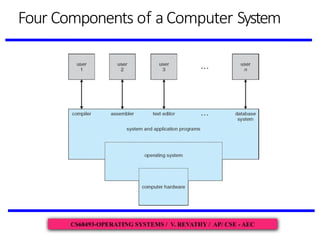
Computer system can be divided into four components:
Hardware – provides basic computing resources
CPU,memory, I/O devices
Operating system
Controls and coordinates use of hardware among various applications
and users
Application programs – define the ways in which the system
resources are used to solve the computing problems of the users
Word processors, compilers, web browsers, database systems, video
games
Users
People, machines, other computers
CS68493-OPERATING SYSTEMS / V. REVATHY / AP/ CSE - AEC
Four Components of aComputer System
CS68493-OPERATING SYSTEMS / V. REVATHY / AP/ CSE - AEC
What Operating Systems Do?
 Depends on the point of view
 Users want convenience, ease of use and good performance
 Don’tcare about resource utilization
 But shared computer such as mainframe or minicomputer must keep
all users happy
 Users of dedicate systems such as workstations have dedicated
resources but frequently use sharedresources from servers
 Handheld computers are resource poor,optimized for usability and
battery life
 Some computers have little or no user interface, such as
embedded computers in devices and automobiles
CS68493-OPERATING SYSTEMS / V. REVATHY / AP/ CSE - AEC
Operating System Definition
 OSis a resource allocator
 Manages all resources
 Decides between conflicting requests for efficient and fair resource use
 OSis a control program
 Controls execution of programs to prevent errors and improper use of the
computer
 No universally accepted definition
 “Everything a vendor ships when you order an operating system” is a good
approximation
 But varies wildly
 “Theone program running at all times on the computer” -the kernel.
 Everything else is either
 a system program (ships with the operating system) , or
 an application program.
Computer Startup
bootstrap program is loaded at power-up
or reboot
Typically stored in ROM
or known as firmware
Initializes all aspects of system
EPROM, generally
Loads operating system kernel and
starts execution
CS68493-OPERATING SYSTEMS / V. REVATHY / AP/ CSE - AEC
Thank You
CS68493-OPERATING SYSTEMS / V. REVATHY / AP/ CSE - AEC

Computer System Overview with diagrams and problems

  • 1.
    ARASU ENGINEERING COLLEGE DEPARTMENT OFCOMPUTER SCIENCE & ENGINEERING CS8493 – OPERATING SYSTEMS II YEAR / IV SEMESTER Anna University Syllabus, 2017 Regulation Prepared by Mrs. V. Revathy Assistant Professor/ CSE
  • 2.
    UNIT-I OPERATING SYSTEMS OVERVIEW SystemOverview-Basic Elements, Instruction Computer Execution, Interrupts, Memory Hierarchy, Cache Memory, Direct Memory Access, Multiprocessor and Multicore Organization. Operating system overview-objectives and functions, Evolution of Operating System.- Computer System Organization Operating System Structure and Operations- System Calls, System Programs, OS Generation and System Boot. CS68493-OPERATING SYSTEMS / V. REVATHY / AP/ CSE - AEC
  • 3.
    What is anOperating System? A program that acts as an intermediary between a user of a computer and the computer hardware Operating system goals: Execute user programs and make solving user problems easier Make the computer system convenient to use Use the computer hardware in an efficient manner CS68493-OPERATING SYSTEMS / V. REVATHY / AP/ CSE - AEC
  • 4.
    Computer System Overview Computersystem can be divided into four components: Hardware – provides basic computing resources CPU,memory, I/O devices Operating system Controls and coordinates use of hardware among various applications and users Application programs – define the ways in which the system resources are used to solve the computing problems of the users Word processors, compilers, web browsers, database systems, video games Users People, machines, other computers CS68493-OPERATING SYSTEMS / V. REVATHY / AP/ CSE - AEC
  • 5.
    Four Components ofaComputer System CS68493-OPERATING SYSTEMS / V. REVATHY / AP/ CSE - AEC
  • 6.
    What Operating SystemsDo?  Depends on the point of view  Users want convenience, ease of use and good performance  Don’tcare about resource utilization  But shared computer such as mainframe or minicomputer must keep all users happy  Users of dedicate systems such as workstations have dedicated resources but frequently use sharedresources from servers  Handheld computers are resource poor,optimized for usability and battery life  Some computers have little or no user interface, such as embedded computers in devices and automobiles CS68493-OPERATING SYSTEMS / V. REVATHY / AP/ CSE - AEC
  • 7.
    Operating System Definition OSis a resource allocator  Manages all resources  Decides between conflicting requests for efficient and fair resource use  OSis a control program  Controls execution of programs to prevent errors and improper use of the computer  No universally accepted definition  “Everything a vendor ships when you order an operating system” is a good approximation  But varies wildly  “Theone program running at all times on the computer” -the kernel.  Everything else is either  a system program (ships with the operating system) , or  an application program.
  • 8.
    Computer Startup bootstrap programis loaded at power-up or reboot Typically stored in ROM or known as firmware Initializes all aspects of system EPROM, generally Loads operating system kernel and starts execution CS68493-OPERATING SYSTEMS / V. REVATHY / AP/ CSE - AEC
  • 9.
    Thank You CS68493-OPERATING SYSTEMS/ V. REVATHY / AP/ CSE - AEC