Josua MSinambela,
CEH,CHFI, ECSA|LPT,ACE,CCNP,CCNA,Security+
Computer Network &SecurityConsultant
 Proses terus-menerus melindungi aset-aset
informasi digital
 Keamanan Informasi merupakan bagian dari
Sistem, bukan sekedar fitur
 Tidak ada yang aman 100%
 Topik yang termasuk dalam Keamanan
Informasi:
ď‚§ Kebijakan & Prosedur,Otentikasi, CyberAttacks,
RemoteAccess, E-mail,Website,Wireless, Devices,
Media/Medium,SecureArchitectures, IPSec,Sistem
Operasi,SecureCode,Cryptography, Physical
Security, Digital MediaAnalysis (Forensics),Audit,
Integritas data dst
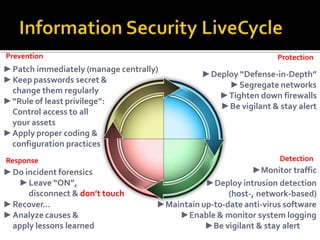
►Recover…
â–şAnalyze causes &
apply lessons learned
â–şPatch immediately (manage centrally)
â–şKeep passwords secret &
change them regularly
►“Rule of least privilege”:
Control access to all
your assets
â–şApply proper coding &
configuration practices
Response
â–şDo incident forensics
►Leave “ON”,
disconnect & don’t touch
Detection
â–şMonitor traffic
â–şDeploy intrusion detection
(host-, network-based)
â–şMaintain up-to-date anti-virus software
â–şEnable & monitor system logging
â–şBe vigilant & stay alert
Protection
►Deploy “Defense-in-Depth”
â–şSegregate networks
â–şTighten down firewalls
â–şBe vigilant & stay alert
Prevention
 Mencegah Pencurian Data
 Menghindari konsekuensi legal dari
tanpa melindungi informasi
 Menjaga produktivitas
 Mencegah dan mengantisipasi terjadinya
cyberterrorism
 Menghindari penyalahgunaan identitas
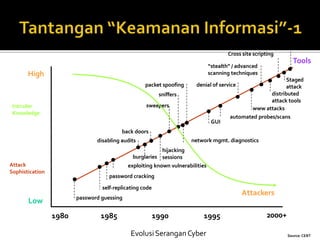
High
Low
1980 1985 1990 1995
EvolusiSeranganCyber
2000+
password guessing
self-replicating code
exploiting known vulnerabilities
password cracking
back doors
disabling audits
hijacking
sessions
sniffers
sweepers
packet spoofing
GUI
automated probes/scans
denial of service
www attacks
Tools
Attackers
Intruder
Knowledge
Attack
Sophistication
“stealth” / advanced
scanning techniques
burglaries
network mgmt. diagnostics
distributed
attack tools
Cross site scripting
Staged
attack
Source: CERT
 Frekwensi dan jumlah serangan bertambah
 JenisSerangan yang bertambah kompleks
 Deteksi kelemahan sistem semakin mudah
dan cepat diketahui
 SeranganTerdistribusi
 Kesulitan dalam melakukan perbaikan
(Patching)
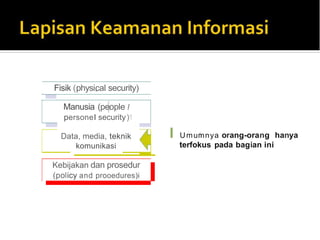
Fisik (physi,cal security)
Manusia (pe,ople I
p1
ersonel security)1
I Umu1mnya orang-orang hanya
terfokus p1
ada bagian ini
Kebijakan dan prosedur
(policy and prooedures)i
Data, media, teknik
komunikasi
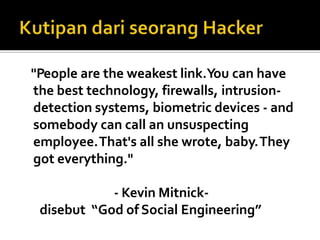
"People are the weakest link.You can have
the best technology, firewalls, intrusion-
detection systems, biometric devices - and
somebody can call an unsuspecting
employee.That's all she wrote, baby.They
got everything."
- Kevin Mitnick-
disebut “God of Social Engineering”
 Pencurian dan Penyalahgunaan Identitas
 Malware
 Patch Management (Software
Update/Patching)
 Denial of Services (DoS & DDoS)
 Penyalahgunaan Kartu Kredit orang lain oleh
paraCarder
 TakeoverAccount IM (Yahoo!, MSN,Google
dll)
 Takeover Facebook,Twitter (Social Network)
 Teknik Phising digunakan untuk menjebak
account tertentu dengan tujuan
mendapatkan informasi
financial pengguna
Alamat email pengirim
dengan mudah dipalsukan!
Pahami metode serangan
“Phishing” ini .
Admin tidak pernah
meminta password dari
user.
Pastikan manaURL Ebay yang benar ?
• http://www.ebay.comcgi-binlogin?ds=1%204324@%31%33%37
%2e%31%33%38%2e%31%33%37%2e%31%37%37/p?uh3f223d [SALAH]
• http://www.ebaỵ.com/ws/eBayISAPI.dll?SignIn [SALAH]
•http://scgi.ebay.com/ws/eBayISAPI.dll?RegisterEnterInfo&siteid=0&
co_partnerid=2&usage=0&ru=http%3A%2F%2Fwww.ebay.com&rafId=0
&encRafId=default
• http://secure-ebay.com
[BENAR]
[SALAH]
 Software yang di disain agar bekerja tanpa
izin atau tidak diketahui oleh user
 Dapat merubah atau merusak data
 Dapat mengoperasikan perangkat keras
tanpa otorisasi
 Dapat mengambil alih proses yang dilakukan
olehWeb browser
 Mampu mencuri informasi
penting/confidential lainnya dari komputer
pengguna
 Virus
 Worm
 Spyware
 Keyloggers
 Rootkits
 Mobile malware
 Program komputer yang dapat
mereplikasikan diri sendiri dan menyebar
melalui jaringan melalui file sharing, email,
adware, file PDF, Doc dll dengan bantuan
pengguna
 Virus biasanya dapat merusak
data, file system serta konfigurasi.
 Program Komputer yang dapat
mereplikasikan diri melalui jaringan tanpa
bantuan pengguna.
 Worm ini selain merusak aplikasi umumnya
juga menggangu performa jaringan atau
bahkan melakukan DoS (Denial of Services)
terhadap server atau jaringan
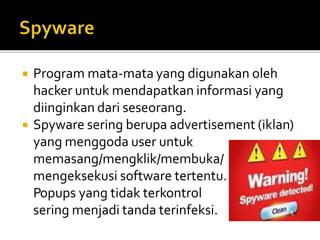
 Program mata-mata yang digunakan oleh
hacker untuk mendapatkan informasi yang
diinginkan dari seseorang.
 Spyware sering berupa advertisement (iklan)
yang menggoda user untuk
memasang/mengklik/membuka/
mengeksekusi software tertentu.
Popups yang tidak terkontrol
sering menjadi tanda terinfeksi.
 Program spyware yang secara khusus
digunakan untuk merekam keystroke pada
keyboard atau bahkan mampu menyimpan
tampilan screen sebuah computer
 Keylogger ada yang berupa software dan
hardware
 Kumpulan Program yang dapat digunakan
untuk memanipulasi proses berjalan, file
system atau aplikasi data dengan tujuan
membantu penyusup untuk maintain akses
system tanpa terdeteksi.
 Banyak jenis RootKit tersedia pada setiapOS
 Sulit dideteksi
 Saat ini banyak sekali virus, trojan, dan worm
yang menginfeksi perangkat mobile spt
Handphone danSmartPhone.
 Malware di mobile ini umumnya menyebar
dariAplikasi Ilegal di internet, Bluetooth dan
SMS/MMS.
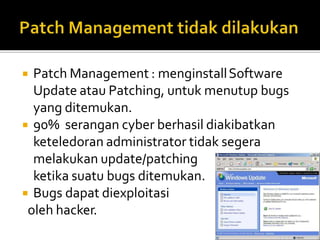
 Patch Management : menginstallSoftware
Update atau Patching, untuk menutup bugs
yang ditemukan.
 90% serangan cyber berhasil diakibatkan
keteledoran administrator tidak segera
melakukan update/patching
ketika suatu bugs ditemukan.
 Bugs dapat diexploitasi
oleh hacker.
 Anti-virus software
 Anti-spyware software
 Windows and applications updates
 Security bundles
 Personal firewalls
 Wireless
 Other best practices
 McAfee:VirusScan
 Symantec: NortonAnti-Virus
 ComputerAssociates: eTrust EZAntiVirus
 Trend Micro: PC-cillian
 Grisoft:AVGAnti-Virus (freeware)
 AlwilSoftware:Avast!AntiVirus (freeware)
 eset: NOD32 (freeware)
 Clamav
 SunbeltSoftware:CounterSpy
 Webroot Software:SpySweeper
 Trend Micro:Anti-Spyware
 HijackThis (freeware)
 Lavasoft:Ad-AwareSE Personal (freeware)
 Spybot:Search & Destroy (freeware)
 Microsoft:Windows Defender (freeware)
 McAfee: InternetSecuritySuite
 Symantec: Norton InternetSecurity
 ComputerAssociates: eTrust EZArmor
 Trend Micro: PC-cillian InternetSecurity
 ZoneAlarm: InternetSecuritySuite
 F-Secure: InternetSecurity
 MicroWorld: eScan InternetSecuritySuite
 PandaSoftware: Panda InternetSecurity
 Softwin BitDefender Professional Edition
 eXtendiaSecuritySuite
 Clamav/Amavisd
 Zone Labs
 Symantec’s Norton Personal Firewall
 Sunbelt’s Kerio Personal Firewall
 TinySoftware’sTiny Personal Firewall
 MacOSX
 WindowsXP (withService Pack 2 & 3)
 WindowsVista & 7 (Seven)
 LinuxOS (ufw/shorewall/iptables)
1. Install OS/Software Updates
2. Run Anti-virus Software
3. Prevent Identity Theft
4. Turn on Personal Firewalls
5. Avoid Spyware/Adware
6. Protect Passwords
7. Back up Important Files

Computer security by josua m sinambela

  • 1.
  • 4.
     Proses terus-menerusmelindungi aset-aset informasi digital  Keamanan Informasi merupakan bagian dari Sistem, bukan sekedar fitur  Tidak ada yang aman 100%  Topik yang termasuk dalam Keamanan Informasi:  Kebijakan & Prosedur,Otentikasi, CyberAttacks, RemoteAccess, E-mail,Website,Wireless, Devices, Media/Medium,SecureArchitectures, IPSec,Sistem Operasi,SecureCode,Cryptography, Physical Security, Digital MediaAnalysis (Forensics),Audit, Integritas data dst
  • 5.
    ►Recover… ►Analyze causes & applylessons learned ►Patch immediately (manage centrally) ►Keep passwords secret & change them regularly ►“Rule of least privilege”: Control access to all your assets ►Apply proper coding & configuration practices Response ►Do incident forensics ►Leave “ON”, disconnect & don’t touch Detection ►Monitor traffic ►Deploy intrusion detection (host-, network-based) ►Maintain up-to-date anti-virus software ►Enable & monitor system logging ►Be vigilant & stay alert Protection ►Deploy “Defense-in-Depth” ►Segregate networks ►Tighten down firewalls ►Be vigilant & stay alert Prevention
  • 6.
     Mencegah PencurianData  Menghindari konsekuensi legal dari tanpa melindungi informasi  Menjaga produktivitas  Mencegah dan mengantisipasi terjadinya cyberterrorism  Menghindari penyalahgunaan identitas
  • 7.
    High Low 1980 1985 19901995 EvolusiSeranganCyber 2000+ password guessing self-replicating code exploiting known vulnerabilities password cracking back doors disabling audits hijacking sessions sniffers sweepers packet spoofing GUI automated probes/scans denial of service www attacks Tools Attackers Intruder Knowledge Attack Sophistication “stealth” / advanced scanning techniques burglaries network mgmt. diagnostics distributed attack tools Cross site scripting Staged attack Source: CERT
  • 8.
     Frekwensi danjumlah serangan bertambah  JenisSerangan yang bertambah kompleks  Deteksi kelemahan sistem semakin mudah dan cepat diketahui  SeranganTerdistribusi  Kesulitan dalam melakukan perbaikan (Patching)
  • 9.
    Fisik (physi,cal security) Manusia(pe,ople I p1 ersonel security)1 I Umu1mnya orang-orang hanya terfokus p1 ada bagian ini Kebijakan dan prosedur (policy and prooedures)i Data, media, teknik komunikasi
  • 10.
    "People are theweakest link.You can have the best technology, firewalls, intrusion- detection systems, biometric devices - and somebody can call an unsuspecting employee.That's all she wrote, baby.They got everything." - Kevin Mitnick- disebut “God of Social Engineering”
  • 11.
     Pencurian danPenyalahgunaan Identitas  Malware  Patch Management (Software Update/Patching)  Denial of Services (DoS & DDoS)
  • 12.
     Penyalahgunaan KartuKredit orang lain oleh paraCarder  TakeoverAccount IM (Yahoo!, MSN,Google dll)  Takeover Facebook,Twitter (Social Network)  Teknik Phising digunakan untuk menjebak account tertentu dengan tujuan mendapatkan informasi financial pengguna
  • 13.
    Alamat email pengirim denganmudah dipalsukan! Pahami metode serangan “Phishing” ini . Admin tidak pernah meminta password dari user.
  • 14.
    Pastikan manaURL Ebayyang benar ? • http://www.ebay.comcgi-binlogin?ds=1%204324@%31%33%37 %2e%31%33%38%2e%31%33%37%2e%31%37%37/p?uh3f223d [SALAH] • http://www.ebaỵ.com/ws/eBayISAPI.dll?SignIn [SALAH] •http://scgi.ebay.com/ws/eBayISAPI.dll?RegisterEnterInfo&siteid=0& co_partnerid=2&usage=0&ru=http%3A%2F%2Fwww.ebay.com&rafId=0 &encRafId=default • http://secure-ebay.com [BENAR] [SALAH]
  • 15.
     Software yangdi disain agar bekerja tanpa izin atau tidak diketahui oleh user  Dapat merubah atau merusak data  Dapat mengoperasikan perangkat keras tanpa otorisasi  Dapat mengambil alih proses yang dilakukan olehWeb browser  Mampu mencuri informasi penting/confidential lainnya dari komputer pengguna
  • 16.
     Virus  Worm Spyware  Keyloggers  Rootkits  Mobile malware
  • 17.
     Program komputeryang dapat mereplikasikan diri sendiri dan menyebar melalui jaringan melalui file sharing, email, adware, file PDF, Doc dll dengan bantuan pengguna  Virus biasanya dapat merusak data, file system serta konfigurasi.
  • 18.
     Program Komputeryang dapat mereplikasikan diri melalui jaringan tanpa bantuan pengguna.  Worm ini selain merusak aplikasi umumnya juga menggangu performa jaringan atau bahkan melakukan DoS (Denial of Services) terhadap server atau jaringan
  • 19.
     Program mata-matayang digunakan oleh hacker untuk mendapatkan informasi yang diinginkan dari seseorang.  Spyware sering berupa advertisement (iklan) yang menggoda user untuk memasang/mengklik/membuka/ mengeksekusi software tertentu. Popups yang tidak terkontrol sering menjadi tanda terinfeksi.
  • 20.
     Program spywareyang secara khusus digunakan untuk merekam keystroke pada keyboard atau bahkan mampu menyimpan tampilan screen sebuah computer  Keylogger ada yang berupa software dan hardware
  • 21.
     Kumpulan Programyang dapat digunakan untuk memanipulasi proses berjalan, file system atau aplikasi data dengan tujuan membantu penyusup untuk maintain akses system tanpa terdeteksi.  Banyak jenis RootKit tersedia pada setiapOS  Sulit dideteksi
  • 22.
     Saat inibanyak sekali virus, trojan, dan worm yang menginfeksi perangkat mobile spt Handphone danSmartPhone.  Malware di mobile ini umumnya menyebar dariAplikasi Ilegal di internet, Bluetooth dan SMS/MMS.
  • 23.
     Patch Management: menginstallSoftware Update atau Patching, untuk menutup bugs yang ditemukan.  90% serangan cyber berhasil diakibatkan keteledoran administrator tidak segera melakukan update/patching ketika suatu bugs ditemukan.  Bugs dapat diexploitasi oleh hacker.
  • 24.
     Anti-virus software Anti-spyware software  Windows and applications updates  Security bundles  Personal firewalls  Wireless  Other best practices
  • 25.
     McAfee:VirusScan  Symantec:NortonAnti-Virus  ComputerAssociates: eTrust EZAntiVirus  Trend Micro: PC-cillian  Grisoft:AVGAnti-Virus (freeware)  AlwilSoftware:Avast!AntiVirus (freeware)  eset: NOD32 (freeware)  Clamav
  • 26.
     SunbeltSoftware:CounterSpy  WebrootSoftware:SpySweeper  Trend Micro:Anti-Spyware  HijackThis (freeware)  Lavasoft:Ad-AwareSE Personal (freeware)  Spybot:Search & Destroy (freeware)  Microsoft:Windows Defender (freeware)
  • 27.
     McAfee: InternetSecuritySuite Symantec: Norton InternetSecurity  ComputerAssociates: eTrust EZArmor  Trend Micro: PC-cillian InternetSecurity  ZoneAlarm: InternetSecuritySuite  F-Secure: InternetSecurity  MicroWorld: eScan InternetSecuritySuite  PandaSoftware: Panda InternetSecurity  Softwin BitDefender Professional Edition  eXtendiaSecuritySuite  Clamav/Amavisd
  • 28.
     Zone Labs Symantec’s Norton Personal Firewall  Sunbelt’s Kerio Personal Firewall  TinySoftware’sTiny Personal Firewall  MacOSX  WindowsXP (withService Pack 2 & 3)  WindowsVista & 7 (Seven)  LinuxOS (ufw/shorewall/iptables)
  • 29.
    1. Install OS/SoftwareUpdates 2. Run Anti-virus Software 3. Prevent Identity Theft 4. Turn on Personal Firewalls 5. Avoid Spyware/Adware 6. Protect Passwords 7. Back up Important Files