Types of Computers
Supercomputers...are used to process very large
amounts of information including processing
information to predict hurricanes, satellite images
and navigation, and process military war
scenarios.
Mainframes...are used by government and
businesses to process very large amounts of
information.
Mini-Computers...are similar to mainframes...they
are used by business and government to process
large amounts of information.
Personal Computers (PC)…
3.
Types of Computers
Personal Computers (Continued)
Personal Computers...also known as
PC’s...are smaller and less powerful
than the others. They are used in
homes, schools, and small
businesses.
4.
Types of Computers
Thereare 3 main types of PCs
Desktop
Portable (Notebook/Laptop)
When portable (notebook/laptop) computers were
first created they were HUGE. They weighed
around 100 lbs., and were carried in a large
luggage suitcase. The creators of the portable
(notebook/laptop) computer dreamed that one day
it would be the size a notebook or pocket
dictionary. With today’s technology, we have been
able to accomplish this goal and more..
Hand-Held
5.
Networks
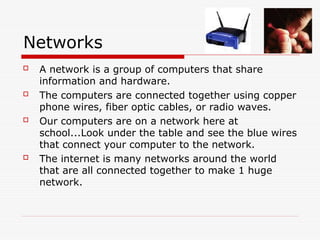
A networkis a group of computers that share
information and hardware.
The computers are connected together using copper
phone wires, fiber optic cables, or radio waves.
Our computers are on a network here at
school...Look under the table and see the blue wires
that connect your computer to the network.
The internet is many networks around the world
that are all connected together to make 1 huge
network.
6.
Parts of aComputer
There are two basic parts that make up a
computer...
Hardware Software
7.
Hardware
Hardware isbasically anything that
you can touch with your fingers.
Computer Case
CPU (central processing unit...Pentium chip)
Monitor
Keyboard & Mouse
Disk Drive, Zip Drive, CD-ROM, DVD,
Hard Drive
Memory (RAM)
Speakers
Printer
8.
Hardware (Continued)
Thereare three
types/categories of
hardware
1. Input Devices
2. Output Devices
3. Storage Devices
9.
Input Devices
Inputbasically means getting data into the
computer to be processed.
Keyboard, Mouse,
Trackball, Touch Pad
Light Pen, Laser Scanner,
Pointing Stick
Touch Screen,
Bar Code Reader,
Scanner
Microphone, Joystick
10.
Output Devices
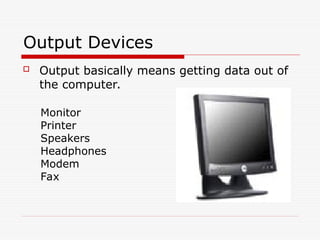
Outputbasically means getting data out of
the computer.
Monitor
Printer
Speakers
Headphones
Modem
Fax
11.
Storage Devices
Storagedevices are both input and
output devices in one. A storage
device is a place to keep data that has
been processed so that it can be
retrieved at a later time to be used
again.
Hard Disk
Floppy Disk
CD’s, DVD’s
Magnetic Tape
Flash Memory, Jump Drive
12.
Software
Software isthe programs and applications
that tell the computer what to do and how
to look.
Computer programmers write the
codes/instructions that make-up software
applications/programs.
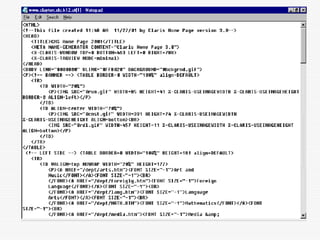
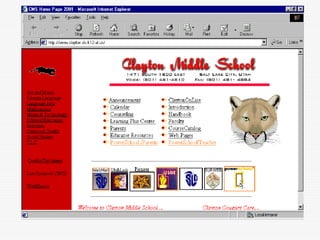
HTML is a type of computer programming
language that allows programmers to make
web pages.
The next 2 slides show what HTML codes
look like and the web page the codes
produce.
15.
Two Types ofSoftware
Application
Software
Operating System
Software
16.
Operating System Software
Directs all the activities and sets all
the rules for how the hardware and
software will work together.
Examples would be:
DOS, Windows 95, 98, ME, NT,
XP, Vista, Windows 7
Unix, Linux,
MAC system OS 6,7,8,9,10
17.
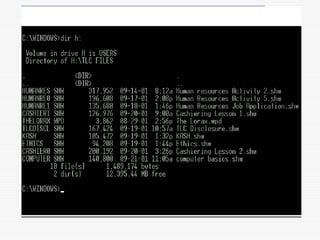
Command Line OperatingSystems
DOS is an example of a command line
operating system.
On the next slide, Notice that there are no:
Icons (pictures)
Colors
Mouse Pointer
Buttons
You have to memorize commands in order
to use this text based operating system.
19.
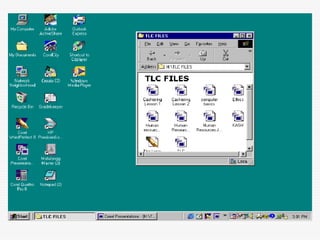
Operating Systems: GUI
GUI stands for Graphical User Interface
Uses pictures (icons) to represent files, folders,
disk drives, modems, printers, etc.
GUI’s were created to make using a computer
easier, more interesting, non-threatening
to inexperienced users.
A mouse allows users to point at something and
click to make it work. With command line
you have to have all of the commands to
make your programs work.
Here is an example of a GUI
Application Software
1. Businesssoftware: word processors,
spreadsheets, and database programs.
2. Communication software: allows computers to
communicate with other computers: fax
software, Novell NetWare, AOL, Modem
Software.
3. Graphics software: software that allows users
to create and manipulate graphics...Photoshop,
Print Shop, etc.
24.
Application Software
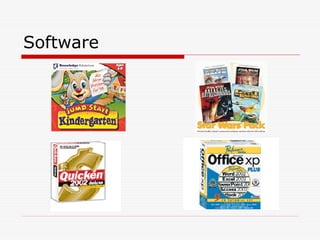
4. Educationand Reference software: Programs that
help teach new material and ideas, and programs
that can be used to find information...Encarta,
Worldbook Encyclopedia, Jumpstart Kindergarten,
MicroType.
5. Entertainment and Leisure software...Warcraft,
Age of Empires, Barbie Design Center, Mrs.
Pacman, Solitair
6. Integrated software: Combines several types of
software into one program or package...Quicken
(Spreadsheet/data
base/communications/reference) or Print Shop
(Graphics/Word processor).













![Lecture_1_-_Computer_Basics[1]. Skills in computer programming](https://cdn.slidesharecdn.com/ss_thumbnails/lecture1-computerbasics1-250602073114-bb8c81e7-thumbnail.jpg?width=640&height=640&fit=bounds)
![Lecture_1_-_Computer_Basics[1]. Computer engineering skills](https://cdn.slidesharecdn.com/ss_thumbnails/lecture1-computerbasics1-250602073309-35fbba6b-thumbnail.jpg?width=640&height=640&fit=bounds)


![C hapter 1 types-and_components_of_computer_system[1][1]](https://cdn.slidesharecdn.com/ss_thumbnails/chapter1-typesandcomponentsofcomputersystem11-140526103200-phpapp02-thumbnail.jpg?width=640&height=640&fit=bounds)


